
Salesforce Data Security: Roles, Profiles, Permissions, and Sharing Rules
Last updated on Oct 1, 2026
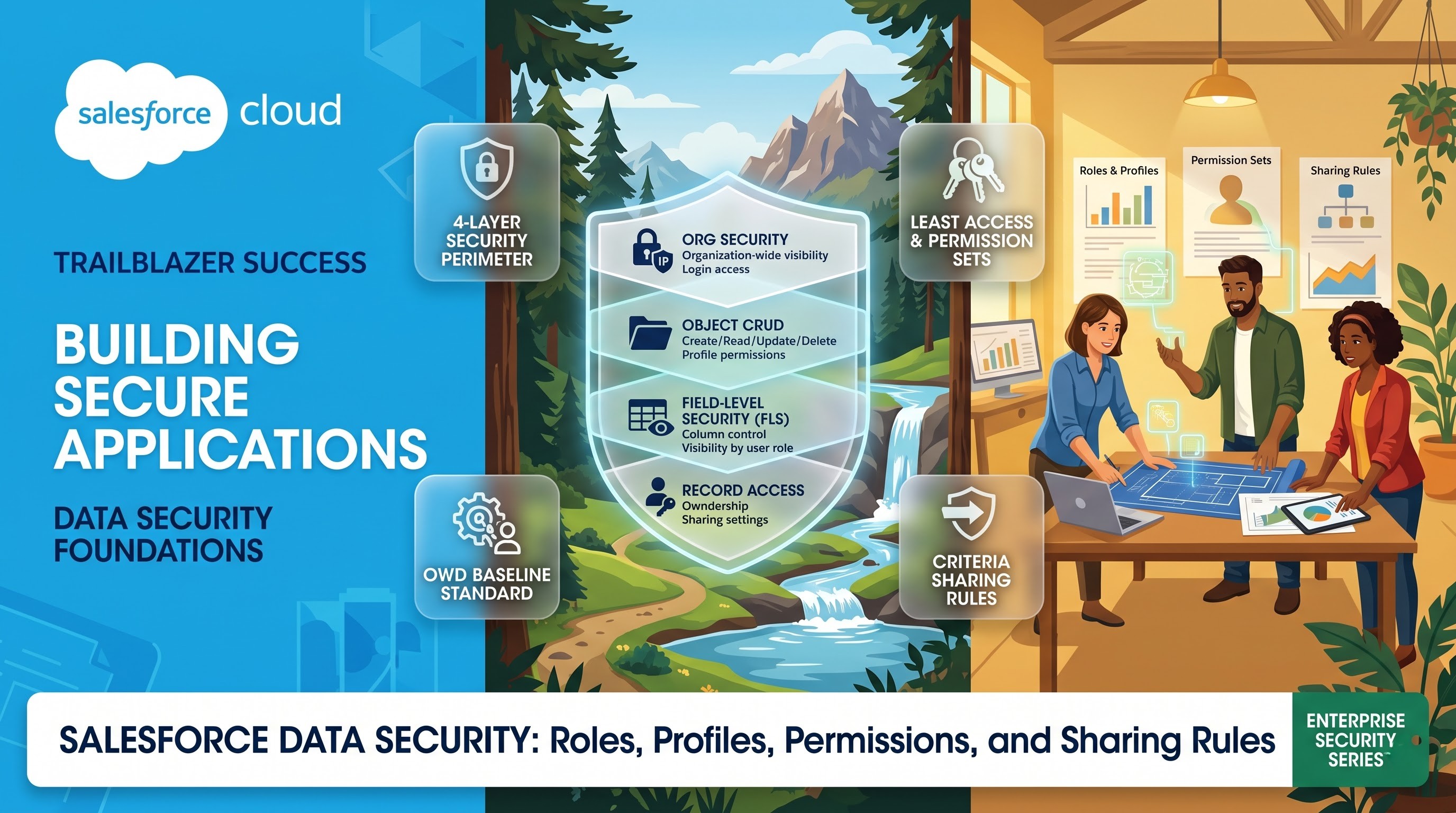
Data security in Salesforce cannot be viewed as just one switch or as a separate firewall. It is actually made up of layers of security that is declarative in nature and solves a core problem for enterprises, i.e., provide employees with easy and required accessibility to the data to perform their job without putting the security of the secret and sensitive data of the company at risk.
As the enterprise scale increases, it becomes increasingly complex to handle thousands of users with the company’s worldwide teams, separate units, partners, and compliance laws. An incorrect security system can lead to data leaks, violation of laws like GDPR, HIPAA and having many problems with simple changes.
To gain mastery in Salesforce security, it is essential to move beyond the notion of the single entity of access control and embrace the concept of information visibility as per the emerging paradigm of layers. In case you are an administrator or a developer who wants to be adept in security processes using the practical scenarios involved in various projects, it would be wise to sign up for and take one of the industry-oriented salesforce course online at OnlineITGuru to develop a solid foundation for custom-building architectures of enterprise quality. Salesforce is unique as it does both these roles of determining what actions a user is allowed to take on an object and which instances of a record the actions apply to.
The Four Layers of the Salesforce Security Model
Access in Salesforce is organized on four different levels starting with access on the level of organization and moving down to the level of concrete data cell.
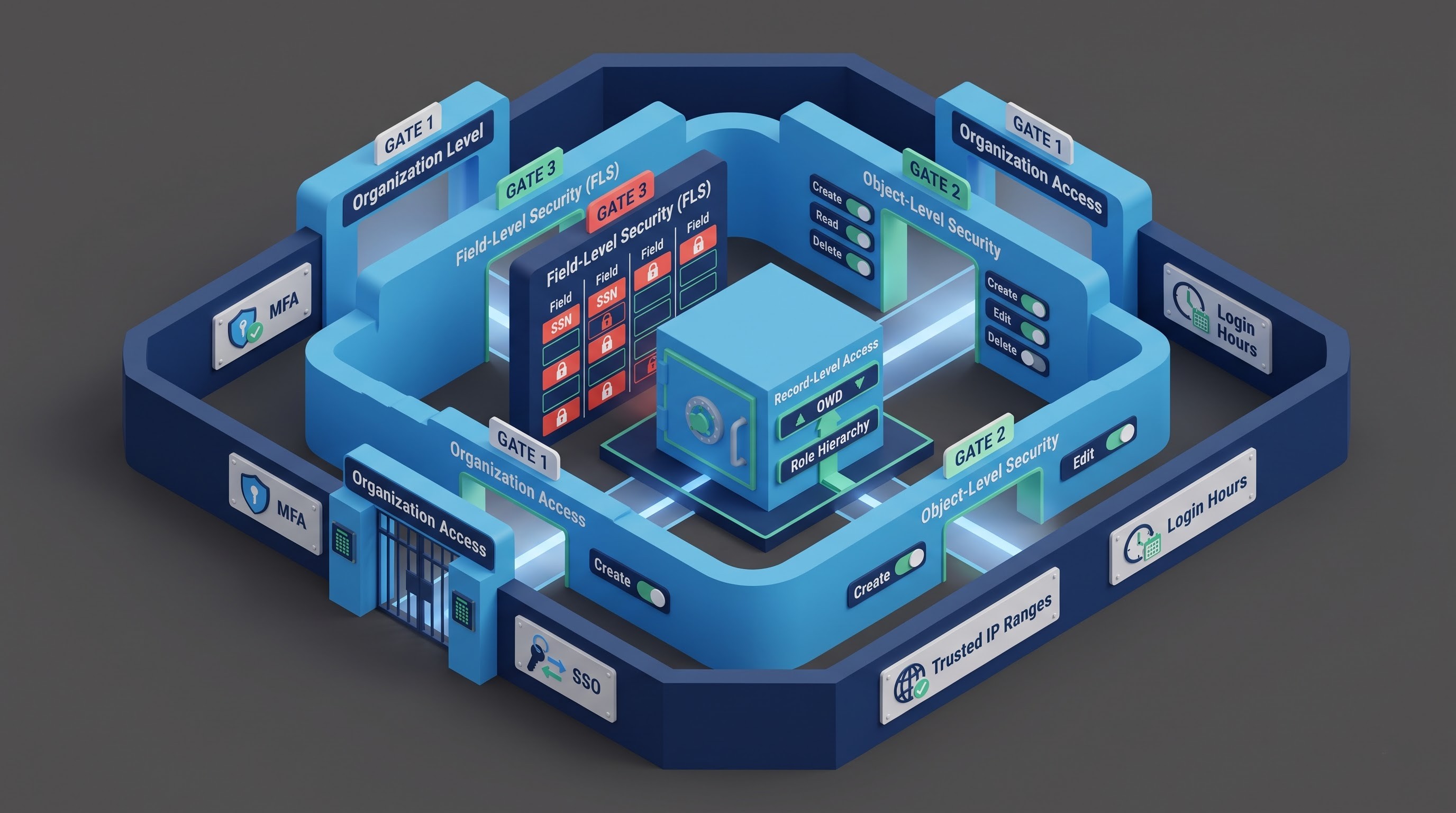
Security at the Organizational Level: The entrance gate of the network. This gate determines who, when, and from where an individual can log in. It includes multi-factor authentication, trusted IP range, single sign-on, login hours, and password policies, among other requirements.
Security at the Object Level: The wide-functional gate. It is sometimes referred to as CRUD (Create, Read, Update, Delete) and defines whether the user can operate with an object type properly or not. For example, can the user work with the Opportunity object or not?
Security at the Field Level: A column gate. Even though the user can read and edit Account records, their ability to read or not read specific fields, such as Annual Revenue, Social Security Number, or Executive Telephone Number, is determined by Field Security.
Security at the Record Level: A row gate. It deals with the question of whether the user can get access to a particular record even though they may have permissions to get access to Opportunities and read Amount fields.
The significance of Object/Field-Level Security and Record-Level Security being mutually related needs to be understood. Object- and field-level controls indicate the basic capabilities, while record-level mechanisms show the specific record instances that the capabilities will apply to. If a user hasn’t got “Read” clearance on Opportunities at the object level, no rule can make the Opportunity visible to the user on the record level since the rule applies to the latter.
Profiles serve as the basis of the identity of the users and constraints imposed on the system
Traditionally, Profile served to fulfill almost all security tasks in Salesforce. Each and every active user of the organization should have exactly one Profile assigned to him/her.
The meaning of Profiles in architectural terms
A Profile is a container defining the basic system-level behavior, the default settings of presentation, and the restrictions placed on the security system. Since the user can have only one Profile assigned, his/her settings provided here will define how the user operates in the application environment.
Page Layout Assignments: This determines the type of interface layout a user will see when accessing a record, based on the object type and record type.
Standard Applications and Record Types: This determines the default Lightning application opened by users upon logging in and the record type selected for them during data input.
Login IP ranges: This limits the IP addresses of the user when they try to log in to the user account. In case a user tries to log in from an unauthorized IP, the system rejects the login request.
Login hours: This specifies the hours and days according to which a user can log in. A session can be terminated and a new login attempt can be denied when attempted outside the specified time range.
Desktop and Session Settings: This helps manage the session timeout intervals and password validity period on the profile level.
The Development Beyond Profile Overload
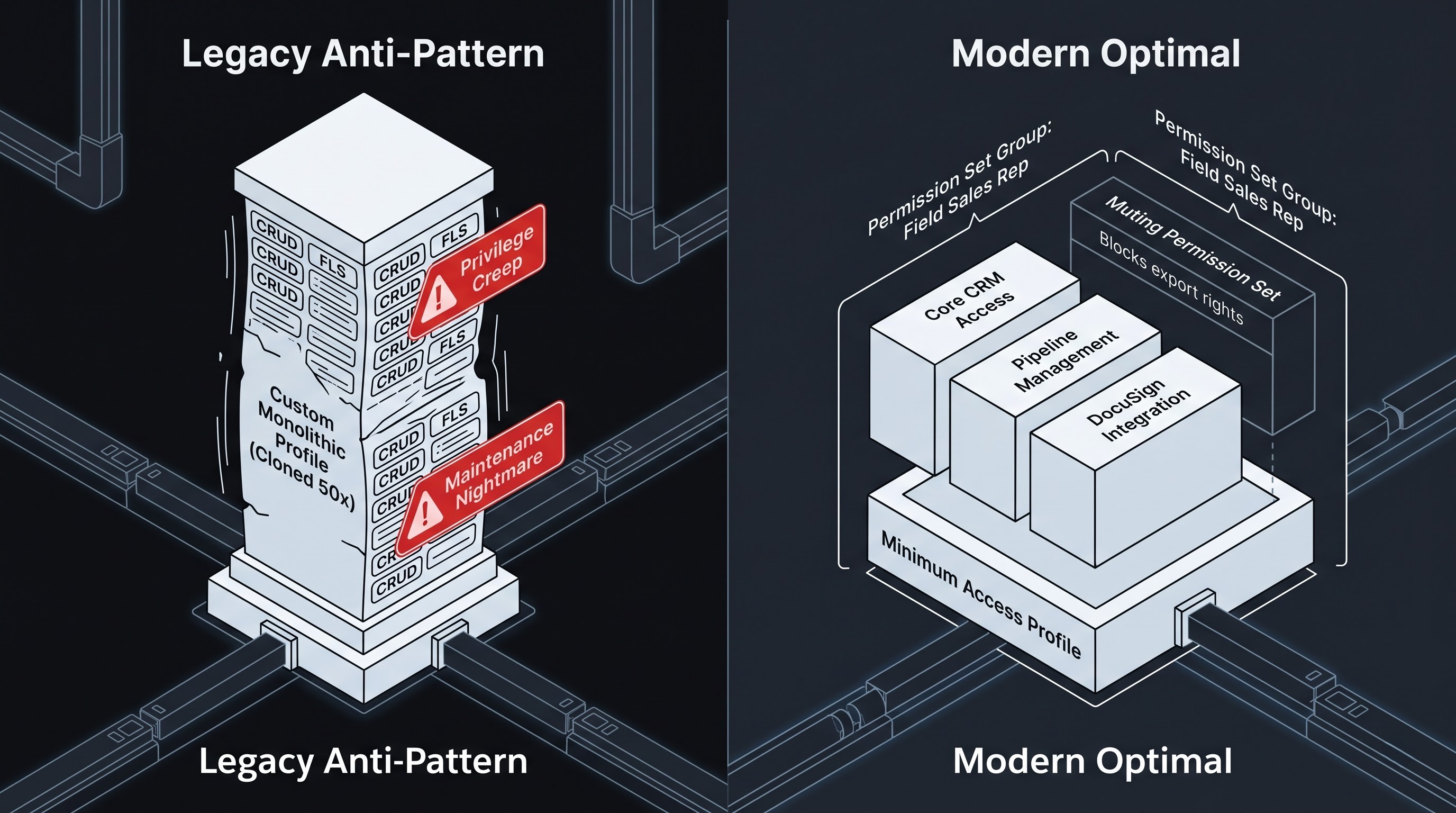
In conventional Salesforce systems, Profiles were used by admin users to manage everything, including object and field access rights as well as Apex class authorizations. When the systems used by some twenty salespeople were alike, but they required each their own version of a custom Commission field to be editable, cloning the Profile into "Sales Rep - Commission Access" was done. Eventually, this method resulted in "profile overabundance," as many established corporate organizations received hundreds of Profiles. During the implementation of system updates or upgrades, these Profiles could not be maintained, which led to various errors and safety issues.
The issue of overwhelming loads of application profiles has been resolved by improving the security approach to the principle of Minimal Privilege. According to contemporary standards, Profiles are kept to the minimum possible. Thus, it is recommended to use the standard "Least Access - Salesforce" Profile (or its corporate alternative), where access to all business objects and admin tools is denied completely. The Profile keeps to the compliance component only (e.g., it involves IP addresses and default applications) and provides no operational access, as this is ensured by Permission Sets or Permission Set Groups.
Permission Sets and Groups for Permissions: Access Control by Adding Together
If Profiles are the basic idea, permission sets are the elements used to arrange the right to do something.
How Permission Sets Work
Unlike Profiles, where a user is limited to one assignment only, in Salesforce a user can have many different permission sets at the same time.
The main concept of permission sets is that they are always added together. A permission set can NEVER take away or limit any access right given by a profile or another permission set.
Permission sets provide access:
Object-level permissions cover the actions that can be completed for an object ( Create, Read, Edit, Delete, View All, Modify All).
Field-level security controls the access allowed to the fields ( Read Access, Edit Access).
System permissions include special types of permissions (like “Export Reports”, “API Enabled”, “Manage Public Templates”)
App permissions and tab settings.
Apex classes and visualforce pages execution access.
Custom permissions used in validation rules, Lightning Web Components, and Flow.
Because capabilities can be collected in a number of separate sets – e.g., a permission set “Export Business Reports” and a permission set “Tier 2 Support Specialist” – the position of a secure posture can be formed without modifying user’s profiles at all. In this case, during rotation or replacement of employees it will be enough to simply deploy the proper set of capabilities.
Permission Set Groups: Business Process Coordination
Despite the accuracy of individual Permission Sets, the need to apply several dozens of them to all new employees would lead to operational complexities in manual oversight. This issue was addressed by the introduction of Permission Set Groups (PSG) by Salesforce.
A Permission Set Group allows combining multiple permission sets into a single administrative unit targeted for a single function performed in the company. For instance, instead of applying fifteen different Permission Sets to a newly hired sales representative, the administrator can use a single Permission Set Group called "Field Sales Representative."
The set includes: Correct access to all basic CRM objects.
Opportunity Pipeline altering rights.
Quota monitoring privileges.
Ability to use the service of DocuSign.
Ability to operate a lead conversion system.
Permission Set Groups have introduced the Muting Permission Set. While standard Permission Sets do not provide any limitations on the access, the Muting Permission Set, which is used within a Permission Set Group, gives the opportunity to limit access to specific permissions of the group at the same time not changing the standard reusable permission sets.
As an illustration, when a company defines a wide-ranging "Finance Operations" permission set for several divisions, it may want to create a "Finance Intern" group which has access to all features except deleting invoice records. The muting permission set is added with this goal in mind. Muting permission set only allows for disabling the "Delete" functions, thus keeping the original permission group usable.
Also, User Access Policies allow modern-day administrators to assign and revoke Permission Sets and Permission Set Groups automatically based on user information, such as Division, Title, or Department, which minimizes human errors during the process of user provisioning. Drawing on this need for setting up such intricate security models, certified administrators possess this basic skill set, and OnlineITGuru offers them a proper salesforce online training course that facilitates attaining of security knowledge in practice.
Organization-Wide Default (OWD)- This is where record-level access kicks
Once a user is granted necessary object and field-level permissions, there is a question of what specific records a user is able to edit out of thousands of customer records present in the system.
It should be noted that the basis for all record-level security is the Organization-Wide Default (OWD) setting.
The Core Principle
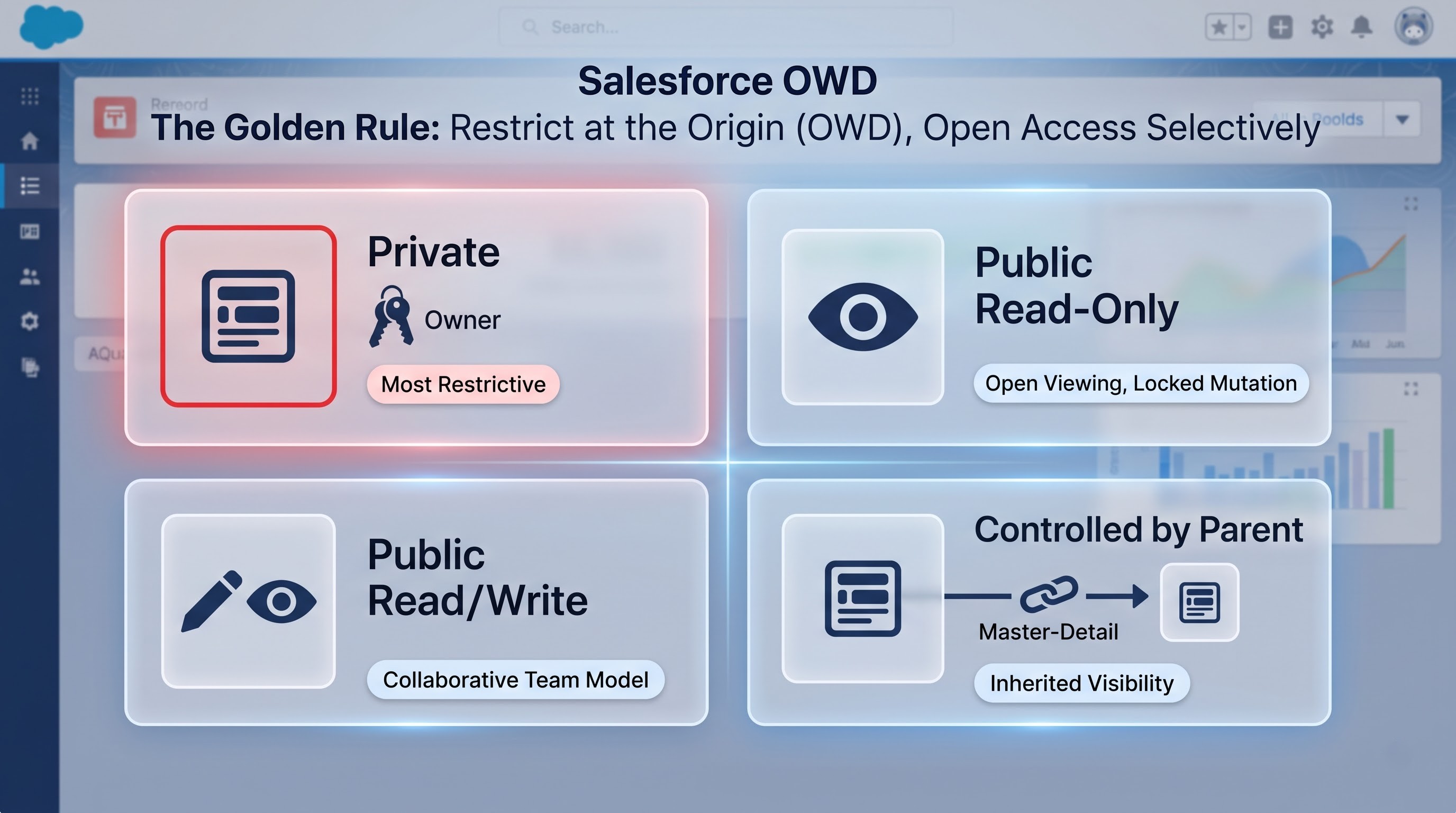
Organization-Wide Default serves as the baseline level of accessibility for records throughout an object for the users who do not own a record and do not have access based on higher-level rules.
An architect should first determine the basic level of openness of all standard and custom objects before creating any sharing rules or hierarchies in the system. Salesforce has different types of OWD settings:
Private: The record can be accessed by the owner, people above this owner in the Role Hierarchy, and the admin having “View All” or “Modify All” privileges. Other individuals won’t have any access unless it is granted through sharing.
Public Read Only: All users in the organization can read the record, and by everyone users in the Role Hierarchy can modify and delete it.
Public Read and Write: It means that any user in the organization with the ability to see the record can also view, modify and create reports using this record, irrespective of who the owner is. However, deletions, reassignments, and manual sharing of the record remain limited to the owner and the administrators.
Public Read, Write and Transfer: It applies only to some standard objects like Leads and Cases. This setup allows any user who has the access to the object to read and modify not only the record owned by the other person but to change the owner of the record.
Controlled by Parent: This mode applies to custom objects that have a Master-Detail relationship with other objects and also to some standard child/junction objects such as Order Items or Contacts that inherit from Accounts. In this case, access to the record depends exclusively on access to the parent record.
The Golden Rule of Record-Level Security
The basic concept of Salesforce security is to restrict data access at its origin and then allow access as needed.
The Organization-Wide Default (OWD) must reflect the least unrestricted data access required by any of the business units in the organization. For instance, if ninety-nine percent of the organization is entitled to access all Accounts, but one internal investigation group or legal department has to conceal certain accounts from anyone who is not the owner, the appropriate OWD for Accounts must be set on the Private option. As far as other visibility options are concerned, it is easier to open access rather than limiting it.
The Role Hierarchy: Vertical Data Access
With OWD being the foundation, there must be more rigid ways of providing wider access to data across the hierarchy of management levels, and the primary tool for that is called Role Hierarchy.
Since the OWD has provided the groundwork, organizations require a method at their disposal to ensure improved visibility of data by various management levels. The most significant method of obtaining visibility of records across levels is the Role Hierarchy.
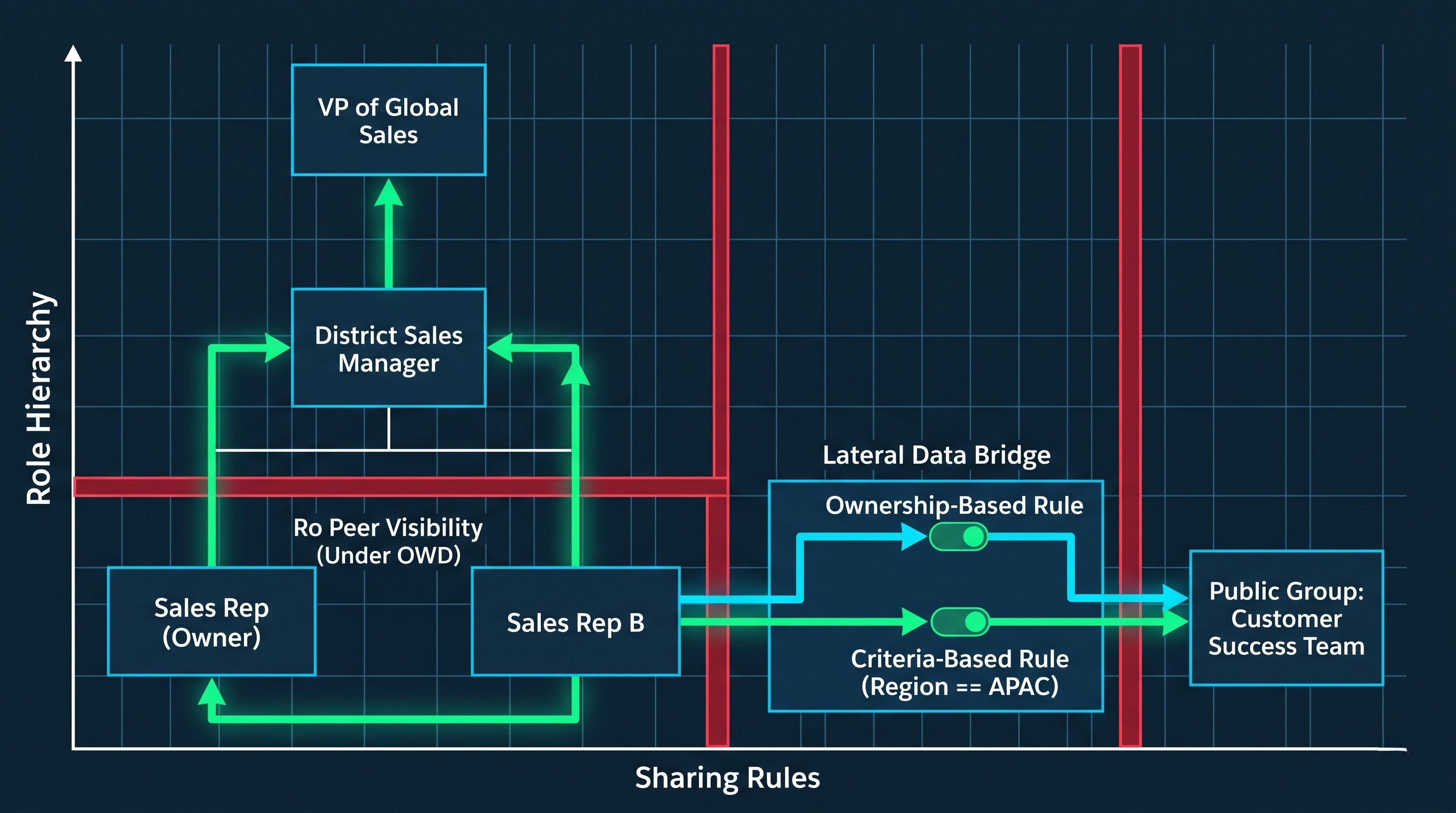
How Role Hierarchy Functions
The Role Hierarchy can be understood as representing the operational set-up of the organization in terms of who has what access to data. It does not necessarily mean that Role Hierarchy corresponds to a chart in a thematic sense but symbolizes how data moves along the hierarchy of management.
When there is a record whose OWD is Private or Public Read Only, in this situation, Role Hierarchy will allow all the records to flow up the hierarchy. The conventional approach used involves the situation where the user with higher hierarchy will obtain the same access to other records as the owner of those records.
For instance, if the “US West Sales” Account Executive has an Opportunity in his/her possession it serves as a basis for him/her obtaining access to all similar prospects.
The District Sales Manager situated directly above "US West Sales" can access and change that Opportunity.
The Vice President of Global Sales, positioned above the District Sales Manager, is granted access and changes that opportunity.
Peer Account Executives who work in the "US West Sales" role cannot access each other’s records (with Private OWD), due to the restriction of vertical sharing in this hierarchy as well.
Standard Vs. Custom Objects
For standard objects (like Accounts, Opportunities, and Cases), tying of records with the Role Hierarchy is built-in and compulsory. The parent's access settings for Account also determine the manner in which the manager accesses child opportunities and cases, thus ensuring that the manager has no difficulty in overseeing.
Upon creating custom objects, the admin has the option to disable the "Grant Access Using Hierarchies" feature within Sharing Settings. If this feature is disabled for custom object defined as Private, only the owner of the record and those having special permission can view the record, and higher-level management does not have visibility into the record even if they are part of the organization.
This technique is commonly applied in situations where confidentiality of sensitive processes is vital, like compliance reporting, whistleblower logs, performance review, or HR disciplinary records, where high-level managers shouldn't be able to see records of their own departments.
Architectural Risks of Designing Role Hierarchy
There are many aspects to consider when designing a Role Hierarchy. One way to get this wrong is to create a separate role for every job title across the enterprise. This leads to creating deeply layered hierarchies.
Deep hierarchies cause serious operational problems:
Negative Impact on Performance: Whenever a record is created or transferred, Salesforce checks the hierarchy to generate internal access tables (Object Share tables). The deeper the hierarchy is, the tougher the recalculation and the more operations take time.
Ownership Skew: The ownership of a large number of records by a single upper-level executive or system integration user in a high-ranking position may initiate recommenced calculation of full table sharing due to changes in that position or some other positions below it, which often causes row locking errors.
Using the best practice, the Role Hierarchy must be streamlined as much as possible with separate roles present only at points of genuine data visibility splitting.
Sharing Modes: Horizontal Data Sharing
While the Role Hierarchy deals with vertical data sharing, business processes also require some data sharing across another dimension.
A regional marketing director may require access to information regarding sales opportunities, or vice versa, an implementation engineer may need to see close accounts assigned to the sales rep in a different segment of the hierarchy.
Principles of the Process of Sharing Rules
Sharing rules refer to automated exceptions or processes in the organization that apply to the Organization-Wide Defaults. Sharing rules specify which types of records should be shared with a certain group of users either by allowing Read-only or Read-write access.
The sharing rule consists of three major parameters:
1. Which records should be shared? This is defined in terms of who is the owner of the record or according to the criteria specified in the record.
2. To whom the access is provided? Access can be given to either Public Groups or Roles or both.
3. What level of access is given? The rule can give Read-only or Read-write access to the records (The sharing rules allow access rights but do not allow transfer or deletion of records since these rights depend on ownership and permission of the administrator).
Types of Sharing Rules
There are two major groups of sharing rules:
1. Ownership-Based Sharing Rules
Ownership-based sharing rules define who is the owner of the record and gives access to other groups of users.
For example, a company has the ability to set a rule that says: "Any account that belongs to someone in the position of EMEA Support Rep must be shared with the public group titled EMEA Customer Success giving them Read/Write access."
This means that any account that is created by an EMEA Support Rep will automatically give the Customer Success Team access. This will also work for situations where the EMEA Support Rep's access is taken away, as the system will continue to monitor the access rights and make sure that the necessary policies are followed.
2. Criteria-Based Sharing Rules
In contrast to ownership-based rules, criteria-based sharing rules do not take into account who owns the record being assigned. They just look at the data in the fields associated with this record.
For example, a corporation could say: "Share Opportunities where Region equals APAC and Deal Size is more than one million dollars with Global Executive Review Team with Read-Only access."
The rules based on criteria separate visibility from the owner of the record. Thus, regardless of whether the record is owned by a junior SDR or an integrated user or perhaps an external partner, once the record matches the criteria outlined, the visibility will be enabled. If the record is updated so it no longer satisfies the criteria, its visibility will be turned off the next time sharing is recalculated.
Public Groups as Basis for Sharing
When setting up a recipient side of the Sharing Rule, targeting users directly is impossible, while targeting roles is too narrow. The first element of the design pattern for the sharing destination is the Public Group.
A Public Group is an administrative container that can consist of:
Individual users.
Other Public Groups (nested groups).
Certain Roles.
Roles and Subordinates.
The use of the Public Groups allows to abstract the sharing logic from the actual assignments of the employees. As people change departments, administrators change only their group membership and do not need to rewrite complex sharing rules. This saves on computation since changing the group membership is simpler than redoing sharing rules which were complicated in nature.
Summary: Architecting Salesforce Data Security
Salesforce's security model is effective because of the segmentation of functions. There are various types of roles when it comes to system security, including Profiles, Permission Sets, and Organization-Wide Defaults. Salesforce focuses on the following key elements: the identity of the system, the ability to add capabilities, the basic level of visibility within the supplied system, the concept of hierarchy that would assist in enforcing the managers’ powers, as well as sharing functions.
It is important to resist the urge to take the easy way out when designing an effective architecture. This means avoiding quick fixes like creating proxy profiles or giving out too many administrative privileges just to get around access issues. When working with the Organization-Wide defaults standards, it is also necessary to employ the simplified role hierarchy, along with comprehensive permission sets and sharing by conditions strategy. The best option for working with these intricate data architectures is to participate in salesforce classes online that are led by mentors at OnlineITGuru.