
Salesforce Developer Edition: Setup and Installation Guide
Last updated on Oct 31, 2026
Introduction to Salesforce Developer Edition
The Salesforce Developer Edition is a very powerful system which offers a complete development environment for free, and which is specifically designed for developers, administrators, architects, and even students who want to build, test, and deploy their custom solutions without affecting the production environment in any way. In the current world of cloud computing in enterprises, it becomes necessary to gain skills in customer relationship management systems and intelligent automation frameworks, and thus there arises the necessity of a safe and secure development environment. This is provided by Developer Edition since it gives a separate instance of the platform itself which includes enterprise features, custom objects, API capability, and configuration. Developer Edition would be the most suitable choice for those who are into backend programming, designing interfaces, testing automatic software and even building their own artificial intelligence agents. For the purpose of faster learning, developers take up the salesforce developer online course as well.
Knowledge about how to configure and administer the Salesforce Developer Edition setup is one of the essential criteria that is required of someone who wants to build a career in Salesforce. This is different from the production setup because in this case you need to pay for a license which is very expensive and in case of the trial setup, the time limit for using the environment is just thirty days. However, since Developer Edition runs infinitely until it is active, it becomes the ideal place where you can have your portfolio and proof of concept setup, prepare for difficult certifications and learn continuously. Considering the changes taking place in enterprise technology due to the emergence of generative AI and multitenant data architecture along with API, it becomes absolutely essential to have a sandbox environment.
Understanding the Importance of Developer Environment
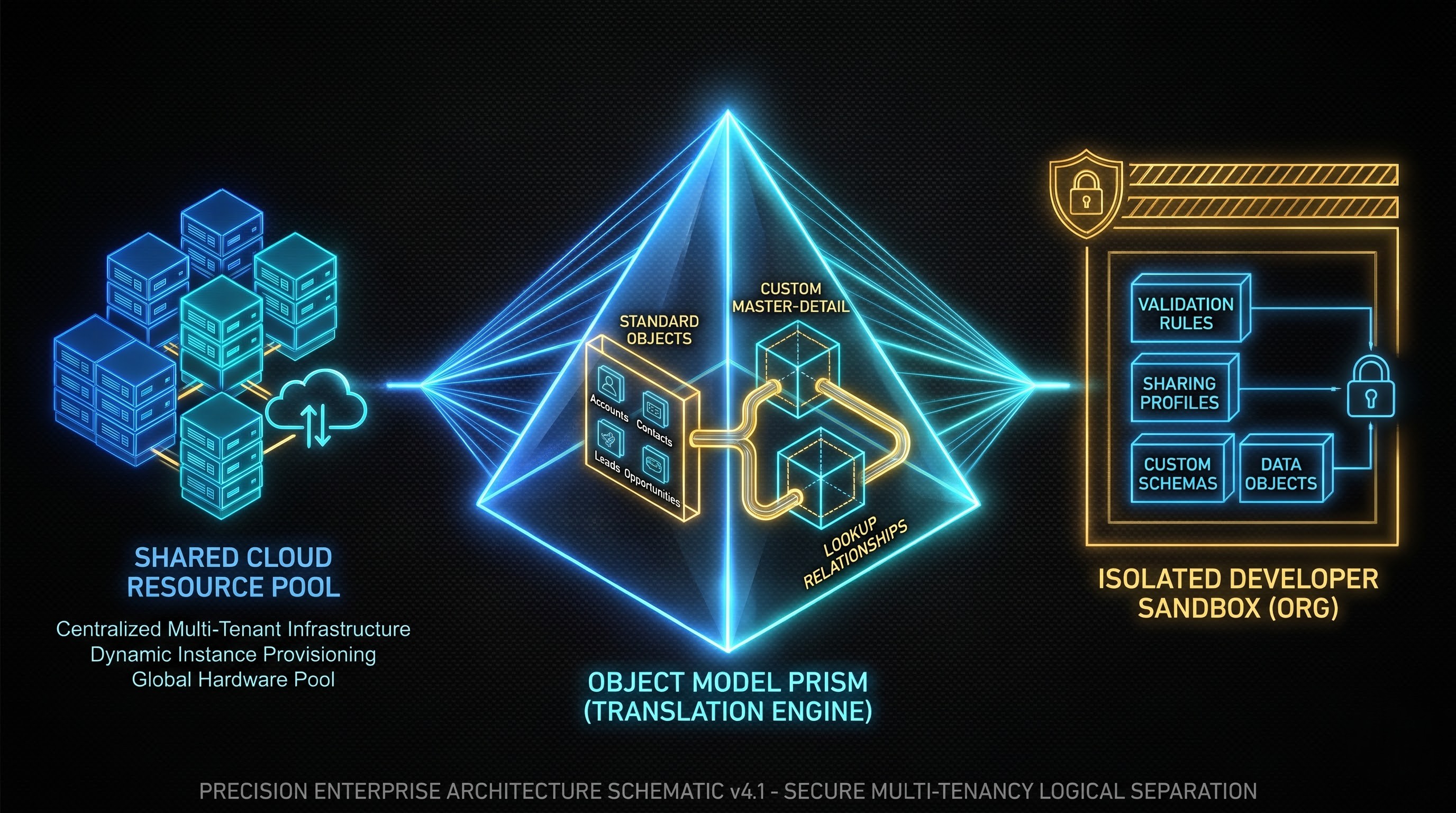
It is important to provide a reason for being different from other Salesforce accounts prior to discussing the details about the process of registration and creation of the account. The Salesforce platform operates on the principles of the multi-tenant system, which means that the clients utilize the same hardware resources and applications; however, all of their information is completely protected and separated. Upon registration in Developer Edition, a user will be assigned an organization that will have everything set up for the development.
The multi-tenant principle provides an access to both low-code and pro-code configurations to the user. With the low-code configuration, the user has the opportunity to work with visual tools that provide such options as the design of data models, implementation of business logic, creation of custom interfaces, and security framework through clicks of a button. With pro-code configuration, the user will work with server-side programming languages, client-side framework libraries, enterprise web services, and version control capabilities.
Moreover, the Developer Edition proves to be the ideal solution when it comes to checking the production environment on a smaller scale business level with typical objects like Accounts, Contacts, Leads and Opportunities. As a result, one gets an opportunity to work with any practical examples as soon as the program opens up. The custom objects could be developed, their relationships defined, including master-detail and lookup fields, validation rules, sharing rules and profiles adjusted. In other words, the architecture would perfectly correspond to that of the organization which one encounters in large enterprise-scale implementations for non-profit, governmental agencies and corporations.
Preparation for Registration and Account Creation
There are some prerequisites which need to be fulfilled before working with Salesforce Developer Edition. Because of the fact that this platform uses unique usernames and connection channels, it becomes important to have an email account available. It will become the source of unique usernames in the Salesforce identification system. However, it is important to keep in mind that the format of the username should be similar to that of the email address and unique throughout the world. Thus, the usernames like developer@salesforce.com could not be used.
Before you proceed to the account creation process, try to find out the name under which your organization wants to be recognized. Although you use your email address as a login, the name of your organization will be added after the name of your professional brand, learning project, or company name. During the account creation process, some personal information such as first name, last name, zip code, and professional title will be requested. Taking some time to come up with a professional naming convention will help you to keep a good order in the development of your projects especially if you work with multiple specialized environments for different learning paths or client simulation.
In order to be well prepared for this process, the important step to do is to get familiar with system requirements from the client perspective. Since Salesforce is based only on the cloud computing and is hosted on the modern web, there is no need to have powerful local computing hardware and particular operating system. All you need is only a modern browser, internet access, and developer tools.
Registration Process Details
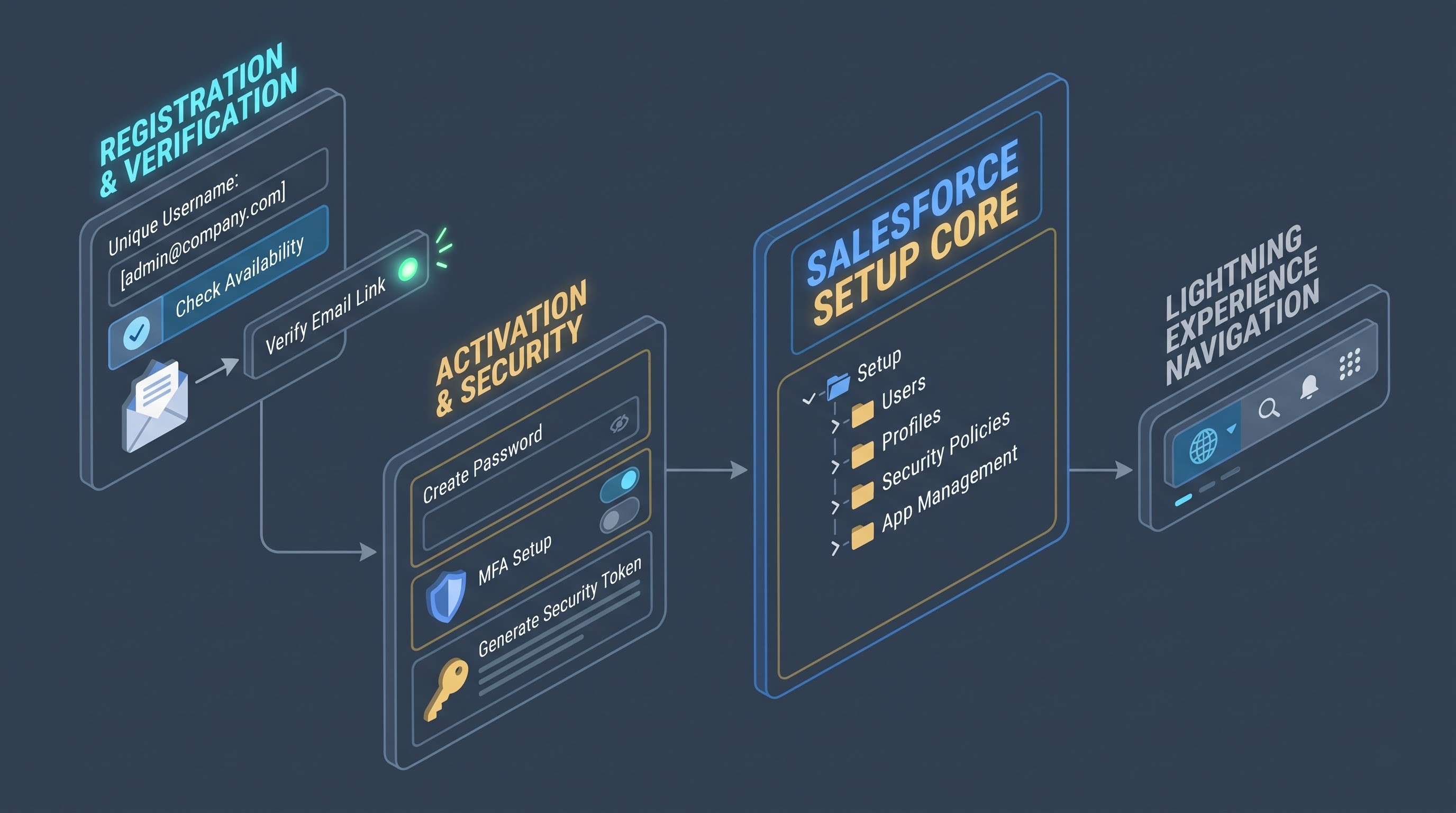
The registration process of Developer Edition environment becomes easy because of the Salesforce developer website. Firstly, you can navigate to the registration website using any browser you prefer. The page that opens will provide information on the functionality of the platform along with the community development tools. You will see the sign-up or register button that will take you to the registration form.
When you reach the registration form, you need to give your identification details properly. Give your first name, last name and the email address. Choose the role from the option that includes developer, administrator, architect and student. Give the name of the company or organization you work with. If you are a single student, then give your own name. Give your country of residence, zip code and give the username. Your username has to be according to the naming pattern of the email account but not of the same domain.
After you fill out all information and check all the steps, you need to accept the terms of service and privacy policy and go further with submitting the registration form. Right away, the Salesforce platform will process your request and begin developing a custom platform for you. In several minutes, you will receive an automatic email confirmation sent to you at the email address that you provided above. Check your email, open the email from Salesforce and then click the link provided there. You will get access to the secured web browser and there you will have to create a password and answer some security questions in order to prevent any potential security breaches of your development environment.
First-Time Login and Security Setup
After you have created your password, you will log into your environment for the very first time. Usually, your homepage will be the setup interface of Lightning Experience or developer dashboard. As it was mentioned above, security is one of the main principles in Salesforce. That is why after you have logged into your development environment, the second thing you have to do is to set up its security.
In the very beginning of your work in the cloud, it is suggested that you get familiar with the global header, navigation menu, and the main tree of core administration setup. The setup is the central control panel which allows you to deal with all the aspects of your environment. Using this control panel, you can manage users, configure security policies, create data models, code your own scripts, and integrate other systems. It is important that your user account has all necessary permissions set for it. The permissions consist of access to API, development, and admin access. Following these instructions, you will have no difficulties creating your custom apps and using various development tools.
Another point to take into consideration is the limitations of resources in the environment. Although the Developer Edition works perfectly fine, it functions within the limitation of the resources. The limitations consist not only in the limit of data storage and file storage in megabytes but also in the daily limit of API calls. This knowledge about the limitations will help you to create your custom applications, data models, and automation scripts efficiently.
Interaction with the User Interface of the Developer and Main Tools
In order to properly use the Salesforce Developer Edition, it is important to have some knowledge about the user interface of this application and its structure that consists of two parts: the first interface that is usually utilized by the end users and the set-up interface. With the help of client interface, it is possible to control the standard and custom objects, customer records, leads, and pipelines, which means that you are going to use the application from the position of the end users.
Regarding the set-up interface, this part includes all the needed functions and has a tree-like structure that consists of three major sections: administration, platform tools, and settings. In particular, set-up interface is used to control user profiles and permission sets, system security, company and domain settings, and also object managers to view all the fields, page layouts, record types, and relationships.
Moreover, there are some developer consoles and workspace utilities that were made to be used right from the web browser. Developer Console enables one to carry out all the development activities using one utility – executing queries on the database, viewing logs in real time, running server-side code and testing client-side pieces of code. In today’s world, apart from developer edition tools, there may be other different workspace plugins, command line utilities and even cloud-based IDEs. This way, the developer gains great flexibility and can pick his favorite development approach.
Low Code/No Code Development Tools Setup
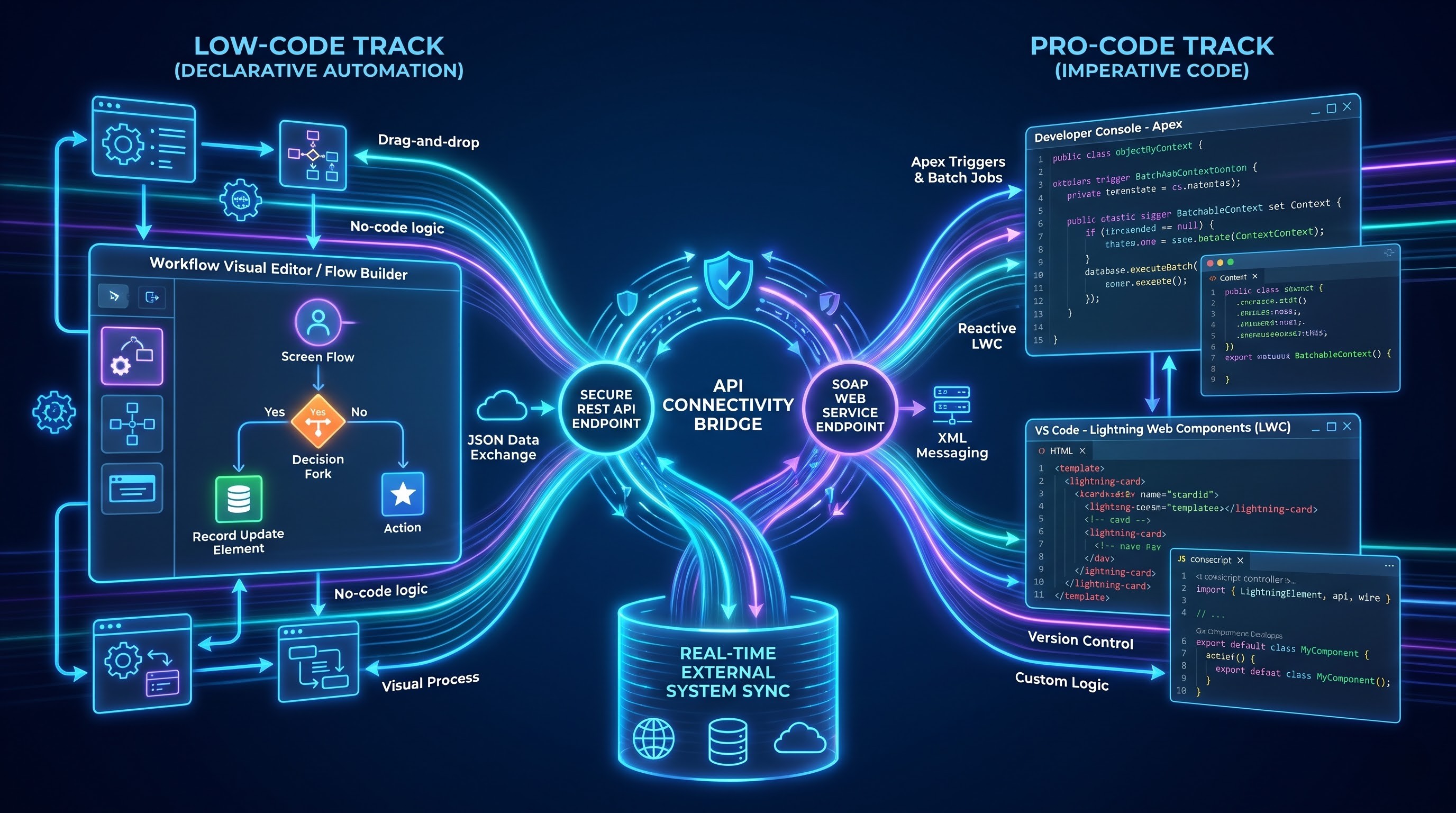
Another notable thing about Salesforce Developer Edition is a broad selection of low-code/no-code development tools. The presence of such tools enables developers and admins to create quite complicated logic, validate data and develop automated processes without writing a single line of code, thus gaining extremely quick prototyping. The usage of these tools is an obligatory skill for any cloud developer of today because low-code is always better than custom code.
The Workflow Visual Editor can be considered one of the main tools in the context of the declarative automation approach during software development. The Workflow Visual Editor allows creating quite complicated processes which include different actions like steps, screen flows, scheduled or triggered automations, decision forks, and many others using the drag-and-drop components. Creating actions like decision forks, iteration through collections of records, database insertions or updates, making HTTP requests in order to interact with external systems and others is not recommended to do by writing regular code. The experience in developing the workflows in Developer Edition gives you enough skills in process optimization and error handling.
In addition to workflow automation tools, the platform provides advanced tools including the schema editors and application customizers. With the help of the schema editor tool, it is possible to see the structure of the database with relations between objects and even to create additional fields and relations within the schema editor tool. With the help of the application customizer tool, it is possible to create custom pages using ready-to-use and custom components.
Investigation of Pro-code Development and API Implementation
Even though declarative apps prove their effectiveness, there are some instances when companies require something more complicated for development purposes. Since it is part of the Salesforce Developer Edition, all the following components are included in the product: server-side scripting, client-side component architecture, and enterprise wide APIs. The server-side scripting is performed by means of the object-oriented programming language that was specifically created for cloud computing purposes. Such technology helps in creating custom triggers, controllers, batch jobs, and schedules that work under multi-tenancy.
As for the client-side development, the developers have an opportunity to create very dynamic user interfaces with the help of component architecture. With components, developers can create reusable UI elements, rich data grids, dashboards, and even mobile application components. Modern web technologies provide great opportunities for mixing client-side components and server-side controllers in order to create single-page experience for end users.
Moreover, there are many integration opportunities for the Developer Edition as well. There is a complete set of web services endpoints that allows other applications, mobile applications, and microservices to communicate with your organizational data safely. It will allow you to configure different kinds of authentication, describe your contacts, create RESTful endpoints and access external data feeds in real-time mode. Through involvement in such integration tools in your development environment, you will be fully prepared to create a well-integrated enterprise ecosystem where the process of data transfer is smooth from the cloud computing environment to the on-premises environment and even external third party applications. In case you want to gain deeper insight into these difficult concepts, then a salesforce developer training online program is what you should definitely consider.
Maintenance and Management of Your Developer Environment
For having your Developer Edition environment working in a proper way, it is necessary to take care about its maintenance and management. The reason is that the given edition of the Salesforce platform is provided free of charge, which means that it is dependent on active use of your environment for provisioning. In case if you do not use your environment for quite some time, Salesforce will suspend or archive your account. For not getting into such situations, you should log in regularly or perform other operations.
For the continued operation of the organization, you will have to make sure that the code and configuration is maintained. In the process of the several development cycles, you will come to realize that very quickly you will find that your database has custom objects, code classes that have been discontinued by you, workflow rules that have been discontinued and unnecessary data. This will make sure that the configuration is maintained and code maintenance is done to a certain percentage of test coverage. It will simplify the process of development and show you how stringent the process of release management is for enterprises.
Finally, you have to know the release cycle of the platform. The organization makes sure that its platform is maintained in several intervals during the year because of the introduction of new features, security policy, API version and developer tools. Such kinds of updates are done in the release season of your developer edition; hence you will be able to access the release notes.
Issues of Installation and Login
Although the procedure of registration and installation of the Developer Editions is quite fast, there still may be some issues when working with Developer Editions which developers may encounter from time to time. The most common problem with the Developer Edition is connected with the password expiration and lock-out. Due to the strict security policy of the system, the absence of activity on the site or incorrect input of the login and password credentials may lead to lock-out from your account. This problem is quite easy to solve since you can reset your password via the password recovery feature available in the log-in portal.
The problem which might occur to be one of the common issues when working with Developer Edition is connected with the browser compatibility. Because of the high demand for the usage of the secure cookies, cross-site scripting protection, and JavaScript, you have to clean up your browser cache, disable aggressive ad-blocking or use your account in the Incognito mode.
If the person is not familiar with integration, then he or she might have connectivity problems or permission problems while working with external development tools or integration scripts coding. In case the connection cannot be established because one of the external applications cannot log in to the Developer Edition, then the reason behind that could be a lack of certain user permissions like the API Enabled checkbox on the user profile or forgetting about the security token in your password while connecting to your system from an unrecognized network. Having the knowledge about how to check your user profiles and security token, and how to use your system logs through the setup menu, will help you to solve your integration issue.
Conclusion and Tips on Continuous Learning
Correct configuration and using the Salesforce Developer Edition is the key to your success in cloud computing. Possibility of access to your personal environment is the source of unlimited opportunities for experimenting with low-code and pro-code automation. From registration and using security measures up to creating data models and automations, custom components and secure API integrations - all the way to your cloud computing career.
Proceed with your development process in the presence of plenty of resources available on the Internet. Get started with developing small applications by yourself, develop your entire application, experience the capabilities of artificial intelligence, and eventually launch it for the world's developers. You will soon become a master of all those skills that are needed for creating enterprise applications on the world's number one cloud platform.
As you make your way through the development process, you will find many community resources, documentation sites, and training courses that you can use through all the internet resources. There is another easier way in which you can choose to enroll in a salesforce developer course online and start developing your portfolio.