
Salesforce Developer Guide: Securing Named Credentials
Last updated on Nov 23, 2026
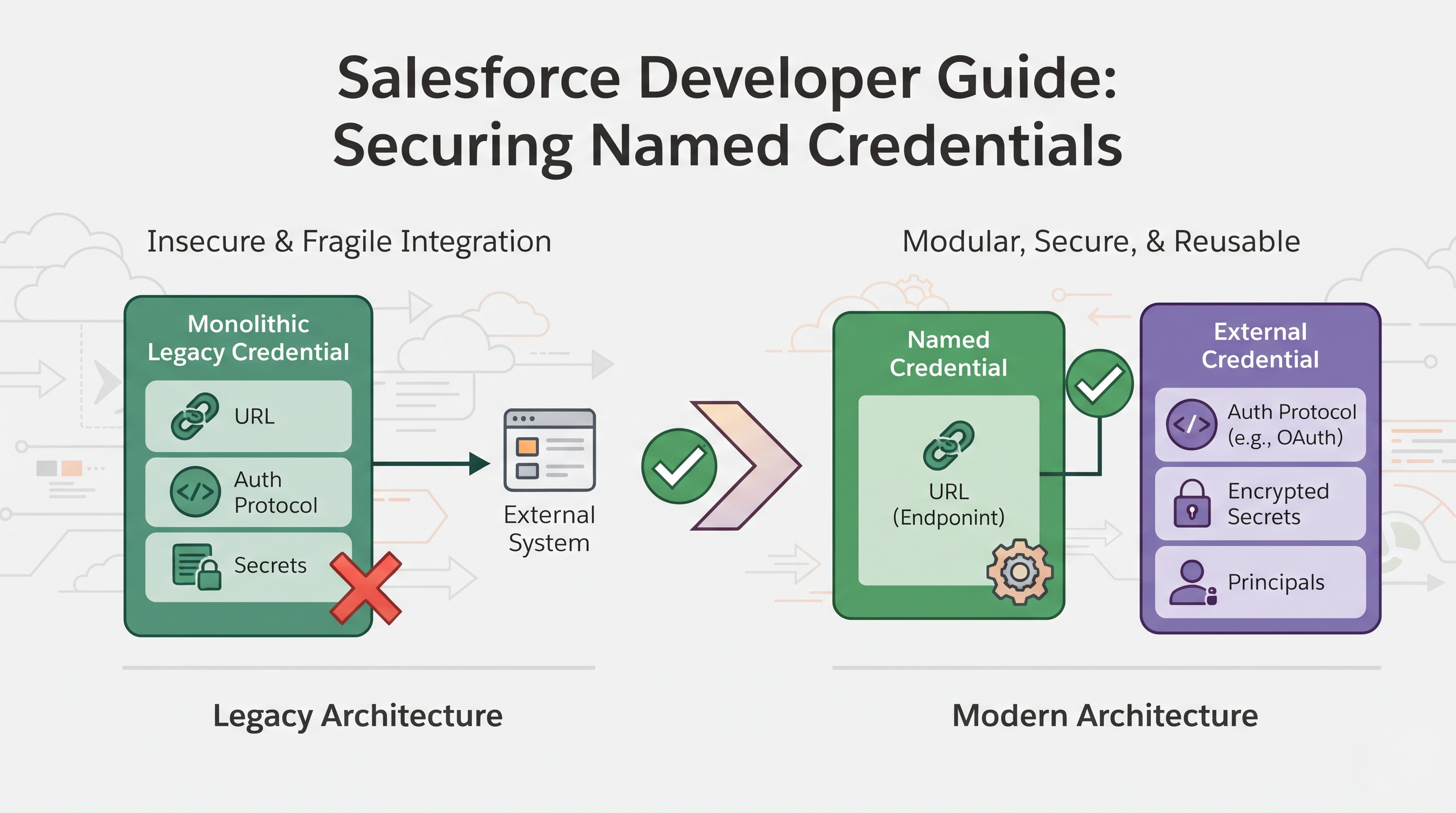
The basic requirement for modern enterprise architecture is integration of Salesforce with other third-party platforms, enterprise resource planning, payment gateways and artificial intelligence services. Every outbound request from Salesforce to an external endpoint creates potential security vulnerabilities, credential management headaches and deployment choke points. Previously, developers have had to use custom settings, custom metadata types or even hard-coded strings in Apex classes to store endpoint URLs, API keys and authentication tokens. These legacy approaches may work in the short term, but they expose sensitive secrets in source control repositories, debug logs, and unencrypted database fields, creating serious compliance and security risks.
In order to address the issue related to architecture, there are the Named Credentials and External Credentials by Salesforce. Gaining knowledge about the process of the two-step declarative security mechanism, which is among the key components of any salesforce developer online training, becomes essential. Named Credentials abstract all authentication logic and endpoint definitions away from the application code, so developers may focus on business logic while the Salesforce platform does the heavy lifting of encryption, token lifecycles and granular access control.
Architectural Change: Legacy vs Modern Named Credentials
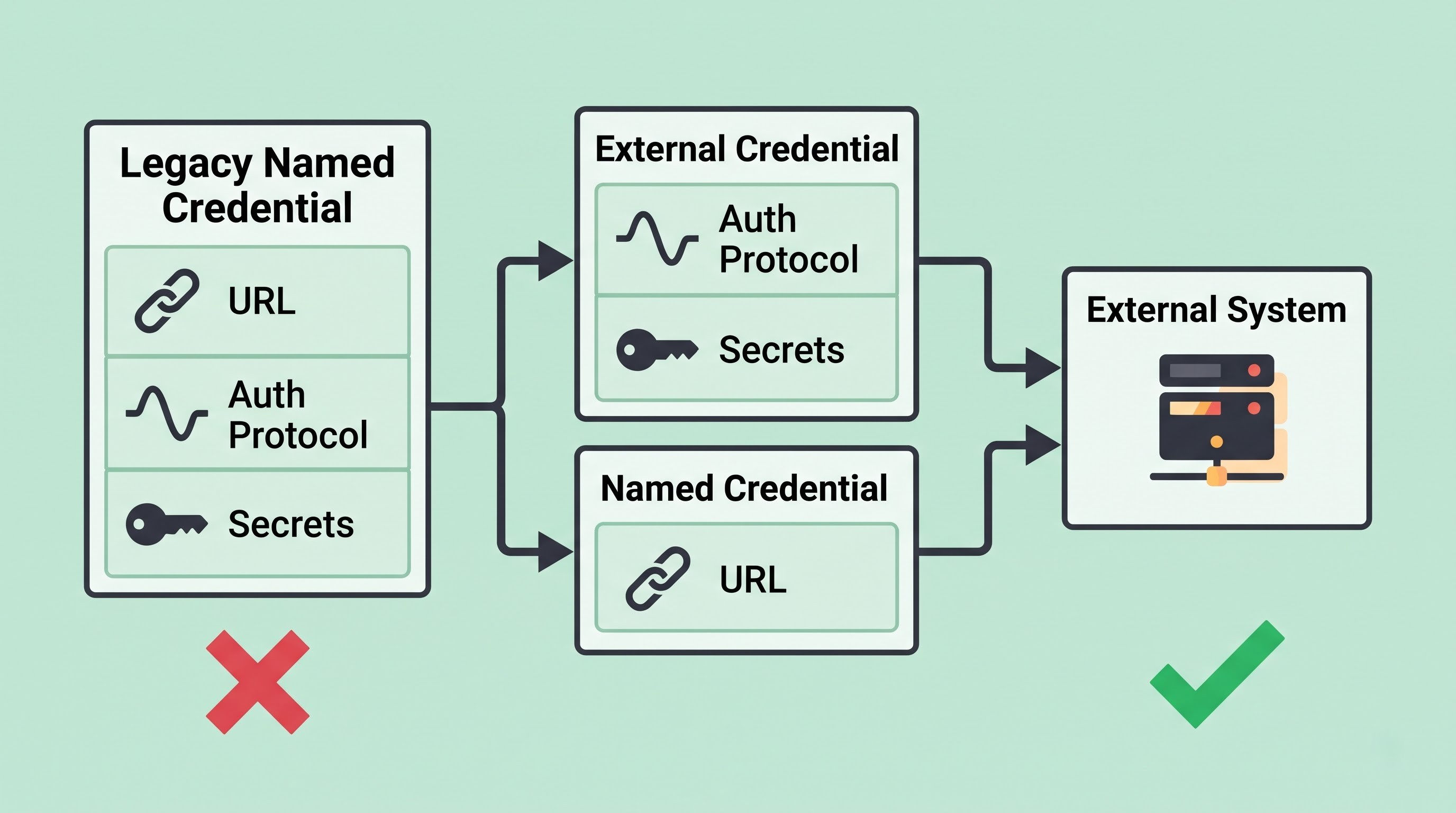
To understand why the modern architecture is structured like it is, it helps to understand the evolution of Named Credentials. Historically, a Named Credential was a monolithic configuration object in the Salesforce platform. It combined the base URL of the external service, the authentication protocol, and the credentials in one place. This was a big step up from hardcoding secrets in Apex, but it didn’t provide any flexibility if you wanted multiple endpoints to share the same authentication mechanism. It also didn't provide much granularity on which users or permission sets could call which credentials.
Salesforce later deprecated the legacy Named Credentials, in favour of an extensible modular architecture that separates the responsibilities into two separate pieces External Credentials and Named Credentials. In this modern paradigm, an External Credential is how Salesforce authenticates with an external system and it contains the authentication protocol, credentials, custom headers and user level or system level principals. A Named Credential, meanwhile, defines where Salesforce sends the request, contains the base endpoint URL, and points to an underlying External Credential.
The separation of concerns has huge architectural benefits for enterprise organisations. Imagine that your organization connects to an external cloud provider that offers five different microservices, each exposed via a different base URL, all protected by the same OAuth 2.0 client credentials. With the modern architecture you configure the External Credential only once and can use it across all 5 Named Credentials. If you ever need to rotate a secret or change the authentication scope, you just update one External Credential instead of five different configurations. Named Credentials also automatically trust the endpoint URL you configure, so developers don’t need to create and maintain duplicate entries in Remote Site Settings.
Key Features of the New Authentication Framework
This information is essential for a Salesforce Developer to correctly implement secure outbound integrations, understanding how the various pieces of the credential schema interact at runtime. The components are built to enforce least privilege and protect sensitive data at rest and in transit.
External Credentials
The authentication engine of the integration is an External Credential. It’s set up in Salesforce Setup and defines the specific authentication protocol that the target API requires. Salesforce natively supports a variety of industry standard protocols including: OAuth 2.0 (both browser-based authorisation code flows and server-to-server client credentials flows), AWS Signature Version 4 for easy integration with Amazon Web Services, Basic Authentication, JWT Bearer flows, and Custom authentication protocols for proprietary API keys or custom token exchanges.
The External Credential is used for the cryptographic storage of the secrets and for the choice of protocol. Client secrets, passwords, API keys and refresh tokens are encrypted at rest using Salesforce platform encryption mechanisms, so that even system administrators cannot read credentials in plain text after they are saved.
Principles and Types of Identity
Authentication secrets in an External Credential are not bound to the credential root directly but to Principals. A Principal is an identity, or a specific set of credentials, used to access the external system. Developers are able to set up a Principal with two identity options: Named Principal and Per User.
A Named Principal uses a common set of credentials for all Salesforce users or automated processes that invoke the integration. That’s the common choice for system-to-system integrations, such as syncing account records to an enterprise resource planning database or calling an AI inference endpoint where the external system just needs to know that the request came from your Salesforce org.
However, a Per User identity type requires every Salesforce user to log into the external system using their own unique user credentials. This is ideal for user-centric integrations (for example, connecting Salesforce to individual Google Workspace, Microsoft 365, or Jira accounts) where any API action must respect the individual user’s permissions and audit trail on the third-party platform.
Permission Set Mapping
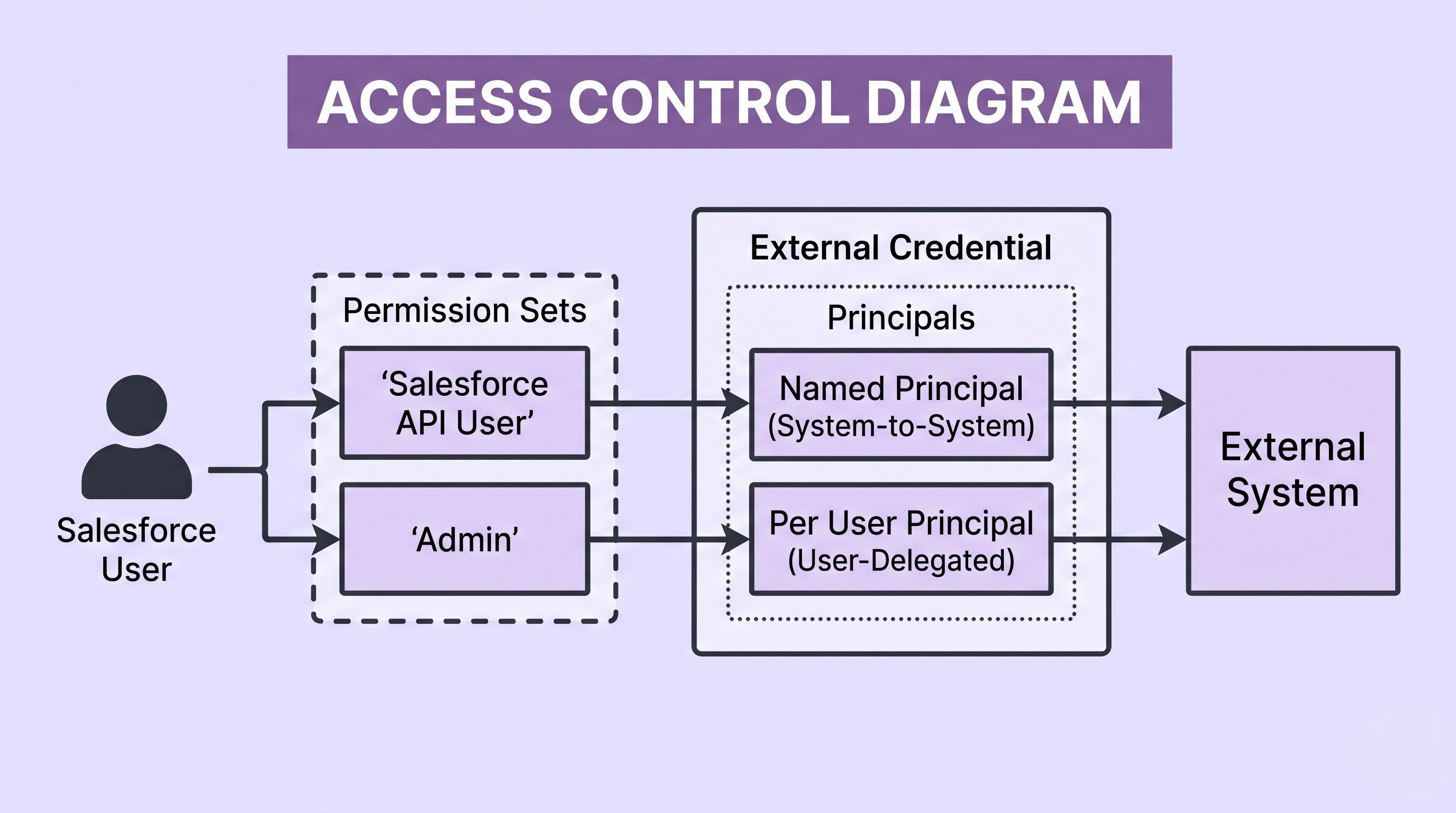
One of the biggest security enhancements in the modern Named Credential framework is how access is controlled. Instead of allowing access to an entire Named Credential at the profile level, access is allowed at the Principal level, through Permission Sets. An External Credential Principal is associated with one or more Permission Sets by a developer or administrator.
When an Apex class, Flow, or External Service makes a callout using a Named Credential at runtime, Salesforce checks whether the user running it has a Permission Set that allows access to the underlying External Credential Principal. If the user doesn’t have the right Permission Set, Salesforce will not allow the outbound callout to leave the platform. This fine-grained control means architects can expose different levels of API access (e.g. read-only versus read-write principals) to different user personas, all through the same Named Credential endpoint.
Named Credentials
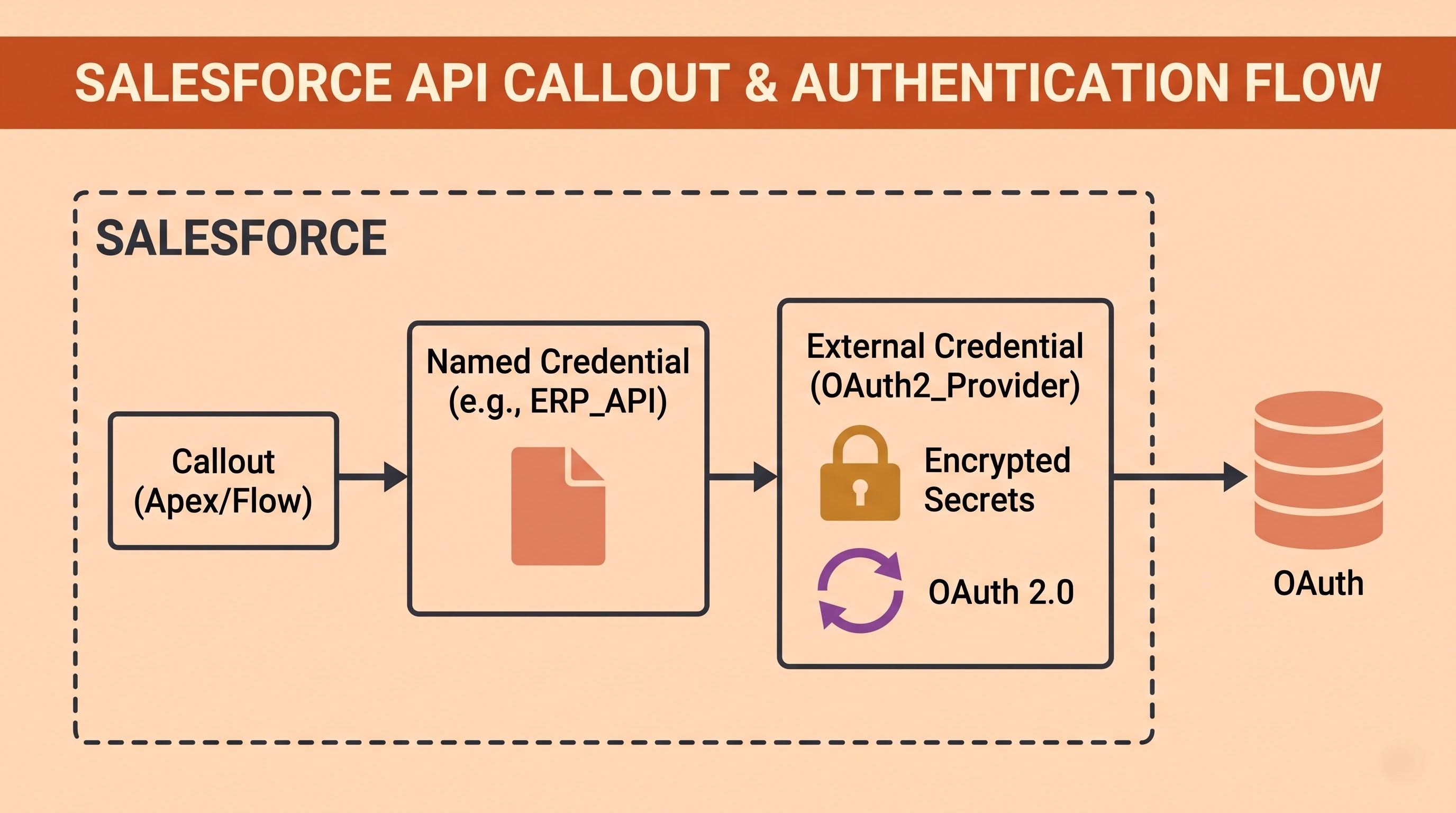
Your declarative and programmatic tools consume the abstraction layer of the Named Credential. It defines the HTTP transport options, links to the parent External Credential and the base URL of the target API. Salesforce gives developers the ability to configure automatic generation of the standard HTTP Authorisation header, inject custom HTTP headers to send with each outbound request and allow formula expressions within headers or request bodies.
When using a Named Credential in Apex, Flow or External Services, the developer never writes the actual domain name. Instead they use a special callout prefix and the developer name of the Named Credential and append any relative resource paths needed for the specific API operation. At run time, Salesforce resolves the callout prefix to the configured base URL, retrieves the encrypted token from the associated External Credential, automatically refreshes the OAuth token if needed, injects the authorisation headers and sends the HTTP request.
Authentication Protocols Supported And When To Use
Choosing the right authentication protocol is important in balancing the security requirements and the capability of the external API. As a Salesforce Developer, you will encounter a few major authentication patterns in enterprise environments.
OAuth 2.0 is widely regarded as the de-facto standard for modern enterprise integration. When you log in to OAuth 2.0–enabled sites, Salesforce associates the External Credential with an Auth Provider. The Authorisation Code flow is for user-delegated flows, or long-lived background integrations, where an administrator or user can authenticate once and Salesforce securely stores the access token and refresh token for you. When the short-lived access token expires, Salesforce uses the refresh token to obtain a new one transparently, without interrupting running Apex jobs or requiring developer intervention. Salesforce can use the OAuth 2.0 Client Credentials flow to trade a client ID and client secret for an access token. This is the flow for server-to-server integrations that are automated and do not require a human user in the handshake process.
Custom Authentication Protocols provide you with the flexibility you want when integrating with third-party vendors that do not support OAuth 2.0. Many specialised REST APIs use static API keys, proprietary bearer tokens or multi-part secret headers. Developers are able to store arbitrary key-value pairs as encrypted Principal Parameters with a Custom External Credential. Custom HTTP Headers on the External Credential or Named Credential can use Salesforce formula syntax to dynamically inject these encrypted parameters in the exact header format the vendor expects, be it an X-API-Key header or a custom Authorisation scheme, without ever exposing the raw string in your codebase.
To make integration with Amazon Web Services like S3, Lambda, DynamoDB or EventBridge easier we natively support AWS Signature Version 4. Manually signing AWS requests in Apex involves complex cryptographic hashing (HMAC-SHA256), canonical request formatting, and exact timestamp synchronisation, which quickly consumes Apex CPU time and adds maintenance complexity. By setting up the AWS Signature Version 4 protocol on an External Credential and entering the IAM Access Key ID, Secret Access Key, AWS Region, and AWS Service name, Salesforce automatically calculates and adds the cryptographic signature to each outbound callout.
Mutual TLS (mTLS) adds yet another layer of transport-level security for industries with high regulatory requirements, such as financial services and healthcare. In a traditional TLS implementation, the outside server simply authenticates itself to Salesforce with an SSL certificate. mTLS is mutual authentication for both parties. Salesforce Developers are able to create a Certificate and Key Pair in Salesforce Setup, share the public certificate with the external system and select that certificate directly on the Named Credential configuration. Salesforce presents the client certificate in the TLS handshake to show that the request was legitimately from your Salesforce org.
Seamless consumption within Salesforce environment
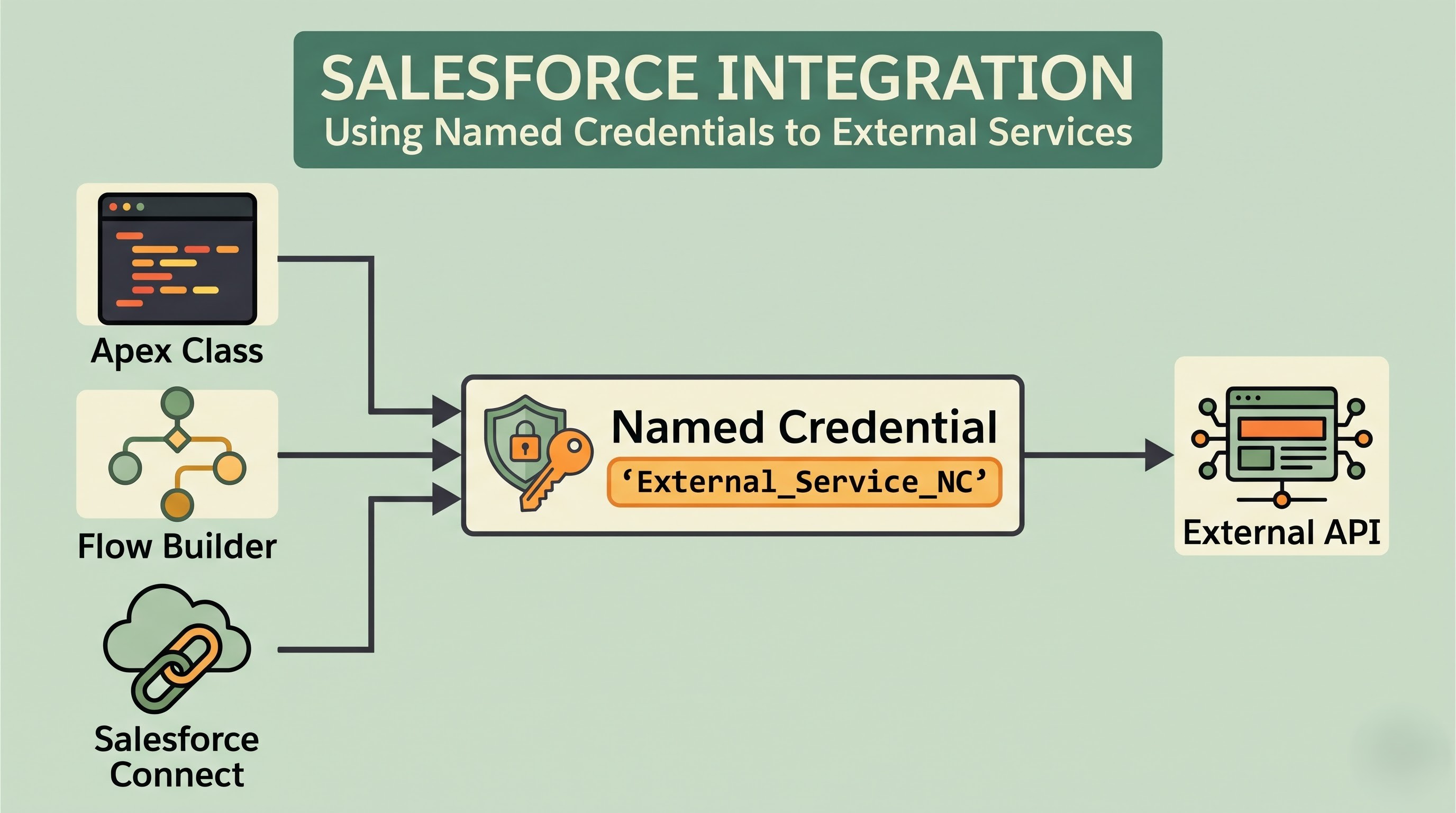
A great advantage of spending time on good Named Credential architecture is that the setup you create can be consumed by any of the programmatic or declarative tools in salesforce.
The Apex Named Credential minimized redundant coding which is an excellent architecture pattern that has been taught to students in a salesforce development course today. If there were no Apex Named Credential, an Apex Developer would need to create a utility class for querying custom metadata, create authentication payloads, make the initial callout to obtain the session tokens, interpret the JSON response for the expiration timestamps, cache the tokens in Platform Cache, and add the authorisation headers to the primary business callout. No more plumbing with Named Credentials.” The developer just builds an HTTP request, specifying the endpoint with the callout prefix and the developer name of the Named Credential and the relative path, sets the HTTP method and payload, and sends the request. Also, testing Apex callouts becomes a lot cleaner — unit tests with HttpCalloutMock don’t have to mock multi-step token exchange endpoints, they just have to mock the actual business API response.
External Services and Salesforce Flow can directly use Named Credentials for low-code automation. When an architect imports an OpenAPI (Swagger) specification into External Services for the purpose of creating invocable actions for Flow Builder, Salesforce needs a Named Credential to handle the underlying connectivity and authentication. Flow Builder HTTP Callout actions have Named Credentials built in to authenticate outbound REST calls, without a single line of Apex. Salesforce Connect authenticates real-time queries that represent external data sources like OData services as native External Objects in Salesforce by using Named Credentials.
Best Practices for Managing CI/CD and Environments
In enterprise Salesforce development, code and configuration move methodically from scratch orgs and developer sandboxes to QA and UAT environments and finally to Production. The main reason for broken integrations right after a sandbox refresh or a production deployment is hardcoded endpoints and credentials.
Named Credentials solve environment parity cleanly. Named Credentials and External Credentials are both metadata types and are both deployable. Developers are able to store the metadata definitions in a Git repository and deploy the same across environments using Salesforce CLI, DevOps Center or third-party CI/CD pipelines. Most importantly, the structural metadata (credential names, authentication protocols, custom header definitions, Permission Set mappings etc) is in source control, but the sensitive secrets and environment specific URLs are stored separately per org.
Salesforce automatically clears sensitive authentication secrets in External Credentials when you refresh a Full or Partial Copy Sandbox from Production. This protects a sandbox environment from accidentally mutating live production data in an external ERP or payment system. Then, administrators or automated post-refresh scripts can update the Named Credential endpoint URL to point to the vendor’s staging server and populate the External Credential with Sandbox-specific API keys or OAuth tokens. The Named Credential developer name is the same in all environments, so there are no changes or hotfixes needed in Apex classes, Flows and External Services when deploying.
Salesforce has Connect API support for Named Credentials for ISVs and internal platform teams deploying managed or unlocked packages. For security purposes, secrets cannot be directly bundled inside a package version, but you can use post-install scripts or custom setup wizards built using Lightning Web Components to programmatically populate External Credential principal parameters and tokens when subscribers install the package via the Connect API.
Protecting the Architecture Through Security Hardening and Governance
The Named Credential is the first point of securing an integration. Yet for the purpose of establishing a robust architecture, governance becomes essential.
First, ensure that you always bind your permission sets to external credential principals using the principle of least privilege. Do not assign External Credential access to generic employee permission sets or broad default profiles. Instead, create specialised integration Permission Sets (e.g. for an integration service user or a narrowly scoped group of operations managers) and assign only the minimum OAuth scopes required by the external API.
Second, don’t override the native header generation of the platform unless you really have to. When you choose to generate the Authorisation header on a Named Credential, Salesforce is stuffing sensitive tokens deep in the network stack of the platform. If you disable this option and you create custom headers using formula merge fields, be very careful of Apex debug logging. Standard Authorisation headers are masked by Salesforce debug logs, however custom headers may be accidentally exposed if a developer logs the complete outbound HTTP request object when troubleshooting. Never print full request headers in production code and sanitise debug logs at all times.
Third, establish a regular schedule for rotating credentials and monitor the health of your outbound callouts. OAuth 2.0 refresh tokens will automate renewal of short-lived tokens but static API keys and mTLS certificates (including client secrets) have expiration dates. Expiration timeframes for all External Credential secrets and certificates. Use Salesforce Event Monitoring and Named Credential logs to audit callout volumes, detect abnormal spikes in outbound traffic, and identify authentication failures before they affect end users.
Authentication and endpoint management are declarative infrastructure, not app code, for Salesforce Developers. That helps them avoid an entire class of security vulnerabilities. Modern Named Credentials and External Credentials provide a clean, reusable, and enterprise-grade foundation that scales effortlessly – from a single Apex callout to a complex multi-system architecture.
Conclusion: Creating Robust Integrations with Named and External Credentials
One of the highest-leverage responsibilities in modern enterprise architecture is securing outbound API integrations, and Salesforce’s modern Named Credentials and External Credentials framework gives teams a clean, declarative way to get it right. Removing hardcoded strings, custom settings and ad-hoc token management utilities eliminates common security blind spots such as exposed secrets in source control, unmasked debug logs and fragile integration plumbing. Instead, authentication and endpoint routing are first-class platform metadata and are processed uniformly throughout the application lifecycle.
The modern design is based on separation of External Credentials and Named Credentials. Named Credentials are the target endpoint URL, with transport behaviour. Salesforce authenticates using External Credentials, which includes protocol selection, encrypted storage of secrets, and modelling of identity through Named Principals for shared system-to-system access or Per User principals for user-delegated actions. We have strictly enforced least privilege by associating access control with Permission Sets at the Principal level. It allows the architect to split read and write access or restrict the usage of secure APIs by certain personas without duplicating endpoint configurations and remotely configuring sites.
The clean architecture will assist in programming and declarative development. The developers will be able to bypass writing any kind of code for acquiring and refreshing tokens, focusing on testing the business logic only. Low-code builders like Salesforce Flow, External Services, and Salesforce Connect can also securely call external APIs using the same credentials. Protocols such as OAuth 2.0, custom header calculations, AWS Signature Version 4, and mutual TLS can handle anything from simple partner APIs to strict regulatory and cloud-native workloads.
The framework also supports disciplined release engineering and continued governance. Teams also reduce the risk of post-deployment breakage and environment drift as credential structures and endpoint abstractions flow cleanly through source control, sandboxes and CI/CD pipelines. Sensitive secrets are isolated by environment and automatically cleared when sandbox refreshes occur. Even distributed packaging scenarios can take advantage of controlled, programmatic secret provisioning with Connect API support, without bundling credentials inside package metadata.
And at the end of the day security is a sum of good architecture and good operational habits over time. Named Credentials move from a convenience feature to durable enterprise infrastructure by preserving built-in header generation wherever possible, guarding against accidental secret exposure in debug logs, enforcing tight Permission Set and OAuth scope boundaries, rotating expiring keys and certificates on schedule, and monitoring outbound callout health. Architects and engineers engaged in system integration need to focus on their own professional development by undertaking salesforce dev training to learn about using External and Named Credentials as this is an essential step toward constructing secure and scalable systems.