
Salesforce Explained: What It Is, How It Works and Why Admins Keep It Running
Last updated on Oct 1, 2026
Walk into almost any mid-sized or large company and ask who owns the customer data. There is a good chance someone will point to Salesforce. It holds the sales pipeline for the quarter, the support cases that came in this morning, the marketing lists for next week's campaign, and often a few spreadsheets that people were too tired to keep emailing around. It is not the flashiest piece of software in the building, but a lot of daily work quietly depends on it.
And yet, for many people the name still feels fuzzy. Is it a website? An app? A database? Why do job listings for it ask for such specific titles, and what exactly does an administrator do all day? This article answers those questions in order. We start with what Salesforce is, define the vocabulary you will keep running into, walk through the products and the way data and security are organised, and then look at the admin role itself: the work, the skills, the certification and the career that grows out of it. You do not need a technical background to follow along. If you can understand how a spreadsheet works, you can understand most of what follows.
What Is Salesforce, Really?
Salesforce is a cloud-based platform that helps organisations manage their relationships with customers. The company behind it, also called Salesforce, was founded in 1999 by Marc Benioff and a small group of colleagues in San Francisco. Their pitch was simple at the time and slightly radical: stop installing expensive software on your own servers, and instead use business software through a web browser, paying a subscription.
Three definitions help here, because they come up constantly.
CRM (Customer Relationship Management): A system for recording and organising everything a business knows about its customers and prospects: who they are, what they bought, who spoke to them last and what was said. A good CRM replaces scattered notes and memory with one shared source of truth.
SaaS (Software as a Service): Software delivered over the internet on a subscription basis. The vendor hosts it, updates it and keeps it running. You log in and use it. Salesforce's CRM applications are the textbook example.
PaaS (Platform as a Service): A foundation that lets you build your own applications without managing servers. Salesforce also works as a platform: a company can build custom apps on it, not just use the ready-made ones.
That mix of SaaS and PaaS is the reason Salesforce spread so far beyond sales teams. Out of the box, it tracks leads and deals. But because it can be shaped to fit almost any process, hospitals use it to manage patient outreach, universities use it to track applicants, and nonprofits use it to manage donors and volunteers.
One more fact worth knowing: Salesforce ships three major releases every year, commonly known as Spring, Summer and Winter. Each one adds features, tweaks the interface and retires a few old behaviors. Someone inside the company has to read the release notes, test what might break and tell everyone what changed. We will come back to who that someone is.
The Salesforce Product Family
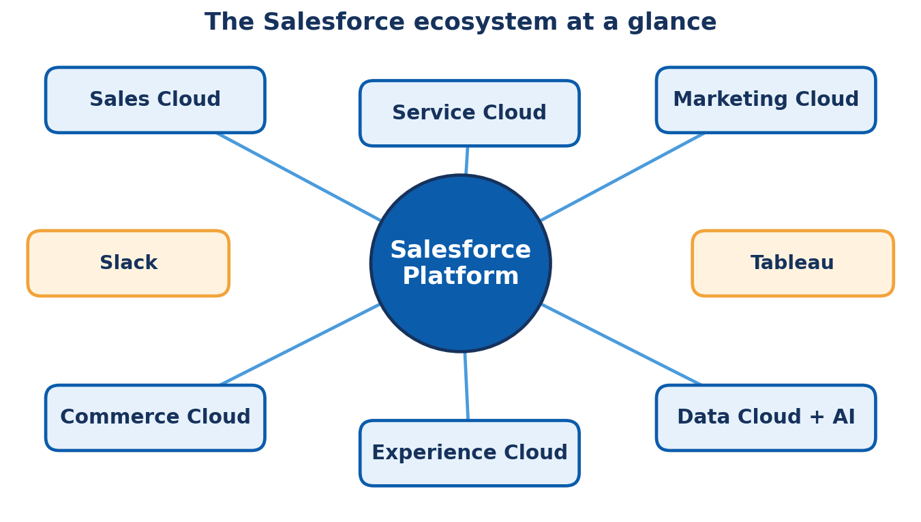
When people say they "use Salesforce," they usually mean one or two products from a larger family. Salesforce calls many of these products clouds, a name borrowed from cloud computing and a bit of branding from the company's early days. Here are the main ones.
Sales Cloud
The original product. It manages leads (people who might buy), accounts (the companies you sell to), contacts (the individuals at those companies) and opportunities (potential deals). Sales managers use it to forecast revenue; reps use it to know what to do next.
Service Cloud
Built for customer support. Customers raise cases by phone, email, chat or a web form, and agents work through them with the help of a knowledge base, queues and service-level timers. Its goal is to make sure no customer problem falls into a gap between two people.
Marketing Cloud
A platform for email, mobile, social and advertising campaigns, with tools for building customer journeys. Where Sales Cloud tracks individuals one conversation at a time, Marketing Cloud works with large audiences and timing.
Commerce Cloud and Experience Cloud
Commerce Cloud powers online storefronts. Experience Cloud lets a company build branded portals and communities where customers, partners or employees can log in, find answers, and manage their own information.
Data Cloud, Tableau, Slack and AI
Over the past several years, the company has added products that sit around the core. Data Cloud pulls information from many systems into a unified customer profile. Tableau is a data visualization tool. Slack is a workplace messaging app that Salesforce acquired and has woven into its other products. And Agentforce, Salesforce's AI agent offering, aims to let software handle parts of customer conversations and routine tasks. Product names and packaging change fairly often, so always check Salesforce's own site for the current lineup. The important point for a beginner is that all of this stands on the same foundation. The objects, fields, security model and automation tools you learn for one product apply to most of the others. Learn the foundation well, and new products stop feeling like new worlds.
How Salesforce Organises Data and Controls Access
Two ideas sit underneath almost every Salesforce project: how data is structured and who is allowed to touch it. Get these right and the system is a pleasure to use. Get them wrong and you end up with duplicate records, confused users and the occasional awkward conversation with the compliance team.
The data model
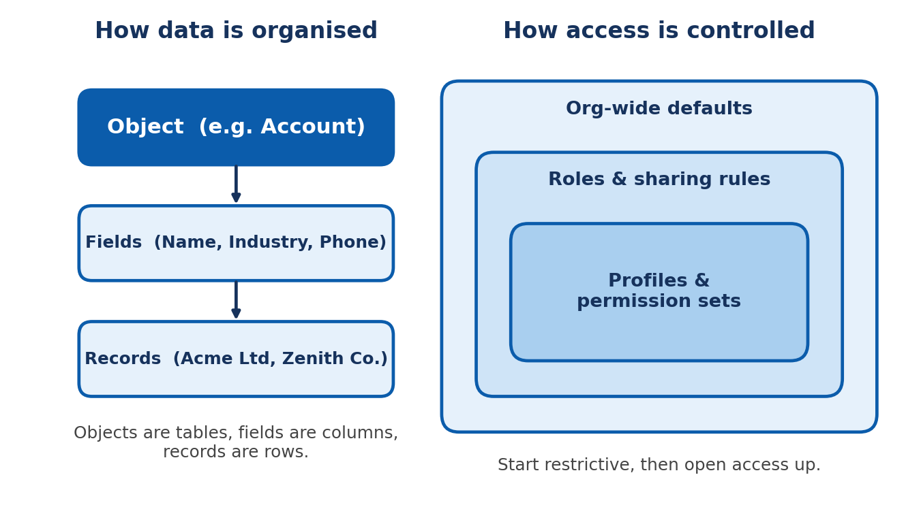
Data lives in objects, which have fields, which hold records. Standard objects come with every org: Account, Contact, Lead, Opportunity, Case and a handful more. When the standard set doesn't fit, admins create custom objects. A school might build an Applicant object; a property manager might build a Lease object. Objects connect to each other through relationships. The most common is the lookup relationship, where one record simply points to another, such as a Contact pointing to its Account. A tighter version is the master-detail relationship, where the child record cannot exist without its parent and inherits its security. Choosing between the two sounds minor, but it shapes how reports, sharing and deletion behave for years afterwards.
The security model
Salesforce security works in layers, moving from broad to narrow.
• Org-wide defaults set the baseline: can users see each other's records at all? The sensible habit is to start restrictive.
• Roles and sharing rules then open access up where it makes business sense, for example letting managers see their team's deals.
• Profiles and permission sets control what each user can do: which objects they can create or delete, which fields they can read, which apps they can open.
The principle behind the layers is least privilege: give people the access they need to do their job and nothing more. It is easier to grant extra access later than to explain why a junior intern could export every customer's phone number.
Automation: Letting the System Do the Boring Parts
A CRM that depends on people remembering to update fields will slowly fill with stale data. Automation fixes that. It watches for something to happen, then takes action, so people spend their time on conversations rather than clerical work. The main tool today is Flow. A flow can start when a record is created or changed, when a user clicks a button, or on a schedule. Typical examples include assigning a new lead to the right salesperson based on region, sending a reminder when a case has been open too long, creating follow-up tasks when a deal reaches a certain stage, or updating a field on a parent record when a child record changes.
Salesforce has older automation tools, namely Workflow Rules and Process Builder, which are being retired in favour of Flow. Many older orgs still contain them, so part of an admin's job is converting that legacy automation into flows instead of leaving it to rot. Beyond Flow, there are also approval processes for routing requests, such as discount approvals, to the right manager, and validation rules to keep bad data out at the door. When automation reaches its limits, developers step in with Apex code or Lightning components. A good rule of thumb is to try clicks before code. Declarative tools are faster to build, easier for the next person to understand and far less likely to break during a release.
What Does a Salesforce Administrator Actually Do?
The Salesforce administrator, usually shortened to admin, is the person responsible for keeping a Salesforce org healthy, useful and secure. Think of them as the combined caretaker, translator and problem solver for the system. They sit between the business, which wants things to work a certain way, and the platform, which has opinions about how things can be done.
A normal week might include any of the following.
• Managing users: Creating accounts for new hires, deactivating those who leave, resetting access and assigning the right permission sets.
• Customizing the platform: Adding fields, building page layouts, creating record types and shaping the app so it matches how teams really work.
• Building automation: Turning a request such as "can we get notified when a big deal stalls?" into a working flow.
• Protecting data quality: Spotting duplicates, cleaning imports, writing validation rules and keeping records trustworthy.
• Creating reports and dashboards: Giving leadership numbers they can believe, and giving frontline users views that save them time.
• Handling releases and change: Reading release notes, testing in a sandbox and communicating changes before users stumble onto them.
• Training and support: Answering questions, writing short guides and listening to what frustrates people.
What surprises many newcomers is how much of the job is not technical. The best admins are strong listeners. A user who says "the system is slow" is often saying "I can't find the thing I need." Translating that kind of complaint into a clean configuration change is where an admin earns their keep.
Skills That Make a Good Admin, and How to Build Them
You can split admin skills into two groups: platform skills, which are learned, and working habits, which are practised. On the platform side, the essentials are the data model, the security model, Flow automation, reports and dashboards, and data management tools such as imports and exports. Light familiarity with how formulas work also helps, because they appear in fields, validation rules and flows. None of this requires programming. It does require comfort with logic: if this happens, then that should follow, unless this other condition is true.
On the habit side, the useful traits are curiosity, patience, a careful eye for detail and a stubborn instinct to ask "what is the real problem here?" before building anything. Documenting your changes, even in a simple log, will save you and your successor many headaches. As for how to learn all this, there is no single correct route, and plenty of admins are largely self-taught. Still, structure helps. A well-designed salesforce admin course gives you a sequence to follow, so you are not guessing which topic to tackle next, and a good salesforce administrator course usually pairs short lessons with practical exercises in a real org.
A practical learning path
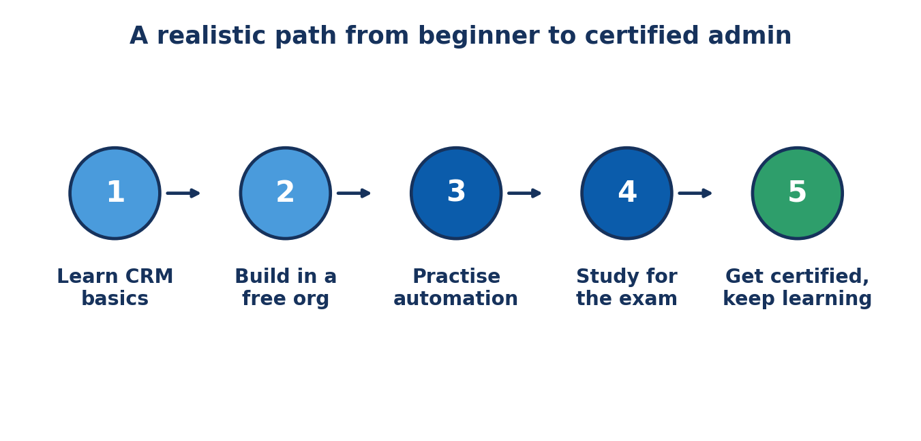
Step 1: Learn the CRM basics. Understand what a lead, an account and an opportunity are before you touch the tool. Knowing the business process makes the software make sense.
Step 2: Build in a free org. Salesforce offers free developer orgs. Create a few custom objects, add fields, change page layouts and break things on purpose. Mistakes are cheap in a sandbox-style environment.
Step 3: Practise automation. Build three or four flows for problems you invent yourself. A lead routing flow and an approval process teach more than reading about them.
Step 4: Study for the exam. Review the official exam guide, take practice tests and revisit the topics that feel shaky, especially security and data management.
Step 5: Get certified, then keep going. Passing the exam is a milestone, not a finish line. Three releases a year means there is always something new to learn.
The Certification and the Career Path
The standard credential for the role is the Salesforce Certified Administrator exam. It tests your understanding of configuration and setup, object manager and Lightning App Builder, sales and marketing applications, service and support applications, productivity tools, data and analytics management, and workflow and process automation. At the time of writing, the exam has 60 multiple-choice and multiple-select questions, a 105-minute time limit and a passing score of 65 percent, but Salesforce occasionally adjusts these details, so confirm them on the official exam page before you book.
Certification helps because it gives employers a shared yardstick. It does not replace experience. Hiring managers tend to be more impressed by a candidate who can describe a flow they built and why they built it that way than by one who only holds a badge.
Once you are comfortable as an admin, several directions open up:
• Senior or lead admin: owning the architecture of a large org and mentoring newer admins.
• Business analyst: moving closer to requirements gathering and process design.
• Advanced Administrator or Platform App Builder: deeper certifications that cover more complex declarative solutions.
• Developer: learning Apex and Lightning Web Components to build what clicks alone cannot.
• Consultant or architect: advising several clients, or designing solutions across multiple clouds.
The admin role is also a very practical entry point for career changers. Teachers, customer support agents, project coordinators and analysts regularly make the jump, because the job rewards people who already understand how organisations really operate.
Common Mistakes Beginners Make
After watching enough orgs grow, patterns appear. Here are the mistakes that show up again and again.
• Building in production. Testing changes on live data is how a harmless-looking field edit ends up emailing every customer. Use a sandbox.
• Over-customising. Just because you can add 80 fields to an object doesn't mean you should. Every field is something a user must read and someone must maintain.
• Giving everyone the same access. Handing out broad permissions is faster today and much more painful during an audit.
• Skipping documentation. Six months later, nobody remembers why a validation rule exists, and nobody dares to switch it off.
• Ignoring user feedback. A technically perfect page layout that people hate is a failed page layout.
• Forgetting data hygiene. Reports are only as good as the records behind them. Clean data is a habit, not a one-time project.
Conclusion
Salesforce began as a bet that business software could live in a browser. Two and a half decades later it is a sprawling ecosystem, but the idea at its core has stayed constant: put everything you know about your customers in one place, and make it easy for the right people to act on it. The administrator is the person who makes that idea work in practice. They organise the data, protect it, automate the repetitive parts and translate between the people who use the system and the system itself. It is a role that blends logic and empathy, offers a clear path to certification, and keeps leading to new places for those who stay curious. If this guide made the platform salesforce administrator training feel more approachable, the next step is easy. Create a free developer org, add a custom object, build one small flow and see how it feels. Ten minutes of hands-on practice will teach you more than another hour of reading, and it is usually where the real interest begins.