
Salesforce Flow vs. Apex: How to Choose Between Declarative and Programmatic Automation
Last updated on Aug 8, 2026
Introduction: The Current State of Salesforce Automation
The Salesforce ecosystem has seen an enormous evolution when it comes to the way business logic and data automation are applied. Administrators and developers have always been forced to rely on various disconnected tools – Workflow Rules to run simple field updates and alerts via email, Process Builder being responsible for multi-criteria record changes, Flow Builder to create complicated user-guided screens, and Apex code being used to cover everything else.
With the sunset of old technologies like Workflow Rules and Process Builder, Salesforce has seamlessly integrated its automated functions into Flow Builder. The modern Salesforce Flow is no longer a simple point-and-click tool – it is a full automation engine, capable of high-level branching decisions, HTTP callouts, platform event orchestrations and sophisticated handling of record-based reactions.
The aforementioned endeavor presents a quandary for builders, administrators, and programmers alike: When should one opt to use declarative automation (Flow), instead of writing code (Apex)?
Salesforce promotes a "Flow-First" philosophy; however, misusing Flow in enormous enterprise-grade structures can result in various issues (performance problems, governor limits, accumulated debt). On the contrary, deploying custom Apex code for simple solutions leads to increased spending on ownership (TCO), and non-developers will struggle to modify operational rules.
Deciding between Flow and Apex isn't about which one is superior, but involves knowing about boundaries, contexts, amount of data, and long-term viability of the solution before making a choice regarding the appropriate tool for the specific case.
Introduction to Declarative Automation An Overview of Salesforce Flow
Salesforce Flow is the primary tool for declarative automation on the Lightning Platform. This program allows you to build logic visually using nodes for actions, decisions, loops, and more.
Flow has four major types of execution:
Screen Flows: a user interface for interactive processes such as wizards and data entry.
Record-Triggered Flows: either asynchronous or synchronous automations that execute actions before or after a database operation.
Scheduled Flows: automated jobs executed at preset times on a certain number of records.
Autolaunched Flows: processes launched either through Apex, REST APIs, Orchestrator or custom buttons.
The following outlines the architectural advantages associated with Salesforce Flow.
Quick Prototyping: Flow Maker greatly minimizes the duration of development cycles. Business stakeholders, Salesforce Administrators and business analysts can create, implement and test the logic much quicker than it takes doing the regular software development cycle.
Reduced Total Cost of Ownership: It is possible to support declaratively developed logic by someone other than the developers. If operational rules change, such as the discount threshold modified or an email recipient raised, a change can be accomplished without release and without waiting for software engineering’s involvement.
Integration with the Ecosystem: Flow communicates with the features provided by the platform. Flow can seamlessly collaborate with the Data Cloud, Agentforce AI agents, Actionable Segmentation and Lightning App Builder functional components without any need for custom wrapper classes or any API calls.
Visual Debugging: Flow Maker includes step-by-step visual debugger enabling builders to create their simulations, examine variable values at certain nodes, and pinpoint the failure points in the browser.
Architectural Constraints of Salesforce Flow
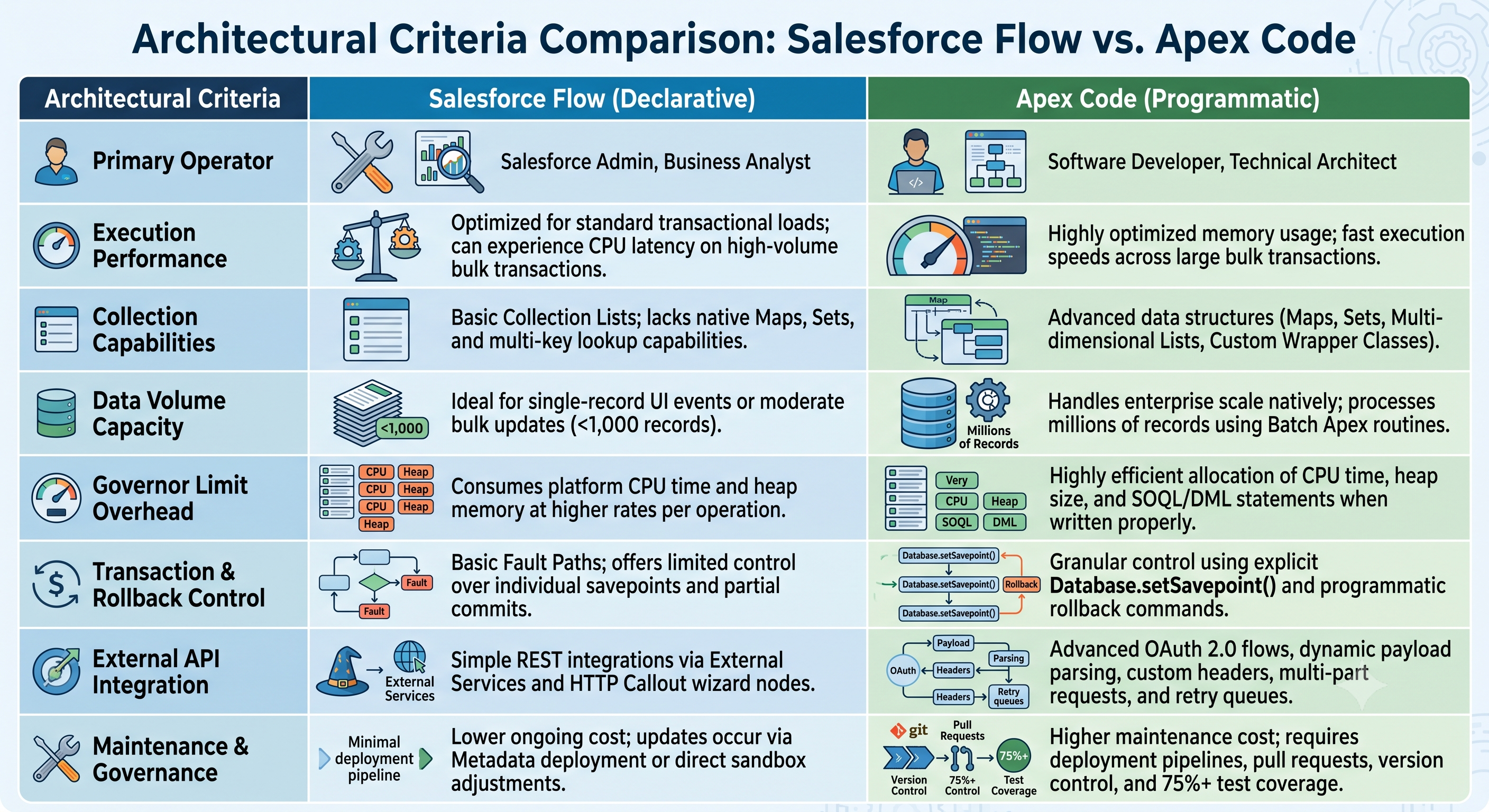
Basic Collection Handling: Though Flow allows use of collection variables and looping nodes, it lacks sophisticated data structures such as the Key-Value Map (Map) and Sets (Set) for distinct elements. This means that if collections from different objects need to be compared in Flow, there may be a need for nested queries or repeated processing which will result in significant performance costs.
Exposure to Governor Limits: Flow works as a typical Salesforce technology, executing regular Salesforce metadata on a graphical interface. If loops are incorrectly configured and contain elements with data (Get, Create, Update, and Delete), they will perform queries dynamically in the loop hitting the governor limits very quickly (for instance, 100 SOQL queries within one transaction).
Limited Transaction Control: Flow does not grant much authority over transaction limits, savepoints, or the possibility of rolling back the database during transactions. When dealing with failures of any associated elements in a multi-component Flow, the proper control of transactions is sometimes rather challenging.
Understanding Programmatic Automation: Apex
Apex is a programming language developed by Salesforce that follows the principles of being a strongly typed and object-oriented language. It runs on the Lightning Platform application server, and its syntax mimics that of Java or C#. It uses the Salesforce Object Query Language (SOQL) in conjunction with the Salesforce Object Search Language (SOSL) to communicate with databases.
The concept of Apex is used for writing:
Apex Triggers: these are event-driven codes which would run before or after a given operation is conducted on the database; the operations include insert, update, delete, merge, upsert, and undelete.
Apex Classes: these are modules of encapsulated logic, service layer logic, API, and logic of control extensions.
Asynchronous Frameworks: in this category of Apex, we can find Batch Apex (the one responsible for processing many records), Queueable Apex (where processing is done in chains ), Scheduled Apex and Future Methods.
Strengths of Apex Architecture
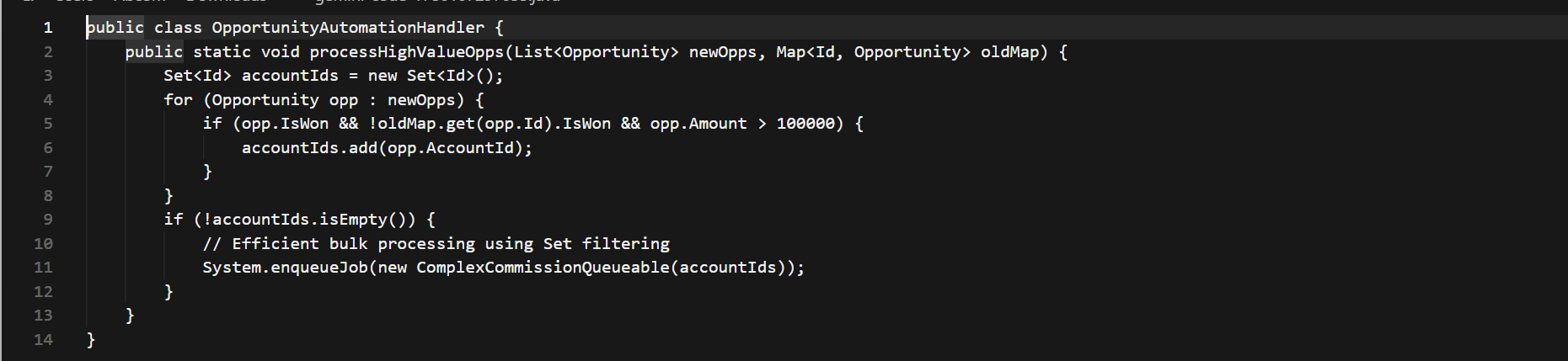
Bulk Capability: Apex itself has the ability to perform bulk processing by processing each trigger execution for up to 200 records in bulk and allowing the processing of records via utilizing maps and sets. Therefore, one of the key factors in the complete salesforce developer online training, which are meant for those who want to become platform architects, is mastering bulk processing.
Algorithms and Logic: Programmers have full control of the algorithms being used, recursive routines, string processing, query generation, and maths.
Error Handling and Rollback: Apex has the possibility of using try-catch-finally blocks and savepoints. Thus, partial transactions can be roll-backed without ruining the surrounding data structures.
Testing Mandated: Salesforce mandates that at least 75% of production Apex code is covered by automated tests, thus forcing the development team to develop reproducible test suites to find bugs early in CI/CD.
Architectural Constraints of Apex
Greater Initial and Continual Expenses: It takes knowledgeable developers to create, test, and support Apex code. Even uncomplicated changes in business processes, such as changing a record assignment rule, need the services of a developer, along with revising the code, updating the test classes, and following the proper deployment process from sandbox to production.
Maintenance issues (Technical debts): Old and badly written Apex codes that don’t follow good design practices like Domain Driven Design and Trigger Frameworks may turn into inflexible, fragile and complex over time.
Best Option For Making Decisions
If you are choosing between Flow or Apex for the automation of business processes, think about the actual requirements rather than the developer’s preference.
When to Select Flow
When the business requirements include flexibility, speed, and general transaction processing, Flow is the automation option used. Individuals engaged in salesforce dev training typically begin with declarative scenario cases.
1. Guided User Interfaces & Screen Experiences
Screen Flow is typically the tool to utilize when the automation needs information from people, including customer service intake wizards, surveys, and asset configuration screens. Creating Visualforce or Lightning Web Components to provide a few fields and decision points adds unnecessary complexity to the deployment.
2. Standard Business Logic and Record-Triggered Routing
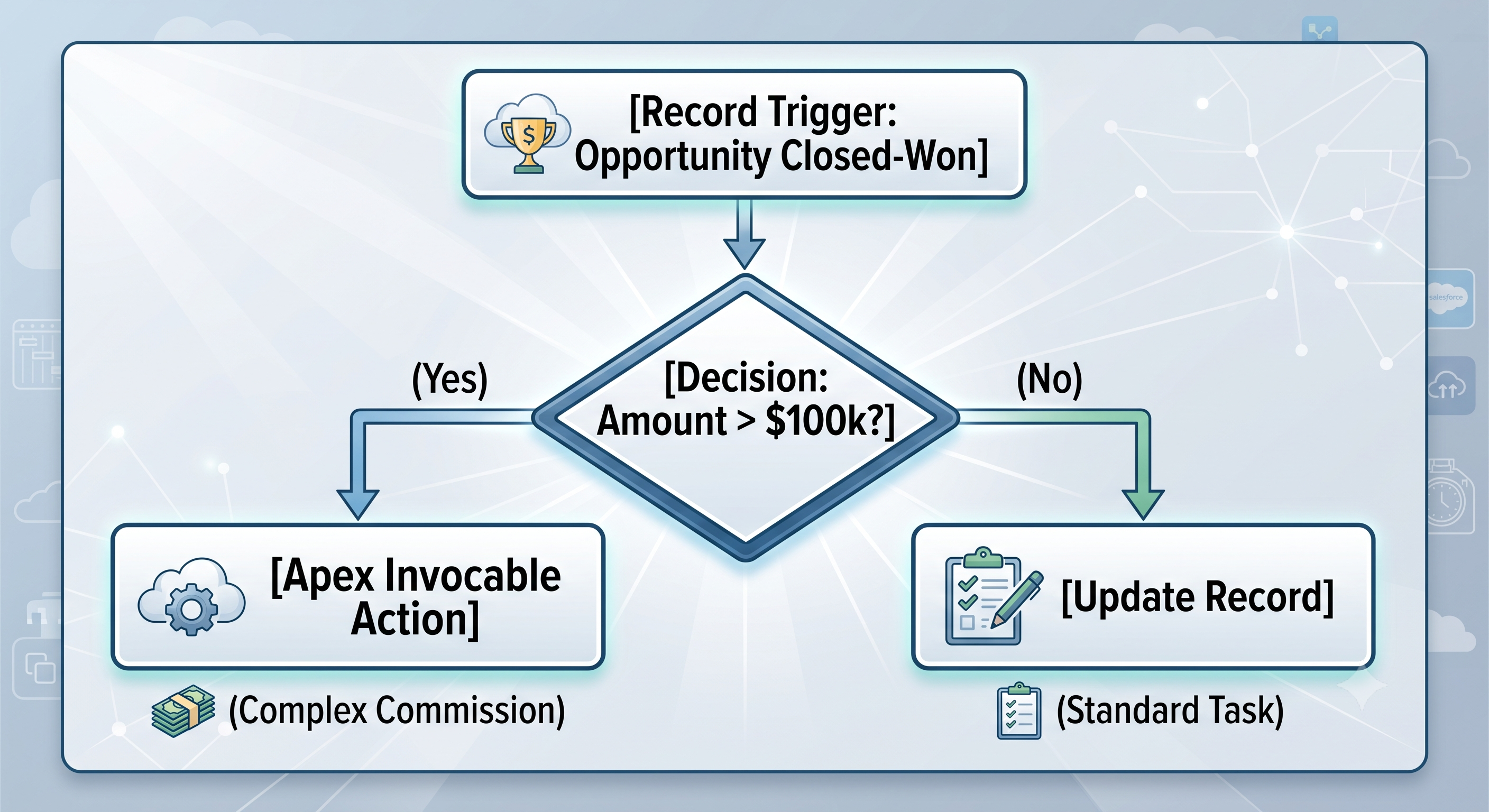
When the state of a record changes (e.g., when an Opportunity goes from "Open" to "Closed-Won"), and standard record-triggered actions are required (e.g., creating follow-up tasks, changing the status of related Contacts, sending Chatter notifications), Record-Triggered Flow is the right solution.
3. Orchestration of Declarative Platform Implementations.
Flow works in conjunction with many features of the platform, such as Approval Processes, Email Alerts, Outbound Messaging, and Orchestration jobs.
4. Business Rules Controlled by the Administrator
Where a business rule must be changed very often based on business circumstances (for example, tier boundaries or geographic routing metrics), developing this logic in Flow gives system administrators the chance to modify decision variables without initiating a software development project.
When to Opt for Apex
While it is preferable that Salesforce must be used as the main approach, implementing software is necessary to be able to ensure scalability, safety, and maintainability of the project.
1. High-Volume Bulk Data Transactions
In the event an object receives automated updates on an ongoing basis because of bulk updating processes, ETL tools (for instance, MuleSoft, Informatica, or Data Loader), or integrated API processes taking place frequently, Record-Devoided Flows concerning this object could entail serious CPU lag.
In case 200 records are processed in the course of database transactions, a Record-Devoided Flow is going to assess each record one by one using the metadata structure of the records. Apex processes lists of objects using built-in bulk methods which allow Apex to work much faster and avoid breaching CPU limitations.
2. Complicated Collection Processing Through Usage of Maps and Sets
Let us picture a situation where an automation process needs to scan 50 incoming line items, check the parent account history, search for custom pricing matrix objects based on different date ranges, and apply a discount as well.
If we were to do this in Flow, we would have to use nested loops and repeated “Get Records” nodes so that we do not cross the limit of 100 available SOQL queries per transaction.
However, with Apex, a developer is able to make a query of all related records through only one SOQL call, save all the matrix records in the Map map, and do the memory lookup in no time:

3. Dynamic External API Integration & Complex Payload Parsing
Although Flow offers basic HTTP Callouts, in practice, API interaction demands the following:
Complex JSON parsing with several levels of nested objects.
Dynamic HMAC signing or generation of dynamic tokens.
Complex retry logic based on specific HTTP response codes (for example, 429 Too Many Requests vs 500 Internal Server Error).
Asynchronous processing based on the use of webhooks.
With Apex, it is possible to use HTTP classes, JSON parsing methods, cryptography libraries and Queueable asynchronous operations in order to satisfy the requirements of complicated enterprise integration scenarios.
4. Enterprise Architecture and Strict Rule-Based Framework
In large multi-cloud environments where many teams are in charge, the use of multiple Flows containing separate business logic on one object can cause issues with unpredictable Order of Execution.
Thanks to Apex technology companies have the opportunity to use various approaches to software development; for example, it is possible to use the concept of Separation of Concerns (SoC) and Trigger Frameworks.
The Hybrid Pattern: Invoking Apex from Flow
There is no surprise one now has the possibility to mix declarative and programmatic automation as long as the latest Salesforce mechanism dear to all of us, namely the Hybrid Pattern, is working. In fact, the main tool allowing us to join these two methods is the @InvocableMethod in Apex.
Signing up for a structured salesforce developer online course can be the fastest route to mastering the creation of reusable @InvocableMethod annotations.
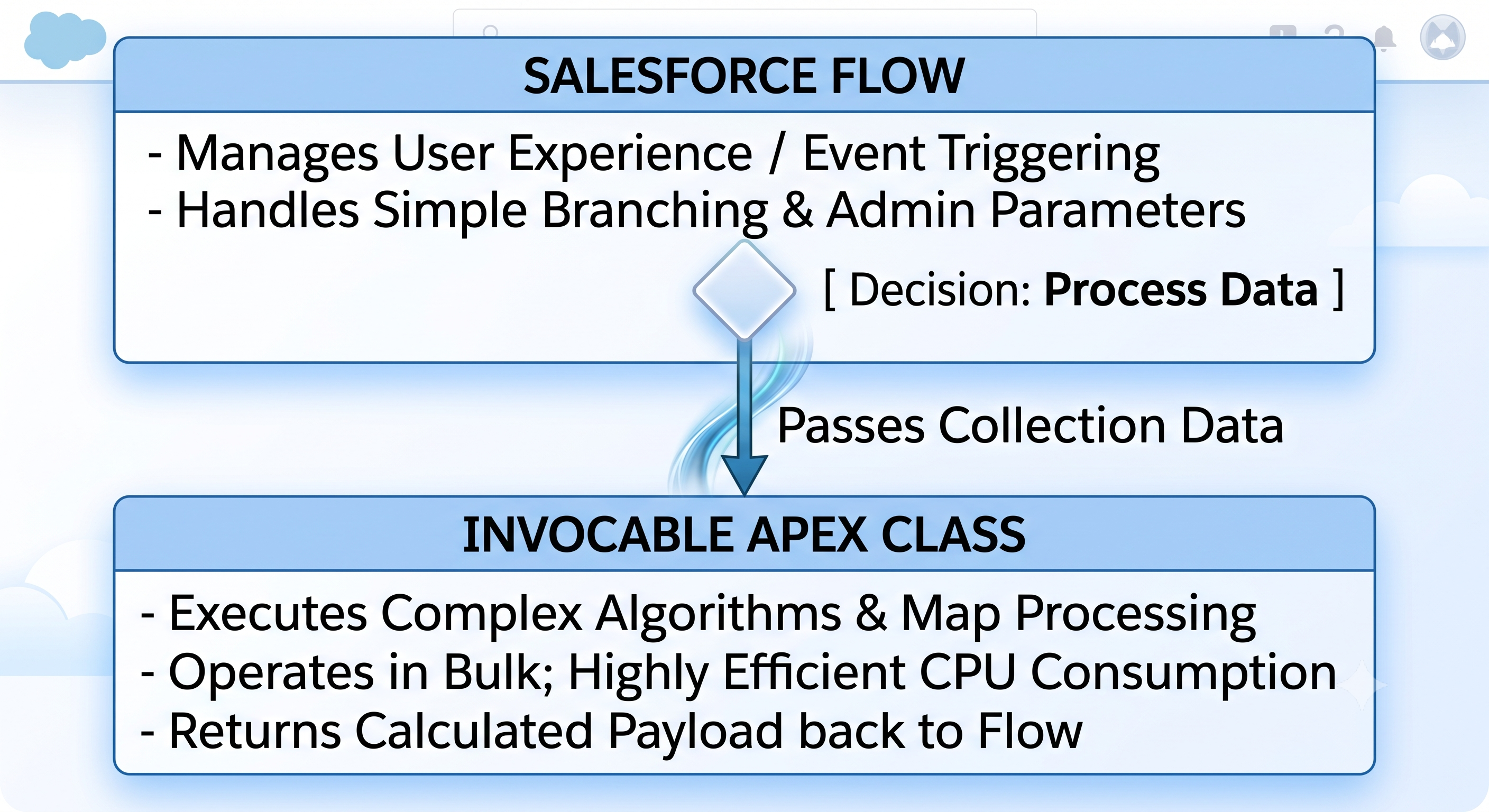
By using the @InvocableMethod annotation in a static Apex method, developers are able to bring their custom code into Flow Builder as reusable action elements.
The Flow's Function: The Screen Flow enables a sales representative to create a customized Quote by gathering line-item details, billing details, and getting client signatures.
The Apex's Responsibility: The Flow hands off the Quote ID to the Invocable Apex class to avoid writing a complicated and inefficient looping process for processing taxes on a state basis.
The Process: The Apex class utilizes a fast external API call to a tax system to acquire a response, updates the database, and sends tax amounts back to Flow instantly.
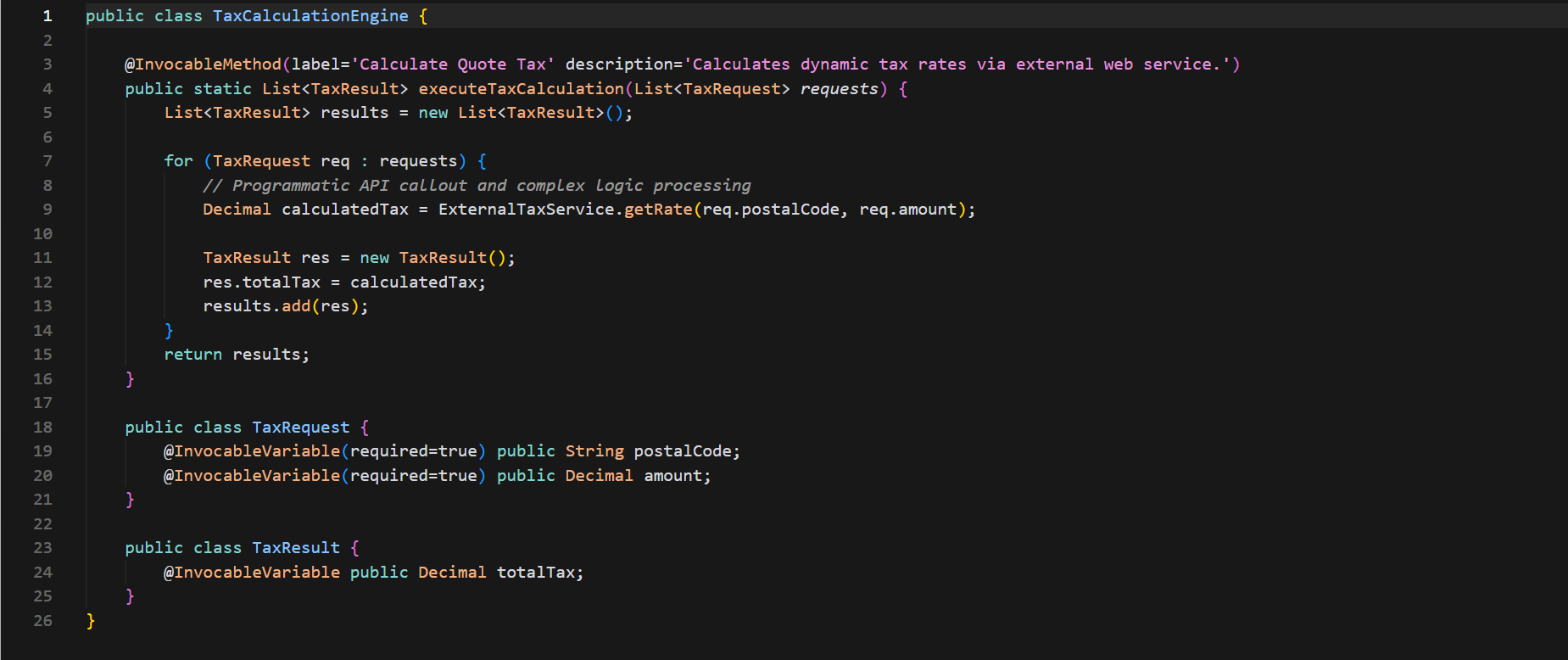
This hybrid model incorporates the advantages of both tools. With the hybrid model, administrators are completely in control of user engagement and the , and developers write modular, scalable, and testable code to process CPU-intensive computations.
Architectural Decision Framework & Flowchart
When creating automation concerning different Salesforce objects, the user should follow this procedure step-by-step:
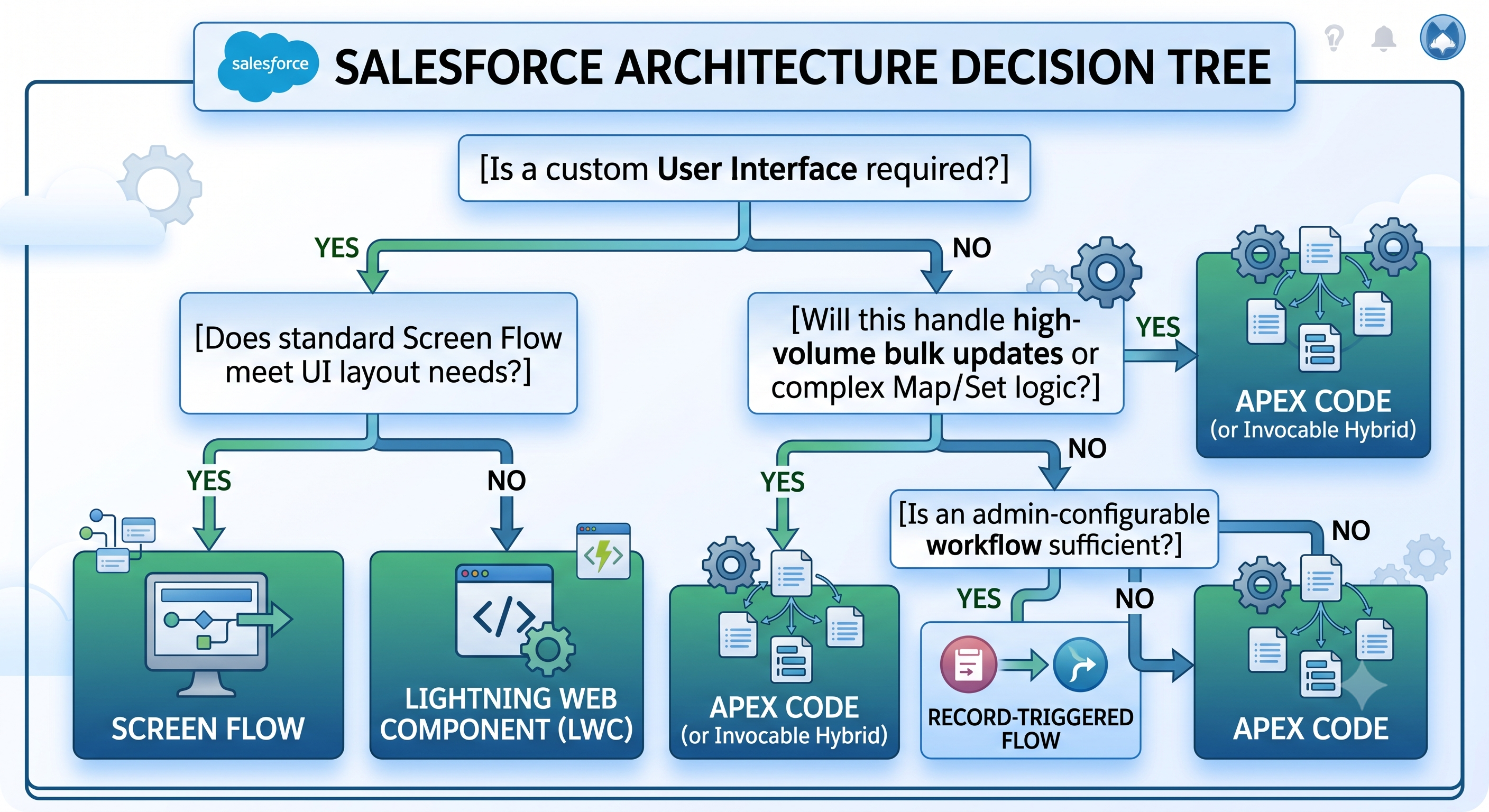
1. Assessing User Experience Needs
If interaction design, wizard stages or input forms are present, start with Screen Flow.
If unique user interface operations are needed, create a Lightning Web Component and insert it in a Screen Flow or Record Page.
2. Assessing Data Volume and Frequency of Transactions
If the target object frequently handles batch jobs, integrations, or large numbers of records in one go (thousands of records at a time) use Apex.
If the object is only responsible for few transactions, which consist mainly of user edits, use Record-Triggered Flow.
3. Assessing Complexity of Data Structure
If the logic needs to join together arrays, remove duplicates from lists, transform key-value pairs, or run dynamic queries which are based on multi-object configurations, write Apex.
If it entails just filtering records, performing simple assignments and some basic decision-making, then use Flow.
4. Assessing Needs for Integration and APIs
If integration with an external REST API with the help of standard JSON payloads is called for, evaluate Flow HTTP Callout or External Services.
If the integration involves complex authentication schemes, encryption of headers, or manipulation of dynamic payloads, do it via Apex.
Governance and Best Practices to Manage Scale
When a Salesforce organization experiences growth in terms of records and teams, adhering to as many architectural principles as possible from a comprehensive salesforce development course helps ensure that the platform remains stable.
1. Assure There’s One Automation Strategy for One Object
Do not rely on multiple Record-Triggered Flows or Apex Triggers at the same object unless there is an established execution process. Mixing different types of automations may create “race” conditions, making it impossible to manage execution order.
If there’s one unified Apex Trigger Framework for a given object, then it would be wiser to keep all transactional logics within this framework, avoiding using Record-Triggered Flows.
2. Start With Bulk Execution Design
One has to consider that every Flow and Apex logic is designed with the idea in mind that 200 transactions may be executed at the same time.
In terms of Flow: Never insert "Get Records", "Create Records", "Update Records", or "Delete Records" elements within a Loop structure. Always gather updates within an Assignment structure and employ a single DML transaction outside of the loop as needed.
Always send the incoming record collections in List format and create query filters to select all the records using WHERE Id IN :recordIds.
3. Ensure Proper Documentation and Naming Conventions
Because flows are visual metadata-based components, it is important to establish proper naming conventions in order to maintain your work:
Naming Conventions: Establish proper prefixes like SubFlow_Account_TaxCalculator or Autolaunched_Order_InventorySync.
Description Section: Mention the reason behind creating the flow, user persona and ticketing details right from the start in the Flow Properties section.
Architecture Log: Maintain one document for all the architecture decision making which states that why specific logic is placed in Flow instead of Apex.
The conclusion
The argument regarding Salesforce Flow and Apex does not consist of selecting the victor. Rather, the emphasis is on the implementation of proven software development concepts on both code and no code platforms.
Salesforce Flow provides speed, adaptability, lower start-up costs, and easy maintenance for business personnel. One should use it as a foundation for standard forms, record routing, and business logic of low and medium complexity.
Apex is the pillar for architecture systems based on a considerable volume of data. It ensures incredible performance, sophisticated algorithms of data processing, and good speed for high volumes of transactions, as well as efficient handling of complicated data integration processes.
By applying declarative flows for standard business processes, keeping Apex for complicated projects, and using hybrid integration, the team of developers can create a scalable Salesforce solution which is simple to maintain in the future.