
Salesforce Org, Objects, Records, and Fields Explained
Last updated on Oct 1, 2026
Using Salesforce initially may appear to be like being dropped into the deep end of a pool of abstract corporate terminology. For people who are using the product for the first time the terms instances, standard objects, custom fields, data schema, and environments tend to be used interchangeably. But, despite the seeming complexity, the actual structure of Salesforce is both logical and pretty obvious once you are able to decode these terms.
Salesforce is essentially a complex relational database leveraged by the multi-tenant cloud computing architecture. To get business value from the platform one will require to grasp the concepts of four important elements of Salesforce: Org, Objects, Records, and Fields.
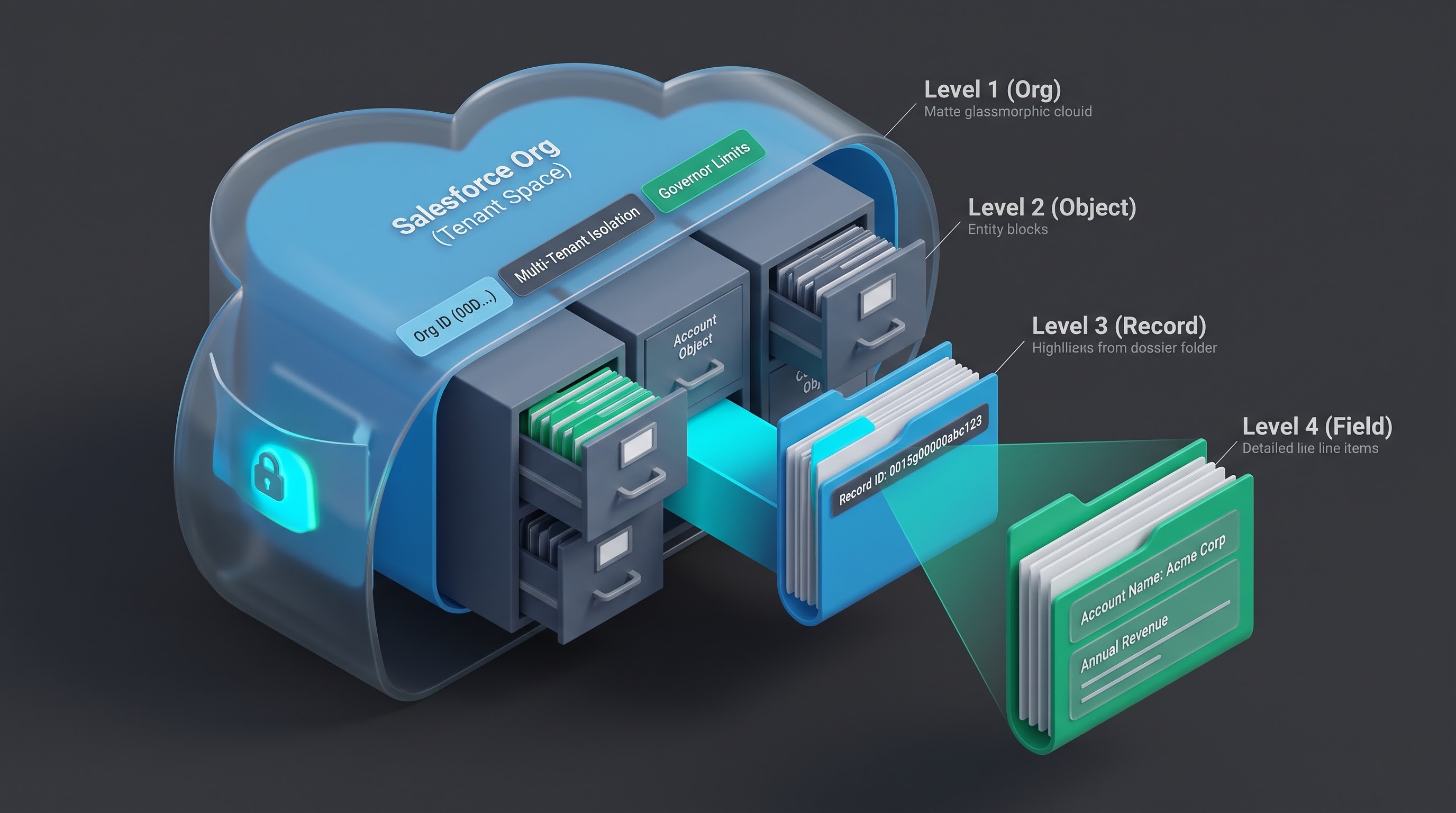
Understanding how these four components operate in relation to each other is akin to understanding the structure of the language: Org is represented by an entire library; Objects represent the different types of books available; Record refers to the pages of a particular book, and Field represents the lines in the book where the description is found. Consequently, finding the correlation helps in process designing, analyzing critical business statistics, preserving the integrity of the data, and mastering the customer relationship management processes. OnlineITGuru provides salesforce administrator training online that provides students with practical experience in real-time developer environments.
The Conceptual Framework: The Digital Workbook and the Filing Box
Prior to scrutinizing technical details, it is rational to use these four ideas as two familiar models for data process simplicity, including the digital workbook and the filing cabinet.
Let’s take a modern business workbook as an example.
The workbook file along with its data access settings, licenses and settings is regarded as your Salesforce Org because it serves as a closed information environment that belongs only to your company.
Every individual sheet (tab) in the workbook, say a tab called Customers, another called Deals, and an additional tab called Support Issues represents a Salesforce Object. Depending on the tab, one can know what information is found in there.
A row in the sheet indicates a real entry, whether it is about a customer like Mr. John Doe or a deal worth fifty thousand dollars.
Every column in the sheet indicates an attribute such as one’s name or phone number.
Now, let's take the traditional office filing cabinet:
The filing cabinet located in your office, guarded with physical keys and building access cards, represents your Organization.
The drawers contained in the filing cabinet, labeled Invoices, Client Dossiers, Product Specifications, etc. represent your Objects.
The folders pulled from the drawer that contain all the information about a client represent your Records.
The empty lines contained in the Paper Form in that folder, where a sales agent writes a phone number, address, or value, represent the Fields.
Being acquainted with these concepts helps in understanding how transactions, communications, and dashboards in Salesforce work.
The Salesforce Organization: Digital Business Boundary
The Salesforce Organization, referred to as the Org, represents the highest-level structure within the Salesforce cloud framework for a business’s operational activity. When an organization forms an agreement with Salesforce, it gets a dedicated space as a tenant. That specific part of the cloud is the Org.
Understanding Multi-tenancy: The Cloud Apartment Complex
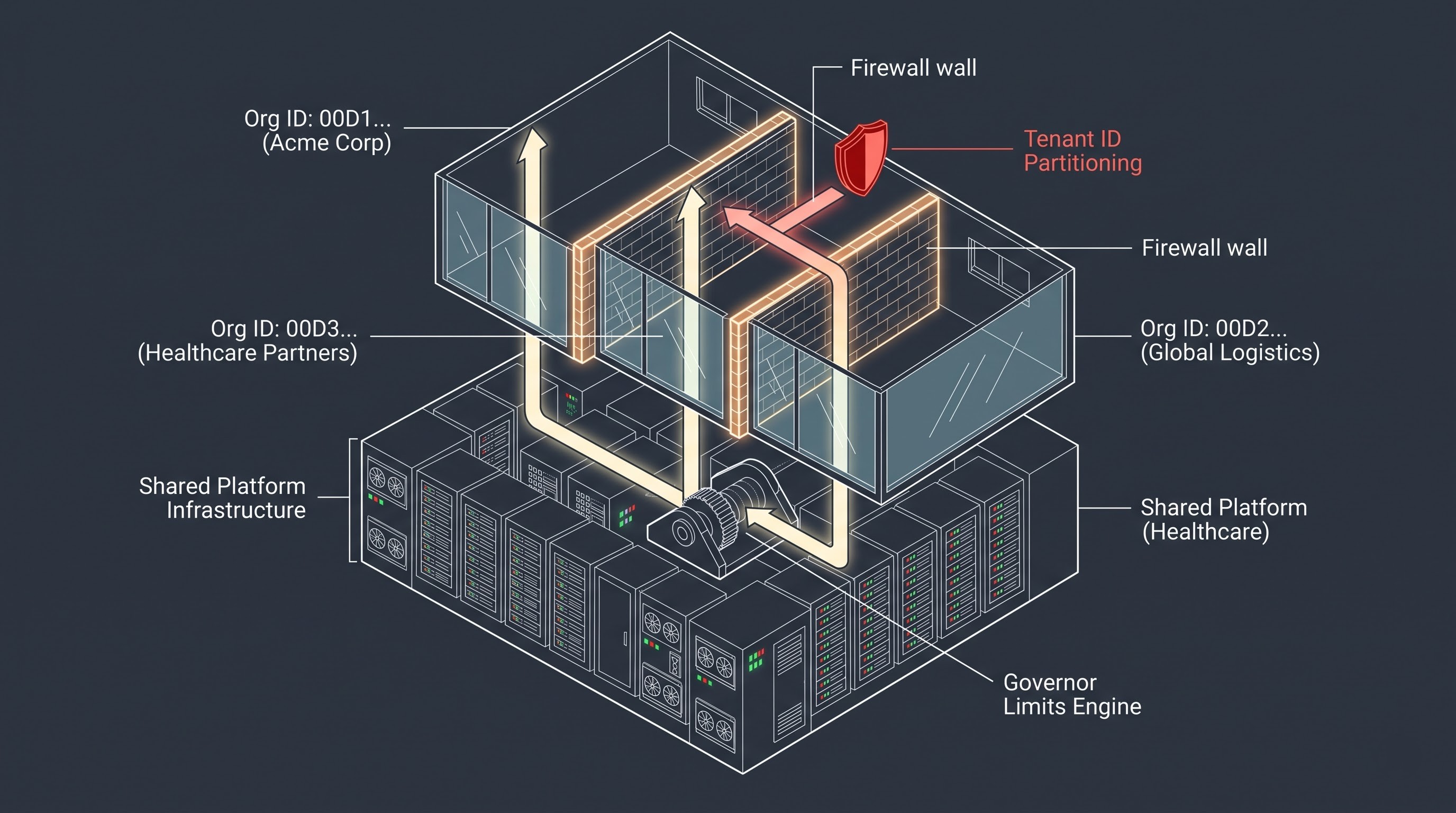
To comprehend what an Org is from a technical standpoint, one must understand the concept of multi-tenancy. In an on-premises software system, the company purchases server devices where the software will run, then sets the devices and takes care of their upkeep. This means that using that same software for 10 companies implies the usage of at least 10 devices.
Salesforce was the company to introduce a multi-tenant SaaS model that works similarly to modern apartment buildings:
Salesforce is the owner and the operator of the foundational infrastructure, physical devices, connection, cooling, and operating systems,
Multiple businesses utilize that common infrastructure (company tenants),
Every business has its own fully isolated and secured apartment (the Salesforce Org).
Someone who lives in apartment 4B will not be able to look into apartment 4C. They will not be able to go to their neighbor’s kitchen, have a look at their mail or move their furniture around. Even though the apartments have similar drains, foundations as well as electrical wiring and elevators, secrecy and safety are assured.
Technologically speaking, Salesforce employs special Organization IDs that are fifteen-symbol-long, in order to process every query, database transaction and file storage event separately. Each time a platform user uses the services of the system, the database engine adds this Org identifier, thus preventing the data from crossing the corporate borders. There are also governor limits that don’t allow a certain tenant to run an infinite loop or consume too much processor’s capacities; the shared infrastructure is stable for all tenants.
The Function of Org in Enterprise Management
Org is not just a data storage unit; it is also the administrative boundary for any organization. The Org can be used to configure the following aspects:
Identity and Authentication: Configurations of single sign-on, requirements for multi-factor authentication, login ranges based on IP addresses, session timeouts, and standards for complexity of passwords.
Licensing: Licenses that define which cloud functions will be accessible to an employee, like Sales Cloud, Service Cloud, Marketing Cloud, or Experience Cloud.
Corporate Governance: Basic corporate currency, several operational currencies, working hours, corporate holidays, time zones, definitions of the financial year, and linguistic locals.
Data Limits and Storage: Restrictions for files in storage and databases, and limits for using API every day.
The broad administrative framework explains the importance of knowing user roles, data governance, and overall estate settings for the administrators. A dedicated salesforce administrator course online at OnlineITGuru will help learners understand the knowledge they have to master to effectively establish and secure complicated enterprise environments.
Types of Orgs: Production vs. Sandboxes
It happens that organizations do not have only one Salesforce Org:
Production Org: This is the live and working environment where employees are working on a daily basis. It contains real customers’ data, existing business opportunities, and live service requests. If any failure or glitch occurs in the production org, the normal functioning is disrupted.
Sandbox Orgs: These are copies of production Org which is used for development, testing, training, and innovating. It enables administrators and developers to create complex workflows and test out new things without risking the live data. There are different kinds of sandboxes starting from simple Developer Sandbox, which is a piece of metadata configuration without any live data, ending with Full Sandbox, which is an exact copy of production Org in terms of data and metadata configuration.
By understanding the Org boundary, it helps to keep in mind that everything in Salesforce—every dashboard, workflow, permission sets, and user accounts—exists within that specific Org.
Salesforce Objects: The Architectural Blueprints
If the Org is the property of the house, Objects are the different structured rooms and architectural blueprints in that house. To put it simply, an object in database terms is nothing other than a database table. In business terms, an object is an entity that needs to be organized, understood, and tracked by the organization.
Objects shape the data. An object is not equal to a name but it is rather a template that tells us the information we will collect regarding the invoices.
There are two main categories of objects in Salesforce: Standard Objects and Custom Objects and some specific categories such as external and big objects.
Standard Objects: The Foundation of Best Practices
When a company gets a new Salesforce organization, it is not like getting an empty container. Salesforce incorporates a lot of experience of different enterprises in the field of marketing and sales in the form of standard objects. All the objects are pre-installed in the system and can be used right after installation.
The most important standard objects are:
Lead: Lead is a potential customer who has expressed interest but is not qualified yet. The lead is said to have raised his hand by filling in a contact form on the website, visiting an exhibition, or getting a white paper. Lead is seen as a place where the salespeople are engaged and establish contact with the lead.
Account: Account is the most important part of the Salesforce business-to-business data model. It is a company, organization, institution, partner, or another customer. There is an option called Person Account in the business-to-consumer model when an individual is treated like an Account. The majority of cases, revenues, and other operations are related to accounts in the system.
Contact: The term Contact refers to a person who is linked with an Account. The Account refers to Acme Corporation, while the Contact represents a person who works at the organization, e.g., Jane Doe—Vice President at Acme Corporation. Contact stores the data required for personal and professional communication, position, reporting structure, and interaction history with the person.
Opportunity: Opportunity is a concept that refers to a valid, potential dollar-generating deal. It is not a human being, but a deal that is happening. The key points about Opportunities are stages of sales, closing date, chances of success, deal amount, competitors, and products.
Case: The concept of Case refers to something that describes customer’s problem, used for customer service. For instance, if a customer writes an email that their shipment is damaged or calls a hotline to solve a problem, this is a Case. Case tracks severity, status of the issue, who deals with it in the organization, and how satisfied the customer is.
The Campaign object serves to connect marketing actions with the revenue generated from those actions. It keeps track of distinct marketing initiatives like email marketing blasts, advertising campaigns, trade shows, webinars, and partner conferences and correlates leads, contacts and closed-won deals with each one of them by proving the effectiveness of the marketing spend.
Standard object includes default business logic functionality and implements its Lead Conversion automatically. In other words, when a broker converts a Lead into a prospect by virtue of the Lead Conversion mechanism, the system will result in creating an Account and a Lead for a qualified Lead automatically.
Custom objects help customize the application according to the specific needs of your business
While standard objects provide a solid basis, every company has its peculiarities of work which cannot be predicted by any software. For example, an apartment management firm will track not only its accounts and contracts, but also the things like apartment units, leases, and maintenance checks. A university will track applications, courses, and grants. And a hospital will have to monitor patients, medical equipment, and scheduled appointments.
That's where custom objects come in. Custom objects are created by administrators to represent anything that can be viewed as a physical object, a financial contract, or a business model.
Custom objects have the same features as standard ones: they can be searched, reported, secured, audited, automated through workflows, and accessed through mobile applications. Custom objects are automatically created by the program that provides all necessary database infrastructure, user interface screens, and APIs.
In contrasting ways, data web and business practice does not overlap well with one another
Whenever the workplace is concerned, it is not about listing people and deals with them. Instead, people work in firms, while firms purchase goods like services, which occur because of contracts made.
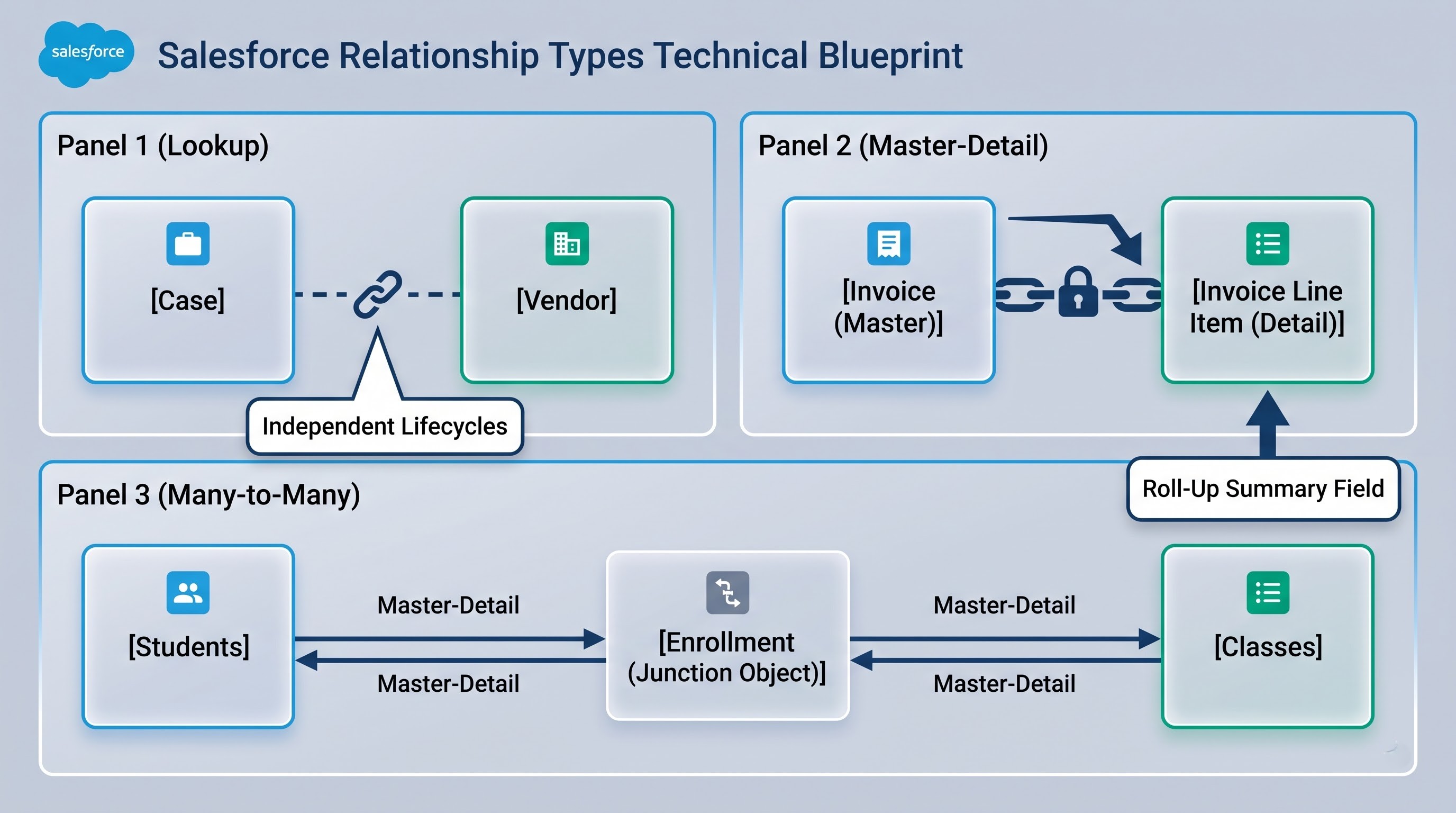
Salesforce helps in defining relations for connecting objects. There are three essential types of relationships that should be highlighted:
Lookup Relationships: A relation that seems loose and not tough between two separate objects. Developing such a kind of knowledge sequence of an object is possible in the first place. For example, a Case of support could have been connected to the special Vendor. This is to say that deleting the record will not eliminate the Case, but rather the connection between these two objects.
Master-Detail Relationships: These are a close, dependent relationship between the parent and child objects. The child cannot exist if the parent does not exist. The traditional example of this type of relationship can be Invoice (Master) and Invoice Items (Detail). When the Invoice is deleted, all the Invoice Items linked to it are deleted as well. The detail will inherit permissions from its master object. Moreover, Master-Detail relationships enable the creation of Roll-Up Summary Fields on the Master object to get, for example, the total amount of the invoices using the unit prices of all Invoice Items.
Many-to-Many Relationships (Junction Objects): Such situations when one object record relates to many records of another object. An example of this is a Student attending different Classes and a Class having various Students. The way Salesforce solves this problem is by using a new, separate, custom object, called the Junction Object, that sits between the two objects and relates them using two Master-Detail relationships back to each parent.
As a result of the aforementioned relationship models, Salesforce enhances itself from a simple data-storage system and becomes a modern, elaborate, interactive corporate knowledge network.
Salesforce Records: The Live Data Objects
If we denote Object as a general architectural plan, Record is the actual house built according to this plan. Record stands for a concrete, singular, real-world instance of data.
When the Account object illustrates the idea of a company, the subjective record specifies:
Name: Acme Corporation
Annual Revenue: 2,000,000 dollars
Website: https://apme.com
Industry: Manufacturing
When the Case object shows what a certain customer issue is, the subjective record specifies:
Case number: 00045231
Topic: The administrative password cannot be reset
Status: Escalated
Priority: High
All the records in Salesforce mean an actual business transaction of contact, interaction, and asset.
The structure of a Record: What is the Record ID?
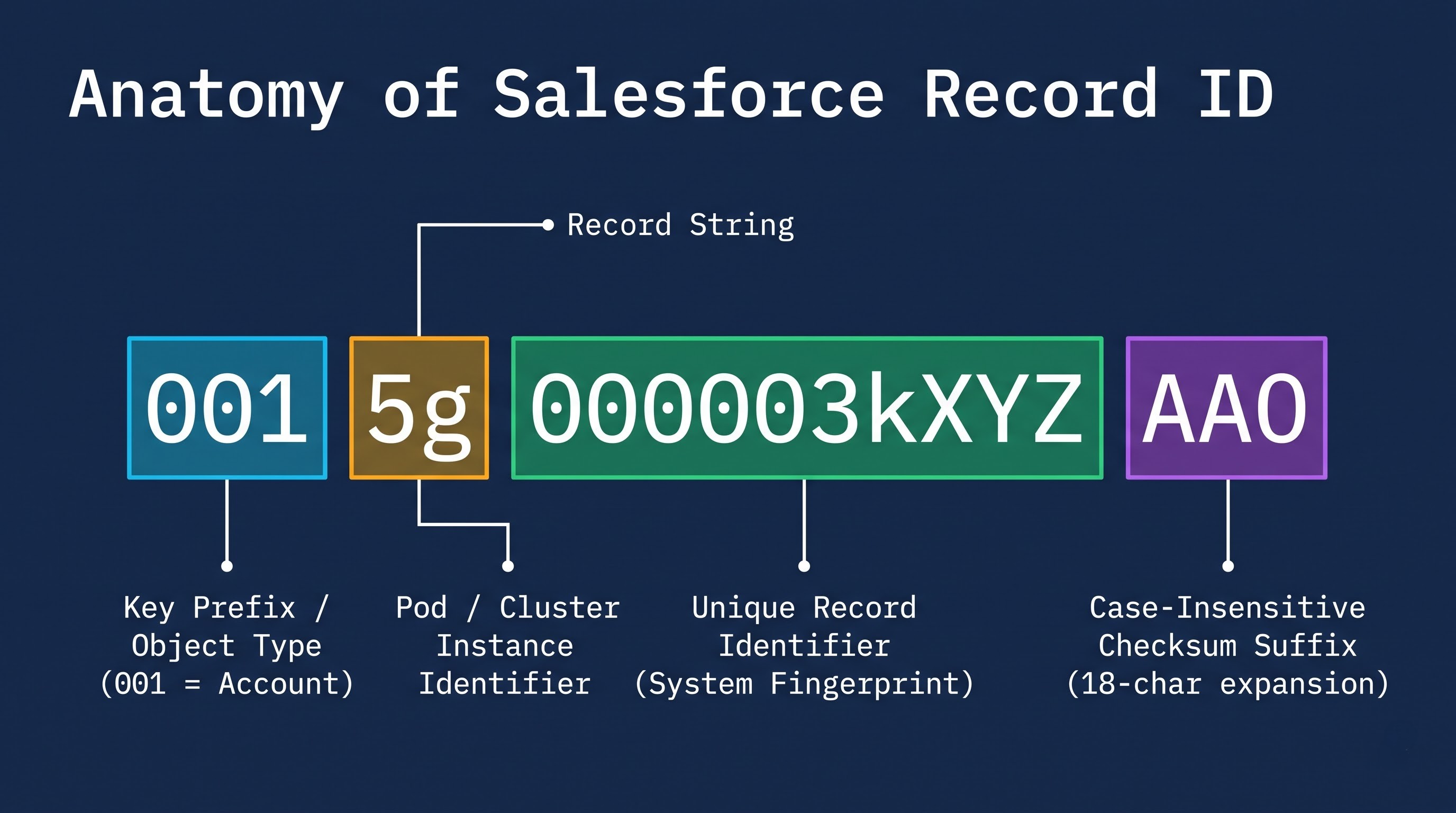
In the real world, two people can have the same name, reside in the same area, and have similar lifestyles, but they are different individuals. This is also true in business databases. A couple of records can have the same name Apex Logistics but differ since one is from Ohio and another from California.
In order to guarantee absolute accuracy and full referential integrity, Salesforce assigns every record created in any Org its unique identifier—the Record ID.
This ID is generated automatically and has either 15 characters (which are case-sensitive) or 18 characters (the latter variant being case-insensitive and exportable to outside analytics systems). The structure of the Record ID is progressive.
The initial three characters let you know what type of object it is (for example, every standard Account record ID across all Salesforce Orgs has certain characters like zero-zero-one).
The next few characters indicate the specific Org instance and the database cluster partition.
The rest of the characters create a unique sequential identifier for that record.
As every record has such an immutable permanent fingerprint, automatic processes, integrations, and analytical reports will not confuse one customer or transaction or case with another.
Records and ownership
Records are the main element of security in Salesforce. The system has a better security model which is one of the best in the industry providing very high granularity in understanding which person can see, edit, transfer or delete every individual record.
Typically it is necessary to have an owner for every record which is either specific licensed user or functional queue (like Tier One Support Queue). Ownership of the records defines the level of access to the data.
Organization-Wide Defaults (OWD): The minimum security standard for the organization as a whole. An administrator can make the records of an object either Private, Public Read-Only, or Public Read-Write. If an object is set as Private, users can view the records they own only.
Role Hierarchies: A way to represent the management structure of the organization in question. The system automatically grants record visibility up the hierarchy of roles. As a result, a regional sales manager can review and modify all Opportunity records managed by those sales representatives who report directly to her, while the sales representatives do not see each other’s records.
Sharing Rules: Automated exceptions to basic security rules. For example, an administrator can create an exception stating that an Account record that has been classified as Enterprise Banking must always be shared with the Legal and Compliance department, no matter who owns it.
Manual Sharing: The practice of sharing a specific record with colleagues for a specific purpose.
This granular security framework guarantees that, even with thousands of individuals tapping into the Salesforce Org at the same time, all employees can only see data that is relevant to their job roles.
Salesforce Fields: The Individual Attributes of Data
If the Org can be viewed as an environment, the Object can represent a table, and the Record is a row, then Fields stand for the encompassing columns that store, identify, and characterize every piece of data.
Simply put, a field depicts a separate characteristic of an object. For instance, the object Contact does not capture a person’s identity in one block, but rather breaks it down into a number of separate fields, such as Salutation, First Name, Last Name, Title, Mobile Phone, email, Mailing Destination, City, and Date of Birth.
It is this approach that converts raw data into actionable intelligence.
Traditionally-Defined Areas: Ready to Use Analytics
All ordinary objects, plus even innovatively designed unique objects, come to the table with prepared Traditional Areas.
When a supervisor produces a new unique object, Salesforce consequently creates various critical system traditional areas.
Record Name: The first human-readable title of the record (like a staff name, bill number, or plan name).
Created By: A system controlled auditing field that collects the username who creates the record and each date of its construction.
Last Modified By: A field controlled by the system to know who made the last amendments to the record and how long prior to the date in question.
Owner: The user or group assigned to the record.
When talking about ordinary objects, traditional fields include important business markers such as Lead Status on Leads, Stage, and Probability on Opportunities, and Priority on Cases.
Custom Fields: Unrestricted Customization
Similar to how businesses are able to develop Custom Objects to represent unique concepts, they come up with Custom Fields that can record specific operational data. An ordinary Account Object may keep track of names and addresses while a health care organization may create an Account field that indicates Joint Commission Accreditation Status. Another educational institution may design a field on the Contact Object that contains the Graduation Year. A factory may come up with a necessary field on an Opportunity Object that will indicate the Primary Shipping Method.
Salesforce enables clients to create multiple properties across various original and customized objects. Upon creating a new custom field a manager must select two crucial components that are known as Data Type and Field Properties.
Acquire Mastery of Salesforce Administration through Hands-On Learning
Having complete knowledge of Orgs, Objects, Records, and Fields is just the first step in the process of building scalable business applications. In order to turn theoretical understandings into practical skills that prepare you for the job, you can sign up for an extensive salesforce admin training course program that OnlineITGuru offers. Project-based training will enable you to learn how to use both administrative tools and declarative tools for managing enterprises in the cloud.