
Say Goodbye to Import Limits and Scale Power BI Architecture for Massive Data
Last updated on Aug 17, 2026
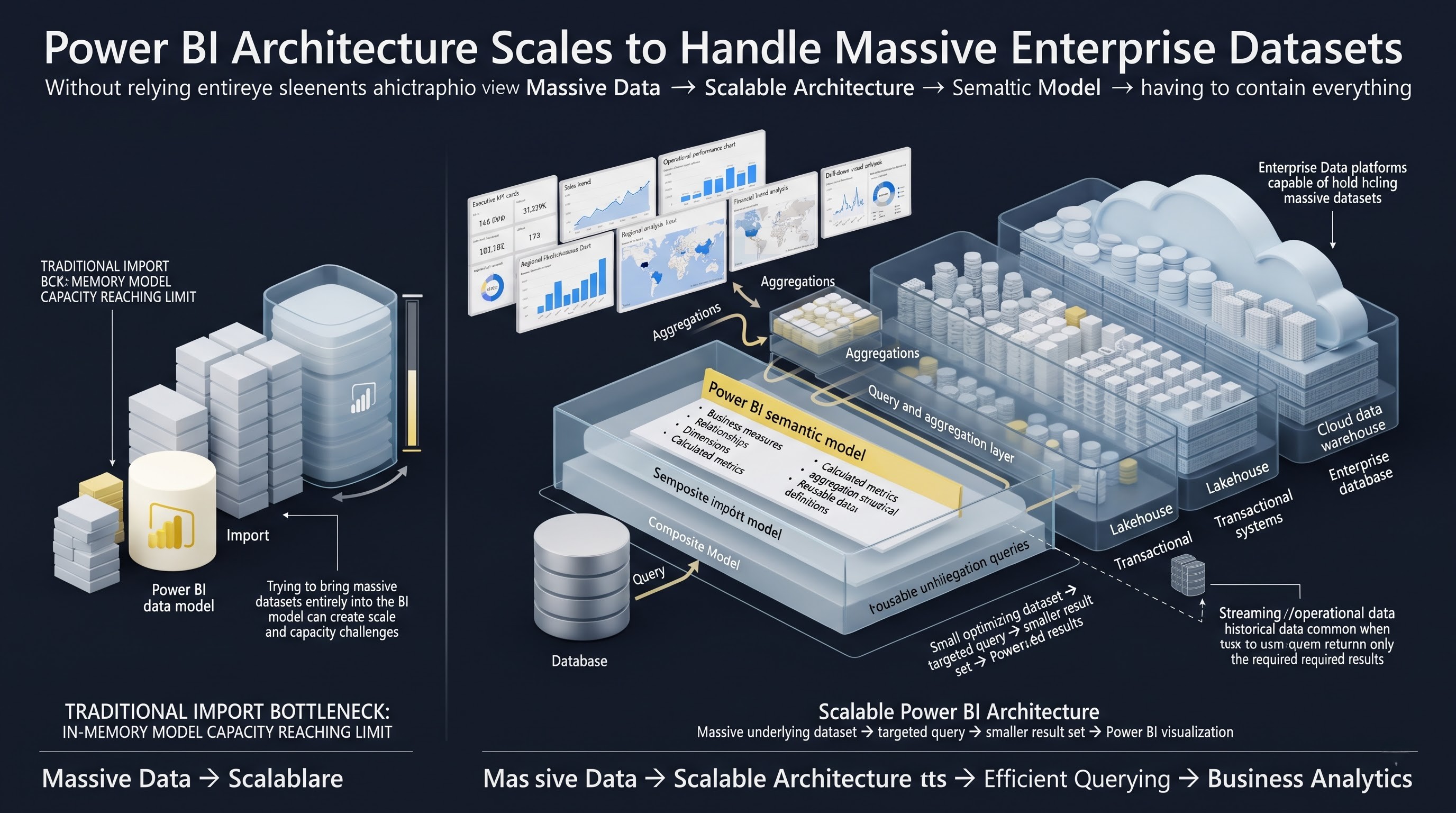
Every data engineering team eventually hits the same invisible wall. It usually happens quietly at first: a scheduled overnight refresh takes forty-five minutes instead of twenty. A few months later, it creeps past two hours. Then, a sudden spike in transactional volume pushes a core dataset past the model size threshold, and the refresh fails completely. Your executive dashboard displays blank cards, sales managers miss their morning figures, and your data team spends half the workday manually restarting ingestion jobs or deleting historical records just to get the report running again.
For years, working with Power BI meant living with a structural compromise. You either imported your data into memory to get lighting-fast user interactions, or you queried your database directly to keep data fresh and bypass size constraints. Both paths had severe operational penalties. As corporate datasets expand from gigabytes into terabytes, this legacy trade-off is no longer sustainable.
This guide breaks down why traditional BI architectures break at scale, how recent storage and engine breakthroughs fundamentally rewrite data delivery rules, and how you can modernize your reporting pipeline to support massive scale without compromising speed or system performance.
The Scaling Problem: Why Traditional Power BI Models Break Down
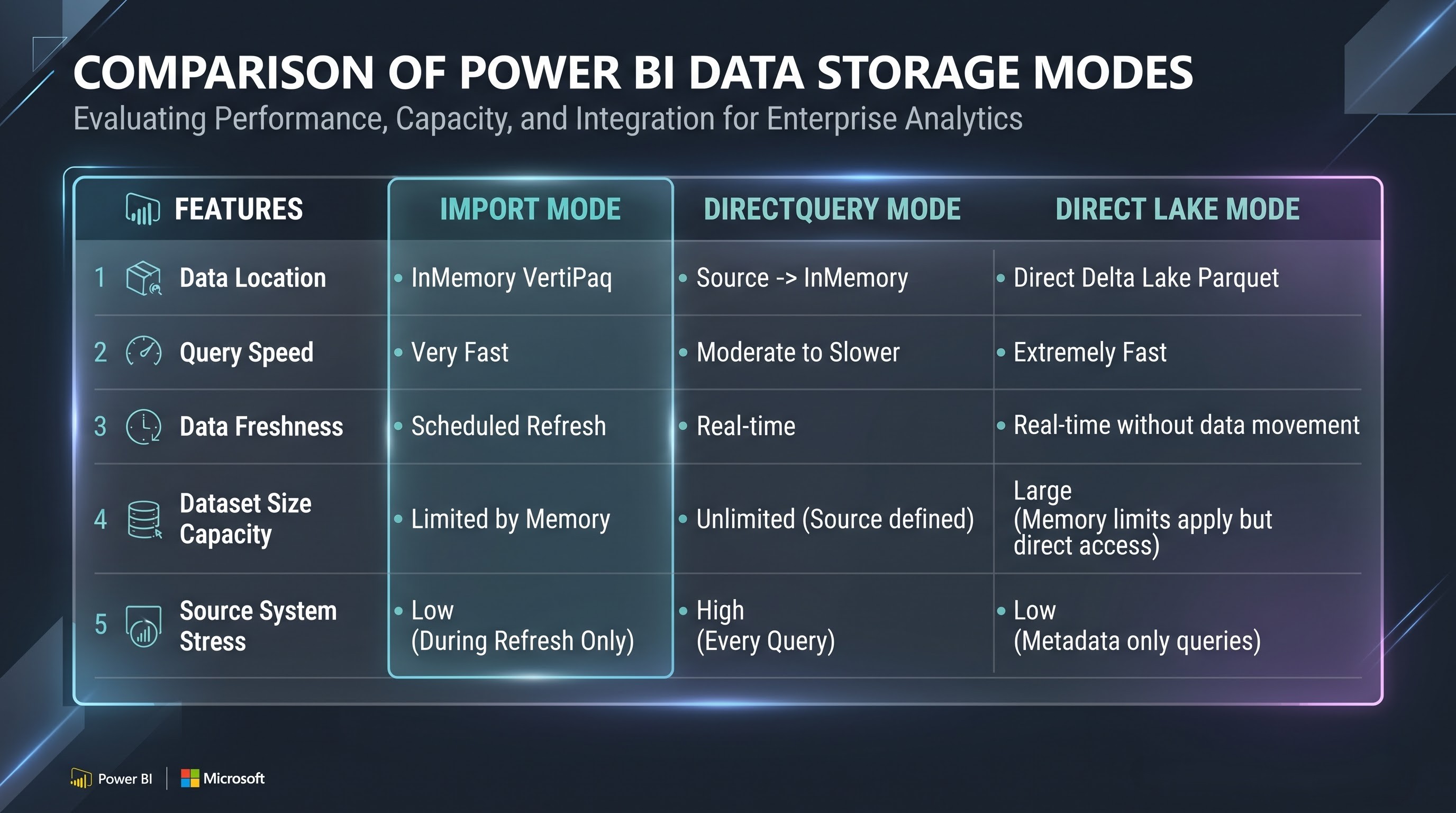
To fix scaling problems, you must understand how Power BI processes data under the hood. For over a decade, BI teams relied on two classic modes: Import Mode and DirectQuery.
Import Mode: High Speed, High Overhead
Import Mode utilizes the VertiPaq engine, an in-memory columnar database engine designed for extreme compression and rapid speed. When you import data, VertiPaq compresses every column, indexes every value, and holds the entire payload in RAM. This gives business users instant filtering, fast matrix updates, and rapid DAX calculations.
However, Import Mode carries heavy operational penalties at scale:
Storage Duplication: Every byte of data stored in your data warehouse must be copied, compressed, and uploaded into the Power BI service.
Rigid Size Limits: Pro capacities enforce strict dataset limits (1 GB), and while Premium capacity scales much higher, loading multi-hundred-gigabyte models into memory causes long load times and high memory costs.
Fragile Refresh Cycles: Nightly refreshes pull millions of rows over network pipes. If network connections drop or source systems slow down, the entire job fails.
Stale Data: Your business decisions are always made on cached data that is hours or days behind real-time transactional activity.
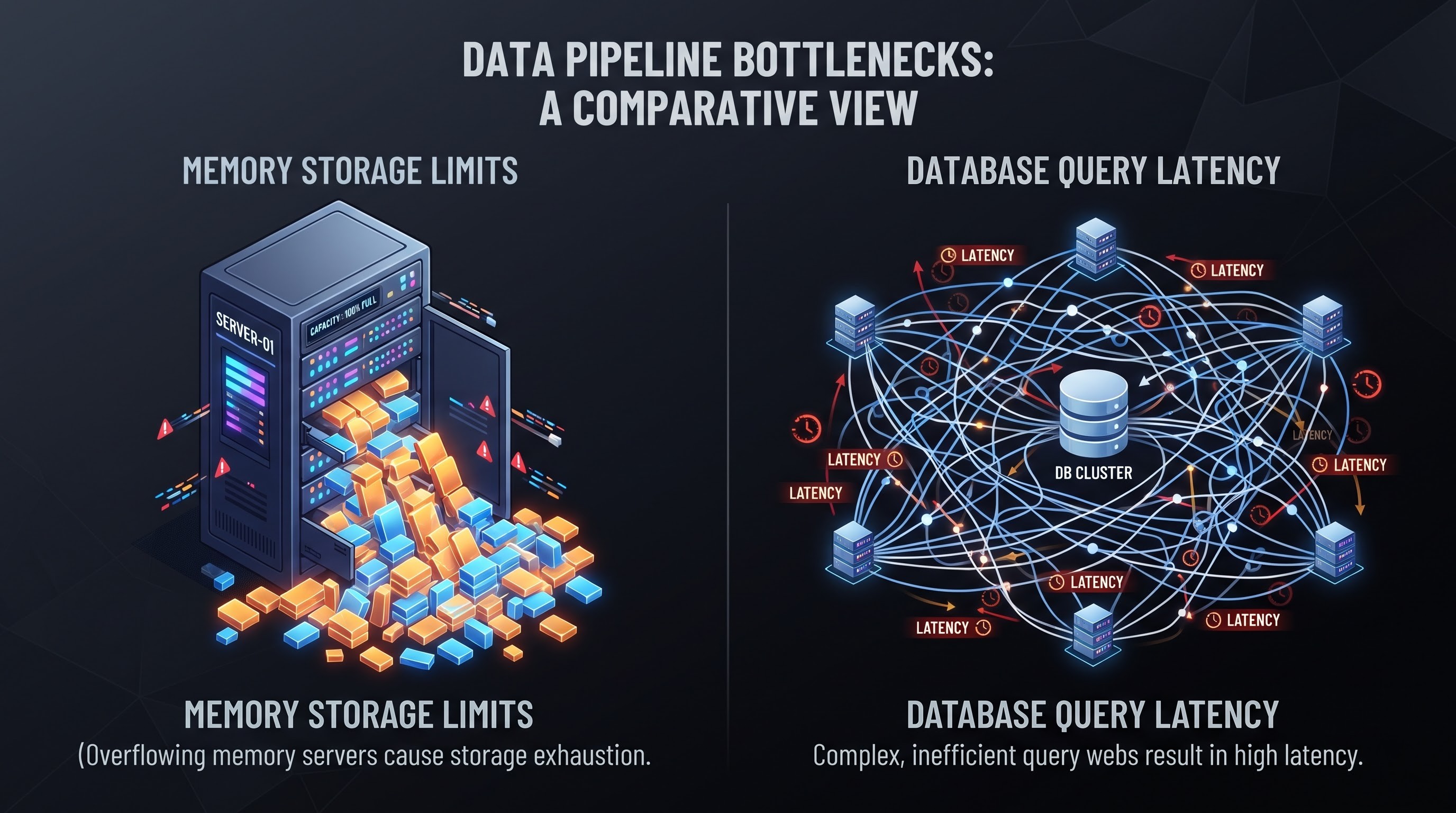
Direct Query: Real-Time Data, Painful Latency
DirectQuery was built to solve the size and freshness limitations of Import Mode. Instead of copying data into memory, Power BI acts as a translating layer. Every time a user clicks a slicer or expands a chart, Power BI converts that action into native SQL (or KQL) queries and sends them directly to the underlying database.
While this eliminates file size limits and guarantees fresh data, it introduces critical bottlenecks:
High Database Load: A single dashboard with fifteen visuals generates dozens of concurrent SQL queries every time a user alters a filter. Fifty concurrent business users can easily overwhelm a data warehouse.
Sluggish Visuals: Users wait several seconds—sometimes minutes—for visual frames to calculate, destroying user experience.
Limited DAX Support: Complex calculations, semi-additive measures, and time intelligence functions struggle under DirectQuery constraints because they translate poorly into standard SQL.
The Architectural Reality: Data teams spent years engineering complex workarounds: aggregated tables, incremental refresh policies, and dual-mode hybrid storage models. While these patches extended report lifespans, they added immense technical debt and made data maintenance a daily chore.
The Paradigm Shift: Introducing Direct Lake Mode
The release of Microsoft Fabric introduced a fundamentally distinct paradigm designed specifically to resolve this dilemma: Direct Lake mode. Direct Lake is neither an import pipeline nor a direct query wrapper. It is an architecture where the report engine queries open-format data lake files directly, matching the speed of in-memory imports without ever importing or duplicating the underlying records.To understand how Direct Lake accomplishes this, we must examine two foundation elements: Delta Parquet formatting and OneLake.
The Magic of Delta Parquet
Traditional databases write records line by line. Columnar formats like Apache Parquet arrange records by column. Because analytics queries almost always request specific columns (such as sum of Sales, grouped by Region and Month) rather than every single field, columnar files allow the system to skip scanning non-relevant data completely.
Delta Lake adds a transactional ACID log layer on top of standard Parquet files. This means systems can safely read and write to the same data store simultaneously without corrupting tables or reading partial transactions.
Direct Loading via Memory Mapping
In traditional Import mode, VertiPaq reads raw data from SQL tables, transforms it, and builds proprietary compressed files in RAM. In Direct Lake mode, VertiPaq bypasses the transformation step entirely. Because Delta Parquet files are already stored in a columnar structure that closely matches VertiPaq’s native layout, the engine uses memory mapping to read Parquet files directly into memory from One Lake on demand.
Engineering a Zero-Copy Architecture for Enterprise Scale
Transitioning from legacy reporting models to an enterprise-grade Direct Lake pipeline requires structuring your data warehouse around modern lakehouse principles. You can no longer rely on Power Query inside Power BI to fix messy source data. Instead, transformations must shift upstream into structured lakehouse layers.
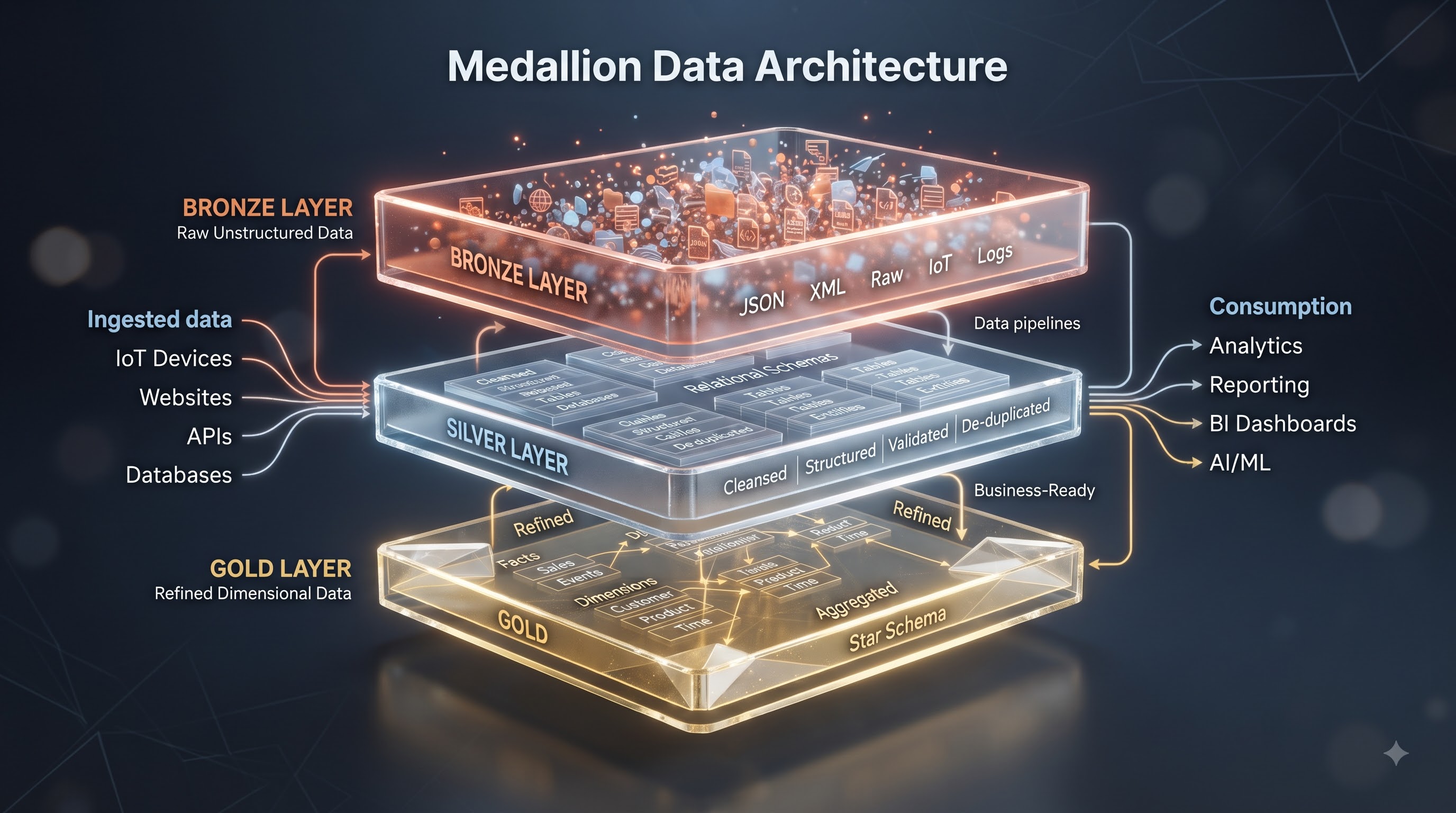
The Medallion Architecture Model
To ensure high performance and maintainable governance, adopt the standard Medallion Architecture inside your data lake:
Bronze Layer (Raw Ingestion): Captures raw transactional records from ERPs, CRMs, logs, and external APIs in their native formats. No business logic or cleaning is applied here.
Silver Layer (Cleansing & Standardization): Cleanses, deduplicates, and joins bronze entities. Data is converted into standardized Delta Parquet tables with enforced schemas and defined data types.
Gold Layer (Business Aggregations & Star Schema): Formats silver data into dimensional models (Fact and Dimension tables). This is the exact layer that Direct Lake connects to.
For organizations looking to upskill their internal teams or onboard analysts to these architectural principles, structured learning programs provide invaluable foundational knowledge. Enrolling in structured power bi online training helps data teams master star schema design, upstream data transformation, and Lakehouse integration without interrupting production pipelines.
Understanding Framing and Metadata Syncing
In a traditional Import setup, when new transactions land in your warehouse, you must run a full or incremental dataset refresh. In Direct Lake, you use a process called Framing. When new Delta files are written to your Gold layer, the Power BI semantic model simply updates its pointer references to the latest Delta log transaction. Framing takes mere milliseconds because it only updates metadata, not the underlying data records. Your users immediately gain visibility into millions of fresh rows without waiting for long ingestion jobs.
Designing High-Performance Semantic Models
While Direct Lake removes traditional file size limits, bad semantic modeling will still degrade report performance. Building reports for terabyte-scale environments requires clean modeling discipline.
Strict Star Schema Principles
Snowflake schemas with deeply nested dimension chains increase query complexity and force the engine to process multi-hop joins across large tables. Always collapse dimensional hierarchies into flat, single-table dimensions surrounding your core Fact tables.
Keep Fact Tables Lean: Ensure fact tables contain only numerical metrics and foreign key keys. Remove long text descriptions, URLs, or unneeded notes from multi-million-row fact tables and move them into dimension tables.
Optimize Data Types: Minimize high-precision floating-point numbers where simple decimals work. Ensure string columns are kept inside dimension tables where high cardinalities can be dictionary-encoded efficiently.
Handling DAX and Fallback Mechanics
Direct Lake supports the vast majority of DAX functions natively. However, if a user writes an un-optimized query or uses specific advanced constructs that the Direct Lake engine cannot process in-memory, the system executes a security mechanism known as Fallback to Direct Query.
When fallback occurs, query speeds drop significantly because VertiPaq hands off calculation responsibility back to the underlying warehouse engine. To avoid fallback in production environments:
Avoid writing complex calculated columns directly inside the Power BI model using DAX; compute them upstream in your SQL end-point or PySpark jobs during Gold layer transformation.
Avoid complex bi-directional cross-filtering across massive fact-to-fact relationships.
Monitor semantic model health using Analyzer tools and SQL Server Profiler traces to catch fallback events before users notice slowdowns.
Mastering these advanced performance tuning methods and learning how to avoid query fallbacks often requires focused professional guidance. Interactive instruction through structured power bi classes gives developers hands-on practice with query diagnostics, DAX optimization, and enterprise model debugging.
Security, Governance, and Deployment Lifecycles
Scaling data architecture is not only about processing speed—it is equally about maintaining control over sensitive corporate information across massive user bases.
Unified Row-Level Security (RLS)
In older architectures, security rules often had to be written twice: once in the SQL database to protect raw tables, and again inside Power BI using DAX RLS rules to protect report visual views. Direct Lake streamlines this by leveraging unified governance frameworks across Microsoft Purview and Fabric storage layers. Security applied at the lake level automatically flows down to the semantic model. If a user in regional sales views a report built on a Direct Lake semantic model, the system respects security policies defined at the lake house level, reducing operational overhead for governance teams.
Developer Workflows: PBIP and TMDL Integration
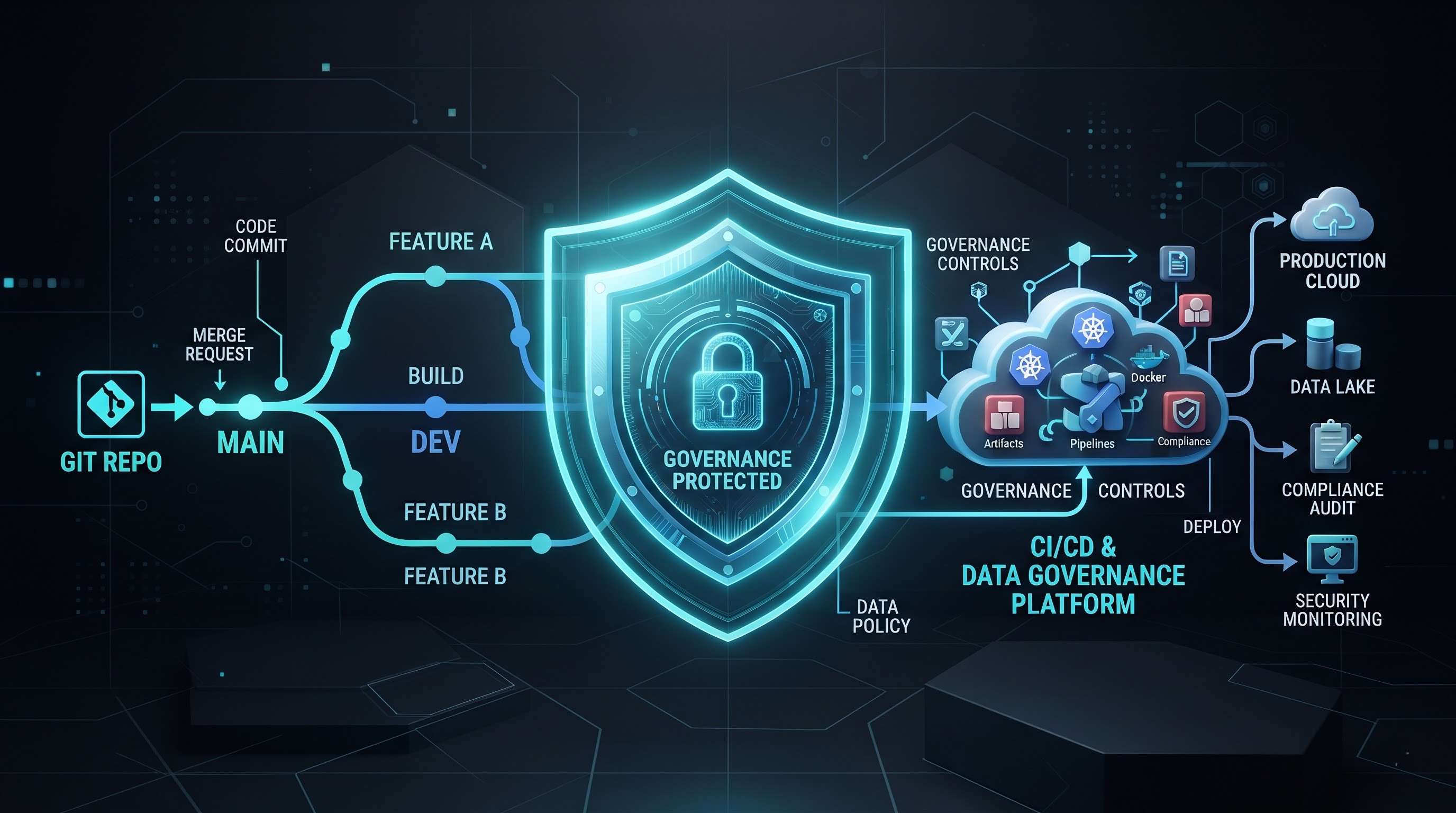
Enterprise data teams cannot manage large-scale models using monolithic, binary .pbix files. Monolithic files prevent collaborative development, make version tracking impossible, and prevent automated code deployments.
Modern Power BI workflows utilize Power BI Project files (.pbip) and Tabular Model Definition Language (TMDL):
Text-Based Definitions: Semantic model metadata, measures, and relationships are stored in plain, human-readable text files rather than binary blobs.
Source Control (Git): Developers can branch code, work on individual features isolated from production, submit Pull Requests (PRs), and perform code reviews in platforms like GitHub or Azure DevOps.
CI/CD Pipelines: Automated deployment scripts validate model schemas, run automated tests, and deploy changes through Development, Test, and Production workspaces without manual file uploads.
Building automated deployment pipelines and establishing source-controlled analytics workflows requires practical technical expertise across both software engineering and business intelligence domains. Participating in comprehensive microsoft power bi training equips architectural teams with the exact technical skills required to implement continuous integration, automated testing, and secure lifecycle management across modern enterprise data hubs.
Practical Migration Roadmap: Upgrading Legacy Datasets
Moving an enterprise from legacy Import/DirectQuery models to a modern zero-copy architecture does not happen overnight. Organizations must take a phased, methodical approach to ensure operational continuity.
Phase 1: Audit and Categorization
Begin by cataloging your existing enterprise report portfolio. Categorize datasets based on three metrics:
Current Data Volume: Datasets approaching or exceeding standard memory thresholds should be prioritized for immediate migration.
Refresh Frequency Requirements: Reports requiring near-real-time updates or suffering frequent refresh failures are prime candidates for Direct Lake transition.
DAX Complexity: Models with clean star schemas and standard measures can be migrated rapidly, while models relying heavily on complex DAX calculated columns will require upstream refactoring first.
Phase 2: Upstream Lakehouse Staging
Shift all data transformation logic out of Power Query (M code) and push it upstream into your storage pipelines. Rebuild source tables into Gold-layer Delta Parquet format inside OneLake. Ensure relationships, keys, and data types match standard relational design best practices.
Phase 3: Parallel Testing and Validation
Build the new Direct Lake semantic model alongside the legacy model. Run side-by-side performance tests during peak user activity hours. Compare visual load times, monitor CPU and memory utilization, and verify that measure results match existing business metrics exactly down to the penny.
Phase 4: Cutover and Retirement
Once validation is complete, point existing front-end report templates to the new Direct Lake semantic model. Deprecate legacy scheduled refresh jobs, free up server resources, and decommission redundant staging databases.
Conclusion: The Future of Analytics at Scale
The constraints that once dictated business intelligence design—file limits, long nightly refresh windows, and slow DirectQuery response times—are no longer inevitable technical burdens. The evolution toward columnar storage, open-format Delta lake houses, and memory-mapped Direct Lake processing allows data teams to deliver near-real-time analytics at multi-terabyte scale with uncompromised response speed. By shifting processing logic upstream, adopting clean star-schema modeling rules, and implementing robust source-controlled development pipelines, organizations can build a sustainable analytics foundation that grows seamlessly alongside their business data. The future of enterprise reporting is fast, direct, and zero-copy.