
Securing Workday Studio: PGP Encryption and Key-Based SFTP
Last updated on Sep 18, 2026
The Need for Advanced Integration Security
ERP applications such as Workday can serve as an organization’s primary source of sensitive information. It typically includes the most crucial details in the financial management and human resource management modules: bank account numbers, social security numbers, and salary structures’ information. As a result, this data becomes vulnerable to hackers as soon as it leaves the confines of the cloud and heads to third-party organizations such as payroll companies, benefit providers, treasury management systems, and tax authorities.
The requirement of security governance today is that companies use multiple layers of protection during the delivery process. Protocols that encrypt data during its transmission, like the Secure File Transfer Protocol (SFTP), are useful for ensuring security while interchanging data. Even though organizations only make use of those protocols, there is still a security gap in the process. As soon as the destination server receives the file, the fundamental mix of data will be vulnerable to leaks since it will be in plain text form.
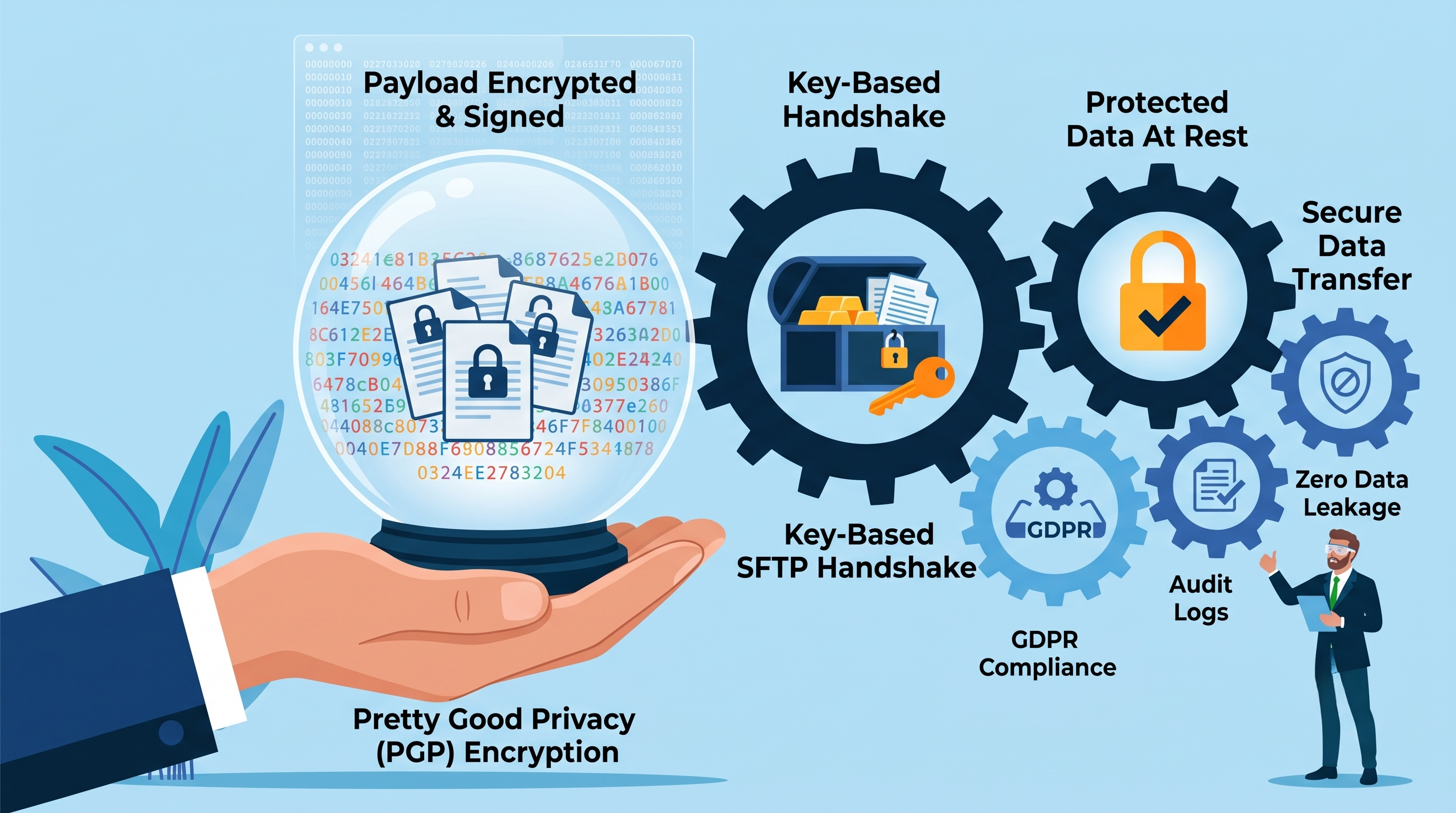
Use of Public-Key-Authenticated SFTP in conjunction with Pretty Good Privacy (PGP) resolves this vulnerability entirely, as by encrypting and signing the payload at the application layer, the data is kept safe from unauthorized access during the entire lifecycle of the file, even when it is temporarily stored in the integration runtime context, when it is being passed through intermediate routing proxies, and when it is sitting on the recipient's file system waiting for the processing to start. The practice of protecting the information being transported using encryption as well as implementing key-authenticated transmission is referred to essentially in the business community as practice of securing business data transfer in the construction of a reliable workday studio integration.
Basic Principles of Cryptography Implemented in File Transfers
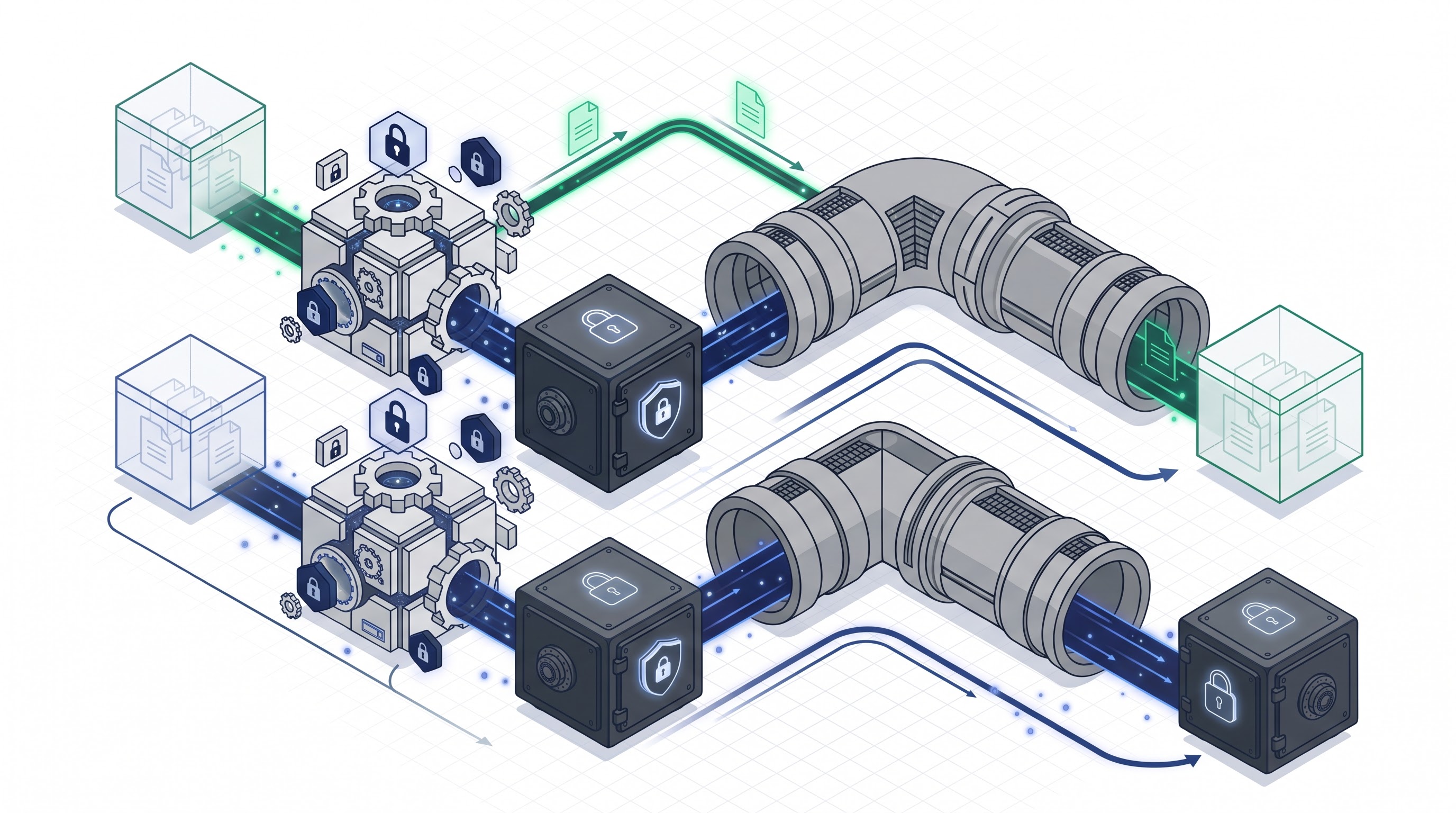
In order to ensure that file exchange via Workday Studio is completely secure, developers need to understand how symmetric encryption, asymmetric encryption, digital signatures, and secure transport handshake all work together. An example of a common design flaw in early integrations is confusion between encrypting the file and encrypting the transfer channel.
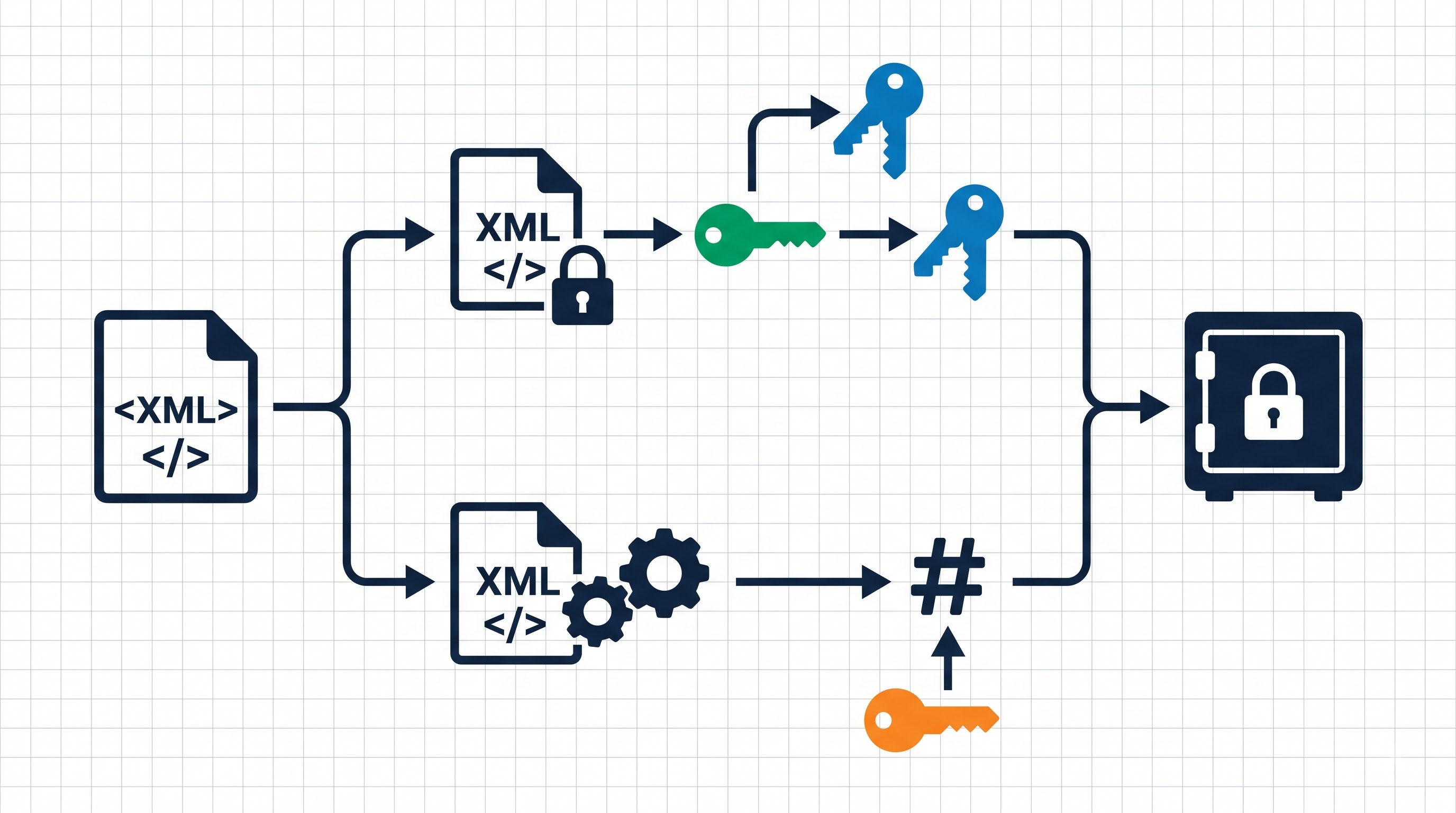
Pretty Good Privacy utilizes a hybrid cryptography approach that enables security along with great efficiency when it comes to processing the data. Asymmetric cryptography is useful in preserving the confidentiality of the data during exchange but consumes high computing power to encrypt large volumes of data at the same time. PGP resolves this problem by creating a random, one-time symmetric session key for every message being sent. This key is then used to encrypt the actual data using one of the fast symmetric algorithms, such as the Advanced Encryption standard, using CBC or GCM mode with a256-bit long key.
The next step is to encrypt the created session key with the recipient's asymmetric public key. The outcome is a package that includes the encrypted data and the encrypted session key. The sender then transfers the package to the recipient, who then uses their private key to decrypt the session key and apply it to decrypt the data.
Let us not forget the fact that encryption can only assure confidentiality! It cannot ensure integrity or non-repudiation of a message. Without digital signatures, an attacker who has the vendor’s public key may be able to prepare a fake payroll file and send it to a vendor without any possibility of being caught. The sender must create a unique hash of the raw payload and encrypt it using their private key in order to ensure integrity. The vendor, in its turn, should use the sender’s public key to decode the hash value and compare it with the hash of the decoded message. If the two hash values match, that means that the vendor has mathematical proof of the fact that the file was generated by a specific Workday environment and was not altered while being transferred.
In contrast to PGP principles, the transport security architecture implemented with the help of SFTP must not be neglected. While traditional file transfer protocols relied on clear text credentials or simple password authentication, enterprise endpoints utilize key-based authentication, where the Secure Shell layer is protected using asymmetric key pairs which differ from PGP keys.
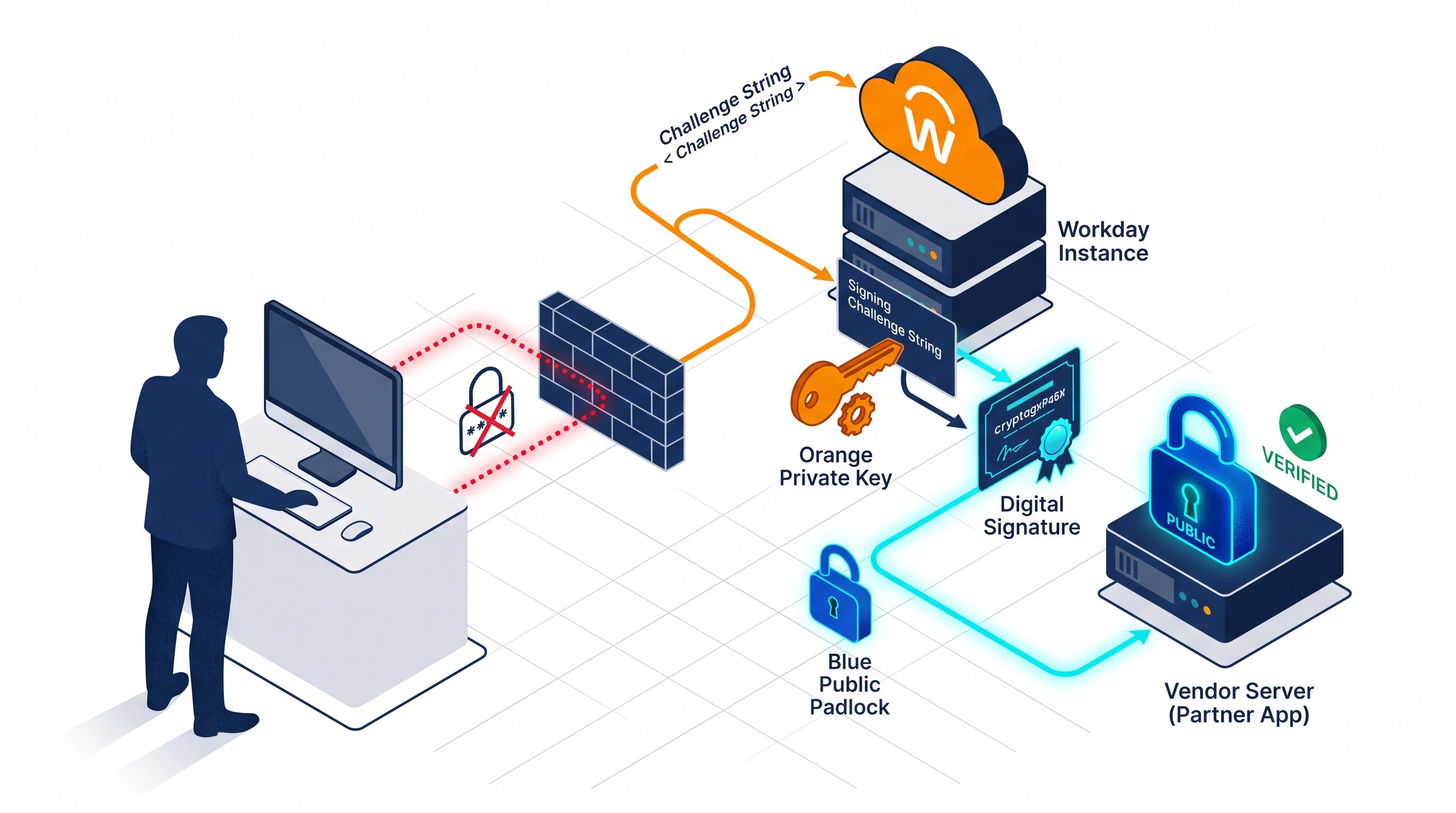
The client performs an identity verification procedure with a target server through signing a random challenge using a private identity key during the transport handshake. The remote server checks this signature through a public key registered within the client's directory of authorized keys. Once the identities of the client and the host are authenticated, a secure cryptographic channel is realized through SFTP.
Incorporating PGP encryption into a key-based SFTP, a company provides a complete cryptographic isolation for the data exchanged. An administrator with the highest level of access to the server will not be able to get hold of the encrypted data without the help of the encrypted private key that is stored offline and protected with the help of a passphrase.
Requirements for Cryptographic Key Creation and Preparation of Tenant
For the deployment to occur smoothly, it is imperative to prepare all the administrative processes before any of the components gets put into place into the Workday Studio. The deployment requirements are covered under three domains of operations, and they include key pairing, their management, and the validation of system connection.
In order to perform secure communication, one needs to use four different keys, namely the PGP key pair (owned by the tenant), the vendor’s public PGP key (provided by the recipient), the SFTP private key (belonging to the tenant), and the vendor’s public SFTP key.
Teams taking part in the administration process should generate the keys according to the contemporary standards of cryptographic key generation. The PGP keys must be based on the RSA algorithm with a key size of 4096 bits or using the modern EdDSA algorithms instead of obsolete 1024-bit keys based on SHA-1 algorithms.
Correspondingly, SFTP keys must use advanced elliptic curve or high quality RSA key algorithms instead of traditional Digital Signature Standard keys. Prior to the generation of keys, a proper level of PGP encryption should be achieved using the designated password. The password encrypts the key because gaining access to the key is not sufficient without the corresponding password in case of its extraction from the encrypted computer files.
After the keys generation process is over, it is needed to conduct the registration of the keys in the Workday system. The next administrative security tasks are required in particular:
Vendor PGP Public Key Upload: Complete the task of creating the integration public key, set the format to PGP, and upload the vendor’s ASCII armored key. This sets up the reference alias that the Studio components use dynamically.
Tenant PGP Private Key Registration: In case you need signatures, upload the tenant’s PGP private key and the pass-phrase as the mandatory credential into the identity vault of Workday.
Setup of SFTP User Credentials: Complete the task of configuring credentials of the integration system. Create the new key-pair type credential for the SFTP user account and upload the private SSH identity key along with the user name assigned by the vendor.
Establishing Known Hosts: In order to prevent man-in-the-middle attacks from occurring at the network layer, obtain the fingerprint for the public host key of the destination server. Add this host key into the configuration for the tenant's external endpoint so that the connection can be stopped immediately should the server host key be unknown.
Network Firewall and Routing Whitelist: Workday uses specific IP subnets within cloud data centers. The network security team will need to contact the vendor to whitelist the Workday IP ranges for its regions. SFTP handshakes will never even start at the transport layer if firewalls block Workday's source IP addresses.
Design of the Workday Studio Assembly Flow
The construction of an integration processing mechanism within the framework of workday studio is initiated by developing an understanding of an assembly which functions as a pipeline for the delivery of messages.
Workday Studio performs integration processing via an assembly that is operated as a target message-driven pipeline. This assembly involves processing the prior payload in sequence with the use of specialized components which deal with the headers and the messages as well as other execution variables.
A typical end-to-end assembly of an encrypted distribution flow with key authentication lacks only four basic phases: extraction and transformation, payload preparation, cryptographic transformation, and transport dispatch.
Every pipeline process begins with an integration start that accepts necessary parameters such as the time range of processing as well as the target environment flag. In the frame of the assembly, specific web services are invoked (Workday Web service or Reporting-as-a-Service, for instance) in order to transfer relevant business records.
After that, the message is directed to the mediator, where it undergoes a transformation process. The basic function is to transform the original XML structure of the message into the target format required by the receiving party, including flat delimiter-separated values, fixed-width records, or certain banking schemas.
After the transformation has occurred, the message reaches the security part of the process. This is usually where the programmers include the cryptographic mediator that meets the requirements for Pretty Good Privacy actions specifically. The package attaches the encrypted byte stream to the main execution context, makes changes to the transportation headers to meet the naming requirements, and sends the information through an outgoing SFTP transport with the respective authentication profile set previously.
During the pipeline, programmers should introduce structural checkpoints to ensure the information contained in the message is not either recorded in the log files or saved multiple times in the engine memory, which might lead to memory overflow during the period of high work.
Implementing PGP Encryption Process in Studio
When programmers begin to try to learn workday studio to efficiently carry out PGP encryption, the biggest challenge that they face is the correct implementation of the different cryptographic mediation steps involved in the construction of the pipeline.
The implementation of PGP encryption in Workday Studio involves the appropriate use of cryptographic mediation steps in the construction pipeline. The main task for this component is to enable access to java security providers for performing some complex mathematical calculations on the message being worked on.
Set up of Cryptographic Mediation Component
The crypto mediation component should be placed right after the last transformation and format conversion in the pipeline. If the message has undergone compression, that should occur before the encryption of the information. When the information is encrypted the data stream is destroyed, therefore compression does not work after the data gets encoded.
In the crypto mediation properties indicate the mode of work. If the contracts state that the data shall be signed and encrypted at the same time in order to ensure the possibility of proof of the message receipt, then it is vital to use the combined approach. By using this option the application will create cipher text, receive the necessary key and then encrypt the data using the key associated with the receiver.
The Dynamic Assignment of Key Aliases
This violates the primary development standard of any enterprise by embedding any security parameters, key aliases, or any file paths in the Studio assembly. Rather, use the Workday integration system attributes and directly map them to the mediator.
Inside the mediator parameters, you must fit the public encryption key with the integration attribute corresponding to the vendor's uploaded public key alias. If the use of digital signatures is enabled, you also need to provide the tenant's private signing key alias in addition to the secure pass-phrase parameter. By assigning the above-outlined values to the integration attributes, operations teams can update any expired vendor keys in the Workday UI without writing any code or rebuilding or redeploying the Studio.
Choosing the Algorithm and Protection Regulations
The cryptographic parameters must ensure that the hashing technique and cipher suites used are the newest versions that are resistant to collisions. The hashing method must specifically mention using SHA-2 with either 256-bit or 512-bit hashing length. The algorithm used for encryption must ensure that AES is selected with a key length of 256 bits, foregoing any earlier methods of encryption like 3DES, IDEA, and Blowfish which would not pass modern security tests.
Set up your file format so that the vendor's specifications are being followed. PGP normally gives a binary byte stream as a result. In case the target must process inputs on some old system, then ASCII armor should be enabled so that a text wrapper is created.
Secure Transport Configuration Using Key-based Authentication
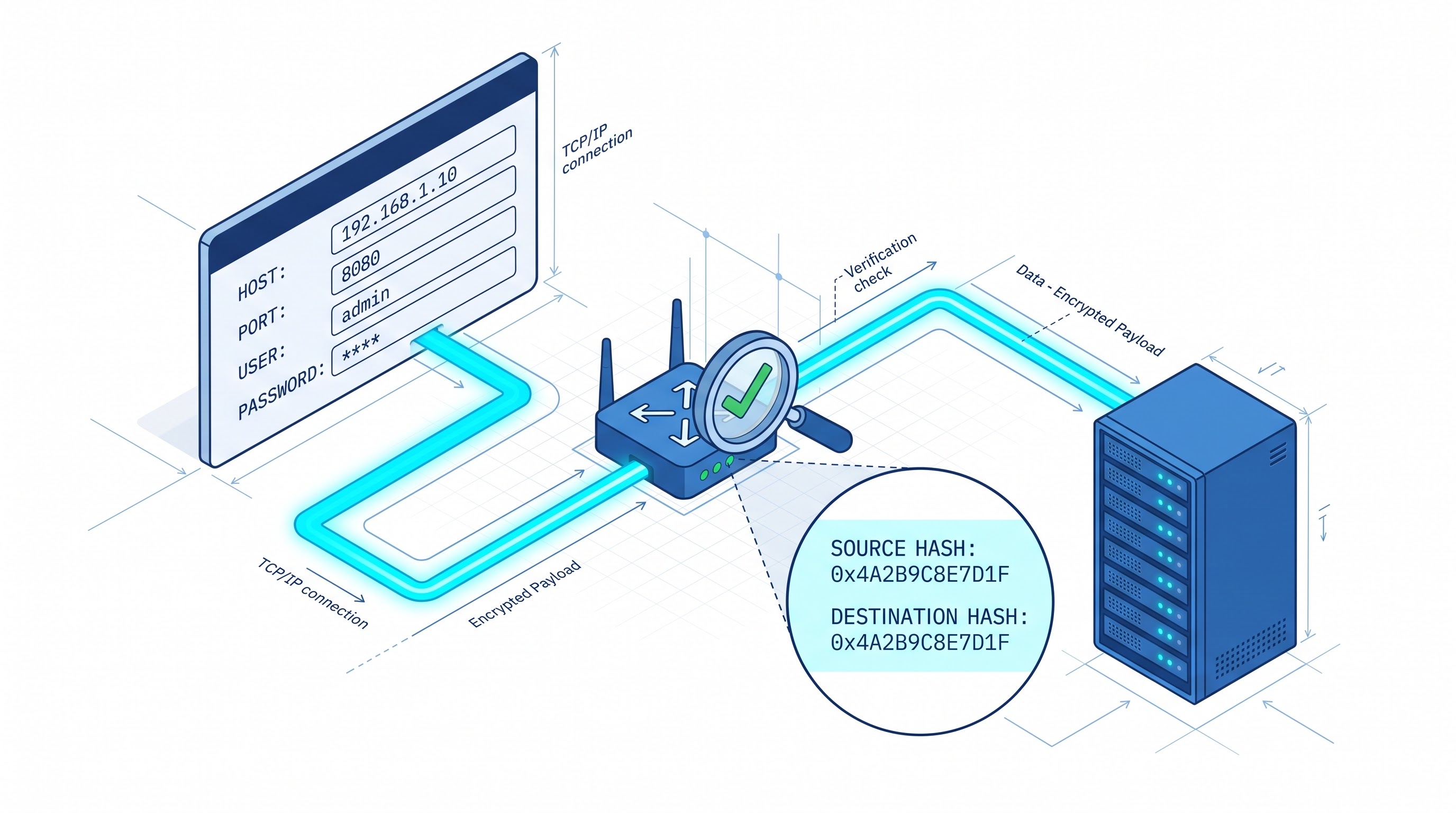
After the message payload leaves the cryptographic intermediary as an encrypted package, it needs to be sent to the remote SFTP storage. In Workday Studio, this process is performed by the outbound transport mediator which directly connects to the SFTP transport definition.
Outbound Transport Architecture Definition
In order to define the outbound transport architecture, the outbound transport mediator should be put into the flow and connected to the cryptographic stage message output as an input. The outbound transport definition should have the transport protocol configured as SFTP.
Do make sure to switch off the plain File Transfer Protocol and the standard File Transfer Protocol over SSL unless needed for external regulatory architectures, given that SFTP can function over Secure Shell version two exclusively without the need for additional ports.
Make sure to specify the remote host name and port number, which can be twenty-two by default. Do not hard code the parameters but rather specify them as integration service attributes in order to direct the tests on sandbox server environments correctly.
Configuring Authentication Credentials Using Public Keys
Rather than simply opting for basic username-and-password authentication systems, you should configure the authentication method using public key infrastructure. Specify the transport definition by using the Key Pair Credential configured at the foundation of the tenant.
When the assembly is called, the transport layer starts the process of SSH handshake. The remote server sends a challenge string. The Workday integration engine gets from its encrypted credential vault the private identity key, creates the signature on the challenge, and sends it back to the server. The remote server performs checks against the authorized keys list that belongs to the service account.
Setting up an Effective Fingerprint Validation for the Host
The configuration of the outgoing transports needs to do proper host key verification. A number of teams wrongly configure the policy to accept any key of the host. This leads to no protection against the man-in-the-middle attacks and allows a hacker to imitate the vendor server and accept encrypted data.
The policy of host identification has to be set as strict. The configuration should always refer to the specific known host key fingerprint from the Workday tenant. During the connection process, Workday checks the public key provided by the remote server. If the key does not comply with the saved fingerprint, the connection will be broken immediately and the exception will be raised.
Improved Management of Errors, Fault Tolerance, and Recovery Techniques
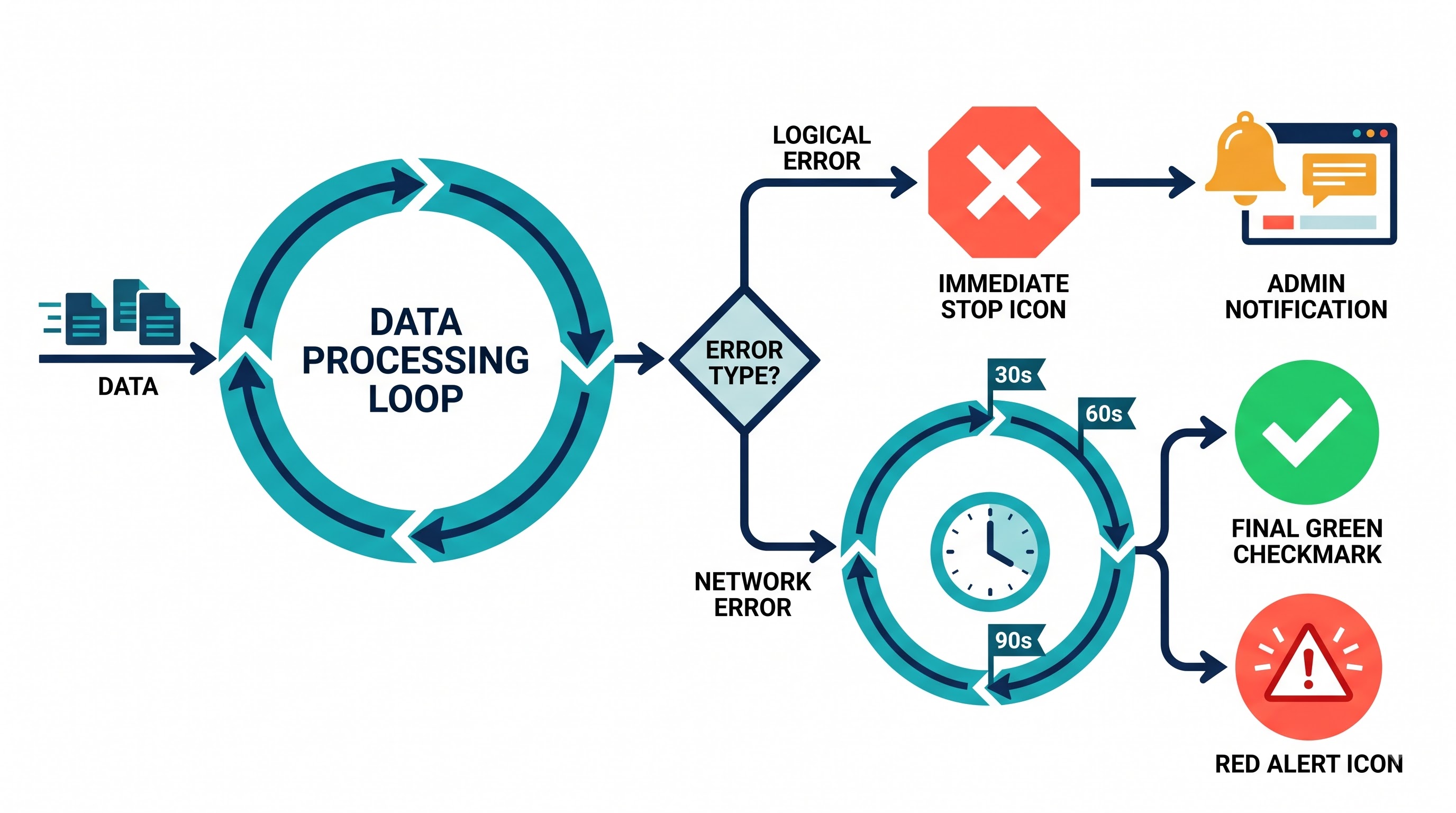
Communicating in distributed networks through public clouds is very unpredictable. Intermediate routers break connections, remote SFTP servers get congested for some time and maintenance periods cause temporary interruption in operations. Workday Studio assembly designed for production usage must be equipped with sufficient fault tolerance in case of PGP and transport mediators.
Place cryptographic and transport components inside the specialized error management sub-assembly, or use try-catch elements. The error management unit must discern between the irrecoverable logical errors and transient network errors.
Processing of Cryptographic Errors
Errors happening in the PGP transformation are mostly structural and are different from errors that might be solved using several retries. In most cases it is necessary to deal with wrong key structures, outdated public key of providers, mismatch between public and private key phrase and algorithm incompatibilities.
In case of the occurrence of a cryptographic exception, the error handling branch must record the event based upon the precise critical error code, store the context attributes, send an integration error message back to the Workday process monitor, and finish the flow perfectly. Re-attempting to send the unencrypted file or retrying the step of encryption failed due to key corruption will lead to failure again - this is bound to happen.
Developing Robust SFTP Transport Retries
Unlike the cryptographic failures, the errors occurred during the outgoing stage are mostly transient. It is enough for the timeouts to happen for a few seconds.
You need to configure the iterative retry cycle around the outgoing transport call. In case of the transport failure, the operation must check whether the maximum retry threshold has been reached. If there are more attempts to retry, the operation moves to the controlled wait based on the exponential backoff approach, like waiting for thirty seconds during the first and sixty seconds during the second retries.
Thus, the purpose of this backoff architecture is to prevent integration systems from burdening a vendor’s host that may already be overloaded. When the last retry attempt is not successful, the error handler must obtain essential SSH error information, document the connection trace, change the status of the Workday Integration Event to failed, and send out notifications to administrators.
Auditing, Compliance, and Operations
The use of automated cryptography systems in enterprises demands a strict operational approach to meet criteria of internal auditors and regulatory rules such as GDPR, HIPAA, and Sarbanes-Oxley.
Cleaning Up Sensitive Information in Logs
The major issue in the work done on a daily basis is that sensitive information is sometimes logged. Developers either configure the parameters for logging to be very complete or log entire messages in scripts for troubleshooting.
Make sure that all logging intermediaries used by the system will log only the metadata regarding the execution process, not the messages.
In the case that message payloads have to be kept stored within the Workday Integration Event for the needs of reconciliation, check the document retention service to make sure that the payload gets archived only after traversing through the PGP encryption mediator. The cleartext artifact has to be present in a temporary memory only during the process of transaction, and disappear completely after the thread of execution ends.
Management of the life cycle and rotation of keys
Cryptographic keys are not everlasting. PGP and SSH keys have a certain lifespan determined by corporate security policies and are usually valid for 12 to 24 months. Unplanned expiry of keys will prevent the crucial automated pipelines from operating, including the distribution of daily payroll data and health insurance data transmission.
Sixty days before the due date of any public key, automated notifications in the Workday platform must inform integration owners about the upcoming expiration of the respective keys.
The technical team has to check for an updated version of the public key from the vendor, verify its cryptographic fingerprint out of the band via another means of communication (e.g. secure voice confirmation, verified portal, etc.), and upload it to Workday under another staging name.
The integration attribute must be switched, thus changing the public key’s alias.
After a successful confirmation of the transmission using the updated key, the old key must be revoked and kept in the Workday security repository to guarantee no unauthorized use.
Implementing strict key governance rules, securing proper functionality retries, and ensuring total encryption of data at the application layer allows companies to turn their Workday Studio assemblies into fully functional enterprises.
In order to develop the practical know-how to create resilient data pipeline architectures that comply with audit requirements, the best way would be to enroll in structured workday studio training provided by OnlineITGuru.