
ServiceNow Admin Guide: Eliminating Technical Debt with Instance Scan
Last updated on Sep 22, 2026
Opening Section: The Rising Cost of Technical Debt
In today’s financial enterprise IT systems, ServiceNow is responsible for directing all the functions of IT operations. This means it handles requests, executes complex automation through several systems, keeps track of and manages all hardware and software assets, manages security issues, and provides self-service applications for tens of thousands of people. The system’s flexibility is a downside too because it allows the teams to design complex business logic through simple clicks, programming, and interfaces.
The problem of technical debt on ServiceNow development rarely makes itself obvious. A few system design shortcuts, poorly done work carried out under strict deadlines, and outdated software tools provide good ground for the technical debt to develop naturally. An engineer who needs to create a customer portal can develop a client script that makes direct requests to the server every time the user types a letter. Another developer might use a regular database query that processes millions of records without employing any kind of indexing. All of the above shortcuts seem to be insignificant when considered separately. Development testing processes that do not deal with cases with big data and high concurrency do not demonstrate.
The actual costs begin to show up when the configurations are moved to production. As the amount of data grows, and the number of simultaneous users rises, the inadequacies in design become glaringly clear. Transactions get bogged down; semaphore pools get exhausted; background processes cease functioning, and people are met with slow-loading forms and frozen pages. Updating to newer versions of the software becomes a drawn-out process that includes months of additional cleansing and testing.
To find a way out of this problem, developers require more than sporadic code reviews, audit meetings, and retrospectives. They need a governance engine that would ensure that their work is checked automatically and consistently as they develop. It is exactly what the ServiceNow Instance Scan is for. This system is integrated into the ServiceNow solution and enables administrators to assess their systems for technical debt with greater ease. If professionals want to start building these basic governance skills or improve them, then choosing a learn servicenow administration course would provide them with enough knowledge for eliminating chances to experience technical debt.
Technical Debt in ServiceNow
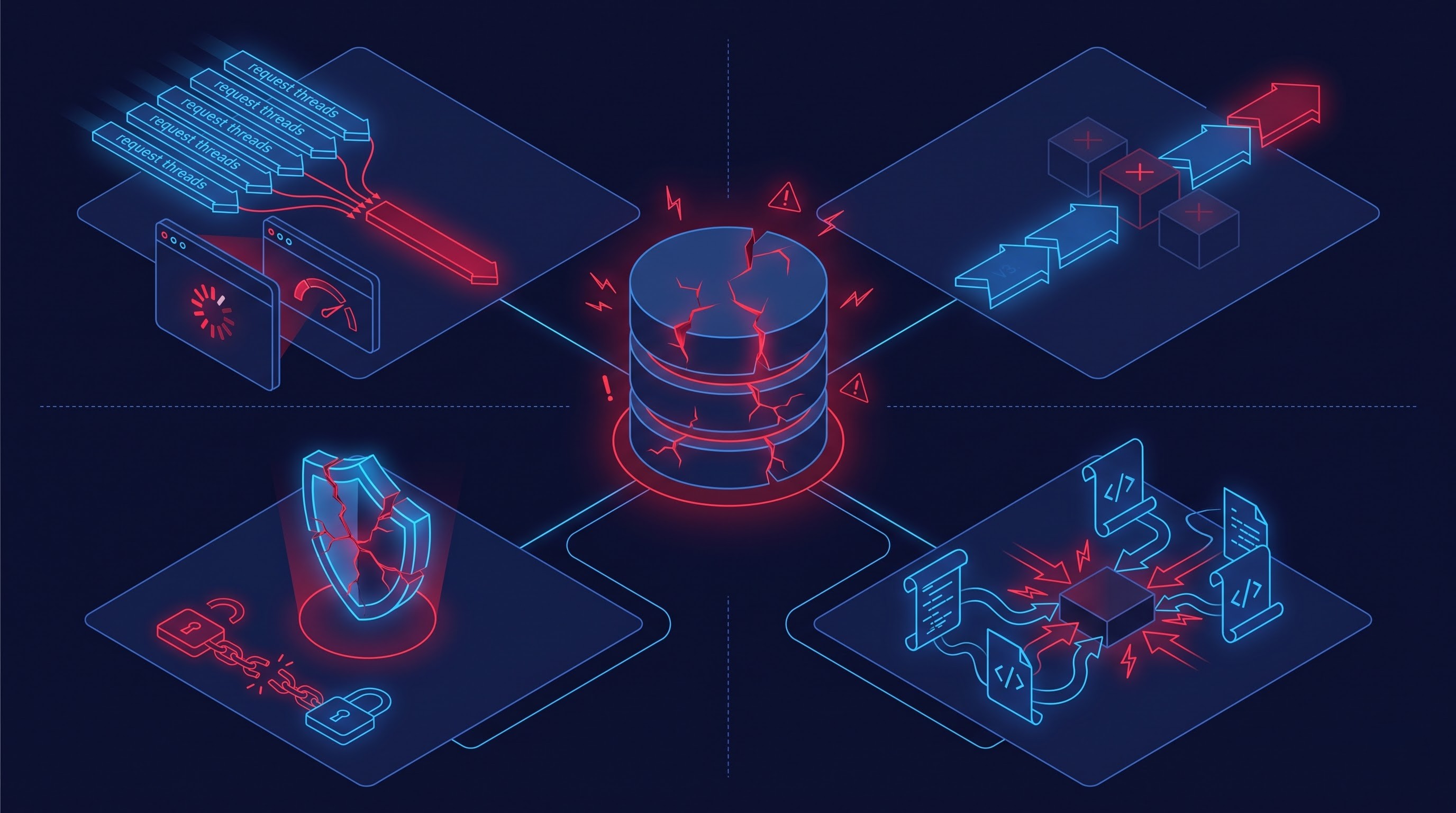
For effective elimination of technical debt, administrators need to recognize the different kinds of technical debt that exist within the application stack. On ServiceNow, technical debt usually falls into four main categories: performance deterioration, upgrade impediments, security weaknesses, and architectural nonmaintainability.
The most prevalent type of technical debt is related to performance. Users get frustrated by slow responses when pages render, catalog forms are not responsive, and integration payloads take too long to process. Although the sources of these problems are common knowledge among administrators, they still exist due to the use of incorrect programming practices.
When synchronous calls are made from the user interface to the server, it creates a serious performance problem. The client's web browser is put at a complete halt. This happens because a synchronous call does not allow the client script to move forward and wait on the server's response. The failure of the server or possible network delays makes the issue worse. This causes the user to think that the entire web application does not work. The contemporary approach to web design dictates implementing asynchronous calls, where the client requests something from the server, registering the conditions on which it can process the response.
Queries run on the server can also seriously affect the performance of the web application. Sometimes developers create database queries that retrieve data without using indexes or without applying significant limitations to the search query. In contrast, in the case of having a database containing millions of records an unindexed query forces the DB to read through all the records in the database. This process requires a lot of time and can make the server run slowly, which will lead to another significant decrease of the app's performance.
Obstacles to Upgrades: Problems Due to Customization
Upgrades are pivotal to the ServiceNow ecosystem by providing security updates, performance advancements, and state-of-the-art features biannually. Instances with technical debt can sometimes cause problems during upgrade processes.
The upgrade engine in the ServiceNow platform identifies customized records when developers have made changes to core business rules, UI actions, script includes, or alerts. In order to avoid losing custom capabilities unintentionally, the upgrade system will skip upgrades of those records and note them as skipped changes. With thousands of years of changes skipped from upgrades, administrators end up having to reconcile many entries.
Frequently, teams find out that previous developers made a customization to a basic piece of code just to adjust a single line of text or modify a little condition instead of using standard platform features. Every redundant customization complicates the upgrade process and increases expenses.
Security vulnerabilities and architectural fragility
In addition to the factors of speed and upgradeability, there are serious governance and security risks presented by technical debt. Configuration of the platform that allows for excessive access control permissions, exposes internal endpoints through public API scripts, or skips validation checks creates an attack surface for the leakage of sensitive data, or manipulation of resources.
In architectural terms, technical debt is especially strong when logic is spread across multiple systems. Thus, it may occur that while investigating an incident, an administrator discovers that the assignment field has been modified at the same time by no less than five different engines: a client script on the form, a business server-side rule on insert, an active flow designer process, an execution plan, or an external web service. With a lack of unified architecture and full compliance to the proper design norms, achieving effective platform support, debugging, and expansions can be impossible.
Launch of Instance Scan: The Inbuilt Diagnostic Tool
Traditionally, ServiceNow administrators utilized third-party static code analysis programs, outside consulting inspections, or particular vendor measurements to determine instance health. While they were useful, these analysis techniques were often only momentary evaluations. A consulting company would provide a comprehensive static report with hundreds of issues; the internal staff would fix only a few urgent ones, and in six months, the condition of the instance would return to its previous state due to a number of new customizations.
As a result, Instance Scan has changed that picture with the help of diagnostic intelligence integrated into ServiceNow's environment. Being a part of the native administrator interface, Instance Scan assesses configurations, scripts, dictionary entries, workflows, and properties according to a set of rules and health indicators.
Instance Scan does not function simply as a static code analyzer scanning strings in code bodies. Since it is operating in the platform itself, it works with deep knowledge of the relational database, table inheritance schemes, dictionary definitions, application scopes, and configuration records. It knows that a business rule that is applied on a global level via the most basic table is fundamentally different from a script that is dealing with an integration endpoint on a scoped level.
The use of Instance Scan in regular platform governance converts the company from the reactive approach to the automated mode of quality assurance.
Basic Mechanism of the Instance Scan
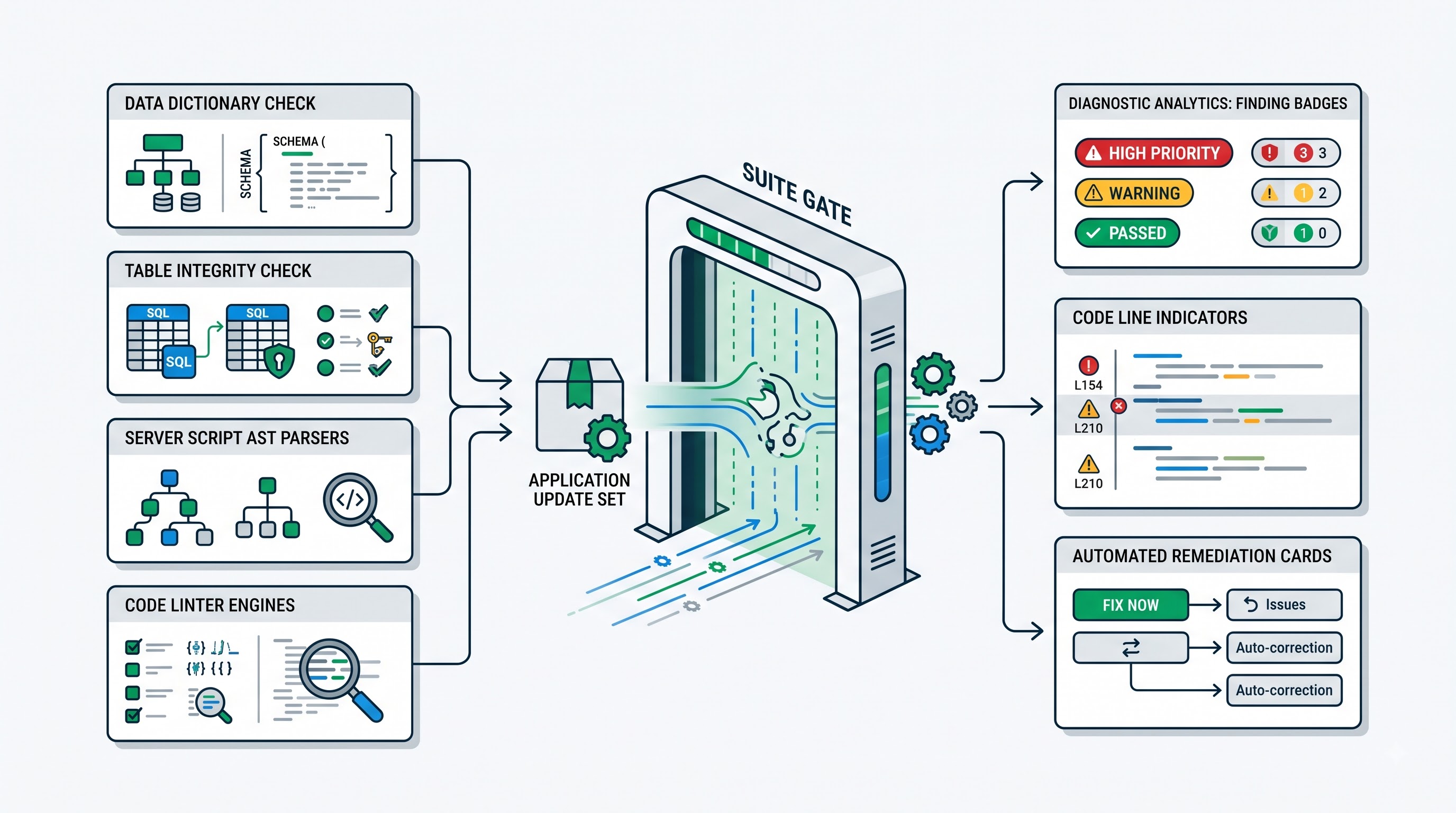
Before making the most of Instance Scan, the administrator should know its basic units: terms, targets, suites, checks, and results of scans. The comprehension of interactions between the mentioned units gives teams an opportunity to apply Instance Scan according to the specifics of their calendar.
Definitions and Types of Checks
The check lies at the center of the scanning architecture. It refers to a unique condition, standard, or rule against which instance records are evaluated. ServiceNow has an extensive library of checks designed to evaluate every aspect of performance, security, upgradeability, user experience, and platform maintainability. Additionally, administrators can create check definitions based on their specific organizational requirements.
The Instance Scan offers various types of checks that differ in terms of their purposes.
Column Type Checks enable evaluation of structural characteristics of the database. They assess fields of the system dictionary and define whether the required properties are set in the right way. For example, the column type check checks whether all strings longer than a certain value have corresponding data types in the database or whether dynamic reference qualifiers do not have any invalid queries.
Table Checks traverse the required sets of records assessing their values of standard fields, flags, and statuses. These are simple checks that do not require complex run logic to determine whether auditing is active for critical compliance tables, and whether inactive business rules have got a necessary tag.
Script Only Checks provide maximum analytic flexibility. A Script check runs custom server-side processes using platform APIs. It can analyze a script include’s abstract syntax tree, decode XML payload, evaluate JSON app configuration, or interrogate a number of associated database tables to see if an architecture dependency is intact.
Linter Checks deal with static code analysis in both client-side and server-side script bodies. The linter checks examine the actual code to find errors in code syntax, obsolete platform functions, hard-coded identifiers, blocking API calls, and nested database queries within loops.
Targets and Scopes
A scan needs to have a target. The target defines the scope of examination performed by Instance Scan during the run.
The target of evaluation in this case can be broad or narrow. By "broad" it means evaluating the entire instance—that means evaluating the application scope or table record or configuration entry as a whole. The narrow target is evaluating the single update set, scoped application, or payload of release. For modern engineering teams, the great advantage is the ability to check narrowly targeted update sets. This allows the administrator or peer reviewer to run an array of diagnostic checks before the update set is committed for further testing.
Suites
The checks are properly organized into suites that comprise a defined set of checks targeted at the particular governance objective.
ServiceNow provides standard suites for the users. For example, the Instance Health Suite that provides checks related to performance, safety, and upgrade maintenance. The system has an option for creating its unique end-user suites to comply with specific needs of the organization. One of the steps the company can take is introducing the necessary "Pre-Production Release Suite" which will consist of checks which have to be passed before the launch of any update package. Knowing how to customize the automated checks, as well as define the limitations of the suite in question is an important part of the structured training that servicenow administrator training goes through to enable them to apply the standards of the platform at all times.
The outcomes and observations resulting from the scan
During a scan, the Instance scan performs the appropriate checks upon records that were specified. The scan results files the header of the results, that is related to what has been established in the findings.
Findings may be the violations of the specific check and they contain all necessary information about the degenerate record, which did not satisfy the requirements. Moreover, it shows the lines of code that contain the problem, the explanation of the issue (why this configuration is anti-pattern), and the recommendations on how to solve the issue. Findings are divided into several categories in accordance to the level of priority and importance of the issue.
Fighting with "The Big Two" – synchronous scripts and unindexed queries
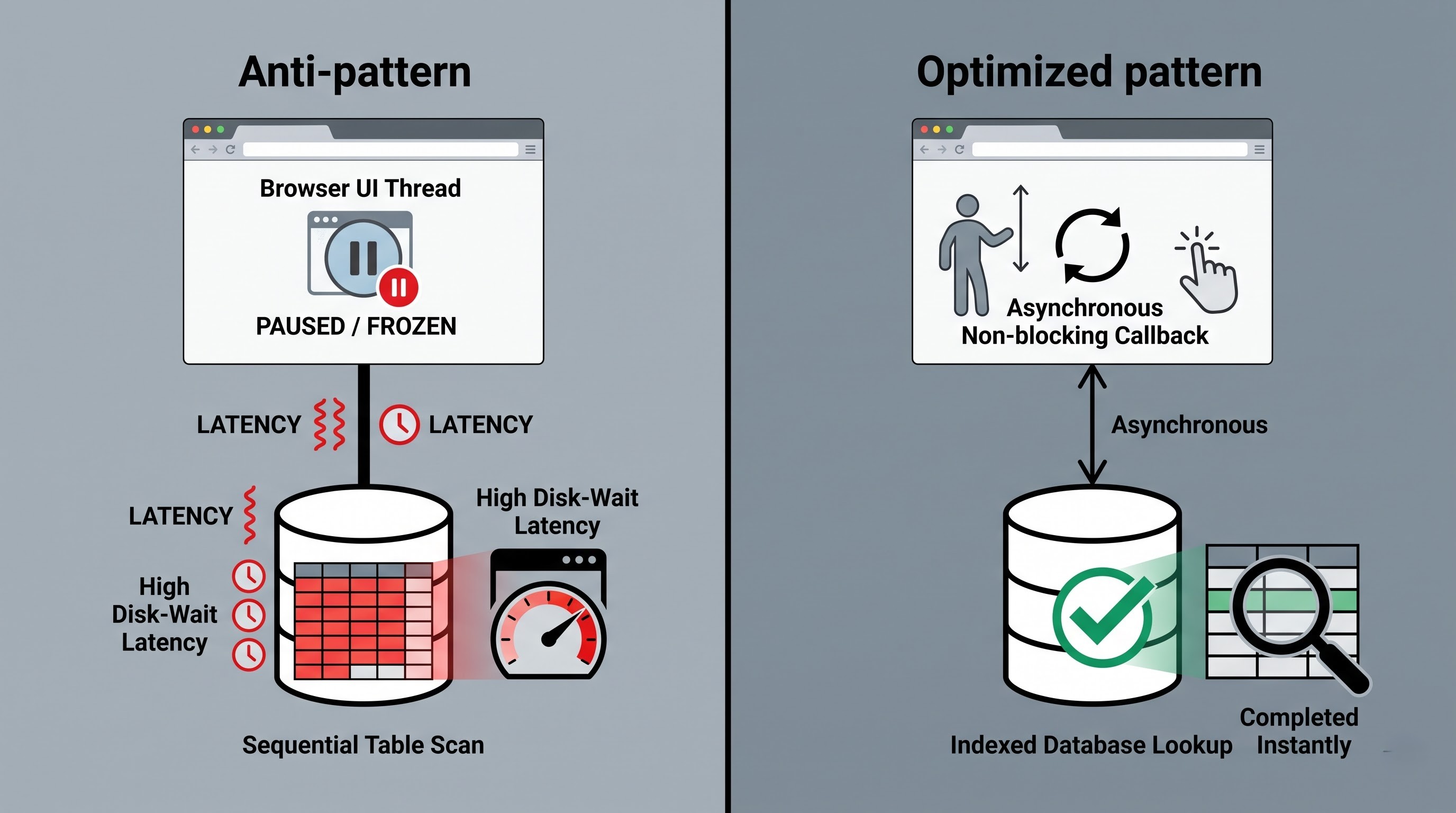
Even though the Instance Scan is capable of performing hundreds of checks, two types of anti-patterns always provide the worst performance results - synchronous client-side execution and unindexed database queries. The use of Instance Scan for pinpointing the two types of anti-patterns allows to make the system more stable and faster.
Removal of Synchronous Client Scripts
Synchronous client calls are a serious user experience mistake. In the earlier versions of this platform, developers used to employ synchronous execution of database queries and server calls simply because these were easy to write and read. But synchronous execution of client scripts makes them pause the single-thread rendering engine of the browser. Until the trip to the server is complete, a user is unable to do anything, which means that a user cannot scroll the screen, type anything, or engage in any other interactions.
Instance Scan is used to stop this process through the available checks that analyze instance scripts, and UI policies, and scripts.
To detect what operations were synchronous, administrators set up linter checks to scan for old-fashioned DB calls and synchronous calls from the server. The scanning engine inspects and parses all active client script entries in order to find synchronous operations.
When Instance Scan identifies a synchronous finding, there is only one remediation available: Convert the logic to an asynchronous model that makes use of client-callable script with callback processing functions. Because the function was rewritten asynchronously, browser requests are made on the server in the background, freeing up the interface immediately. As soon as developers realize that automated scans will block the update sets with synchronous client calls, the use of this anti-pattern drops to zero.
Finding and Solving Non-indexed Queries
The second worst performance problem is the non-indexed query. The ServiceNow relational database has indexed the tables for the keys, standard references, and key columns of the system. However, as companies build their own business logic, they create queries with non-standard characteristics that filter the large table depending on custom attributes and strings.
When a query executes against a table that comprises millions of records, the database engine is restrained in that it must perform a sequential scan without an index. Thus in high user activity conditions multiple concurrently running table scans consume the whole capacity of the database input-output. As a result of that, the disk wait times increase and the overall responsiveness of the instance drops down.
Instance Scan allows administrators to detect the use of unindexed queries and inefficient query structures by running a series of dictionary and script checks.
First, the administrators can run checks on dynamic reference qualifiers used in all dictionary entries and variable definitions in the instance catalog. If the reference qualifier used on the high transactional table refers to unindexed data or is based on the broad string contains operators, then the record is marked as an inefficient query pattern.
Second, the way in which users can customize the script checks against the server business logic scripts, periodically executed scripts and script includes. The main part of the check lies in the parsing of the script body in order to identify the methods of constructing the query.
After discovering an unindexed query finding, administrators can proceed in two ways. The first choice is to attempt to rephrase the query in order to make use of the existing indexed columns, modifying the data model or filtering logic in such a way as to reduce the burden on the database. Alternatively, if the particular business case necessitates regular filtering of a custom column in the highly used table, the platform team can either send an index request to ServiceNow infrastructure support or create an admin index through database dictionary settings. Indexing can improve query processing efficiency and minimizes the database responding time to milliseconds. Since restructuring complex asynchronous models and database schema qualifiers requires in-depth knowledge of the platform, taking the servicenow admin full course gives engineers the required exposure to real-life laboratory training needed for the successful implementation of such improvements.
Advanced detection: Expanding scan boundaries
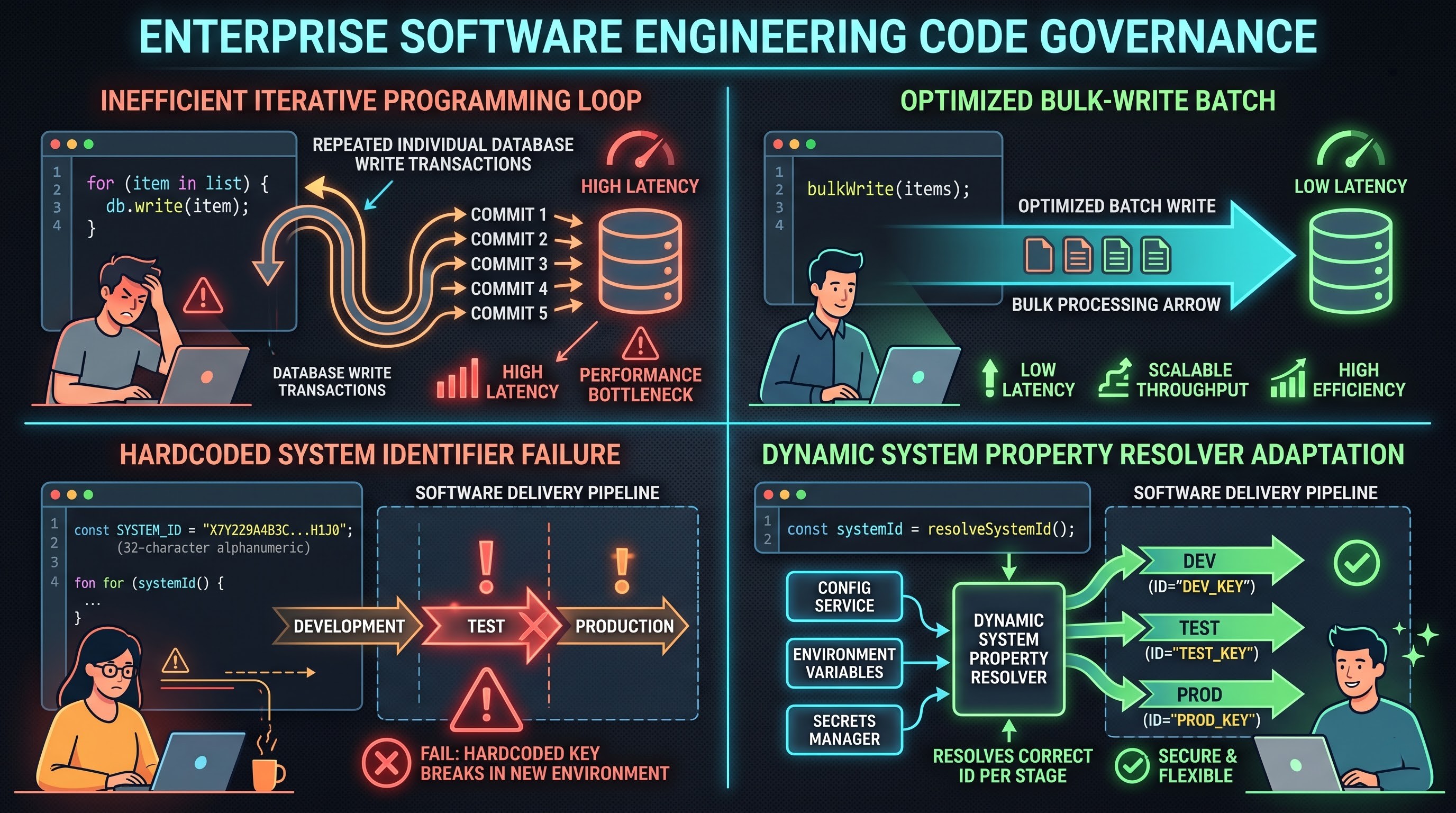
While dealing with unindexed queries and synchronous scripts enhances the performance of an instance considerably, the presence of technical debts can be observed in many different parts of application architecture. Administrators may take advantage of the instance scan to find other types of issues regarding bad practices.
Updates to Database While Looping
One specific anti-pattern that is highly regarded in server-side programming is performing record updates or inserts within loops. Whenever an operation processes records with an application programming interface, it updates the database transaction by transaction in the looping process, initiating numerous database transactions with their business rules and audit executions for each of the iterations. It means that if the operation processes about 10,000 records, it performs approximately 10,000 transactions.
A tool named Instance Scan helps identify the above-mentioned behavior using linter checks which will analyze the code syntax trees. Therefore, linter will find instances of database updates and inserts in the loop and to fix the situation, it is necessary to explain to developers how to apply batch operations, how to use bulk APIs or how to separate record processing from the database transaction.
Hardcoded local identifiers and environment-specific constants
Hardcoding of local identifiers of thirty-two chars directly into business logic, client scripts, and flow definitions qualifies as a more subtle form of tech debt. It is unlikely that a local identifier for a user, group, category, or catalog item in an environment will match the one used in production unless data has been migrated using specialized configurations.
Scripts with hardcoded identifiers are likely to fail in silence when promoted to higher environments: the syntax will be verified successfully but the condition will evaluate to false as the identifier does not exist anymore. In addition, hardcoding the values makes it impossible for the business admins to change the routing groups or operation categories without the involvement of developers.
The Instance Scan tool uses regular expressions and syntax checkers to identify the patterns of hardcoded platform identifiers. When the issue is flagged, the admins resolve it with the help of externalizing the values in the system properties, user preferences, or dynamic tables.
Incorrectly configured Access Control Lists
Controlled access lists control the privacy and security of information across the platform. Unfortunately, security-related debt accumulates when developers create open rules, or create rules without including field-level restrictions.
The Instance Scan checks the access control table for security issues. The check can verify if an access control rule has role-based definitions as well as conditions, to see that an access control rule is not made up of complicated script evaluations, which slow down the access evaluation process. The ability to safeguard data integrity while sustaining a nimble, debt-free operation is one of the many competencies used to evaluate modern administrative credentials. When preparing to establish your expertise in enterprise platform implementations, it is worth it to invest in the accredited servicenow admin certification training through OnlineITGuru, which will equip you with both day-to-day operations and high end platform management techniques.