
ServiceNow Admin: Guide to Tables, Records & Forms
Last updated on Oct 28, 2026
It is evident that ServiceNow is one of the best cloud computing platforms in the world today. Many firms operating in diverse areas, such as IT Service Management, Customer Service, Human Resources, and Security Operations, regularly make use of this platform in order to automate and unify processes. Apart from the user-friendly interface, automation rules, and enterprise dashboards, another feature of the platform is an advanced relational database.
Any individual starting out his/her career in ServiceNow, whether in the capacity of a system administrator, business analyst, process manager, or even a user, needs to know about three major components of this architecture. They include tables, records, and forms.
Even though these concepts may look very simple from the database viewpoint, the perspective of ServiceNow on this issue is somewhat different owing to the interconnectedness of the whole system and its user-friendly nature. While the table is a static row and column combination, it is also the representation of the business logic, inheritance, and governance. While the record is no more than just text, it represents the alive business object, for example, the IT incident, the onboarding process of the employee or the asset of the company. Lastly, the form is not only a digital questionnaire but the major component via which people can work with database fields in an easy way without the need for any database language.
Everything that you need to know about this topic is mentioned below. From this article, you will come to know about how the data in servicenow is being managed and how it works in servicenow. Those students who want to make their career in the technical field can register for servicenow admin online training from OnlineITGuru.
The Basics of ServiceNow Tables
The main component of the ServiceNow environment is the database. Whatever action you do in the ServiceNow – register your broken laptop, ask for vacation or watch server alerts – everything is the action related to the database table.
Table in ServiceNow
Plainly speaking, the table can be defined as the layout of the set of data. In order to define the table, one can use their own knowledge gained from the experience in using the spreadsheet in the PC where the name of the tab, the column that specifies the type of the data, and the rows that denote particular entries are found.
As for the ServiceNow system, it is necessary to note that the table is the schema of a certain business object. Thus, in the ServiceNow, there are specific tables of:
Incidents that show any interruptions in the provision of IT services;
Change Requests that indicate the approved additions, modifications, and deletions of any objects that affect the IT services;
Users that provide data concerning employees' profiles, emails and other credentials;
Configuration Items that represent the tangible and intangible assets of the company, including laptops and cloud databases.
The table includes two main elements that are the fields and records. The fields are the attributes of the table, for example, "Short Description", "Priority", "Due Date".
Classification of ServiceNow Tables
It should be mentioned that there is a classification of ServiceNow tables based on source, management, and functionality of the tables. It is of great importance for the future development of the platform in the company.
Base Tables and Core Tables
Base tables are those that are built-in ServiceNow by default. Base tables show core functionalities at a low level. One of the most widely used tables among the base tables can be called the Task table. All characteristics of task such as reference number, assignment group, assigned technician, creation date and status (New, In Progress, Closed) are reflected in the table.
Core tables are those tables that are native to ServiceNow and related to core business entities (Users, Companies, Departments and Locations). Since there are core tables in ServiceNow, it is unnecessary to design common business schema from scratch.
Custom Table
In the ServiceNow platform, there are many tables that have been established with the main intention of solving various problems such as those that are related to IT, Human Resource issues, and customers' services. However, since all companies have their processes, it becomes easy for the administrator to create a custom table that will cater for specific problems within his organization such as the existence of fleets in his organization, patents in his organization or keys in his organization. In the ServiceNow platform, every custom table must be unique in terms of the strings which differentiate it from other existing tables in the ServiceNow.
Table Inheritance and Task Architectural Design
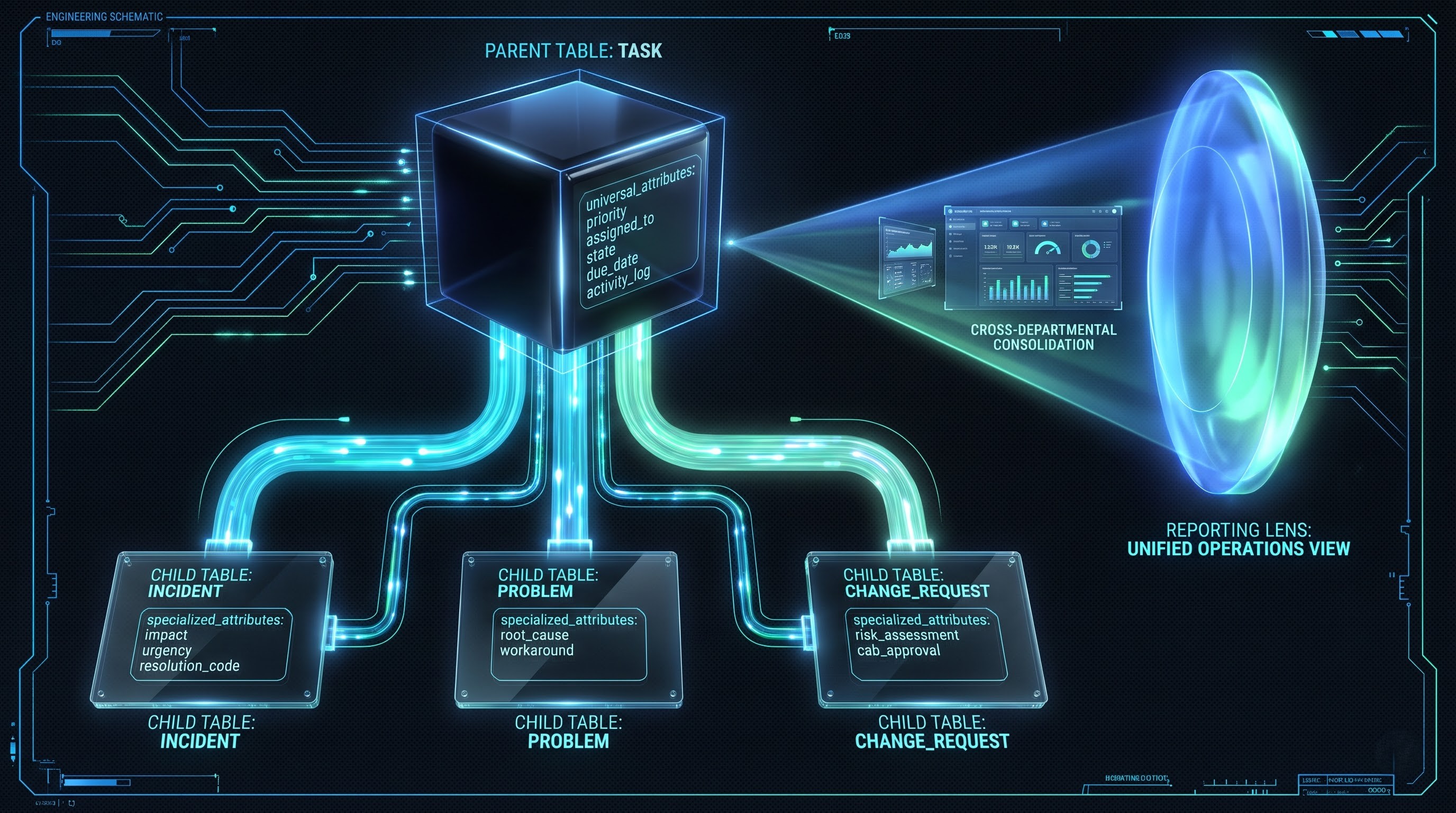
The best architectural design in the ServiceNow platform is the table inheritance. It is not necessary to continue making similar tables. In the ServiceNow platform, an administrator can inherit a table from another one.
A very important example of a hierarchical table structure in ServiceNow framework would be that of the Task Table Hierarchy. Incidents, problems, changes, HR Cases, and facility fixes may be termed as tasks. These common tasks have some attributes which are common in nature like priority, assignee, due date, and activity log. Rather than having separate definitions for these common attributes within the five tables, ServiceNow creates a parent Task table from which the incident table inherits.
In this situation
All common attributes are added in the incident table automatically.
The incident table gets some extra attributes like impact and resolution code.
Generating reports at an enterprise level becomes very easy. For instance, if an executive wants to find out the total number of tasks performed by all departments of European service team, then he can do that by querying the parent task table.
Fields and Data Types
All tables contain fields that represent the kind of data that needs to be entered in the table. In the database, there are many different types of fields in ServiceNow which ensure data integrity by preventing users from entering unstructured data in the wrong places. Some common types of fields include:
String fields – standard text field for giving a name, summarizing something or commenting on something.
Integer field and Decimal field – used for calculations, counting and evaluating costs of assets.
Date/Time field – indicates date/time, SLA due dates and created date.
Choice field – provides a drop-down menu with predefined values which restricts the options of the user. For example, Priority field can have values like Low, Medium, High or Critical.
Reference field – this is one of the most important features of ServiceNow. The reference field is not merely a text field but a link to some other record in some other table. Understanding the basics of how to work with table relationships, inheritance, and field dictionaries is what will make the difference in reaching the accomplishment that is essential for every admin. For all of those who wish to learn about everything regarding schema management, workflow automation, and platform security, the servicenow admin full course is available.
Units of Work: ServiceNow Records
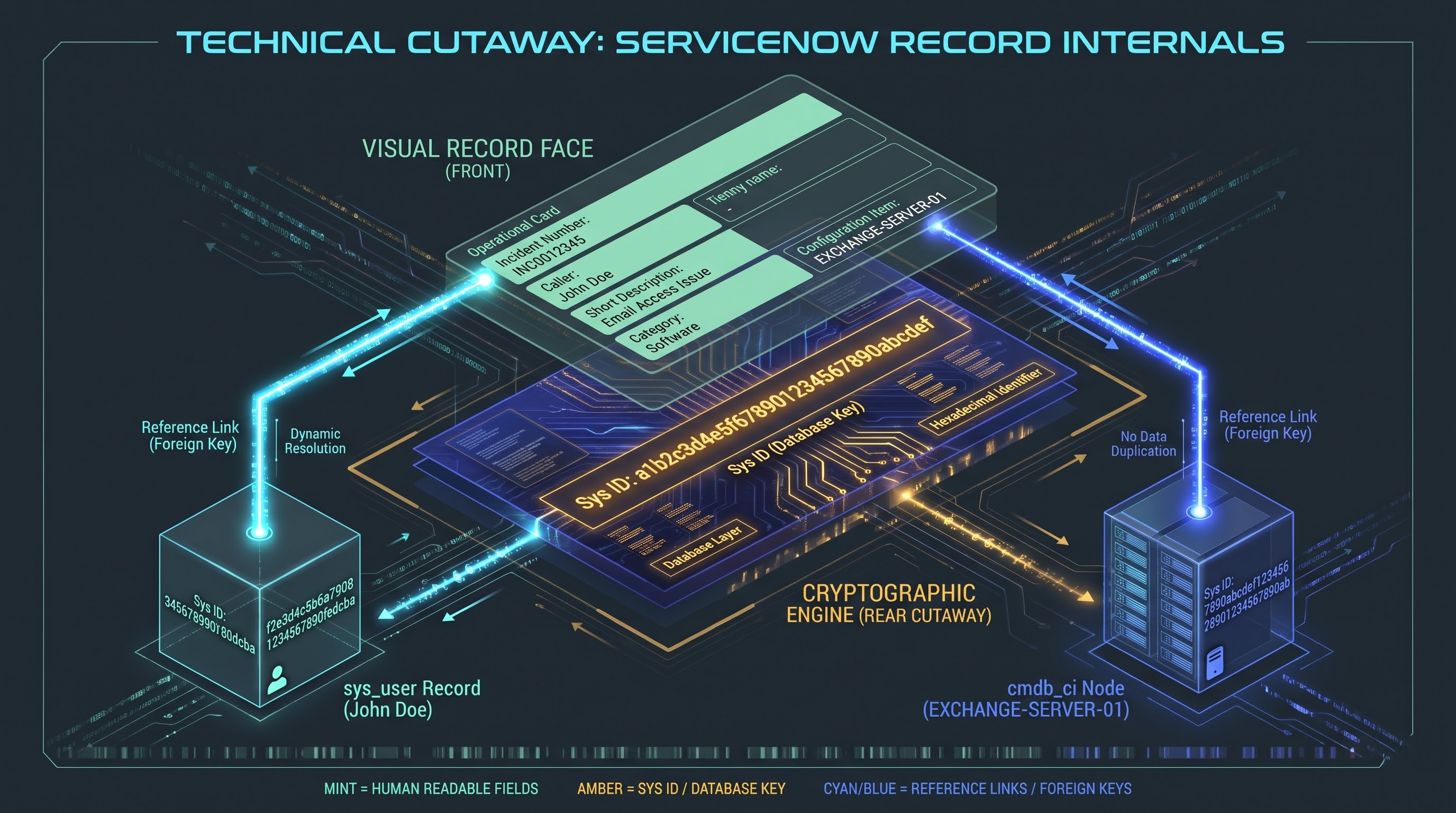
While tables are described as filing cabinets and the blueprint of the architecture, records are described as actual files found in these filing cabinets.
Definition of a Record
A record can be said to be a single data item that exists in the table. In cases where an employee contacts the help desk in order to help him/her with issues of his/her computer monitor failing to turn on, then a record will be made in the incident table by the support team.
The details that will be available in the record about this incident are:
The unique number of this incident.
The time the incident took place.
The name of the person who had this problem.
Category of the problem and its sub-category.
Details provided by the technician.
Every single entry in the ServiceNow list view is called a record. Many records are produced each year in an organization.
Sys Id - The Invisible ID
It can never be denied that in order to track down every record present in any relational database, there has to be an identification number given to them so as to differentiate them from other records as they may possibly have the same name or description.
The unique identifier for ServiceNow is known as the System ID or Sys ID. Sys ID is actually a hex number generated automatically and it comprises thirty-two characters. Every table, incident, user, catalog item, and all other entities present in ServiceNow has a Sys ID of their own.
While the users will identify the incident based on the reference number, the activities taking place in relation to the incident in ServiceNow will be based on their Sys ID only. In other words, even if there are two users working in the same organization and having the same first and last name, their Sys IDs will be absolutely different.
Life Cycle of a Record
A record in ServiceNow is not only a static record, but it is also a dynamic record since the record will change depending on its life cycle.
Creation of a Record
There are various ways a record can be created. First, the record can be created using the self-service portal where there will be creation of a ticket for the record. Second, the record can be created through the inbound email parsing where there will be creation of an email alert for the record. Third, the record can be created through the network management solution integration where there is a manual entry of the word "new" in the regular ServiceNow interface.
Change and Change Modifiers
The record after creation will become a live record. The record will be modified in several ways through the reviews done by technicians that make changes to the record and assign it to the subject matter expert. The changes done to the record in ServiceNow are monitored. Change history to the record shows the exact time, the person making the change and the old and new values.
Closure and Archiving
When the service is rendered or an issue has been sorted out, the record is considered to be closed/resolved. According to certain company policies, such records are archived for future audit, reporting purposes, and creating knowledge bases. Having worked for years, the companies can apply archiving process to move old records from operational tables to archive tables to maintain the best possible performance of the database and to keep it legal.
The Human Interface: ServiceNow Forms
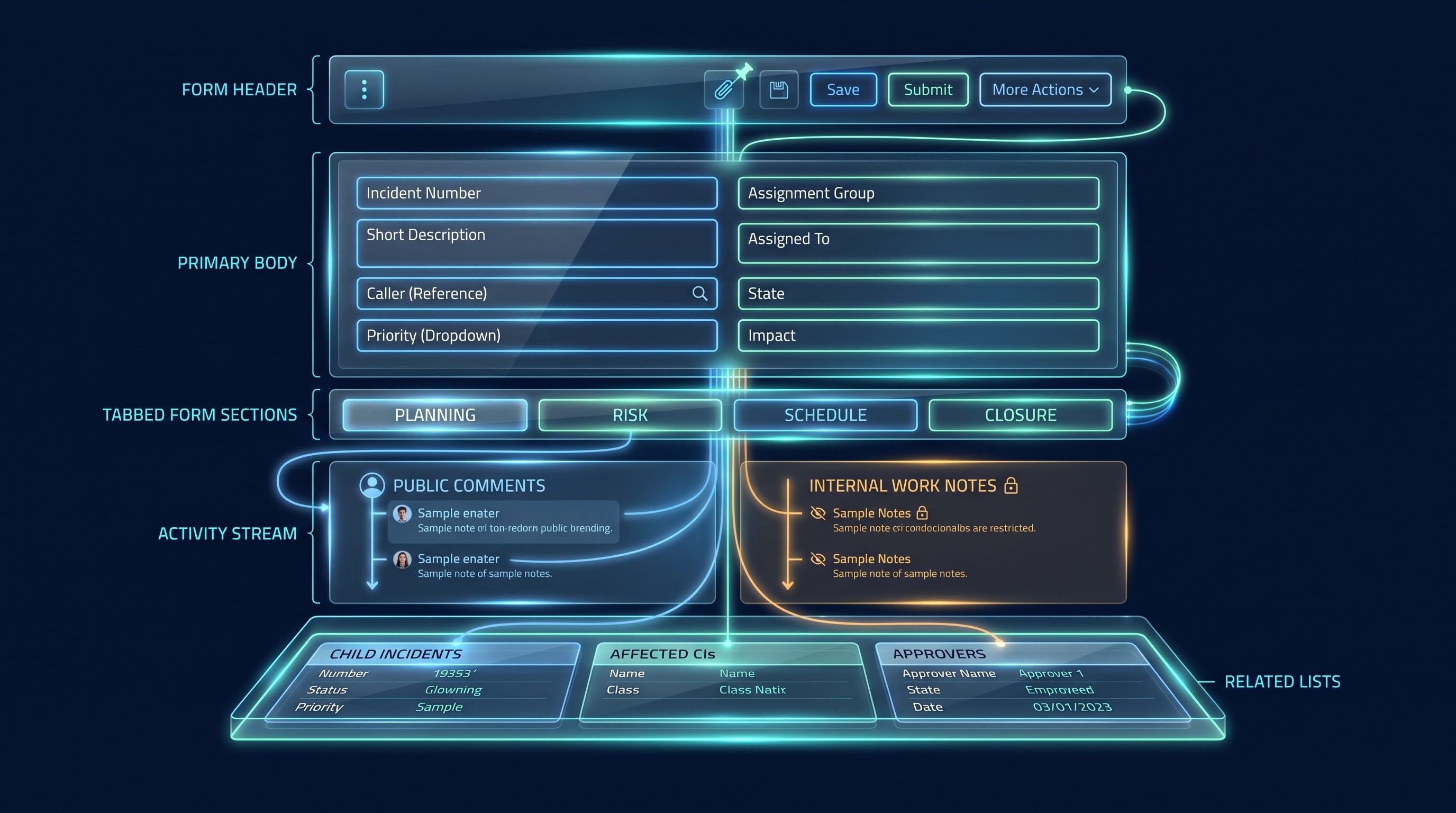
While the programmers and database administrators can be satisfied with having the records and values of fields, average workers need some kind of interface to view and manage this data. This is where the ServiceNow forms come in handy.
What Is a Form?
The form is a graphical user interface displaying you all the fields and data of a certain record. When working with the list of incidents and opening the particular ticket number, you will see the form.
It gives a structural structure. In order not to confuse the users with a large amount of raw data, which in this case is the key data from the database, the form uses names, text boxes, date pickers, drop-down boxes, and tabs. And that is how the complicated database operation is presented with the help of UI elements known to any Internet user.
What is even more important, there is one-to-one mapping between the form and the table. If you edit something in the “Short Description” field in the form and press on the save button, the form will edit the specified field in a specific record in the table below.
Elements of Form Structure
Though being quite customizable, the forms in ServiceNow are similar to each other in many ways.
Form Header
The form header is located in the upper part of the interface and includes control and navigation buttons. The form header includes:
Back buttons to navigate back to the previous listing.
Name or ID of the record.
Buttons to perform actions such as save, edit, and delete the record.
Options from context menu that will enable the administrator to change the layout of the record, export the record, and get the technical details of the record.
Toggle buttons that will give users the possibility to attach the files necessary to the record such as screenshots, logs, approval documents and etc.
Body of the form and Columns of fields
The main body of the form takes up the biggest space on the form after the header section.
The fields of the form are organized in several columns in order to use the large monitor of today's age provided by ServiceNow.
Fields of the record can be organized in the following manner:
The upper section of the form usually holds data about the identity of the record, for example who created the request, which service is involved, what priority is the request etc.
Such text boxes are generally used in the center of the forms wherein the explanation and justification of the details is required or repetition of the process is necessary.
Sections in Forms and Tabbed Forms
In the case of the enterprise level processes, it becomes imperative to collect the information about different data elements. Displaying 70 fields on an infinitely long web page becomes very difficult for the technicians.
The ServiceNow form is divided into the sections known as “Form Sections”. These form sections can be presented in the form of vertically arranged and collapsible containers or tabbed form sections. For example, a change request form will contain four tabs like “Planning and Implementation”, “Risk Assessment”, “Schedule and Milestones” and “Closure Information”. These tabs can be accessed only by those technicians who are currently engaged in that process stage.
Activity Stream and Work Notes
The activity stream can be found at the bottom of the form. The Activity Stream becomes the interactive timeline of all the activities done on the record.
The activity stream helps in understanding two different communication streams:
Visible Comment to Customer: These comments will be delivered to the requestor through email or they can be seen by the requestor from the self-service portal itself.
Work Note: All the information provided in this comment will be purely technical information like the diagnostics information, technical outputs or technical discussion between the staff members and should not be shared with the customers.
Related Lists
At the end of the form, ServiceNow displays the Related Lists. Related lists are nothing but the list of records which are being displayed from other tables having some relation with the record which you are working on.
For example, while analyzing the form of Major Incident, some of the lists which might be displayed at the end of the form are:
List of all Configuration Items (servers, network switches) associated with the issue.
List of Child Incidents logged by other users for the same issue.
List of change requests created for resolving the issue.
With related lists, the technician gets an easy access to understand the problem without leaving the current form.
The Relationship Between Tables, Records and Forms
For instance, think about the case when the user cannot get access to his/her enterprise email account.
The Blueprint (Table): In this application, the existing Incident table is used. The definition comprises the data that should be in each incident, which includes caller, category, impact, assignment group, and timestamp.
The Presentation (Form): After the IT support technician opens the application for the specific user, ServiceNow creates the Incident Form. It includes the blank fields in proper order and identifies the required fields.
Data Entry: First, the technician enters the name of the user in the Caller field. As he/she realizes that it is the Reference field, which relates to the User table, it searches for the user automatically and finds his/her office location and department.
Preservation (Record): The technician clicks on the “Submit” button. At that point, the system saves all the input fields that have been filled out on the form and creates a new record in the “Incident” table together with the Sys ID, which consists of 32 characters.
Lifecycle Goes On: In the future, the technicians use the form to retrieve the record, edit it (e.g., add activity notes, change the state to Resolved from In Progress). Everything that is edited is saved into the underlying record of the table.
The whole lifecycle of tables that include the rules, forms for human interaction, and records representing the real-time state is done millions of times per day by millions of people around the world in their enterprises.
Conclusion
It may appear at a first glance that the enterprise system is extremely complicated because of numerous menus, terms, and navigational problems. However, after analyzing the architecture of ServiceNow, it turns out that the architecture is based on three brilliant concepts:
The Table is the firm foundation that helps to create the data architecture, rules and hierarchy of inheritance.
The Record is a real life example of any action – some concrete case, corporate resource, user or task.
The Form is the friendly interface that helps to make the complicated architecture of relational database a friendly one.
Getting familiar with all these terms and their relations is the key to success in ServiceNow. Now that you have learned about tables, records, and forms, you know that nothing is impossible anymore.
In order to prove yourself and get ready for international industry qualifications, such as CSA, you can take servicenow admin certification training at OnlineITGuru.