
ServiceNow Configuration vs Customization: Key Differences
Last updated on Oct 7, 2026
The Basics: Grasping the Concept of the Enterprise Platform
Not many platforms are as strategically significant in modern enterprise IT setups as ServiceNow. Although it started out as an IT Service Management platform, today ServiceNow is an advanced digital services platform that runs essential enterprise processes, including customer experience, human resource management, security, asset management, and development of custom applications.
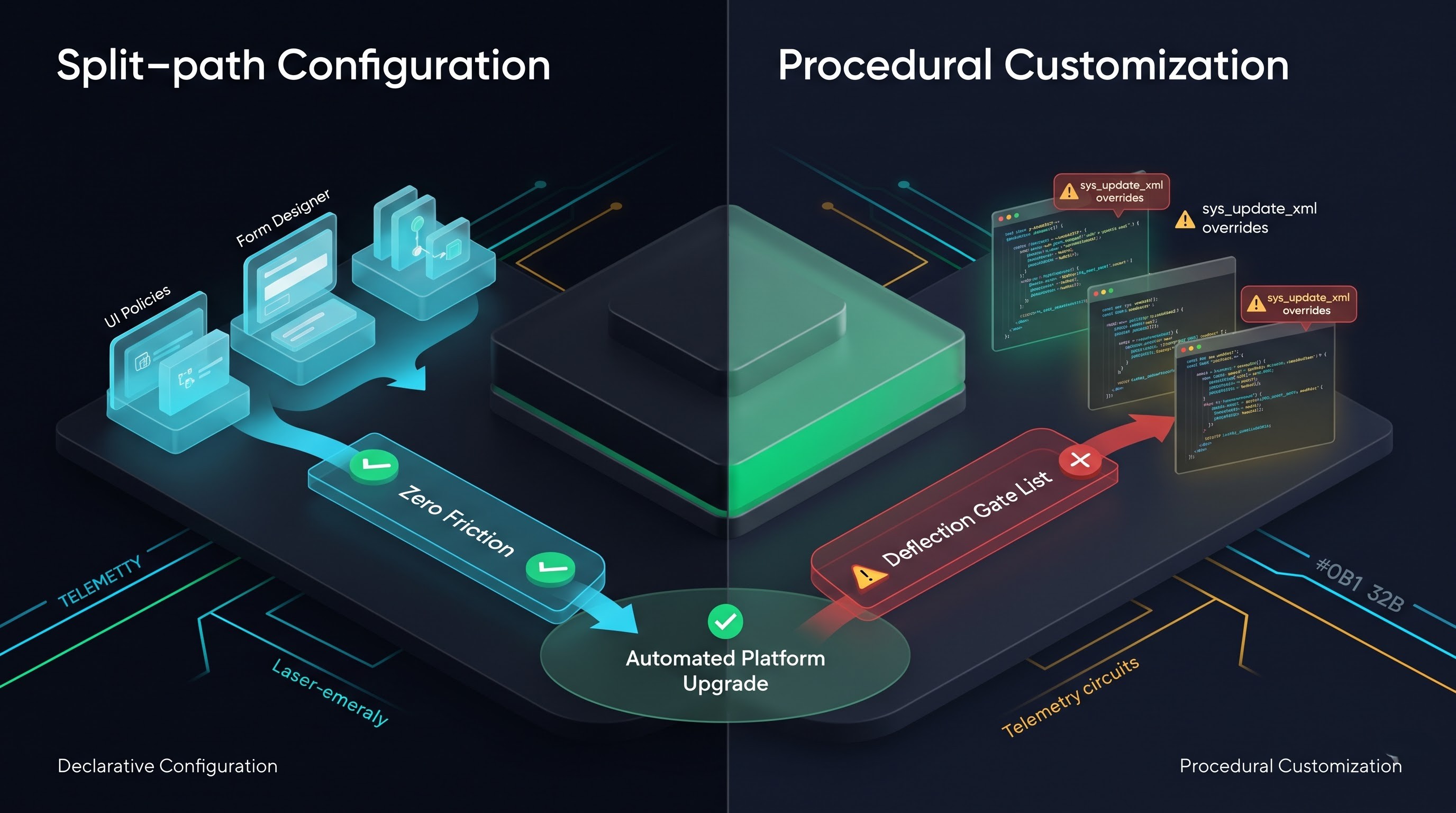
The importance of ServiceNow systems lies in the fact that they enable organizations to decide on each particular case of business inquiry: should the requirement be resolved via configuration or customization?
Configuration vs customization is not only a technical issue, but also a corporate governance and cost management issue. Each wrong decision in this regard may turn into unnecessary business problems later on.
To efficiently handle the ServiceNow system, it is crucial for platform owners, architects, and administrators to understand the difference between customization and configuration. If a professional is interested in understanding the new system facilities, a proper servicenow administrator course can give basics for setting everything up without any need of difficult coding.
Explanation of Main Concepts
Understanding Configuration:
Configuration in the context of ServiceNow refers to the process of changing the behavior of the platform, including form design, views creation, implementation of routing, and utilization of various workflows, by the means of pre-existing capabilities, features, and options provided by ServiceNow for its customers. When an administrator performs configuration in ServiceNow, they do it only with the possibility of the developers of ServiceNow. In this way, ServiceNow enables clients to make these settings as per their requirement.
Adding a new field to an existing table with the help of Form Designer or Form Layout.
Changing field properties, like making a field compulsory, read-only, or inactive.
Setting up UI Policies to show and hide fields on a form, depending on the end user's choice.
Creating workflows using Flow Designer or Workflow Studio with drag-and-drop functions.
Making Business Rules that involve standard Filter Conditions and Template Actions without writing custom JavaScript code.
Creating user groups, giving roles, regulating the workings of ACLs and configuring SSO parameters with standard condition builders.
Creating reports, interactive dashboards, and visual boards with the help of inbuilt reporting tools.
Because configurations remain within the ServiceNow parameters, the ServiceNow core architecture knows about the settings. Whenever ServiceNow releases a new version, it automatically recognizes, captures, and verifies all configurations without disturbing your changes and without denying any new upgrades.
Definition of Customization
Customization encompasses the introduction of new logic, modifications of standard platform scripts, changes in the operation of predefined records, or the writing of custom code that replaces or considerably modifies the Workstream logic delivered by ServiceNow platform.
Customization can be of two main types:
First of all, customization occurs when the developer modifies an object of the base system provided by ServiceNow. In case the developer changes the standard Business Rule, Script Include, Client Script, UI Page, or UI Macro by changing, adding, or removing any script modifying its logic, such an object will be considered customized. From that very moment, the record will be marked as modified by the customer in the system database.
Secondly, customization occurs when the developer creates new complex custom functionality that covers a business task that cannot be solved using the usual declarative tools. This includes writing comprehensive codes in JavaScript for Client Scripts, UI Scripts, Scripted REST APIs, complex background processors, or creating complicated HTML, CSS, and Angular logic within Service Portal widgets or components of Next Experience workspace.
Examples include:
Using an off-the-shelf client script to insert the JavaScript needed to replace existing functionality.
Altering a typical script that manages the main IT services so that it incorporates everything from incident notification to status changes.
Building a custom service portal widget using nonstandard programming language, such as HTML, CSS, and a combination of client and server-side computer programs instead of following existing standards.
Introducing a business rule and writing a complicated asynchronous script containing dozens of lines of unique programming code required for calculations on multiple databases.
Establishing a unique database structure and an application environment that bypasses ServiceNow’s normal operation (like building an own ticketing system instead of modifying the standard Task table).
Customization is what turns ServiceNow from a regular managed service platform into a unique software solution.
How ServiceNow Processes Changes
To comprehend the importance of this concept, one must understand the mechanics of the way ServiceNow performs updates in relation to its architecture based on both the relational database and the update set technology.
Baseline System Flag and sys_update_xml
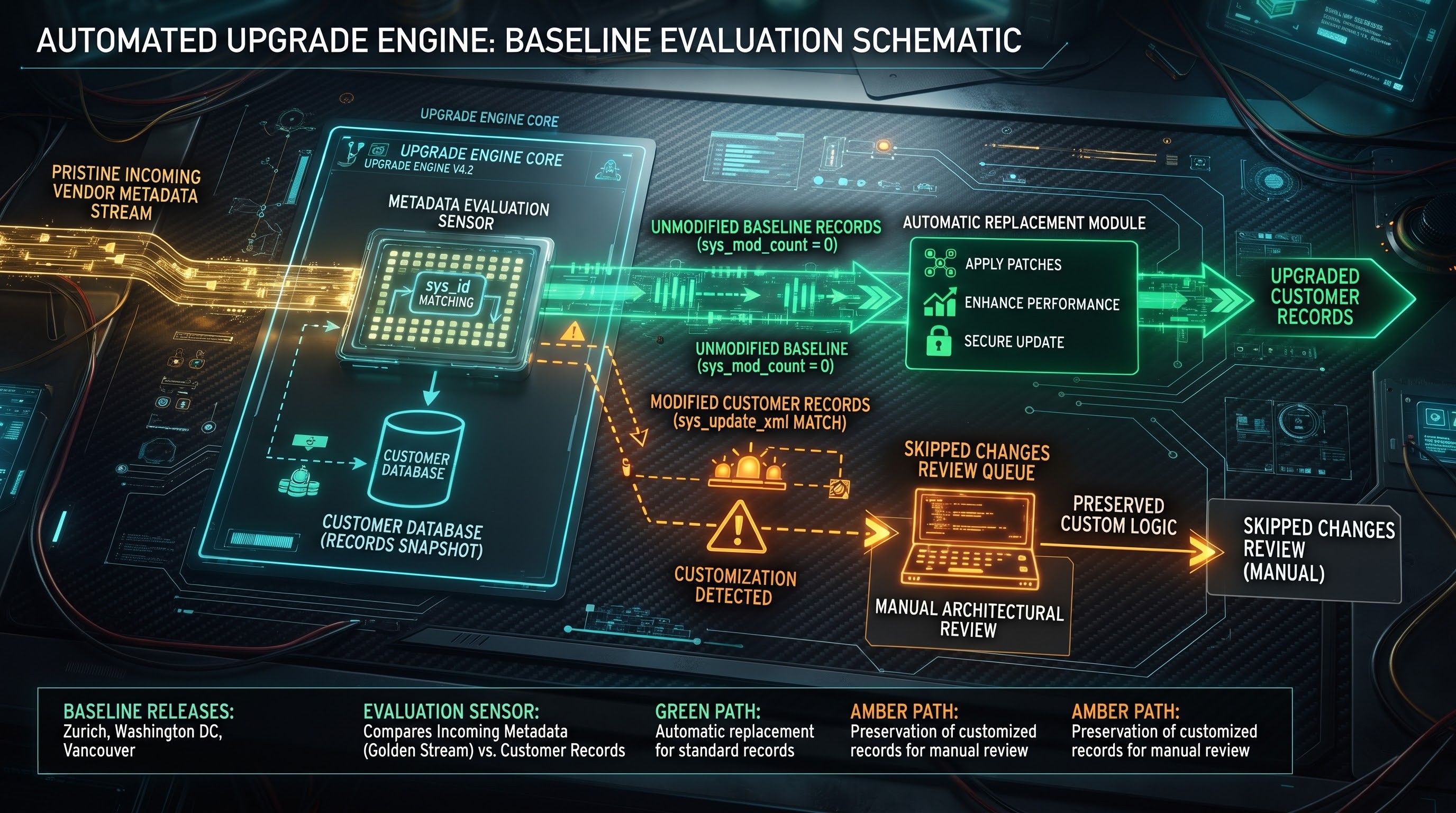
Each ServiceNow entity, be it a business logic, a table definition, a script include, or a form view, is stored as a record in a database table. When ServiceNow releases a product (Zurich, Washington DC, Vancouver, Utah), thousands of pre-built records are entered with specific timestamps and metadata that make them connected to the baseline version of installation.
When an end-user performs the usual configuration, such as using the Form Designer to add a custom string field called "Business Justification" to an Incident form, the system generates a new sys_dictionary data entry and modifies an existing record of the form section. The baseline application files and incident management scripts stay untouched.
On the opposite side, once an engineer modifies an out-of-box record such as the common "incident autoclose" business rule, the platform takes note of this change. The changes are registered in the record's metadata, which is automatic in updating the fields sys_updated_by and sys_mod_count. In the process of doing this, ServiceNow records the occurrence in the sys_update_xml table.
By virtue of this, ServiceNow's clients acquire a specific customer mark on the base record of theirs. This means that they obtain exclusive rights for the given object.
Upgrade Engine and Skipped Changes List
At the moment ServiceNow publishes a family release, patch, or hotfix, the automated Upgrade Engine works over the instance. The Upgrade Engine checks every incoming record from the base system against the record from the client's instance.
If a specific record had never been updated in the client's instance (that is, it is identical to the original metadata), the Upgrade Engine automatically replaces it with the most updated version of that functionality. Hence, the customer gets access to the improvements in error fixes, performance, security updates, and interface improvements.
The Upgrade Engine will cease the automatic replacement of a record if it recognizes that the record is customized (i.e., the customer has customized the original record). Following ServiceNow's general principle, it will not just overwrite the customer's customization without informing him, since the process could cause any disruptions to his work.
Instead, the platform saves the customer's custom record and marks the new ServiceNow release as “Skipped Change” in the Upgrade Center log.
This mechanism is the main culprit of enterprise technical debt in ServiceNow environments. Each skipped record requires a manual search-and-review process by a developer or a platform architect. This is insignificant when the organization has five customized records, but when there are hundreds of modifications made by the company over many years, the upgrade becomes an exhausting process requiring numerous consultations.
The gap between upgradeability and maintenance
The long-term total cost of ownership (TCO) for any enterprise software is primarily determined by how easy it is to maintain. The difference between configuration and customizing is particularly apparent when it comes to upgrades.
Simple upgrades due to declarative configurations
ServiceNow spends millions of hours on developing backward-compatible declarative configurations. If a company's business rules are written using Flow Designer, UI Policies, Assignment Rules, or System Properties, the engine preserves backward compatibility through all family versions of the platforms.
The upgrade process for a configuration-based instance usually concludes in a matter of days with the help of the Automated Testing Framework (ATF) which helps a company to conduct automated regression tests during the upgrade.
Moreover, ServiceNow continuously re-evaluates backend performance improvements, database indexing procedures, and user experience techniques. By depending on configuration, your instance can automatically adopt these platform improvements without having to make any structural changes.
The Problem with Customization
Customization effectively separates your instance from ServiceNow’s ordinary development processes.
When you create custom scripts or modify core Script Includes, you are working in the context of the platform’s current Document Object Model (DOM), existing APIs, and present database query schemas. The company gradually does away with older APIs, makes upgrades to newer versions of JavaScript (for example, through the transition to advanced ECMAScript standards), and improves its user interfaces—for example, the earlier movement from interface UI15 to UI 16, and later to the new Next Experience and flexible Workspaces.
Custom code that depends on unknown DOM changes, hardcoded internal IDs, sending queries to the tables directly, or executing synchronous scripts on the client side can stop working unexpectedly during significant releases.
Extended Upgrade Cycles: Instead of the necessary two weeks, upgrades remarkably last three to six months. Teams have to take a long time to go through hundreds of unconsidered update records, comparing the vendor's incoming script with their internal team's custom script manually.
Regression Testing Bloat: The presence of custom code complicates the process of predictability of potential failures in the system. Thus, the amount of mandatorily performed manual regression testing massively increases the involvement of business users in user acceptance testing.
Feature Stagnation: Adapting new ServiceNow products and services is highly challenging in the case of highly customized implementations. In case, Change Management procedures are extensively modified long ago, using advanced capabilities such as Multimodal Change, DevOps Change Velocity or CAB Workbench becomes hardly attainable without deleting many lines of previous programming work.
Performance, Efficiency and System Loads
The selection made about architecture does not only affect the process of upgrading, but also performance in operating the system in daily matters. For instance, how responsive the application is or whether horizontal scaling is possible.
Standard Execution and Optimisation
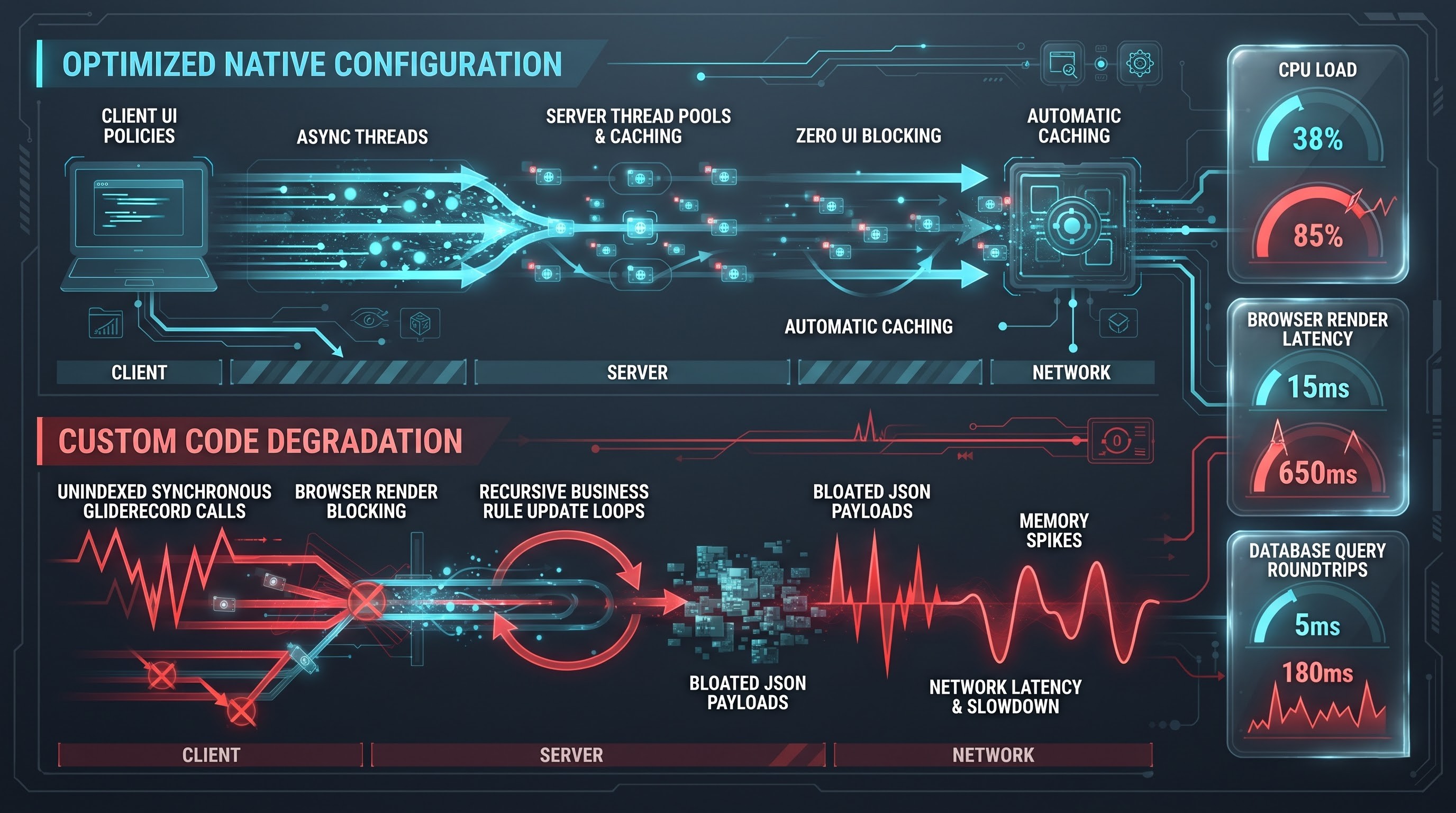
ServiceNow includes ready to use compiled and optimised routines in its declarative configuration.
To illustrate, when the obligations of a certain field depend on the function of another field, ServiceNow operates in a rule defined with UI policy via a rapid and efficient client-side process. The platform is very precise and knows the time to verify the rule, applies native caching mechanism, and guarantees that the browser is not overloaded unnecessarily.
For one, Flow designer is powered with an enterprise-level asynchronous executor, which takes care of managing the server thread pool, slashing transaction time as well as executing the processes in the background without preventing users from availing of the system resources.
Common performance weaknesses in custom code
Custom JavaScript is often the source of performance limitations within the ServiceNow ecosystem, as custom scripts usually come from developers without the proficient knowledge of ServiceNow architecture.
Examples of frequent performance fades in custom codes include:
Running Synchronous GlideRecord in Client Scripts: Many developers write client scripts that call for queries to be made at the server level synchronously making the user wait for the form to render. This leads to the freezing of the users' browsers since it makes the process of rendering the form very slow hence causing many inconveniences.
Wrong Implementation of Business Rules and Query Cascades: Custom business rules that run unindexed queries, create too many loops over lots of records, or result in running infinitely update loops will bring a big burden to the ServiceNow application server.
UC Script Includes: When personalized scripts continuously call on static configuration information or baseline tables without applying caching mechanisms, the database undergoes thousands of needless read operations.
Payload Expansion: Custom APIs and custom-built UI widgets usually transfer large and redundant JSON payloads, causing higher consumption of memory and latency on the network for employees working remotely.
When using configuration, the problems associated with performance, caching, and indexing fall onto the ServiceNow engineering department. When utilizing customization, these issues become the responsibility solely of an internal development team.
User Experience and Interface Consistency
An enterprise service management platform is the virtual entrance into the organization. Employees, IT specialists, agents, and external suppliers use it every day. The decision about whether to configure or customize has a great impact on interface consistency, usability, and accessibility.
Harmonized Design with Configuration
ServiceNow offers advanced design systems, including the Next Experience framework, Configurable Workspaces, and the Employee Center. When administrators use standard configuration tools like UI Builder, Form Designer, and Workspace Views, the user interfaces comply with the enterprise-wide variables, typography, responsive breakpoints and Web Content Accessibility Guidelines (WCAG 2.1 AA compliance).
The platform ensures consistency in design: incident forms look, act and navigate like change requests, HR cases, or facility requests. Such type of structural uniformity is quite beneficial as it simplifies training for operational teams since staff can move freely across the modules without having to relearn interaction with the interface.
The Collision of Custom Interface Experience
Customization causes fragmentation of user experience. When a developer creates a widget for Service Portal, makes a custom UI Page, or uses a custom Workspace with libraries, custom CSS, or custom JS framework, visual and functional inconsistency appears in small proportions.
Corporate branding standards are ignored when choosing colors, states of buttons and font levels.
Responsive layouts are spoilt when using the platform on tablets, phones or ultrawide monitors.
Compliance with accessibility is usually ignored. Custom code forms may be missing ARIA labels, keyboard traps, landmarks for screen readers and contrast ratios required by the modern regulation.
When ServiceNow introduces changes in the global style or a new space style, custom widgets cannot inherit the new style, thus leaving the enterprise with a user interface that is half old and half new.
Cost analysis: Initial delivery and total cost of ownership
Organizations, when choosing between configuration and customization, often fall into the capex fallacy trap of looking only at initial costs and ignoring continuous operational costs throughout the lifecycle of the asset.
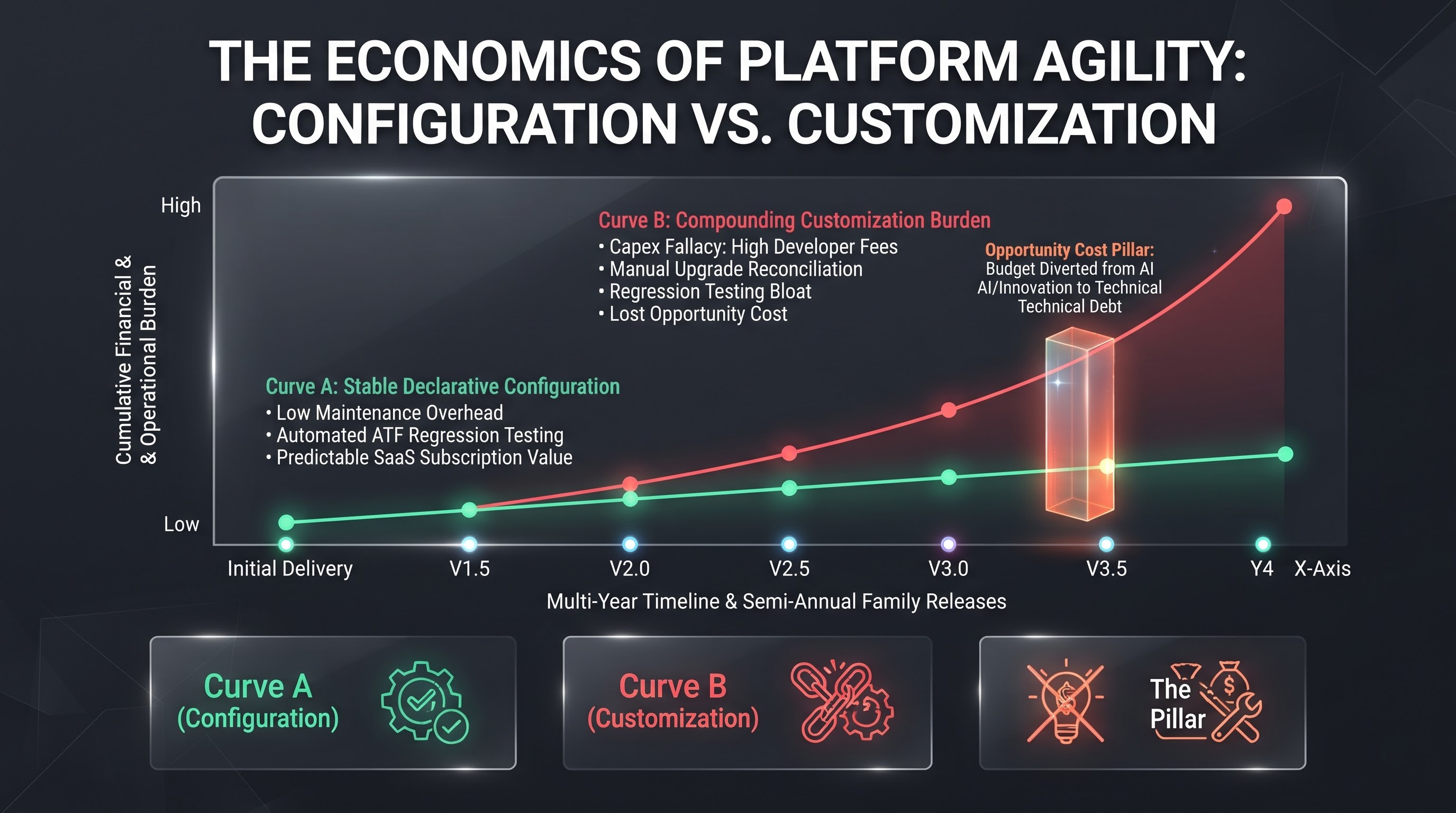
Economic model of configuration
The economic model of configuration is usually quite stable and straightforward;
Initial Development Cost: Low to moderate. The modifications to the system require less time to be developed, fewer hours to work, and can be done by administrators that are already familiar with the native tools. Training your staff with a dedicated service now admin course will guarantee that the platform's experts are capable of coping with the daily activities using native tools, thus avoiding unwanted development costs.
Costs of Testing: Small amount. Core engine is pre-tested, which means that testing is limited to checking whether a business condition is activated.
Maintenance and Support Cost: Very little. The vendor always does normal operation of the engine. Troubleshooting defects is simple because there is no complex code that has to be examined.
Revamping Overhead: Insignificant. Logs of remarks will be left without any changes and only qualified smoke tests will be needed.
Total Cost of Ownership: Has predictable and standard pattern similar to regular SaaS subscriptions.
The Economic Model of Customization
Customization has an inverted accumulation of prices of costs.
The cost of initial development: elevated. Custom coding necessitates highly-skilled consultants or specially-trained software engineers who command high fees. The development of unique APIs, database patterns, and frontend codes requires considerable time spent on drafting, designing, and developing.
Cost of testing: elevated. Developers need custom, elaborate testing plans since standard tests cannot predict how custom logic works.
Cost of support: compounding and expensive. This means that regular support cannot help when production problems arise, for instance. In the case of existing programming errors, tier-three support cannot rely on ServiceNow vendor assistance. Any requests fed into ServiceNow may be closed or redirected after it is established that the issue stems from custom creations instead of a platform failure. The company should depend exclusively on its developers and costly outside consultancy firms in resolving errors in unique codes.
Expenses for Upgrading: Extremely Significant. Each semi-annual release involves hundreds of hours of manual script fixing, code combining, running regression tests, and post-upgrade error fixing.
Opportunity Cost: the most serious hidden price of customization is loss of speed. When a platform team spends 40% of its yearly budget on maintaining and upgrading a customized version of the software, it cannot spend this budget on developing new business automation solutions, implementing new AI features into the system, and modernizing their workflows.
Time for Configuration vs. Customization: Making Decisions
The dispute about configuration vs. customization is seldom straightforward. It is absurd to expect that a complex global company would not use customization. Highly regulated industries, special business models, and complicated legacy software integrations may sometimes require proprietary solutions that the existing configurable mechanisms cannot provide.
The goal is not to completely ban all customization, but to eliminate unnecessary customization and ensure that needed customization follows strict architectural guidelines.
Recommended Hierarchy for Evaluation
The platform steering committees and the Enterprise Architecture Review Boards (ARB) will apply a strict hierarchy of evaluation to every incoming requirement.
Adopt OOTB: Can the business change its internal process to comply with ServiceNow's native workflow?
Basic Principle: The OOTB ServiceNow workflows follow global ITIL, human resources, and service and support best practices gathered from thousands of enterprise users. Whenever a business unit claims that its process is unique, that claim must be scrutinized. Most likely, the process will turn out to be either inefficient or obsolete, and adapting the business to the platform will be more beneficial than trying to adapt the platform to accommodate old processes.
Declarative Configuration: When you need to modify the default workflow, can this alteration be done by using standard configuration methods?
Use Form Designer, Form Layouts, UI Policies, Data Policies, System Properties, View Rules, Assignment Rules, and Flow Designer.
Whenever workflow functions are required, make sure to use Flow Designer standard actions and subflows before coding anything.
Platform Extension: If you find that configuration does not meet the purposes of the user, is it possible to satisfy the users' requirements by creating new items which do not change the baseline database?
The table to be filtered (e.g. Task or CI) has to be extended and connected by the same entities instead of modifying attributes of the core system tables.
A new Script Include or Flow Designer Action can be developed instead of changing the existing script.
Declarative Configuration: When you need to modify the default workflow, can this alteration be done by using standard configuration methods?
Use Form Designer, Form Layouts, UI Policies, Data Policies, System Properties, View Rules, Assignment Rules, and Flow Designer.
Whenever workflow functions are required, make sure to use Flow Designer standard actions and subflows before coding anything.
Platform Extension: If you find that configuration do no meet the purposes of the user, is it possible to satisfy the users' requirements by creating new items which do not change the baseline database?
The table to be filtered (e.g. Task or CI) has to be extended and connected by the same entities instead of modifying attributes of the core system tables.
A new Script Include or Flow Designer Action can be developed instead of changing the existing script.
Improving skills for Sustainable Platform Architecture
Knowing when to configure and when to customize is a key ability for any platform owner or system administrator. If you wish to work with native forms, Flow Designer, security ACLs, and safe upgrade practices, read more about the detailed servicenow admin course from OnlineITGuru. Gaining substantial administrative knowledge allows your organization to minimize its technical debt and gain the maximum return on your commitment to ServiceNow.