
ServiceNow Request Fulfillment: Automating Employee Service Requests
Last updated on Oct 20, 2026
In the present-day business environment, the operation of an organization can be influenced by how effective its services are when provided to internal clients. In times past, making an internal service request meant sending numerous email requests, using a generic mailbox, filling out paper forms, and keeping records in an extensive number of spreadsheets. Such disjointed processes resulted in operational inefficiencies, errors, and a general lack of transparency.
The advent of ServiceNow Request Management and Fulfillment changed the traditional paper-based system into a digital one that is much more effective. With the introduction of the single-tenancy cloud model of ServiceNow, organizations can now automate their processes and switch from being reactive to being proactive. The implementation of innovations such as centralized data processing and workflow management makes it possible to prevent the issues associated with service request processes.
The Significance of Request Fulfillment in Strategic Terms
The ITIL definition explains Request Fulfillment as the process of managing requests from users of services to providers. This particular term is different from incident management, which is the process of dealing with the emergencies with the services. In Request Fulfillment, request is a repetitive action of users asking for a certain item or service. For instance, users can request new hardware, apply for user ids, ask for any access to the network or request an installation of software.
The problem appears to be that service desk departments do not distinguish between these two processes making the things much harder. Thus, the emergencies, such as breakdown of equipment get confused with requests for software installation and the specialists of the IT department get busy with minor requests ignoring the more serious technical problems.
The Framework of ServiceNow Request Architecture
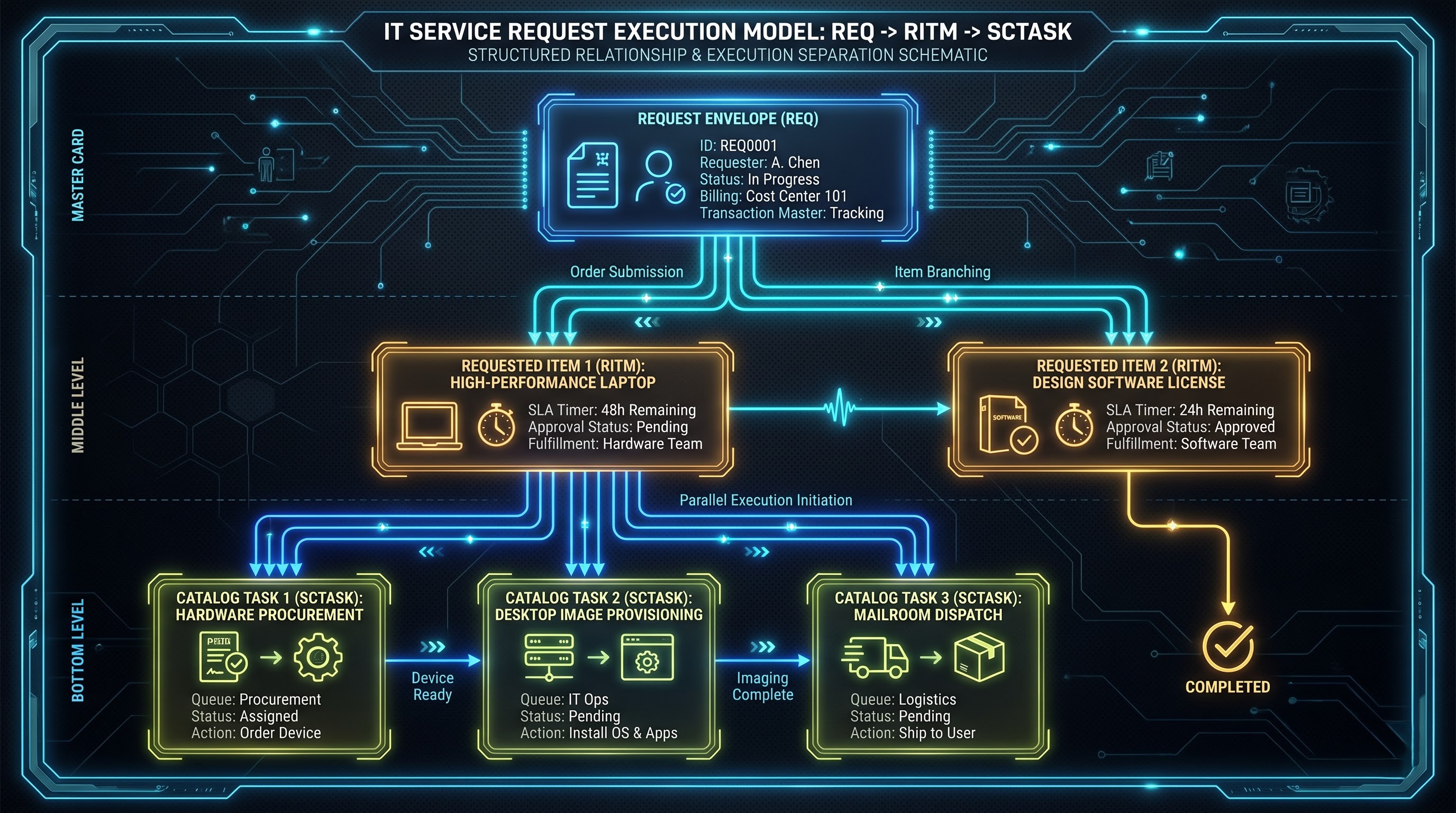
To comprehend how ServiceNow has been fulfilling its entire process of request fulfillment, it is necessary to be aware of the basic architecture of the tool. Unlike its competitors in the area of service request management tools, ServiceNow has a different view on the service request. ServiceNow does not treat the request as an isolated unit as it builds a three-level system of requests that implies an input from users and execution of complicated things in the background.
Request (REQ)
The Request in the administration sector is located at the top of the hierarchy. Using this request enables transferring the process of making a transaction. When the user goes to the Service Portal and makes an order of something like packages for new employees containing a computer, an external monitor, needed software, and a badge for access to the building, only REQ number will be used while making the order.
The RITM (Requested Item)
Each Request contains one or multiple Requested Items, which are designated through RITMs. An RITM refers to a single item being ordered from the catalogue. In one REQ there can be an RITM for hardware (for example, a mobile phone), for software (for example, a design software license) as well as for a physical item (like a parking permit).
As each of the items in the Request is different as far as the procurement needs, vendor relationship, security parameters, and delivery timelines, each RITM also goes through different lifecycle stages, SLAs, and automated processes.
The SCTASK (Catalog Task)
At the aggregate level of objects, we refer to the Catalog Task as SCTASK. SCTASK entails particular actions that must be performed by people and machines for completing the Requested Item.
For instance, if you have ordered an RITM of a high-performing workstation there will be at least three SCATSK activities carried out in parallel or consecutively.
The hardware asset management system is responsible for managing sourcing processes and inventory allocation.
Asset marking and image distribution is performed by desktop support.
Delivery confirmation, shipping, and delivery verification are handled by facilities or mailroom services.
Three-way segregation of tasks results in clear understanding of the process involved. Managers get their approval information at the RITM or REQ level, while technical personnel focus only on their assigned SCTASK queues without considering anything else; an important principle that is stressed in all servicenow administrator training programs.
Customer Experience Improvement: Service Catalogs and Portals
Automation can only be accomplished if certain data is collected, organized, and confirmed. If a worker sends a message saying “I need access to a database,” a service desk employee will have to spend several days clarifying details about required access, environment name, approvals, and business justification in order to provide assistance. ServiceNow saves time by employing Service Portal and Employee Center to eliminate misunderstandings from the very beginning.
Consumer Self-Service
ServiceNow's Employee Center gives employees an integrated and easily navigable interface for submitting requests and accessing information about the services offered by the various parts of the company, such as IT, HR, Workplace Services, Legal Services, and Finance. The user interface is responsive and allows workers to find the necessary information from multiple departments via a global search or simply by righting their query in the search bar. Thanks to the intuitive menu, the application helps with navigation within various departments since it is organized by themes like "Working from the Office," "Devices," and "Software and SaaS Solutions."
Smart Construction of Catalog Items
Catalog items are created through creating Variables and Variable Sets in order to connect the clients with the portals. Variables are the fields used to accept customer input, like type of software chosen from the drop-down menu, or the dates of the access requested.
Using Variable Sets enables transferring repetitive questions such as shipping address reconfirmation, billing dept points of contact, and receiver data into various blocks and sharing them across multiple goods. To enable front-end dynamic processes to function, Catalog Client Scripts and UI Policies are applied to reveal, hide, apply, and clear fields according to user actions.
Automation Implementation: Flow Designer and Workflow Engines
The next step in the delivery process after the request has been prepared correctly is to use Flow Designer, which is a modern engine developed by ServiceNow and replaced all older instruments, making automation more readable and easy to use by people.
Automated Routing and Approval Chaining process
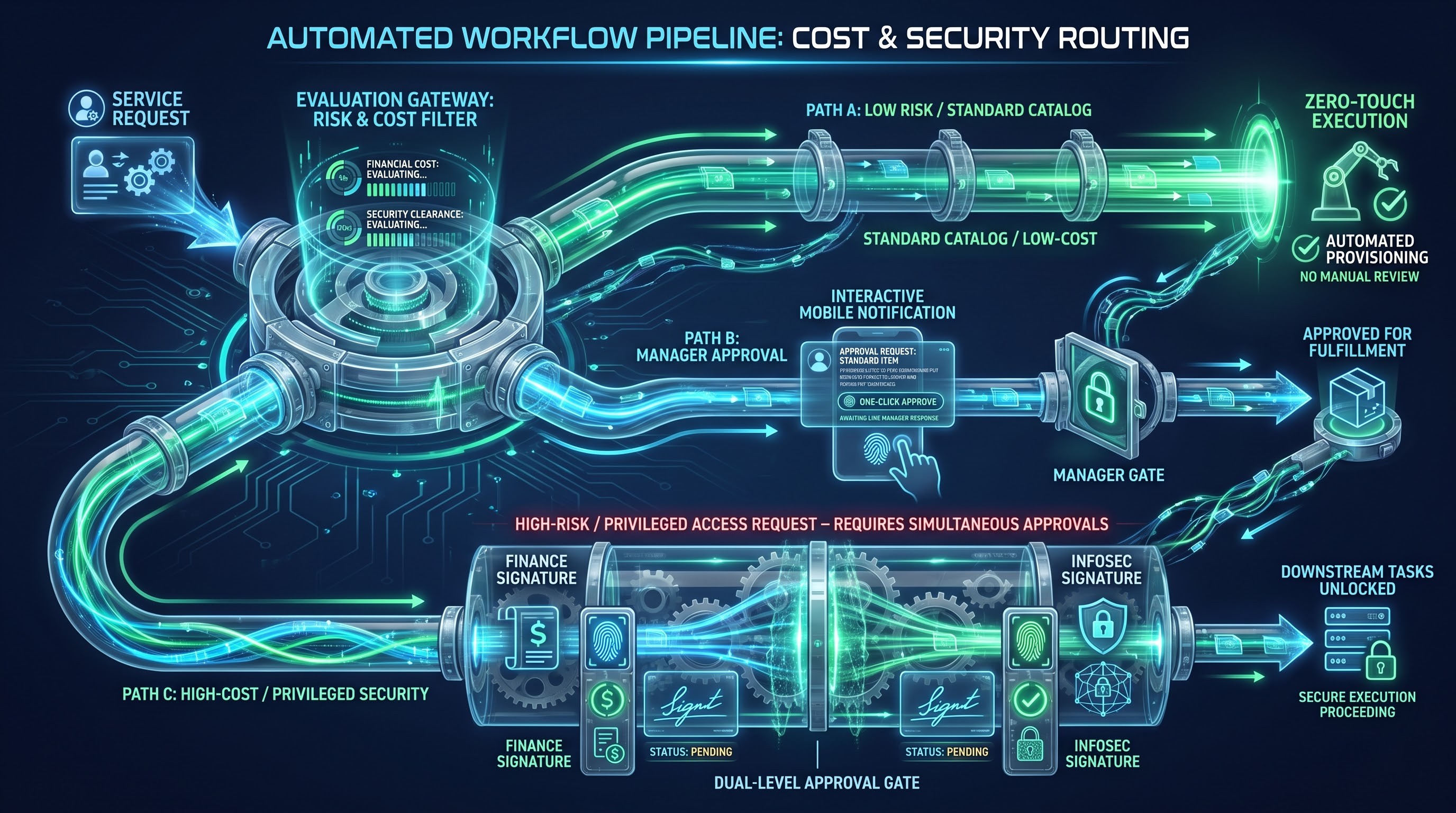
Most service requests get stuck in the phase of approval. If the request requires a manual approval process and is sent as an email, it may remain waiting for a manager’s approval forever if the manager is unavailable.
In Flow Designer, systems for approval operate according to logic defined by certain rules:
Firstly, requests that do not imply any financial or safety risks stop undergoing approval process as they will enter automated processing at this stage.
Secondly, routine requests generate an automatic approval request to be sent to the end user's administrator based on the current hierarchies reflected in the databases connected to Active Directory or HR database.
Thirdly, requests exceeding the financial threshold are subject to two-level approval, as they require signature of both the supervisors and the financial administrators.
Fourthly, requests considered sensitive regarding access to privileged information undergo approval in a dynamic way by obtaining approvals from security and information management departments.
It should be emphasized that ServiceNow has changed the system of approvals by introducing notifications for the approvers through different means, such as actionable emails, push notifications through the ServiceNow application, and messages in chats in Microsoft Teams and Slack. In this way, the manager can approve or disapprove of something in the click of a button rather than wait for days.
The function of carrying out assigned tasks and managing multiple processes involves the management of the expectations of the different processes by the Flow Designer. The skills needed by someone who wishes to learn servicenow administration include study about parallel process flows, approvals through multiple channels, and condition triggers.
Task Orchestration and Parallel Processing
For instance, let us imagine the HR unit has a procedure for recruiting new employees in the following way:
- The IT unit must supply the new employee with devices.
- The premises unit has to provide the employee with a badge.
- The telecom unit needs to provide the person just hired with a work number.
All these tasks can be performed simultaneously since they do not depend on one another. Nevertheless, the Flow Designer will prevent the downstream tasks from starting until the previous operations are accomplished if the new task cannot be accomplished without completing previous assignments.
Zero-Touch Request Fulfillment via System Integration
The concept of Zero-Touch Request Fulfillment signifies the highest level of request development, meaning that service requests are fulfilled without human involvement in any manner. All of this is achieved through ServiceNow technology with the help of ServiceNow Integration Hub used within the framework of ServiceNow Flow Designer, which transforms ServiceNow into a serious solution beyond mere ticketing stages.
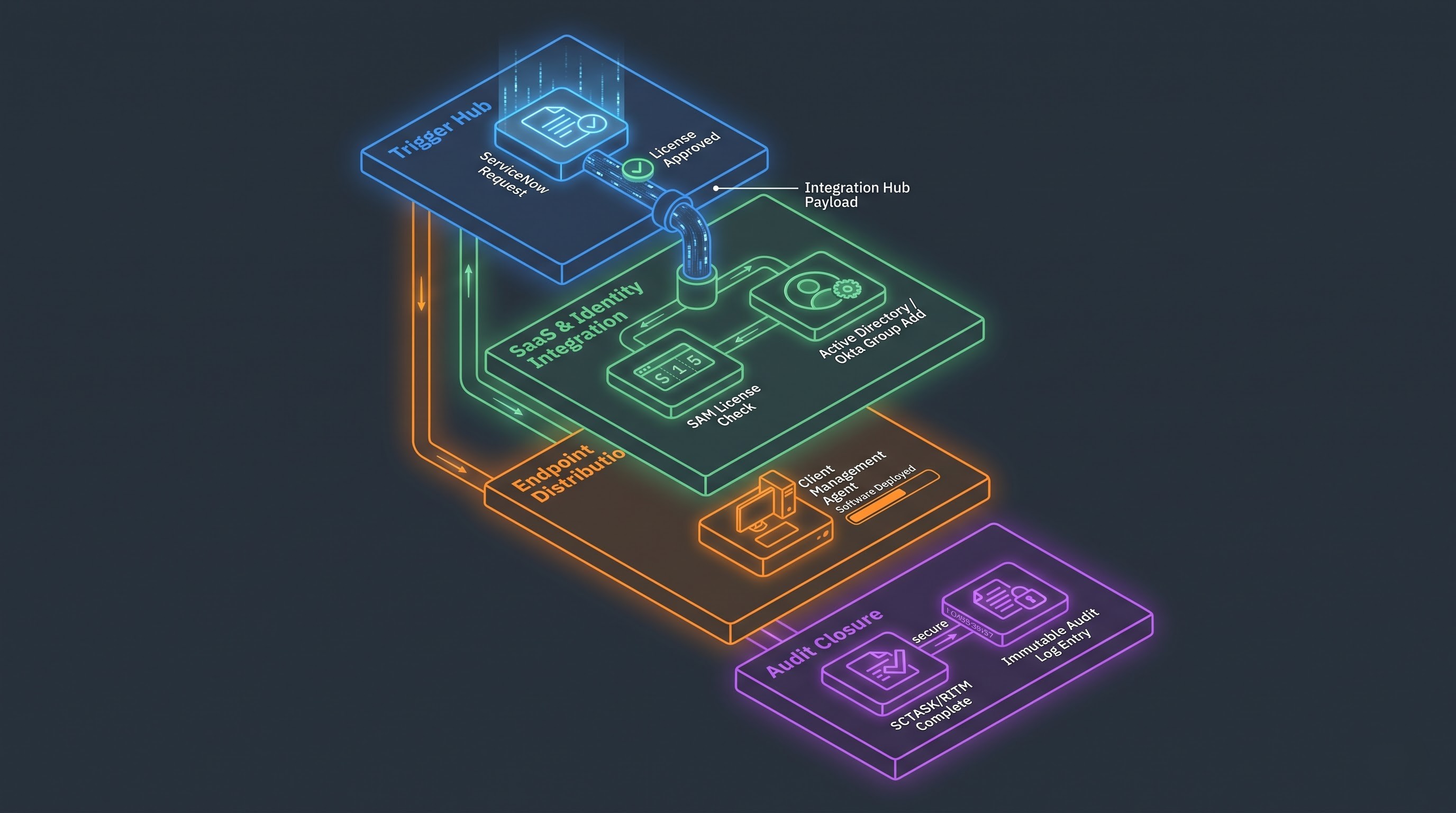
Integration Hub includes established spokes that establish ServiceNow connections with any SaaS platforms, infrastructure providers, directories, and any on-premises company system.
Fully Automated Identity and Access Management
One of the most popular types of requests processed in IT service management is user provisioning. In the manual management process, systems administrators need to find directories, allocate permission to users, and carry out several verifications through the directory user console by pushing various buttons.
In an automated ServiceNow manner:
An employee can seek permission to access CRM systems or get connected with the project management personnel.
The catalog form gathers information about the motivation behind the request; the official position of the user, etc.
After the System Owner approves the request through mobile notifications, the Flow Designer continues the automatic Integration Hub process.
Thus, ServiceNow interacts with the Identity Provider (IDP) such as Entra Identity or Okta, adds the user's account to the proper security group, records the conducted actions, and makes Request Item complete.
The user can get inside the app in several minutes and all the actions are traceable thanks to the audit trail.
Automated Software Provisioning
License compliance is automated as well. The process is almost the same, with the only difference being that integration is done with other software such as ServiceNow Software Asset Management (SAM) and unified endpoint management systems.
Employees can select a specific developer tool from the catalog to proceed.
The availability of licenses will be checked by ServiceNow, and upon discovering any unallocated licenses, it will make a reservation. However, if there are no free licenses, it will trigger a necessitated procurement process.
After receiving the consent from management, ServiceNow will relay the information to client management software regarding the requirement of software distribution to an employee’s PC.
Software installation will be carried out by endpoint management application automatically without any input from the employee, and it will communicate that implementation has been completed successfully through ServiceNow.
Improving the Complete Process through Conversational AI Application and Virtual Agents
Although self-service portals help people order what they need, the trend nowadays is towards conversational self-service. ServiceNow Virtual Agent includes natural language understanding and generative AI.
Natural speech ordering in context
Instead of searching a catalog of needed tools, an employee can communicate through chat in one of the convenient chats (for instance, Microsoft Teams) and send a request like “Give me access to the VPN London.”
The method by which the Virtual Agent works includes interpreting the intent, obtaining the required information from the ServiceNow configuration management database (CMDB) and catalog repositories, identifying the suitable catalog item, and gathering all needed details by having a conversation with the employee.The nature of messages such as "How to configure my email on phone?" and "What is our replacement policy for monitors?" is about finding the information.
Virtual Agent uses contextual knowledge in order to offer information, directions, and other relevant information in the chat. In this case, if the employee sees that he has enough information to solve the problem, then there is no need for putting in a request. However, if human assistance is needed, the agent passes all required information to the human in the form of RITM.
Evaluation of Actionable Performance: Metrics and Oversight
Although automating service requests made by employees brings a tremendous operational advantage, maintaining significant value in the long term relies on strong metrics, analytical performance, and governance models. ServiceNow provides built-in tools for reports and service level management that enhance operational intelligence.
Mean Time to Fulfill (MTTF)
The Mean Time to Fulfill (MTTF) is different from Mean Time to Resolution (MTTR), as MTTF calculates the duration of time from making the service request till the delivery of the service to the employee. Companies analyze MTTF by categories to discover bottlenecks of operations. A high MTTF in a software distribution indicates a delay from managers approving requests, revealing precise points where automation or integration solution can give maximum returns.
First Touch and Zero Touch Ratios
The metric of zero-touch technology ratio compared to the total number of service requests fulfilled with some level of manual involvement is crucial to assess the progress of digital transformation. Leading IT companies try to achieve at least 80% automation rate for service requests that are frequently made, such as password resetting, and access to numerous cloud applications.
SLA Management Process
The SLA system in ServiceNow offers precise service agreements between service providers and end users. The system calculates SLA responses automatically based on business hours, holidays, and priorities. If the service team fails to meet SLA requirements for any Catalog Task, ServiceNow notifies the team leader or reassigns the task to other queues so that no request left unanswered.
Avoiding the Black Hole Approach to Request Management
Traditional request management may be referred to as a black hole: when the employee has sent an email but is not informed about the request anymore until it is completed or simply forgotten.
ServiceNow offers proactive notifications via multiple channels:
- The system sends updates to the users through automated emails and notifications in the portal when their requests pass various stages;
- The progress display in the employee center shows the status of the request at all times making all involved parties accountable;
- Employees can evaluate the performance of the service provider by providing feedback via CSAT surveys which prevents possible issues with the catalog and service delivery.
Strategic Recommendations for Sustainable Automation
Effective automation of request management processes requires companies to have proper architecture, governance, and maintenance systems. This can be achieved by having an efficient operation that starts with training internal staff through servicenow admin training such that system administrators can create resilient workflows, dynamic forms, and scalable integration pipelines. Companies that leverage their systems' functionalities adopt some proven best practices.
Do not try to digitize and automate all company processes at the same time. Instead, use past service desk performance data to determine the most frequently processed and straightforward requests, which are usually resets of passwords, provision of hardware, installation of software, and adding individuals to mailing lists. Early automation of such requests can drive the needed momentum in various departments while demonstrating the effectiveness of the solutions used.
Eliminate unnecessary approval stages that are still there because it’s always been done.
Challenge the need for getting approval on actual hardware items.
Unify different variations of similar items from different departments into one category of items that have the same logic behind their management.
Keep the Service Catalog alive and current
The successful Service Catalog must never be considered a “one-and-for-all” kind of project. With the development of technology, the changes in the ways of doing business and the specifics of the equipment, a company needs to ensure that there is responsibility assigned to each of the Service Catalog categories. Audits of the Catalog should be done to ensure that all the outdated information is removed, all the points are clear, and all the integration points function properly and match the latest API news.
Human resources teams apply the REQ/RITM/SCTASK structure in processing onboarding, approvals of benefits, taking leave applications, and requesting relocations.
The facilities team utilizes the catalog's workflows to manage desk moves, physical maintenance, key card distribution, and supplying.
Legal and contract procurement departments use automated fulfilment chains for signing non-disclosure agreement, checking contractual documents, and vendor onboarding.
Common and standardized fulfillment and intake policy boosts the internal servicing of the organization.
Steps Ahead
ServiceNow Request Fulfillment improves communication between the needs of the workforce and processing in the back office. ServiceNow transforms inefficient manual processes into a standardized automatic process, thus helping reduce the amount of time spent on administration and enhancing the efficiency of deliveries.
Thanks to the use of self-service portals, structured catalog forms, Flow Designer, Integration Hub solutions, as well as conversational AI, it is possible not only to handle tickets but also to provide a more flexible and progressive work environment for the employees.