
Strategic CI/CD Modernization: Migrating from Jenkins and GitHub Actions to Azure DevOps
Last updated on Sep 19, 2026

Organizations engaged in enterprise engineering frequently have to deal with a fragmented landscape of continuous integration and continuous delivery. In maturity stages of corporate development, companies face an issue with coordination of delivery pipelines. The resulting dilemma forms disarray from using legacy Jenkins controllers being resource-intensive on the one hand and the emergence of incoherent GitHub Actions running organically on the other hand.
Though each software application functions independently, deployment across multiple disparate systems has resulted in operational drag, compliance gaps, unpredictability of licensing costs, and fragmented audit trails. The integration of a lot of this intricate ecosystem with Azure DevOps Pipelines marks the start of organizational control, centralized policy implementation, and full integration with Azure assets. Engineering teams aiming to harness these features and fill the vacuum left by the platform can benefit from taking a systematic azure devops course online before entering the world of large-scale pipeline conversions.
Migrating several mission-critical pipelines of an organization cannot be accomplished as easily as rephrasing the text. Indeed, Jenkins is quite complicated because of its reliance on advanced Groovy scripting language, plugins, and the agent-controller model it uses. As for GitHub Actions, it focuses on the declarative framework, making it hard to transfer job definitions.
It should be noted that Azure DevOps Pipelines has an entirely different approach; it has a strict execution framework utilizing stages, jobs, tasks, gates, service connections, templates, etc.
Thus, a simple lift-and-shift of pipeline definitions would lead to regressions, security problems, and missed deadlines, which is why it is so essential to reach a deep understanding of the key architectural discrepancies such as possible issues and migrations occurring during this process.
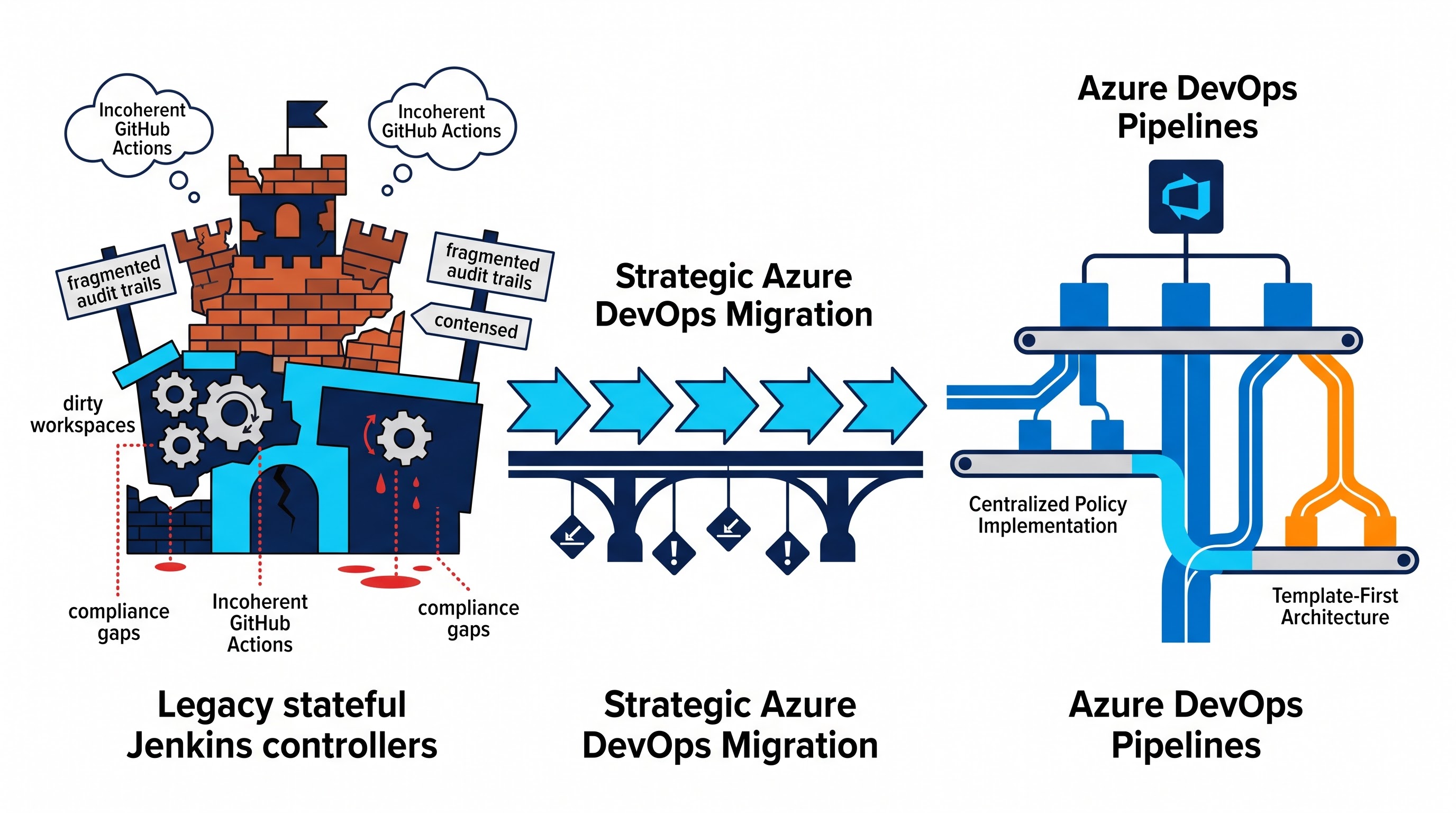
Architectural Models: Examining the Various Execution Paradigms
It is important to have knowledge regarding how each orchestration engine obtains knowledge regarding execution topology before planning for either an automated or manual migration.
Jenkins: The Stateful, Procedural Optional Laborer
Jenkins carries out build workflows through either previous Freestyle configurations or scripted or declarative Jenkinsfiles processed by a Java Virtual Machine in control of the controller.
State and Agent Lifecycle: Jenkins agents have been known to exist as long-term virtual machines or bare-metal environments in which the workspace folders collect state over time. Even though Kubernetes-based agents may be temporary, plenty of Jenkins footprints using stateful nodes that are on operating systems having several dependent persons.
Model of Extensibility: Jenkins gives users the internal Java Virtual Machine that it uses for plugins. The build scripts written in Groovy enable users to manipulate the internal system, run unknown Java class files, and access pipeline stages that depend on plugins provided for free by the community.
Secret and Credential: Jenkins has a single centralized credential store that is operated through its administrator interface by which all secrets are inserted into the environment.
GitHub Actions: The Ecosystem of Decentralization and Event Handling
In GitHub Actions, workflows are treated as priority objects, incorporated into the application’s repository.
Event-Driven Model: Workflows are executed as a result of several webhooks related to repositories, like push of branches and pull requests, comments from users and deployment updates.
Flexibility Model: Unlike conventional applications running on Java Server, GitHub Actions have been developed using containers based on Docker technology.
Logic Model: Using the particular functionality of a workflow, it can consist of a variety of jobs. Each job can contain multiple stages during which it either runs in a virtual machine that is being controlled by the client or on an external platform.
Azure DevOps Pipeline: The Governed and Hierarchical Enterprise Engine
Azure DataOps is multidisciplinary and hosted in a hierarchical form; PipeLines contain Stages, Stages contain Jobs, and Jobs contain Steps.
Hierarchical Structure: Stages form the macro-phases of the delivery (such as build, integration testing, staging, production deployment), wherein each takes place in the context of bounded.
Separation of governance and implementation: Azure DevOps creates a separation between operations dealing with sensitive issues from the coding repository. Service connections handle cloud authentication outside the source control; variable groups make possible centralized secret management referring to the Azure Key Vault; and environments implement the necessity of checks for approvals, deployment at working hours, and automated health checks with no input modifications of the YAML pipeline definition.
Template-first architecture: Instead of using the non-typed execution of actions, Azure DevOps allows for the pipeline templating coupled with strict compile-time checks of the input parameters.
Major Migration Challenges
While performing migrations, teams encounter different kinds of errors due to architectural discrepancies. Seizing these threats prevents delays in the delivery of migrated pipelines.
Pitfall 1: Treating Migration as Translation
One of the most common mistakes to be made during migration is considering the migration of a pipeline to be equivalent to the translation of text strings. It is rare that Jenkins and GitHub Actions workflows have a one-to-one correspondence with Azure DevOps syntax.
Groovy Misconceptions: In Jenkins, engineers typically inject elements of procedural programming—complex control structures, non-standard object models, or even raw disk access—into pipeline scripts. When trying to bring it over to Azure DevOps, engineers get comfortable dumping lengthy bash or PowerShell scripts into single pipeline steps, which ultimately results in pipeline non-scannability, lost granular reporting, ignored step retries, When using Azure DevOps there are many instances in which the only thing a business accomplishes when doing so is to end up with an unmaintainable “shell script” container. To prevent their modern pipelines from becoming unmanageable shell scripts, development teams are often microsoft azure devops training courses, focusing on the use of declarative YAML authoring and native task development instead of procedural scripts.
GitHub Actions Context Issues: The GitHub Actions framework utilizes dynamic repository expressions and certain contexts that do not exist in Azure DevOps, so carrying them over directly may lead to incorrect evaluations when running a pipeline.
Pitfall 2: Adding Plugin Overload with Untested Marketplace Plugins
When the engineering teams need a specific feature that they can’t find with a Jenkins plugin or GitHub Action, they usually decide to download an outside plugin that they found on the Azure DevOps Marketplace.
Security Surface Increase: The plugins that have been downloaded from the outside will be running with pipeline agent permissions. Thus, using these plugins increases the level of supply chain risk.
Maintenance Neglect: Most of the marketplace tasks have been developed by individuals from the community and are not updated after the refreshment of APIs. That means using the unverified tasks repeats the instability of the plugins that caused the teams to abandon the use of Jenkins.
Native Option: Azure DevOps allows using so many native tasks for scripting, installing tools, publishing artifacts, working with containers and launching things in the cloud.
Pitfall 3: Not Isolating Secrets and Not Understanding Variable Life
The security frameworks of the above-mentioned platforms are completely different.
Jenkins leaks secrets: The environment variables in Jenkins can be leaked into logs as long as your child shell process prints its environment.
GitHub Actions goes with environment secrets: GitHub eats secrets at the repo, organization, or the environment levels and provides them on an opt-in basis for certain steps.
Azure DevOps variable groups and secret masking: Azure DevOps masks secrets that are located in variable groups or coming from Azure Key Vault in the logs of the pipeline. However, using a secret variable in a nested template can lead to an empty pipeline invocation if you are not mapping your variable in the task. Misunderstanding the differences between compile-time macros, runtime variables and environmental variables makes your pipeline fail silently.
Pitfall 4: The Problem of Incorrectly Set Up Temporary Runners and Absence of Build Caches
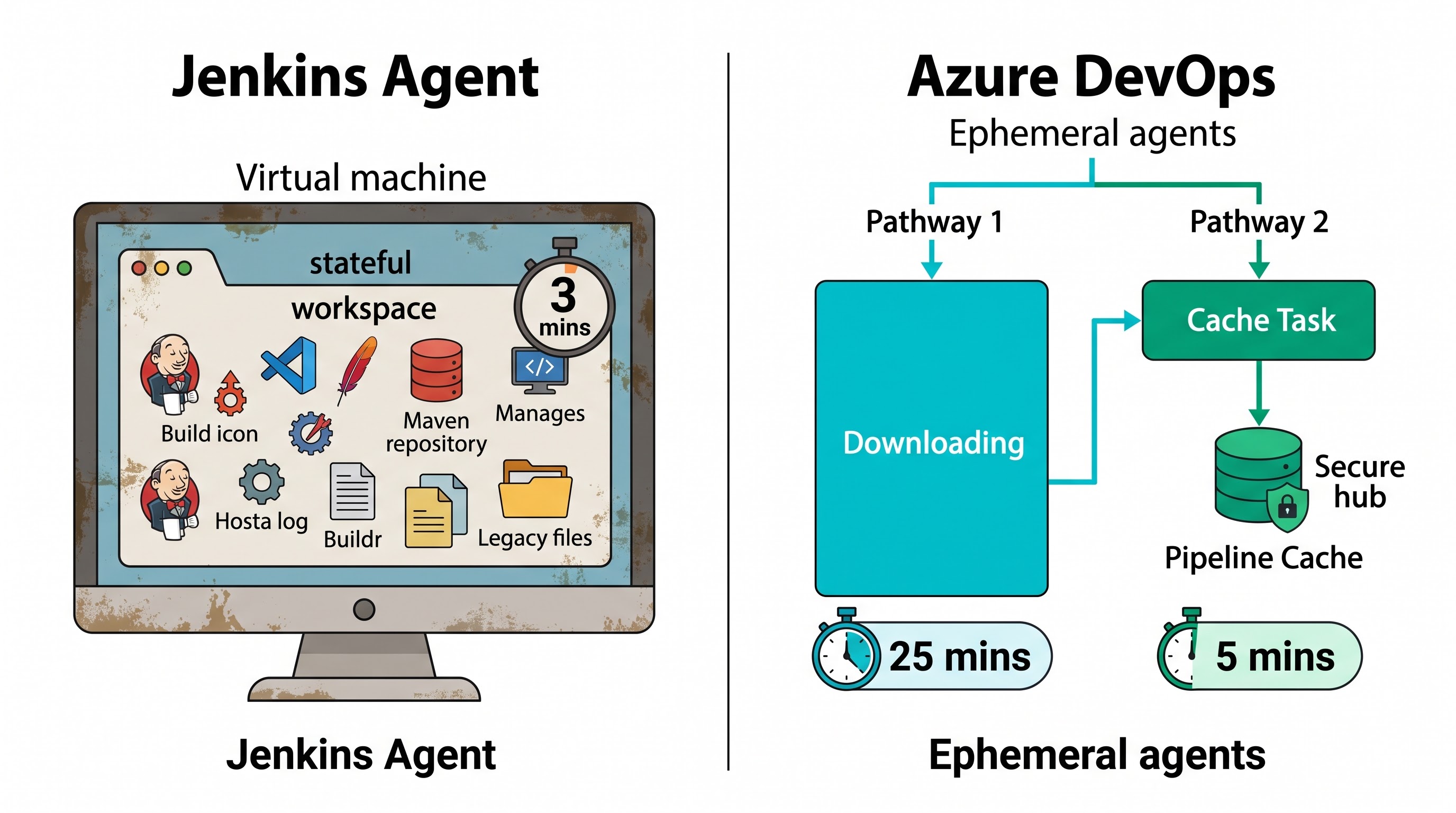
The presence of dirty workspaces in Jenkins environments often hides performance problems: builds of the project, local Maven repositories, Docker layer caches, and modules stay on a long-running VM making further builds happen extremely fast.
The Cold Start Surprise: Using Microsoft Azure Pipelines results in a completely new environment for every build. Because of this, the teams suddenly see the move of the build time from 3 minutes on Jenkins to 25 minutes on Azure DevOps because the pipeline does downloading of the runtimes, installing of dependencies, and pulling of the image at every run.
Unsuccessful Caching of Pipeline Tasks: Azure DevOps has caching tasks in its pipelines, but if the cache key is not configured properly or one tries to cache the directory having an absolute path to the file, the probabilities of cache misses and invalidation will be pretty high along with the prolongation of the execution time of the pipeline.
Pitfall 5: Monolithic Pipelines as opposed to Split Environments and Deployment Gates
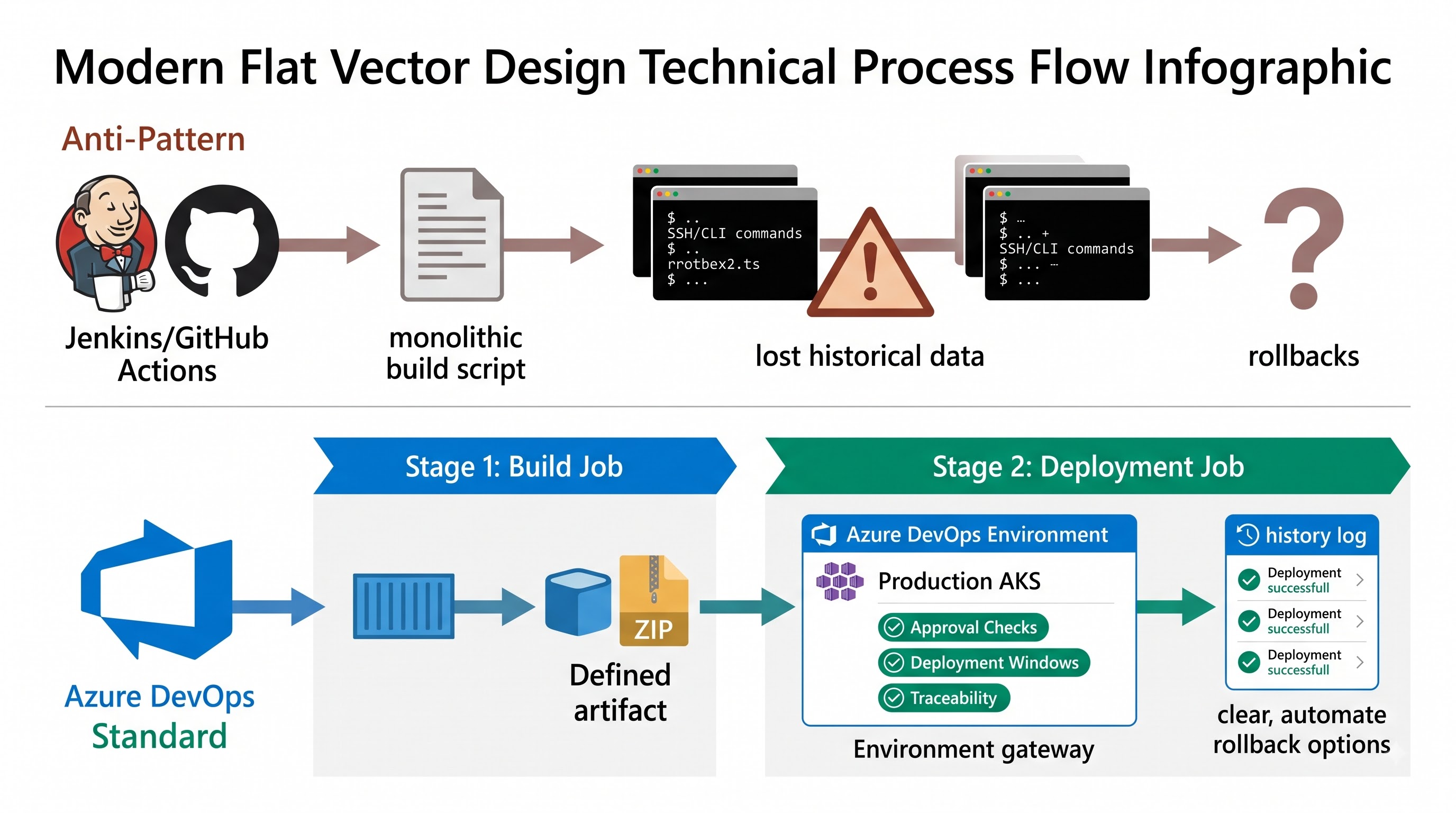
Continuous deployment management is regularly performed by Jenkins and GitHub Actions executing shell scripts conditionally on the designated infrastructure at the conclusion of a build script.
Avoiding Azure DevOps Environments: Teams that are moving towards Azure DevOps frequently use this method of creating a single build job that ends with an SSH command or cloud CLI deployment without using Azure DevOps Environment operational features.
Results in practice: By applying this method the engineers cannot track deployment history, have the checkpoints for approval, tracing back to work items and commits, and cannot set up automated rollback features. The process becomes obscure both for engineering teams and for governance teams who lose sight of artifacts located on various infrastructures.
Pitfall 6: Underestimating Agent Concurrency, Pool Sizing, and Queue Bottlenecks
Enterprise Jenkins systems commonly achieve high levels of concurrency using large internal clusters of virtual machines spread across the data center. GitHub Actions provides large pools of runners that are hosted based on the organization’s subscription level.
Concurrency Limitations: The pricing model of Azure DevOps relies on the use of parallel jobs (either Microsoft-hosted or self-hosted). Migrating a large number of repositories without taking into account the maximum parallel job usage required results in the clogging of the pipeline during the peak working hours. In this way, developers may spend hours waiting for the pull request builds to complete even with minimal workload.
Architectural Mapping: Converting Ideas into Azure DevOps
To create well-functioning pipelines, engineers on the platform must map concepts, models and methods of action across all three systems.
Structural Hierarchies
Jenkins: Use of folder, multi-branch pipeline/job, stage, step.
GitHub Actions: Use of workflow, job, step (action/ run).
Azure DevOps: Use of pipeline, stage, job (agent job, deployment job or serverless job), step (task or script).
A stage layer is especially important for Azure DevOps. The stage refers to a unique environment having its unique requirements, pool of agents and security policies. The existence of multi-stage pipelines facilitates the segmentation of Continuous Integration and Continuous Delivery.
Model for Reusability
Jenkins: Implements Jenkins Shared Libraries written using Groovy and are dynamically loaded from a Git.
GitHub Actions: Implements Composite Actions that combines a list of steps to create a single reusable action, and Reusable Workflows that are used as jobs.
Azure DevOps: Implements YAML Templates
Step and Job Templates: integrate repeatable logic, jobs, or procedures into a current pipeline execution plan.
Template Extends Pattern: uses an inversion-of-control architecture where application repositories do not constitute pipeline stages but communicate metadata (such as application type, installed version, and testing commands) to a centrally controlled platform template that provides a needed definition of the build and deployment sequence.
Infrastructure Authentication
Jenkins: is based on the performance of manually configured credentials appearing in the controller database (SSH keys, username/password combinations, API tokens).
GitHub Actions: relies on the secrets of repositories against OpenID Connect (OIDC) federation with clouds due to short-lived tokens.
Azure DevOps: has its Service Connections that represent centralized project-level constructions forming secure connections to external platforms (Azure, AWS, GCP, Kubernetes clusters, Docker registries). Service connections in Azure DevOps enable the use of Workload Identity Federation (OIDC), negating the necessity to store long-lived service principal secrets or management certificates in the system.
Secrets and Configuration Data
Jenkins: The credentials plugin in conjunction with environment variables and configuration binding.
GitHub Actions: Secrets and Variables, as part of Organization and Repository secrets.
Azure DevOps: Variable Groups and Secure Files. Variable Groups collect either built-in encrypted data within the Azure DevOps environment or make connections in Azure Key Vault. The secrets are obtained this way at runtime, which is the reason why credential rotations in Azure Key Vault are automatically applied and there is no need to implement any changes in the corresponding pipeline.
Enterprise Migration Patterns
The process of developing an enterprise’s delivery footprint is one that must be executed systematically and strategically. The migration patterns described below will ensure stability, security, and effectiveness.
Pattern 1: Strangling Fig Pipeline Migration
Implementing a “big bang” delivery method across an entire engineering team is fraught with operational risk. The Strangler Fig pattern offers a gradual, parallel transition strategy.
Dual Running: Create an Azure DevOps pipeline in YAML to run in parallel with the existing Jenkinsfile or Github Actions pipeline in the application repository.
Non-Invasive Testing: Configure the Azure DevOps pipeline to trigger on repositories, pull requests, or commit events, and not on deployment environments or as a branch policy.
Parity Testing Use data from both platforms to compare build artefacts hash, code coverage and testing results.
Authoritative Cutover When you are satisfied that the Azure DevOps pipeline is stable, change the repository branch settings so that Azure DevOps checks are preemptive and Jenkins or Github Actions triggers are disabled.
Shutdown: Finally, shutdown the old configuration files and unnecessary agents / GitHub runners of Jenkins.
Pattern 2: The Template Chassis (Control Inversion)
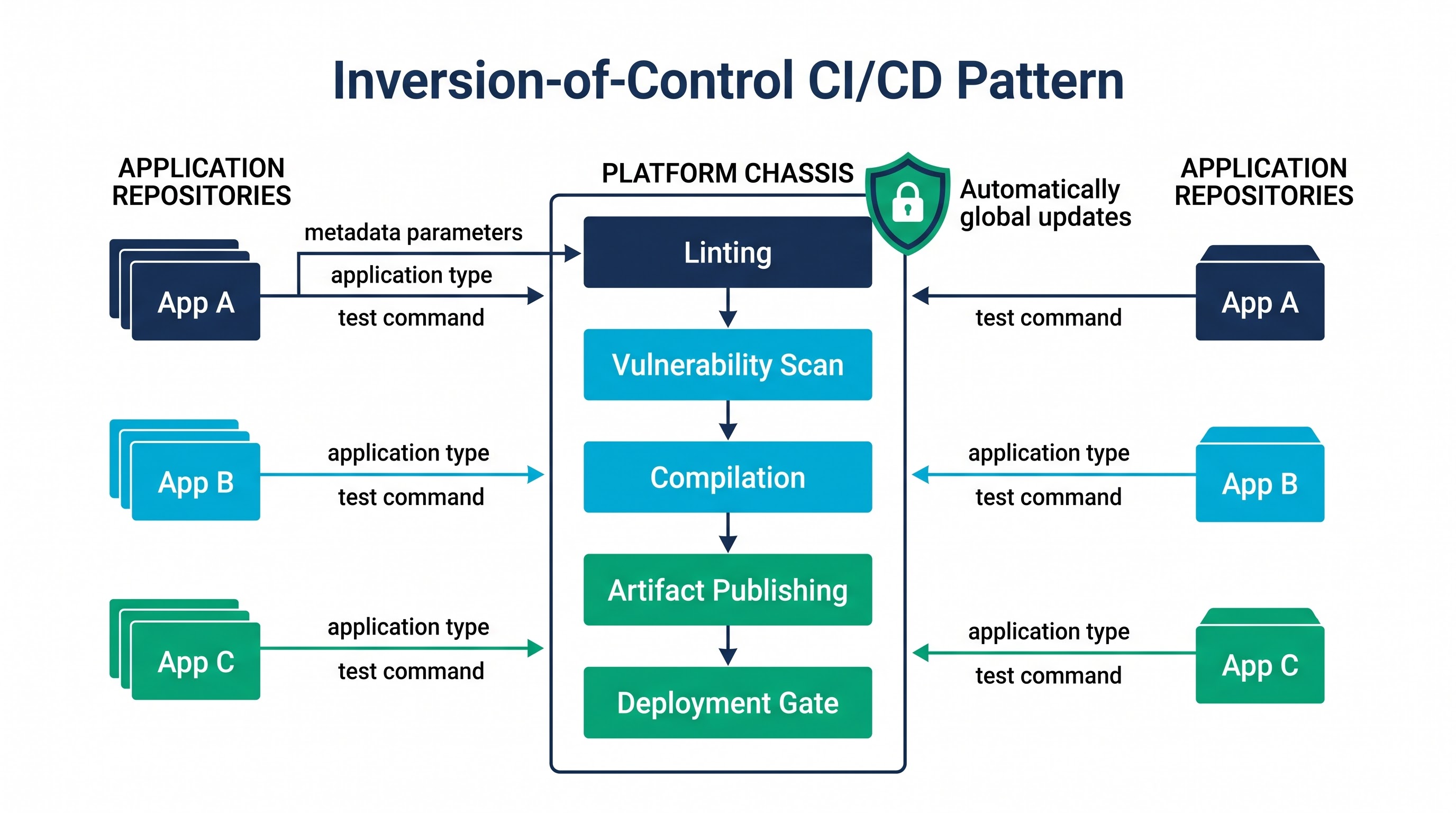
Enterprise platform engineering teams might consider a repository of templates to keep custom pipeline logic from getting out of control.
Central Repository for Platforms Create a separate Git repo for the platform-pipeline-templates.
The Extends Pattern: Enforce a requirement on application teams to produce minimal pipeline definitions that are extensions to the platform chassis template. The chassis specifies the required sequence of operations in terms of static code analysis, vulnerability scans, compilation, automated testing, artifact publishing, and execution of deployment gates.
Parameterization: Application teams provide only declarative parameters regarding the application runtime, tests to be run, and environments where the deployments are going to be done.
Security Enforcement: Platform teams ensure that these templates are used by implementing the necessary Azure DevOps pipeline permissions, as well as by utilizing some branch policies. In case the standards for security scanning have evolved (for example, regarding the requirement for software bill of materials), Template updates done by platform teams are automatically reflected in all the hundreds of pipelines utilized by the application teams without any involvement from the latter. Achieving this degree of control over the processes calls for specific architectural knowledge that front-end engineers usually acquire with the help of comprehensive azure devops online training for enterprise orchestration.
Pattern 3: The Hybrid Agent Framework
When transitioning away from Jenkins, one important aspect to consider is the problem of legacy pipelines that require access to particular networks or devices, or need to run tasks for longer than the time limitations of public cloud services. On the other hand, if one deploys completely in-house infrastructure still adds to the management duties of Jenkins.
The solution consists of a multi-layered agent architecture:
Traditional Builds on Temporary Agents: Use Microsoft provided agents to perform standard builds for microservices, linting, unit tests, and creating containers. This allows for Microsoft to take care of system updates, OS maintenance, and the scaling of the infrastructure.
Self-Hosted Container Pools: For situations when private networks need to be worked with (e.g. accessing database, private repositories, artifact storage), use Azure virtual machine scale sets configured as a self-hosted pool of Azure DevOps agents. This can include autoscaling down to zero instances in non-working hours, which helps to apply reasonable spending limits.
Temporary Kubernetes Agents: For very fast scaling and resource isolation deploy Azure DevOps agents within the company’s Azure Kubernetes cluster, using KEDA.
Pattern 4: Workload Identity Federation in Cloud Authentication
It is common for legacy systems to keep the cloud provider's credentials permanently stored in their credential databases (like AWS keys or Azure Service Principal client secrets). Credentials might lapse unexpectedly, disrupt workflows, and create significant security concerns in case of unauthorized disclosure.
Azure DevOps migration includes:
Create Service Connections that will use Azure Workload Identity Federation Create Managed Identities
OIDC handshake: When the pipeline runs, the Azure DevOps agent requests an OpenID Connect token from the Azure DevOps Authentication Server.
Verification of Target Cloud Cloud Provider (Azure , AWS or GCP) verifies the OIDC token via their Authentication Server and returns a temporary scoped access token.
Having Zero Secrets: No credentials are stored in Azure DevOps variable groups or repositories or agent memory.
Synthesis: The Unified Enterprise Delivery Plane
Migrating from different Jenkins handled production roles and independent GitHub Actions workflows to Azure DevOps Pipelines is mainly an architectural modernization project. It facilitates the transition of organization from the segmented, manually configured, and loosely governed CI/CD scripts to the integrated policy-driven software delivery engine.
By sidestepping some common traps of direct 1:1 translation, unauthorized plugins picked from the market, dirty dependencies, and leaking credential scopes, the engineering teams can ensure building the enterprise delivery ecosystem that is secure, cost-effective, and highly scalable. Implementing such techniques as the Strangler Fig principle, template-first technique, ephemeral auto-scaling agents, and federated workload identity ensures that the resulting Azure DevOps implementation will lead to both good governance and quick return on investment.
Speed-Up Your CI/CD Transition
The transformation of the company’s pipeline calls for upgrading engineering teams' knowledge of cloud automation, environment safety, and multi-tiered YAML designing. Discover the specialized azure devops online course provided by OnlineITGuru in order to enable your delivery teams to become familiar with the needed skills in implementing the solution.