
Tableau 2026 vs Previous Versions: What’s Changed and Why It Matters?
Last updated on Dec 24, 2025

Within the fast-moving environment of data business intelligence, the advent of Tableau 2026 is one of the key milestones in the interaction, analysis, and visualization of data by organizations. With the further development of an environment where artificial intelligence and real-time decision-making become a reality, Tableau is no longer a visualization tool but an entire AI-based analytics platform. It is not just a rollout of the previous version as it is a paradigm shift in the philosophy of VizQL and is intended to ensure that data insights become accessible to all, including top-level executives and low-level workers.
Tableau 2026 updates will be the foundation of this change, and a more integrated experience will be provided in Desktop, Cloud, and Server setups.
What were the new functions of Tableau 2026?
Tableau 2026 has a series of disruptive features which are aimed at democratizing data. The most notable one is that Tableau Pulse is fully integrated into the main workflow. Whereas the previous versions of Pulse were their own experiences, the 2026 edition enables authors to add Pulse measurements to any dashboard with greater customization, including rounded corners, and adaptive layouts. This makes sure that key performance indicators (KPIs) will always remain in the limelight so that it will show users a newsfeed-like format of MIS that informs users of what changed and why.
The other significant feature is the VizQL Data Service. The new service enables developers to access Tableau data beyond the workbook framework. It allows integrating the power of Calculation engine of Tableau into applications, websites, and even third-party productivity apps in the form of Slack and Microsoft Teams, by letting it query data sources without needing a head. Also, Table Viz Extensions are also expanded in the 2026 release, enabling more liberal, Excel-like interactions with tables in a visualization, such as being able to rearrange columns and modify aliases on-the-fly. All these features are meant to decrease the distance between data ready preparation and insight delivery.
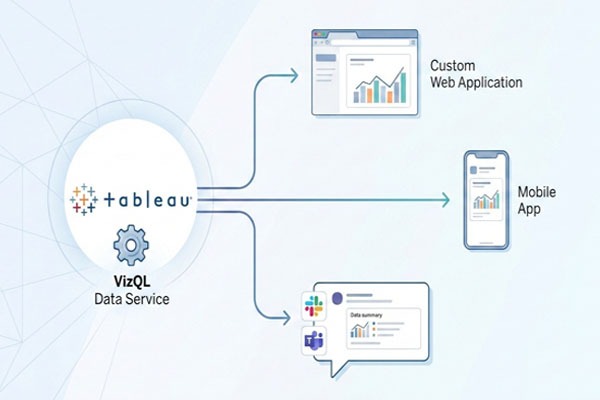
Comparison of the versions of Tableau shows that older versions were very much oriented towards the drag and drop desktop experience, however, 2026 is designed in the cloud first, AI everywhere mindset.
What is the advantage of Tableau 2026 over previous versions?
Tableau 2026 performance has experienced a radical change in strategy. It has been used in earlier iterations where users had to heavily depend on the use of "View Acceleration" and individual specific Data Acceleration APIs to support reduced time of loading. Tableau has however declared that the retirement of these features will occur by mid-2026 and they will be replaced by a more effective, native optimization in the Hyper engine. This is a new technique that enhances the asynchronous fetching of data and caching based on smartness. The 2026 engine does not precalculate whole views but makes the most important visual objects important, giving the user an opportunity to engage with a dashboard with the rest of the data loading in the background.
Also, there is the introduction of Performance Insights Dashboard to site admins which gives a real time perspective of the health of the workbooks. This is in contrast to the performance recordings of the past that were inactive and would only record the performance of a specific visualization or complex calculation, whereas this tool has the ability to actively detect which of these are causing the load times to be slowed down, as well as providing automatic suggestions of what can be done to improve this performance. In the case of organizations with large volumes of data, the 2026 release enhances the performance of the Extract operation, with more sophisticated compression algorithms in the hyper format, saving a huge amount of storage space on Tableau Server and Cloud and still supporting the same light speed of response to queries.
Want to know Advantages of Tableau 2026 by real time industry experts, Enroll for Tableau Online Training
The 2026 release of Tableau is highly biased in terms of the new features, which appears to be focused on the so-called Agentic Analytics, which represents the next stage of automation.
What have been the AI and augmented analytics changes in Tableau 2026?
AI is not a side feature of Tableau anymore; it is the engine, in 2026. Tableau Agent has been completely rebranded and grown out of the former Einstein Copilot. This conversational assistant is now built-in to Tableau Desktop and Prep and allows users to create complex calculations, pivot tables and even propose the most effective types of visualizations with natural language questions. A new layer known as the Semantic Learning has also been introduced which enables the AI to study the business specifics of an organization, and this way the responses that the AI can give are not only mathematically accurate but also relevant to the business.
Moreover, Tableau Pulse now has the option of "Enhanced Q&A" whereby users can pose free form, conversational questions about their metrics. As an illustration, a user can query as, why did our sales in the Midwest go down last Tuesday? and the AI will automatically compute drivers, trends and outliers, giving a natural language summary with a supporting visualization. This is a move towards an Agentic Analytics which implies that Tableau can now actively notify users of anomalies even before they are logged in, which essentially transforms the platform into more of a business partner than a reactive one.
Tableau 2026 transforms the thinking aspect of the Data Model and makes it clear and easily accessible to the common man.

What is the new data connectivity in Tableau 2026?
The 2026 version of data connectivity has developed because of the gap that would occur under private infrastructure and cloud-based analytics. Among the updates that shine out is the addition of the Private Connect to Tableau Cloud. This enables organizations to create a secure, trusted connection to the data stored in AWS and in other private clouds without putting that data in the public internet which meets even the worst IT security concerns. Moreover, the Tableau Model Context Protocol (MCP) is also presented to establish the communication process between the source of data and analytics layer more effectively, keeping the metadata intact and using it more efficiently.
A redesigned interface View Data Model is also provided in the 2026 release. In previous versions, the end-users might be in the dark, regarding the relationships between the tables of a published data source. Analysts can now visualize the relationship model and navigate it more easily with better keyboard controls and support of screen readers, opening up the data structure to all. Connectivity is also improved with a finer grained control of Extract Refresh Permissions where the owner of the data can control the refresh permissions of more specific assets without providing access to full administrative privileges thus simplifying the data update process in large scale enterprise settings.
The most obvious increase in Tableau performance is observed when the users engage with the new and quick dashboard objects.
What changes can Tableau 2026 make to dashboard design and user experience?
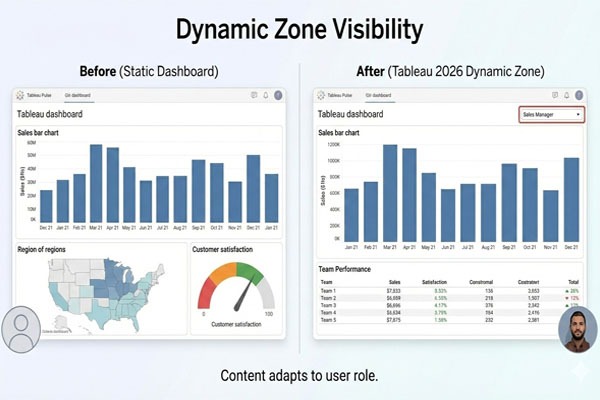
Tableau 2026 is characterized by flexibility and personalization as the user experience. This feature is the maturation of Dynamic Zone Visibility that features in the headline. Although presented in earlier years, the 2026 version offers much easy configuration and creators can conceal or reveal whole parts of a dashboard depending on user privileges, parameter settings or even particular data criteria. The outcome of this is Swiss Army Knife dashboards that can be tailored to the requirements of various departments within one file.
Want to know Tableau Dashboard by real time experts, Enroll today for Tableau Online Classes
The new Custom Themes feature is also useful to designers, as they can have a consistent branding throughout a site. Rather than having to manually change the colors and fonts in each of the workbooks, admins can specify a global theme, which will be applied automatically to any new material. IM has also been streamlined in its user interface (UI) where the Project Tree within the Viz Portal gives a hierarchical listing of assets so that it is far easier to structure and locate workbooks in hectic spaces. In the case of mobile users, a Site Switcher and redesigned Pulse home page on the Tableau Mobile app make sure that insights are within the reach of clicks, and the user interface is built around small-screen displays and touch responsiveness.
Tableau vs. previous versions, is a comparison of the old form of governance (traditional) and the new and decentralized form of governance (Trust Layer).
What security and governance enhancements does Tableau 2026 have?
In 2026, security and governance have undergone a significant revising to meet the demands of the modern and compliant businesses. Tableau Cloud is also now PCI-DSS compliant which is essential to organizations that process sensitive payment and cardholder information. The long-awaited feature on the governance side is the introduction of a Recycle Bin. It also enables users and admins to restore deleted workbooks, data sources and projects within a period of up to 30 days giving the benefit of having a crucial backup in case of unintentional loss of data.
The tightening of the access has also been strengthened by increased control of Personal Access Tokens (PATs). The admins of these sites are now able to set up certain time limits of tokens (between 1-365 days) and who may create them. This granular control minimizes the possibility of orphaned, long-lived credentials. In addition, Tableau 2026 will use a central repository of Semantic Models for business logic. This guarantees that a calculation of a profit would be the same in all the dashboards, despite the dashboards being built by different people, which essentially served as a remedy to the multiple versions of the truth issue that bedeviled the earlier, more fragmented systems.
Tableau analytics improvements emphasize much on assisting users to shift what has occurred to why it occurred without breaking the flow of work.
What are some of the backward compatibility and migration updates that users need to know about?
Migration to Tableau 2026 should also be thought through, in particular, in the context of the obsolescence of previous features. As noted, view acceleration is being deprived and therefore organizations that depended on the view acceleration should review their workbook performances with the new native Hyper optimizations. Speaking of backward compatibility, as much as Tableau 2026 Desktop can still be used to open workbooks produced by older versions, not all the way around- particularly not when the new .hyper format or Agentic functionality is used.
Enroll Tableau Online Classes to gain the practical experience on compatibility and migration Classes
Tableau has simplified the cloud migration process by unveiling Tableau Cloud Migration Technical Readiness Assessment. This tool performs scanning of the current Server environments and detects the possible roadblocks, e.g. unsupported data connections or complex legacy workbooks. Tableau still supports Server to those who are still on-premises, however, the difference between Cloud and Server is growing. The majority of the new AI and Pulse are now Cloud-first or Cloud-only and a transition to Tableau Cloud would be required to ensure organizations can use all the capabilities of the 2026 changes.
Tableau BI upgrades in 2026 will be a transition to a platform not merely a tool, but a strategic asset.
Does Tableau 2026 upgrade make sense to developers and organizations?
The answer to this, at least in most organizations, is a resounding yes, but the answer depends on what positions one holds. To developers, the VizQL Data Service and Table Viz Extensions allow a whole new field of possibilities of custom application integration and rich UI design. The capability to create complicated SQL or Python scripts by means of the Tableau Agent translating natural language can greatly lessen the amount of grunt work in data preparation so that developers may work at the higher-level architecture and strategy.
In the case of the organization, the democratic access to information is a value. The fact that Tableau Pulse can drive the data-driven culture by shifting away from stagnant reports and to the AI-driven newsfeed allows the businesses to provide all the insights needed by each and every individual to make decisions on the spot. Although the migration process is associated with effort, especially when it comes to auditing old dashboards to evaluate their performance, long-term outcomes of enhanced security, automated governance, and proactive insights provided by AI are easily worth the expenses.
Conclusion
In order to take full advantage of these new features and make a seamless transition, most of the professionals are resorting to special purpose training sites such as OnlineITGuru where they can learn the finer aspects of the 2026 release and be well ahead of the game in the competitive BI environment.