
Tableau Bridge: Connecting On-Premises Data to Tableau Cloud
Last updated on Oct 21, 2026
Every business across the globe is embracing cloud business intelligence as a result of increased efficiency because of decreased administration and scalability as well as enabling remote working capability. Tableau Cloud is the cloud business intelligence of Salesforce, which will become the future of all businesses for those who are looking to embrace better business intelligence with zero server administration. For those interested in getting more information on this advanced deployment mode, they can enroll in online tableau course from OnlineITGuru and gain practical experience with the hybrid BI architecture and governance. However, embracing this kind of deployment in mature organizations requires solving the issue of cloud reporting integration with corporate firewall enabled operational data.
But what about integration of cloud-based analytics platform in on-premise network architecture in order to provide dispersed teams with access to critical internal data without penetration of perimeter firewall of corporate network?
Solution of the above-mentioned problem is called Tableau Bridge. Tableau Bridge is a lightweight and secure software proxy which creates an outbound encrypted connection between the perimeter of the corporate network and cloud-based analytics platform.
The Problem of Network Security for Hybrid Clouds and Tableau Bridge
In order to learn about the necessity of using Tableau Bridge, one has to research the problem of network security that arises for modern businesses. The security of the corporate network is like the security of an ancient castle. The corporate network stores all important information such as the company's financial data, the client data and so on. It is located within the internal subnets where it is secured by multiple firewalls that use stateful inspection, intrusion prevention systems and NATs. No connections from the outside are allowed except for virtual private network connections and DMZs.
Tableau Cloud, in its turn, is an external cloud solution that is located outside the corporate network. In order to work with the data, the connection between Tableau Cloud and the data sources should be made. Opening the inbound ports of the firewall for the external solution will break the security of the network and it will not comply with HIPPA, GDPR and SOC 2 standards.
Thus, the solution to this problem is achieved thanks to the outbound connection approach. Having been installed at the machine which belongs to the internal network and can access target databases, the client side of Bridge starts all the communication process from the internal network to Tableau Cloud via web ports. As there is no inbound connection used here, the company firewall does not have to accept any traffic from the Internet. Tableau Cloud uses the established connection channel and asks Bridge to perform query operations and extract/refresh and return data back to Tableau Cloud.
Architecture and Key Technology
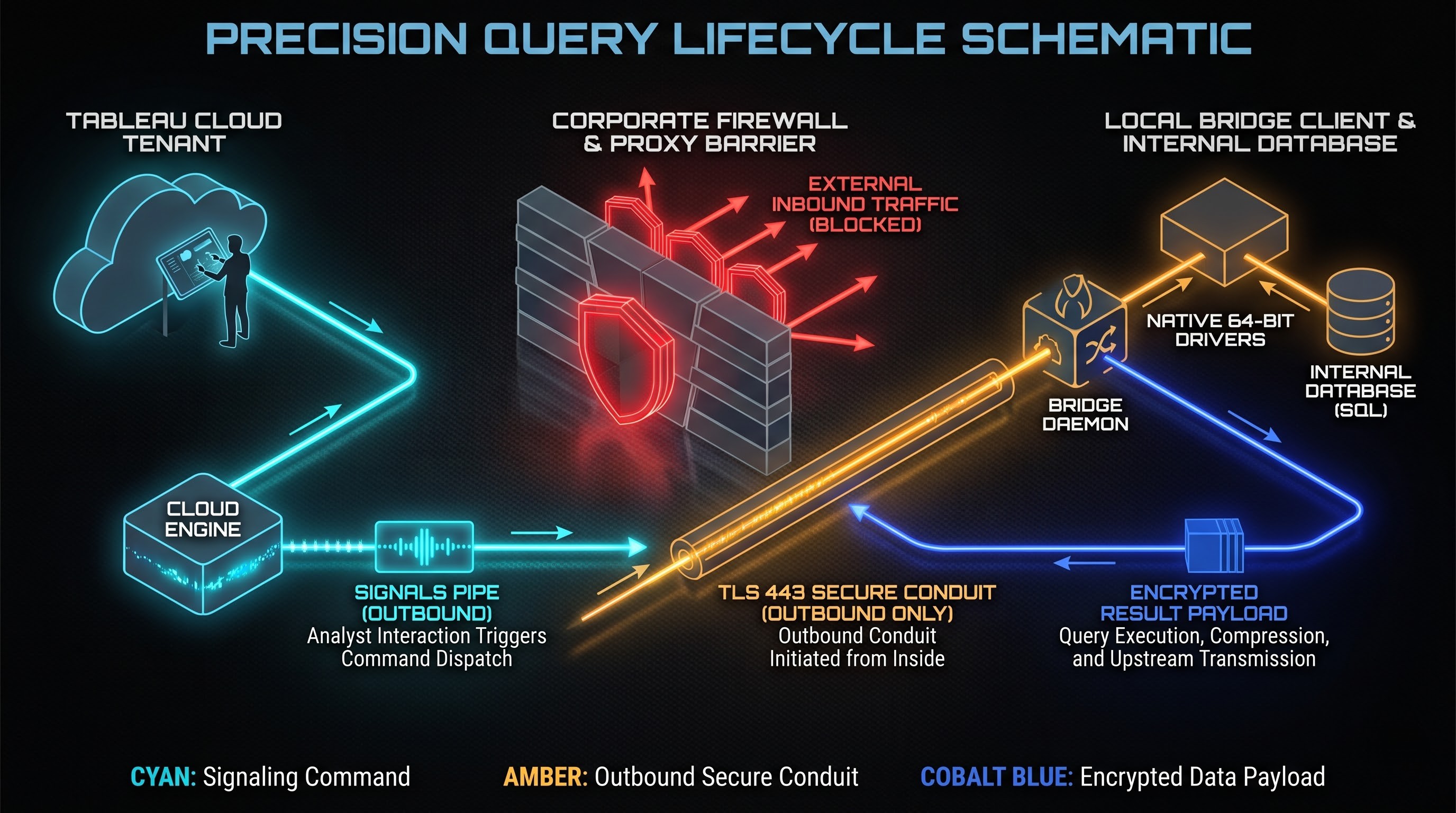
By its essence, Tableau Bridge can be defined as a dedicated gateway agent. It does not have the ability to store any enterprise data and neither does it replicate database clusters.
However, if the situation arises where the workbook or the data source provided by Tableau Cloud needs to contain the data residing on the server behind the firewall, Tableau Cloud analyzes the connection details and determines whether the path leads to a private host name or IP address. In such a situation, the resource would be considered as the on-premise bridged resource and the request would be sent to one or several Tableau Bridge instances that belong to the Tableau Cloud site in question.
Connection to the Tableau Bridge and Tableau Cloud takes place with the help of the Transport Layer Security protocol. After the Tableau Bridge service is started, authentication is performed with the use of secure personal access tokens or administrator credentials on the Tableau Cloud site and the signaling channel is established with the cloud service.
When the dashboard is launched in Tableau Cloud or the extract update task is launched, then the following events occur:
Firstly, Tableau Cloud sends a signal through the signaling channel with an instruction for execution.
Second, the Tableau Bridge client gets the command sent through the channel. Since the Tableau Bridge client operates within the corporate local area network, it can connect directly to internal databases over the network.
Third, the Tableau Bridge client utilizes the correct native database drivers installed within its operating environment in order to connect locally to the target database and authenticate with it using its credentials. These credentials may come from the Tableau Bridge client itself, or they can be supplied by the publisher or enterprise directory protocol.
Fourth, Bridge executes the SQL statement or an extract command against the database engine.
Fifth, Bridge gathers the results. In case of live query, Bridge serializes the tabular data and sends it through the secure outbound tunnel to Tableau Cloud for visualization on behalf of the user requesting the visualization. In case of extract refresh, Bridge gathers the data locally into Tableau data extract file, compresses it, and sends the extract file through the secure outbound tunnel to Tableau Cloud, where it will overwrite or append the current hyper file in the cloud repository.
The whole time throughout the life cycle, the corporate data being used by Tableau Bridge never reaches the Public Internet and port exposure does not happen ever.
Connection modes: Live Query Connections and Extracts Scheduling
There are two main approaches to connecting that can be utilized by Tableau Bridge; they satisfy their requirements:
Live Queries
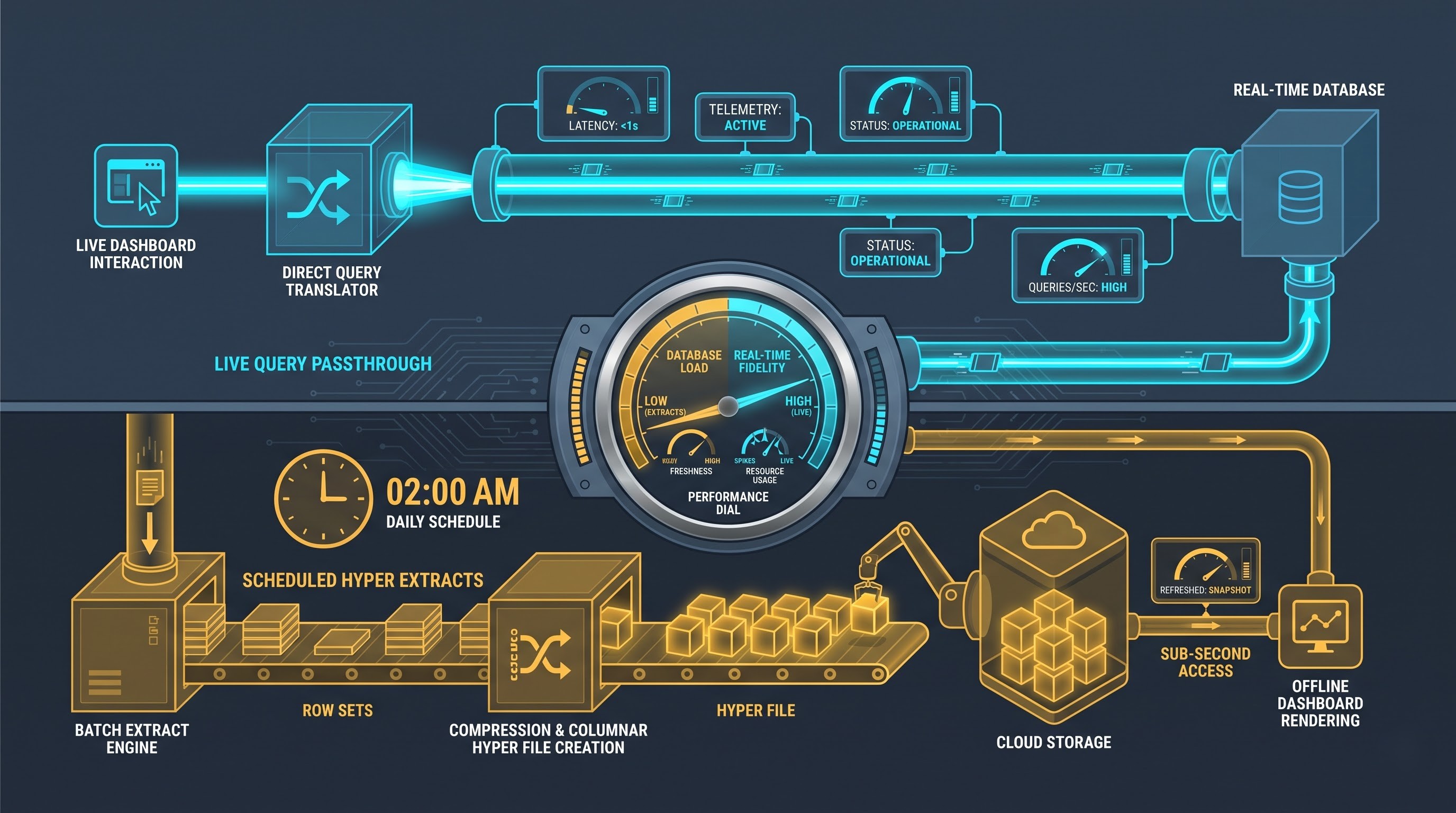
The approach of using live queries is crucial if a user wants to use operational dashboards to work with real-time data. The examples of such data can be: manufacturing data, intraday financial risk positions, and rapidly changing customer service queues, which do not allow scheduling an extract.
As soon as a user establishes live connection through Tableau Bridge, all activity performed through the Tableau Cloud is connected with sending of queries through Bridge, where it runs them and gets data from database.
Although live connections ensure that the information is fresh, performance considerations come up here. The user experience is determined by such parameters as local database latency, computing power of Bridge host machine, bandwidth between Bridge host and Tableau Cloud, and nature of analytical queries. Live connections with Bridge are normally performed via a database that has good performance regarding analytical queries or operational views without any data latency.
Scheduled Extract Refreshes
Extract is the most widespread approach used in modern business intelligence infrastructure. It consists in the complete copying of data set at some point of time and converting it into Tableau data engine format in the form of a columnar table.
In the case of scheduled extract refresh, there are no queries performed from Tableau Cloud to the internal database while dashboards are being viewed. Thus, dashboards are being rendered in subseconds without any load on the internal production database.
It becomes the job of Tableau Bridge to run the above mentioned process in the background. At the predefined time intervals, which could be every hour, every day, or every week, Bridge will access the database and extract the required number of rows, hyper extract them, and push them as the latest extract to Tableau Cloud. Two methods of refresh operations by Bridge include Full Refresh and Incremental Refresh. While the former includes creating the whole dataset, the latter includes extracting new rows according to the increment keys/timestamps.
The businesses benefit from the fact that they can offload their analysis into the cloud along with guaranteed performance irrespective of the dashboard concurrency in the cloud extracts.
Deployment Models: Single Client vs. Pooled Approach
Until recently, the deployment of Tableau Bridge used to happen in single client mode where Bridge was available as a standalone software in the backend of either Windows or Utility Server. Although this was fine for smaller teams requiring infrequent extract refreshes, it wasn’t good enough.
Pooled Bridge Architecture is used for enterprise deployments.
Dilemma of Application Mode versus Service Mode
In the process of installing the Bridge client separately in the host operating system, the following two modes of operation are available:
Application Mode - launching of the Bridge process in the open user desktop session. It is usually applied for testing, configuring, and personal extract management. In case of logging out or re-starting of the computer without autologon scripts, the Bridge process will be stopped, and there will be no refreshing and queries processing.
Service Mode - launching of the Bridge process as an operating system background daemon or service. The process is automatically started at the boot time of the host operating system and runs independently from any open session of the user. By default, service mode is necessary for production use.
Bridge Pooling and Load Balancing
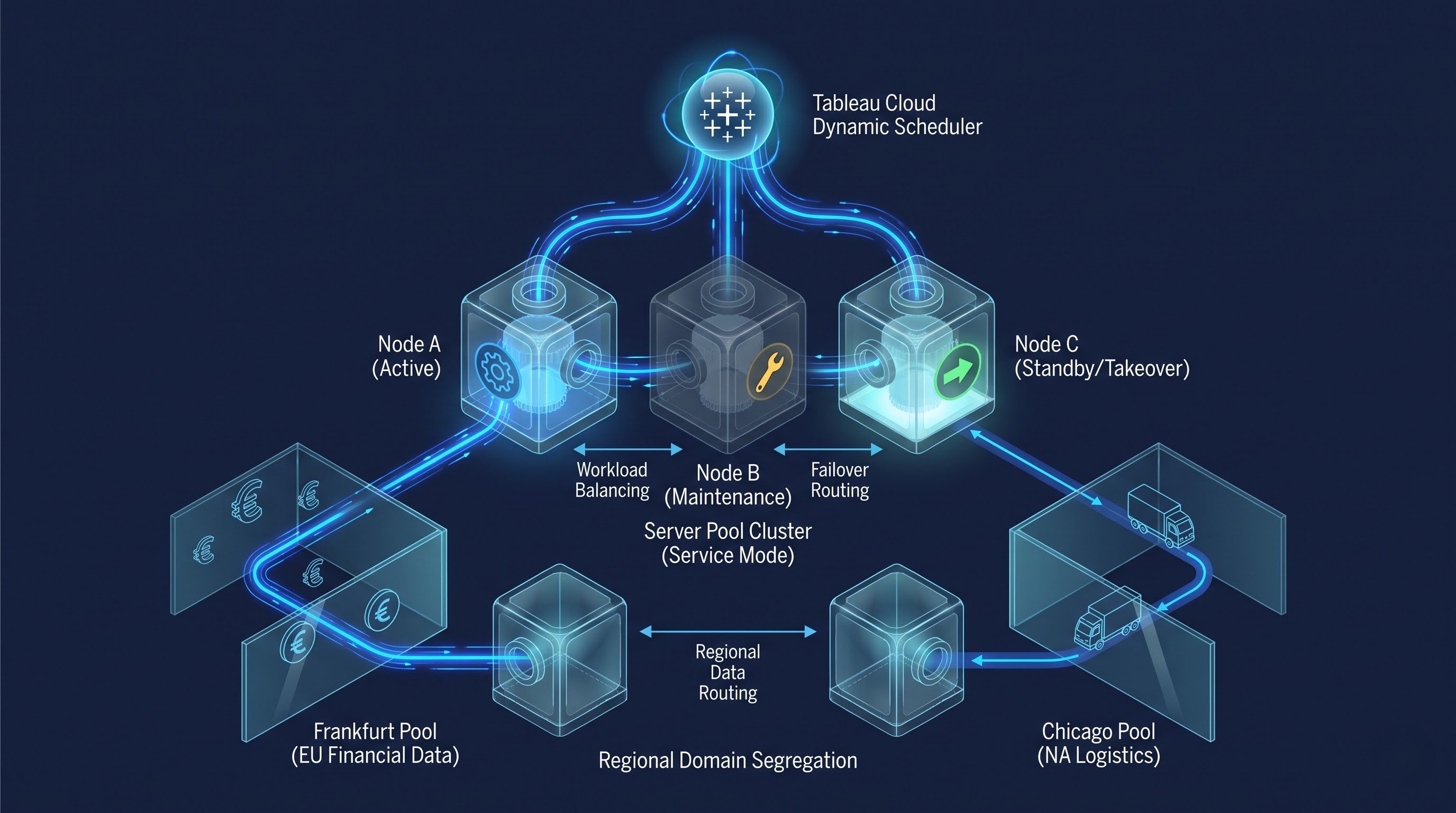
Bridge pooling makes it possible to create the pool of Bridges located on different servers but treated as one logical set for specific Tableau Cloud site.
Tableau Cloud has become the dynamic scheduler and load balancer in this case. In case there is a need to make a refresh or live query, Tableau Cloud considers the available capacity and load from all instances of Bridge running in the pool and directs the process to run on the least loaded machine. In case any of the machines becomes unavailable because of hardware or any other issues, all machines from the pool take responsibility and perform the process on other machines which are in good condition.
Domain and Network Isolation
Typically, large corporations have different networks or even distributed data centers. For example, the corporate office will have its own local data warehouse in Chicago, but the operational unit will also have its own server farm in Frankfurt along with cloud infrastructure in a private virtual network.
Pool of Bridges can be linked to some particular network domains/resource pools. Also, it might be necessary to use Pool of Bridges only in Frankfurt and internal European database because of the need for compliance and better network connectivity. Pools of other clients will give access to the secure subnet where the financial system will work and will not allow any general analysis of the same hardware/network.
Operating System Models: Windows and Linux
The deployment and usage of the Tableau Bridge were highly related to the Microsoft Windows operating system before. In order to deploy Tableau Bridge into the enterprise environment, it was necessary for Windows Server to work, get Windows license and update of it with the help of Windows technologies.
Today, it became possible to use Tableau Bridge in the Linux environment and it is a huge achievement for the enterprise infrastructure engineers. The main advantages of:
Efficiency of Resources: Since the Linux instances do not have a desktop shell, there is no overhead of additional processing and memory that is imposed on the operating system by the Windows desktop shell. This enables Bridge to be deployed on more affordable compute nodes.
Containerization & Orchestration: As the deployment is done on Linux, there is a possibility of containerizing the client using Docker or any other container runtime platform as well as orchestrating multiple such instances using Kubernetes and other such orchestration tools for enterprises. Infrastructure teams can scale and update Bridge clusters with infrastructure as code.
Cost Saving: Since there is no need for paying for licenses of Windows operating systems, there are savings in terms of cost when building hybrid cloud architecture for business intelligence.
Authentication, Credentials and Security Architecture
Security is the main reason behind development of Tableau Bridge. Therefore, one has to know about its security features, like handling of credentials, encryption and authorization to meet enterprise security requirements.
Secure Outbound Connections
Tableau Bridge always makes use of TLS for making connections on the default port 443 (HTTPS). Such kind of security architecture is quite common when it comes to enterprise egress policy, as web-based outbound connections are permissible for corporate proxies and next-generation firewalls.
Proxy settings for Bridge contain such settings as forward proxy with authentication, which allows disabling of SSL inspection and allow-listing of domains. For proper functioning of Tableau Bridge it is necessary to make secure outbound connections to some particular fully qualified domain names and notification endpoints of Tableau Cloud.
Database Credentials Handling
In order to connect to internal database it is necessary to use credentials starting from simple users of the database to service principals and domain accounts. Different types of handling credentials by Tableau Bridge in case of different connection types are presented below:
Embedded Credentials: When auto-refresh is selected, the credentials for database are embedded in the data source when published. The database credentials are stored in the credential vault of Tableau Cloud when publishing from Tableau Desktop. If there is scheduled refresh, the credentials are transported securely by tunneling and decrypted in memory to connect to the database.
Stored Bridge Credentials: In some cases, credentials are stored directly in the OS keychain or credential store of local Bridge client which makes sure that passwords are never disclosed outside the corporate environment.
Kerberos and Windows Integrated Authentication: Using Active Directory environment, Bridge clients running on Windows can use Kerberos authentication and perform Kerberos delegation without storing any password in data connections.
OAuth and Token Authentication: Using cloud data sources using token based authentication, Bridge uses OAuth to refresh tokens.
Best Practices for Enterprise Implementation and Management
The utilization of Tableau Bridge in the organizational setting will need proper architecture design and management. The organizations that want to plug the skills gap to implement Tableau Bridge effectively should consider getting tableau training online from OnlineITGuru where the data architects will be able to learn how to manage clusters, create pools, and handle the credentials. Once you know the process, the next step is easy.
Infrastructure Sizing and Capacity Planning
Tableau Bridge Client is a computing instance and not a gateway. In the data extract operation, Tableau Bridge utilizes the computing power of its local machine to interpret the SQL queries' results, the memory of its local machine to create the data chunks and local storage space to compress hyper extracts that are then sent to Tableau Server.
Under sizing of Tableau Bridge is the most common reason for data refresh failure and live query performance. There are some basic guidelines on infrastructure sizing that should be followed by organizations:
Compute Sizing: The production deployment of Tableau Bridge should have multi-core processors which can execute the queries in parallel.
Memory Sizing: It is very important. Large memory buffers hold large results sets of database queries. Low memory causes paging and data extraction is very slow.
High-Speed Disk Caching: Temporary disk caching significantly influences the extraction process performed by Bridge. For instance, if fifty million rows are extracted from the database, Bridge will have to store a considerable amount of temporary data in gigabytes. A dedicated Bridge installation on the server equipped with fast solid-state disks will avoid any potential bottlenecks in the process of disk writing.
Dedicated Machine Isolation
One of the most common design flaws is the installation of Tableau Bridge on the same server as the production database. Because of the competition between database engine and Bridge client in terms of CPU, RAM, and disk reading/writing resources, it is evident that they will struggle for resources on the same machine. The Bridge should be installed on separate virtual/container machines that will be in the same local network as the databases.
Concurrency Management
When an organization possesses a great number of published data sources, the scheduling of the extracts refresh should be performed appropriately. If there are a lot of data sources that require many resources in order to perform extraction and they are configured to refresh simultaneously during midnight, there will be a large number of Bridge pool jobs.
Scheduling ought to be evenly distributed at non-working hours, execution windows ought to be distributed evenly, and the administrators ought to strive to use incremental refresh as much as possible. Incremental refresh does not require any data which has not been refreshed in the previous refresh cycle and, thus, saves a considerable amount of time which Bridge spends in the execution windows.
Driver Maintenance and Compatibility
In light of the fact that Tableau Bridge forms the interface via which the database query is run, then the computer through which Tableau Bridge is run requires appropriate and compatible database drivers. In view of the fact that the publisher uses a particular database driver in Tableau Desktop, then the same database driver should be installed in all of the Bridge machines in the pool.
Monitoring, Observability, and System Health
An enterprise-grade hybrid data pipeline needs to have visibility into the health and performance of the system as well as any failures that may occur. There are monitoring options available from both Tableau Cloud and an enterprise operating system.
Administrative Connection Monitoring for Tableau Cloud
Tableau Cloud has administrative consoles which allows one to monitor the health of the connections made by Bridge clients. One is able to monitor the connectivity of the nodes, running jobs by the clients, time taken for refreshes and failures of different data sources.
In the event of failed refreshes, Tableau Cloud will report the error providing details about the failure caused by timeout errors or connection rejection from databases. When a refresh fails, an email alert can be sent automatically ensuring that one is able to rectify the problem before displaying an outdated dashboard in Tableau.
Observability of the Host Operating System
Apart from monitoring of Tableau Cloud, there should be monitoring of the operating system hosting the Bridge services. Below are some of the metrics:
Host Uptime and Service Availability: Monitoring the Bridge service process status will allow us to automatically be notified in case there is any daemon failure or inadvertent shutdown of the process.
Resource Usage: Monitoring the CPU usage, memory usage, and disk space usage will ensure that we don’t have any surprises with regards to big extract jobs.
Network Connectivity from Outbound End: Monitoring network connectivity from the outbound end to Tableau Cloud will help us identify any issues with the corporate proxies and firewall drops.
Conclusion
Regarding the current enterprise data, it can be seen as being a blend of both the in-house and cloud-based data. While the flexibility, ease-of-use, and absence of management overhead associated with cloud BI platforms make Tableau Cloud a perfect BI platform, the critical data related to operational activities will continue to remain in-house in the near future.
Here comes Tableau Bridge. Due to the outbound and encrypted protocol used, Tableau Bridge serves well to perform live queries and extract synchronization for Tableau Cloud users without affecting the perimeter firewalls. After the migration of the legacy BI workload to the hybrid environment, it is vital to develop skills in the usage of Bridge, Desktop, and Cloud tools. Such skills can be acquired through the online training tableau from OnlineITGuru.