
Testing Workday Integrations Before Production Deployment
Last updated on Oct 6, 2026

Workday is the digital backbone for modern global companies to manage human resources, finance, payroll and supply chain. However, an ERP solution does not work in total independence. Its functional value is related to its ability to deliver key data to a wider ecosystem of additional software including external payroll systems, health and retirement insurance providers, applicant tracking, corporate banking, IAM, CRM, and enterprise data hold systems.
When integration goes wrong in a live environment, the impact is immediate and enterprise-wide. A corrupt payroll file can halt approvals for thousands of employees. Identity integration issues may prevent operational teams from receiving their ID badges and network access. Integration problems with the financial journal can delay month-end closing procedures, as well as cause problems with regulators.
Tests of Workday integrations need not be part of normal practice. This needs to be seen as an activity for serious risk mitigation that requires thorough knowledge of architecture, methodology, and data governance. This document is aimed to clarify the end-to-end methodology, frameworks for testing systems, management of the environment, and cutover requirements for testing the Workday implementation before deploying it into production.
Workday Integration Architecture and Testing Requirements
Before coming up with a sustainable testing strategy, quality engineering personnel need to understand how Workday integrations work. Workday does not work on a one-size-fits-all type of approach. Instead, it provides different types of integration mechanisms, each of which has its own unique characteristics in terms of processes, failures, and tests.
Enterprise Interface Builder
Enterprise Interface Builder is meant to serve as a visual interface for easy-to-use data import and export operations.
The Inbound Enterprise Interface Builders make use of a variety of file formats, including spreadsheets, CSVs, and XML files, to check the contents through Workday's business logic and also use the company’s web services to import the data.
Outbound Enterprise Interface Builders utilize Workday Custom Reports to acquire data, apply transformations by means of using custom stylesheets or inbuilt delimiters, and send the final result to other systems through file transfer protocol (FTP), hyper text transfer protocol (HTTP), or cloud storage solutions.
Testing problems: The testing of Enterprise Interface Builders involves the process of validation of source data for a given report, validating if filtering of records was performed correctly, validating the logic of custom transformations, and validating whether data validation procedures are functioning properly but don’t cause a crash of processing in case of having invalid records.
Core Connectors and Document Transformation
Core Connectors represent ready-made solutions provided by Workday for some of the business domains including human resources, employee benefits, payroll processes, and financial transactions.
They provide the XML messages with transaction data that can be either delta transactions or the full data snapshots.
If there is a need to send the output in a special format, the Document Transformation process is involved. This transformation makes use of the Extensible Stylesheet Language family technology.
The complexities of testing: It is crucial that testers are familiar with the desired logs and detection of alterations. Complex criteria provided by Workday are used to establish whether something qualifies as a change. Subsequently, testing should ascertain each variation in data is appropriately able to send output via the connector as well as confirm that all transaction logs appear in further processing of data.
Workday Studio
Workday Studio is an advanced graphical integrated development environment that enables users to create unique connection solutions. Workday Studio is capable of managing complex lead and command tasks including combining Michael. Java coding, creating custom error management procedures and communicating actions in two ways.
Challenges in testing: The testing of integration using Workday Studio has a much higher defect density and a higher probability of problems arising compared to testing integration with build at a simpler complexity. The ability to control memory allocation, thread limits, and error routing is usually learned through a separate training on workday integration course that focuses on assembly debugging.
Cloud Connect and Payroll Connectors Employing Specialized Technology
Workday’s global payroll systems can be integrated in accordance with the required functions that allow the Payroll Effective Change Interface and Payroll Interface Common Output File to be delivered to the organization.
Such programs will account for the specifics of payroll settings that typically include retroactive pay adjustments, adjustments of employment in advance dates, and tax refund payments among relevant aspects.
Testing Challenges: It is not possible to validate connectors without having adequate domain expertise of the field. It is important to check whether the output file is being sent properly, but at the same time, there should be a check on how the retroactive payments of the employees have been processed during different time periods. In the same way, the testing of enterprise rollouts where workday learning integrations have been done includes validation of real-time progress feeds of learners and third-party connectors.
Tactics for Workday Tenant and Environment Isolation
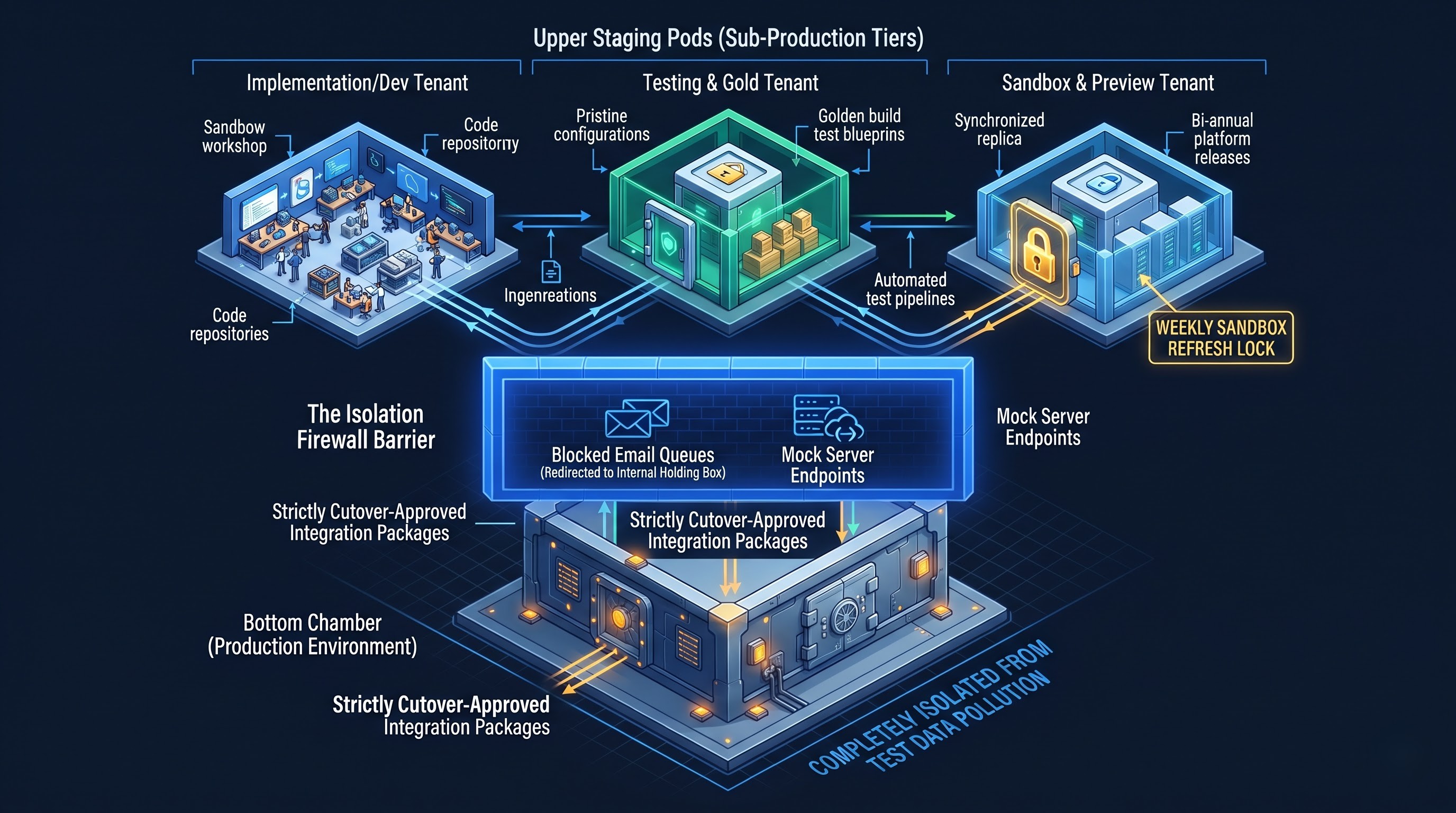
Successful testing relies completely on the hygiene and architecture of a testing environment that is called tenants in the Workday ecosystem. If the tests are being conducted in a different way or in the improperly prepared or mismatched tenant it will lead to erroneous results and operational issues.
Classification of Different Types of Tenants
Companies have to ensure that their various testing stages correspond appropriately to different types of tenants:
Implementation Tenants: Referred to as Implementation, Development, or Prototype, these are open spaces for developers that allow the creation of integration components, the generation of initial custom reports, and the performance of data conversion. Such environments cannot be used for the end user acceptance testing as the configurations settings keep changing.
Testing and Gold Tenants: These environments are controlled places to conduct tests. Gold Tenant has no transactional overload in its production configuration, so is the master template for production. Testing tenants have a stable configuration and are used for formal integration cycles.
Sandbox and Sandbox Preview Tenants The normal Sandbox tenant is refreshed weekly providing an exact copy of the production configuration and transactions. Sandbox Preview is the first to receive biannual Workday updates and is used as the basis for regression testing of integrations in the light of further releases.
Production Preparation Tenant: This is a mirror of the planned production environment and is used in the last few weeks before deployment or major release.
Preventing Environmental Cross-Contamination
The most severe mistake in the course of integration test is a random interference between a test tenant and an outside production endpoint. If an outbound worker integration in a test tenant uses production credentials, real outside systems receive outdated or invented test data. On the other hand, an inbound financial integration can unintentionally transfer transactional files that were produced in a real environment.
For absolute isolation:
- External endpoints should not be used in non-production environments at all. Every testing configuration should end at the closed secured mock server, vendor sandbox or staging area.
- Block outbound communication channels in testing tenants. Workday offers controls at the tenant level to send all outgoing e-mails and notifications to holding addresses so the end users will get no automatic test e-mails.
- Always use correct endpoint naming conventions. External destinations should have staging identifiers and credentials should not match.
Navigating Tenant Refreshes
Since Workday Sandbox environments usually reset themselves automatically on weekends, quality assurance teams experience interruptions when conducting an ongoing test cycle that lasts for multiple weeks.
All custom integration elements or temporary configuration changes, as well as test records that have been created by hand and existed only inside of Sandbox, will be wiped out during refresh.
The testing managers must schedule their test cycles to take place during the refresh periods or request Workday to set up a temporary refresh lock for their important testing tenants.
Security, Authentication, and Identity Architecture
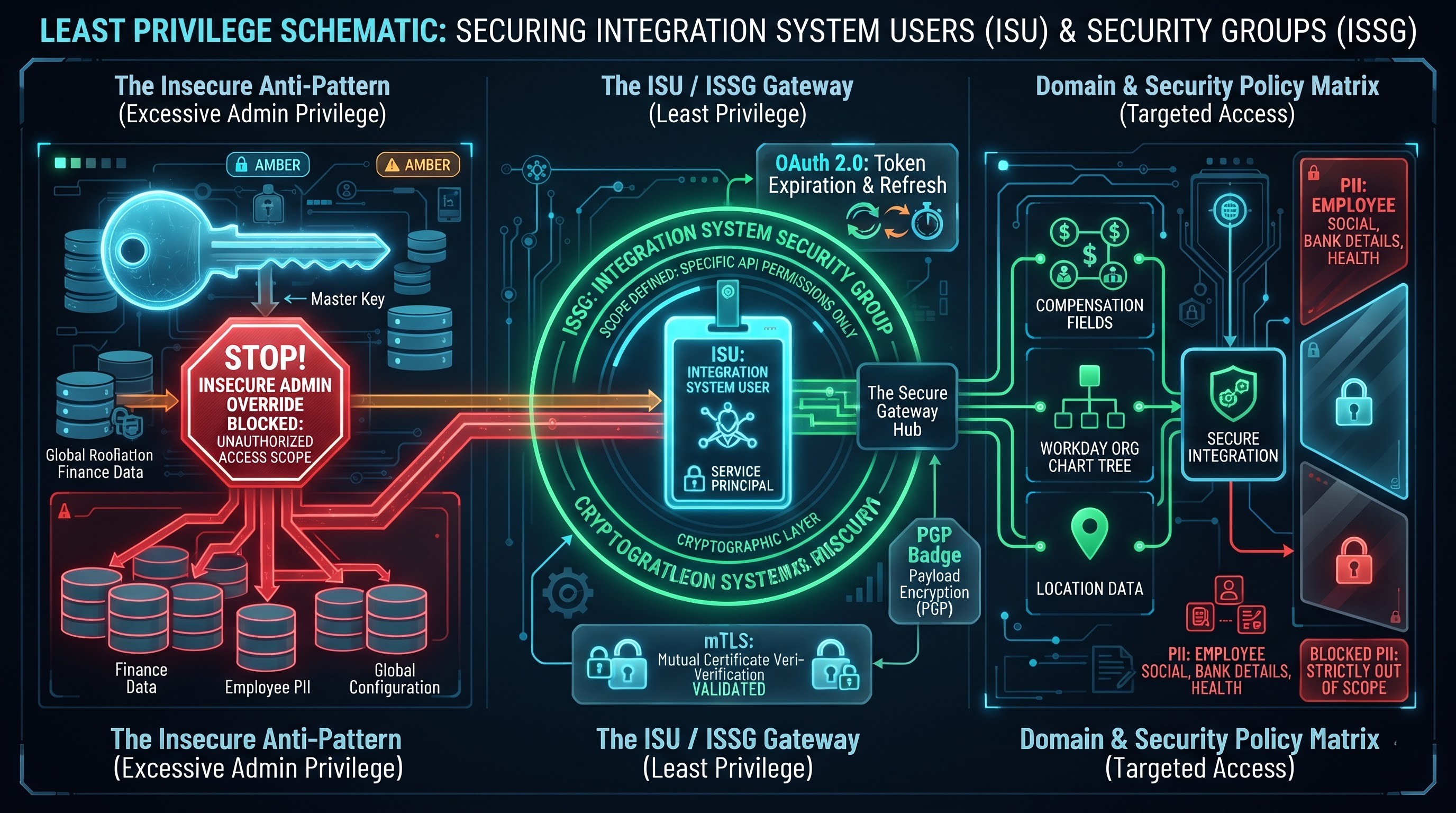
Integrations in the Workday system do not run under standard user profiles. They use the so-called Integration System Users, which are assigned to Integration System Security Groups. Most failures in the test cycles of integrations are caused not by mistakes in programming but by mistakes in security settings.
The Principle of Least Privilege
During development, engineers often encounter the access mistakes when custom reports or web services do not get the required fields. The common and dangerous mistake is to assign the administrative users group to the Integration System User in order to bypass access restrictions.
Testing has to make stringent security policies mandatory before saying yes to production deployment.
All the privileges from the integration system user including administrative privileges need to be removed.
The testers are to check every security policy specified in terms of domain and business process.
The data point that the integration is using (for instance, personal remuneration data or organization charge code trees) needs to be authorized by security policy documentation.
If security policy is modified at the domain level, the changes should be applicable to tenants. It has to be checked that the integration can work with only permissions mentioned.
Verification and Protocol Testing
Normal username-password authentication methods have become obsolete in today’s corporations, which employ secure authentication protocols such as:
Mutual Transport Layer Security: This protocol demands that both parties validate that the certificates used are valid and acceptable by the external server and Workday.
Open Authorization Frameworks: Verification for OAuth 2.0 in Workday API necessitates the verification of the entire authorization token procedure, from issuance of the token to refreshing of the same token once it expires. This should involve issuing of the token and execution of actions that cause expiration of the authorization token.
Export Signatures and Encryption: All the exports, which contain sensitive HR or financial information have to be signed and encrypted using Pretty Good Privacy. Tests must be conducted in order to verify the configuration of the public and private keys' validity and capability to decrypt the payloads.
Test Data Management and Life Cycle Coordination
Any integration process will only work if the data itself is good. If tests are being run on limited, ideal or static data samples, the unexpected issues that may arise during the integration process will go unnoticed. The above paragraph provides evidence of the assertion that for proper testing, care must be taken when managing test data in order to replicate the real-life processes during the testing process,
The Spectrum of the Worker Life Cycle
From the examples used in the human resources and payroll integration, the author offers an overview of the need to include all the employment life cycle stages during the testing process:
Onboarding and Conversion: Regular Hires, Future Hires, International Relocation, Changeover from Temporary to Permanent Employment;
Changes in the Middle of Life Cycle: Changes in base salaries, awards for variable compensation, promotions in ranks or change in areas of responsibility, changes in departments and taking leave from work.
Errors in Status: Mistakes may happen in doing business. A company employee might implement a promotion event by mistake and after realizing there was a mistake in the date of the event, rectify the error, or cancel an entire promotion event. The testers need to check how the integration solutions behave with respect to rectified and canceled processes. There are many poor delta integrations not working in terms of notifying other systems about the cancellation of an event, which leaves irrelevant pieces of information in the databases.
Offboarding and Following Adjustments after Terminating: Events related to voluntary and involuntary leave from a company, payments for termination, retirement information, and particularly retroactive payments that were made after the worker has left the company.
Edge conditions and Extreme Values
The integration schemes and third parties will not work properly with respect to the records at the borders of the data expectations. Tests with wide coverage have to explicitly create the values of the edge conditions and carry out the testing.
Character Sets and Special Characters: Names, addresses and transaction notes that include diacritics, special characters, hyphens, apostrophes and non-Latin alphabets need to go through the translation process to ensure that individual legacy systems are not triggered by encoding errors.
String Length Restrictions: Checking whether the integration properly handles string values which are longer than the values that are accepted by databases. For example, a payroll software program might limit the length of address to only thirty characters.
Null, Empty and Zero Values: Checking whether empty optional fields and blank organisation fields give rise to parser problems downstream.
Data Privacy and Synthetic Generation
Using production data in non-production systems makes the company liable for serious privacy violations under international data law systems like General Data Protection Regulation and Health Insurance Portability and Accountability Act.
Organizations must utilize data obfuscation programs or synthetic data generation methodologies. Organizational-specific personal identifiers, social security numbers, bank references, and amounts of payment should be obfuscated on a systematic basis while keeping some structural integrity in place.
Step-by-step Testing Strategy
A systematic integration testing strategy entails passing through various, separating stages. Jumping from developer unit testing directly to company-wide user acceptance testing can produce confusion. Each phase of testing must be based on specific architectural layers along with passing certain exit criteria in order to commence new phases.
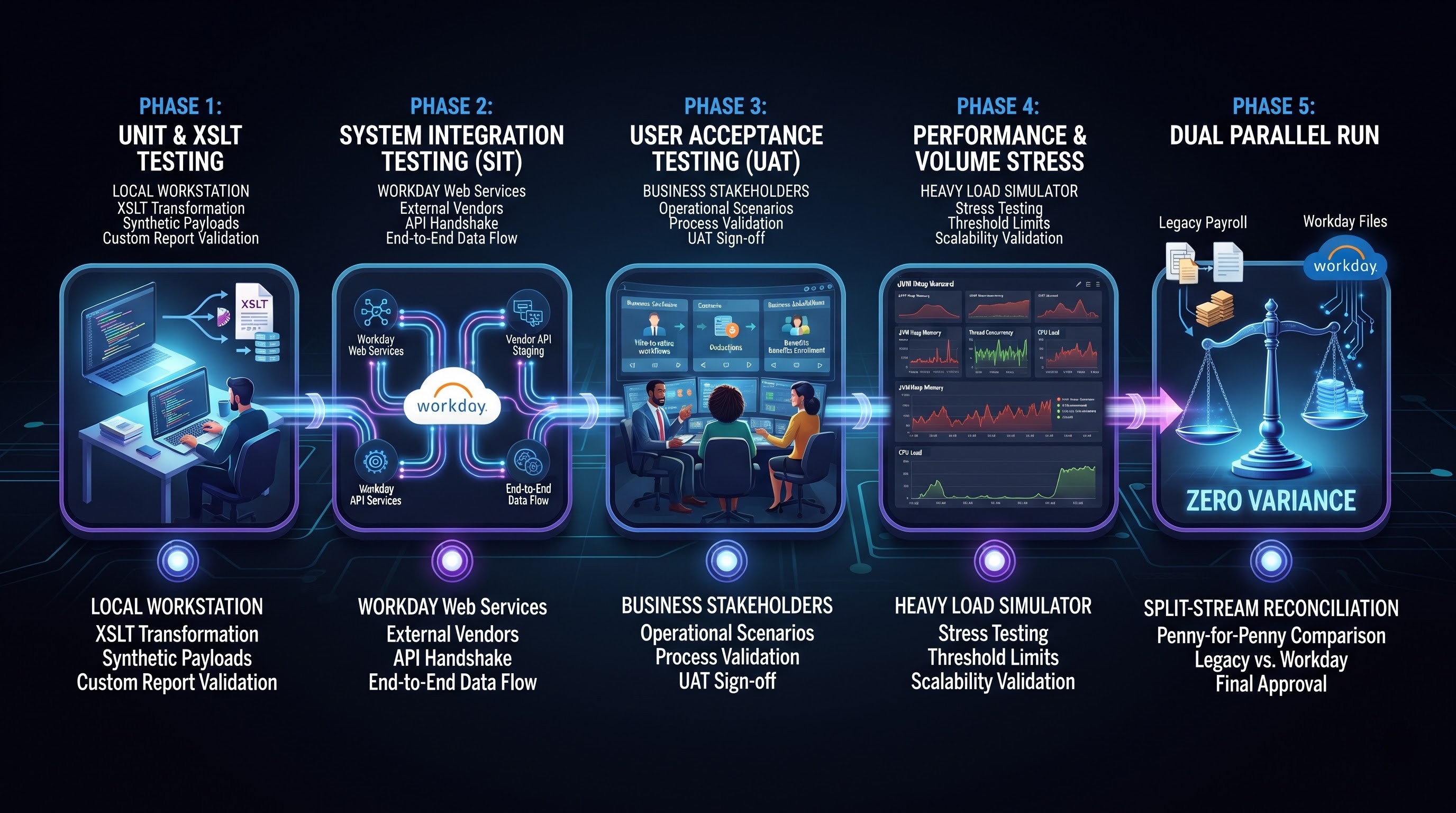
Phase 1: Unit Testing and Component Verification
Unit testing is driven by development or operating tenants, accommodating units built by integration testers only.
The Workday Custom Reports are verified in order to make sure that the data sources for the report, core business objects, and relevant business objects are getting the required number of records. Since coding with the help of XSLT and creation of custom fields require practical knowledge, the enterprise team is often workday integration training in order to avoid common mistakes.
Before focusing on the use of this technology in Workday, the developers will test Extensible Stylesheet Language Transformations locally through an independent transformation tool. The test involves sending synthetic input payloads through the stylesheet to verify whether the appropriate namespaces, nodes, attributes, and formatting loops generate a document that has the correct structure.
The validation of Integration System Prompts and Launch Parameters is done to confirm whether default functionality, date range, and user overriding work in line with expectations.
Verification Gate: The integration should be successful with no transformation errors as compared to the baseline developers' testing records.
Phase 2: System Integration Testing
When it comes to System Integration Testing, the focus shifts from the internal Workday workings to the actual data pipeline linking Workday to external systems.
The test team checks the entire process of making connections: picking the data out from Workday, transmitting it on the network using secure protocols, ensuring the handshake acknowledgments, and thus confirming that the target system receives the data, unpacks, and processes it.
Inbound processes are checked by sending the vendor files born outside Workday to the Workday file storage, starting the inbound integration and checking the workings of the Workday web services that will process the data into records.
Validation Gate: either external systems successfully receive, extract, and save the data from Workday or not.
Phase 3: Acceptance Testing by Users
User Acceptance Testing (UAT) moves the validation from the technical architects to the functional business owners – payroll administrators, benefits specialists, compensation directors and financial controllers.
Business users confirm that the integration aligns with real-world operational workflows, not just technical design specifications.
Testing scenarios are analogous to daily, weekly and monthly operational tasks. For example, a benefits administrator ensures a health insurance carrier feeds properly enrols a new hire with the appropriate coverage tier and that the corresponding employee payroll deductions are correct.
Verification Gate: Business stakeholders explicitly sign off, verifying business operations run accurately, predictably, and without administrative workarounds.
Phase 4: Non-Functional & Performance Testing
An integration that runs perfectly with twenty test records may fail under the weight of an enterprise payroll run with fifty thousand workers. Non functional testing assesses stability under extreme operational stress.
Volume Testing: To measure execution time, server memory utilisation and bandwidth consumption, full-population extracts are run. Monitor Workday Studio integrations for exceeding Java Virtual Machine heap memory thresholds and for triggering engine execution limits.
Concurrency Testing: Run reports and background business processes concurrently, and simulate peak business periods with multiple heavy integrations. This raises contention issues, like database record locks or throttles for rate-limiting web services.
Latency and Timeout Resiliency: Creating artificial delays on external third-party servers to ensure that Workday Studio integrations are designed with resilient retry loops and timeout bounds rather than hanging forever and consuming worker threads.
Verification Gate: The integration operates within the defined enterprise batch operational windows without consuming the tenant computational resources.
Phase 5: Parallel Processing Runs
With the most complex enterprise integrations, especially payroll and core financial ledger interfaces, organisations need to run dual processing or parallel runs before the production cutover.
A parallel run occurs when the legacy platform and the new Workday deployment operate simultaneously for the same operational pay periods or accounting cycles.
The output files from both systems are fed into automated reconciliation engines. Every single field, gross pay calc, tax withholding value and journal line item is compared penny for penny.
Discrepancies are categorised systematically: genuine Workday integration bugs, defects in legacy systems or accepted variance due to updated calculation methodologies.
Verification Gate: Mathematical reconciliation of legacy and Workday outputs against defined enterprise variance thresholds over two or more consecutive operational cycles.
Change Detection, Delta Processing, and Timeline Mechanics
Delta processing is one of the most complex architectural components of Workday integrations. Unlike full-file integrations that pull the entire enterprise population each time they run, delta integrations determine and transmit only those records that are created, modified, or deleted since a particular moment in history.
Workday Change Detection Mechanics
Workday considers changes through a number of complementary mechanisms:
Transaction Log Monitoring Core Connectors read the internal Workday transaction log, tracking discrete business process events impacting targeted business objects.
Modified Since Filtering Custom reports and Enterprise Interface Builders use temporal criteria to identify worker or financial records whose system modification timestamp is greater than the previous execution timestamp.
Last Successful Run Parameters Workday automatically records the date and time of each successful integration run. The stored value is used as the starting point for the change window on the next run of the integration.
Commonly tested delta failure modes
Testing delta processing is complex and involves multi-step test scenarios that simulate temporal edge cases:
Zero-Change Execution: The integration starts when there is no relevant business data change. The integration needs to be clean, ideally resulting in an empty notification or not delivering the file, rather than creating corrupted or empty header files that break downstream ingestion engines.
Mid-Period Double Update: Changing a worker record twice in one integration cycle, e.g. address in the morning and job title in the afternoon. Testing should confirm that the final integration payload includes the consolidated net state of the record and that no duplicate or contradictory data rows are sent.
Effective Dating vs. Transaction Timing: Workday is truly an effective-dated system. Also, the administrator can log into the platform on the 10th of the month and create a promotion that will be activated on the 1st of the next month. Or, they can retroactively adjust the salary on the tenth of the month retroactive to the first of the previous month. Testing should verify that delta integrations can correctly handle both future-dated and retroactive events, pulling records based on when the transaction occurred in the system, not just the operational effective date.
Rescinded and Cancelled Transactions Create an event, allow the integration to process and transmit the delta downstream, and then rescind the event in Workday, and run the integration again. The testers must verify that the integration is able to detect the cancellation and inform the downstream system to undo the prior update.