
The 2026 Enterprise Blueprint for End-to-End CI/CD Automation via Azure DevOps
Last updated on Jun 29, 2026
The modern software engineering systems have now abandoned manual software deployment approaches. By 2026, the global market value of DevOps is estimated to be more than $18.77 Billion, which is about 22% of the complete cloud migration infrastructure market. The hand-offs among the development (Dev) and operations (Ops) teams have traditionally led to risky deliveries of codes, configuration drifts, and maintenance windows.
In this extensive research guide, there is provided an architecture that will help build fully automated multi-stage CI/CD pipelines with Azure DevOps. Based on the engineering knowledge gained from various frameworks in the industry as well as the benchmarks of DORA (DevOps Research and Assessment), we evaluate how the integrated platform ecosystem minimizes the internal friction, manages pipeline governance, stabilizes microservices deployments, and increases developer velocity.
Why Azure DevOps?
It is a set of tools from Microsoft for planning, development, code writing, building, testing, and deploying software. With its help, a team does not have to use separate tools but manages the whole software development lifecycle in a single location. Thus, they achieve greater efficiency, organization, and transparency.
The simplest functions that the tool performs include answering such crucial questions for the developer as:
What is being developed?
Who is developing?
Has the code been prepared?
Did the build succeed?
Was the deployment successful?
This tool is used by development teams, QA teams, DevOps engineers, and project managers. With its help, collaboration, automation, and management of the whole delivery process become possible. It is extremely valuable for modern software teams because of rapid changes in software.
The Historical Background and the Cultural Shift
To comprehend the reasons behind the emergence of current platforms, it is necessary to consider the friction created by legacy architecture prior to the advent of DevOps.
1.1 Legacy Wall of Confusion
Traditionally, the developers and operations specialists operated in separate silos, where developers were motivated to release updates as soon as possible. In contrast to that, the operations specialists' performance was evaluated based on system availability and stability. Thus, the conflicting structural objectives emerged as follows:
Development: Releasing frequent code updates without taking into account the operational costs.
Operations: Avoiding any changes to the production environment in order not to cause system outages.
As a result, the notorious "Wall of Confusion" emerged. Developers were packing their code into a .zip archive or a binary file and throwing "it over the wall" for the deployment purposes. Upon system failures caused by the difference in environment, unmet requirements or database configuration, a blame game would start.
[Development Team] ---> (Throws Unvalidated Code) ---> [ THE WALL OF CONFUSION ] ---> [Operations Team] ---> (Production Failure)
1.2 The DevOps Cultural Approach
Beyond new software tools, DevOps is a fundamental cultural change, bridging people-process-technology. DevOps removes fragmentation by owning the entire code ecosystem from cradle to grave.
Companies with top DORA global benchmark scores release code 46 times as frequently and recover from production outages 96 times faster than the poorest performers.
Important Elements of Azure DevOps Architecture
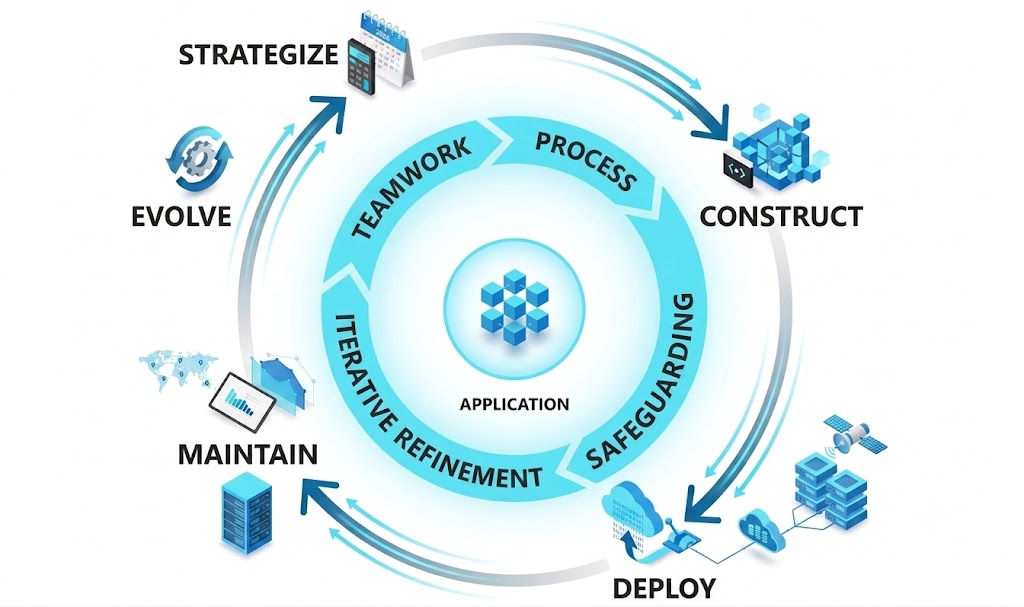
Azure DevOps is a seamless SaaS platform with complete, end-to-end tools covering all phases of the SDLC. "...The whole system operates as one through 5 inter-related but completely integrated structural modules. In order for you to become proficient in usingthese tools in practical situations, you can look into the azure devops training online provided by OnlineITGuru."

2.1 Azure Boards: Enterprise Agile Management
Azure Boards offers highly detailed insights into work portfolios for cross-functional teams using custom-built Kanban boards, backlogs, team sprints dashboards, and delivery plans. Work items from epic to detailed tasks and bugs are tracked using Azure Boards. It is traceable as it enables linking particular Git commits to a particular work item ID.
2.2 Azure Repos: Advanced Version Control & Branch Policies
Azure Repos contains unlimited cloud-hosted private Git repositories. In order to ensure security in the case of modern enterprise engineering, it starts with the source code level. Using Azure Repos, organizations can have strict policies enforced on primary production branches (for example, main or master). Those include:
Minimum number of peer code reviewers prior to merge. Successful execution of automated build verification pipeline. Complete closure of all comment threads.
2.3 Azure Pipelines: The Cloud-Native CI/CD Orchestrator
Azure Pipelines is the fundamental automation run-time engine. It offers multistage execution paths that can be completely defined using YAML configuration. This run-time engine automatically maps workloads for either Microsoft-hosted temporary virtual agents or self-hosted builds running on secure corporate private networks.
2.4 Azure Test Plans: Quality Assurance Strategically Planned
Azure Test Plans assists with manual testing in a browser environment, exploratory test suites, and user acceptance testing (UAT). It operates as a heavy-duty diagnostic tool by automatically capturing video recordings, interaction, and internal environment logs and submitting very detailed bug tracking reports to Azure Boards upon any application failure.
2.5 Azure Artifacts: Securely Managing Packages in an Immutable Way
Enterprise applications today have a high degree of dependency on third-party dependencies whether they are from public or private sources (such as npm, NuGet, Maven, or Python Pip packages). Azure Artifacts provides a secure way of creating an internal storage for custom binary packages which will be securely shared among multiple application projects.
Detailed Understanding of Azure Pipelines (CI/CD Engineering Mechanics)
Building a modern CI/CD pipeline uses the Pipeline-as-Code approach. It is not necessary to configure the settings using an old GUI-based tool, but rather define everything that is related to the pipeline in a specially formatted file named azure-pipelines.yml.
3.1 Continuous Integration (CI) Mechanics
Continuous Integration has a simple yet radiant charter of ensuring that every single change in code made by a developer is compiled, verified & checked in an isolated environment. The process is simple:
This is how it works: The Code Trigger: A developer issues a Pull Request for the changes made in a feature branch to merge into the main.
Agent Provisioning: Azure Pipelines listens for the webhook and provisions an on-demand, isolated virtual environment (container) running Ubuntu or Windows or macOS build agent.
Restore Dependencies: The agent checks out the source code and requests build runtime packages from Azure Artifacts.
Static Code Analysis & Linting: Security scanners that look for hard-coded secrets, API keys or bad constructs of syntax by reading source code + static analysis.
Compilation & Unit Testing: The source code is compiled followed by the execution of automated testing frameworks (NUnit, JUnit, Jest) blocks in parallel.
Artifact Generation: If everything is fine, without errors, the compiled code is packaged into an archive and published to a secure location in
3.2 Continuous Deployment (CD) Layer Mechanics
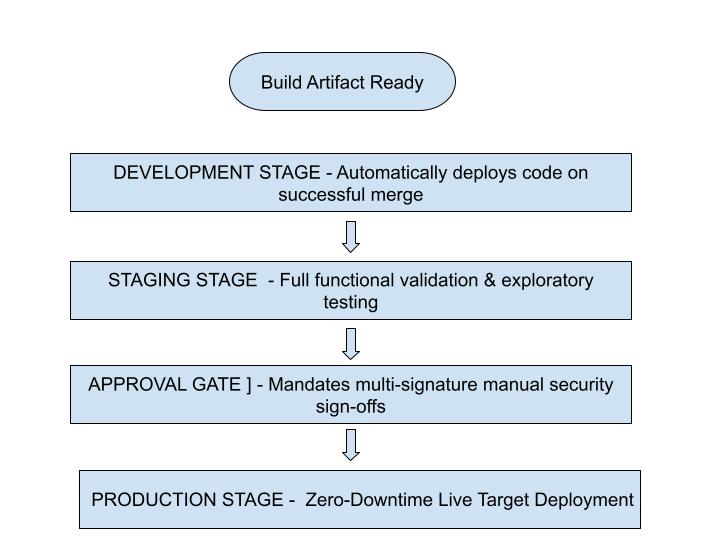
After registering a build artifact, the pipeline moves to the Continuous Deployment stage, where the build artifact is converted into an operational environment. This is a tiered deployment process consisting of:
Detailed Architectural Blueprint Matrix
The below matrix highlights the process through which technical architecture within a production business environment converts into practical results.
Phase Header
Tool Infrastructure
Technical Execution Pattern
Enterprise Real-World Outcome
Project Tracking
Azure Boards
Implement custom Scrum matrices, interactive Kanban tracking blocks, and direct links to product backlogs.
Break down communication silos and give project managers 100 percent transparency on delivery metrics.
Source Management
Azure Repos
Use isolated private Git repositories with automated validation and strict branch protections.
Protect master code; ensure that any invalid or insecure code does not come close to a deployment environment.
Continuous Build
Azure Pipelines (CI)
Detect any code triggers instantly and create isolated build environments where automated unit tests are run.
Greatly reduce integration defects during builds; detect code issues within minutes of code creation.
Continuous Release
Azure Pipelines (CD)
Automatically push binaries to environment rings using declarative multi-staged YAML configuration.
Replace manual server setups with highly-repeatable and faster deployment methods.
Quality Control
Azure Test Plans
Mix automated regression and functional test cases along with exploratory manual processes.
Detect user-runtime catastrophes before they get to the production market
Project Tracking
Azure Boards
Implement custom Scrum matrices, interactive Kanban tracking blocks, and direct product backlog links.
Break down communication silos and give project managers 100 percent transparency on delivery metrics.
DevSecOps – Shifting Security Left
In contemporary cloud engineering practices, it is impossible to consider security as an afterthought that needs to be done at the last stage of software deployment. DevSecOps refers to building up automated security gates right in the core of CI/CD pipelines. It is also known as "Shifting Security Left."
[Plan] -> [Security Scan] -> [Build] -> [Vulnerability Check] -> [Test] -> [Deploy]
^----------------- SHIFTING SECURITY LEFT -----------------------^
DevSecOps inside the Azure Pipeline takes care of itself in an automated way using three specific layers:
4.1 Static Application Security Testing (SAST)
Automated SAST Scanner(SonarQube or Mend) or using our configuration tools (Grouper or io) these are the ways to view files without compilation on plain text inside the agent. Which means verifying some of the entry level security problems such as SQL Injection, cross-site scripting (XSS), and poor use of cryptographic practices. If any security bug breaches the thresholds set by the company then it fails and halts the deployment.
4.2 Software Composition Analysis (SCA)
These days modern applications consist of open source software packages. SCA tools check for any vulnerabilities inside the dependency trees in your package.json or pom.xml file by comparing it with global registers of vulnerabilities (like CVE register). In case the developer accidentally uses an open source package with a high criticality remote code execution vulnerability, the build process gets dropped by Azure Pipelines.
4.3 Secrets Management Using Azure Key Vault
One of the reasons for hacking of cloud infrastructure is developers mistakenly hard-coding the passwords of administrative services, database strings, or API keys of cloud providers in their code files in Git repositories. In an Azure DevOps environment:
No secret codes are ever saved in the code.
Credentials are safely provided to the running code using an isolated hardware security module named Azure Key Vault.
These runtime values remain well-secured in the output of terminal readouts via the pipeline, which prints *** to safeguard the privacy of environmental data strictly.
Metrics, DORA Benchmarks, & Enterprise Optimization
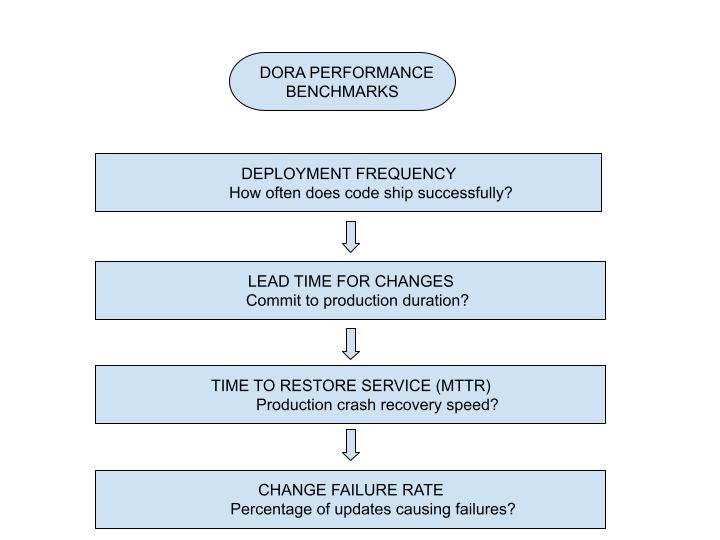
To demonstrate the effectiveness of the DevOps engineering efforts employed within an organization, the engineering leadership uses the data provided by DevOps Research and Assessment (DORA). Azure DevOps has inbuilt analytic dashboards to monitor these 4 key efficiency metrics.
1. Deployment Frequency
This is a measure of how frequently a company manages to successfully release the software code to a production environment. Good performing teams do deployments many times a day via short-lived feature branches and automation pipeline instead of releasing a huge number of updates all at once on a scary monthly basis.
2. Lead Time for Changes
This is the exact period that one line of committed code goes through in order to compile and test itself, pass validation rings and end up being operational and running in production. Enterprise setups reduce lead time from months to less than an hour.
3. Mean Time to Restore Service (MTTR)
This is the amount of time it takes the operations team to restore a service after a critical infrastructure failure occurs in the production environment. By using automated cloud-native pipelines and Infrastructure as Code (IaC), the platform will be able to recreate the whole failed cloud datacenter node from scratch in minutes.
4. Change Failure Rate
This is the exact percentage of the times deployments that happen in the production fail and result in an instant crash, performance decrease or require complete rollback. Automated pipelines lower change failure rate to below 15% while manual processes have change failure rates above 50%.
Future-Proof Engineering – AI, AIOps & GitOps Trends
Throughout 2026, the Azure DevOps technology stack keeps evolving at an increasingly rapid pace. Keeping up with the engineering times calls for understanding three key macro trends within the industry.
6.1 AIOps (Artificial Intelligence for IT Operations)
The modern enterprise pipeline continuously outputs massive amounts of log data, testing metrics, and system metrics. The speed of reading is too slow to uncover any potential bottlenecks in performance within the system. AIOps utilizes machine learning algorithms built into the Azure DevOps pipeline infrastructure in order to:
Analyze build test flakiness automatically.
Anticipate cluster scaling errors prior to impacting web traffic.
Optimize pipeline agent distribution in order to reduce costs of cloud infrastructure.
6.2 AI-Aided Software Development with GitHub Copilot & Azure
Nowadays, AI pair programming assistants are embedded into the whole software development life cycle. Using AI models within Azure Boards and Azure Repos one can:
Generate YAML files for the pipeline template autonomously from textual descriptions of basic language.
Propose unit tests that are missed when reviewing code within Pull Requests.
Automatically comment the code changes to increase the developer experience and reduce engineering cognitive load.
6.3 Declarative GitOps Approaches
For cloud-native systems deployed within Kubernetes clusters, GitOps approach became a new standard. Within this approach, your Git repository becomes a single source of truth about the state of all physical systems you own. When a cloud server requires an update, you do not sign into a cloud management console but just update a declarative file in Git.
Continuous reconciliation services constantly compare the live cloud cluster with the Git repository and make configuration identical to the code repository.
Why Take an Azure DevOps Course Online
There is a huge rise in online learning today due to its flexibility and convenience. A well-designed online course in Azure DevOps would let you study anytime at your convenience. This will be beneficial for beginners who would like more time to grasp every lesson taught.
An online course will also provide you with:
Structured learning.
Recorded videos.
Practical demos.
Practice through projects.
Doubt clearing sessions.
Flexibility in timings.
More time to prepare for interviews.
A well-designed course could save a lot of time for the learners by letting them concentrate on the most important things first.
Qualities of a Good Azure DevOps Course
All courses may not be helpful. A good Azure DevOps course should be practical, clear, and up to date. Not only should it cover all the concepts but also teach them in a simple manner.
Look out for a course which has:
Explanation for beginners.
Hands-on demos.
Workflow in actual projects.
Training on YAML pipelines.
Coverage of Git and branching.
Preparation for interview questions.
Course materials/notes.
🚀 Take the Next Step in Your Cloud Career
Theory reading is just one part of the equation. The other, very important part of the equation to move from code to cloud is getting involved with laboratory exercises. Want to design your own pipeline solutions? Sign up for our industry relevant azure devops online training now.
FAQs
For what purposes is Azure DevOps used?
It is used for planning, coding, building, testing, and deployment of software.
Is Azure DevOps appropriate for beginners?
Yes, it is a good fit for beginners as long as one learns the topics in proper sequence.
Will learning Azure DevOps help in job interviews?
Yes, as the majority of the companies are interested in CI/CD, pipelines, Git and releases processes.
Is Azure DevOps only for Azure cloud?
No, it can be used in any software environment, not only Azure cloud solutions.
Can people not involved in development learn Azure DevOps?
Yes, QA professionals, system administrators, and project managers can learn it as well.
Conclusion
Thus, Azure DevOps is one of the most practical platforms for today's software industry. It brings together planning, coding, building, testing, and deployment into a single pipeline that makes it essential for enterprises and very useful for the learner who wants to master DevOps.
If you write content for your Online IT Guru website, remember about clarity, practical examples, SEO structure and course benefits. This will allow the reader to easily grasp the topic and be interested in taking the azure devops training online from you.