
The Architect Behind the Dashboard: Master the Salesforce Admin Ecosystem
Last updated on Sep 14, 2026
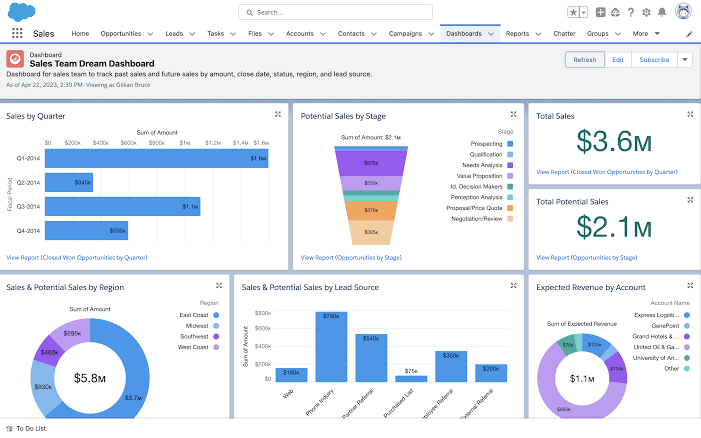
Modern technology infrastructure often feels invisible until it fails, but inside a growing enterprise, someone is constantly tweaking the engines. That individual is the Salesforce Administrator, a strategic orchestrator sitting squarely at the intersection of operational strategy and technical execution. They translate fuzzy business requests into concrete database structures, seamless automated processes, and dynamic user interfaces that thousands of employees rely on every single day.
Without a skilled administrator, a company’s CRM quickly degrades into an expensive, cluttered spreadsheet that nobody enjoys using. With one, raw data transforms into actionable revenue streams, cross-departmental handoffs happen instantly, and executive leadership gains clear visibility into future forecasts. Understanding this role requires stepping past basic software configuration and examining how business mechanics, data hygiene, human psychology, and platform governance align to power modern enterprise growth.
Deconstructing the Salesforce Administrator Role
At its core, the Salesforce Administrator role demands a fluid combination of business acumen and technical knowledge. Admins do not spend their days buried in traditional programming languages; instead, they command an immense suite of low-code and no-code tools built into the Salesforce platform. They manage user access, structure custom data fields, automate repetitive operational tasks, and build insightful reporting dashboards that keep executive teams aligned on daily performance.
Beyond technical maintenance, effective administrators serve as strategic business analysts who bridge organizational communication gaps. When sales directors request faster deal approvals or customer support managers ask for streamlined ticket routing, the admin listens, diagnoses the root issue, and translates those operational desires into working platform solutions. This unique positioning makes them irreplaceable advisors who directly influence how efficiently an entire company runs on a daily basis.
Here is a detailed breakdown of each functional area and its key operational deliverables for a Salesforce Administrator:
Security & Access
This area focuses on user management and safeguarding organizational data so that users see only the records and tools necessary for their jobs.
Profiles: Baseline definitions that dictate what a user can do within the system, controlling object-level permissions (Read, Create, Edit, Delete) and tab visibility.
Roles: Hierarchical structures that control record-level access, determining what data users can view based on their position in the company hierarchy.
Permission Sets: Flexible, additive permissions granted to individual users to extend their access beyond their primary profile without changing the profile itself.
MFA (Multi-Factor Authentication): Security protocols requiring users to provide two or more verification factors to gain access, protecting against unauthorized logins.
Data Management
Data management ensures that business data entering and residing within Salesforce is accurate, up-to-date, and compliant with governance policies.
Data Imports: The process of safely migrating, bulk loading, or updating external records into Salesforce using tools like Data Import Wizard or Data Loader.
Deduplication: Strategies and matching rules designed to identify, merge, or prevent duplicate records (such as duplicate Contacts or Leads).
Hygiene: Ongoing auditing and maintenance tasks, including cleansing dirty data, validating entries, and archiving stale records to ensure high data quality.
Process Automation
Process automation streamlines operations by reducing manual tasks, eliminating repetitive data entry, and enforcing business logic.
Flow Builder: Salesforce’s primary declarative automation tool used to build complex end-to-end logic, auto-update records, send notifications, and guide users through guided screens.
Approval Processes: Automated workflows that require specific manager or stakeholder sign-off before a record (like a discounted opportunity or expense report) can move to the next stage.
Analytics & Reporting
Analytics transform raw transactional data into actionable operational metrics and strategic insights for management and business teams.
Custom Reports: Tailored, filterable list views and summarized data aggregations configured to track specific metrics, sales pipelines, or support cases.
Executive Dashboards: Visual representations of key performance indicators (KPIs) consisting of charts, graphs, and summary figures built from underlying reports for high-level decision-making.
System Customization
System customization adapts the standard Salesforce environment to fit an organization’s unique business processes and branding requirements.
Custom Objects: Dedicated database tables created to store unique business information outside standard entities like Accounts or Contacts.
Page Layouts: Tailored user interfaces that control the arrangement of fields, buttons, related lists, and sections on record pages for different user profiles.
Lightning (App Builder): The point-and-click interface tool used to design custom, dynamic Lightning pages and app navigation experiences for desktop and mobile users.
Setting Up Security and Data Architecture
Security within Salesforce operates on a strict principle of least privilege, ensuring employees see only the information necessary to perform their roles. Administrators construct this security foundation using a layered model that combines Organization-Wide Defaults, Role Hierarchies, Sharing Rules, and Permission Sets. Managing these layers requires a precise balance between strict data protection and effortless cross-team collaboration across different departments.
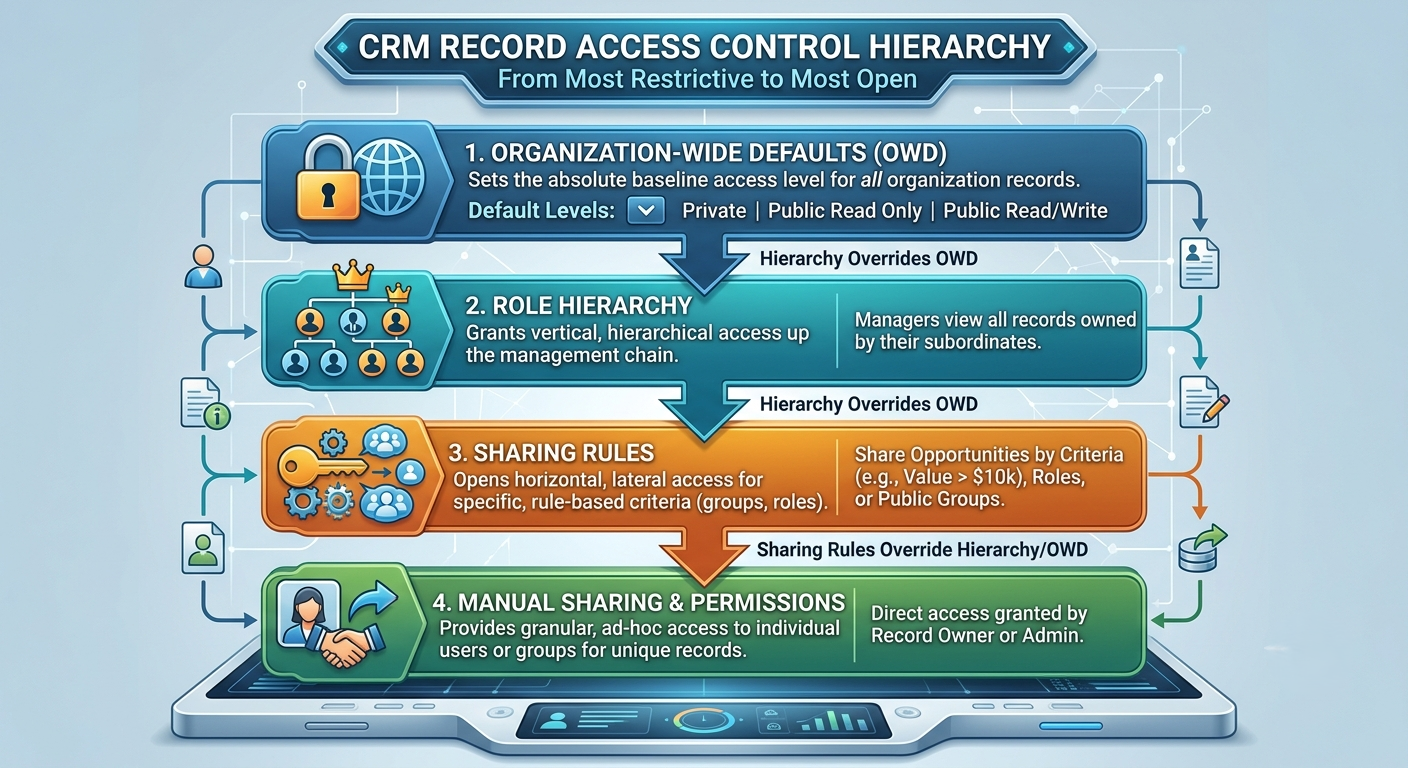
Structuring objects, fields, and record types forms the underlying data architecture of the organization. Admins determine how Accounts, Contacts, Leads, and Opportunities link together using master-detail or lookup relationships. By carefully engineering this schema, they ensure that every customer touchpoint is cleanly recorded, easily searchable, and capable of scaling cleanly alongside company growth.
Mastering Automation with Flow Builder
Process automation represents one of the highest-value capabilities in an administrator's toolset. Through Salesforce Flow Builder, admins create sophisticated, multi-step logic paths that execute automatically whenever record data changes or specific schedules are met. Flows can update related records, send targeted email alerts, generate follow-up tasks, and integrate seamlessly with third-party tools without writing a single line of Apex code. To build reliable enterprise workflows, admins must master the primary types of flows: Record-Triggered, Screen, Scheduled-Triggered, and Autolaunched Flows. Record-Triggered Flows act like database triggers in real time, Screen Flows offer interactive step-by-step forms for end users, Scheduled Flows handle bulk background maintenance, and Auto launched Flows allow admins to build modular, reusable sub flows. Selecting the correct flow type ensures that automated actions remain light on system overhead while delivering immediate results to front-line teams.
Transitioning from legacy tools like Workflow Rules and Process Builder toward modern Flow architecture requires a deep understanding of logical structures and governor limits. Because Salesforce operates in a multi-tenant cloud environment, administrators must design "bulkified" flows that safely process thousands of records simultaneously without triggering system limits or breaking dependent processes. Avoiding database interactions inside loops and consolidating logic onto single objects are core skills for any senior admin. Beyond record updates, modern Flow Builder capabilities include advanced fault-handling logic and asynchronous processing paths. Admins construct explicit fault branches to capture unexpected system errors gracefully, sending detailed diagnostic logs to technical teams rather than displaying abrupt system failures to end users. Asynchronous paths allow resource-heavy operations—such as calling external APIs or sending external email notifications—to run in the background without delaying the primary user's screen speed.
Masterful process design ultimately eliminates redundant manual data entry, keeping sales and service representatives focused squarely on high-value human interactions. By continuously auditing active flows and removing outdated business logic, administrators maintain a clean, resilient automation architecture. This strategic oversight ensures that as an enterprise scales up its operational complexity, the underlying Salesforce engine continues to execute every background business rule smoothly and reliably.
Navigating Learning Paths and Skill Acquisition
Building a successful career in this ecosystem demands continuous structured learning and hands-on system experimentation. Professionals usually start by building a structured foundation through a high-quality salesforce admin course that walks through platform architecture step by step. These formal learning modules help non-technical candidates convert abstract software concepts into practical hands-on exercises within free developer sandbox environments.
The Administrator Skill Matrix highlights the balance of technical proficiency, analytical thinking, and interpersonal skills required to manage a Salesforce environment effectively.
Logical Reasoning enables administrators to dissect intricate business requirements and translate them into efficient, automated workflows. In practical application, this skill is essential for mapping complex business rules to Flows, ensuring that automated processes execute reliably without creating system bottlenecks or logical loops.
Data Governance focuses on maintaining the integrity, accuracy, and security of organizational information over time. Admins apply this competency directly through regular auditing of data quality and cleansing records, which prevents duplicate entries, fixes formatting inconsistencies, and ensures leadership can rely on accurate reporting.
Communication acts as the crucial bridge between non-technical business stakeholders and technical execution. Administrators leverage strong communication skills when translating user feedback into clear specification sheets, ensuring that technical updates accurately resolve operational friction and meet end-user needs.
System Design involves structuring the user interface and platform architecture to maximize productivity and adoption. Practical application of this competency centers on building clean, intuitive UI page layouts that display relevant information clearly, minimizing clutter and helping users complete their daily tasks with minimal clicks.
A well-rounded training path emphasizes real-world application over simple theoretical reading. Candidates should construct mock business builds, complete specialized Trailhead modules, and actively participate in user groups to solve practical challenges. Mastering core concepts early ensures candidates build the confidence needed to handle complex production environments without introducing unexpected operational disruptions.
Certification and Structured Training Preparation
Earning official Salesforce credentials remains one of the most recognized ways to demonstrate professional competence to recruiters and hiring managers. Preparing thoroughly through a comprehensive salesforce administrator course equips candidates with deep context across all core exam topics, including user management, standard object configuration, analytics, and security settings. Passing these rigorous exams validates that an administrator understands platform best practices and industry-standard security frameworks.
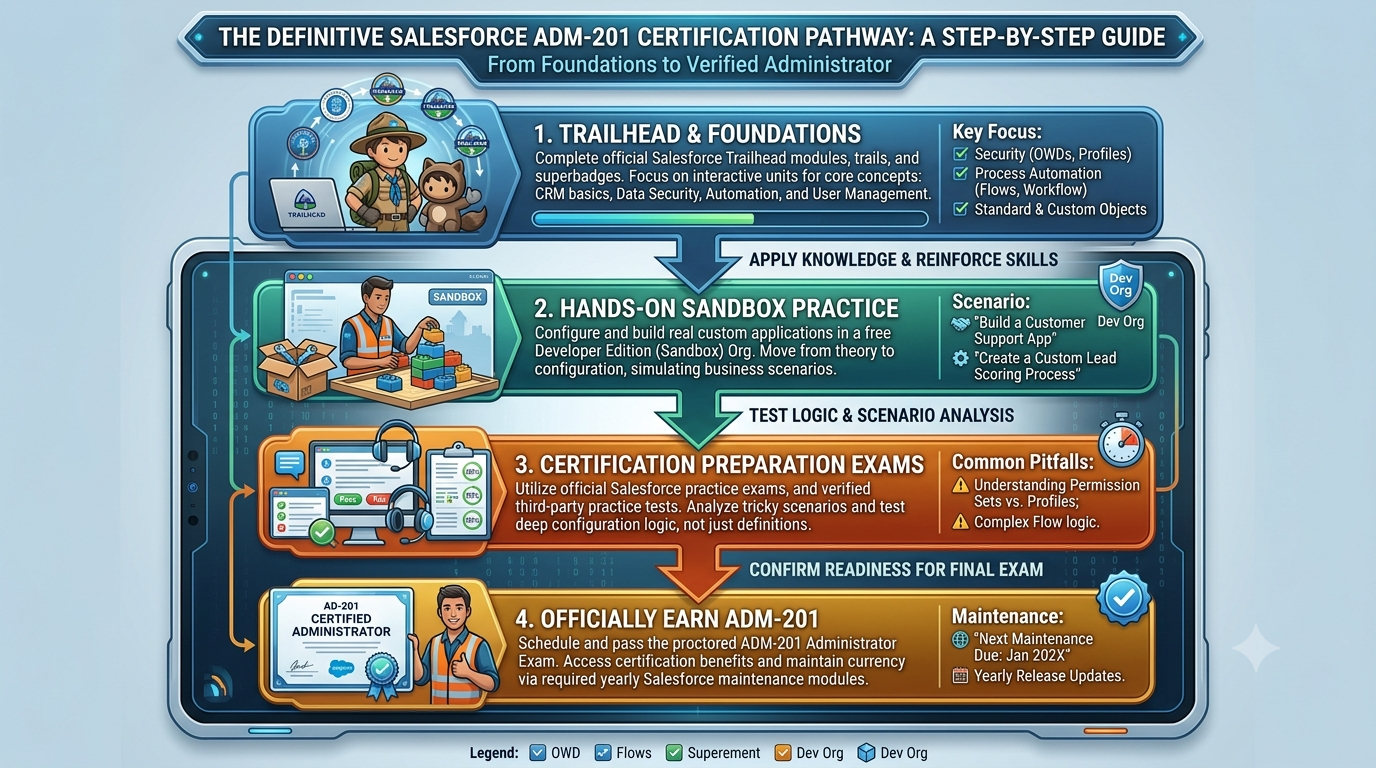
Certification study should focus on scenario-based problem solving rather than simple keyword memorization. The administrator exam tests real-world judgment, asking candidates to select the most efficient, scalable, and maintainable solution for a given business challenge. Structured prep builds a strong foundation that helps professionals hit the ground running on their very first day on the job.
Advanced Platform Maintenance and Governance
Sustaining a healthy Salesforce org over several years requires rigorous data hygiene and active release management. Administrators routinely audit user access logs, monitor system storage limits, remove duplicate records, and clean out unused custom fields that add unnecessary clutter. Establishing clear operational governance prevents technical debt from building up, keeping the platform performant and intuitive for every user.
A structured quarterly org maintenance routine ensures that a Salesforce system remains secure, performant, and cost-effective over time.
User & License Audit focuses on reviewing active user accounts and permission assignments across the entire organization. By identifying and deactivating inactive accounts, administrators free up costly unused licenses for new employees while simultaneously closing security risks associated with former team members retaining system access.
Security Health Check utilizes Salesforce's built-in security auditing tools to evaluate the org’s posture against recommended security baselines. This task allows admins to proactively identify and fix baseline vulnerability gaps, such as overly permissive sharing settings, weak password policies, or missing multi-factor authentication requirements.
Storage & Data Hygiene targets data cleanliness and system capacity limits to prevent performance degradation. Through this process, administrators archive old system logs, clear out outdated transactional records, and purge duplicate entries, ensuring that data storage limits are managed efficiently and reporting metrics remain accurate.
Automation Review evaluates all active processes, Apex triggers, and Flow Builder workflows to streamline system logic. By auditing automation performance, admins can consolidate overlapping processes and decommission redundant flows, which reduces processing overhead and prevents conflicting logic from disrupting daily business operations.
When rolling out platform updates or building new capabilities, admins strictly utilize sandbox environments for isolated building and testing. They carefully manage change sets and deployment pipelines to transition updates smoothly into production without interrupting daily business operations. This disciplined approach guarantees system reliability while enabling continuous innovation across the broader enterprise.
Next-Level Leadership: The Evolving Role of the Modern Admin
The Salesforce platform evolves constantly, delivering three major software releases every year packed with new features, tools, and enhancements. Enrolling in advanced salesforce administrator training programs helps seasoned administrators stay ahead of these updates, ensuring their organizations take full advantage of cutting-edge capabilities like AI-driven analytics, predictive forecasting, and automated cross-cloud integrations. Staying educated prevents technical debt and keeps internal workflows aligned with platform best practices.
Beyond immediate system performance, continuous learning opens up exciting, high-impact career trajectories across the broader Salesforce ecosystem. Experienced admins often expand their expertise to transition into specialized roles like Business Analyst, Salesforce Architect, Enterprise Consultant, or Platform Developer. Each step forward shifts an administrator's focus toward high-level strategy, system design, and large-scale digital transformation.
Ultimately, system administration is less about routine software maintenance and more about driving measurable business growth. By consistently building new technical capabilities, mastering emerging platform features, and keeping organizational goals at the center of their work, modern Salesforce Administrators transition into indispensable strategic leaders within digital enterprises.