
The Architectural Frontier of Large Data Volumes in Salesforce: Apex Cursors versus Batch Apex
Last updated on Aug 25, 2026
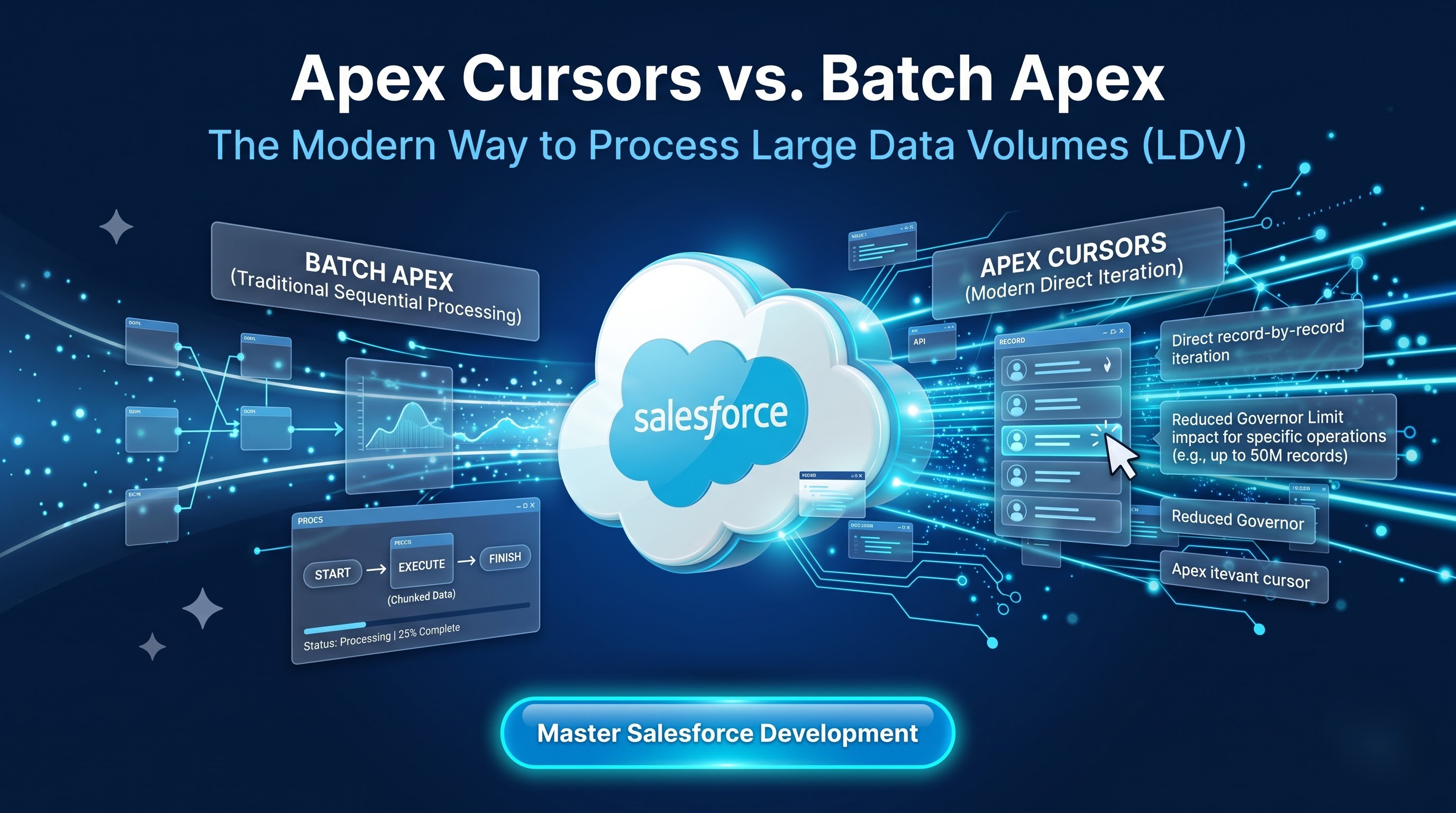
The Architectural Evolution of Asynchronous Processing on Force com
The Salesforce multitenant runtime has been characterized by rigid transactional parameters and governor constraints for almost twenty years. It is impossible for any tenant to use database connectors, CPUs, or RAM excessively in the shared resources situation. To enable useful application development with large data volumes, the platform has embedded asynchronous implementations that separate intensive calculations from real-time user actions.
Batch Apex is the irrefutable basis of this asynchronous framework. First used to amplify the limitations of real-time inquiry and processing transactions, the batchable framework enabled business operations to divide great volumes of data into small portions. Thanks to processing transactions in separate data contexts, developers are able to cope with hundreds of thousands or millions of records without breaking execution limits.
Nonetheless, the environment of enterprise software development has changed drastically. Customers’ expectations for CRM systems and custom business systems have changed from being static at intervals to event-based architecture with real-time synchronization, a continuous data flow, and user-friendly interfaces. In such a context, slow and inflexible Batch Apex methods create obstacles.
The emergence of Apex Cursors has been a great improvement for both the data querying process and the technology development. Thanks to the implemented technology of low-overhead server-side query cursors, developers can gain access to data sets of up to 50 million records in Apex. Unlike the unified batching technology of Batch Apex, Apex Cursors allow programmers to easily navigate through records, adjust sizes of the windows, memory usage, and level of concurrency.
Ultimately, the comparison of the two technologies cannot take place without a review of their engineering principles. Understanding their advantages and disadvantages related to transaction safety, memory usage, queuing, and governors is significant for the stable operation of enterprise architecture while data volumes grow. For those developers who want to learn the intricacies of these asynchronous technologies, taking a relevant salesforce development course at OnlineITGuru will give them both basic and advanced knowledge on how to implement them in practice.
Understanding the Batch Apex Engine
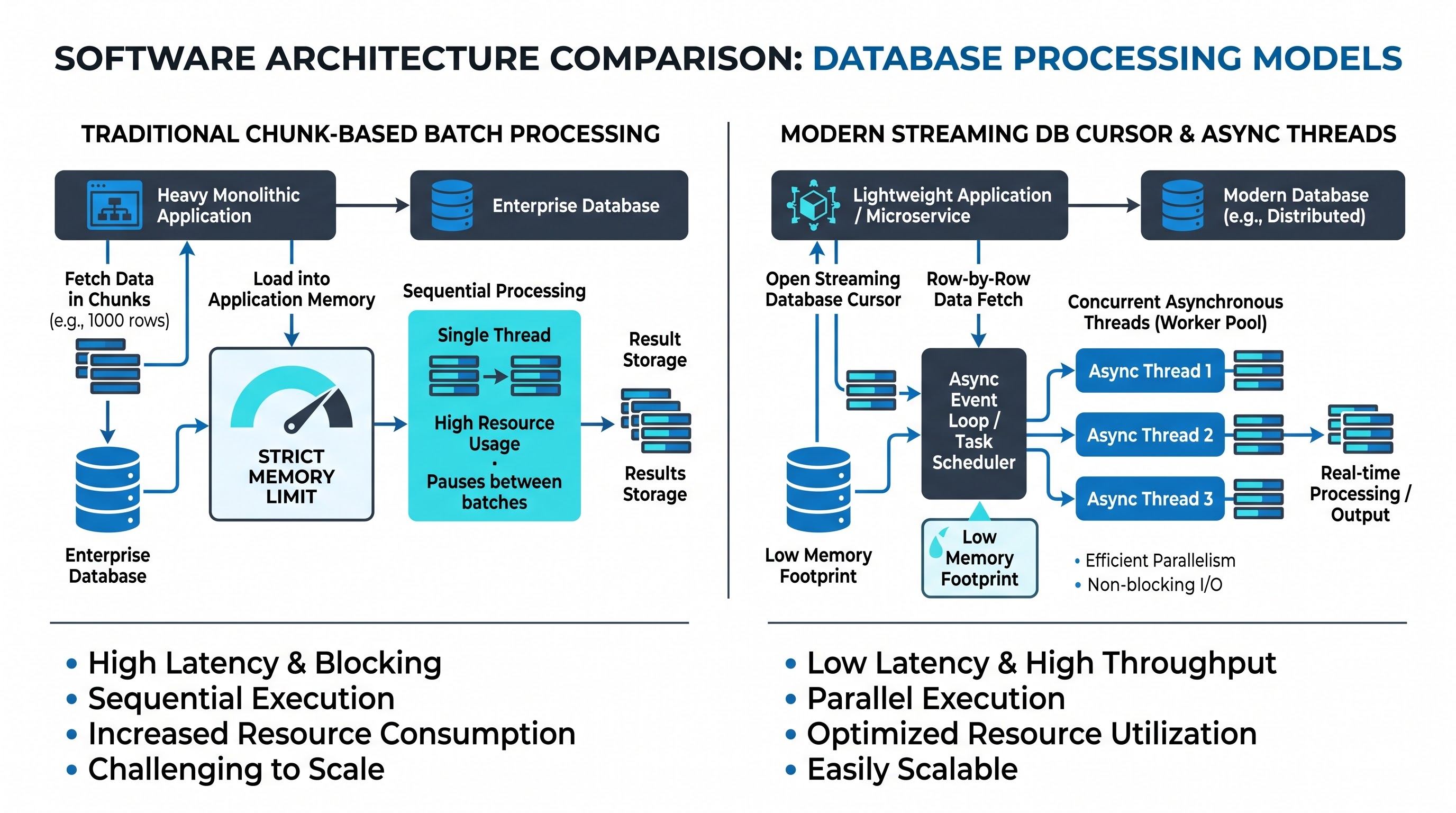
Understanding the architectural breakthroughs achieved using Apex Cursors requires knowledge of how the engine of Batch Apex operates, specifically how the database query locator operates through state management, memory, and managing database cursors.
The Different Stages of Execution
Batch Apex has a predefined three-step execution process that is taken care for by the asynchronous queue manager of the platform.
The initialization phase starts with the platform triggering the start method, after which the process begins. The start method operates in an isolated synchronous transaction and returns a collection that can either be a database query locator or an iterable collection. The database query locator allows the database to generate a query and create a server-side cursor that can identify as many as fifty million records.
After that, comes the processing stage at which the platform’s internal scheduler assesses the total dataset that was previously determined by the query locator, and the dataset is separated into a sequence of contiguous slices of data. The batch engine proceeds to enqueue the jobs that need to be run to process those slices of data. Each execution block runs within its own transaction boundary, and it is given a list of records to process and a unique set of execution restrictions. In the case of a transaction failure due to runtime exception or validation error in a particular chunk, that transaction is rolled back independently, and processing of other chunks can continue.
After all chunks have been processed, the finalization stage begins. The finish method is called by the platform within the last transaction boundary. This stage is associated with post-processing operations like sending of email alerts, logging and saving metrics, or setting up of next asynchronous tasks.
An Overview of the Database Query Locator
Database query locator is active; it serves as a pointer managed by the platform to access a result set from the database tier. In the moment when the start method executes, the query locator transmits its internal query ID to the Salesforce application server and returns computative control back to the application.
The application server generates the execution parts and issues database queries in order to fetch further batches containing the specified number of records ranging from one record to two thousand, with two hundred records being the default number.
Since the query locator is entirely managed by the platform itself, it has no idea of the runtime status of the pointer. The platform decides when the records get materialized, how memory gets allocated, as well as the order in which execution parts go to the asynchronous job pool.
Architectural Challenges of Traditional Batch Designs
Although Batch Apex has a solid, declarative structure for scheduled maintenance and batch interactions, its structure leads to some specific architectural limitations in high-volume scenarios.
Linear and Monotonic Processing
Batch Apex is based on the principle that the operations in the application are traversed in a straight line. The application proceeds from record zero to the final record without any possibility of going back.
Developers have no ability to change the direction of the query locator, skip a block of records, jump to a calculated offset, or reevaluate any records that were processed already in the situation of this specific job. Batch Apex cannot perform these operations unless it uses the limited database records.
Concurrency Constraints and Flex Queue Starvation
One of the major operational issues concerning Batch Apex implementation in large enterprises is concurrency contention.
The Salesforce platform establishes a strict limit on the concurrency of batch jobs, holding this value at five for each organization. This implies that if there are six batch jobs that start at the same time through different automation processes, packages, or integrations, the extra jobs will go to the Flex Queue. The capacity of the Flex Queue is exactly one hundred.
The cases of the Flex Queue starvation are typical for mature Salesforce instances. A pertinent batch job that is executed based on an incoming customer order might get stuck behind a long-running process initiated by third-party packages or scheduled reports leading to the indefinite holding of the job. This situation generates unpredictable delays, and violates the service-level agreements of a given enterprise.
Inflexible Chunk Sizing and Memory Materialization
Once a batch job is initiated, the size of its scope remains constant throughout the operation. For instance, if a coder has set the scope size to two hundred records, every operation employed will try to create two hundred sObjects in the heap of Apex at once.
In the case of ordinary standard objects with small schemas, this materialization is manageable but not so in the case of more complex enterprise objects with a bunch of unique fields, wide text areas or rich text. Hence, once we have said that our logic loads two hundred records at once, numerous megabytes of heap space are already consumed even before the logic is executed. If the logic also creates child objects, forms JSON payloads or makes lookup maps, the transaction might hit the asynchronous heap limit of twelve megabytes.
As the chunk size is invariable depending on the type of record as well as on the usable heap, the developers will need to make the batch jobs of a significantly smaller size like 10-20 records, etc. which will lead to more overhead during the transaction and execution of the batch job. Understanding how you can overcome such memory constraints requires practice, so comprehensive salesforce dev training programs focus on teaching the principles of bulkification and the management of governor limits.
Complexity in Orchestration and State Management
Batch execution is unpredictable and independent of the worker threads employed. Developers have no control over the precise order in which the process parts are executed.
In addition, state management between transactions necessitates the implementation of the stateful interface. This interface compels the platform to save the batch instance state after every part of the execution and load it before the next one. In the case of stateful variables collecting lots of data, such as tracking sets, aggregate maps, and error logs, serialization can cause the process to proceed so slowly that heap exhaustion can happen as soon as class deserialization occurs.
The Mechanical Basis of Apex Cursors
Apex Cursors are different from the batch execution model entailing platform management. Rather than encapsulating the query execution process within an automated lifecycle mechanism, the Apex Cursor allows developers to obtain server-side query results programmatically.
When an Apex Cursor is created by executing a query, the platform compiles this query and marks the activated cursor in the database tier. Still, no recorded instances are transferred to the Apex application server.
A cursor instance thus constituted is a light handle containing metadata, which refers to the query execution context, a cursor id, and the total number of returned records.
Thus, the developer is able to control the process for transferring the data into application memory according to their own discretion based on this handle.
The Difference Between Standard Cursors and Pagination Cursors
The requirement to maintain both flexibility for developers and the capability of multitenancy requires the system to create two different kinds of Apex Cursors that cater for different types of operations.
The first type is the Standard Apex Cursor, which is designed for asynchronous data pipelines, large-scale background processing, and data extraction. A standard apex cursor can perform operations on datasets of up to 50 million rows. However, it is only applicable in asynchronous Apex environments such as Queueable classes and Scheduled jobs. The organization is allowed to use the standard cursor only ten thousand times in a rolling 24-hour period. The main purpose of creating this type of cursor is to replace lengthy batch jobs with a lighter and faster value of the Queueable ability that is able to handle millions of records and consume less memory.
Pagination Cursors provide interactive, synchronous experiences for users and backend systems that need low-latency access to data. A pagination cursor may return query results of up to one hundred thousand rows. Each retrieval of records may return two thousand rows per execution. Given that many interactive users are working in enterprises, the platform includes up to two hundred thousand pagination cursor creations every day. The main purpose of the technology is to power fast Lightning Web Components, custom databases, and other integrations where data traversal and sorting is needed.
Bidirectional and Indexed Data Navigation
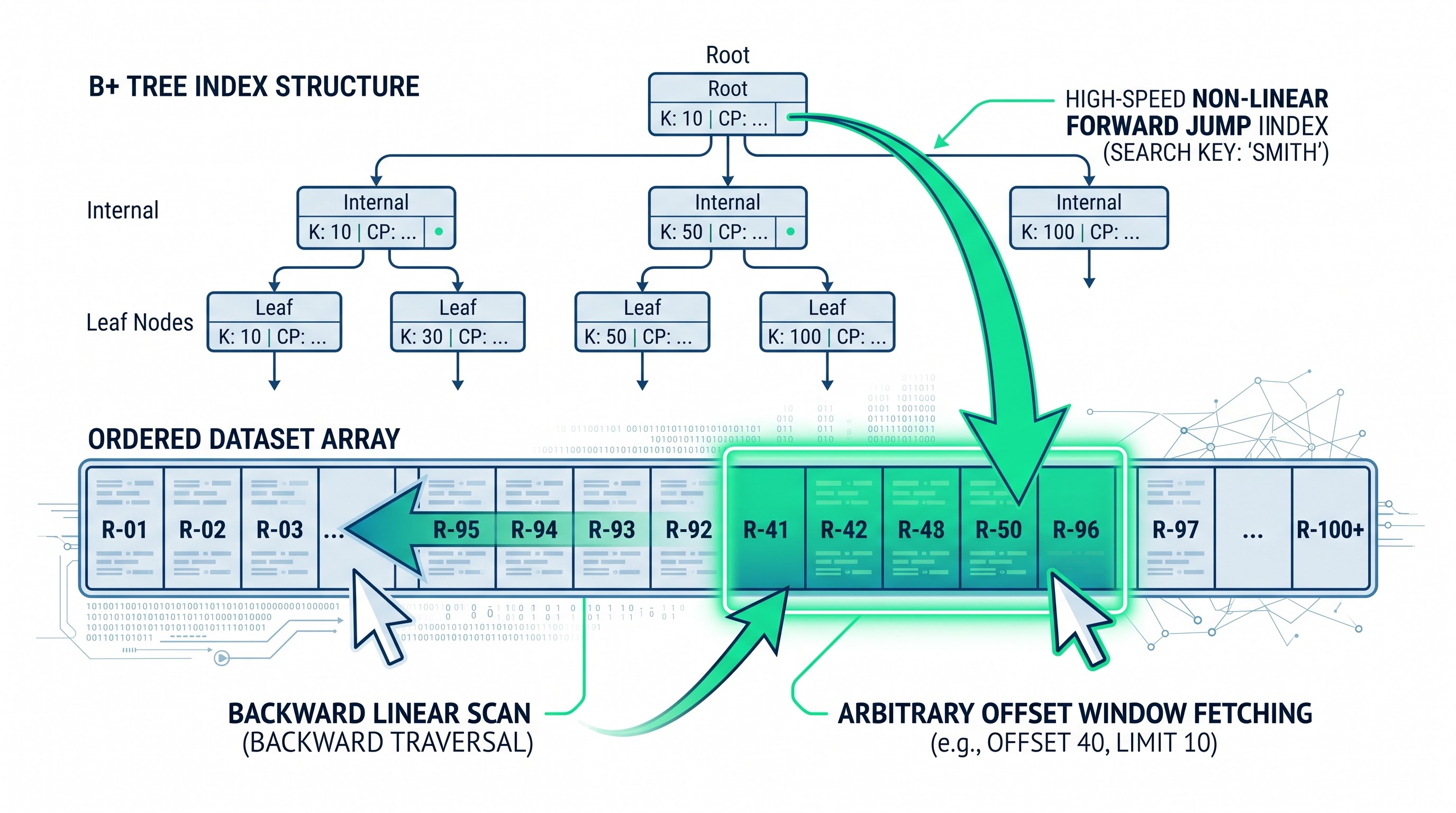
The most functioning-changing feature of Apex Cursors is the introduction of the concept of non-linear indexed navigation over database results.
The Problems with Traditional Offset and Keyset Pagination
Before Apex Cursors came into play, the only way to implement pagination over large datasets in Salesforce was through two flawed methods.
The first method relies on the SOQL offset clause. While the method may seem simple, the platform puts a maximum cap of two thousand records on the offset. Additionally, the database engines lack efficiency when performing offsets, which means when asking for an offset of two thousand, the database engine has to scan through the previous two thousand rows. As offsets increase, the time it takes to execute the query increases significantly.
The second method uses keyset pagination, where queries are filtered on indexed fields like record IDs or creation timestamps. Although this method avoids the two-thousand-record limitation, it does require strict indexing, which makes complex sorting nearly impossible.
The Process behind Low-Latency Indexed Fetching
Apex Cursors eliminate such issues associated with performance impairment by maintaining the query execution status at the database level. Once the Apex Cursor is created, the database decides and formats the index of the ordered row pointers that satisfy the query. When the user makes the request for fetch of 50 records starting from position of offset 30000, the database utilizes the internal addressing scheme of the engine responsible for delivering the information concerning the 30000-th block used in the process of indexing the records.
Therefore, requests for the records from offset 0, offset 40000 or offset 10000 will go smoothly with the result in terms of the speed.
This new approach can help achieve some advanced data processing techniques in Apex:
Symmetrical Bidirectional Navigation: In this type of navigation, the applications forward traverse through query results and after discovering an anomaly or dependent record state navigate backward to previously retrieved records from the same execution context.
Arbitrary Jump Paging: User interface enables the retrieval of complete paginated controls over huge datasets comprising thousands of records enabling the users to jump to any page instantly without any delay or the need of re-running queries.
Non-Linear Algorithmic Search: Using Apex, developers have the ability to create a binary search algorithm on any sorted dataset allowing retrieval of midpoint information from a database containing millions of records, assessing the results and subsequently slicing the data space even without the loading of large data sets in the memory.
Adaptive Dynamic Windowing: Asynchronous workers can optimize their retrieval volumes in real time, for example if they come across complex records which require high computational resources, they can immediately adjust the following calls in the same pipeline to make them smaller.
Memory Utilization and Heap Dynamics
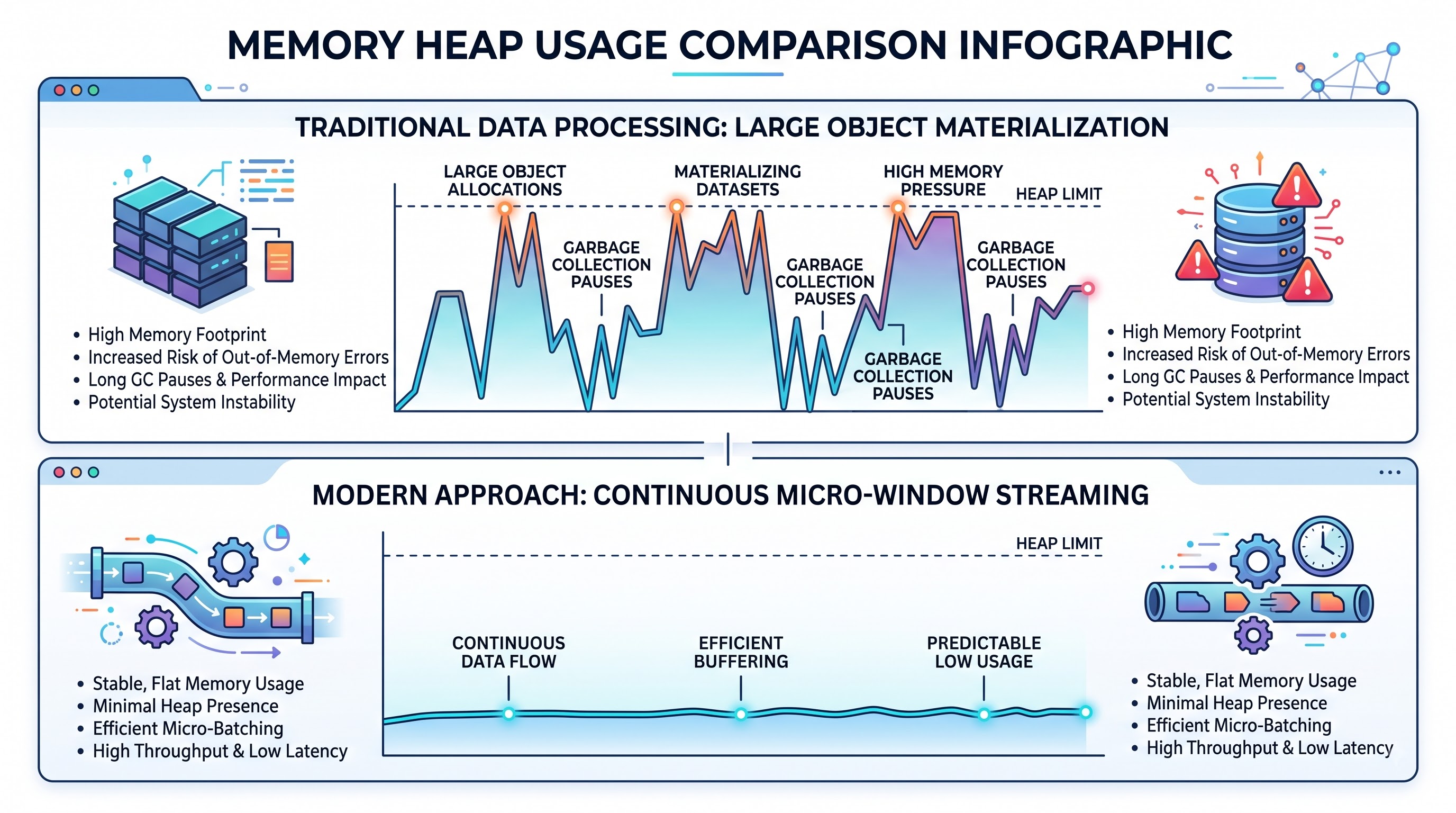
Among the various disciplines associated with creating applications in Salesforce, managing memory consumption within the limits of synchronous Apex heap 6MB and asynchronous Apex heap 12MB is one of the toughest disciplines.
Scope Materialization in Batch Apex
With Batch Apex architecture, the memory consumption is directly dependent on the defined scope size of the execution method. Just before the execution of any user-defined logic takes place, the platform has to create the collection of sObjects defined for the scope.
Suppose there is an enterprise object with one hundred custom fields, five long text areas, and a couple of parent relationships. When you have to instantiate two thousand enterprise records at the same time, it can take around seven to nine MB of heap memory. This ensures the developer has only two-three MB of heap left for implementing business logic, creating children collections, mapping external integration systems, and preparing record lists for updates in the database.
If the transaction ever goes over the twelve-megabyte asynchronous limit while being processed, then an exception occurs that cannot be caught. The transaction is rolled back completely, and the rest of the chunks in the batch job stop processing, so a manual clean-up is needed to clear the partial state.
Streaming Window Materialization in Apex Cursors
The use of Apex Cursors enables a new approach for heap management that switches from bulk scope materialization to continuous window streaming.
Unlike traditional bulk processing, an active Apex Cursor takes up almost no space in the heap when running with the only data stored being the internal string id and integer metadata of the process. The records are on the server until they are requested from it.
As a result, a streaming pipeline can be constructed:
The transaction creates the cursor handle.
The algorithm runs a loop to retrieve a strict micro-window of records like 25 or 50 records .
The data is processed, converted, or forwarded to another system.
The local record collection variable is cleared or reassigned, enabling the Apex garbage collector to release the heap memory.
The loop increments the offset value and continues fetching the next micro-window.
Thanks to the streaming approach, the Apex transaction can process thousands of wide records within the transaction boundary and keep the heap usage within the limits of 1 Megabyte. The memory usage and the processing capacity are two distinct processes.
Concurrency, Queue Dynamics, and Asynchronous Orchestration
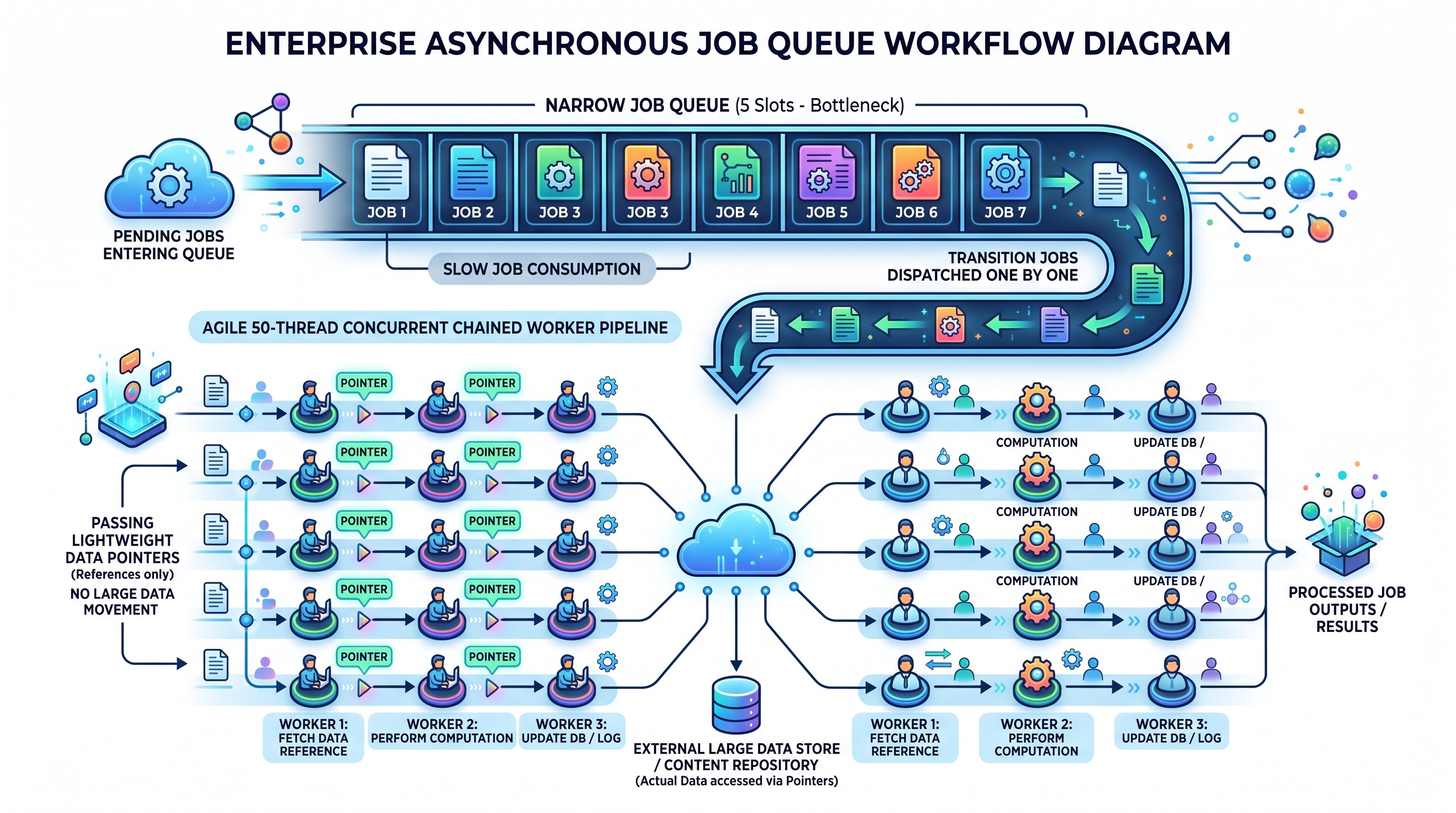
Salesforce enterprise projects do not process data in isolation from other tasks. High-volume solutions must utilize concurrent processing and these operations happen simultaneously with transactions and integrations. Understanding the interaction between Batch Apex and Apex Cursors and the queues is a prerequisite for avoiding system-wide bottlenecks.
The architectural challenges faced by Batch Apex stem from its rigid concurrent execution limit of five jobs.
When a batch job is initiated, the system checks the availability of one of those five active job slots. Whenever all five jobs slots are taken, the incoming job goes into the Batch Flex Queue.
Although the Flex Queue permits a hundred jobs to be queued at one time, it also brings with it significant risks to the system:
Lack of Control over Latency: A job in Flex Queue cannot be initiated until other jobs in the queue have completed. This means that long-running maintenance jobs, taking four hours, will force operational batch jobs to sit in the queue for the same amount of time.
Flex Queue Limitations: Only up to one hundred batch jobs can be present in the Flex Queue at the same time. Any attempt to submit any batch job when the Flex Queue is at capacity results in an error message being returned.
Lifecycles Are Rigid: Any kind of adjustment to batch jobs in the queue is impossible once they are in the queue.
Flexibility of Queueable Cursors
Apex Cursors do not feature an execution engine. Thus, the creation of asynchronous processing pipelines requires combining Cursors with Queueable Apex.
This architectural pattern involves the first Queueable job executing a query, instantiating a Standard Apex Cursor, and processing an initial portion of data utilizing the fetch method from the cursor. If there are still some records in the result set of the cursor, the Queueable job creates a new instance of itself, providing the cursor handle that is active at present and the new offset of the current job which is to be executed.
This hybrid Queueable-Cursor architecture has several advantages:
Huge Concurrency Growth: Queueable Apex jobs do not use places in the restricted five-job Batch Apex pool. Business can process up to fifty Queueable jobs concurrently in asynchronous execution environments, thus greatly improving processing speed.
Avoiding the Flex Queue: Chained Queueable jobs use standard asynchronous application queue so that they are exempt from the restriction of the one hundred batch jobs available in the Flex Queue.
Dynamic Pipeline Throttling: With the help of modern Queueable Apex, they can enqueue jobs using delays varying from zero to several minutes. The Queueable Cursor pipeline is capable of pausing between execution parts while processing the records sent to an external service affected by certain speed regulations. This cannot be achieved through Batch Apex.
Ability to Operate at the Runtime: In this context, every chain link acts as a separate transaction enabling the class to check existing governor limits prior to making a request for a different micro-chunk or queuing another transaction link. Strong Queueable-Cursor chains can only be formed if an individual understands modern asynchronous methods which are very well taught via live salesforce developer online training available at OnlineITGuru.
Conclusion: Streaming Over Chunking
The Conclusion section of this paper focuses on the concept that streaming is preferred over chunking in the process of data processing. The advancement of Apex Cursors has brought about a revolutionary change in data processing in Salesforce that has allowed developers to start using a flexible approach to replicated DML operations with the help of its native transactions and declarative administrative controls, Batch Apex lacks flexibility and has a limited concurrency of five jobs. remaining. Despite the fact that Batch Apex has proved to be helpful for large and com
Using Apex Cursors due to their prominent properties of low overhead, bidirectionality and random access will enable one to overcome Batch Apex challenges. The fact that developers can use Queueable Apex alongside Apex Cursors eliminates the problems associated with Batch Flex Queues as well as allows them to keep their memory usage low while developing. Whether you are performing a modernization of historical batch frameworks or designing scalable multitenant data pipelines from scratch, updating your skill set with an industry-aligned salesforce developer online course on OnlineITGuru will prepare you for implementing major projects in the field of large data volumes in the enterprise Salesforce space.