
The Architecture of Modern Delivery: An Enterprise Guide to Azure DevOps
Last updated on Jul 11, 2026
Nevertheless, the struggle between development speed and security remains relevant to the IT industry. There are always conflicting interests between developers’ speed, governance, security constraints, and complexity.
This is where Azure DevOps comes into play. It is a system that is not just a suite of tools and has been designed to help efficient software development teams.
Architecture of Azure DevOps
Azure DevOps has been divided into five components. It is critical to understand the way these elements interact with each other to develop an effective platform strategy.
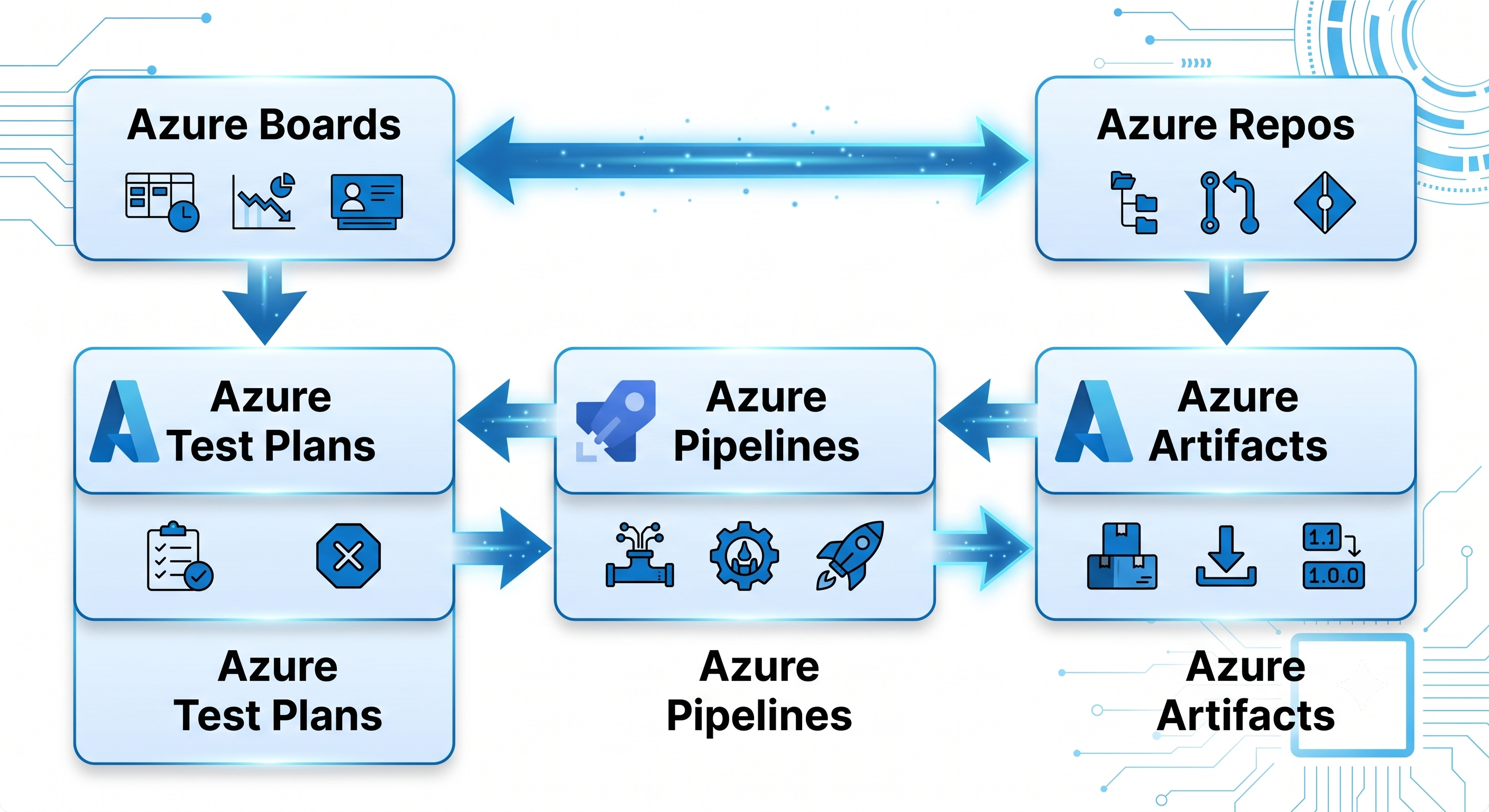
Azure Boards – Planning and Work Tracking through Agile Practices
Azure Boards covers the intake phase of the development life cycle. In large-scale deployments, it translates strategic portfolio management into detailed engineering tasks. Azure Boards has three different levels of functionality:
Epics and Features – Portfolio management tools that enable leaders to monitor the progress of projects across many teams.
Backlogs and Sprints – Execution spaces for teams configured according to Scrum, Kanban, or custom hybrid methodologies.
Queries and Dashboards – Data engines that consolidate delivery data, monitor sprint velocity, and detect delivery constraints.
Azure Repos – Code Version Control Architecture
Azure Repos offers private Git repositories or traditional Team Foundation Version Control (TFVC). In the age of modern infrastructure and application development, Git is standard. Repos includes:
Branch Policies – Constraints that prevent direct pushing of codes to the main branch, instead ensuring that successful builds, successful testing, and code reviews are required.
Semantic Code Reviews – PR interface with markdown comments, multi-person approval, and linking to work items.
Code Search Capabilities – Indexes code to allow searches for code snippets, API signatures, and dependencies used in all repos in an organization.
Azure Pipelines: Orchestration and Execution
Azure Pipelines offers cloud-native CI/CD for applications, compiling source code and generating deployable software artifacts.
Definitions in YAML: Code-defined pipelines which coexist with the application logic itself allowing for versioning, linting, and PR-based validation of the build environment.
Multi-Stage Orchestration: Pipelines divided into separate and ordered stages (Build, Test, Staging, Production etc.) secured by environment approvals and deployment gates.
Hybrid Execution Pools: The capability to combine Microsoft-hosted agents for effortless cloud build operations with self-hosted agents used for deployment inside private virtual networks.
Azure Artifacts: Package Management and Dependencies Control
Azure Artifacts generates internal package feeds for the safe sharing of code among different teams and applications.
Multi-Protocol Feeds: Direct support for NuGet, npm, Maven, Python(pip) and Universal Packages.
Upstream Sources: Capabilities of proxying external public registries (npmjs, nuget.org) caching the dependencies and scanning for vulnerabilities in order to ensure reproducibility of the build.
Immutability and Lifecycle Control: Ensuring version policies in order to prevent the silent modification of the packages once they were published.
Azure Test Plans: Quality Assurance and Manual Testing
Whereas automated testing is in the pipeline, Azure Test Plans manages structurally for exploratory, manual, and user acceptance testing (UAT).
Test Suites and Cases: Step by step execution that captures manual testing processes in varying OS and browser combinations.
Exploratory Testing Extensions: Browser extensions that enable QA engineers to take screenshots, video interactions, and underlying network traces from the web page and add to the Azure Boards bug.
Traceability Matrix: End-to-end traceability logging from a line of code in Repos through to pipeline, test suite, and original business requirement in Boards.
Creating a Business Tenant and Company
A poor installation will result in issues with governance, security, and the organization of the team in the future. In order to avoid that, you have to have a good installation process.
1. Connect the Tenant with Microsoft Entra ID: Condition
Connect the Microsoft Entra ID tenant that is in the center to the Azure DevOps organization. It ensures that user provisioning, multi-factor authentication, and conditional access policies will all be carried out automatically. Therefore, do not invite users manually.
2. Define the Organizational and Project Architecture Structure: Architecture Planning
In most cases, use one organization and several projects. Some projects can only be separated due to compliance, invoicing needs, or entirely different business units. Teams have to be applied inside the project so that organizational silos are avoided.
3. Use Security Groups and RBAC: Access Control
Map Entra ID security groups to Azure DevOps built-in groups (Project Administrators or Contributors). Implement the Principle of Least Privilege: Developers must be contributors within their project but should not have any global administrator rights over service connections and agent pools.
4. Set up global process templates: Process Standardization
Adopt a single inheritance process template (for example, extended Agile/Scrum process). Custom field, state, and rules configuration must be done globally so that such metrics as velocity, lead time, cycle time would be the same throughout the organization.
Customization of fields, states, and rules should be done at the global level in order for the following metrics to be consistent through the company: Velocity, Lead Time, and Cycle Time.
In order for the engineering teams to have complete knowledge about such standardized governance models and role-based access, many companies utilize an azure devops course online.
High Performance Continuous Integration (CI)
CI isn’t only about compilation of the code but ensuring that the changes made are stable and secure upon commitment.
YAML Multistage Pipelines
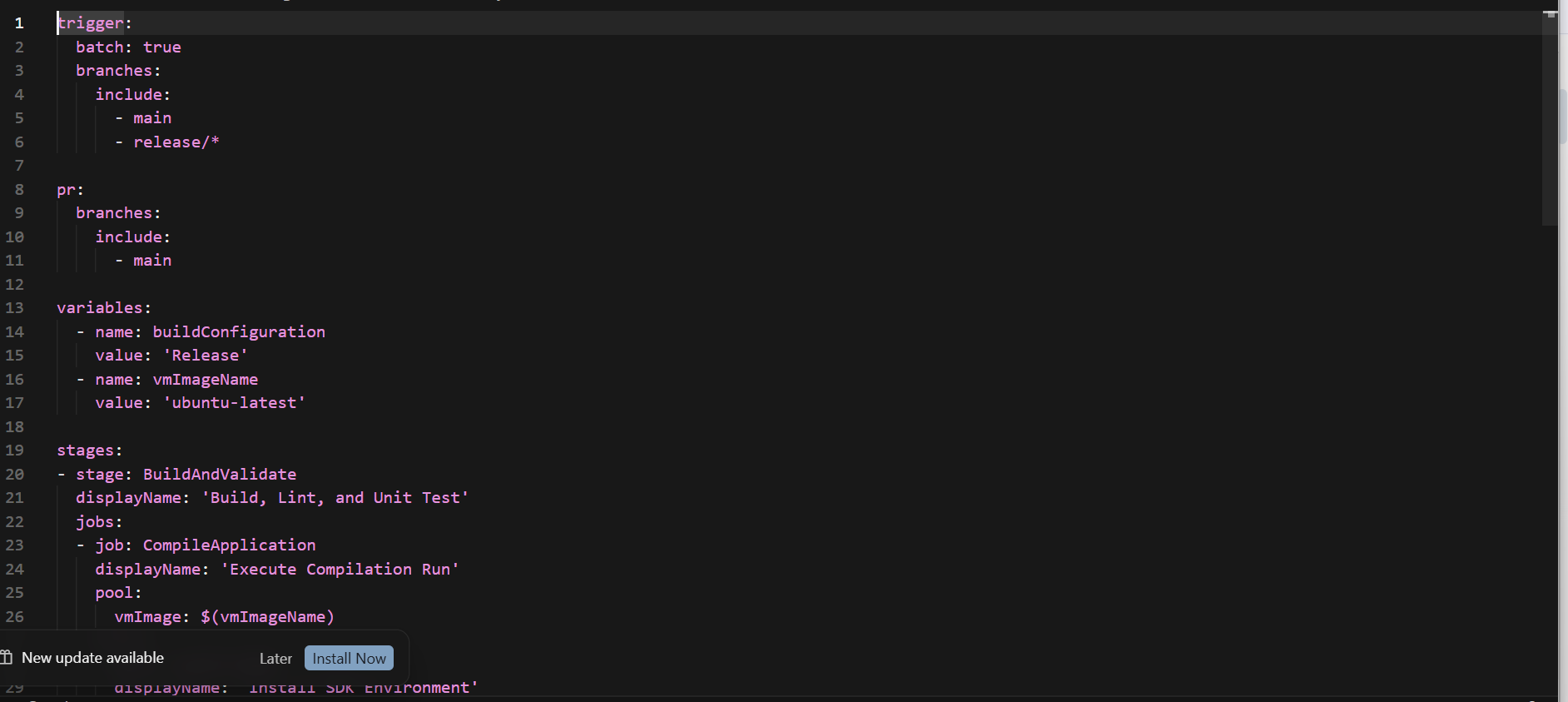
In modern days, the pipeline has to be constructed as the declarative YAML file. That means that your build is always close to the source code of the application, and any change to the process of delivery will go through the same peer review process as the product itself. Knowing how to read the syntax of this complicated pipeline is an integral part of any high-quality azure devops online course.
Guardrails for Branch Policies and PR Validation
To maintain stability in the main branch, it is important not to allow direct pushes into this branch. The following guardrails have to be applied using branch policies:
Build Validation: Pull request merging is possible only after successful CI pipeline completion. This measure will help to prevent broken builds affecting other developers.
Minimum Reviewer Thresholds: At least two different engineers need to approve any architectural change in the application to create proper segregation of duties.
Work Item Linking: Apply policy that requires developers to always link their PRs to specific Azure Boards work items.
Continuous Delivery (CD) and Environment Environments
Continuous Delivery is mainly about promoting builds across a series of increasingly strict environments.
Environment and Deployment Gates
In Azure Pipelines, the concept of Environment represents the physical or logical hosting location (Kubernetes cluster, App Service, on-premises server).
[ Build Stage ] ---> [ Staging Environment ] ---> [ Manual Approval / Automated Gate ] ---> [ Production Environment ]
Environments allow you to separate your engineering pipeline from deployment governance:
Approvals: You can delay deployment to production until certain people approve it manually, like Quality Assurance leads or Release Managers.
Checks and Gates: You can fully analyze your external data proceeding and deployment. The pipeline may ask Azure Monitor if your staging environment is healthy, find an active ticket for change window in the IT Service Management tool, or check for any security vulnerability.
Release Strategy using Deployment Jobs
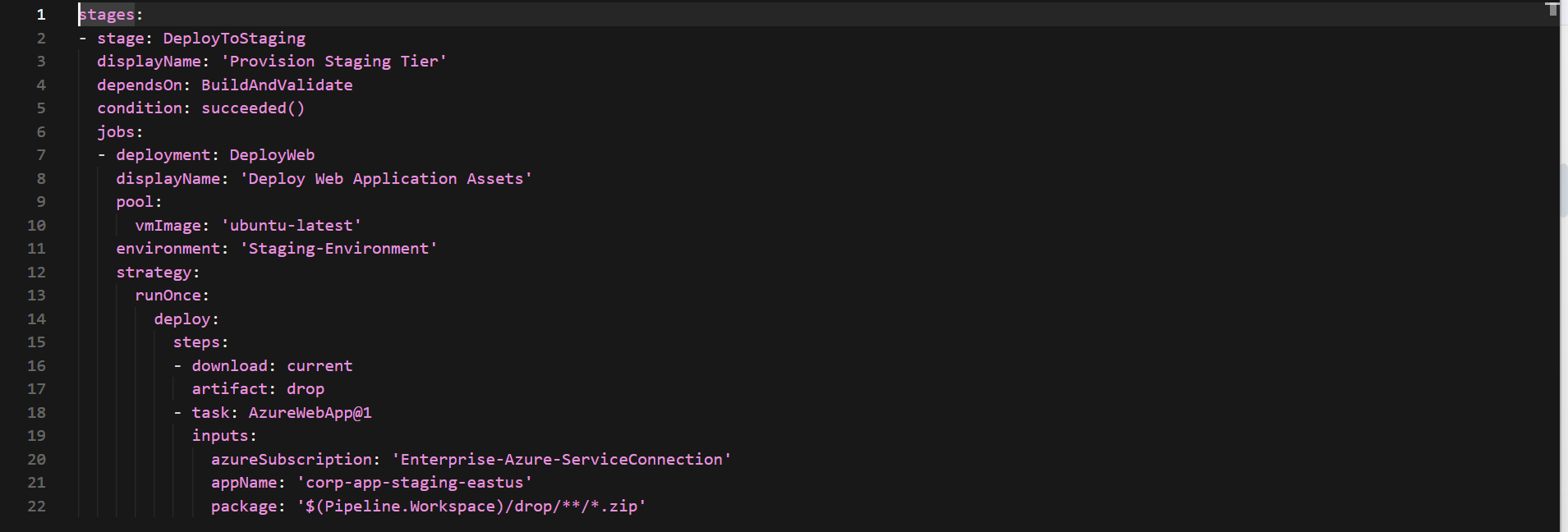
The use of deployment jobs in YAML will give you natively implemented support for complicated deployments, like blue-green and canary deployment strategy. Also, it will log the exact deployment history and rollback automatically if anything went wrong.
Securing and Complying in the Delivery Pipeline (DevSecOps)
Security is supposed to be integrated into the delivery pipeline, rather than being seen as something separate from it. Modern-day DevSecOps solution utilizes automated tools for early detection and prevention of potential problems.
Shift-Left Security Scans
Using security scans in CI build will detect problems before code merge.
Static Application Security Testing (SAST) – analysis of source code text for detection of certain patterns indicating the existence of security issues (like SQL injections or XSS).
Software Composition Analysis (SCA) – analyzes third party libraries listed in package.json or pom.xml and verifies their compatibility with public databases (such as CVE repositories), ensuring that libraries containing any security issues are not used.
Secrets Push Protection – automatically detects presence of any secrets like hardcoded password, private keys, or API keys in incoming commits and blocks the commit.
Key Management Using Azure Key Vault
It is not good practice to keep any plain-text secrets, certificates, or connection strings in YAML files or variable screens. They should be stored in a hardware security module (Azure Key Vault). Azure DevOps will pull those values dynamically using secure service connections. Values are then injected as environment variables and masked in all logs by replacing output with *** characters.
Advanced Customization and Platform Extensibility
Each business has specific needs. The platform is flexible and customizable and can integrate itself into an elaborate chain of applications and procedures.
REST APIs and Service Hooks
The platform has a variety of REST APIs, which allows you to automate practically any activity—from creating new repositories to analyzing group memberships.
Service Hooks allow Azure DevOps to communicate with third-party services when certain events take place. For instance, you can trigger an external process on failure of a build, send notifications through Slack and Microsoft Teams channels after creation of a pull request, or update an issue tracker automatically when the release is made.
Custom Extensions for Pipelines
If predefined tasks do not meet your needs, you can create custom tasks with Node.js or PowerShell. These tasks can be easily distributed privately across all of your organization through Azure Artifacts.
Metrics, Observability and Continuous Improvement
In order to keep on improving, engineering teams require the measurement of the delivery performance of their organization by means of metrics that have been clearly defined and standardized. The Azure DevOps uses the four key DORA metrics:
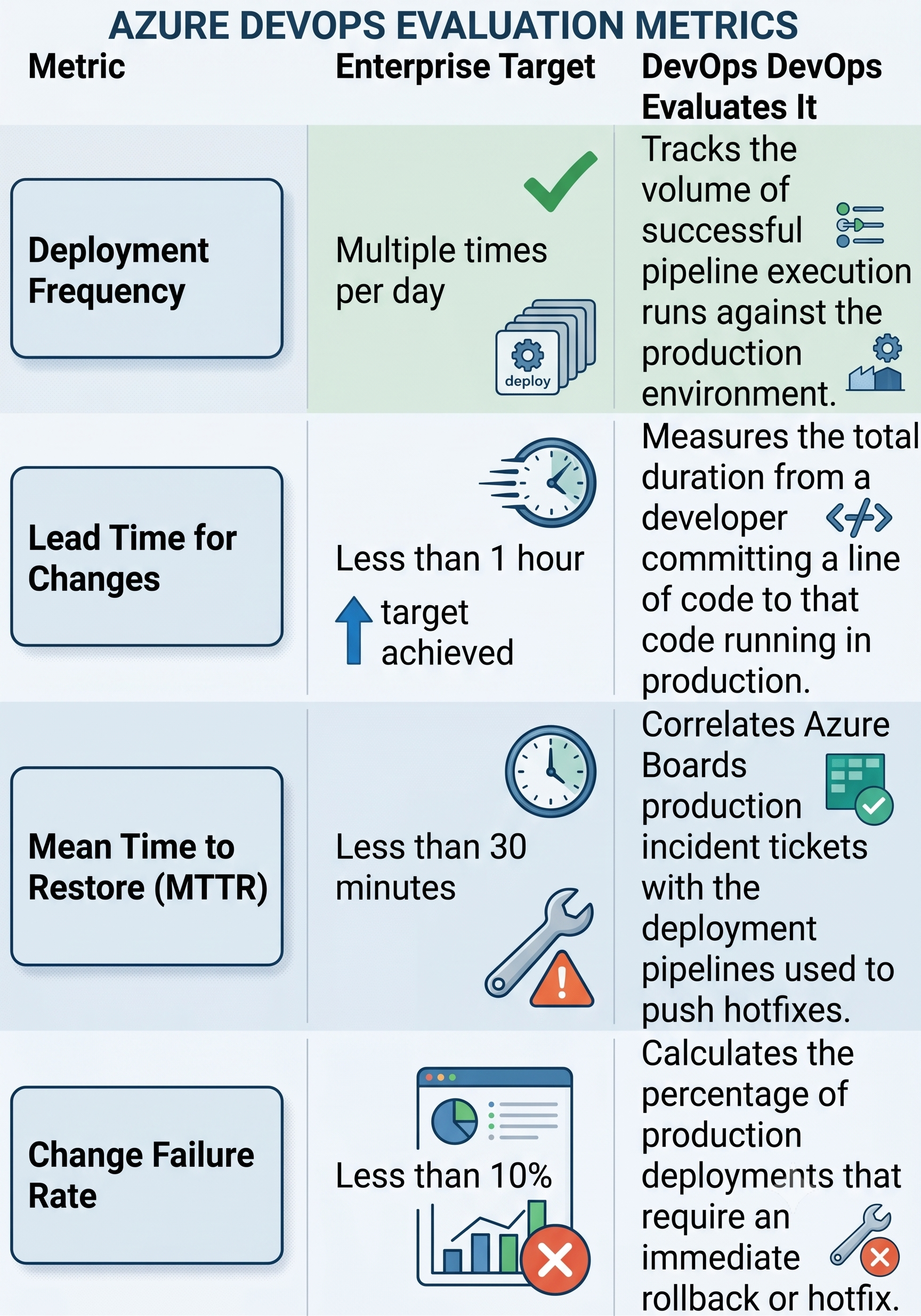
The engineering managers can identify such problems, for example, lengthy QA review cycles or unstable automated testing suites, and make changes to their processes, ensuring seamless delivery.
Enterprise Infrastructure as Code (IaC) Pipelines
Enterprise-level applications cannot be separated from the infrastructure that they are being deployed to. In a proper DevOps environment, infrastructure configuration is taken care of with the same diligence as the application source code. To do this within Azure DevOps, one can create IaC pipelines using such technologies as Terraform, OpenTofu, Bicep, and Pulumi.Immortal Infrastructure via Declarative PipelinesInstead of configuring servers by hand or using imperative scripts to change the existing environments, enterprise-level applications require the use of immortal infrastructure. Each and every change in network configuration, firewall rules, or database provisioning requires an entire path-to-production pipeline to be run.
[ Git Commit (IaC) ] ---> [ Terraform Validate & Plan ] ---> [ Security Scan (trivy/checkov) ] ---> [ Manual Approval Gate ] ---> [ Terraform Apply ]
In order to effectively manage IaC in Azure Pipelines at scale, separation between Plan and Apply phases must be achieved through the use of multi-stage pipelines and pipeline artifacts. This will guarantee that the plan that was verified and approved within a staging gate is the same plan applied in production.Production-Grade Terraform YAML StrategyThe below pipeline shows how stateful infrastructure can be deployed in Azure Pipelines in a secure manner.
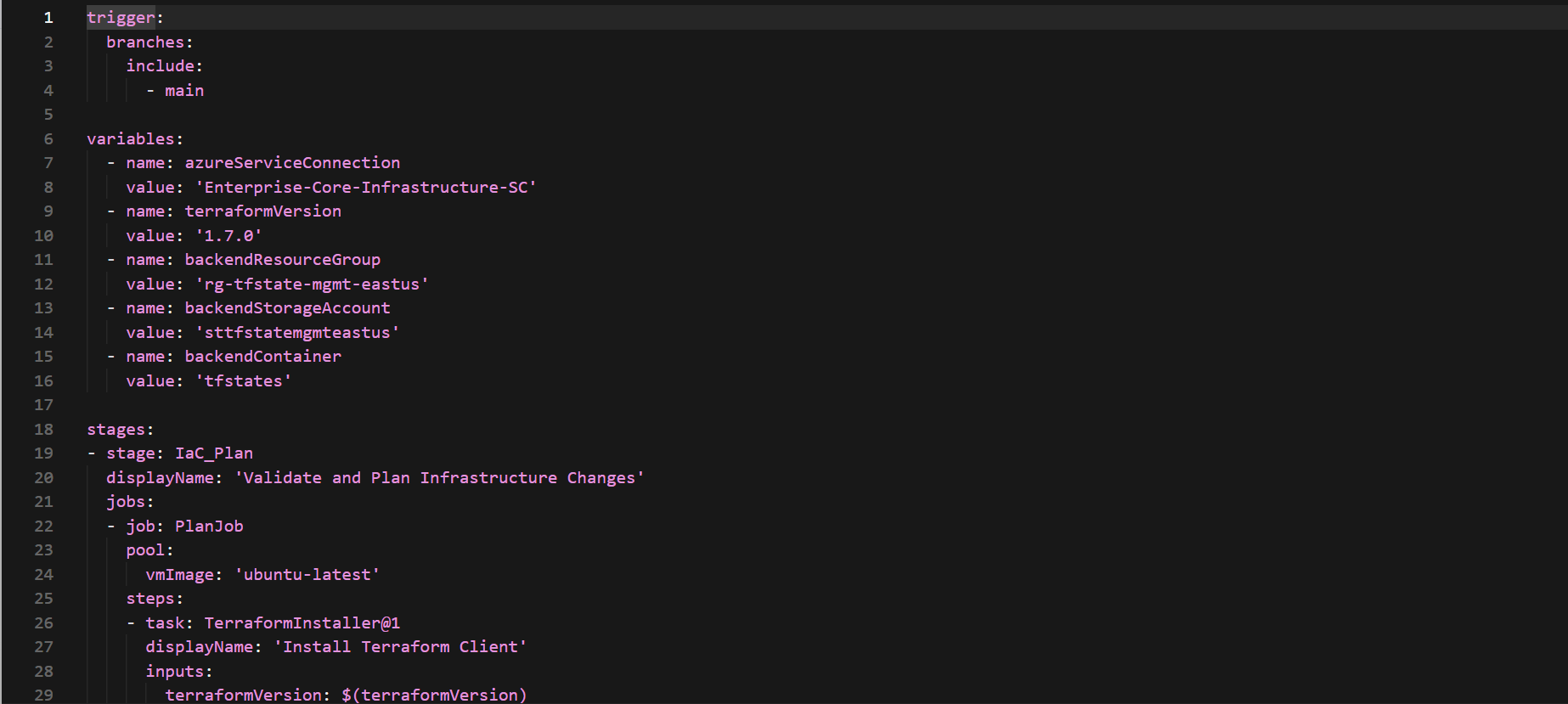
Highly Advanced Agent Pool Infrastructure and Management
The efficiency of software deployment engines greatly relies upon the execution pool infrastructure used by these engines. Though agents that are hosted on Microsoft servers provide a convenient alternative, enterprises building highly sophisticated microservices in restrictive network infrastructures or using older frameworks will face various limitations.
Hosted Agents and Self-Hosted Agents: A Comparison
An enterprise needs to find a perfect balance between the convenience of hosted infrastructure and the efficiency of self-hosted infrastructure for their builds.
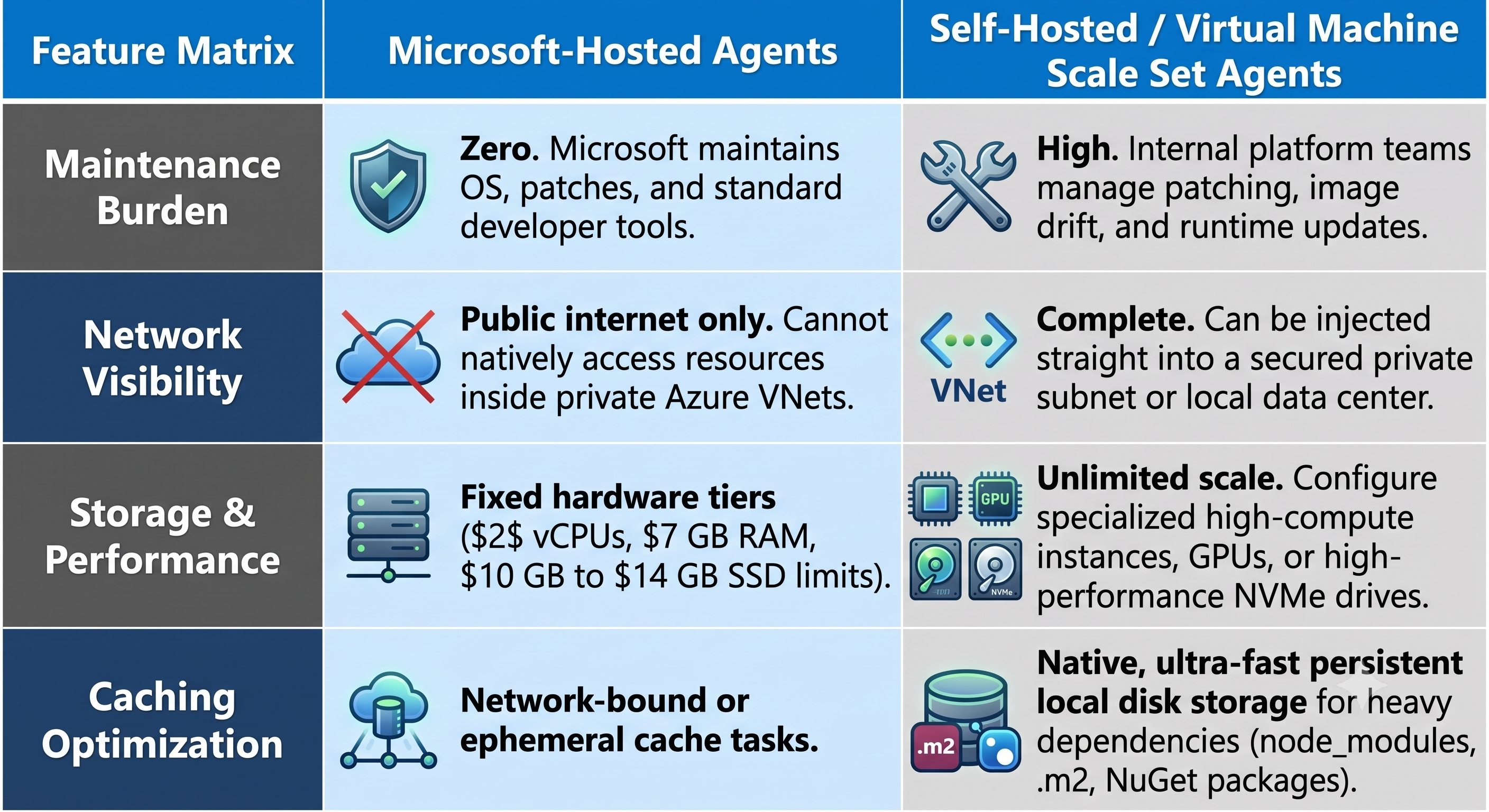
Dynamic Scaling Using Azure Virtual Machine Scale Sets (VMSS)
In order to take advantage of both hosted infrastructure and self-hosted agent flexibility, companies have the ability to make use of Azure DevOps VMSS Elastic Pools.
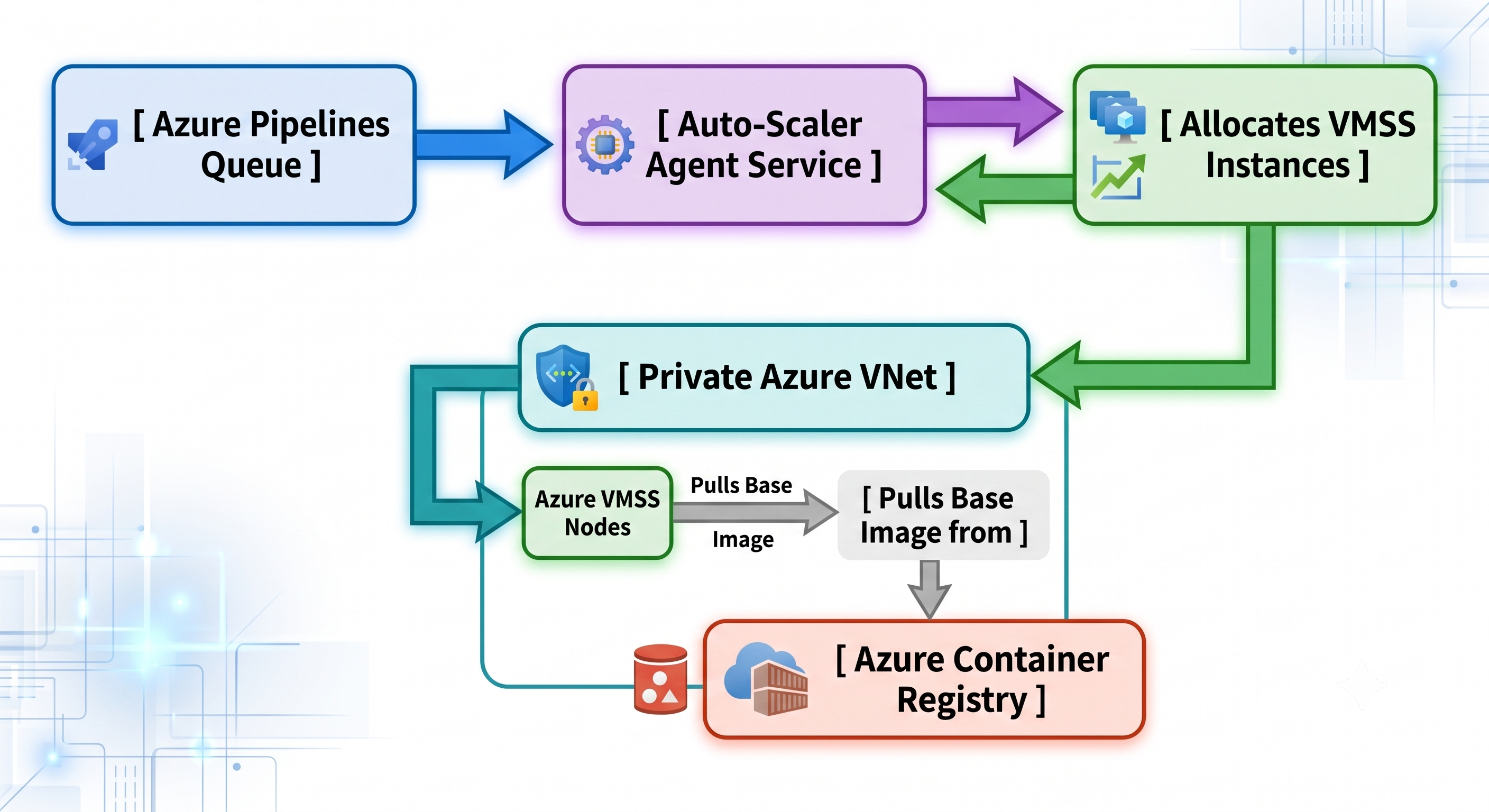
Instead of always-on virtual machines $24/7$, there is a possibility of integration of Azure DevOps with the Azure VMSS, whereby:
When developers initiate a pull request, the Azure DevOps triggers the Azure Scale Set API to launch additional target worker instances.
The scale set creates new VMs from a standardized, pre-loaded gold image which includes security software and base libraries.
Once the build queue becomes empty, then the platform decommissions the instances. This helps reduce configuration drift and ensures compute costs remain low.
Governance for Multi-Tenancy and Scalability Across Organizational Boundaries
With growth, multi-team governance in a common architectural construct becomes one of the key issues for organizations. Many multinational corporations face difficulty maintaining a proper balance between self-governance of each engineering team within and adherence to company-wide standards.
Structural Blueprints for Single-Org vs. Multi-Org Platforms
Deciding how you will structure your platform determines the way of collaboration within the organization:
Single Organization Blueprint (Preferred): In this scenario, there is one centralized Azure DevOps organization where various business units are defined as Projects/Teams. It allows for easy licensing, helps with inner-sourcing, enables sharing package feeds, and gives visibility on delivery metrics across the organization as a whole.
Multi-Organization Blueprint: Fully segregated organizations are created within one Microsoft Entra ID tenant. This model applies to cases when regulatory restrictions call for a complete segregation of code/data (for example, for defense contracts vs. commercial activities) or independent global legal entities who need completely different invoicing model.
Centralized Management with Shared Variable Groups and Service Connections
The following scope inheritance models are applied in order to define guardrails without limiting product teams:
Enterprise Service Connections: Services connections pointing at key cloud subscriptions are created in the restricted area centrally and are made available only for particular production pipelines and not available for all project contributors. It reduces the risk of unauthorized applications changing core cloud infrastructure.
Inherited Variable Groups: Instead of putting sensitive information (like compliance keys/license number) into each repository, teams connect their pipelines to the centralized variable groups which are stored in Azure Key Vault. Access to those groups is controlled via access control lists (ACLs) managed by the security team.
Custom Extensibility Templates: Platform teams create standard YAML templates and publish them in the centralized location. Product teams can use those templates via pull, as shown below:
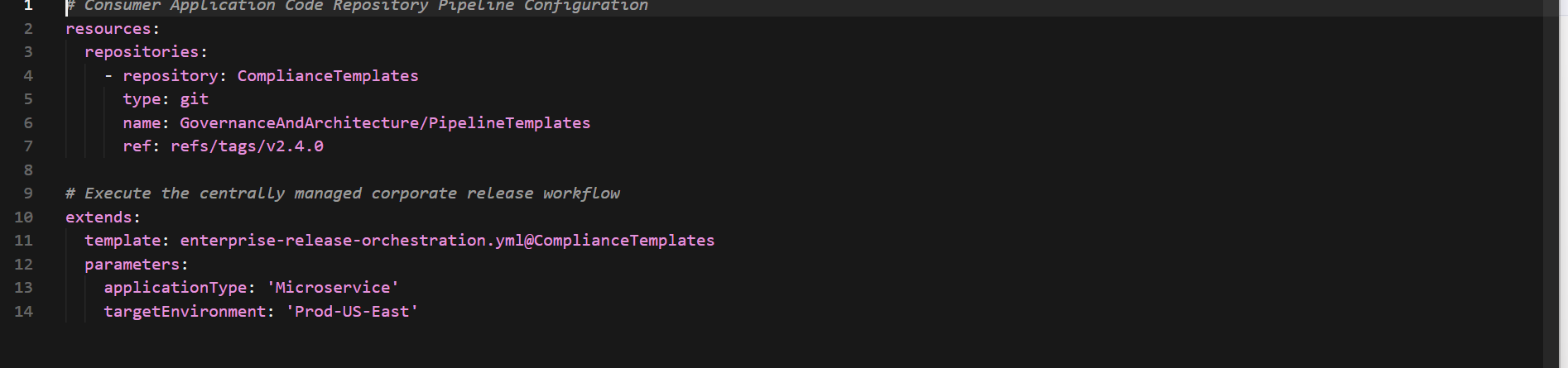
This reference model allows for changing the foundational aspects, such as updating the compliance scanner and introducing a new telemetry collection agent, without making changes in each of hundreds of application repositories.
Conclusion: The Journey of Enterprise Delivery
Azure DevOps remains the key element of enterprise delivery pipelines and a fully matured environment that successfully balances developer speed with corporate governance needs. While some point solutions might add complexity and overhead, the consistency of Boards, Repos, Pipelines, Artifacts, and Test Plans helps to build a cohesive chain of events leading to production.
With modern software engineering moving towards automation, proactive security and execution in elastic self-hosted pools, not only creating code but managing platforms becomes a critical factor for success. With pipeline logic treated as code, Azure Key Vault to manage secrets, and DORA metrics to monitor the performance, an enterprise is capable of transforming the delivery pipeline from an overhead to a differentiating aspect.
In essence, for the formation of a performance engineering culture, it is crucial to ensure continuous reduction of friction in the process. As a result of adopting the above architectural approach using Azure DevOps, the platform team can provide an environment where developers can innovate and keep things stable, secure, and in compliance. In order to speed up the shift to such operation practices, the most effective way for engineering teams is to register for an azure devops online course.