
The Data Detective: How Workday Integrations Track Down Missing Information
Last updated on Oct 9, 2026

Every Missing Record Leaves a Trail
In an organization information rarely stays in one application. An employee may update a home address in an HR platform while payroll, benefits administration, identity management and reporting tools each need the details for their own processes. When the information reaches one system but not another the result can look like a mystery: the source record is correct the destination record is old. No one is immediately sure where the missing data disappeared. This is where the work of a data detective begins. Than guessing or repeating the same transfer a data detective follows the evidence identifies the point where the process diverged and confirms the underlying cause.
Workday integrations help Workday exchange data with applications and services. Depending on the business need an integration may use an API, a connector, a scheduled file, a configured Workday integration tool or middleware that coordinates systems. The method matters because each design has its processing steps, dependencies, security requirements and failure modes. A scheduled file may be delayed before it is delivered; an API request may be rejected by a destination system;. A record may arrive but fail a validation rule. "Missing data" is therefore a symptom, not a diagnosis. A data detective’s first task is to define what missing data is missing, where missing data should have appeared and when missing data was expected to arrive.
Imagine that Maya, an employee changes her bank details through the approved HR process. The updated information appears in the source system. The payroll provider still shows the old details. It would be risky to assume that Workday itself lost data or that the payroll provider is at fault. The integration may not have run yet the record may have been excluded by its selection criteria the receiving system may have rejected a field or a permission or connection issue may have interrupted delivery of missing data. A reliable investigation separates these possibilities. Tests them one at a time. The goal is not simply to make one record appear; the goal is to understand the process enough to restore missing data safely and reduce the chance of a repeat incident.
This investigative approach also protects people and business operations. Employee information can influence pay, benefits, system access, compliance reporting and workforce planning. Reprocessing missing data without checking what already succeeded can create duplicates or unintended updates. Changing permissions broadly to make a transfer work can expose information. Good troubleshooting balances speed with verification, privacy and control. The sections that follow trace the missing data journey examine evidence, identify common root causes and explain how teams can recover missing data while strengthening the integration for the future.
The Missing Data Mystery: Where Did the Employee Record Go?
A useful investigation begins with an incident statement. "Payroll data is broken" is too vague to test. A better description identifies the employee or business object, the field or transaction affected, the source system, the expected destination, the approximate time of the change and the observed result. For example: "The employee’s approved bank-detail change is visible in the source system as of Tuesday morning. The payroll destination still shows the previous value after the expected integration window." This wording creates a boundary around the missing data problem. Gives the team a clear way to confirm whether the missing data issue has been resolved.

Next establish the expected behavior. Was the integration designed to send every change run at a fixed time or transfer only selected records? Does it send the employee record or only fields changed since the last successful run? Does it exclude worker types, statuses, countries or effective dates? These details matter because an integration may be operating exactly as configured when a user expects a different outcome. A future‑dated change, an approval, a selection rule or an eligibility condition can explain why a record was not included. Before treating the behavior as a failure, compare what happened with the documented design and the relevant business rules.
The detective must also separate distinct outcomes. A record might never have been chosen for processing; it might have been chosen but failed during transformation; it might have been. Rejected by the destination; or it might have been accepted but not shown where the user expected it. These are investigations. A successful transmission does not always prove that the destination finished every action just as a failed record does not always mean that the entire integration run failed. Teams should use status definitions and verify the result at the destination when appropriate.
Finally, assess the impact and urgency. A missing dashboard attribute may be inconvenient while a payroll or access‑management discrepancy may require attention according to the organization’s procedures. Follow incident and privacy policies limit access to sensitive records and avoid putting bank details, government identifiers or other confidential information into ordinary tickets or chat messages. Start with the reproducible example and the least sensitive evidence needed to investigate the issue. This keeps the investigation focused while protecting employee data.
Following the Data Trail: How Workday Integrations Move Information
An integration can be understood as a controlled journey from a source to a destination. First the process identifies which data should be included. It may retrieve records from a supported interface, respond to a business event or read a file that another system produced. Next the integration prepares the data for transfer. This can involve selecting fields, applying business rules, converting values, arranging data into a required structure or filtering out records that do not meet agreed criteria. Then the integration transmits the information through the chosen connection method. Finally the receiving application processes the payload. May return a response or an error. The exact sequence depends on the architecture. Thinking in stages helps narrow down where the trail ends.
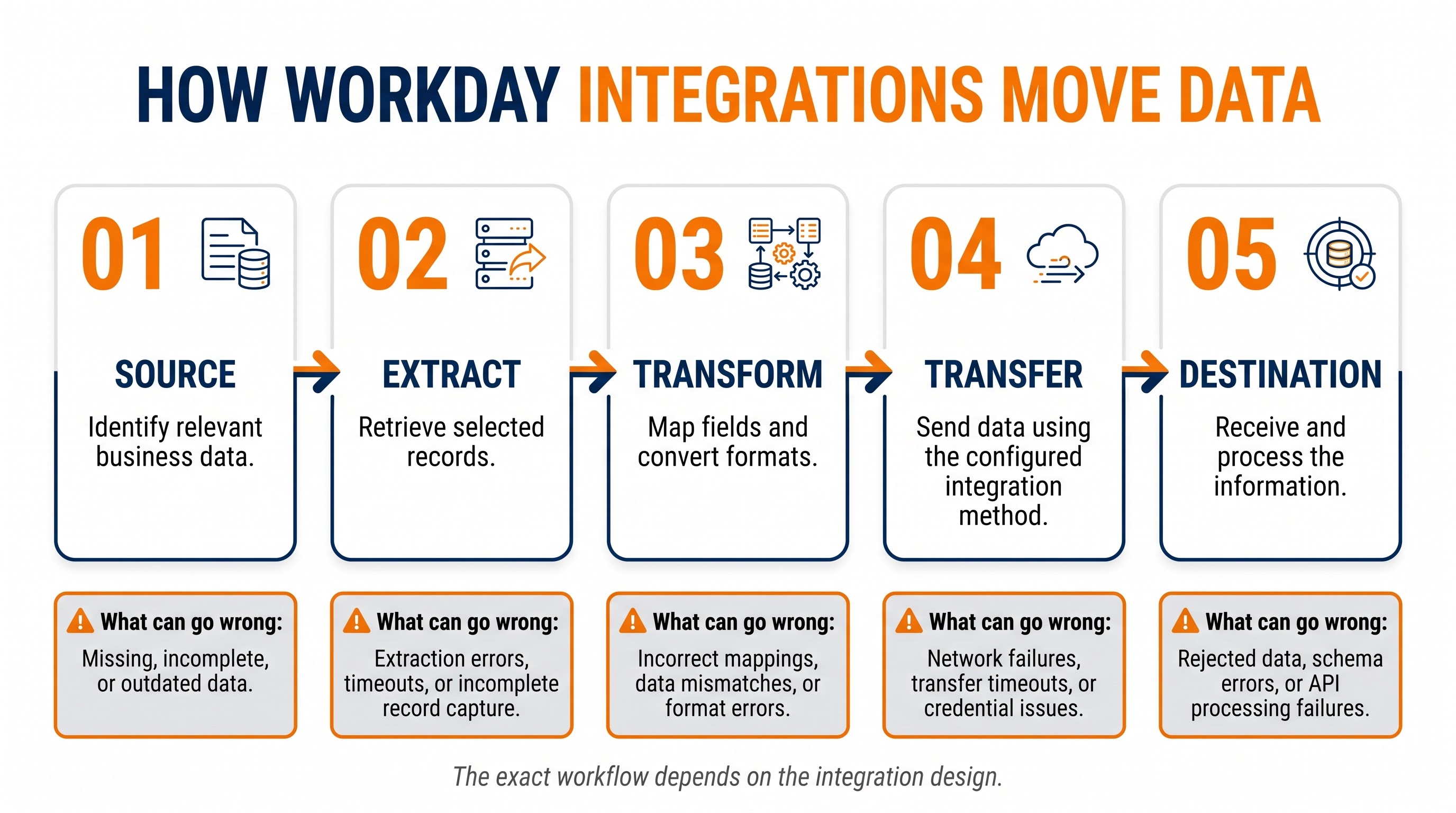
Workday offers integration capabilities for scenarios, including configured integrations and tools that help build or manage more tailored data exchanges. Some designs use APIs to request or send information. Others use exchanges, where data is generated in a defined format and transferred through an agreed secure channel. Middleware may sit between applications to coordinate routing, transformation, monitoring or communication across endpoints. No single method is best for every situation. The right choice depends on volume, latency, supported interfaces, security, complexity, maintainability and the capabilities of the systems.
A detective maps the path before making any changes. Record the source, the integration or process, name its schedule or trigger the transformation steps, the transport method, the destination and any intermediate service. Then identify the evidence at each stage: source values, selection counts, execution status, output files or payload metadata, transport acknowledgements, destination logs and reconciliation reports. A simple process diagram can be surprisingly effective because it turns a connection into a series of checkpoints. If the source contains the value but the generated output does not, the investigation can focus on selection or transformation. If the output is correct. The target has not updated the investigation and can shift to delivery, target processing or downstream rules.
Timing deserves attention. A user may save a change at 10:15 a.m. while the integration runs at midnight. In that case the information may be waiting for its schedule rather than being lost. Other designs may depend on event delivery, polling intervals, queue processing or the availability of a third‑party system. Teams should compare timestamps across systems taking time zones and clock differences into account. Teams should also check whether a previous run is still processing or whether a later run has already superseded the expected data. The key question is not "Did the integration run?" but also "At which stage did the expected value stop progressing?”
Examining the Evidence: Logs, Errors and Failed Transactions
Integration logs and execution records provide a timeline of what the process attempted and what it reported. Depending on the tools and configuration in use an administrator may be able to inspect the start and end times overall status, record counts, warnings, error messages and relevant processing details. Begin with the run to the time of the missing update then compare it with the last known successful run. A sudden change, in record volume a new warning or a repeated error can point toward a configuration change an upstream data change or a dependency that is no longer behaving as expected.
Read error messages as evidence not as an explanation. A message about a field may show a format mismatch, a missing required value or a changed destination rule. An authentication error may show expired credentials or a wrong security setting. A connection timeout shows a communication problem. It does not prove whether the destination received part of the request. Turn the message into a testable hypothesis: which component sent the message, what operation was being done, which records were involved and what changed just before the first error. If the message is generic, look at the product documentation. The organization runbook instead of guessing.
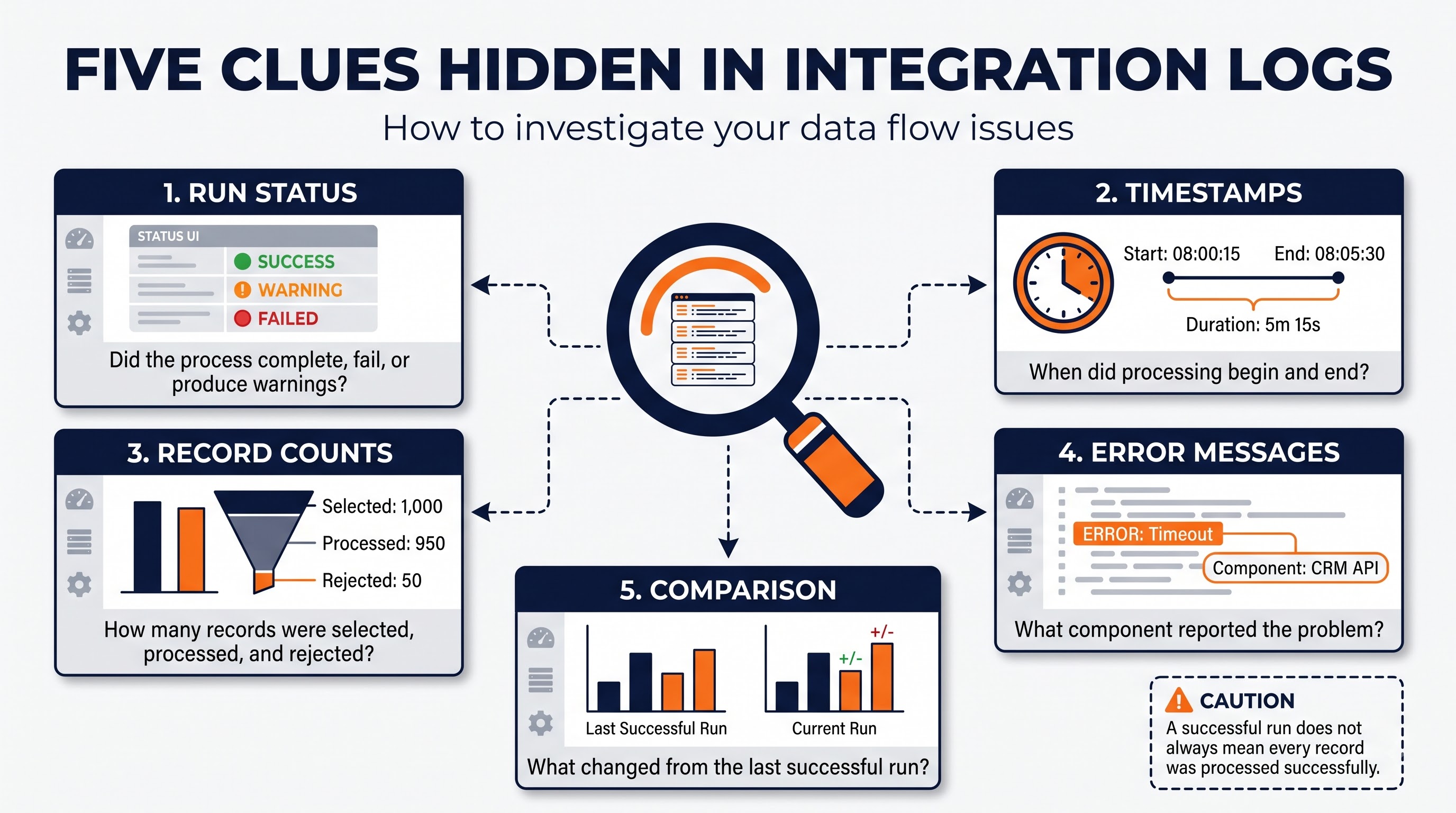
Record counts can be very useful. Suppose a process chose 500 records, produced output for 498 and reported two validation errors. That pattern points to problems at the record level not to a connection failure. If the process chose zero records, look at selection rules, timing, effective dates or source availability. If all records were ready but the target accepted none the investigation may need to go to transport or destination processing. These patterns are clues, not universal rules: counts and statuses must be read in the context of the integration design and the meaning that was given to each metric.
Compare the failed run with a run that worked. Look for changes in field definitions, integration settings, certificates or credentials target endpoints, schedules, source data and external system rules. Use the least amount of sensitive data needed and hide confidential values when sending logs to people outside the support team. Retain timestamps, correlation IDs, record references and error codes when policy allows because they help teams link evidence across parts. Do not run a failing process again and again before knowing if it is safe; some integrations allow repeat runs while others can make transactions or trigger more downstream actions.
A disciplined case record should list the observed symptom, the expected result, the actual result, the time window affected, the run ID, the evidence checked, the hypothesis. The outcome. This makes the investigation repeatable. Stops many administrators from doing the same checks again. It also builds operational knowledge for future incidents. A log is valuable when it links an event to a confirmed cause and to a safe fix.
The Hidden Clues: Data Mapping, Validation and Transformation Errors
Data mapping shows how a value in one system matches a field in another. The two systems may use names, formats, codes or detail levels for what looks like the same business concept. One system may show a location with an ID while another expects a known location code. A worker status may be stored as a value in the source but need a different allowed value in the target. If the mapping is old or incomplete the transfer can fail and the value can be left out. The destination can read it wrong. The investigator should compare the source field, the transformation rule, the outgoing format and the target’s documented requirement of assuming that similar names mean the same data.
Validation rules are another checkpoint. A destination can require a field that's optional in the source, limit a value to an approved list or enforce a length, date, numeric or format rule. For example, a date can be correct in one format but rejected in another; a code may look right to a person. Not match the destination’s reference list. A record can also fail because a related value is missing or inconsistent. These are not always connectivity problems. They can be data quality problems, business rule conflicts or configuration gaps that must be fixed with the data owner and the system owner.
Transformation logic can create errors. A rule might. Join fields, change time zones, standardize dates, translate codes or create a value from other data. If the rule is wrong, good source data can become bad output. If a transformation assumes a field is always filled, a new blank value can cause an exception. Changes to a source or target schema can also make an old mapping incomplete. For this reason, integration changes should be. Tested with real records, including edge cases such as blank optional values, odd but valid characters, future dates, and records that do not follow the usual path.
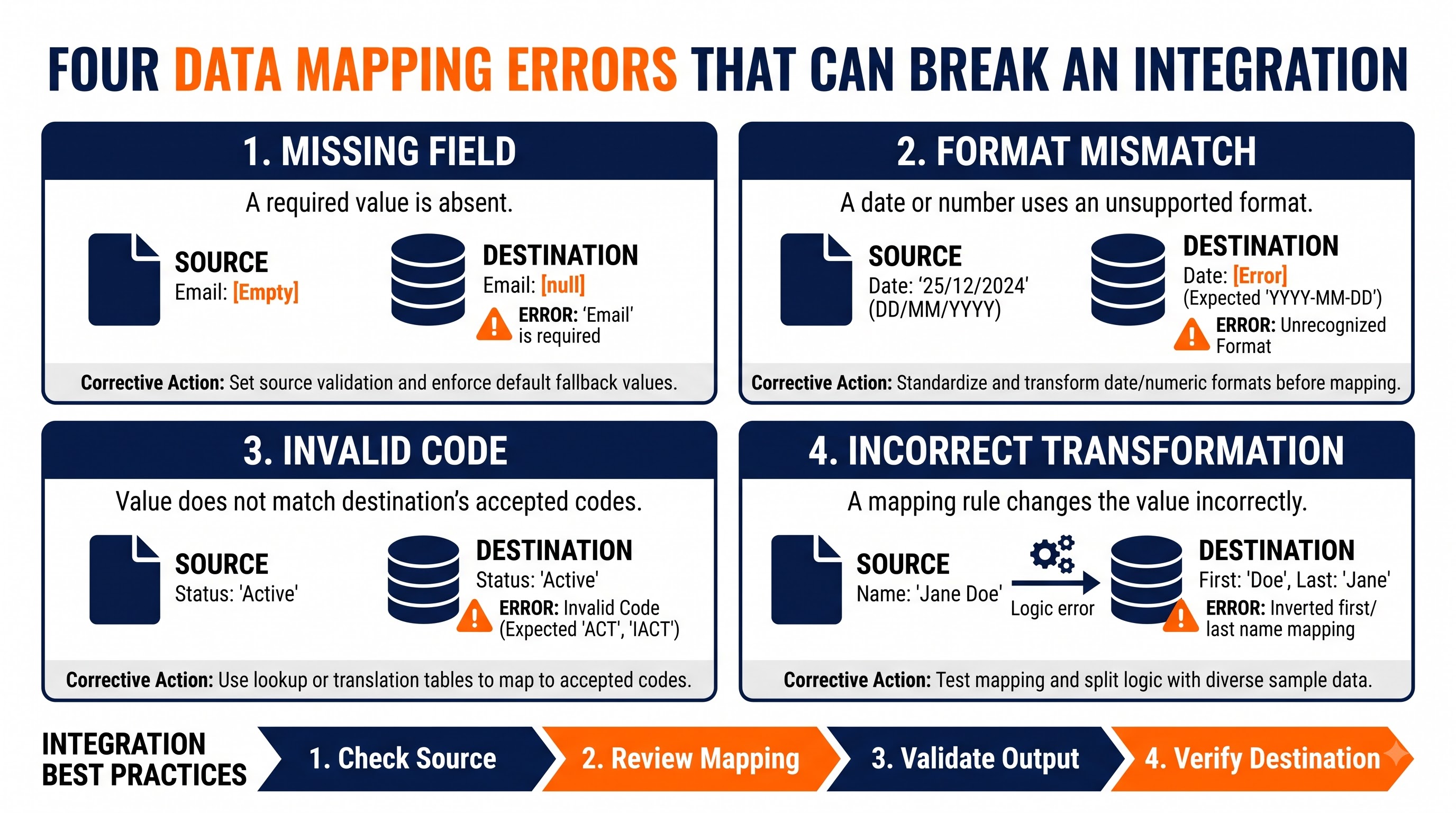
A practical way to investigate is to compare one record across the stages. Confirm the source value and its effective date; check whether the record met the integration’s selection rules; inspect the transformed value or approved output evidence; and verify the destination’s acceptance criteria. Where possible compare the record with a similar record that processed successfully. The difference may reveal a missing code, a null value, a special character or a field that changed after a system update. Do not expose employee records simply to make the comparison: use masked examples or approved test data wherever possible.
Teams learning how to design and troubleshoot these workflows may encounter a workday integration course that covers integration concepts, supported tools, data transformation, testing and error analysis. Training can provide a foundation but practical competence also comes from understanding the organization’s actual integration design, security controls, business rules and support procedures. The objective of learning is not to memorize error messages; the objective is to build a method for tracing a value from source to destination and proving where the result changed.
The Unexpected Suspects: Permissions, Connectivity and Timing
Not every missing record is caused by data. Integrations also rely on identities, permissions, endpoints, certificates or credentials network paths, schedules and the availability of services. An integration account may lose access to a required object, a credential may. A security policy may change. In cases the connection is available but the account is not authorized to perform the specific operation. A broad permission increase may appear to solve the problem. The permission increase can introduce unnecessary risk. The safer response is to confirm the access, compare it with the approved configuration and make the smallest authorized correction through the organization’s change process.
Connectivity issues can produce failures. A destination may be temporarily unavailable, a request may time out, a certificate may no longer be trusted or a third‑party service may enforce a request limit. The investigation should establish whether the error originated in Workday, a platform, the network path or the receiving application. Review status information and logs check whether other integrations using the same dependency are affected and confirm the destination’s response where that evidence is available. A timeout should not be treated as proof that nothing was received; before retrying determine whether the operation could have succeeded on the target side despite the acknowledgement.
Scheduling can create the appearance of failure when the process is healthy. A daily integration will not necessarily reflect a change immediately. A downstream application may take additional time to process an accepted file or request. Daylight‑saving changes, time‑zone differences, holidays, maintenance windows, and dependency ordering can also affect when a result becomes visible. Document expected processing windows and service expectations so that users know when an update should arrive and when to raise an incident. When a delay exceeds the agreed window, compare the source timestamp, run start transfer time, destination receipt, and final processing time.
The organization’s support model matters as much as the technology. Workday administrators may own the source configuration, an integration team may manage the transfer, and a vendor may control the target system. If responsibilities are unclear, a case can move between teams without anyone owning the data journey. Establish escalation paths, identify the evidence each team needs, and assign one person to coordinate the investigation. Any credential rotation, endpoint change, permission adjustment, or production rerun should follow change controls. The aim is to restore the flow without weakening security or creating a problem.
Closing the Case: Recovery and Prevention
Once the root cause is supported by evidence choose an action that addresses the root cause directly. A mapping defect may require a reviewed configuration change; a rejected code may need correction by the data owner; a permission problem may require a narrowly scoped access update; and an unavailable target may require coordinated recovery with its support team. Correcting the symptom without fixing the cause can make the next run fail in the same way. Before applying a change, in production use the organization’s testing and approval process. Consider which other records or integrations could be affected.
Recovery needs attention. Reprocessing a failed record can be right when the integration allows a retry and the destination has not yet applied the transaction. In setups the team might have to fix the source data, make a new output, reconcile the destination or follow a written recovery procedure. Check if the operation is idempotent meaning that repeating the request gives the same result and does not create duplicates. Do not assume that every integration can be safely retried. When duplicates or money issues could happen check the destination state before replaying data and bring in the system owner.
Reconciliation gives a line of evidence. Then trusting only a "successful" status compares the records or totals you expect with what the destination really processed. Depending on the case reconciliation may look at record counts, transaction IDs, dates or chosen field values. For work like payroll follow the formal approval and audit steps instead of a quick spot check. Specify what a match looks like, what amount of difference is okay who checks exceptions and how unresolved differences are raised. A written reconciliation plan helps teams find omissions and clear failures.
Prevention starts by testing scenarios before any change goes live. Include records missing optional fields, wrong codes, changed field formats, edge limits and expected error routes. Test not that the integration finishes but also that the destination gets the correct data and deals with rejected records the way it should. After a change, watch the live runs and compare them to a baseline. Having configuration under version control peer review, clear dependencies and a solid rollback or recovery plan makes later investigations easier.
Monitoring should look at signals: failed runs, odd record counts, repeated validation errors, late arrivals, strange processing times and gaps found in reconciliation. Alerts must have a person and a clear response plan; too many small alerts can hide the big ones. Runbooks should show where to find proof, how to spot the affected records, which retirees are safe, when to stop and raise the issue and what data must stay secure. Teams should keep checking recurring incidents for patterns because repeated failures often mean a design problem, not bad data.
Companies that spend on workday integration training can turn incident reviews into training drills. A good drill begins with a scenario that asks the learners to make and test guesses and ends with a confirmed root cause, a safe recovery plan, and a prevention step. This pushes people to know why a process broke off by just ticking boxes. It also helps analysts, admins, integration experts and system owners share a language for talking about data quality, how things are processed and who is responsible across apps.
Finally, treat prevention as a part of work, not just a job after a problem. Review who owns the integration, update the docs when rules change, test changes in the environment, make sure credentials and certificates go through approved steps and keep checking that alerts and reconciliation still run. Keep a log of the incident, the proof that found the cause, the fix, the recovery result, and any next steps. If a failure happens again, use that history to see if the earlier fix hit the cause or just one symptom. A mature integration routine sees every incident as a chance to make things more reliable while keeping privacy and control.
The best data detectives prove the cause. Missing data can be irritating because the symptom you see is often far from the reason. An employee record might be right, in the source. Missing in the destination because it was not picked, not turned the way we expect, not sent, not approved or not processed. The safest way to investigate is to follow the data through every step, compare the behavior with a good example, read logs in context and test one idea at a time. This keeps you from making live changes, keeps sensitive data safe and checks the final result instead of assuming a green status tells the whole story.
I have learned that Workday integrations are not simply pipes that move data. Workday integrations are designed processes shaped by business rules, data structures, security, timing and dependencies on applications. Strong troubleshooting therefore combines evidence with an understanding of Workday integration business outcome. When teams document Workday integration paths, monitor signals from Workday integration, test Workday integration changes thoroughly, reconcile important Workday integration data and define safe Workday integration recovery procedures, Workday integrations reduce both the duration and the recurrence of incidents. The case is truly closed when the correct Workday integration data has been verified at the destination and the reason for the failure is understood.
I also notice that the broader ecosystem includes workday learning integrations. can connect learning-related information and processes with enterprise applications when supported by the systems and configured interfaces involved. As with any integration the design of Workday integration should define which data is exchanged, why it is needed, who can access it and how errors are. How the results are verified. The same detective mindset applies: trace Workday integration data, respect the controls and confirm the outcome.