
The Integration Puzzle: EIB, APIs, Connectors and Workday Studio
Last updated on Oct 7, 2026
Workday is powerful. It can't work alone
Modern companies rarely use one software platform. A business might use Workday to manage employee records, payroll, hiring, talent, finance, learning and other functions. At the time it may also use many other applications for identity management benefits administration, time tracking, reporting, communication, recruitment and specialized business tasks.. The real challenge begins when all these systems need to share information
An example of this can be an employee joining the company. This one event can affect systems. Their data needs to reach the payroll provider, a user account needs to be created in an identity system and benefits records need to be updated. They must appear in another application. It's the Workday integration that makes this possible allowing different systems to talk to each other without people moving data between them.
This is the puzzle of the integration. There's no integration method that works well for every situation. Some are simple. Can be met with configuration tools. Others require connections, APIs or complex custom logic. Workday offers approaches because enterprise needs vary. EIB, APIs, connectors and Workday Studio should not be seen as competing technologies. They are parts of an integration strategy. Knowing where each fits is what separates someone who just knows the names from someone who truly understands how enterprise integrations work.
Why Workday Needs Multiple Integration Tools
Imagine a company with thousands of employees spread across departments and locations. Workday might hold the employee record. Other systems still need access to specific pieces. The payroll system may need compensation and employee details. A benefits platform may need eligibility data. An identity-management system may need hire info so accounts and access can be set up. A learning platform may need employee and department data. A recruitment tool may need candidate updates as they move into the employee lifecycle.
Expecting staff or administrators to copy all this information manually would be slow, repetitive and full of mistakes. Integration solves this by creating controlled paths for data to move between applications. The way that movement happens can differ greatly. One business might only need to export a file of employee data a day. Another might need an app to pull data from Workday on demand. A third might use a prebuilt connector for a third-party system. A complex requirement could involve apps, data transformations, conditional logic, validations and custom processing.
That variety is why Workday has multiple integration options. The better question is not "Which Workday integration tool is best?" Instead ask: "What does this integration actually need to do?" Once you understand the business goal, choosing the technology becomes much easier.
EIB: The Simpler Route for Moving Workday Data
The Enterprise Interface Builder or EIB, is one of the tools in Workday integration. The strength of it lies in the fact that many integration needs don't require coding. Organizations need to move data into or out of Workday, and EIB provides a way to do it through configuration. For example a company might need to send employee data to another system on a schedule. By building a custom integration, a developer can configure an EIB, define the data needed, set rules for processing and decide how the output should be delivered. The exact setup depends on the business need. The core idea stays the same: configure the integration around the data, its source and its destination.
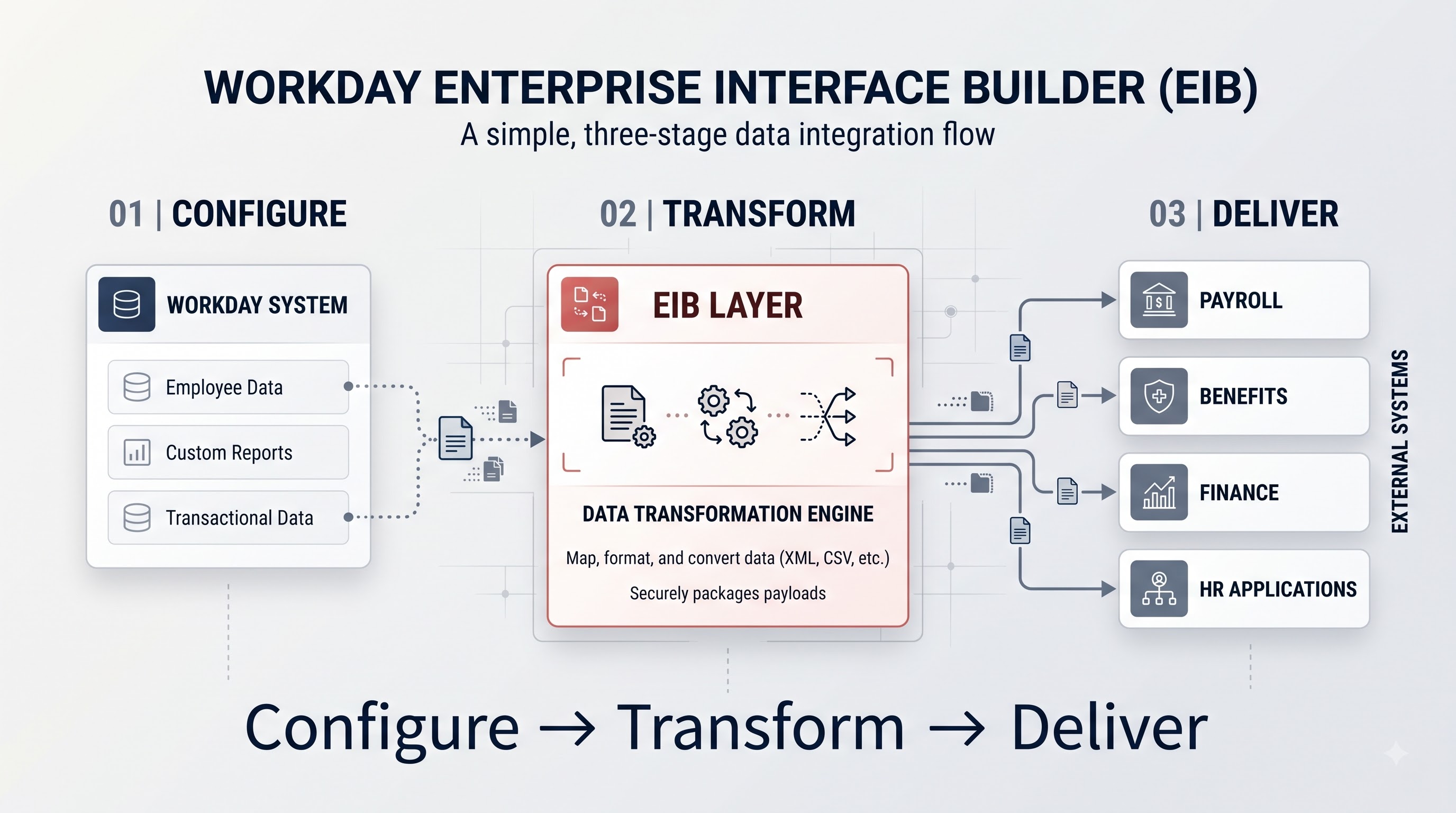
EIB works well when the requirement is clear and doesn't need customization. It supports both flows and can work with different data formats and delivery methods based on settings. For learners, EIB is important because it teaches the thinking behind integration. What data is needed, where does it come from, where does it go, how often should it move, what format does the receiving system have? What happens if something fails?
These questions matter more than memorizing acronyms. Because an integration is ultimately a business process expressed through technology. EIB gives a place to explore that connection.
APIs: When Workday Needs to Communicate
While EIB focuses on configuration-based setups, APIs introduce a type of interaction: direct communication between applications. An API or Application Programming Interface, lets software systems exchange information following defined rules. Of waiting for scheduled files APIs can allow apps to request or send data programmatically. This level of interaction matters when a business process requires real-time response. For instance another application might need employee data from Workday during a workflow. Than waiting for a file it can use a Workday web service or API to get the info immediately. The implementation varies depending on services and business needs but the point stays: APIs let systems talk to each other using requests and responses.
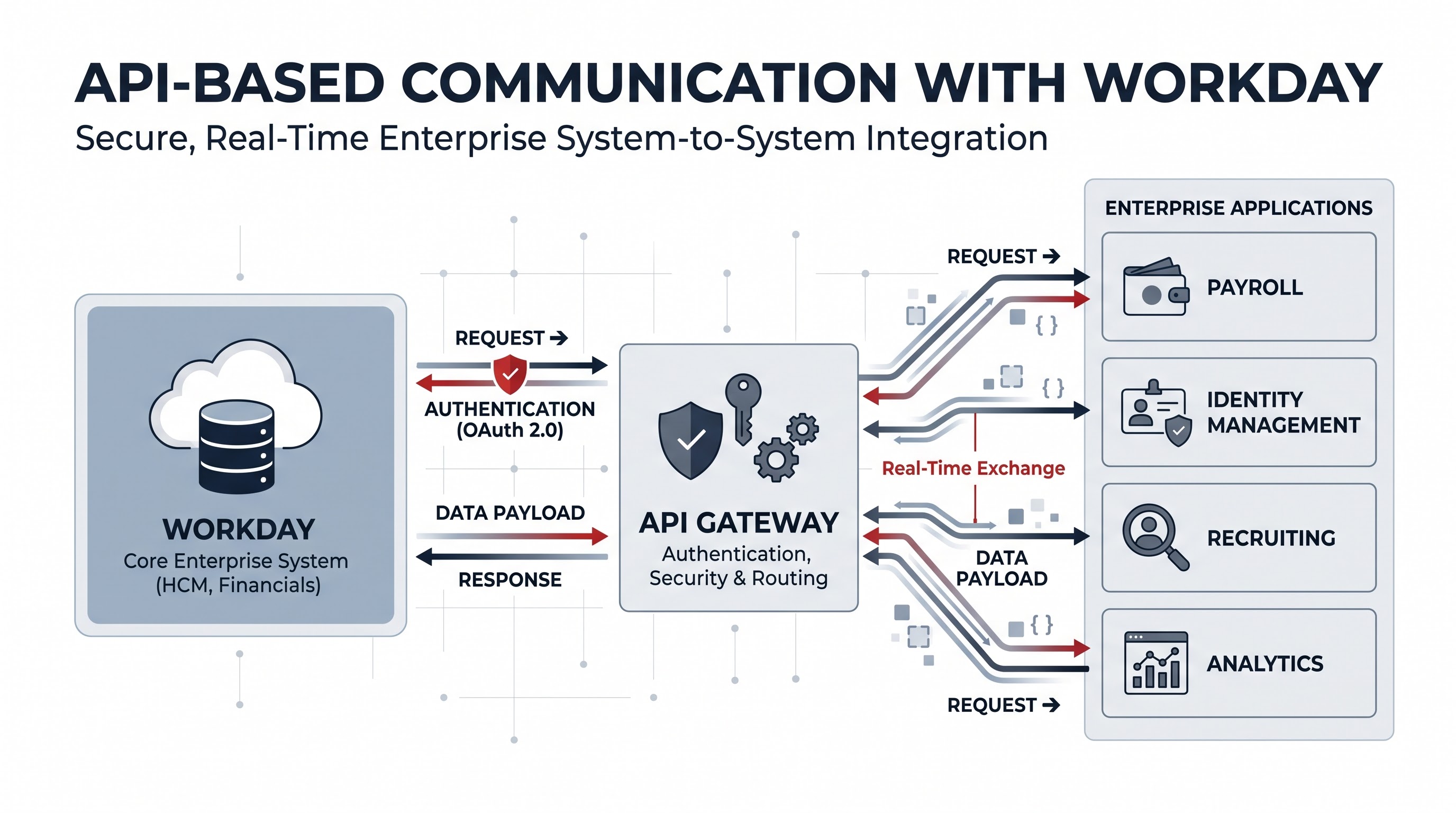
For people learning Workday integration it's important to note that APIs aren't replacements for EIB. They solve problems. One scenario might need a scheduled file transfer while another needs data access. API-based integrations also bring elements like authentication, authorization, data formats, error handling, rate limits, versioning and security. The technical terms can seem overwhelming at first. The core idea is simple: one app asks for something from another. The API gives a safe way for that conversation to happen. The real difficulty isn't in the idea of communication. Designing that conversation to stay reliable, secure, scalable and easy to manage as the business grows.
Connectors: The Shortcut for Common Business Requirements
Not every integration needs to start from scratch. Many companies face recurring integration needs. It can waste time and effort to build a custom solution for each one. That's where Workday connectors come in. A connector provides a way to connect Workday with an external system or business function. Of designing everything from the beginning, integration teams can use an existing pattern. Adapt it to their needs. This reduces development time. Makes deployment more predictable when the requirement matches what the connector supports.
The true value of connectors isn't convenience. They reflect a principle in enterprise software: use solutions when they meet the need and customize only when it adds real business value. Over-customizing a process can make systems harder to maintain tougher to troubleshoot and more expensive to change
Connectors aren't a one-size-fits-all answer. A standard connector may work perfectly for a supported case. Fail when unusual rules or complex data processing are involved. That's why integration professionals must first understand the business process before picking a tool. For learners, connectors teach a lesson: sometimes the smartest technical choice isn't to build something. To keep things. Avoid unnecessary complexity.
Workday Studio: Where Complex Integrations Get Serious
As integration needs grow, complicated straightforward configuration may no longer be enough. An organization might need to connect systems, transform data between structures, apply conditional logic, run advanced processing, handle difficult error scenarios or coordinate multi-stage workflows. This is where Workday Studio comes into play. Workday Studio is built for integration development. It goes beyond configuration. Gives developers a space to design more complex logic. This makes it ideal for situations needing customization or involving processing steps. Think of a company where employee data starts in Workday and moves through stages before reaching downstream systems. Certain fields might need to be converted to records filtered by business rules. Different types of employees routed differently errors handled based on where they occur. A simple integration wouldn't offer the flexibility needed. An advanced development environment becomes necessary.
The key insight here is that complexity should justify the tool. Using a platform just because its available doesn't automatically mean a result. Complex tools also have responsibilities. Development, testing, monitoring, maintenance and troubleshooting. So Workday Studio should be seen as part of a progression. As the business problem gets more complex the integration architecture may need to evolve.
EIB vs APIs vs Connectors vs Studio: Which One Should You Choose?
One of the mistakes beginners make is trying to pick one tool as the "Workday integration option. In reality it's about the requirement. Integration architecture is about decisions, not popularity contests. For a data exchange EIB may be the efficient option. If a common need matches a connector, using it can save time. If an app needs real-time communication with Workday, APIs or web services may be better. When a task involves transformation, multiple systems or complex logic Workday Studio may be the choice.
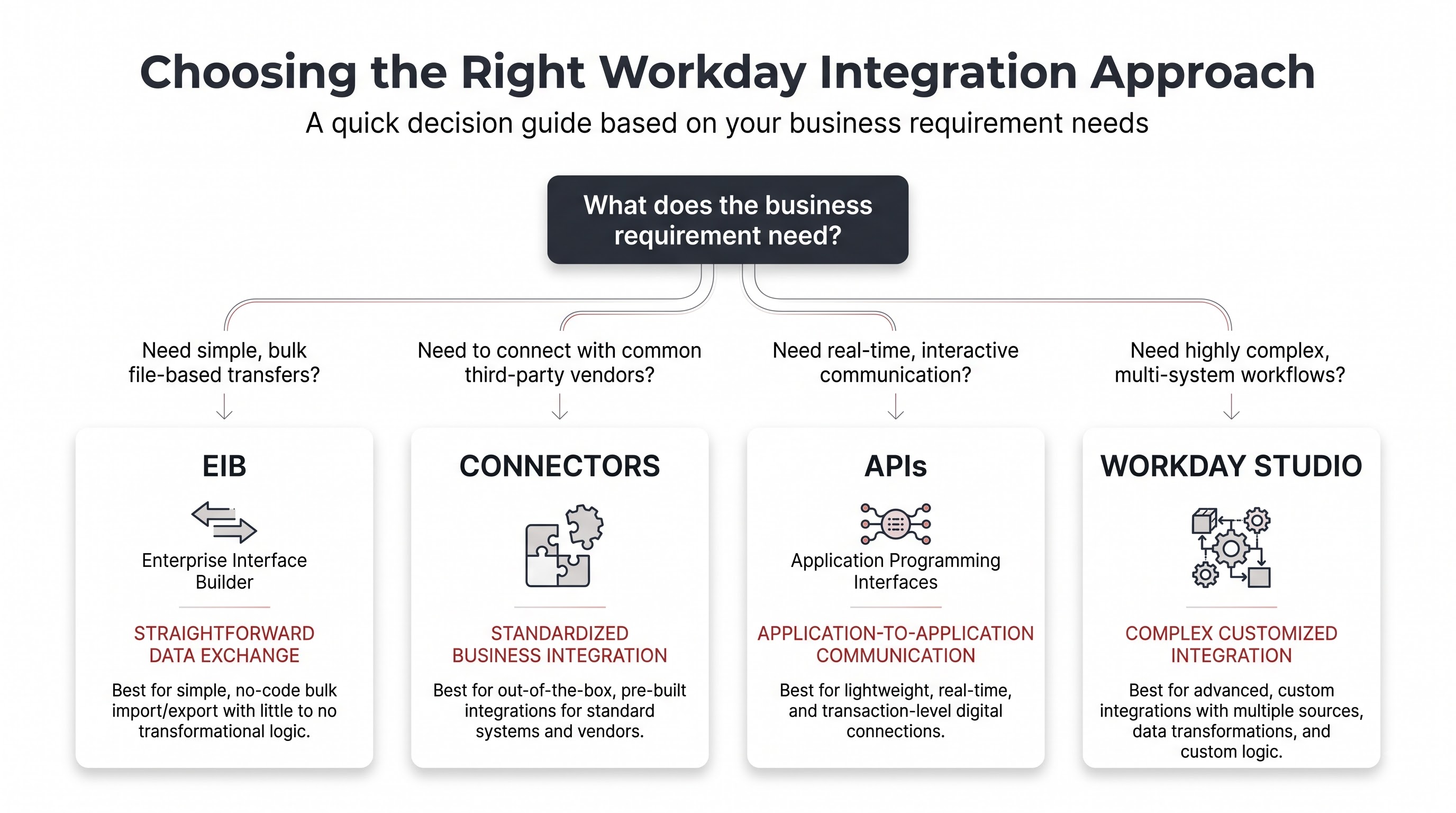
A helpful way to think about it is by complexity and purpose not tool name. Simple configurable needs point to EIB. Standardized requirements point to connectors. Dynamic app communication calls for APIs. Customized complex needs lead to Workday Studio. Each tool serves a role. The goal isn't to find the tool. To match the tool to the job.
These categories are not walls. A real enterprise environment may use approaches at the time. One organization might use EIB for one outbound process, connectors for other APIs for application communication, and Studio for an integration involving systems. Integration professionals therefore need to understand not only technologies
but also how those technologies can co-exist within an overall architecture. This is one reason a structured workday integration course can be useful for learners: the important skill is not memorizing definitions. Learning how to analyze a requirement and identify constraints. Select an appropriate integration strategy.
What Happens When an Integration Fails?
The overlooked part of integration is often what happens after the integration has been launched. Designing an integration is part of the work. Enterprise systems operate continuously. Real-world data is rarely perfect. An employee record may contain information. A required field may be missing. A target application may become unavailable. Authentication may fail.. A data transformation may produce a result.
This means integration professionals need to think about error handling from the beginning. What happens when one record fails? Does the entire integration stop? Can the successful records continue? How is the failure reported? Who receives the alert? Can the problematic record be identified quickly? Can the integration be restarted safely? What information is available for troubleshooting?
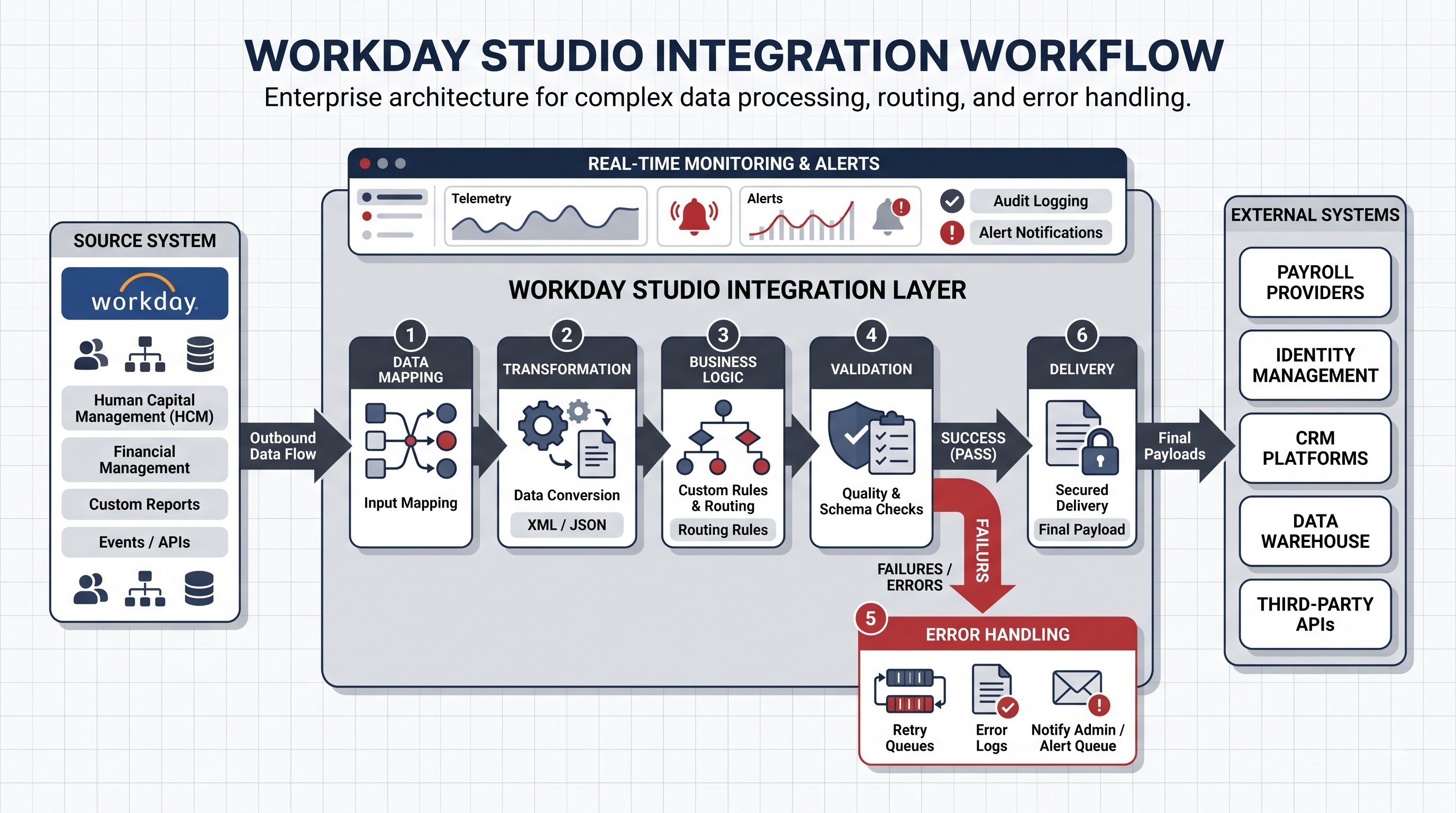
A reliable integration isn't one that never encounters errors. It's one that makes errors visible, understandable and manageable. Monitoring is equally important. An integration may technically complete while still producing a result. For example an integration could run successfully. Transfer information because the source data was missing required values. Effective monitoring therefore involves more than checking whether a process finished. It requires understanding whether the expected business outcome actually occurred.
Testing also plays a role. Developers need to consider scenarios, edge cases, invalid data, unexpected conditions, security requirements and performance. The more important the integration is to the business, the more dangerous it becomes to assume that a successful test run guarantees long-term reliability. This is where integration work becomes less about connecting systems and more about engineering.
The Skills Behind Modern Workday Integration
Workday integration involves more than becoming familiar with EIB, APIs, connectors and Studio. The strongest integration professionals understand the business process behind the technology. They can look at a requirement. Ask what information needs to move, why it needs to move, where it originates, who owns it, where it is going and what should happen if something goes wrong. Technical understanding is obviously important. Professionals may need knowledge of integration architecture, data mapping, APIs, web services, authentication, data transformation, error handling, testing, monitoring, and troubleshooting. Technical knowledge becomes more valuable when combined with an understanding of HR and enterprise processes.
For learners pursuing workday integration training, one of the habits is to avoid learning every tool as an isolated topic. Instead learn through scenarios. Consider an employee onboarding process. Ask what systems need to participate. Consider an employee termination. Identify which downstream systems need to receive the change. Consider a payroll process. Determine what information must be exchanged, when it needs to be available and what happens if the data is incorrect.
Another valuable area is understanding how integrations connect with Workday business domains. For example, workday learning integrations can involve the movement or synchronization of workforce and learning-related information between Workday and other systems. The specific architecture depends on the organization's applications and requirements. The broader lesson remains the same: integration professionals must understand both the connection and the business meaning of the information being exchanged.
As enterprise environments become more interconnected this combination of skills becomes increasingly important. Companies do not simply need people who know how to configure an integration. They need professionals who can understand the flow of information and identify where technology can make that flow more reliable and efficient.
The Real Skill Is Knowing Which Piece Fits
The world of Workday integration can initially appear complicated because it contains technologies, tools, patterns, and architectural decisions. EIB, APIs, connectors and Workday Studio can seem like subjects. They become much easier to understand once they're viewed as pieces of the same puzzle.
EIB provides an approach for straightforward data exchange requirements. Connectors can simplify integration scenarios. APIs and web services enable communication between applications. Workday Studio provides flexibility for highly customized integration requirements. None of these approaches automatically makes an integration successful. The quality of the solution depends on choosing the approach, understanding the data, designing appropriate security, handling errors, testing thoroughly, and monitoring the integration after deployment.
The valuable lesson for anyone entering this field is therefore simple: don't start with the tool; start with the problem. Understand the business process first. Determine what systems need to communicate, what information needs to move, how frequently it needs to move, and how sensitive that information. What should happen when something goes wrong? Once those questions are answered, technology becomes a means of solving the problem rather than the starting point. That is the real integration puzzle. The goal isn't simply to connect workday integration course another system. To create a flow of information that allows the entire enterprise to operate as one environment.