
The Modern Blueprint for Full-Stack .NET Architecture
Last updated on Jun 30, 2026
The concept of a full stack developer has changed drastically. In the past, becoming a full stack developer involved handling fragmentation in the system, integrating a backend framework, frontend technology altogether, various kinds of database drivers, as well as a separate setup of continuous integration systems. Nowadays, the development process emphasizes the importance of an efficient runtime environment, fast iterations, and reduced mental stress of developers.
In that regard, Microsoft has introduced its .NET ecosystem (.NET 10), which provides a consistent multi-platform ecosystem for the development of cloud-native end-to-end applications. Using C# language across the whole architecture stack from the server-side edge logic and Blazor-based browser interfaces to Entity Framework Core-based data layers and cloud infrastructure created using .NET Aspire, developers have the ability to build enterprise-level platforms in one consistent runtime environment.
This in-depth architectural study analyzes modern full-stack .NET development. It covers basic backend engines, modern frontend delivery approaches, data management techniques, cloud native deployment, and security requirements that allow creating a resilient and distributed system.
1. The Backend Engine: Advanced ASP DOT NET Core & C#
The first important component of the full-stack .NET application is a high-performance and cross-platform backend created using ASP DOT NET Core. This modern framework offers two main ways of exposing server-side logic: Controllers (based on the classical MVC/API approach) and Minimal APIs.
Comparison of Minimal APIs and Controllers
Minimal APIs, which were invented to eliminate overheads, employ lambdas and direct route mappings to create highly efficient endpoints. Such endpoints have the ability to directly connect with the application’s routing mechanism and do not require any process of creating controllers and applying filters for reflection. It is evident that Minimal APIs are highly efficient for microservices, public cloudless endpoints, and BFF.
On the other hand, controller architecture can prove highly effective in vast corporate environments, which require reflection, inheritance, and filter chains.
Dependency Injection Lifecycles
ASP DOT NET core comes with a built-in IoC container that is responsible for managing the lifecycle of component instantiation and destruction. Understanding the lifecycles of these components is an essential stage explored inside a modern dot net online course, since otherwise there may be no memory leaks, threadsafe problems, or other state corruption issues:
Transient (AddTransient<T>): A new instance is created each time it is requested by the service provider. This is best for lightweight and stateless components like individual validation operations or business calculation classes.
Scoped (AddScoped<T>): A single instance is created each time a HTTP request life cycle is completed. This is the mandatory life cycle for the creation of stateful context in a single thread logic, like a database context (DbContext) with Entity Framework.
Singleton (AddSingleton<T>): A single instance is created once when the application starts. This will live throughout the lifecycle of the application. This should always be thread-safe.
Asynchronous Processing: The Task Asynchronous Pattern (TAP)
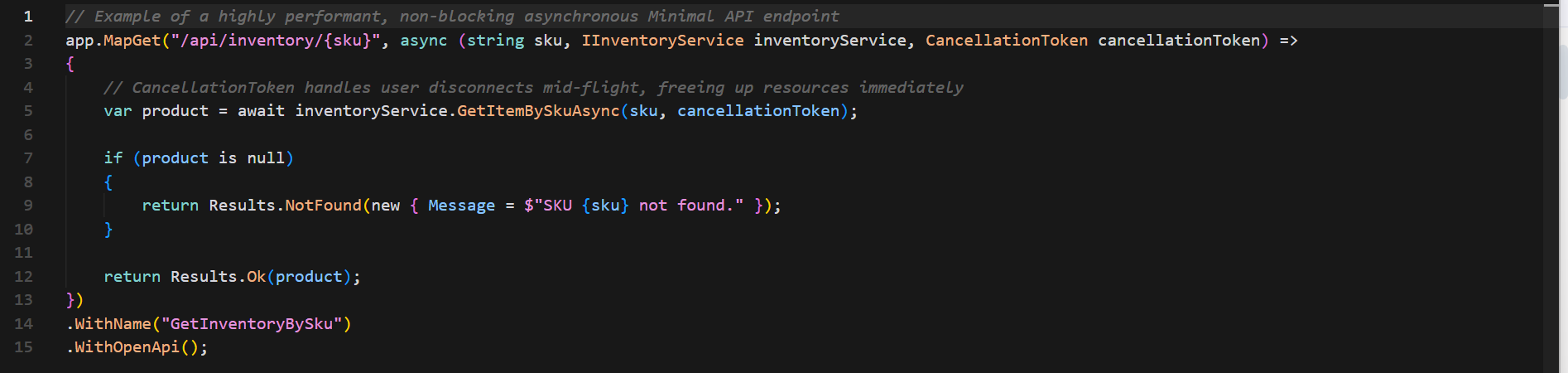
The modern backend software development process requires non-blocking, asynchronous execution of tasks to avoid blocking thread pools when there is too much work for them. This approach is supported by .NET using the async and await language constructs, which are based on the fundamental building blocks of Task and Task<T>.
As soon as the asynchronous execution begins, the thread executing the asynchronous action (external database access, external API requests, etc.) is released from the thread pool to serve other HTTP requests. When the OS informs the runtime about completion of I/O, the thread returns to continue the method's execution state.
2. The Frontend Revolution: Blazor Ecosystem and Alternatives
One of the main features of full-stack .NET development is the execution of C# code directly within the browser of the user, avoiding the obligatory context shift between backend programming language and JavaScript.
The above-mentioned feature is ensured by Blazor
Blazor architecture: Server vs. WebAssembly (WASM)Blazor supports two runtime architectures, which may be combined using different interactive rendering modes:
Blazor Server
Application is fully executed at the web server side. Browser is a thin client, where UI events are delivered from the client to the server using real-time SignalR-based connection (WebSocket with a set of fallbacks). Then the server-side makes calculations for the minimum UI layout change and delivers the resulting changes to the browser to update the DOM.
Advantages: Immediate start-up time, full protection of intellectual property of the source code, and ability to communicate with server databases and services directly.
Disadvantages: Increased memory usage on the server side (each connection needs to be kept open) and extreme dependence on network latency.
Blazor WebAssembly (WASM)
Application code is delivered to the client’s browser directly together with the optimized .NET runtime compiled into WebAssembly. The application executes locally in the browser environment.
Benefits: Delegates UI processing and rendering tasks completely to the user’s computer, helps in running applications offline (Progressive Web Apps), and allows direct static web hosting.
Drawbacks: Increases the size of the initial bundle download, resulting in slower page loading at the start, and exposes the compiled client-side assemblies on the client side.
Interactivity modes in Blazor
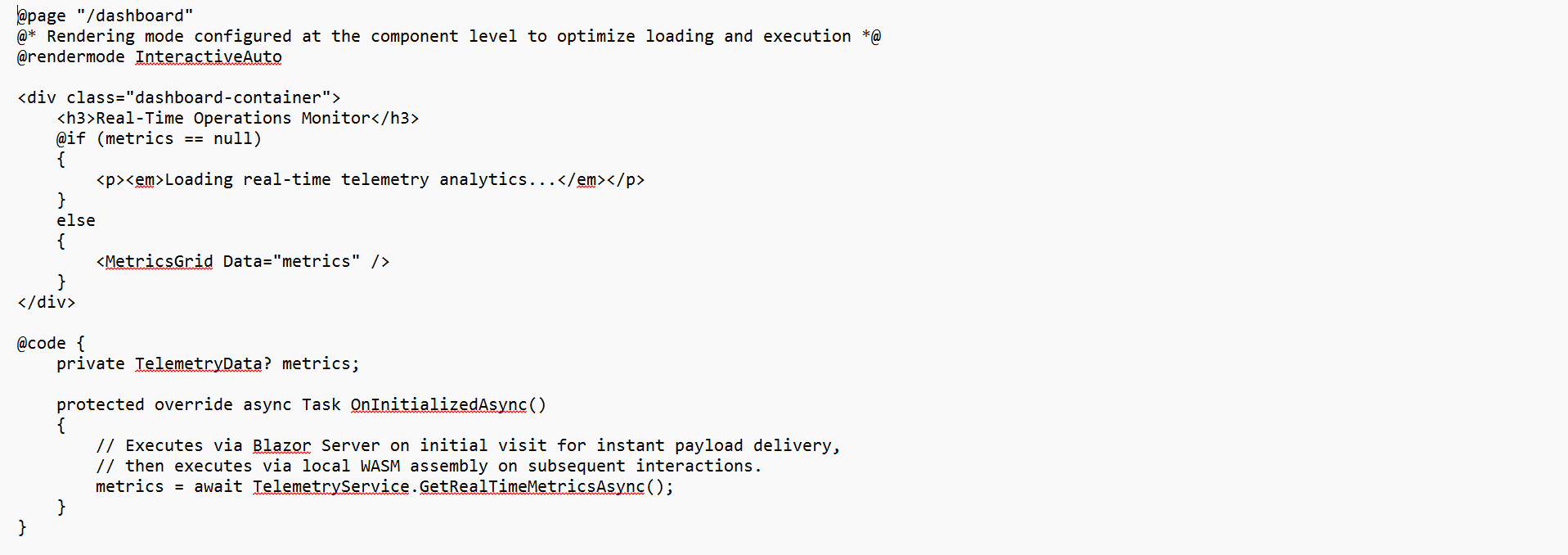
Today's complete .NET framework uses auto-switching interactivity modes to offer best web performance:
Decoupled Single Page Applications: React, Angular, and Vue.js
Although Blazor offers a single-language development experience, full-stack .NET frameworks typically use decoupled frameworks such as React, Angular, or Vue.js as the industry standard for JavaScript/TypeScript, using ASP DOT NET Core only as the gateway to the RESTful/GraphQL API.
In the decoupled architecture pattern, the front-end application itself is a stand-alone application that can be bundled by various means like Vite and Webpack. The interaction between the front-end and back-end is done through the stateless HTTP networks.
This approach enables independent deployment and localized scaling as well as allowing front-end designers to fully utilize modern browser user interfaces while leveraging the power of type-safe and business logic processing in .NET servers.
3. Data Architecture: EF Core & Database
A fully functional stack app depends largely on the efficiency, versatility, and speed of the data access layer. Inside the .NET world, the object-relational mapping process is handled by Entity Framework Core (EF Core).
Model Configuration: Data Annotations VS Fluent API
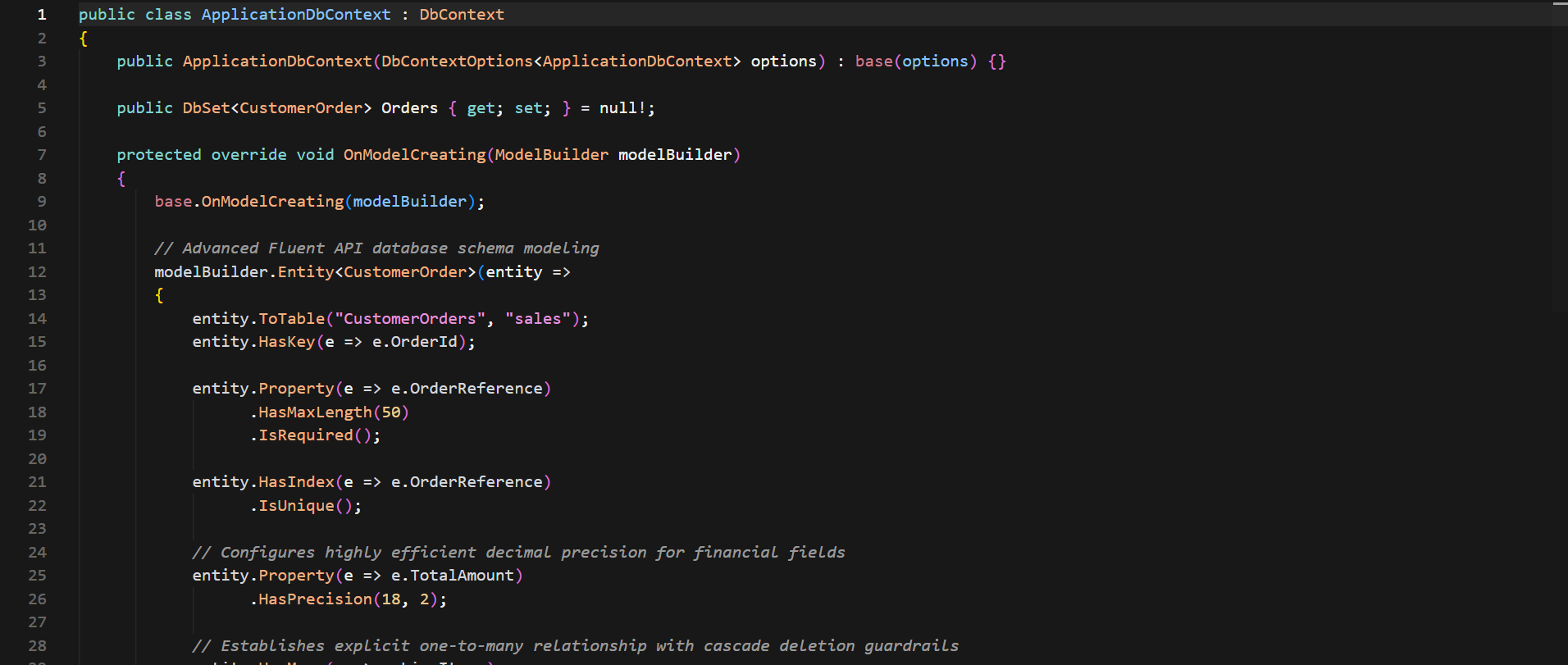
In EF Core, there are two ways of mapping your domain entities from C# to database tables, namely through Inline Data Annotations or through the decoupled Fluent API.
Although Inline Data Annotations work by defining C# attributes in line to class properties which is convenient for fast setups, enterprise full-stack development usually prefers Fluent API configurations in the OnModelCreating method of the DbContext.
Performance Optimization Methods
An untuned ORM query is able to create serious issues within an application rather fast. Structural approaches to increase database performance in EF Core include the following:
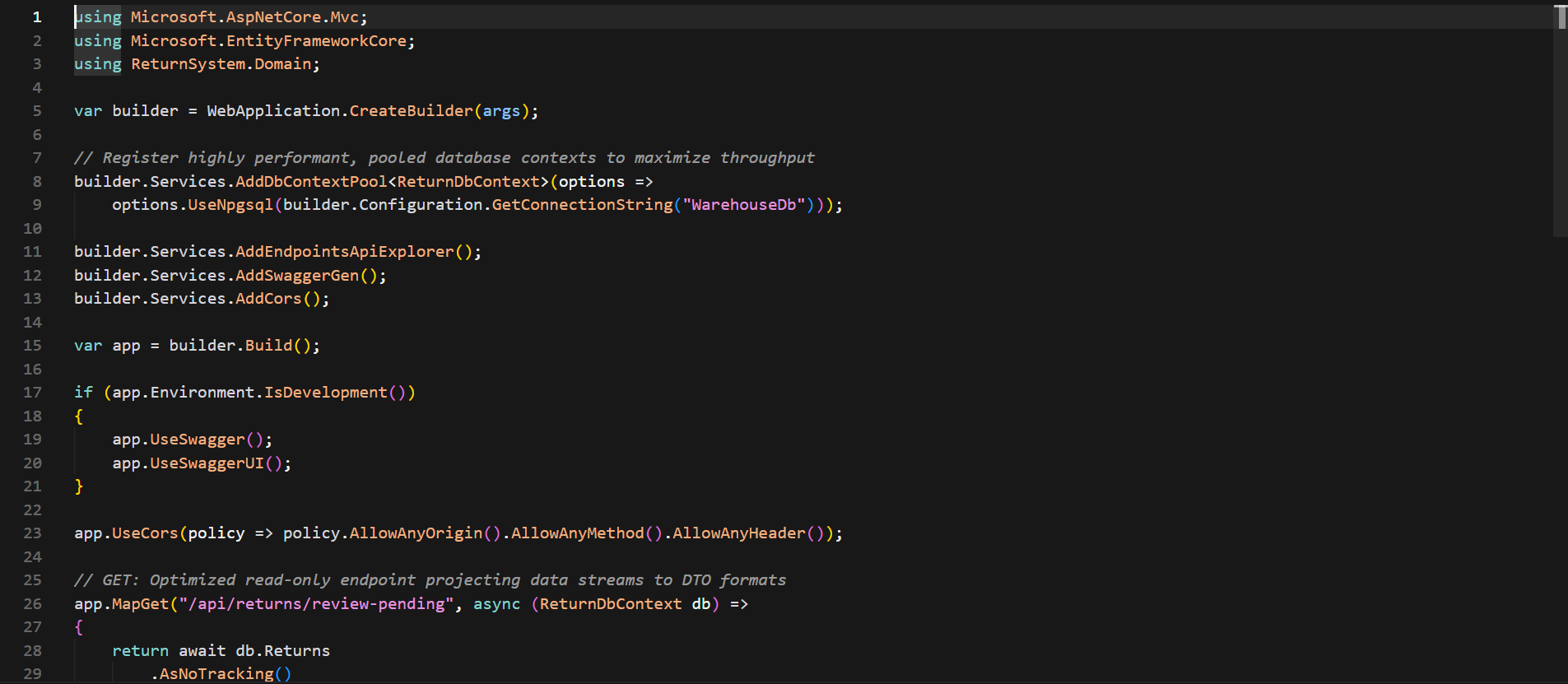
AsNoTracking(): By default, EF Core creates a local memory cache which tracks the state of any retrieved entities, because the latter are needed for generation of update queries. In case of read-only operations, AsNoTracking() disables tracking, therefore memory usage is reduced and execution loops are made faster.
Explicit Projection Selection: It is not recommended to fetch whole tables from databases to server memory. Queries should be projected right into the specified Data Transfer Objects (DTOs) through Select(). In such a way only necessary columns of the database will be transferred through the network.
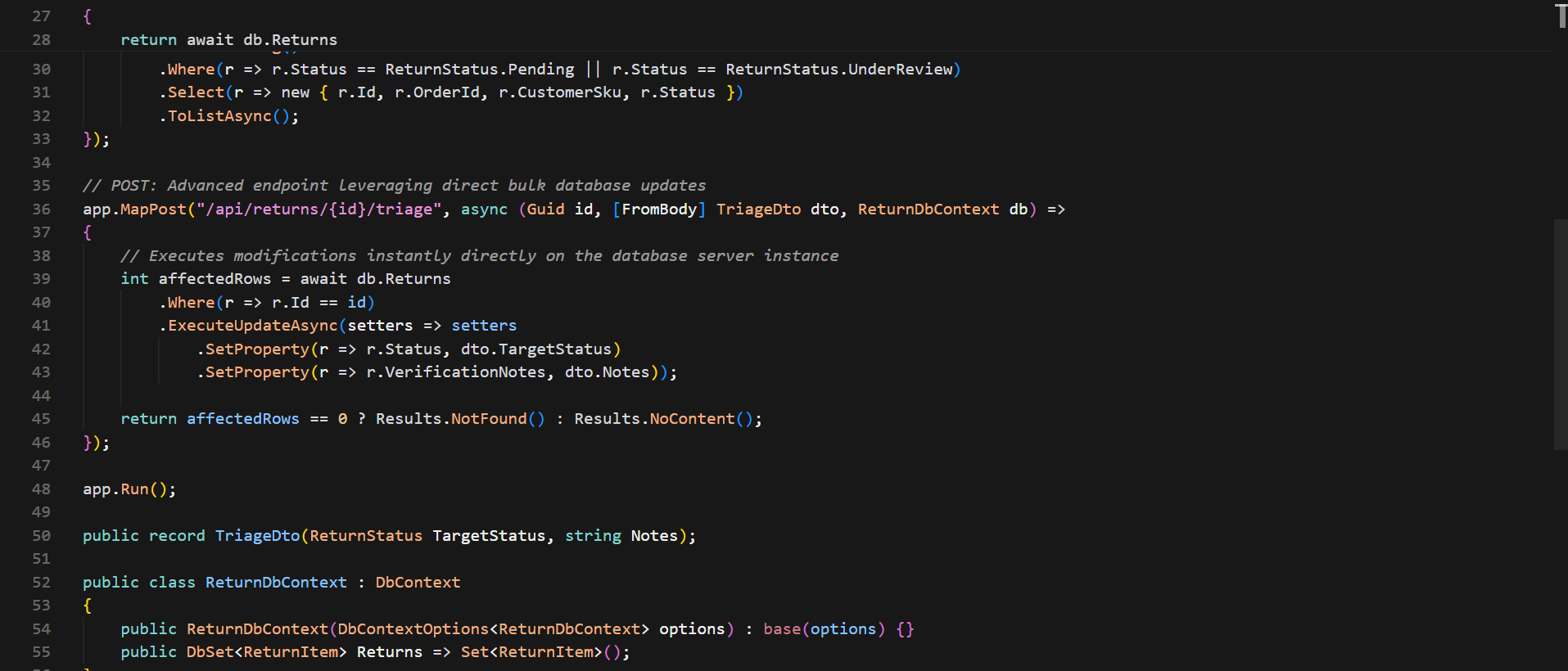
Bulk Operations on Databases: In a traditional workflow, data was modified by EF Core through loading data into memory, individual updates and running SaveChanges() method. EF Core now provides two additional methods: ExecuteUpdateAsync() and ExecuteDeleteAsync(), which allow for executing bulk database modifications without loading entities into memory in one pass over the network, like raw SQL queries do.
4. Modern Cloud Native Full Stack Approaches
Modern full stacks are based on cloud-native architecture and distributed services models since application designs go beyond traditional monolithic systems.
App Designing Using .NET
There are many complications in distributed systems such as, service discovery, container orchestration, and monitoring. Being able to abstract these complex microservice topologies is an integral part of a modern dot net online course curriculum.
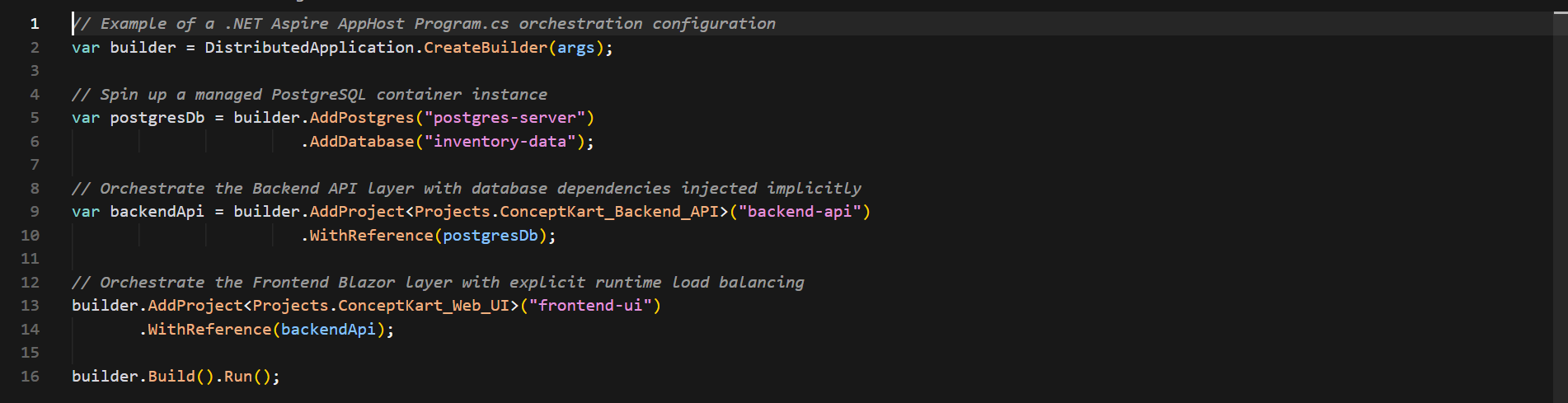
With .NET Aspire, the entire development environment gets streamlined, with system port allocation management, connection string injection, health check configurations, and OpenTelemetry monitoring being incorporated in distributed systems automatically.
Native Ahead-of-Time Compilation (AOT)
For cloud-native applications where rapid scaling and less consumption of resources are needed, there are many advantages offered by Native AOT. However, in case of a .NET application, where compilation of the IL code to machine code takes place at runtime with the help of the JIT compiler, in Native AOT, the actual application gets compiled into native machine code before runtime.
This results in an entirely independent and standalone executable program, without the need for any JIT compiler at runtime.
5. Security and Authentication Architecture
The process of securing full-stack web architectures involves multiple layers of protection including token authentication, route guarding, and payload standardization.
Token-based authentication (JWT, OAuth2, and OpenID Connect)
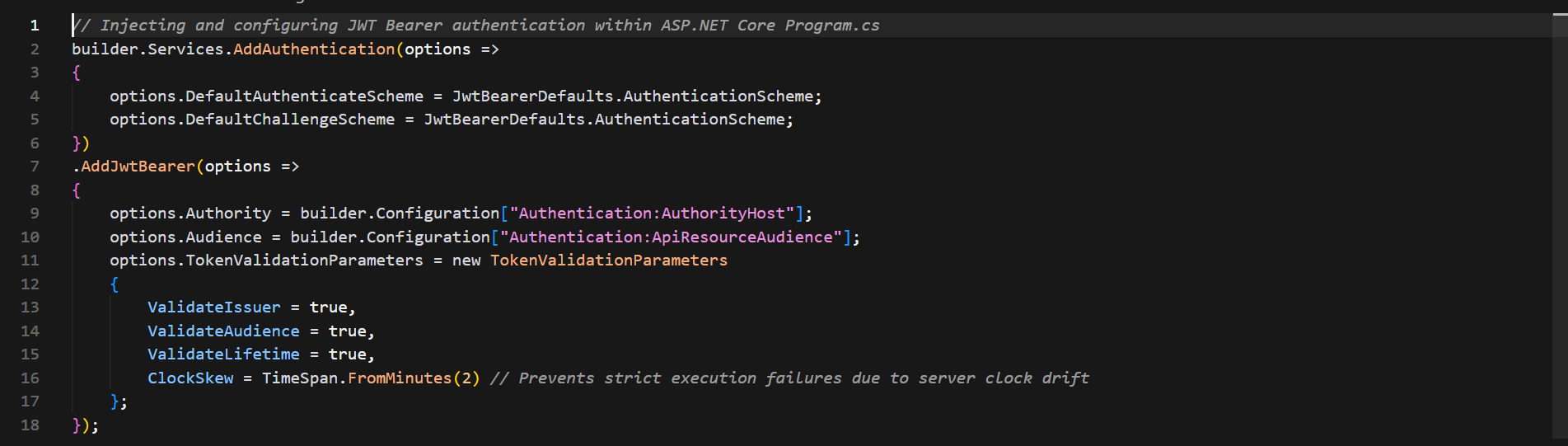
In fact, the traditional state-based approach to session cookie authentication is extremely vulnerable to cross-site request forgery (CSRF) attacks and hard to deploy in a multi-region cloud infrastructure. Designing secure API configurations with a stateless architecture is a core capability developed in a dot net certification course online.
Once the user authenticates himself in the authorization endpoint, the identity provider provides the signed JWT to the user. The frontend client captures this token and sends it in all HTTP requests' headers under the Bearer scheme.
Authorization via Policies
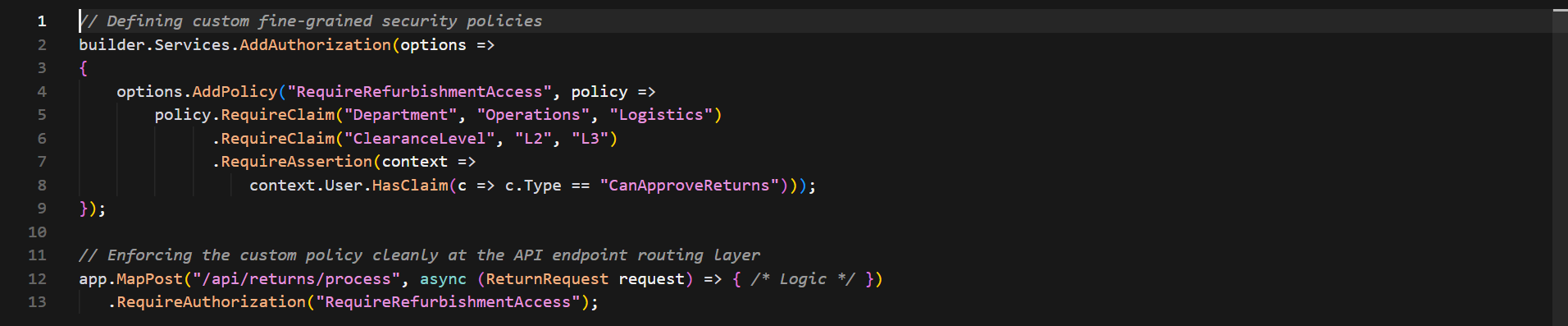
While simple Role-Based Access Control (RBAC) usually results in inflexible role hierarchies which find it difficult to conform to changing business logic, ASP DOT NET Core offers an alternative approach – Authorization via Policies.
6. End-to-End Implementation: Creation of a Production System
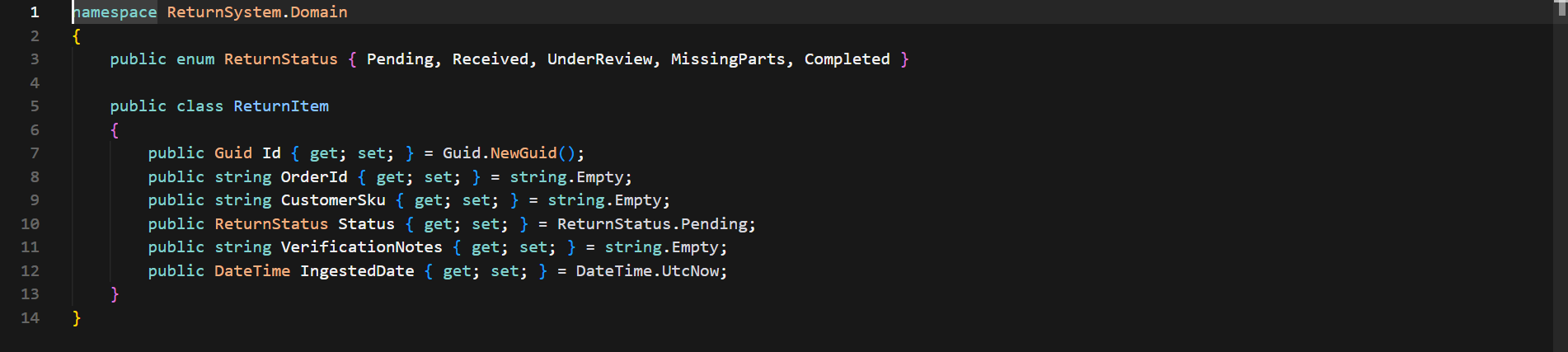
In order to demonstrate these architectural concepts, we will create a production-grade system – a real-time E-commerce Return Management System that tracks customers’ returned shipment items, tests components at various warehouse teams, and broadcasts the information in real time through a fully scalable and decoupled full stack .NET architecture.
Data Model Domain Structure
High-Throughput ASP DOT NET Core API Routes
Reactive Application UI Layer
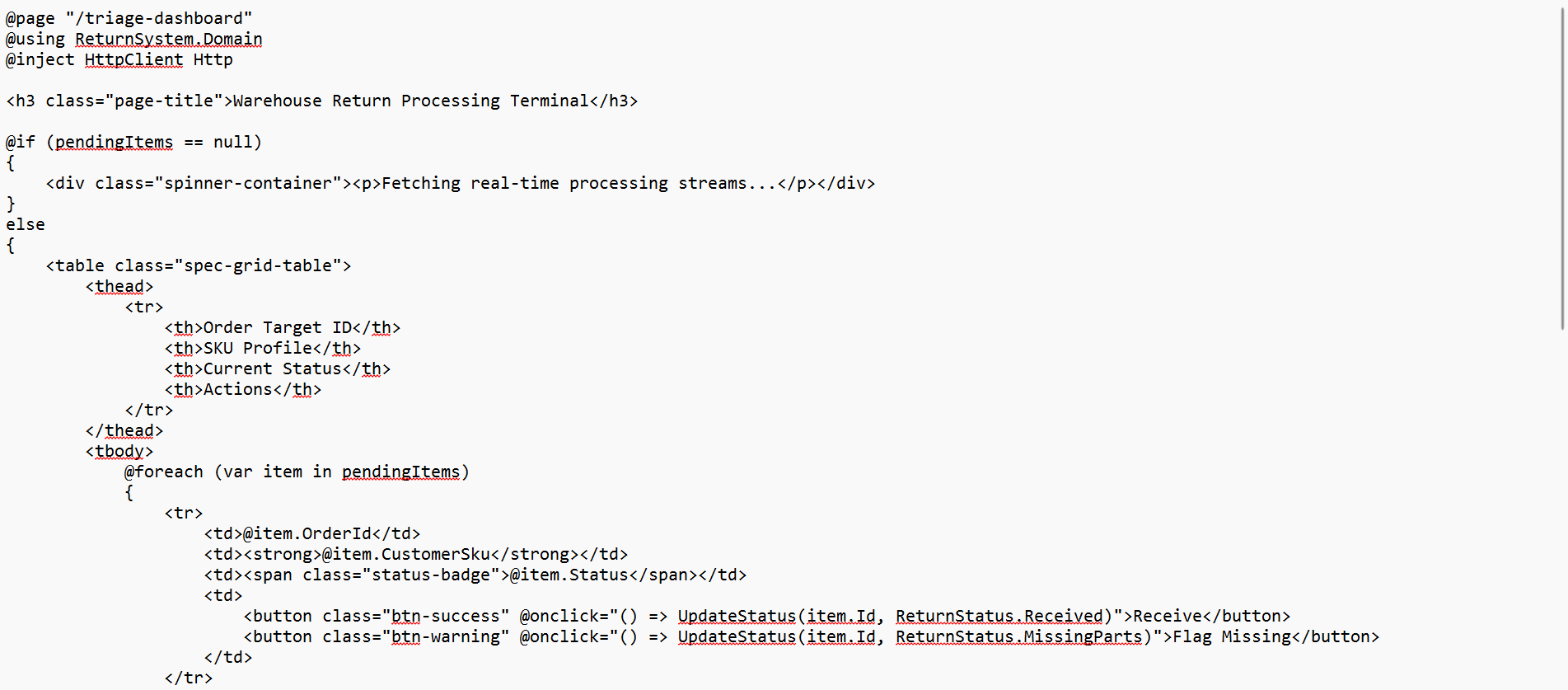
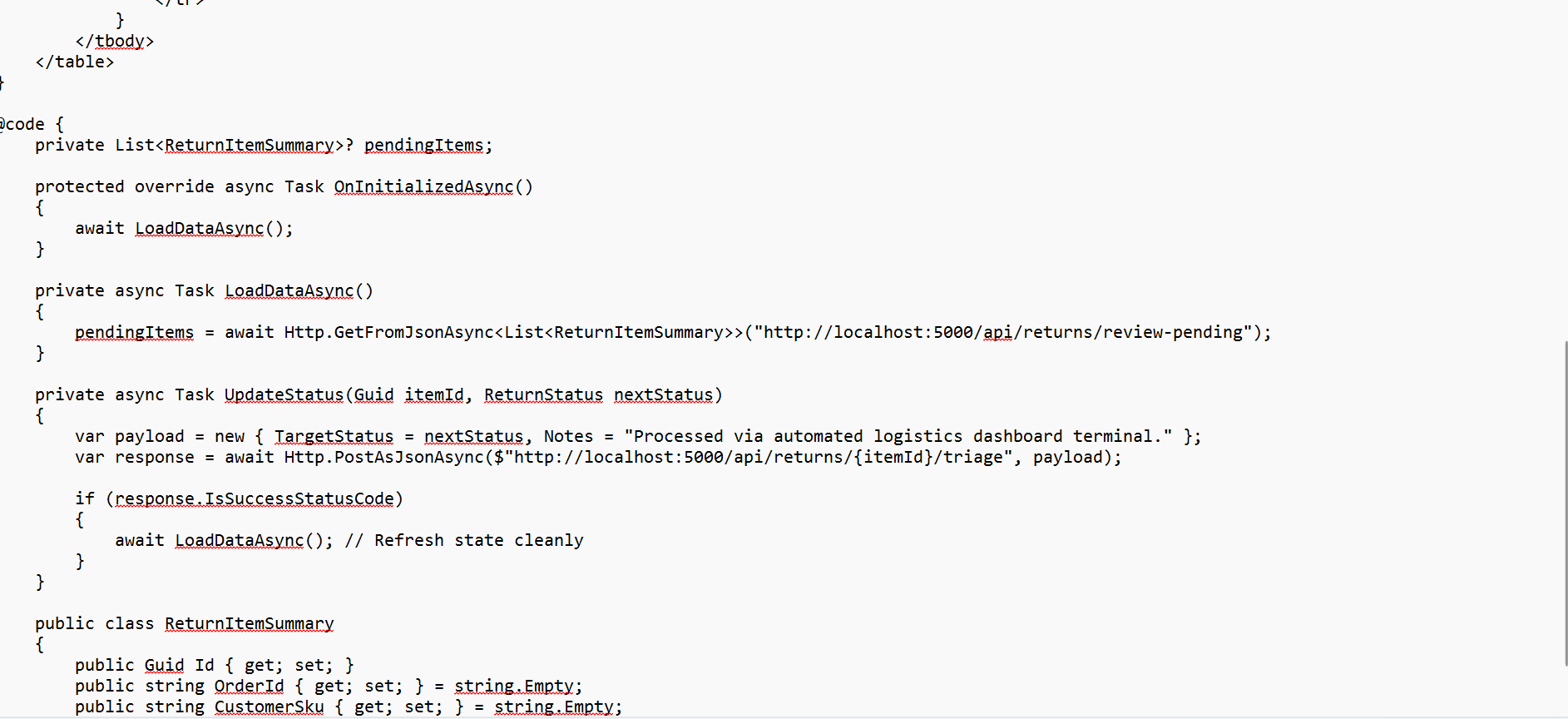
This is where we deploy our reactive front end client interface with Blazor, providing real-time feedback of triage operations from server-side.
7. Advanced Monitoring, Telemetry, and Diagnostics
A production-grade app needs comprehensive insight into the running performance of the system. Monoliths may have basic logging capabilities, but for cloud-based architecture, proactive observability based on metrics is needed.
Structured Logging using Serilog
Basic string interpolation logging ($"User {id} failed login") slows down the application due to repeated allocation of heap string arrays and generates unsearchable structures. Structured Logging is mandatory in modern full stack development. Rather than converting logs to simple text, logging is done through JSON objects with execution parameters embedded within them.

This way, operation teams can search through millions of distributed logs instantly using precise values, without having to parse textual information from strings (Log.Information("Processing return request for Order ID: {OrderId}", orderId);).
Integration with OpenTelemetry
Modern .NET applications include out-of-the-box support for open source OpenTelemetry standard. It helps to monitor application performance by tracking its behavior on three key pillars:
Traces: Monitoring the journey of an incoming HTTP request as it is passed between boundary systems (for instance, traveling from Blazor application, passing through API Gateway, then reaching a dedicated microservice and ending up at the physical database server).
Metrics: Reporting real-time numeric metrics, such as memory consumption, spikes in threads count, limits of connection pools, or custom counters like number of processed orders per minute.
Logs: Data streams that have direct relation to the execution traces by means of correlation identifiers.

This inherent observability means that in case of any error or performance degradation in production, engineers will be able to locate the specific line of code, network request, or database queries causing the problem.
8. Frontend State Management & Component Architecture
As a full-stack .NET application scales, the UI of the application should have a proper state management architecture. The failure to coordinate the flow of data among independent components is common during distributed system or dashboard development.
State Containers v/s Cascading Parameters
Blazor provides two ways to propagate data down the component hierarchy:
Cascading Parameters: It uses a native Blazor feature which allows state information propagation down the particular UI rendering hierarchy. However, while it serves well for global and non-frequently changing metadata (changing applications' theme (Dark/Light) or sending language-specific translation dictionaries), it may cause unnecessary UI refreshment in the nested child components.
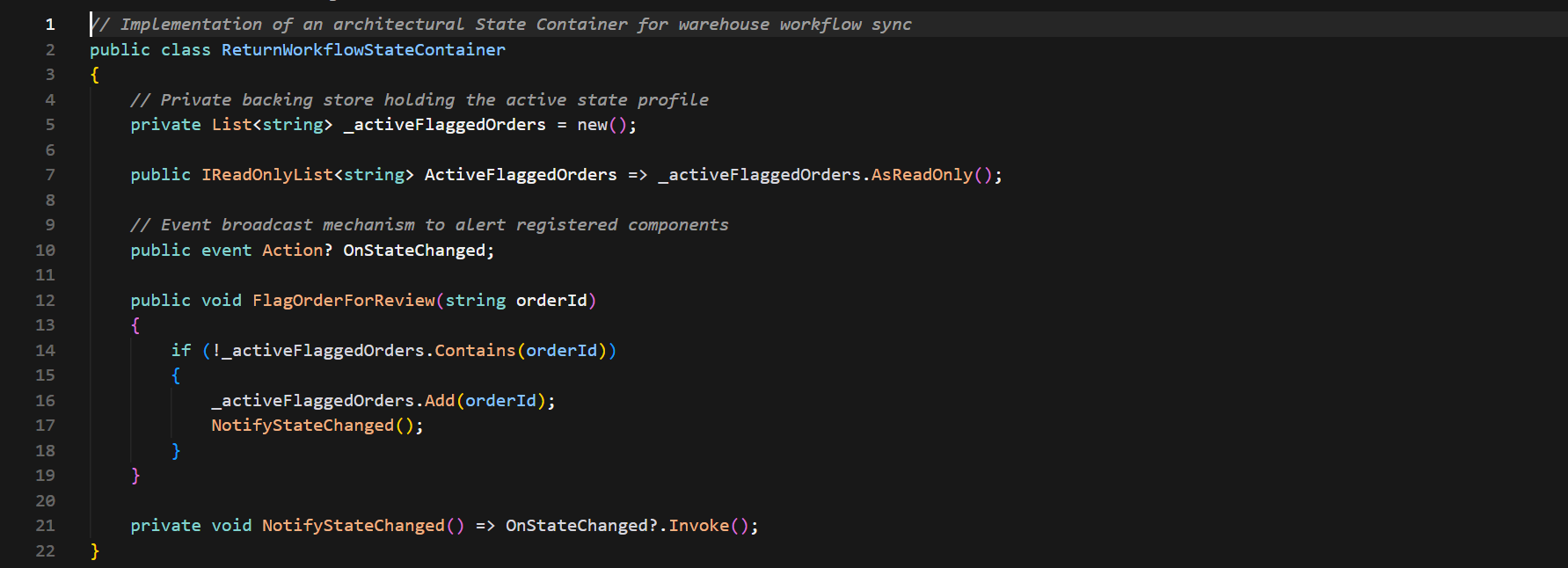
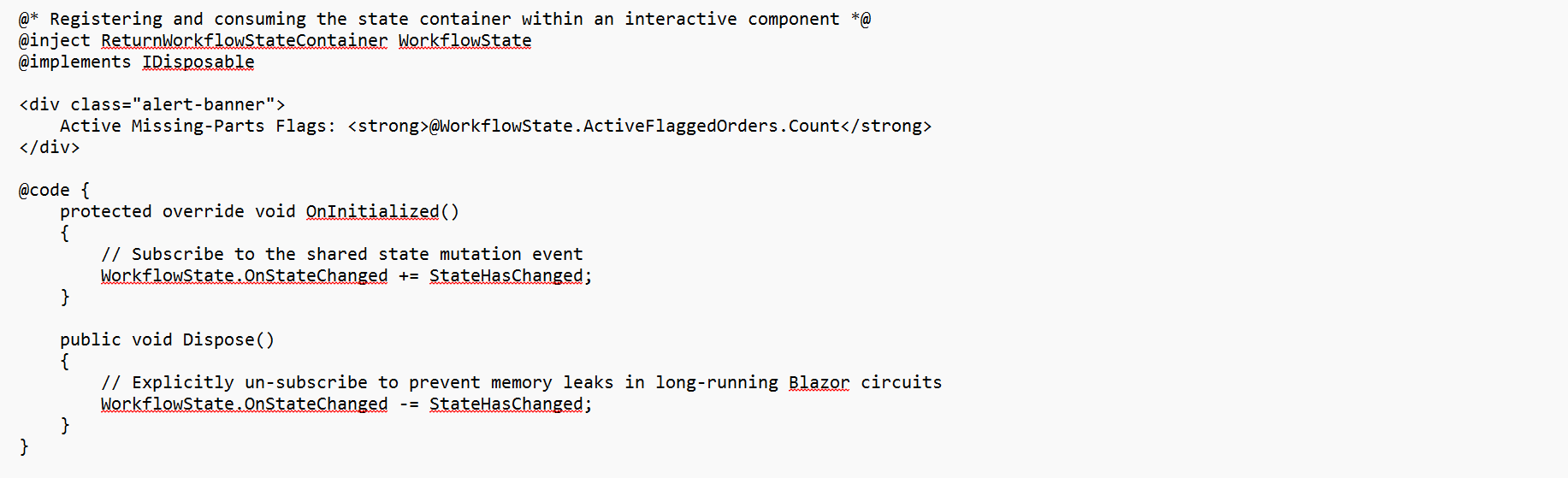
State Containers for In-Memory Business Logic: Enterprise architecture uses architectural state containers to store current data models in memory for live business logic. State containers are C# classes that can be registered within the DI (dependency injection) container. Explicit C# events such as Action or EventHandler are exposed by the state containers which can be subscribed by various components so that their layouts can be updated simultaneously if there is any change in data models.
9. Advanced CI/CD Pipeline
A fully stack-based .NET application is greatly affected by its delivery pipeline. Moving a software application from development to cloud-hosted environments involves container build layers and automated deployment procedures.
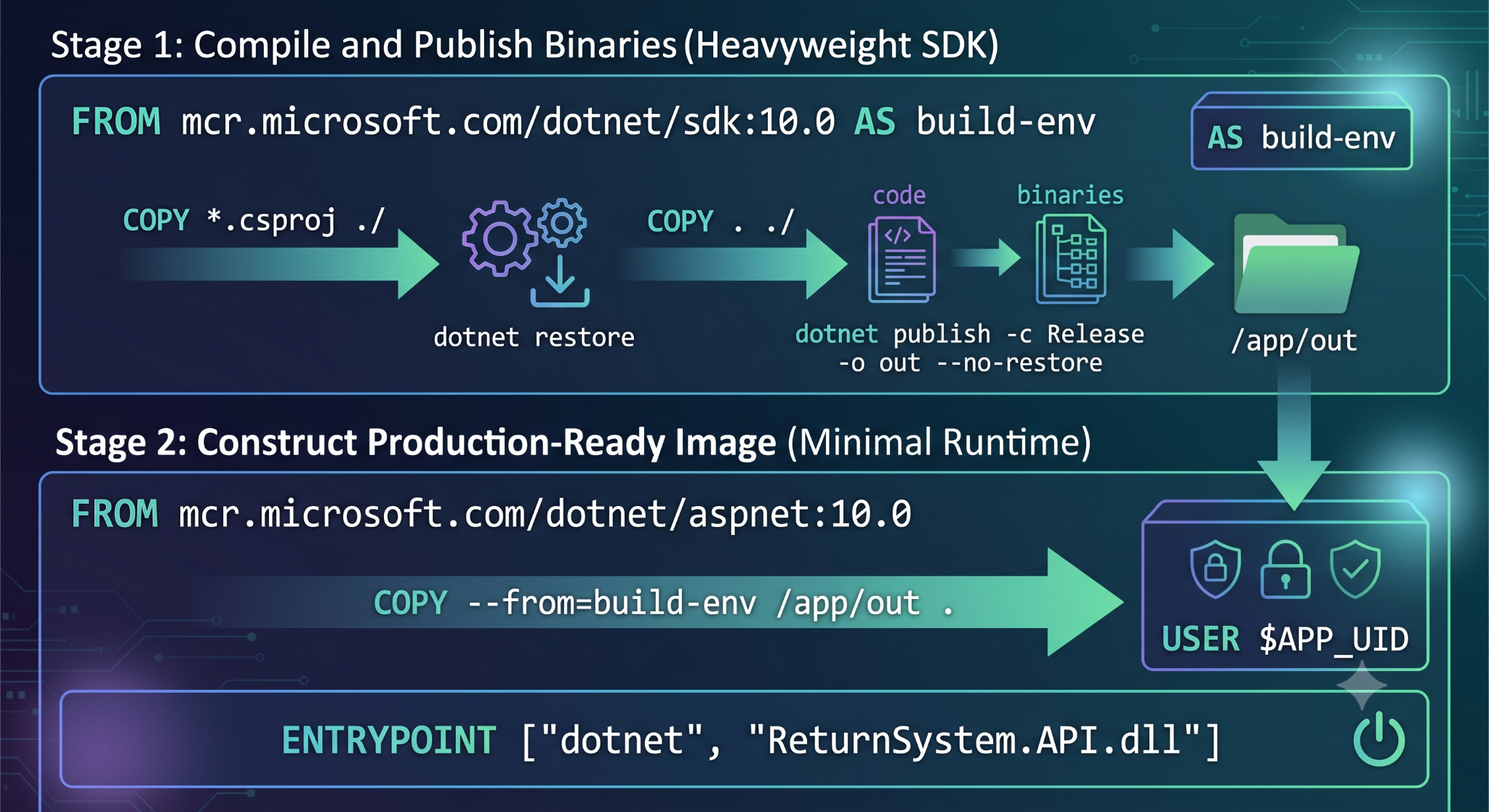
Multi-Stage Docker Container Build Process
In order to ensure that build processes involve smaller footprints and less security risks in production environments, multi-stage Docker containers are employed in full-stack .NET microservices. This entails separating the bulky .NET Software Development Kit (SDK) responsible for the compilation process from the ASP DOT NET Runtime engine which hosts the application executable.
IaC Implementation using Azure Developer CLI and Aspire
With the rise of modern DevOps, manual configuration of web services through cloud portal interfaces is being phased out. This is possible because .NET Aspire provides an abstraction layer for service topologies, which is based on C# code.
Running the Azure Developer CLI command (azd init) results in the generation of declarative templates for the infrastructure from the service dependencies written in the C# AppHost file. Developers can use this method to deploy cloud databases, load balancers, and container applications using source-code configurations.
10. Integration of API Gateway and Microservices Design Patterns
In case the application grows from a modular monolith to microservices, opening up all backend endpoints directly to the frontend client causes problems for the architectural structure of the system since the UI is tightly coupled with particular server network endpoints and CORS configuration should be done between many different domains.
Backend-for-Frontend (BFF) Pattern
In order to solve this problem, full-stack .NET applications typically apply the Backend-for-Frontend (BFF) pattern or use reverse proxy engines such as Yarp (Yet Another Reverse Proxy).
Yarp is a secure and highly performing API Gateway located between the frontend UI and internal microservices clusters. It intercepts the traffic coming from the client, checks the security token, applies the routing logic and forwards the request to internal microservices.
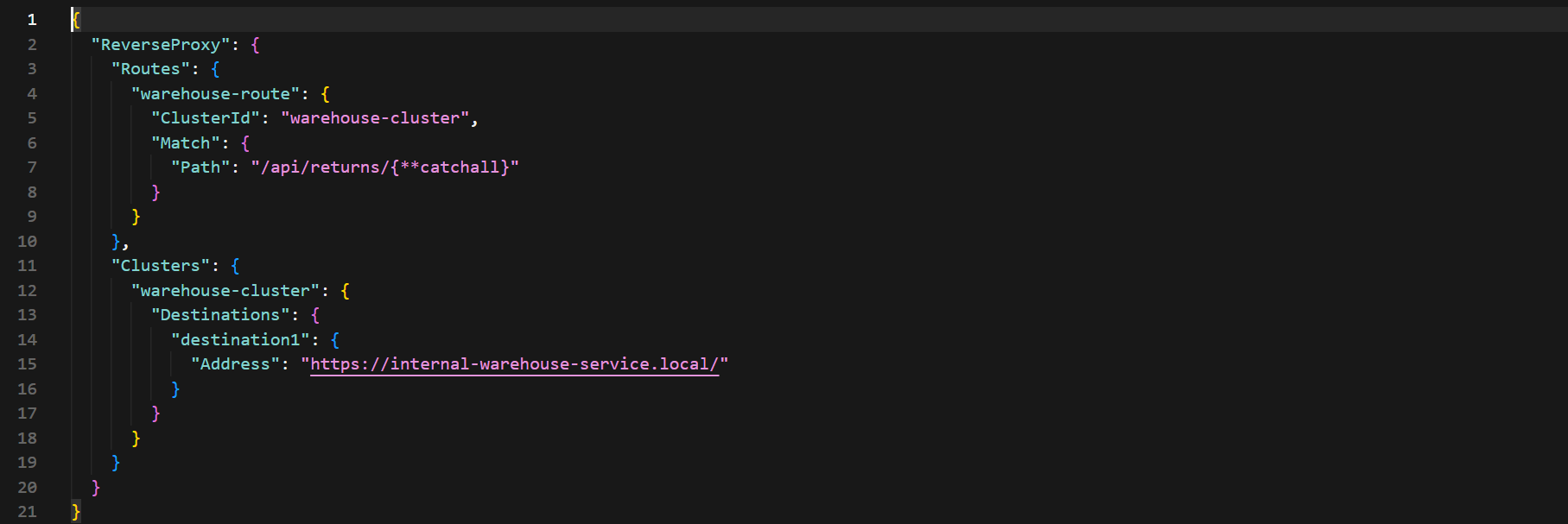
The segregation of structure keeps the internal microservices inside a secure network boundary. This enables the developers to make changes to the back-end endpoints, to break the monolithic databases, or route the internal services without changing or re-deploying the front-end user application.
Conclusion
The Value of Integrated .NET In today’s world, the .NET platform offers an integrated solution for full-stack developers. Instead of dealing with disparate ecosystems and multiple tools, teams can rely on one runtime environment and one type system. From developing high-performance APIs using Native AOT and building responsive web front-end using Blazor to working with sophisticated microservices through .NET Aspire and managing databases through EF Core, .NET makes the development process much easier.
To become an adept professional in such a multi-tiered platform system for software engineers, taking part in a well-designed dot net certification course online Program will be a major step in reducing the learning curve. To move from being a one-tier specialist to becoming an architect, one needs practical skills throughout the entire development process, which a proper .net course program can help provide.