
The Psychology of Enterprise Integration: Mastering Workday Studio
Last updated on Sep 7, 2026
When software architects and HR leaders discuss enterprise system integration, the conversation almost always devolves into raw mechanics: XML schemas, web service endpoints, payload limits, and transport protocols. Yet behind every data pipeline lies a deeply human narrative. Enterprise integrations are fundamentally about how human organizations handle complexity, maintain a sense of control, manage operational stress, and navigate digital transformation.
When software systems fail to communicate, human beings bear the operational burden. HR specialists spend hours manually copying records across spreadsheets; payroll managers stay up late verifying batch files; and developers burn out attempting to stretch rigid, pre-built connectors beyond their design limits. Approaching integration through the lens of human psychology shifts our focus from mere connectivity to human-centric architecture.
By examining how cognitive load, trust, and control dictate software adoption, we can rethink how complex integrations are designed, deployed, and maintained.
The Psychology of Control: Why Out-of-the-Box Tools Aren't Enough
Human cognition is hardwired to seek control over unpredictable environments. In an enterprise setting, unpredictable environments manifest as fragmented data, compliance risks, and fragmented workforce records. When an organization adopts a modern Human Capital Management (HCM) system, executive teams often experience a temporary illusion of complete order. However, as the organization grows, reality reasserts itself. Custom commission structures, regional union agreements, vendor-specific benefit formats, and legacy hardware systems demand bespoke integration logic.
Pre-packaged connectors and simple core connectors serve an essential purpose: they offer cognitive shortcuts. They allow teams to launch standard integrations quickly with minimal setup. However, as business requirements evolve, these standardized tools become restrictive boundaries. When developers are forced to fit complex, non-standard business logic into rigid pre-built templates, they experience intense cognitive friction. The system no longer serves the organization's unique processes; instead, the organization is forced to compromise its operations to fit the software's limitations.
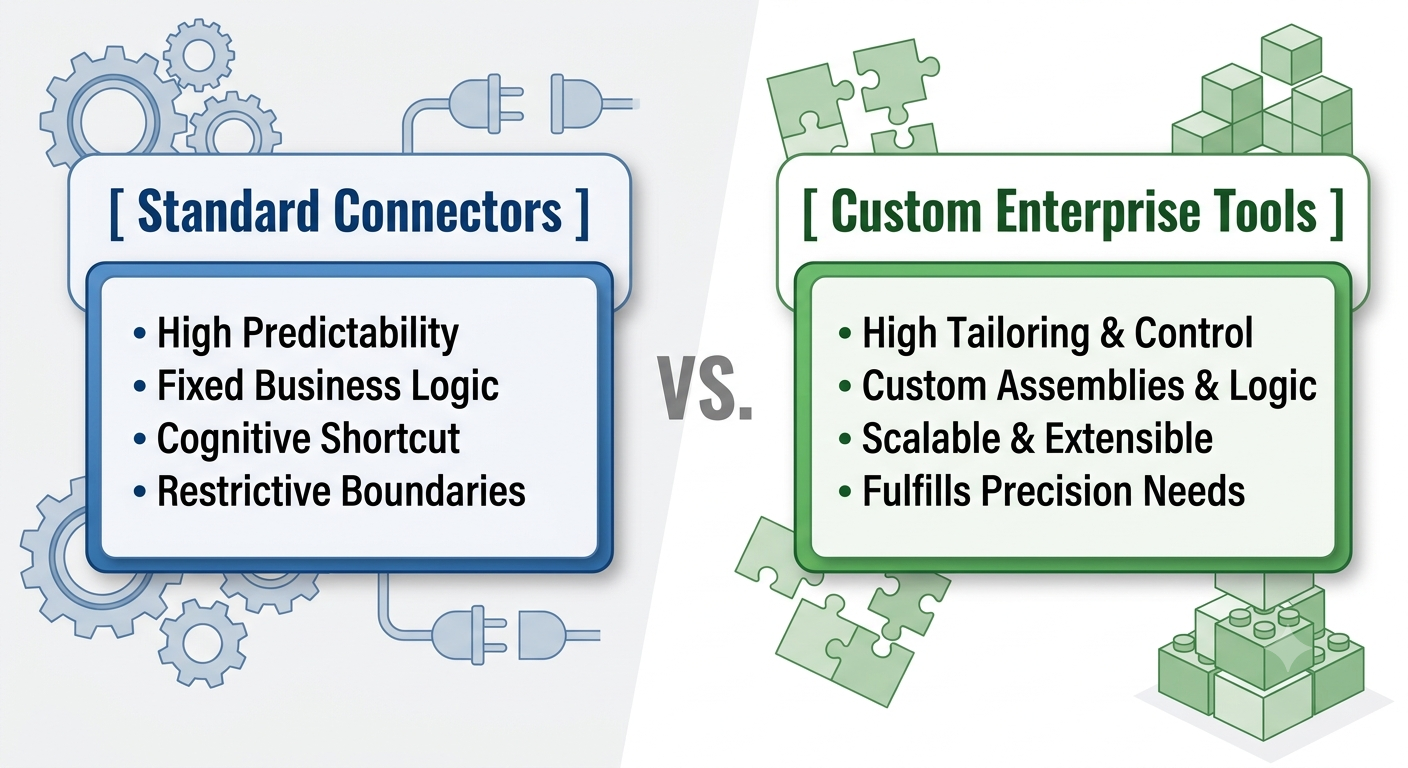
This structural bottleneck is precisely where tailored integration environments become necessary. When data environments grow too complex for basic configurations, technical teams require a platform that provides granular control over every step of the message lifecycle—from inbound transport to payload transformation and downstream delivery.
Utilizing a high-powered environment like workday studio satisfies this core human drive for architectural precision. It provides a visual, component-based development environment built on Eclipse, allowing developers to craft custom data pipelines using specialized mediation components, Java, Python, or XSLT. By giving architects total command over inbound and outbound messages, complex routing, and split-join logic, the platform turns architectural constraint into operational agility.
Architecture and Cognitive Load: Designing for Human Mechanics
Cognitive Load Theory, developed by educational psychologist John Sweller, posits that the human mind has a limited capacity for processing information at any given time. In software development, cognitive load is heavily influenced by how intuitively a system presents its abstraction layers. When a integration framework is needlessly convoluted or visually chaotic, developers waste valuable working memory trying to understand the system structure rather than solving the actual business problem.
A well-architected integration environment balances complexity and usability by organizing data flows into logical, visual assemblies. Developers can visually drag, drop, and configure components while maintaining low-level control over underlying XML, Java, or scripting assets.
Key Components of Assembly Architecture
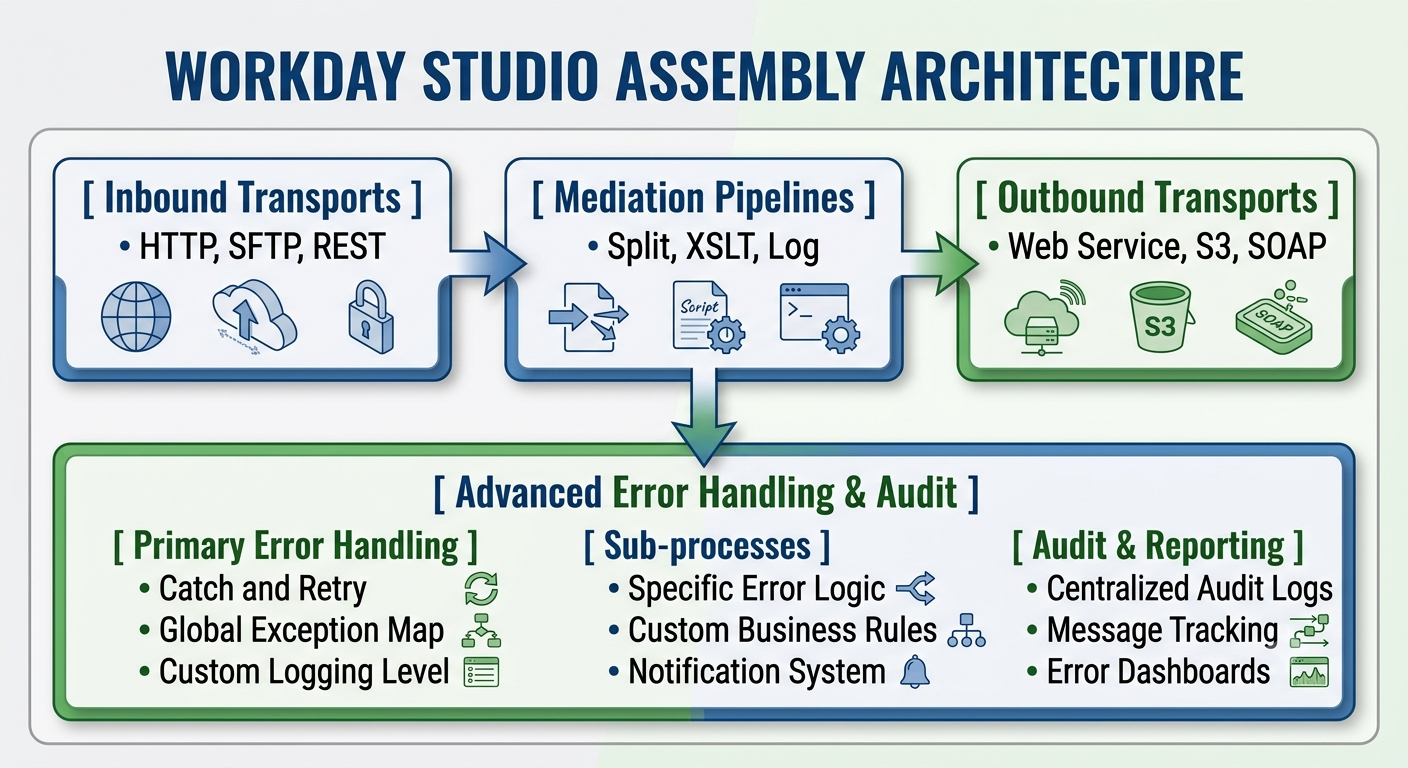
An enterprise integration framework relies on modular building blocks designed to keep developer cognitive load manageable while supporting processing power:
Inbound and Outbound Transports: Transports act as the boundaries of the integration assembly. They define how data enters and exits the environment, supporting protocols such as SFTP, HTTP/HTTPS, REST, SOAP, and AS2. By isolating protocol details within dedicated transport nodes, developers can modify connection methods without altering core message-processing logic.
Mediation Components: Mediation nodes serve as the workhorses of data processing. They execute message transformations, property assignments, logging, dynamic routing, and payload filtering. Instead of cluttering codebases with boilerplate networking logic, developers connect mediation components in sequence to create clean, human-readable data pipelines.
Splitter and Aggregator Patterns: When processing large enterprise datasets—such as global payroll files containing tens of thousands of employee records—attempting to process the entire file in a single memory context causes performance bottlenecks and memory errors. Splitter components divide large XML or CSV payloads into manageable chunks, while Aggregators reassemble the processed results into a unified output file.
Context Properties and Maps: Throughout execution, an integration assembly maintains a context map containing properties, variables, and headers. Developers store key operational data—such as execution timestamps, run parameters, and step-specific status flags—directly within this map, providing transparent state management across all assembly steps.
By structuring integration logic into clear, visual steps, developers can quickly diagnoseperformance issues, identify logical bottlenecks, and maintain software pipelines with clarity and ease.
The Education Gap: Overcoming Resistance through Technical Mastery
Technological change within an enterprise almost always triggers an emotional response across engineering teams. When engineers are introduced to a powerful new integration engine, their initial reaction is often shaped by a tension between fear of complexity and a desire for technical mastery. Without structured learning and hands-on practice, developers often retreat into familiar habits, attempting to solve enterprise-scale integration challenges with fragile custom scripts or over-engineered middleware.
Overcoming this resistance requires moving past trial-and-error development and building true engineering competence. Embracing comprehensive workday studio training provides developers with the deep architectural understanding required to handle high-throughput, enterprise-grade integration projects with confidence.
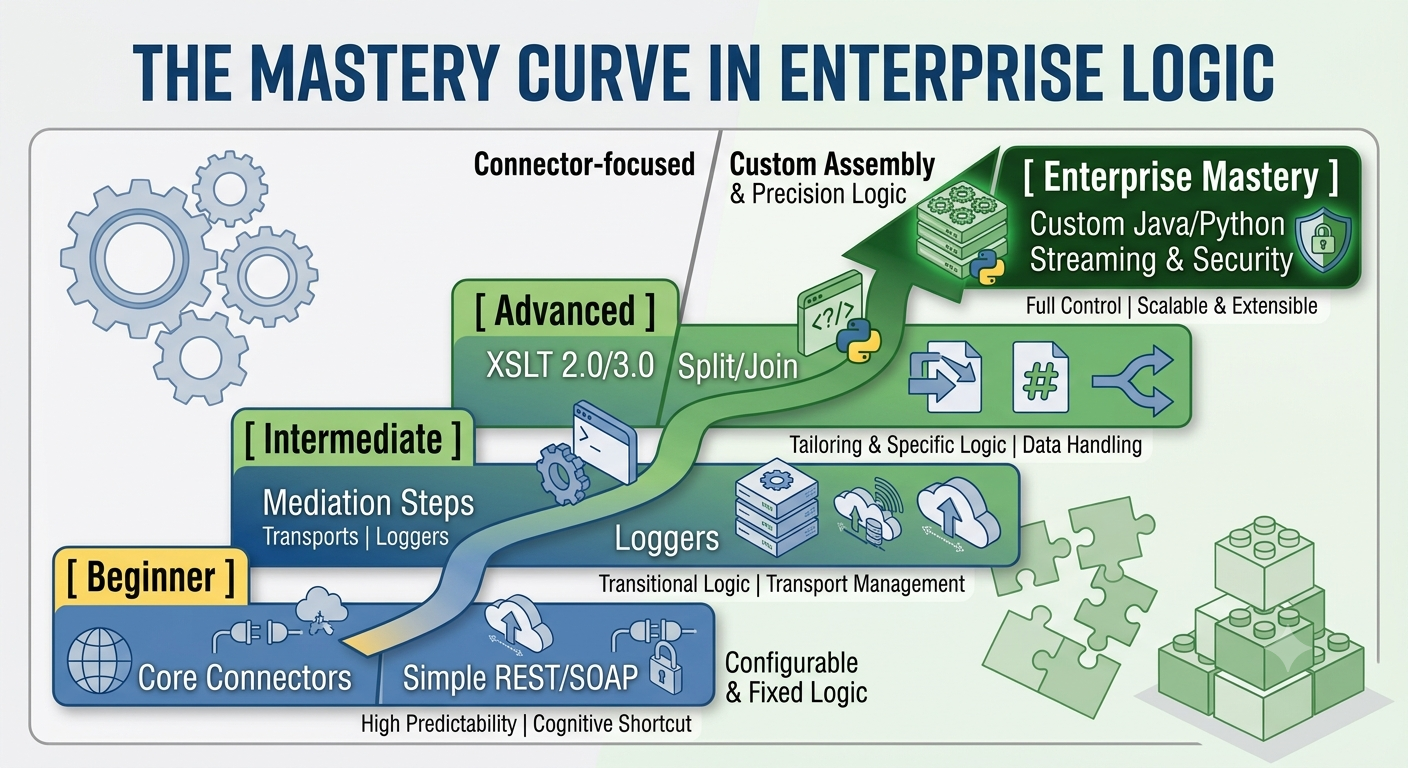
When teams invest in formalized technical education, they move through several clear stages of architectural mastery:
Foundational Assembly Mechanics: Developers master the Eclipse-based Studio interface, learning how assemblies initialize, execute mediation steps, and manage context properties without causing runtime memory leaks.
Advanced Payload Transformation: Developers move beyond simple field mappings to build performant XSLT 2.0/3.0 stylesheets, configure MVEL (MVFLEX Expression Language) expressions, and use streaming transformers to process large XML files efficiently.
High-Performance Aggregation Logic: Engineering teams learn to handle extreme data scale by implementing parallel processing, chunk-based splitting, and dynamic memory optimization strategies to ensure system stability under heavy loads.
Security, Governance, and Encryption: Advanced practitioners master enterprise security patterns, including WS-Security, PGP encryption/decryption, OAuth authentication, and strict certificate management to protect sensitive HR and payroll records.
When developers shift from feeling overwhelmed by complex architectures to mastering them, their productivity increases dramatically. Teams stop fearing edge cases and start designing resilient systems capable of running flawlessly for years.
Real-World Use Cases: How Custom Integrations Solve Complex Business Problems
Theoretical framework discussions are valuable, but the true test of any integration technology lies in how it performs under real-world operational pressure. Enterprise environments present unique constraints that standard connectors simply cannot accommodate. Below are three real-world integration scenarios that demonstrate the power of custom enterprise assembly development.
Use Case 1: Global Multi-Country Payroll Orchestration
Large multinational corporations often operate with fragmented payroll landscapes. While core workforce data resides in a centralized cloud platform, actual payroll calculation and disbursement are handled by localized external engines in each operating country. Each local provider mandates its own file format, encryption protocol, transmission schedule, and validation rules.
A standard outbound connector cannot handle twenty different country-specific formatting configurations within a single execution path. By developing a custom assembly, integration architects can establish a flexible processing pipeline:
An initial API call pulls global payroll changes for the active pay period.
An assembly Splitter divides the master XML payload by country code.
A dynamic Router evaluates each sub-file and directs it through country-specific XSLT transformation components, converting generic HCM XML into localized formats (e.g., CSV, fixed-width flat files, or country-specific XML schemas).
Integrated PGP Encryption modules encrypt each sub-file using the respective payroll provider’s public key.
Outbound SFTP Transports deliver each encrypted file to the appropriate external server while logging granular execution metrics back to the core system.
Use Case 2: Real-Time Identity Provisioning and Access Management
In high-security environments, delays in provisioning or revoking system access create severe operational and regulatory risks. When a new employee is hired—or an existing worker is terminated—identity management platforms (like Active Directory, Okta, or Ping Identity) require immediate updates to grant or revoke system privileges. Batch-based overnight synchronizations are inadequate for modern security standards. Using real-time integration features, architects build event-driven integrations that react instantly to workforce changes:
A business process event triggers an immediate outbound notification as soon as an HR action completes.
The custom assembly intercepts the payload, extracts user details, and calls downstream identity endpoints via REST APIs.
If downstream identity platforms require multi-step account creation (e.g., creating a base profile first, then assigning security groups based on department), the assembly executes sequentially, using response values from initial API calls to construct subsequent requests.
In cases of network interruptions, the assembly handles retries automatically without re-triggering the parent business process, ensuring system consistency across platforms.
Use Case 3: High-Volume Benefits Carrier Sync with Aggregation
Annual benefits enrollment pushes enterprise data infrastructure to its limits. During open enrollment windows, thousands of workers select, modify, or drop healthcare and retirement plans simultaneously. Third-party benefit providers require aggregated, fully validated data files that precisely reflect these choices without missing records or duplicating entries.
Processing these massive enrollment volumes requires specialized memory management and aggregation strategies:
The assembly uses a Paged Get pattern to query benefit enrollment data in controlled batches (e.g., 500 employee records per request), preventing memory overload.
As batches are retrieved, a custom Java Mediator normalizes election details, cross-referencing plan IDs against dynamic lookup maps.
An Aggregator node compiles the processed records into a structured output file while enforcing carrier-specific header and footer formatting rules.
Before final transmission, an internal audit routine verifies that record counts and checksums match source data, providing complete validation before data ever leaves the environment.
Reducing Organizational Stress: Advanced Error Handling and Resilience
In enterprise software engineering, failure is inevitable. Networks experience outages, downstream vendor APIs time out, third-party systems alter file schemas without warning, and human users enter corrupted data. What determines an organization's operational resilience is not the complete absence of errors, but how gracefully its systems handle those errors when they occur.
From a psychological perspective, unhandled software failures generate acute organizational stress. When a payroll file delivery fails quietly overnight, the resulting crisis erupts the following morning when hundreds of employees discover missing paychecks. This reactive fire-fighting causes systemic burnout, damages employee trust, and eats up valuable IT resources.
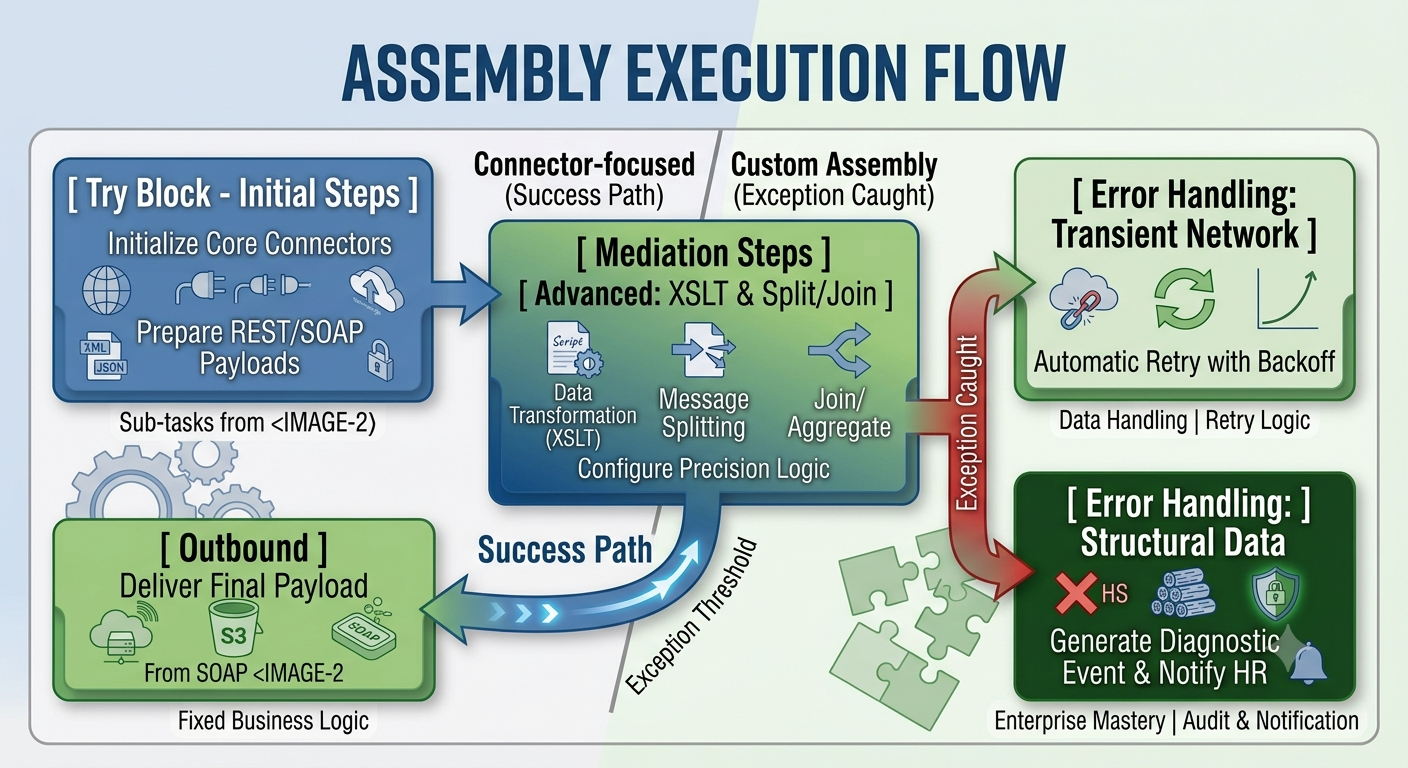
Designing for resilience means treating error handling as a core architectural priority rather than an afterthought. Implementing a well-designed workday studio integration ensures that operational anomalies are captured, classified, and resolved automatically whenever possible, or routed to the right teams with clear, actionable context when human intervention is necessary.
Core Architecture for Resilient Error Handling
A robust integration framework relies on layered exception handling strategies to maintain stability and keep operations running smoothly:
Try/Catch Scope Management: Wrapping complex mediation steps within explicitly defined Try/Catch components isolates localized errors. If a single employee record contains corrupted data, the Catch block catches the exception for that individual record, logs the diagnostic detail, and allows the remaining thousands of records to continue processing without interrupting the entire pipeline.
Transient Fault Handling with Exponential Backoff: Network dropouts and temporary vendor API outages are common causes of integration failures. Instead of failing immediately, resilient assemblies analyze exception types. If the error is transient (such as an HTTP 503 or SFTP connection timeout), the assembly executes automated retry loops using exponential backoff schedules, recovering gracefully without requiring human intervention.
Custom Audit Logging and Event Creation: Raw system error logs are often unreadable to business stakeholders. Resilient assemblies intercept technical stack traces and convert them into structured, business-friendly error logs. These custom events can be surfaced directly within administrative dashboards, listing the exact employee ID, field name, and operational context that triggered the failure.
Automated Alerting and Diagnostic Routing: When an integration requires human attention, speed and clarity are paramount. Custom assemblies automatically compose targeted email notifications or dispatch alerts to operations platforms like PagerDuty or Slack. These alerts include direct links to execution logs, diagnostic summaries, and proposed resolution steps, drastically reducing Mean Time to Resolution (MTTR).
By engineering self-healing integration pipelines with intelligent error handling, organizations transform chaotic software failures into orderly operational workflows. System administrators move from panic mode to proactive monitoring, building long-term confidence in their technological ecosystem.
The Future of Integration: Designing for Human Potential
Enterprise integration is ultimately an exercise in human-centered design. While systems exchange XML messages, JSON payloads, and binary data streams, the ultimate goal of software engineering remains simple: empowering human beings to accomplish meaningful work without unnecessary friction.
When integration architectures are fragile, rigid, or poorly documented, technical teams spend their days putting out operational fires, business leaders lack timely data insights, and workforce productivity suffers. Conversely, when organizations invest in robust enterprise platforms, prioritize technical education, and design resilient, self-healing integration pipelines, software transforms into a dependable strategic asset.
By approaching enterprise software development through the dual lenses of technical excellence and human psychology, organizations build technology stacks that stand the test of time. Mastering high-performance integration environments allows developers, HR specialists, and business leaders to focus less on manually moving data and more on driving strategic