
The Ultimate Guide to Microsoft Azure: Architecture, Services, Security, and Cloud Career Path
Last updated on Jul 24, 2026
The use of cloud computing services is no longer a luxury as many contemporary companies are adopting it for transforming their entire approach to processes. Many organizations are moving from outdated on-premises infrastructure to new agile and scalable computing solutions, and Microsoft Azure has become one of the most acclaimed companies regarding this issue. Azure is implemented by 95% of the leading companies on the Fortune list to run everything from online platforms with a high number of visitors and databases of various companies to advanced AI and IoT technologies.
It is crucial for developers, administrators, engineers, and future architects to possess knowledge of Azure and understand its functions. This guide will provide readers with basic information about Azure, its architecture, principles behind deployment, security issues, and profession-related benefits.
The introduction of Microsoft Azure and Cloud Computing
What does Cloud Computing mean?
Cloud computing refers to the delivery of IT services such as networking, servers, databases, storage, software, and analytics on a pay-per-use basis via the internet ("the cloud"). Organizations do not need to operate their own data centers as they can opt for renting IT resources from cloud computing companies.
History of Microsoft Azure
The company first mentioned Microsoft Azure in October 2008 under its codename Project Red Dog and sanctioned its launch in February 2010 as Windows Azure before rebranding it to Microsoft Azure in March 2014. Now, Azure offers 200+ cloud services in more than 60 countries around the world via hundreds of data centers.
The key benefits of Microsoft Azure
Global Presence and Maximized Availability: Microsoft Azure provides organizations with the advantage of having its own experienced global network assuring low latency and security in service with guaranteed availability.
Flexibility and Capacity to Scale: Azure is capable of providing organizations with scalability providing the chances to scale computing resources.
Economical: Azure is more cost-effective than having to spend money on the purchase of necessary hardware and services of cloud providers.
Hybrid Cloud Capability: Azure is equipped with a variety of tools enabling synchronization between cloud and local data storage.
Top-notch Security: Microsoft spends a lot of money on ensuring its customers long-term data safety.
Cloud service models and deployment models
To create and manage cloud environments effectively, it is necessary to know how cloud resources are categorized and deployed.
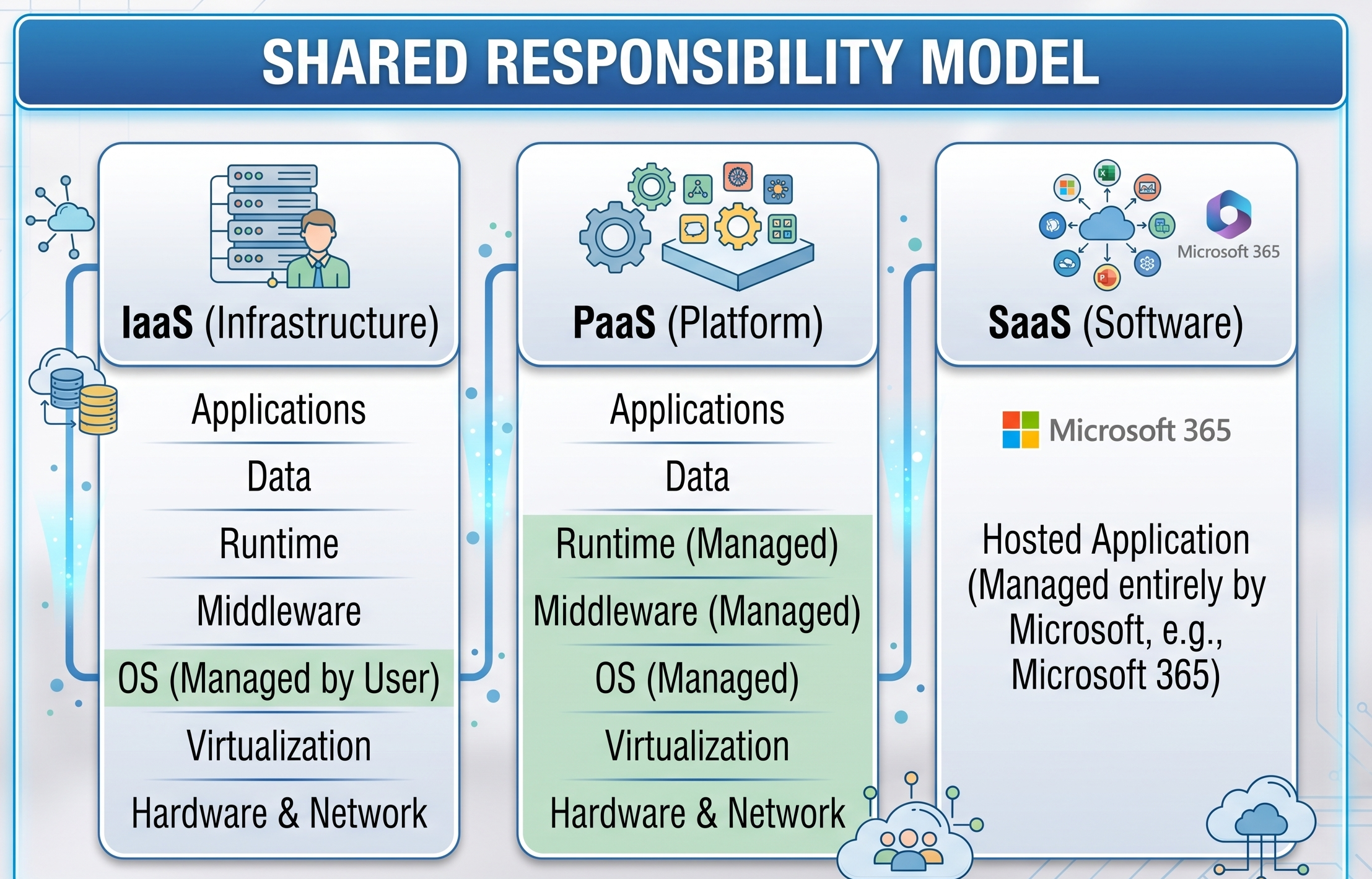
Different Types of Services
Infrastructure as a Service (IaaS):
This service offers raw computing power such as Virtual Machines (VMs), storage and virtual networks. You have the control over the installed software, the operating system and configurations, while Microsoft takes care of the physical equipment.
Some of the common examples of this service are Azure VMs, Azure Virtual Network, Azure Disk Storage.
Platform as a Service (PaaS):
With this service users can create it and test it without using it server infrastructure or operating system updates.
Some popular examples of this service include Azure App Service, Azure SQL Database, Azure Functions.
SaaS ( Software as a Service ):
Such a service provides fully managed software without any installation.
Some of the common examples are Microsoft 365, Dynamics 365, Salesforce.
Models Used in Cloud Deployment
Cloud deployment takes on three different forms, based on a company's requirements, budget, and security considerations:
Public Cloud
When it comes to public cloud computing, the infrastructure and services are solely owned by third-party service providers such as Microsoft Azure, and accessed over the public internet. Public cloud computing allows the users to share physical infrastructure with other users and provides great flexibility without the need to maintain infrastructure. Public clouds are perfect for new startups and web apps because of their ability to scale at short notice.
The Private Cloud
The private clouds are made up of setups dedicated to one company and made through hosting with either an in-house company or through an external hosting entity. Such a model allows for total control of hardware, networking, and security and is thus best suited for businesses that have to adhere to strict laws or have highly sensitive data to protect.
Hybrid Cloud
The hybrid cloud is a model that is characterized by the combination of private clouds and public clouds to facilitate the exchange of data and applications. This mode provides the greatest flexibility for the organization as it makes it possible to hold sensitive operations on the premises while employing the public cloud services when developing new applications.
Microsoft Azure Architecture and Structure
Understanding how Azure organizes resources globally and logically is important to build resilient and cost optimized environments.
Structure of global System
Azure Region: A region is a set of one or more data centers on the fast-latency network.
Region Pairs: Most of the regions in Azure are paired together with another region in the same area, with over 300 miles, to make sure the business gets always running and recovering from disasters.
Availability Zones (AZs): Viable data centers located within Azure regions. AZs offer power supply, cooling, and networking services independently. Azure’s customers benefit from applications deployed across AZs and getting secured from one datacenter failure.
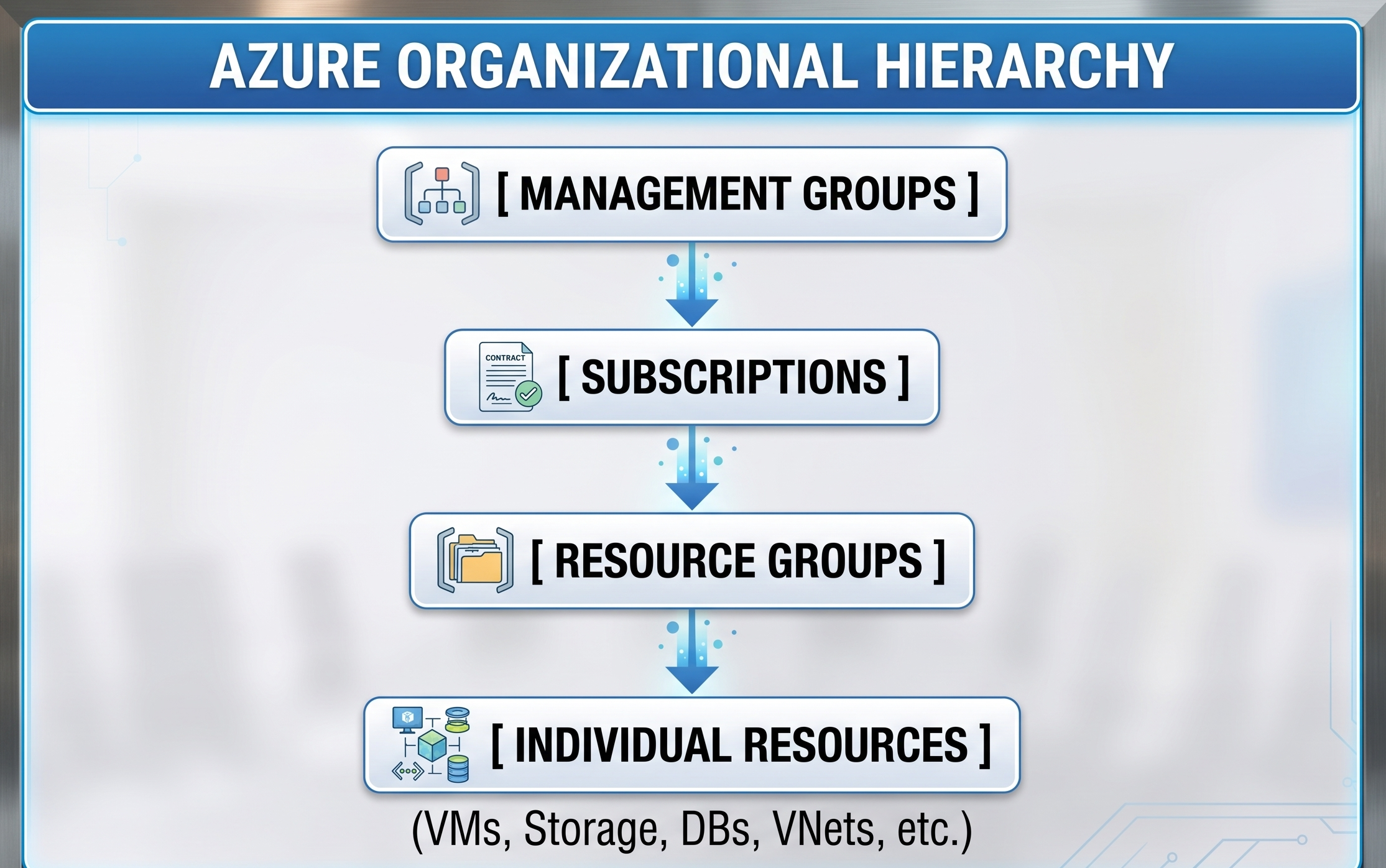
Logical Resource Management Hierarchy
Management Groups: Create a management level above subscriptions, allowing to manage resources across many subscriptions at the same time.
Subscriptions: Logical objects that make a connection between the user accounts and resources created, including billing.
Resource Groups: Logical containers where resources are installed and managed as a whole.
Resources: The tangible resources of the service which users create.
Deep Focus on Key Azure Services
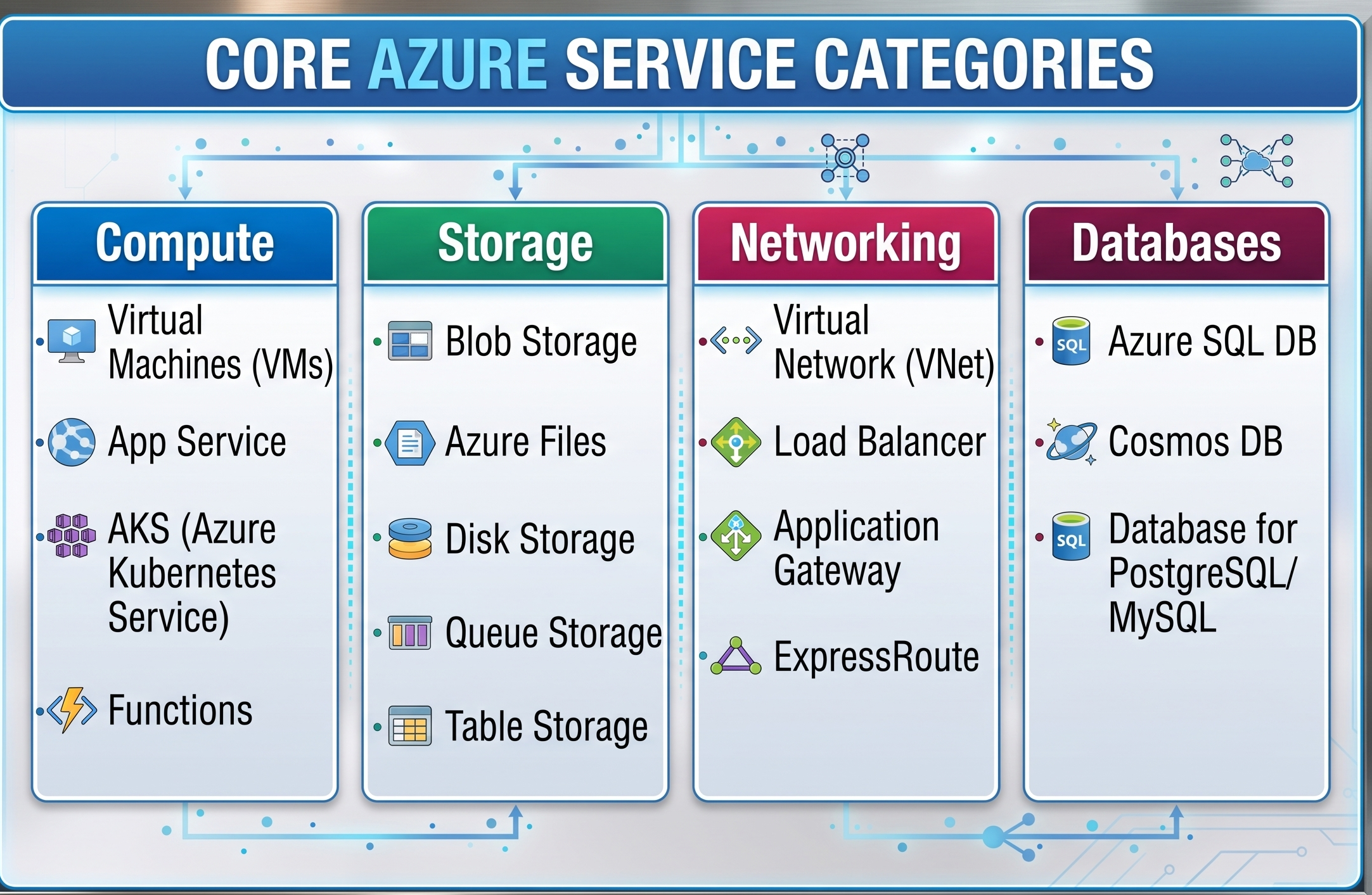
Azure has about 200 services. Let's specify the categories that each Cloud engineer should know.
A. Compute Services
Compute services are the engine behind your cloud applications.
Azure Virtual Machines (VMs): These are on demand computing resources that are customizable meaning that you control the OS (Windows or Linux).
Azure App Service Azure App Service is a fully managed PaaS service for hosting web apps, RESTful APIs and mobile back ends in .NET, Java, Python, Node.js or PHP languages.
Azure Kubernetes Service (AKS): An orchestrated container service that makes it easy to deploy, manage, and scale containerized applications with Kubernetes.
Azure Functions Serverless compute service to run event-triggered code without having to explicitly provision or manage infrastructure.
B. Storage Services
Azure makes use of scalable and durable storage technologies.
Blob Storage: This storage solution is optimized for storing very large amounts of unstructured data.
Azure Files: The full service cloud file shares that can be accessed by using the Server Message Block (SMB) protocol or Network File System (NFS).
Disk Storage: A reliable high-speed block storage connected to the Azure virtual machine.
Queue & Table Storage: The Queue Storage lets you store messages while Table Storage lets you access unstructured data.
Storage Tiers and Redundancy of Data
Azure Storage has 3 levels of access to minimize expenditures depending on the way of data usage:
- Hot Tier: Ideal for the data which is accessed often.
- Cool Tier: Opted for lower storage cost and higher access cost; used for data types stored for a time period of about 30 days.
- Archive Tier: The storage tier with the lowest cost and the highest access cost; used for data that can be stored for more than 180 days with low time of retrieval.
In order to keep the information safe from mechanical faults or disasters, Azure provides different replication methods:
- LRS (Locally Redundant Storage): accommodates data three times in a concrete location of the first area;
- ZRS (Zone-Redundant Storage): keeps the data in three zones of the primary area
- GRS (Geo-Redundant Storage): moves the data to the remote area for its protection from local malfunction.
C. Networking Solutions
Networking Solutions uses the infrastructure of businesses to provide a reliable link between the cloud and the existing network.
Azure Virtual Network: Azure Virtual Network is the technology that uses virtualization of networks to host programs and routers in Azure. The partitioning of networks is done with the help of subnets.
Azure ExpressRoute: Azure ExpressRoute provides a private link between Azure and the existing infrastructure of the organization.
Azure Load Balancer and Application Gateway: Load balancer operates at layer 4 (the TCP/UDP layer) to distribute data efficiently. Application Gateway can introduce the load balancer, built on layer 7 technology and leverages web data.
Azure Content Delivery Network and Front Door: CDN is a media that doesn’t change content. Front Door is a platform to access websites from different regions of the globe.
D. Services of Database
Azure provides various managed options of the database that can be relational, NoSQL, or an in-memory database.
Azure SQL Database: Highly regarded as a managed relational database engine, the latest stable version of SQL server is being used in this service.
Azure Cosmos DB: It is a distributed NoSQL database service that offers high latency speed, automated scaling, and unique five levels of consistency (Strong, Bounded Staleness, Session, Consistent Prefix, Eventual).
Azure Database for PostgreSQL / MySQL: This is a fully managed relational database service for an open-source database that performs patching, backup, and security configuration automatically.
Azure Cache for Redis: Offers an in-memory data structure store, database, cache and message broker for boosting application performance.
E. Automation in DevOps & CI/CD
CI/CD pipelines allow engineering teams to automate application build, testing, and deployment. Azure DevOps and GitHub Actions are the backbone of today’s cloud deployment workflows.
DevOps Getting Started: If you wish to learn how to build automated deployment pipelines and prepare for the AZ-400 exam, then joining a structured az 400 online course or enroll in az 400 online training will teach you how to set up continuous deployment, infrastructure as code (IaC) and DevSecOps practices.
Innovations of Today: AI, Serverless and DevOps
Microsoft Azure is the frontrunner in the field of modern technology.
Azure AI Services and Azure OpenAI
Azure offers a high-class AI technology which consists of ready-made models and APIs for audio, image, translation, and language processing capabilities. With Azure OpenAI Service, software developers may apply generative AI technologies such as GPT-4 and Embeddings to their applications in accordance with the enterprise standards.
Serverless Computing Trends
Serverless computing is a modern technology created to help developers create applications much quicker without having to deal with infrastructure. Azure takes on itself provisioning, scaling, and managing of the necessary resources for code running.
Azure Functions: Serverless computing is event-based.
Azure Logic Apps: Visual workflow.
Azure Event Grid: An event-routing tool.
Azure DevOps
Azure DevOps provides software development teams with an integrated toolset:
Azure Repos: Private Git repositories in a cloud.
Azure Pipelines: Continuous integration and delivery service that automates builds and deployments within any cloud environment.
Azure Boards: Methods for making plans, problem tracking, and reporting.
Azure Artifacts: Package management system.
The capability to manage Azure Pipelines as well as CI/CD automation is among the most sought-after qualifications for cloud engineers. Learn these techniques with our comprehensive az 400 online course or acquire hands-on experience with pipelines through our az 400 online training program.
Security Issues, Identification and Governance
Security is an important concern for Microsoft Azure.
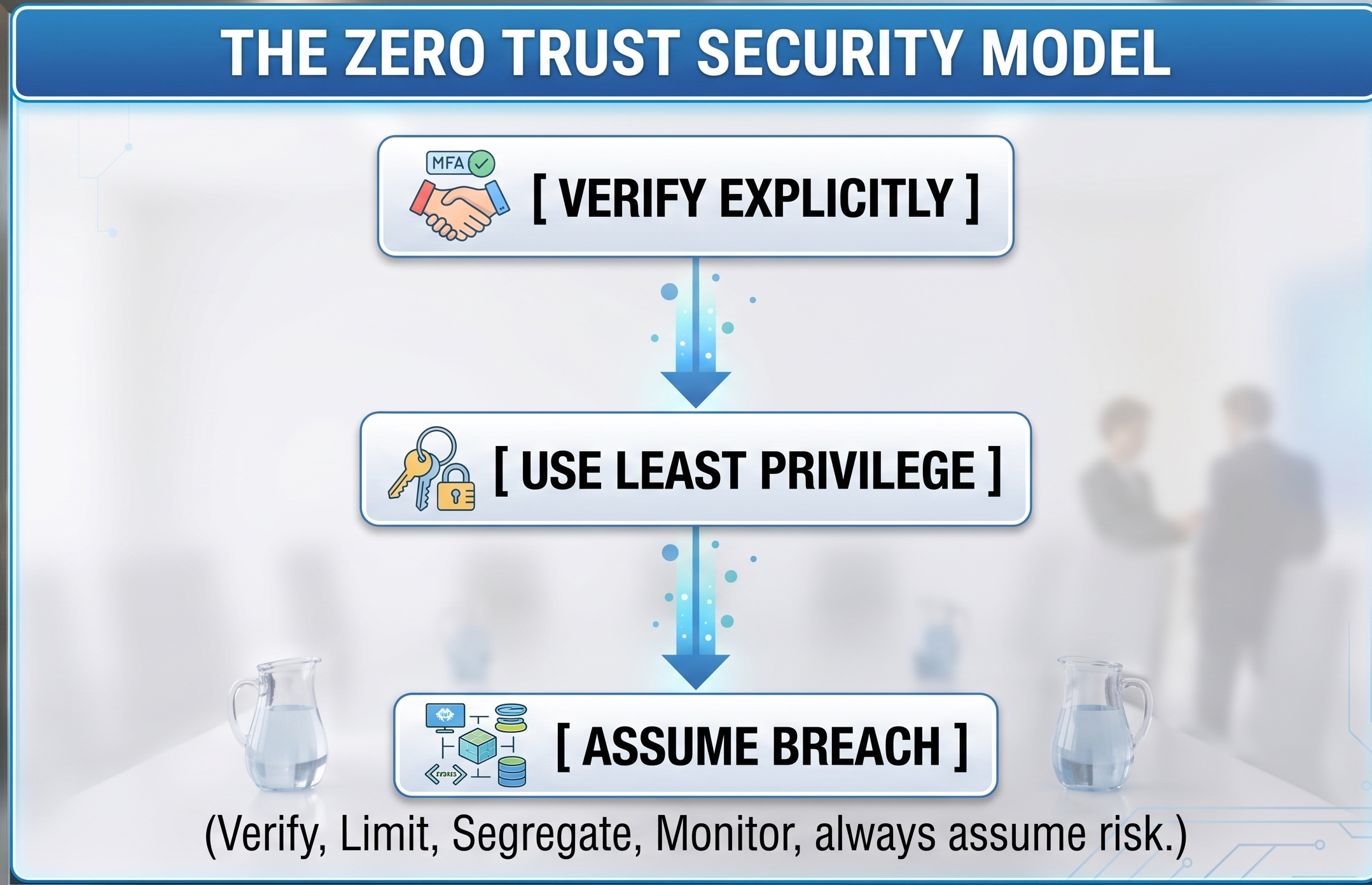
Identity management is handled by Microsoft Entra ID (previously called Azure Active
Directory). Basically, it is a service that operates in the cloud to provide identity and access management functionality. This includes user identity and application identity management, authentication, single sign-on, Multi-Factor Authentication (MFA), and various conditions applied to the accounts.
Access Control and Governance
Role-Based Access Control (RBAC) is a method that allows users to manage permissions precisely and only to the extent that is relevant for the employment duties.
Azure Policy is a tool that makes compliance of certain standards possible.
Azure Blueprints helps easily execute tasks on a large scale by featuring weights, tools, and templates necessary for this process.
Administration of Security & Threat Protection
Microsoft Defender of Cloud: This service gives customers a comprehensive approach to managing security threats through a single platform.
Microsoft Sentinel: This is an end-to-end solution that is cloud-enabled SIEM and SOAR technology that gives intelligent analytics at the business level.
Principles of Cost Optimization & Resource Management
Cloud computing resources can produce massive costs if they are not used carefully.
Pricing Principles
Microsoft Azure uses the pay-as-you-go payment model and the following factors in pricing:
Type of Resource: All types of resources are usually characterized by a defined amount of processing power, RAM, and storage.
Geographical Location: The price of the service depends in a certain way on the cost of providing data processing within the data center.
Volumes of Bandwidth Used: The costs of application of data are comparatively lower, as the inbound data operations do not cost anything, but the outbound data is typically paid after the limit.
Ways to Save on Costs
Azure Reserved Instances (RIs): Sign a contract for either one year or three years of computation services for savings up to 72% when compared to regular pricing.
Azure Hybrid Benefit: Leverage your existing Windows Server and SQL Server licenses with Software Assurance in the Azure environment to reduce the costs of computation.
Azure Spot Virtual Machines: Purchase unused resources of Azure computation for workloads that can be interrupted (for instance, testing) at discounts of 90 percent.
Auto-scaling: Pay less for idle capacity by scaling out compute resources based on live metrics.
Case Study: Building a Resilient Web Architecture
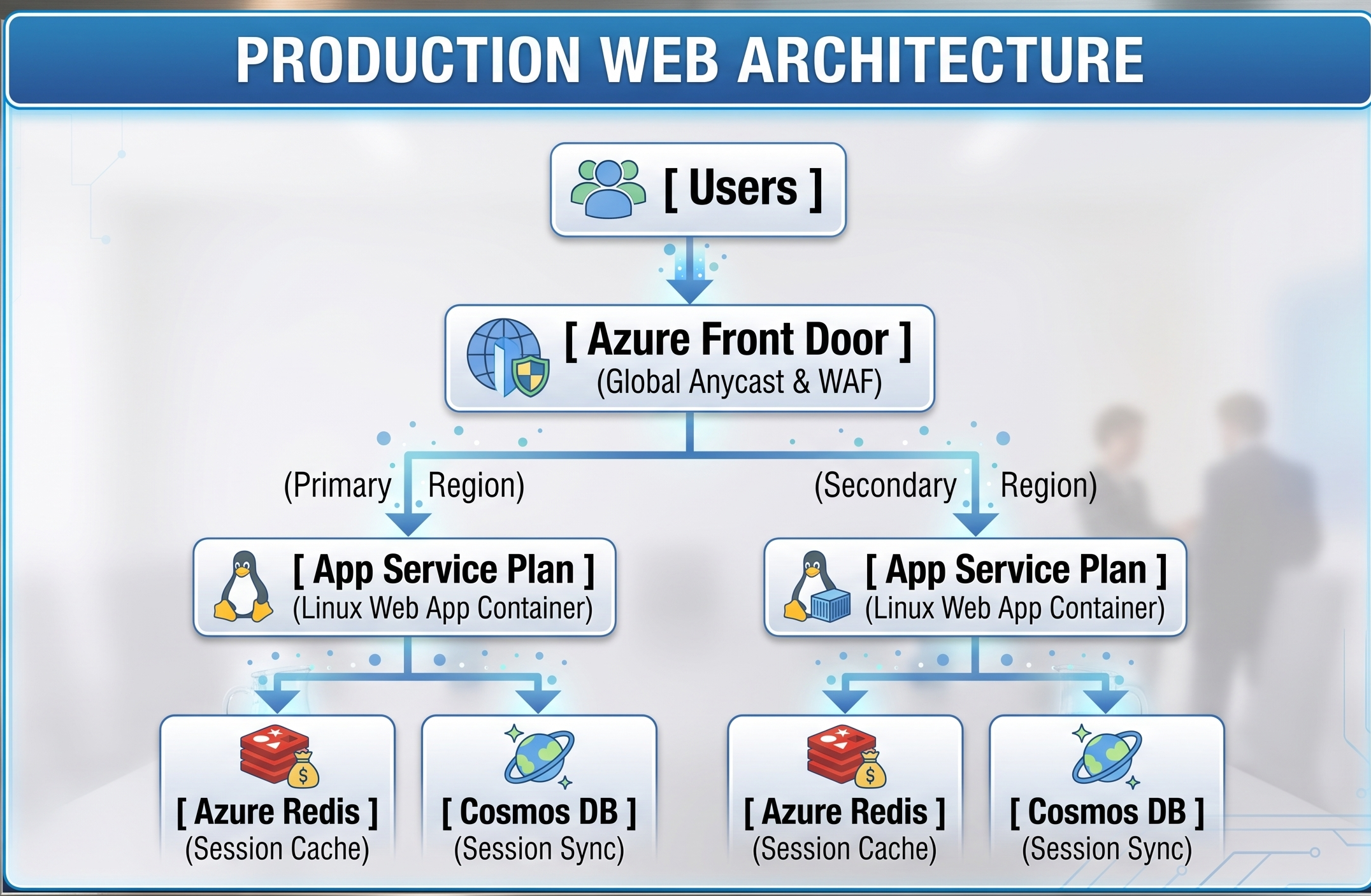
To understand how Azure services work in real life scenario, let’s have a look on the following web architecture.
Architectural Process:
Traffic Entry: Global web requests hit Azure Front Door and WAF rules are applied to successfully mitigate DDoS and top 10 OWASP attacks before requests are routed to the closest healthy region.
Application Processing: After traffic arrives at Azure App Service, the microservices continue the business process with the help of auto-scaling.
Session & Caching Layer: Frequently requested data with low variability is stored in Azure Cache for Redis to reduce the load on querying in the back end.
Database Layer: Azure Cosmos DB processes the transactional data with replication and distributed writing of the data across the globe ensuring that response time is below 10ms.
Microsoft Azure Certification Roadmap
The Microsoft Azure certification is an efficient method for validating the skills and accelerating career development in cloud engineering.
To get ready for the AZ-400 certification, you must have practical experience dealing with version control tools and designing pipelines. The best way to gain required skills is to enroll in an interactive az 400 online training course.
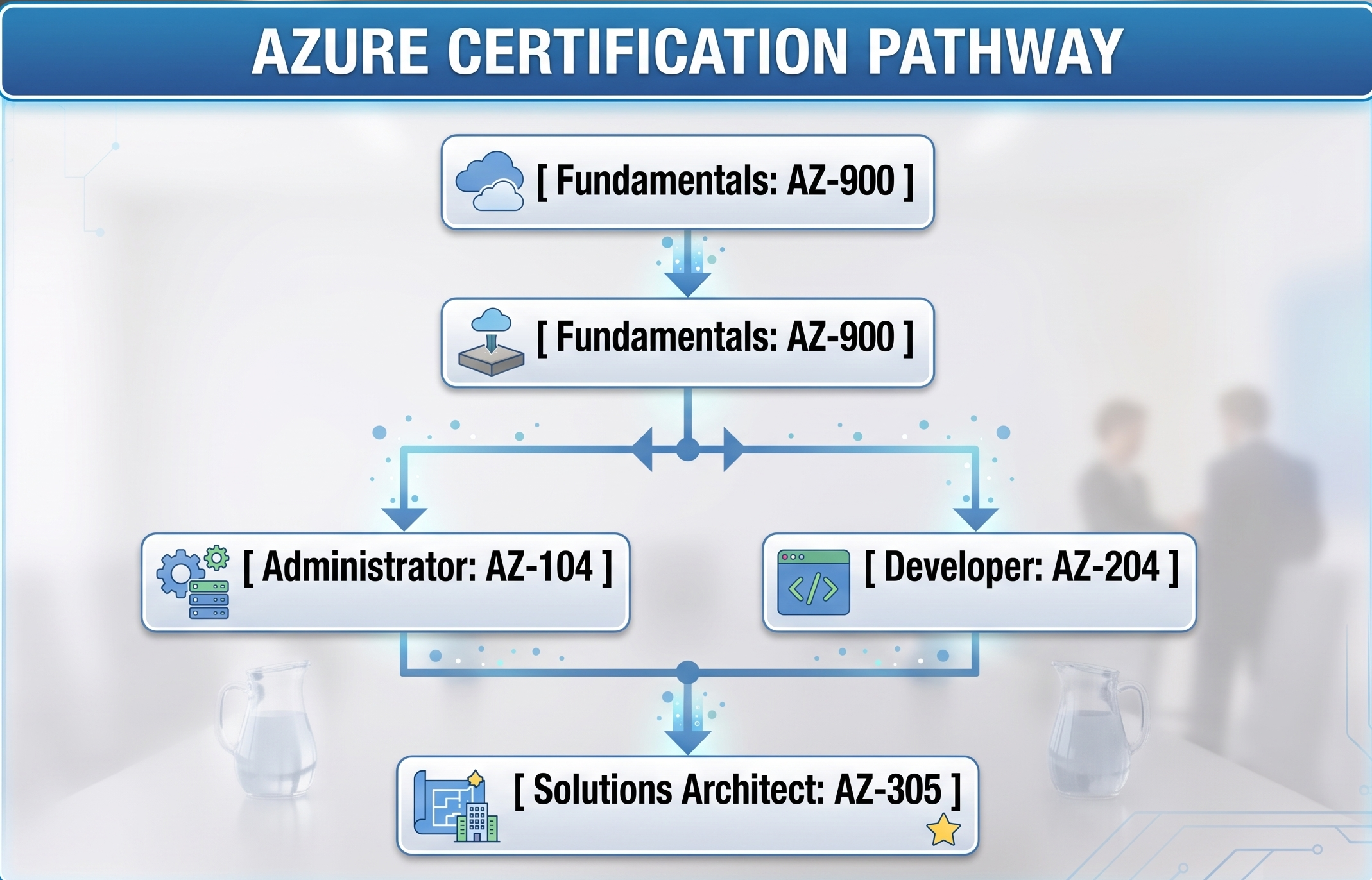
Main Certification Options:
Fundamental Level
AZ-900: Microsoft Azure Fundamentals
Intended Audience: Beginners, non-tech people, and IT specialists in cloud methodologies.
Main Topics: General cloud principles, Azure architecture, main features of cloud, and safety.
Associate Level
AZ-104: Microsoft Azure Administrator
Intended Audience: IT administrators dealing with different types of cloud services.
Main Topics: Creating VNets, managing subscriptions, backing up resources and monitoring systems.
AZ-204: Developing Solutions on Microsoft Azure
Intended audience: IT programmers who create applications for cloud infrastructure.
Main Topics: Azure Functions, Cosmos DB, SDK integration, API Management and authentication.
Master Level
AZ-305: Implement and manage Microsoft Azure Infrastructure Solutions
Audience: Architects who have worked on cloud plans.
Major Points: Continuity of Business Operations, Data and Availability, Cloud Database Structure
10. Recap and Future Prospects
Microsoft Azure is a powerful cloud computing solution that revolutionized the software creation, data management, AI, and cyber security sectors. Knowing the very principle of Azure would give you an advantage in your career in the IT sphere.
Now let’s discuss the ways to implement your newfound knowledge in practice.
Make your free Azure Account: Visit azure microsoft com to create a free account and get access to free credits and products for one year.
Learn using Microsoft Learning: Microsoft Learning offers an assortment of free, self-paced courses on Azure, which completely align with Azure certification exams.
Azure Practise: You would create different Virtual Machines, Web Applications using Azure App Service, build an entire CI/CD pipeline with Azure DevOps, and more.