
Understanding Modern Data Integration and ETL Fundamentals
Last updated on Sep 2, 2026
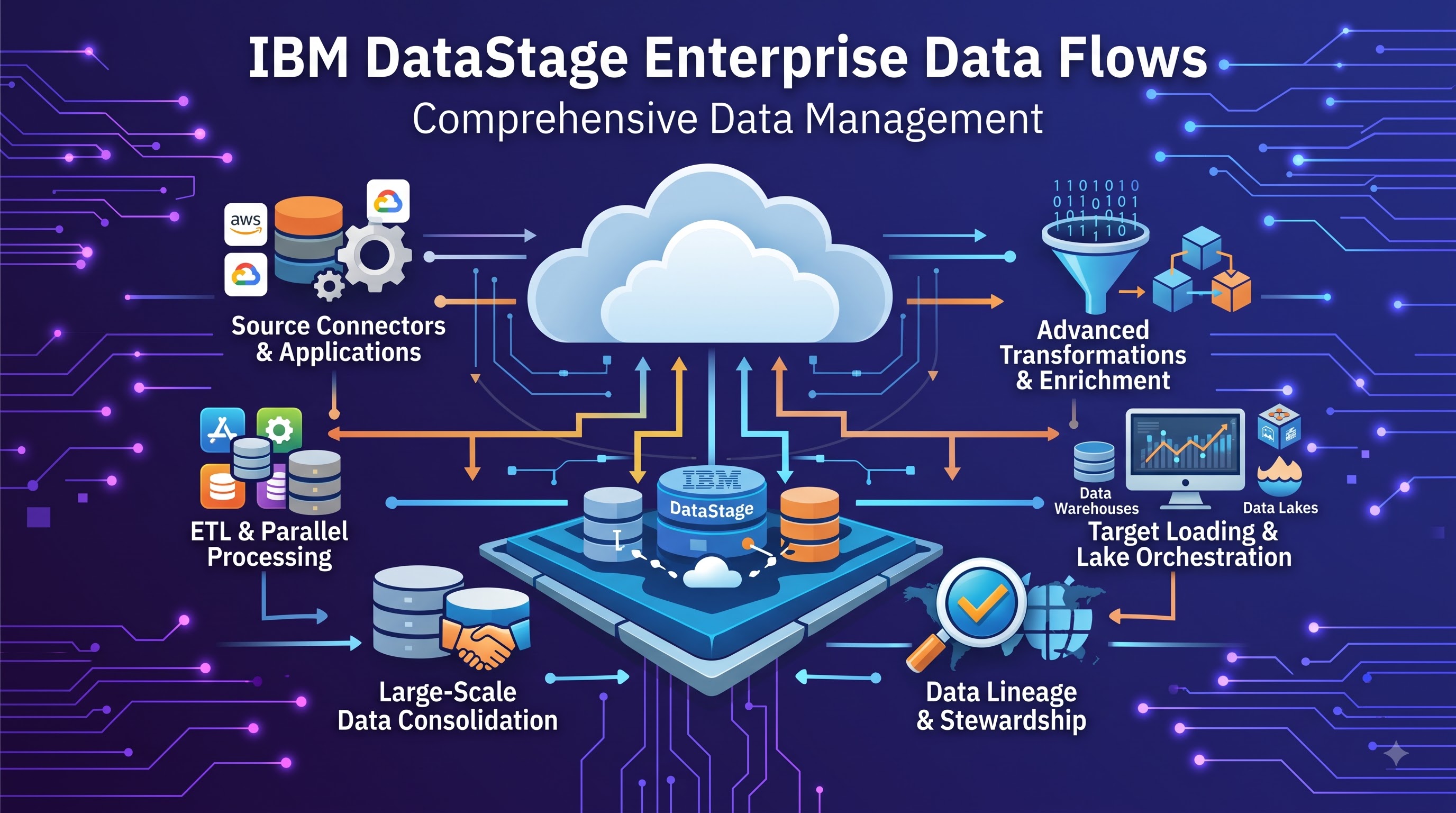
Data integration forms the backbone of modern enterprise information architecture. As organizations scale, they collect massive volumes of raw data across disconnected storage layers, legacy databases, cloud platforms, and third-party operational tools. Unifying these isolated sources into a reliable stream of business intelligence requires high-performance Extract, Transform, and Load (ETL) processing.
At the center of enterprise-grade ETL systems is IBM DataStage, a powerful data integration tool designed to build, execute, and manage complex data pipelines. Rather than treating data transfer as a simple copy-and-paste operation, modern processing engines break down raw source structures, enforce business logic, clean corrupt records, and load organized outputs into targets like enterprise data warehouses or data lakes.
The core challenge in big data processing is balancing velocity with accuracy. Pipelines must handle millions of incoming transactions without introducing latency or bottlenecking business reporting. Designing these data workflows requires a clear understanding of client-server components, memory allocation, and pipeline orchestration. When implemented correctly, structured data pipelines give businesses actionable insights, operational consistency, and reliable data governance.
Exploring the Core IBM DataStage Architecture
IBM DataStage relies on a multi-tier client-server structure designed for stability, multi-user development, and high-throughput processing. To work effectively within this environment, engineers must understand how the front-end design tools connect to the background server components.
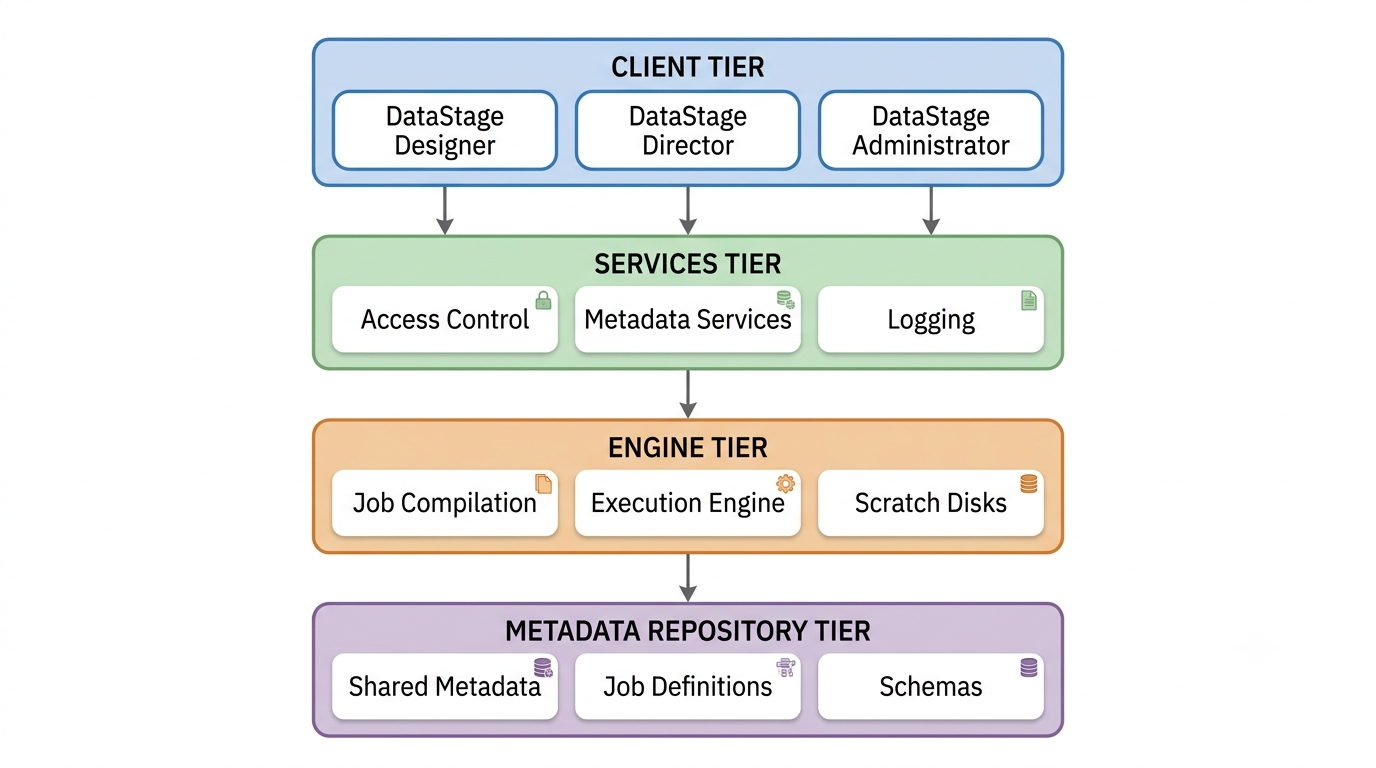
The system splits operational responsibilities into distinct tiers:
Client Tier: Provides graphical interfaces for developers, operators, and systems managers. It includes desktop software like the Designer, Director, and Administrator clients, alongside web-based creation interfaces like the IBM DataStage Flow Designer.
Services Tier: Manages user access, security permissions, shared service calls, and central logging across the platform.
Engine Tier: The heavy-lifting layer that executes compiled jobs, handles memory allocation, manages temporary file storage (scratch disks), and coordinates parallel runtime environments.
Metadata Repository Tier: Houses design-time metadata, target table definitions, project configurations, and operational job run histories.
This separation of concerns ensures that visual flow development remains lightweight on developer machines while the backend engine harnesses dedicated processing power to move large volumes of data.
Core Client Tools and Roles
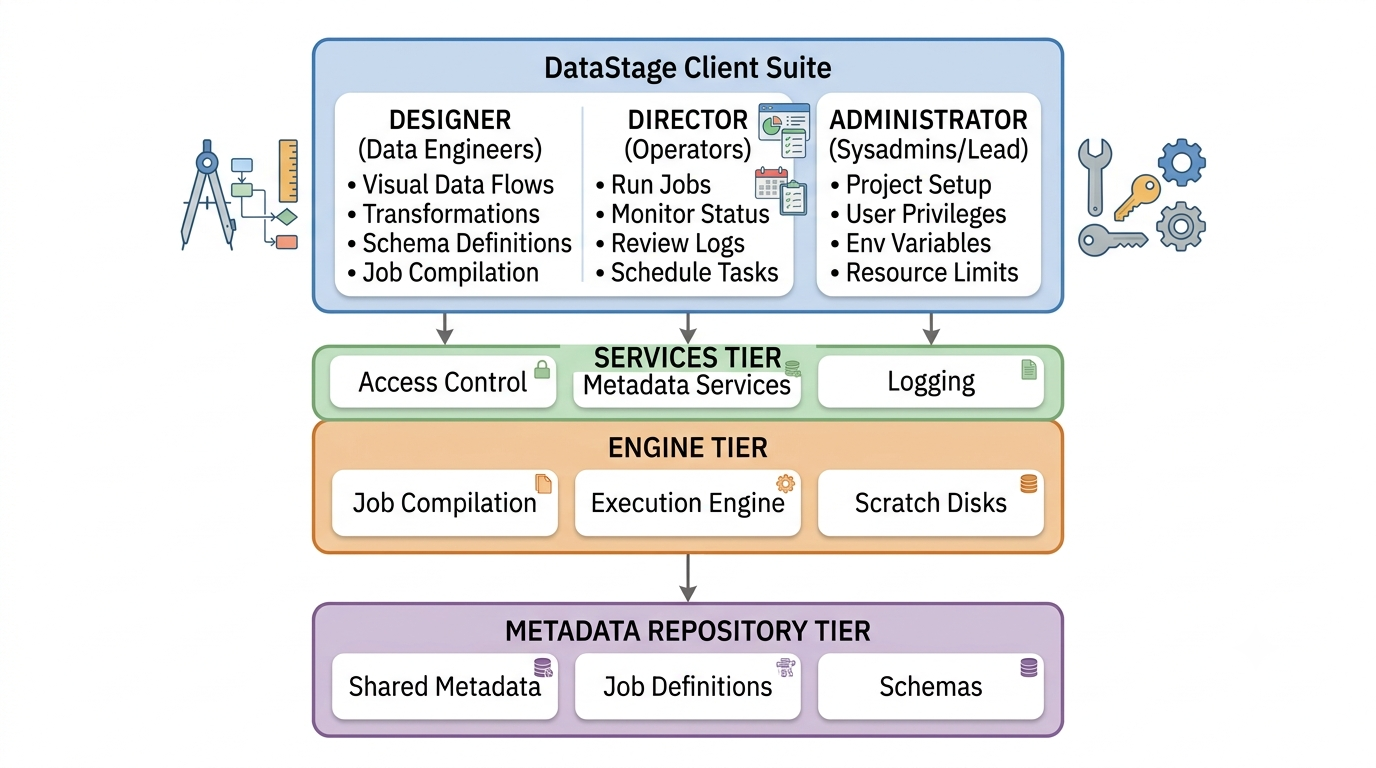
DataStage divides operational responsibilities into three major tools: Designer, Director, and Administrator. Each client serves a distinct step in the data lifecycle, allowing teams to separate development tasks from operational oversight and project administration.
The Designer: Building Visual Data Flows
The Designer is the workspace for data engineers. It replaces manual code with visual data flows made of source stages, transformation stages, and target stages connected by data links. Developers drag components onto a canvas, configure properties like file locations or database connections, map input fields to output schemas, and compile the workflow into an executable job.
The Director: Execution and Operational Monitoring
Once a job is compiled, operators use the Director interface to run and monitor it. The Director acts as a control center where team members can manually trigger runs, set execution parameters, schedule automated executions, and view real-time status indicators. If a job fails or generates warnings, the Director logs detailed warning messages, row counts, and error codes down to the specific failed stage, making troubleshooting quick and targeted.
The Administrator: Environment and Security Management
The Administrator tool manages workspace security, project settings, and environmental constraints. System administrators use this interface to create projects, configure access controls, assign user roles, set engine defaults, and prune log files. Managing system resources correctly at this level prevents orphaned files from consuming server disk space and ensures job runs stay isolated across environments.
Hands-on Environment Setup with IBM DataStage Course Concepts
Setting up a stable data environment requires clear administrative oversight and systematic project configuration. Exploring the foundational concepts of an ibm datastage course helps engineers understand the step-by-step process of configuring a workspace from scratch:
Connecting to the Domain Engine: Launch the Administrator client, enter the domain server credentials, and verify connectivity to the underlying services tier.
Creating a Dedicated Project: Set up an isolated project workspace to separate operational assets, shared schemas, and database connections.
Configuring Environment Variables: Define global variables such as system file paths, temporary scratch disk allocations ($APT_ORCHESTRA_SHM_PIPE_SIZE), and default database connectors to streamline deployment across environments.
Assigning Access Privileges: Map user accounts to predefined security roles like Developer, Operator, or Administrator to enforce security best practices.
Setting Purge Rules: Establish log cleanup policies within the project properties so job execution histories do not overwhelm the repository database over time.
Designing DataStage Pipelines: Sources, Targets, and Metadata
Building a data pipeline begins with defining source data, target schema formats, and intermediate transformations. DataStage uses stage objects to represent data sources, targets, and processing logic.
Source and Target Stages
Source stages pull data from external systems, while target stages write processed data to their destinations. Common connectors include:
Sequential File Stage: Reads or writes delimited text files (.csv, .txt, .dat), supporting custom column delimiters, line terminators, and fixed-width layouts.
Relational Database Stages (ODBC, DB2, Oracle, SQL Server): Direct connection objects optimized for native bulk reading, native bulk loading, and running custom SQL queries against enterprise databases.
Data Set Stage: A DataStage-native binary storage format. Writing intermediate results to native DataSets avoids file translation costs and keeps parallel partitioning intact across job steps.
Metadata Propagation and Schema Definitions
DataStage relies on strict metadata definitions to maintain data integrity across pipeline operations. Metadata specifies data types, field lengths, precision, and nullability rules for every field moving through a link.
When configuring links in the Designer interface, developers can manually define columns or import metadata table definitions directly from target databases. Built-in features like Runtime Column Propagation (RCP) allow jobs to dynamic process extra, unmapped columns without hardcoding them into every single transformation stage, making pipelines resilient to source schema changes.
Managing System Administration and Governance
System stability depends on regular routine maintenance, secure project management, and environment setup. Pursuing structured datastage administrator training teaches administrators how to manage environment variables, tune disk resources, and prevent system bottlenecks.
Project Management Best Practices
Administrators must organize project structures carefully to keep development, testing, and production code isolated. They use administrative workflows to:
Back up project repositories routinely using object export tools (.isx or .dsx packages).
Configure project-level default settings, such as buffer sizes and performance flags, ensuring all developers inherit production-ready parameters.
Clean up orphaned scratch files and old log entries to prevent disk degradation.
User Permissions and Security Mapping
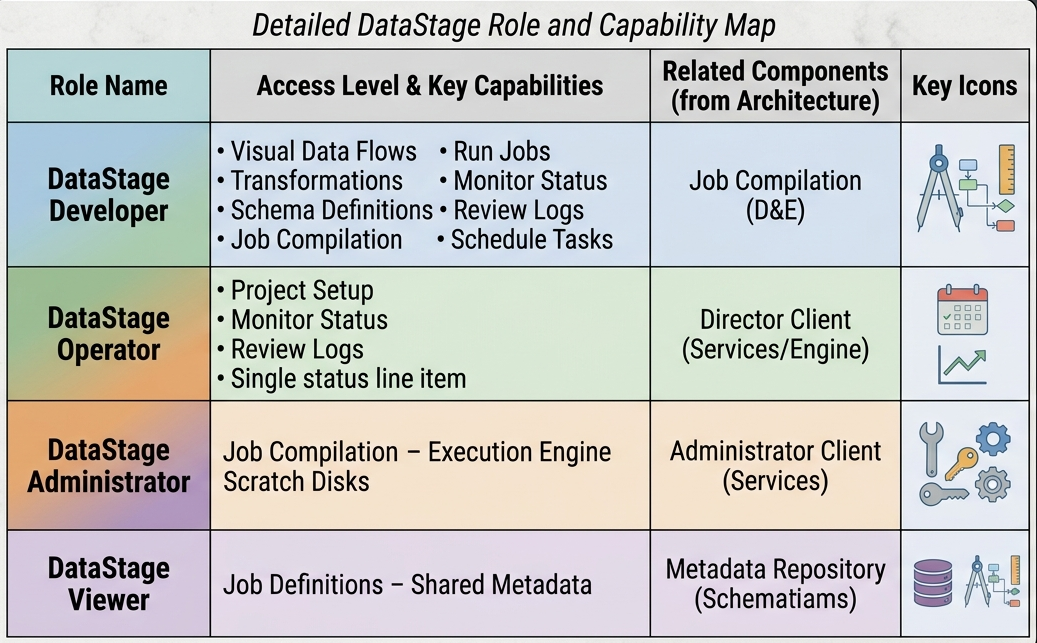
Security management involves granting users access based on the principle of least privilege. System roles mapped in the Administrator panel include:
Advanced Data Transformation Techniques
Transforming data requires applying business rules, standardizing formats, and combining data from disparate sources. DataStage provides specific stages for data cleansing, conditional routing, and structural multi-stage transformations.
The Transformer Stage and Stage Variables
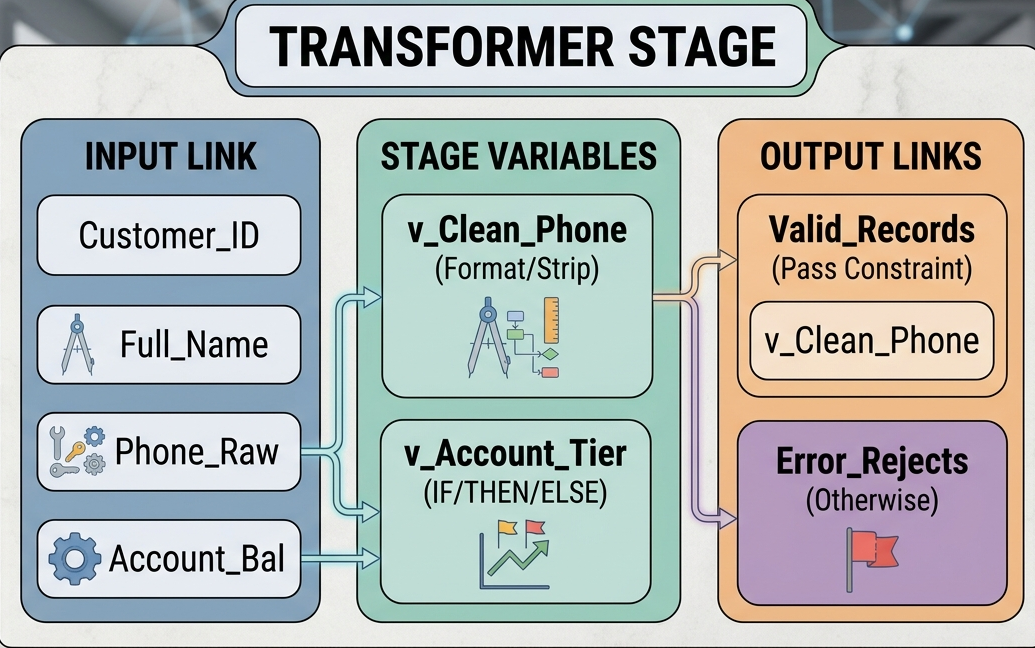
The Transformer stage is a core processing component used for complex column logic, pattern matching, conditional derivation, and string manipulation. Inside the Transformer, engineers can define Stage Variables—intermediate calculation variables that persist across rows during execution. Stage variables allow developers to track running totals, keep record counts, or reuse evaluation logic across multiple output columns without recalculating expressions multiple times per row.
Output links from a Transformer stage support Constraints. Constraints act as filtering logic, routing rows to specific output destinations based on boolean conditions (e.g., sending valid records to a target file while routing malformed rows to an error drop directory).
Joining, Looking Up, and Merging Datasets: Combining multiple datasets requires choosing the right stage based on data volumes and memory capacity:
Join Stage: Performs relational joins (Inner, Left Outer, Right Outer, Full Outer) on two or more high-volume datasets. Performs best when both input streams are sorted by the join key.
Lookup Stage: Matches incoming records against reference datasets loaded into memory. Ideal when processing a primary transaction stream against smaller reference tables (e.g., mapping zip codes to state names). Supports dynamic database lookups for reference values that change frequently.
Merge Stage: Combines one sorted master dataset with one or more sorted update datasets. Handles complex update rules, allowing records to be updated, inserted, or dropped depending on match conditions.
Pipeline Orchestration and Workflows
Real-world integration workflows require orchestrating dependent jobs, executing sequences in parallel, handling failures gracefully, and passing dynamic operational parameters across tasks. Sequence jobs coordinate the execution order of multiple DataStage jobs. Rather than running tasks individually, developers build sequence flows using control stages:
Job Activity Stage: Triggers execution of a target DataStage job and captures its return status code.
User Variables Stage: Pass parameters dynamically between steps at runtime (e.g., passing batch execution dates or target directories).
Routine Activity Stage: Calls external code routines, shell scripts, or stored procedures during workflow execution.
Notification Stage: Triggers automated email notifications to operations teams when critical pipelines fail or complete successfully.
Exception Handling and Retry Logic
Production pipelines must recover gracefully from transient failures like temporary network drops or locked database tables. Sequence jobs support conditional branching (On Success, On Failure, Warnings Only), enabling developers to attempt job retries, roll back transaction blocks, or clean up temporary files before terminating downstream executions.
Developer Workflows and Design Patterns: Completing comprehensive datastage developer training helps engineers write clean code, design reusable jobs, and apply production patterns across systems. Adopting standardized design patterns reduces maintenance overhead, improves readability, and speeds up onboarding for new developers.
Standardizing Job Layouts and Naming Conventions: Consistent design layouts make complex enterprise jobs easy to read and debug. Developers should follow standard design practices:
Flow Alignment: Maintain a left-to-right processing layout (sources on the left, transformations in the middle, targets on the right).
Naming Standards: Use consistent prefixes for visual stages (e.g., seq_ for Sequential Files, db2_ for DB2 connectors, xfrm_ for Transformers, lkp_ for Lookups).
Shared Parameters: Use Parameter Sets to centralize shared database connections, server names, and directory paths across multiple job components.
Reusable Logic: Local and Shared Containers
When identical transformation logic is needed in multiple jobs, developers can encapsulate processing rules using containers:
Local Containers: Group a section of stages within a single job canvas to simplify visual readability.
Shared Containers: Build reusable components that can be inserted into multiple independent jobs. Updating a shared container updates its processing logic across every job that calls it, enforcing standard design standards across project teams.
Performance Optimization and Parallel Engine Execution
DataStage handles large volumes of data by spreading processing across multiple CPU cores, memory channels, and server nodes using its parallel processing engine. Understanding how parallel processing works allows data engineers to build high-performance pipelines that eliminate bottlenecked data flows.
Pipelining vs. Partitioning
The parallel engine uses two primary methods to process large datasets concurrently:
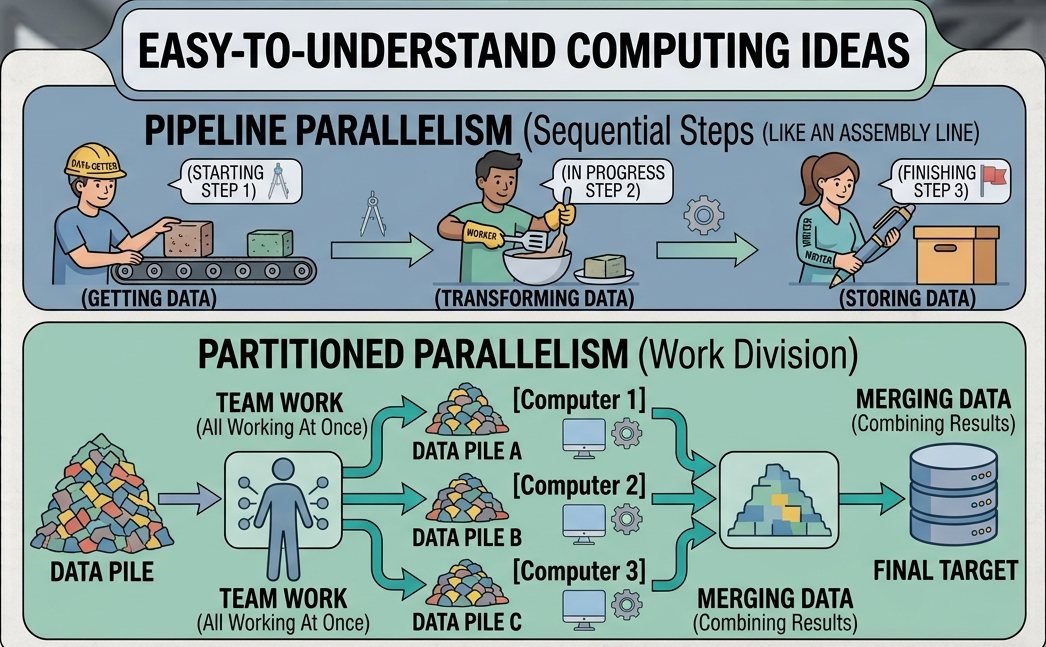
Pipeline Parallelism: Streams rows directly from one processing stage to the next without waiting for the entire stage to finish. For example, while Stage B cleans record 50, Stage A is already reading record 51, and Stage C is writing record 49 to the destination file.
Partitioned Parallelism: Divides a single incoming dataset into multiple smaller streams (partitions) and distributes them across available processor nodes, executing the same processing steps concurrently.
Data Partitioning Methods
Choosing the correct partitioning method is critical for performance. The table below compares common partitioning algorithms, their best use cases, and potential performance impacts:
Hash Partitioning: Uses a key column's hash value to assign matching key rows to the same processing node. It is best used for key-based operations like Joins, Aggregations, and Remove Duplicates stages. While essential for grouping matching data together, choosing low-cardinality or poorly distributed keys can cause severe data skew across nodes.
Round Robin: Distributes rows evenly across processing nodes in a sequential loop (Node 1, Node 2, Node 3, and back to Node 1). It works best for initial file reads and simple data loading jobs where order does not matter. It delivers a perfectly balanced distribution across nodes, but it breaks any key grouping required for downstream operations like joins or aggregations.
Entire Partitioning: duplicates the full input dataset across every available processing node. It is primarily used for small lookup reference tables so every node has local access to the entire reference set. While highly efficient for fast lookups, using this method on large files will quickly consume system memory and degrade performance.
Same Partitioning: Preserves the exact partition structure established by the previous processing stage without altering row locations. It is ideal for downstream sequential stages that require no change in data arrangement. By reusing the existing data layout, it eliminates the CPU and memory overhead of repartitioning data between stages.
Modulus Partitioning: Divides an integer key column by the total node count to assign rows to specific nodes. It is best suited for numeric key distributions where keys are evenly distributed sequential numbers. It offers extremely fast processing, but it requires uniform numeric keys to prevent certain nodes from receiving a disproportionate share of data.
Diagnosing Data Skew and Node Imbalance
Data skew occurs when one processing node receives a disproportionate share of data rows while other nodes sit idle. This usually happens when hash partitioning uses low-cardinality keys (such as partitioning by state or gender). Engineers can spot data skew by checking CPU utilization across nodes or monitoring row counts in the Director client. Re-partitioning data on high-cardinality keys redistributes workloads evenly and prevents single-node processing bottlenecks.
Troubleshooting, Monitoring, and Maintaining Data Pipelines Maintaining enterprise integration pipelines requires active monitoring, logging review, and systematic troubleshooting. When jobs stall, fail, or run slowly, engineers must know how to quickly isolate root causes across system layers.
Reading and Interpreting Execution Logs
The Director client logs event entries recorded during job execution. Entries are categorized by severity:
Info: Standard execution metrics, such as node allocation messages, run start/stop times, and row processing metrics.
Warning: Non-fatal exceptions, such as implicit data type conversions, truncated strings, or lookup failures that dropped non-matching rows.
Fatal: Critical failures that abort job execution, such as missing source files, database authentication failures, or out-of-memory errors on scratch disks.
Debugging Techniques for Complex Jobs
When pipeline results fail validation checks, data engineers can isolate errors using dedicated debugging steps:
Inspect Warning Messages: Expand the job log in the Director client to identify the exact stage, link, and row number where processing failed.
Insert Peek Stages: Add temporary Peek Stages into intermediate processing links to print sample row contents directly to job output logs during execution.
Run Sample Datasets: Limit input file reads to small data samples using stage limits (e.g., reading only 1,000 rows) to validate transformation logic quickly without waiting for full production job runs.
Review System Resource Metrics: Monitor server CPU, RAM, and scratch disk space while jobs execute to check for hardware resource exhaustion.
Building Scalable Enterprise Data Integration Architectures
DataStage remains an enterprise-grade ETL solution, giving data engineers, database administrators, and system developers the tools needed to design, run, and scale enterprise data integration pipelines. Mastering the platform requires balancing theoretical ETL patterns with hands-on practice across the Designer, Director, and Administrator clients. By understanding system architecture, managing system parameters effectively, configuring partitioning models, and enforcing standardized design patterns, organizations can build data integration pipelines that reliably convert complex raw data into trusted, actionable business intelligence.