
Understanding Tableau Worksheets, Dashboards, and Stories
Last updated on Oct 29, 2026
Data itself is not used as decision-making tools anymore in modern business intelligence. An enormous amount of transactions, Excel tabs, and database schemas has a lot of valuable information inside; however, it can be hard to draw anything from it. This is how the approach called visual analytics comes into play because it allows one to create mappings of abstract numeric data to visual properties such as position, size, shape, and color. Tableau is one of the methods of visual analytics which became a gold standard because of its ability to create a strategic story from the initial data hierarchically.
Worksheet, dashboard, and story are three hierarchical elements of Tableau. Even though for newcomers they might look like the same things initially, they have nothing in common and represent totally different stages of analysis. Worksheet is the stage where explorations happen, when analysts ask questions and filter/sort specific variables. Dashboard is a tool of operations which brings together different views into a control center. Story is a sequence of actions that are designed to guide stakeholders through the process of discovery/crisis/strategy development.
However, for someone to understand how to arrange the buttons on Tableau, there is need for one to gain additional information other than the information that can be found in the software’s interface. One needs to join the best tableau training online where one will learn how to make data questions into calculations, dynamic actions, and executive stories. Understanding how works, purpose of, structure and relation between worksheets, dashboards and stories is necessary to get all the benefits that can be achieved through the art of visual data storytelling.
The Basic Mechanics: Tableau Worksheets
The insights or the information gained from the presentation in an enterprise are because of the first step taken in the worksheet. In Tableau, the worksheet forms the base of the data visualization. Although it is true that the dashboard and stories forms the buildings and tours of the city, the worksheet provides the basic parts on which the building stands. Good buildings cannot be constructed on bad sheets.
The Mechanics of Visual Translation
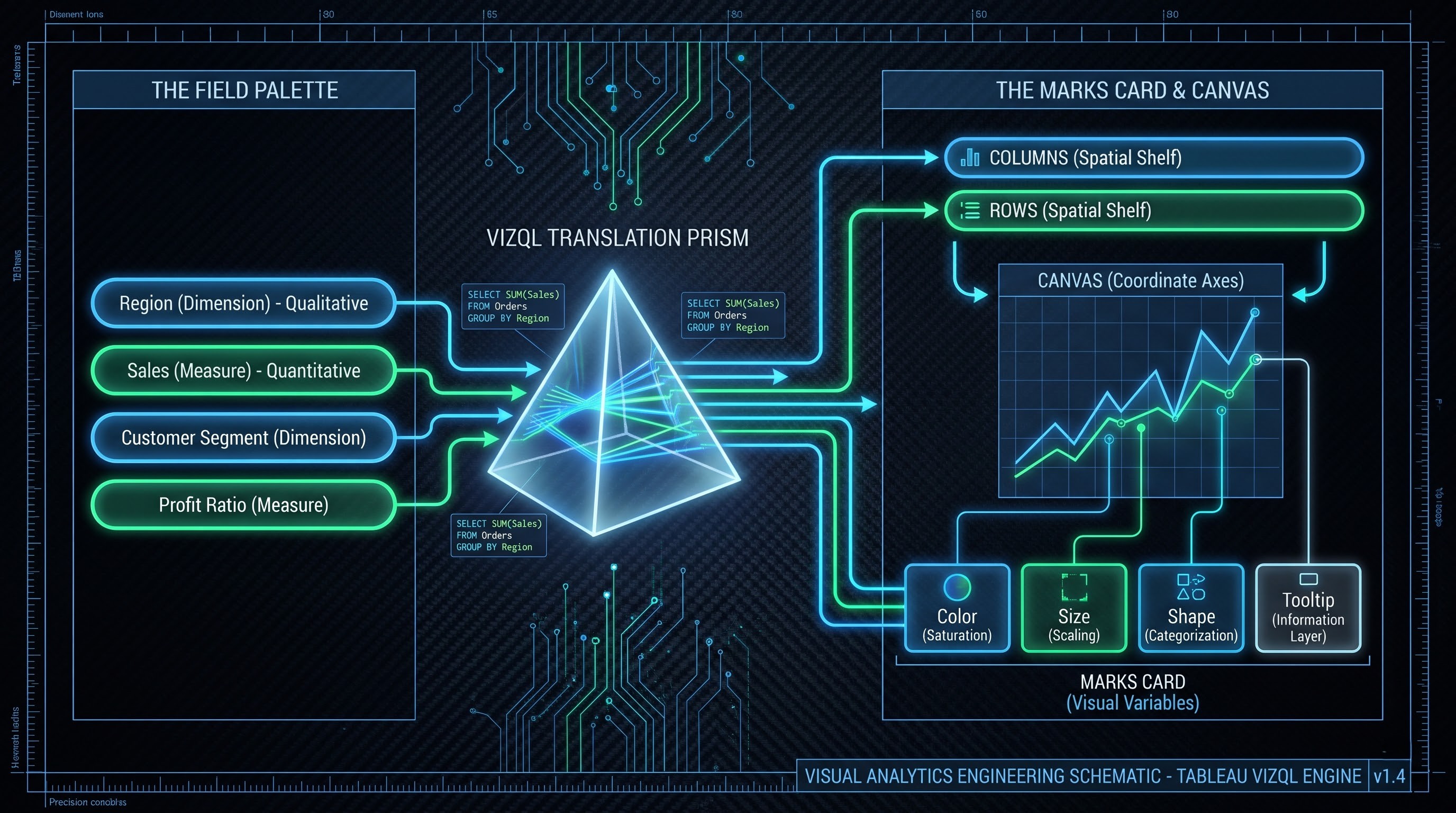
One way in which one can comprehend how the worksheets work is through the events that take place when the analyst drops a data field on the worksheet. In contrast to spreadsheet applications where calculations are performed based on coordinates of cells (e.g., A1, B12), Tableau uses Visual Query Language (VizQL). When an analyst drops a customer segment on the shelf and blends it with ratios of profit, Tableau understands it from the perspective of VizQL and performs a structured database query.
There are two primary dualities in which the data fields are classified on the worksheet dimensions versus measures and discrete versus continuous variables:
A dimension is a qualitative value that is characterized by the geographical location, the names of the customers, or type of the product. This value segregates the data and defines the granularity level while creating a category title for the visualization.
The measure is a quantitative value that can be measured and mathematically aggregated, e.g., sales revenue, inventory units, discount percentage.
The main working space of the worksheet includes the following shelves: Columns, Rows, Marks, Filters, and Pages. The placement of continuous and discrete variables on the shelves Columns and Rows allows one to specify the spatial structure of the view. Marks shelf allows making detailed manipulations with visualization and using color, size, label text, tooltips, and shape for presenting the secondary and tertiary variables without altering the axis structure.
The True Purpose of a Worksheet
The main purpose of a worksheet is the analysis of the single question or dependencies among several variables. The following are examples of such questions:
What are the trends of shipping delays during the last five years by quarters?
Which are the sub-categories of the products that have negative margins despite their large sales volumes?
Is there any dependence between the experience of the employees and client's satisfaction level in different regions?
Worksheets analyze single questions; thus, they become a laboratory of an analyst who can test his assumptions, refuse from wrong ways of thinking, calculate the local fields, etc.
Typical Mistakes in Developing Worksheets
One of the primary advantages of using worksheets is the opportunity it gives people to do things freely. Consequently, one of the errors made by analysts while developing worksheets is creating very complicated visualizations in one worksheet. When an analyst attempts to answer five questions in one worksheet by using multiple colors, shapes, reference lines, and dual axes in Marks Card, there is no way one could avoid visual overload.
A human brain cannot read a visual that is made up of ten colors for distinguishing different regions, six shapes for depicting different tiers of customers, varied size of markers for different numbers of transactions, and two axes for revenue and margin. It is vital to note that worksheet is just one component of analysis. In case one needs to use multiple visualizations for analyzing the data, he/she should make several worksheets and not one.
The Operational Control Room: Tableau Dashboards
Even though the worksheets answer the certain questions, the real-life situation is usually much more complicated. The reduction in revenues of the company cannot be judged by only the information provided by the sales statistics, but should also include expenditures on marketing, logistics on the local level, rate of turnover, and use of season discounts. It is this combination and multi-facetedness that makes us refer to the second part of the platform – the dashboard.
Cohesion and Interactivity
Dashboard is an interface, which combines different worksheets, context, media, and controls in one whole. The dashboard can be considered in comparison with a dashboard of a car or airplane. A pilot of an airplane would not check the altimeter, close it, check the speedometer, close it, and check the fuel consumption. All the necessary indicators should be combined in one plane visually depending on the situation.
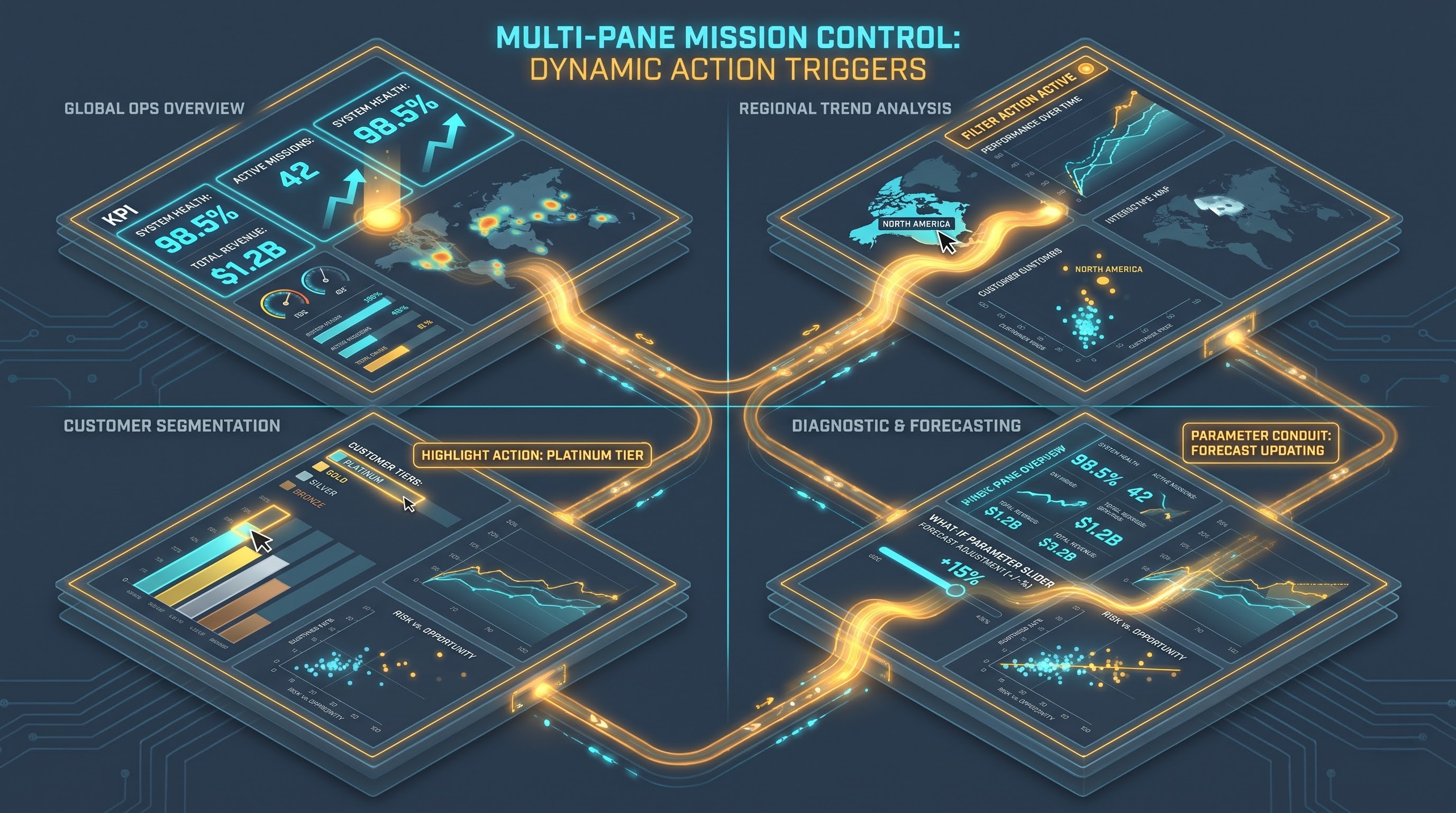
The key characteristic of the dashboard against the background of a collection of static charts is its interactivity. Dashboard is not just a poster, but rather an interactive analysis tool, which reacts to certain actions. There are several types of actions that can be done in Tableau dashboards:
Actions related to filter: In the scenario of choosing something from any of the worksheets, such as in the scenario where one chooses the European continent from the geographic worksheet, then all other worksheets will be filtered in order to display all data related to Europe.
Actions related to highlight: If you use the cursor on any particular customer tier, then all the line charts, scatter charts, and distribution charts will be highlighted in relation to that customer tier, and all other views will also be somewhat dull.
Actions related to URL and navigation: When you click on any account or inventory data input, then you can edit the parameter of customer relationship management website or navigate to the secondary diagnostics dashboard.
Actions related to parameter and set: By taking some action on the visual elements, the user will be able to edit the parameter or the dynamic set of a cohort.
Strategic versus Tactical Dashboards
Not all dashboards are created equal, and different kinds of dashboards must be designed considering the pace at which decisions have to be made. Present times have seen classification of several types of dashboards depending upon their characteristics as follows:
Strategic Executive Dashboard: Designed for executives, such dashboards contain key performance indicators and organizational health indicators in terms of months, quarters and years. They stress on clarity in visuals and not technicalities like row level data.
Tactical Operational Dashboard: These are designed for managers handling day-to-day issues and working according to service level agreements, opened tickets, logistics and daily sales targets. All in all, whatever can help managers in handling the issues in time.
Diagnostic Analytics Dashboard: They possess powerful analytics tools in terms of information complexity and include several filters, trends and cross tabs. These dashboards are designed for analysts in order to diagnose the root causes of the problems discovered through operations management.
Visual Real Estate Discipline
The first challenge that must be faced when designing a dashboard is visual real estate discipline. As many as a dozen different spreadsheets can be put on one sheet, and, therefore, dashboards become messy matrices of visual clutter.
A good dashboard takes into account natural patterns of visual perception of our brain, for example, Gutenberg Diagram or F-Pattern. Major overview indicators must be placed in the upper left part of the screen because this is exactly where our eyes rest at first. Visualization must start from the overview indicators and continue with the analysis of particular dimensions in the following order: from upper left corner to lower right corner.
In addition to that, there is the challenge of tiled or floating objects in the dashboard. While tiled layout means that objects are locked in responsive grid, and that means the stability of the layout on any display resolution, floating layout guarantees the absolute positioning of objects that might overlap with others, which is important in case of branding, but makes it difficult to visualize on the unknown resolution.
The Guided Journey: Tableau Stories
Whereas a worksheet is an individual analysis and a dashboard is an interactive surgery theatre, a tableau story is a journey. A story highlights an essential psychological factor concerning the leaders in organizations, in that, the leaders of organizations may not always have the time, interest or even the know-how on how to analyze the tools in the dashboard. Individual analyses can lead to errors, failure to analyze as well as the failure to contextualize. A story makes sure that you are guided.
Tableau Story Structure
A Tableau story is an organized collection of sheets and dashboards arranged into an organized set of pages known as story points. Visually, a Tableau story is a bar indicating the progress along the top or bottom of the visualization in the form of text boxes, arrows or dots.
Each story point is characterized by a particular state of a worksheet or dashboard in terms of visualization. But, story points save a certain configuration. Inside each story point, an analyst can configure a certain number of filters, zoom in on an anomalous cluster of data points, select an outlying cohort, and comment on this anomaly. In switching to the following story point, the dashboard may be configured with another configuration of filters, look at a different part of operations, or bring in more information as an explanation for the previous anomaly.
But visuals shown in the story points stay live and not screenshots. That means that the presenter or the viewer can hover over the marks, see the tooltips, and do a couple of checks in a live presentation. Still, the journey will not be free-form like it could be on a dashboard.
When to Use a Story Rather Than a Dashboard
Dashboard by its nature is an open system. It implies the following message for the user: "This is your command center. You have control, you have filters - explore the terrain and monitor performance as you please."
In contrast, the story tells the user, "I will guide you on how things happened, why it happened, what will happen if you don’t heed our advice, and the evidence that we have on why our proposed solution makes sense."
An organization ought to incorporate the use of stories in the following scenarios:
Capital/Raising Investment: The raising of millions of dollars of capital involves leading the management team through the history of past issues, current cost structures, benchmarking data against risk model prediction.
Diagnosis of Operational Failure: Every diagnosis of operational failure (software failure, inventory failure and so forth) involves analyzing the time aspect from pre-failure period to first failure, second failure, and the post resolution.
Reversal of Static Presentations: In the past, analysts were required to create static presentations. They had to collect charts and figures through their analytical work, paste them onto slides and bullet point them. If the executive posed questions regarding an exceptional case, they would be unable to help as they were merely presenting static charts. Through Tableau stories, analysts are able to present structured narratives while still remaining flexible to handle any question posed.
Story Structure in Tableau
True Tableau story is based on four key components of classical plot structure: exposition, complication (rising action), climax, and resolution.
Exposition: The first component of the story explains the background. In the terms of Tableau story, the exposition helps to define the definition of normal performance by creating a strategic background in the terms of comparison with historical data.
Complication (Rising Action): The second and third components raise the tension. They reveal the situation, when the certain business units operate poorly, when the costs of acquisition of new clients exceed acceptable values or when there are no goods in particular regions.
Climax: The fourth component reveals the reasons for this problem. By using the targeted view and isolation filter, the analyst states that the problem is not only poor performance, but some kind of logistic issue or price update issue.
Resolution: The fifth and sixth components represent the solution of the problem, forecasts for the future and suggestions to resolve the problem.
Comparison and Synergy of Concepts
In order to understand, how the worksheets, dashboards and stories work together, it is necessary to determine their role in different fields.
Granularity and Scope
Worksheet operates at microscopic and mesoscopic granularities. Scope of worksheet is narrow. Worksheets are meant to convert dimensions and measures into geometrical form. The strength of worksheet is analytical precision.
Dashboard operates at macroscopic granularity level. Scope is wide and relational. It explains how different worksheets relate to each other, placing them on one plane. The strength of dashboard is situational analysis and interaction diagnostics.
Story operates at strategic and temporal granularities. Scope of story is sequential and explanatory. Stories are organizing microscopic observations and macroscopic surveys along timeline of thoughts. The strength of stories is communication.
Cognitive Load and Audience Psychology
After the user has opened the Tableau worksheet, his/her cognitive load will be focused on interpreting it. User asks himself/herself a question: "What does this line/distribution mean?"
Interpreting the dashboard creates the cognitive load that involves synthesis and analysis of information. There is a need to perceive much information that competes for attention, to establish connections between different information pieces, choose proper filters, and to know what piece of information to focus on. Ineffective dashboards can worsen the viewer’s performance and provide no good entry point for making decisions.
Looking through the story, the viewer does not face any problem with navigation, because the navigation path is set by the author, and the viewer needs to analyze the information only.
Synergistic Pipeline
The above-mentioned three components do not compete against each other; they create the synergistic pipeline:
Everything begins with worksheets, in which an analyst asks questions to the database, analyzes statistics, and looks for patterns and anomalies.
Then, having found several patterns of interest, an analyst creates a dashboard based on these worksheets to try and see if there are any systemic dependencies between the filters and variables through their interaction.
The main objective of the advanced tableau developer course provided by OnlineITGuru is the mastery of the whole process of developing from atomic sheets to multi-actions dashboards and the formulation of the strategy story.
Technical Performance and Scalability Issues
Creation of complex worksheets, dashboards, and stories creates specific challenges in terms of technical performance. As beautiful as your dashboard may be, it would not be used for long if it takes forty-five seconds for loading each time you try to open it.
Query Load and Dashboards Response Time
The issues of technical performance start with worksheets but become extremely expensive while creating dashboards. Any single worksheet within a dashboard will load queries from the database engine, unless all worksheets use the same level of detail and share the same data source.
For example, if an analyst has used twelve sheets to create a dashboard, then clicking the global filter results in twelve queries on the database running simultaneously. In a situation when the source of the data is a live connection with a non-indexed transactional production database, the speed of data processing in the application is bound to be poor.
To achieve maximum performance:
The number of sheets that will be used in the dashboard must be restricted to four or six sheets.
If possible, the calculated fields must be reduced. Calculations involving strings or complex conditions need to be executed before visualizations are created through data preparation.
Fields such as cardinality fields or transaction IDs or timestamps to the second must not be included in the Marks Shelf of aggregated visualizations because generating millions of marks takes much processing power.
State Preservation in Story
A story has unique performance characteristics due to its state preservation method. This is because each story point preserves an authored state of some dashboard or worksheet, and modifying the story point causes Tableau to go back into the database to get the state of filters or highlighted marks of the story point.
This will be especially difficult in situations where all story points rely on a dashboard which is very complex and consists of many sheets and calculations. It is imperative for the author to ensure that the dashboards and worksheets in the story run fast using data extracts with pre-aggregated fields and without any database connection.
Finesse Your Analytical Abilities Even More
While it is crucial for you to understand the distinction between worksheets, dashboards, and stories in theory, hands-on experience is only possible through training. Taking the most effective tableau courses online offered by OnlineITGuru on the web will enable you to do that.