
Why does Salesforce Apex fail at scale? Governor Limits & Code Optimization Essay
Last updated on Sep 28, 2026
Salesforce development can seem simple when an application is working with a small amount of data. An Apex trigger may run successfully, a SOQL query may return the expected records, and an update may complete without any visible issue. The situation can change completely when the same application starts to handle hundreds or thousands of records. Code that worked perfectly during development can suddenly fail in production because Salesforce puts limits on how much data each transaction can consume.
These limits are referred to as Governor Limits and they are one of the most important concepts a Salesforce Developer needs to learn. They regulate the amount of database access, processing time, memory, and other resources that a transaction can consume. Instead of worrying about them when an error appears, developers should think about these rules while designing Apex itself.
The real challenge is not simply making Apex work. It is making Apex work efficiently at scale. A solution that works successfully with ten records will need to work successfully with a much larger data volume without unnecessarily consuming platform resources. This is where code optimization, bulkification, and efficient queries come into play. A practical salesforce development course can help developers understand these concepts through real-world scenarios and learn how to build Apex solutions that remain reliable as data volumes grow.
When working Apex suddenly fails in production
One of the most common situations that Salesforce Developers encounter is code that works perfectly in a development environment but fails after deployment. A developer may test a trigger with five records and see the expected result, but later a business user may import hundreds of records and have the same trigger throw a governor-limit exception.
The business requirement has not changed. The code itself has not necessarily changed either. What has changed is how much work needs to be done to complete a transaction. This is why Salesforce development needs to take into account situations where triggers, integrations, data loads, and other automation processes can process multiple records. If the code repeats the same database operation for every record, resource consumption can increase dramatically.
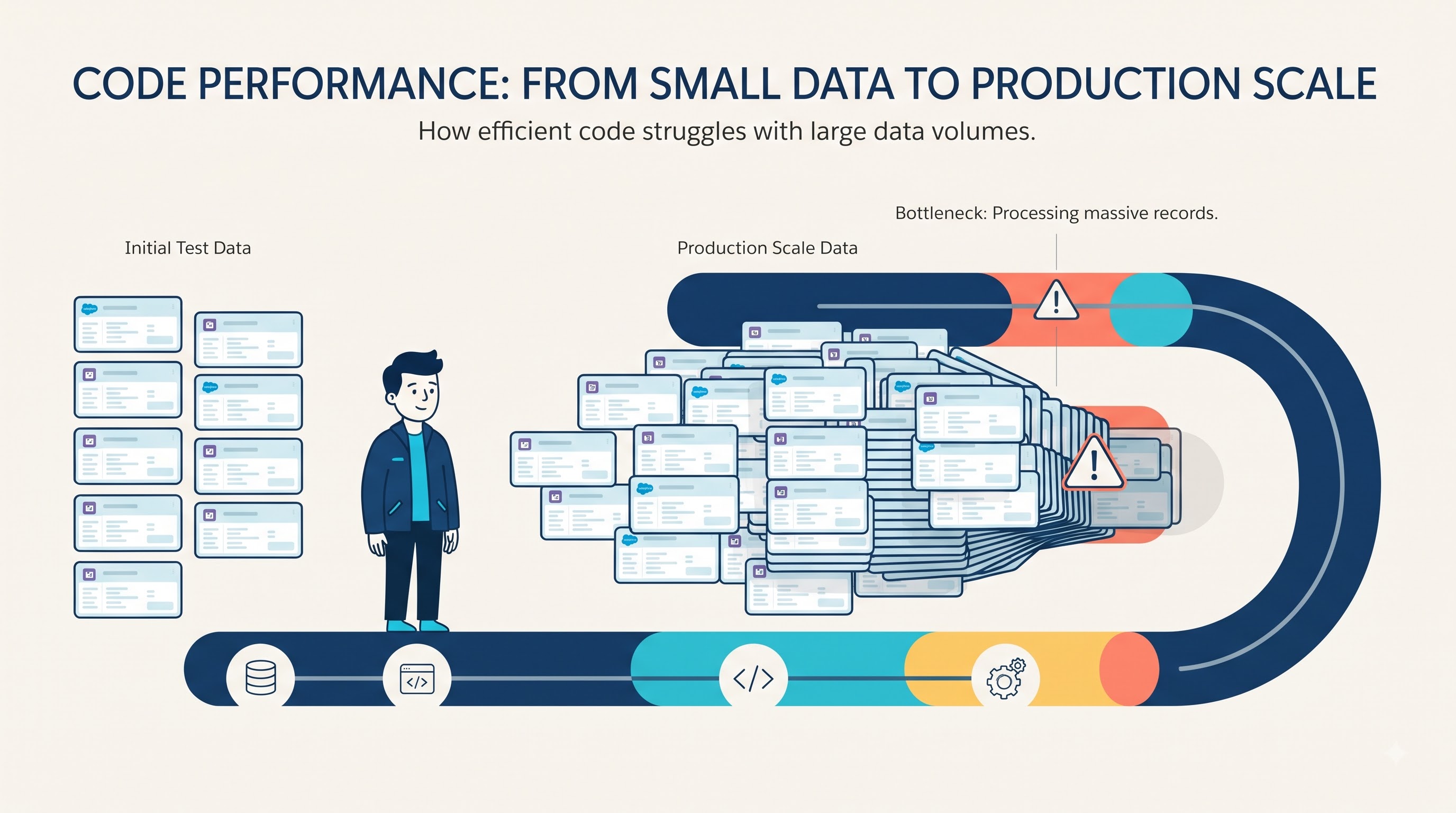
A simple question to ask while developing Apex is ‘what happens if this code receives 200 records instead of one’? That question will force developers to think about scalability before a production issue exposes the problem.
Understanding the governor limits developers actually encounter
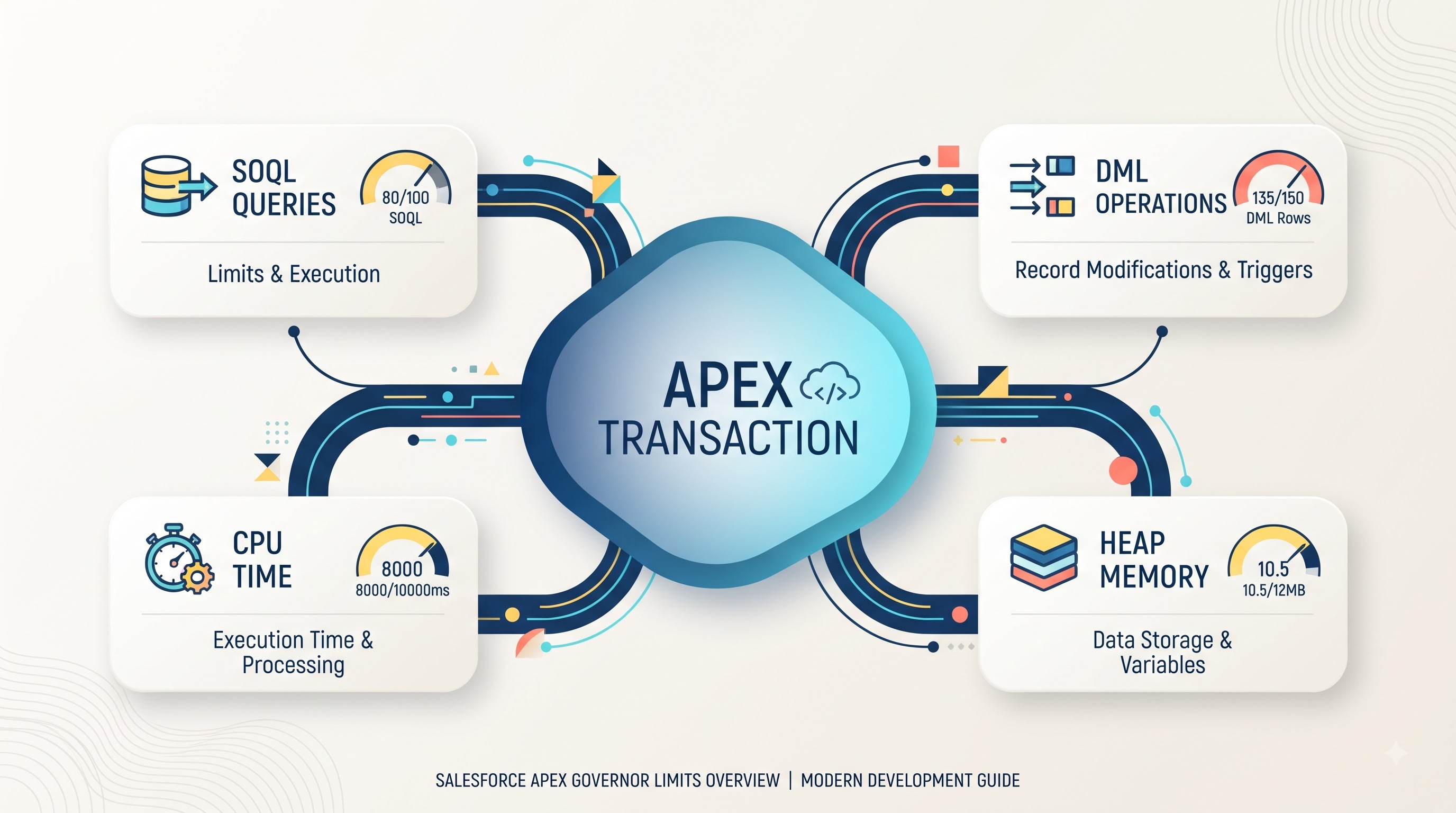
Salesforce has a wide range of governor limits, but developers do not need to treat every limit as equally important in every situation. Some limits are particularly relevant to everyday Apex development because they directly affect how data is queried, processed, and updated. SOQL limits regulate the number of queries that can be executed within a transaction. DML limits govern operations such as inserting, updating, deleting, or upserting records. CPU time limits the amount of processing that can be completed, while heap size relates to the amount of memory that can be used to hold data during execution.
The important fact is that these limits are not isolated from one another. An inefficient design can consume several resources at the same time. For example, querying records repeatedly inside a loop can increase SOQL usage, while processing unnecessarily large collections can increase memory and CPU consumption. For developers, understanding governor limits should be more about identifying which coding patterns consume unnecessary resources and how those patterns can be redesigned.
The classic problem of SOQL inside a loop
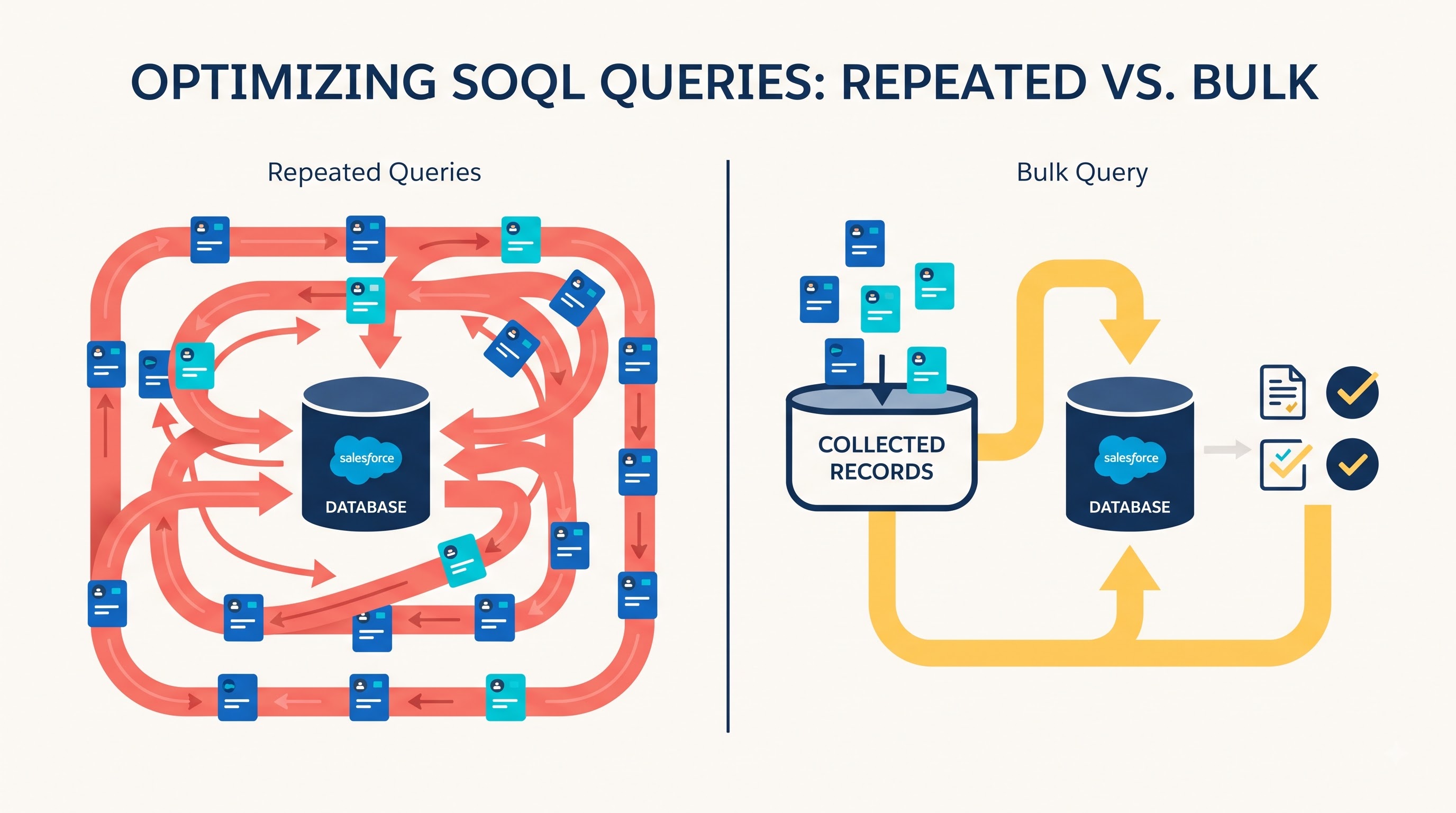
One of the clearest examples of inefficient Apex is the placement of a SOQL query inside a loop. The approach may look perfectly logical at first. A developer takes one record, queries the related information, processes it, and moves on to the next record.
The problem is the sheer number of records that can be processed within an Apex transaction.
If the same query runs once for every record, a transaction that processes hundreds of records can be far more likely to exceed its query allocation. The code may work perfectly during a small test because only a few queries are executed. The same logic can fail when the transaction becomes larger. The better approach is to identify the information required by all records, collect the relevant IDs, and perform the query outside the loop. The resulting records can then be stored in an appropriate collection such as a Map so the code can access them efficiently during processing.
The idea is simple: collect first, query once, and process efficiently.
Bulkification: writing Apex for more than one record
Bulkification is one of the most important concepts in Salesforce development because Salesforce automation frequently works with collections of records instead of individual records. A trigger should not assume that it will receive one record at a time. A single transaction can involve many records because of data imports, integrations, administrative updates, APIs, or other automation. If the code is designed only for one record, it can become inefficient as soon as multiple records are processed together.
A bulkified approach treats the incoming records as a collection. Instead of performing a separate query for every record, the developer gathers the required IDs and retrieves the related data in a single operation. Instead of updating records individually, the developer collects the records that need changes and performs the DML operation in bulk.
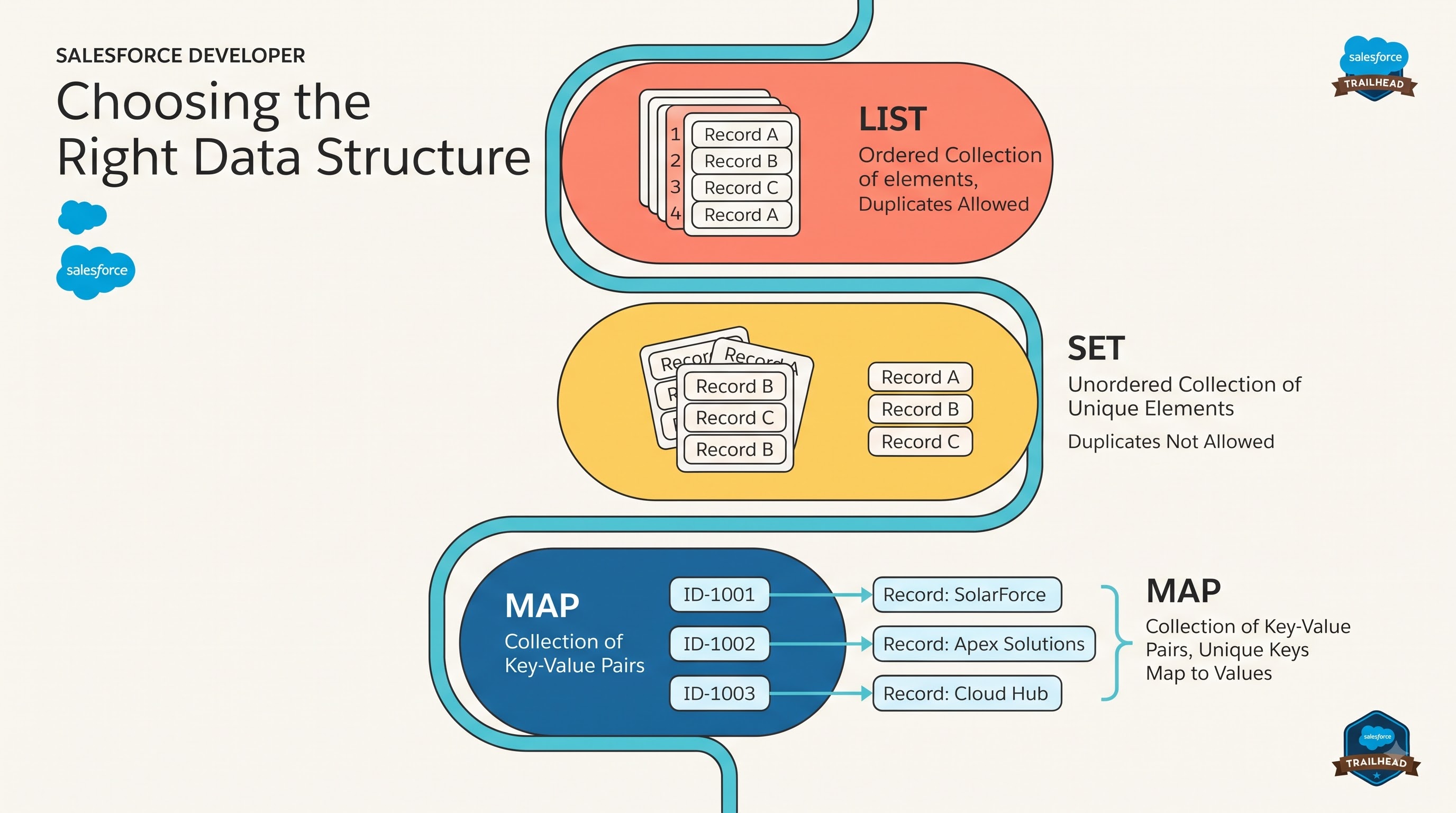
Lists, Sets, and Maps become extremely valuable during this process. A Set can hold unique IDs, a Map can provide quick access to records using a key, and a List can hold records that need to be inserted or updated. The benefit extends beyond avoiding governor-limit errors. Bulkified code is generally easier to reason about because the developer is working with a clear data-processing strategy instead of repeatedly performing the same operation.
This is also why practical sales force development course programs often link Apex programming with bulkification, SOQL optimization, and governor limits. These concepts are closely related when developers begin to work with real-world Salesforce data.
Why CPU time can become the next problem
Avoiding excessive SOQL queries and DML operations is important, but it does not automatically make Apex efficient. A transaction can remain within its database limits and still consume too much CPU time. CPU usage can increase when code performs unnecessary calculations, processes the same records repeatedly, uses inefficient loops, or contains complicated logic that becomes expensive as the dataset grows. Nested loops deserve special attention. A loop inside another loop can be completely valid for a small dataset, but the amount of processing can increase dramatically when both collections become larger.
For example, if one collection contains hundreds of records and another contains hundreds more, comparing every record to every other record can create a large number of operations. In situations where a Map or Set can provide direct access to the required data, using that structure can significantly reduce unnecessary processing. The goal is not to eliminate every loop. Loops are integral to programming. The goal is to make sure the algorithm and data structures are appropriate for the volume of data being processed.
Choosing the right data structure
Code optimization is not always about reducing the number of lines written. In many cases, the biggest improvement comes from choosing the right way to organize data. Suppose a developer has a collection of Accounts and repeatedly needs to locate one specific Account using its ID. Searching through a List every time can require repeated iterations. A Map can provide a more efficient approach by associating each Account ID with its corresponding record.
Similarly, a Set is useful when the developer needs to maintain a unique collection of IDs. A List is appropriate when the application needs an ordered collection or a group of records that will eventually be processed together. A simple approach to these structures is to think about Lists as useful for maintaining and processing a collection of records. Sets are useful for storing unique values, and Maps are useful when records need to be accessed efficiently through a key.
The right data structure can reduce unnecessary loops, simplify the code, and improve performance as data volume increases. Writing more efficient SOQL queries
Reducing the number of SOQL queries is only one part of query optimization. Developers also need to think about what each query retrieves. A query should return the fields and records actually required by the business logic. Retrieving unnecessary information increases the amount of data Salesforce has to return and the amount of information Apex needs to process.
Filtering is equally important. If the application needs records belonging to a particular group, the query should use appropriate conditions instead of retrieving a large dataset and filtering it later in Apex. Relationship queries can also help developers retrieve related information efficiently. Depending on the requirement, a properly designed relationship query may eliminate the need for multiple database operations.
The key is to treat every SOQL query as a deliberate operation. Instead of asking, ‘can I query this data?’ a developer should also ask, ‘can I retrieve exactly what I need in the most efficient way? ’
This becomes increasingly important as an organization’s Salesforce database grows.
When more processing should move away from the current transaction. There are situations where the problem is not necessarily inefficient code. Sometimes the application simply has more work to perform than is appropriate for a single synchronous transaction. Consider a process that needs to handle a very large number of records. Attempting to complete every operation immediately can place significant pressure on CPU time, memory, and other transaction resources. In such cases, asynchronous Apex can provide a better architecture. Salesforce offers mechanisms such as Queueable Apex and Batch Apex for processes that require asynchronous processing.
Batch Apex can be useful when very large datasets need to be processed in manageable groups. Queueable Apex can be useful for background processing where developers need more flexibility than a simple synchronous operation provides. However, asynchronous processing should not be seen as a shortcut for poorly optimized code. Moving inefficient logic into an asynchronous process does not automatically fix the underlying design. Developers should first understand why the transaction is consuming excessive resources and then determine whether asynchronous processing is genuinely appropriate.
Debugging governor limit errors
Governor-limit errors can be frustrating because the error message often tells the developer what resource was exceeded, but finding the actual cause requires looking deeper into the transaction. Debug logs are one of the most useful tools for this analysis. Developers can examine the sequence of operations performed during execution and identify where queries, DML operations, processing time, or other resources are being consumed.
If the transaction reports excessive SOQL usage, the developer can look for repeated queries and identify whether queries are being executed inside loops. If CPU time is the problem, the investigation needs to focus on processing-heavy areas. Nested loops, repeated calculations, large data transformations, and interactions between multiple automation processes can all contribute. The important thing is to diagnose the resource before changing the code.
A systematic debugging approach usually follows three questions:
What is being exceeded? Identify the specific governor limit involved.
Where is it being consumed? Trace the transaction and locate the expensive operation.
Why is it happening? Determine whether the underlying design can be made more efficient.
This approach is far more effective than changing code randomly and hoping the error disappears.
Testing Apex with realistic data volumes
Testing with a single record is useful for confirming basic functionality, but it is not enough to demonstrate that Apex is production-ready. A developer should consider how the code behaves when multiple records are inserted, updated, or deleted within the same transaction. This is particularly important for triggers because triggers are designed to respond to groups of records. Testing with realistic volumes can expose problems that remain invisible during small tests. A query inside a loop may look harmless with one record. A nested loop may appear perfectly acceptable with five records. Bulk testing reveals how quickly these patterns become expensive.
Good testing should challenge the implementation rather than simply confirm the easiest scenario. The objective is not only to prove that the business logic produces the correct result. Developers should also verify that the solution continues to operate efficiently when the amount of data increases.
Keeping trigger logic clean and maintainable
As Salesforce applications become more complex, placing all business logic directly inside triggers can make the system difficult to understand and maintain. A cleaner approach is to keep triggers focused on responding to the relevant Salesforce event while delegating more complex processing to handler classes or other structured components. This separation makes it easier to organize business logic, reuse functionality, test individual components, and identify performance problems. It can also help developers understand how different automation processes interact. When everything is placed inside a single trigger, identifying which part of the logic is responsible for a performance problem can become difficult. Good architecture does not eliminate governor limits, but it gives developers a cleaner foundation for managing them.
Avoiding unnecessary DML operations
DML operations are another area where small design decisions can have a significant effect on transaction efficiency. Developers should avoid updating records when no actual change is required. An unnecessary update consumes platform resources and may also cause additional automation to execute.
Rather than updating each record individually, developers should collect the records that actually need changes and perform the appropriate operation in bulk. This becomes particularly important in systems where an update can trigger additional Apex, Flow, validation, or integration activity. One unnecessary update can therefore create more work than it initially appears to. Efficient DML is not simply about reducing the number of statements. It is also about making sure that every database operation has a meaningful purpose.
What developers should learn beyond Apex syntax
Knowing Apex syntax is only the starting point for becoming effective at Salesforce development. Real projects require developers to understand how code behaves within the Salesforce platform.
They need to think about data volume, transaction boundaries, database access, automation dependencies, security, testing, and performance at the same time. This is why hands-on salesforce dev training should go beyond writing simple classes and triggers. Developers benefit from working through realistic scenarios where they have to identify inefficient queries, bulkify existing code, analyze debug logs, and redesign processing logic. The difference between knowing Apex and developing reliable Salesforce applications is often the ability to understand what happens when the code meets real business data.
A practical governor-limit review before deployment
Before deploying Apex, developers can perform a focused review of the implementation.
Review SOQL usage: Look for queries inside loops and unnecessary database calls.
Review DML operations: Check whether records can be collected and processed together.
Review loops: Look for unnecessary nested loops or repeated processing.
Review data structures: Confirm that Lists, Sets, and Maps are being used appropriately.
Review queried data: Retrieve only the records and fields required by the business logic.
Review processing strategy: Determine whether large operations should be handled asynchronously.
Review test scenarios: Test the code with multiple records and realistic data volumes.
These checks are simple, but they can identify many common performance problems before the code reaches production.
Building Apex that can survive production
The real purpose of understanding governor limits is not to memorize a collection of platform restrictions. It is to develop a mindset around scalability. A Salesforce Developer should assume that today’s small dataset may become tomorrow’s large dataset. A trigger that currently processes ten records may eventually process hundreds. An integration that currently handles a small number of transactions may eventually become a critical business process. That means performance needs to be considered during design rather than treated as an emergency fix later.
Bulkification, efficient SOQL, consolidation of DML, appropriate data structures, clean architecture, realistic testing, and careful debugging all contribute to this goal. None of these techniques exist in isolation. Together, they help developers build Apex that can handle changing business requirements and increasing data volumes. Developers who understand this approach are better prepared to identify performance problems before they become production incidents.
Conclusion
Salesforce Governor Limits are a fundamental part of developing on the platform. They can create challenges when Apex is written without considering data volume, but they also encourage developers to build applications with efficiency and scalability in mind.
The biggest lesson is simple: Apex should not be designed only to work; it should be designed to scale. That means avoiding SOQL queries inside loops, using collections efficiently, bulkifying triggers, minimizing unnecessary DML, writing selective queries, monitoring CPU-intensive logic, and testing with realistic volumes. When a process genuinely requires more work than a synchronous transaction should handle, developers can also evaluate asynchronous processing. For anyone pursuing sales force developer training, these concepts are particularly important because they represent the difference between learning Salesforce development theoretically and understanding how Salesforce applications behave in real projects.
Ultimately, good Apex development is about thinking ahead. The strongest implementation is not necessarily the one that works fastest with a handful of records. It is the one that continues to behave reliably when the data grows, the automation becomes more complex, and the application becomes an important part of a real organization’s daily operations.