
Why This One Skill Is Quietly Becoming the Most In-Demand Line on Tech Resumes
Last updated on Sep 5, 2026

A practical, no-fluff guide to what MuleSoft actually is, why companies are obsessed with it, and how to build a career around it
Here's a question worth sitting with for a second: how many different pieces of software does your company actually run on? Payroll is on one system, customer data lives in another, inventory sits in a third, and somewhere in the mix there's a legacy tool from 2009 that nobody wants to touch but everybody still depends on. Multiply that across a mid-sized enterprise and you get dozens, sometimes hundreds, of applications that were never designed to talk to each other.
That disconnect is not a minor inconvenience. It's the reason projects stall, reports take days instead of minutes, and IT teams spend more time patching connections than building anything new. It's also exactly the problem that has turned one platform into one of the hottest skill sets in enterprise technology: MuleSoft.
If you've been scrolling job boards lately, you've probably noticed the pattern. Integration Developer, API Specialist, Anypoint Consultant, Solutions Architect — the job titles change, but the requirement underneath them keeps repeating: experience with MuleSoft. This article breaks down what the platform actually does, why it matters so much right now, and how someone starting from zero can realistically build a career around it, without the marketing fluff you usually find in these explainers
What Is MuleSoft, Really?
Strip away the buzzwords and MuleSoft is, at its core, a connector. It's built by Salesforce and centered around a product suite called Anypoint Platform, which gives developers a structured way to build, manage, and monitor Application Programming Interfaces, or APIs. An API, if you need the plain-English version, is simply a defined way for two pieces of software to exchange information — think of it as a waiter who takes your order to the kitchen and brings your food back, without you ever needing to know how the kitchen actually cooks.
MuleSoft's job is to be that waiter for entire organizations. Instead of writing custom, one-off code every time Salesforce needs to talk to SAP, or a mobile app needs data from an old on-premise database, teams build reusable APIs on Anypoint Platform that handle the exchange in a standardized, secure, and monitored way. Once that connection exists, it can be reused again and again for future projects instead of being rebuilt from scratch.
This idea has a name in the MuleSoft world: API-led connectivity. Rather than building messy point-to-point integrations that break the moment one system changes, MuleSoft encourages three distinct layers of APIs — System APIs that talk directly to backend systems, Process APIs that combine and reshape that data, and Experience APIs that deliver it in a format specific apps and devices can use. It sounds abstract until you've dealt with the alternative: a tangle of custom scripts where changing one thing breaks five others.
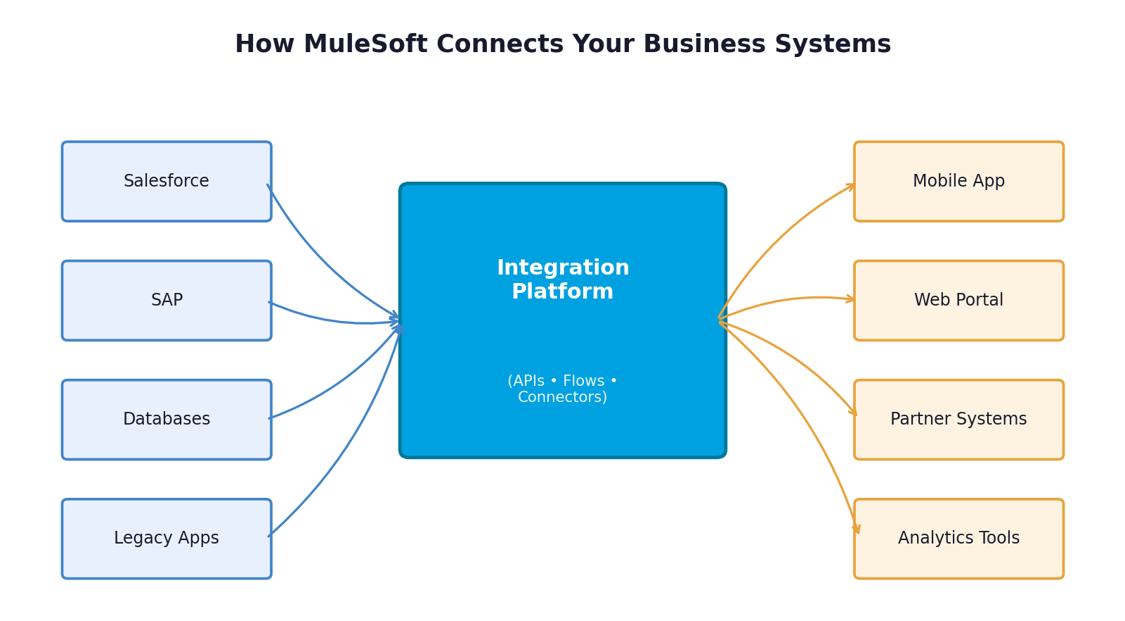
It's also worth understanding why MuleSoft, specifically, became the dominant name in this space rather than one of its many competitors. Part of it is Salesforce's backing, which gave the platform enterprise credibility and a massive existing customer base to sell into. But a bigger part is the design philosophy itself — the emphasis on reusable, discoverable API assets stored in Exchange means that integration work compounds over time instead of resetting with every new project. A System API built for one initiative can be reused six months later for something completely unrelated, which is a very different experience from the throwaway custom scripts that used to dominate this space.
Where MuleSoft Shows Up in the Real World
It helps to ground all of this in concrete examples, because integration work can otherwise sound abstract. A retail company might use MuleSoft to connect its e-commerce platform, in-store point-of-sale systems, and warehouse inventory software so that stock levels update everywhere in real time the moment a sale happens, instead of overselling items that are technically out of stock. A healthcare provider might use it to connect electronic health record systems with insurance verification tools and lab result databases, cutting down the manual back-and-forth that used to delay patient care.
Banks and financial institutions lean on it heavily too, often connecting decades-old core banking systems with modern mobile banking apps without having to rebuild the legacy infrastructure from scratch — something that would be enormously expensive and risky to attempt directly. Telecom companies use it to unify billing, customer support, and network provisioning systems that historically ran in isolation. None of these are hypothetical use cases; they're the kind of work that shows up in real client projects, and it's exactly why the demand for integration skills spans nearly every industry rather than being confined to one sector.
Why Companies Can't Stop Hiring for This Skill
Digital transformation stopped being a buzzword a while back and turned into a survival requirement. Every company, regardless of industry, is now running a patchwork of cloud tools, on-premise systems, mobile apps, and third-party services. The businesses that figure out how to connect all of that quickly move faster than the ones still copying data between spreadsheets.
That's the demand side of the equation, and it explains why enrollment in a mulesoft course has climbed steadily over the past few years. Recruiters aren't just filling a niche technical role anymore; they're trying to plug a genuine bottleneck. A mid-sized enterprise might have one or two people who understand its full integration landscape, and when those people leave, projects grind to a halt. Certified MuleSoft professionals are scarce enough, and valuable enough, that they routinely command premium salaries compared to general software developers with similar years of experience.
"Integration used to be the unglamorous plumbing work nobody wanted. Now it's the thing that decides whether a digital transformation project succeeds or quietly dies in a backlog."
There's also a structural reason for the demand. Unlike a lot of tech skills that get replaced every few years, integration as a discipline doesn't disappear — it just changes shape. Companies migrate to new CRMs, adopt new cloud providers, acquire smaller businesses with incompatible systems, and every one of those events creates new integration work. MuleSoft has positioned itself as the standard tool for handling that work at enterprise scale, which is precisely why the skill keeps compounding in value rather than fading out.
What You Actually Learn in Proper MuleSoft Training
A lot of people assume MuleSoft training is just about learning a tool, the way you'd learn a new app. In practice, it's closer to learning a discipline — a specific way of thinking about how systems should be built so they don't collapse under their own complexity a year later.
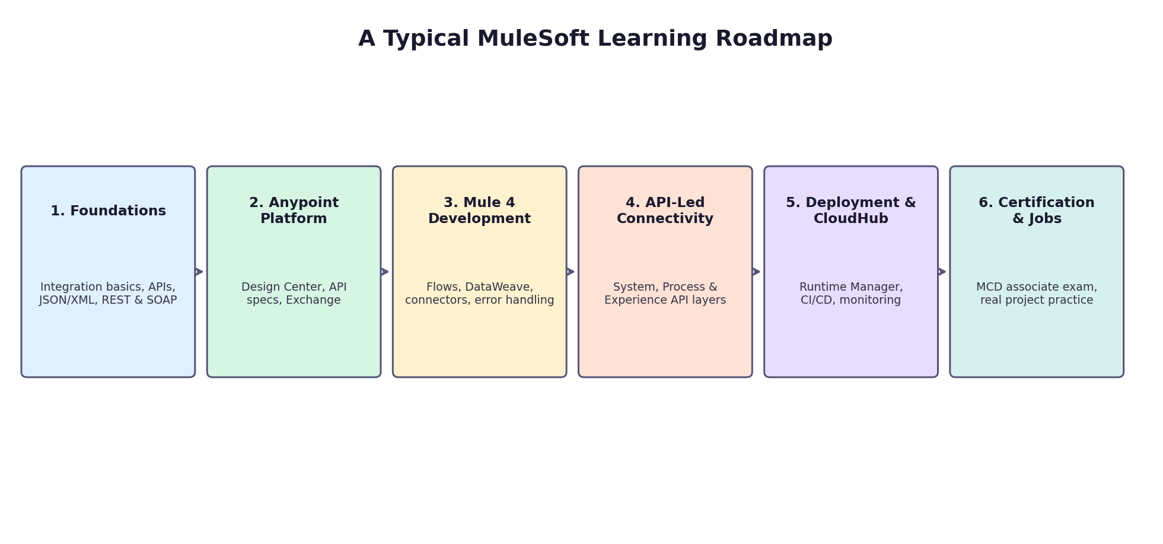
Solid mulesoft training usually starts with the fundamentals: what APIs are, how REST and SOAP differ, and how data formats like JSON and XML get passed between systems. From there, it moves into Anypoint Platform itself — Design Center for building API specifications, Exchange for discovering and reusing existing assets, and Mule 4 as the runtime engine where the actual integration logic lives.
● Building and testing Mule flows using Anypoint Studio, the platform's visual development environment
● Writing DataWeave scripts to transform data from one format or structure into another
● Connecting to real-world systems using pre-built connectors for Salesforce, databases, file systems, and messaging queues
● Handling errors gracefully so one broken connection doesn't bring down an entire business process
● Deploying and monitoring applications on CloudHub, MuleSoft's cloud runtime
What separates decent training from forgettable training is how much hands-on building is involved. Reading about DataWeave syntax is very different from actually debugging a transformation that keeps failing because a nested array wasn't handled correctly. The people who come out of training genuinely job-ready are the ones who've broken things, fixed them, and understood why the fix worked — not the ones who watched videos and never opened Anypoint Studio.
Choosing the Right Format: Classroom, Self-Paced, or Live Online
This is where a lot of people get stuck, and understandably so. There's no shortage of options claiming to teach the same skill, and the format you choose has a real impact on whether you actually finish and retain what you learn. For most working professionals, mulesoft online training has become the practical middle ground between the flexibility of self-paced videos and the accountability of a physical classroom. A well-run live online program gives you a real instructor, scheduled sessions, and classmates you can compare notes with, while still letting you attend from home and rewatch recorded sessions when something didn't click the first time. That combination matters more than it sounds — plenty of people buy a bundle of pre-recorded videos with good intentions and never finish them, simply because there's no fixed schedule creating a reason to show up.
A few things are worth checking before committing to any program, regardless of format:
Does it cover Mule 4, not an outdated version of the runtime?
Is there a genuine hands-on lab component, or is it mostly slides and theory?
Does the curriculum map to the actual MuleSoft Certified Developer exam objectives?
Are instructors currently working with the platform, or teaching from years-old material?
Is there post-training support for interview preparation or project-based doubts?
None of these questions are unreasonable to ask before paying for a course, and any legitimate training provider should be able to answer them clearly without dodging.
The Real-World Projects That Make the Learning Stick
Theory only gets you so far with a platform like this. What actually builds confidence — and what interviewers actually want to hear about — is project experience. A few examples of the kind of practical work that shows up in a good training track:
Building a System API that syncs customer records between Salesforce and an internal SQL database in near real time
Creating a Process API that combines order data from an e-commerce platform with inventory data from a warehouse system
Designing an Experience API that formats backend data specifically for a mobile app's needs, separate from what a web dashboard needs
Implementing error handling and retry logic so a temporary network failure doesn't cause data loss
Setting up API policies in Anypoint Platform for rate limiting, security, and monitoring
Each of these mirrors something companies are doing right now, which is exactly why they show up so often in interviews. Being able to describe a project you actually
built — including the part where it broke and how you fixed it — carries far more weight than reciting definitions.
What a Career Path Actually Looks Like
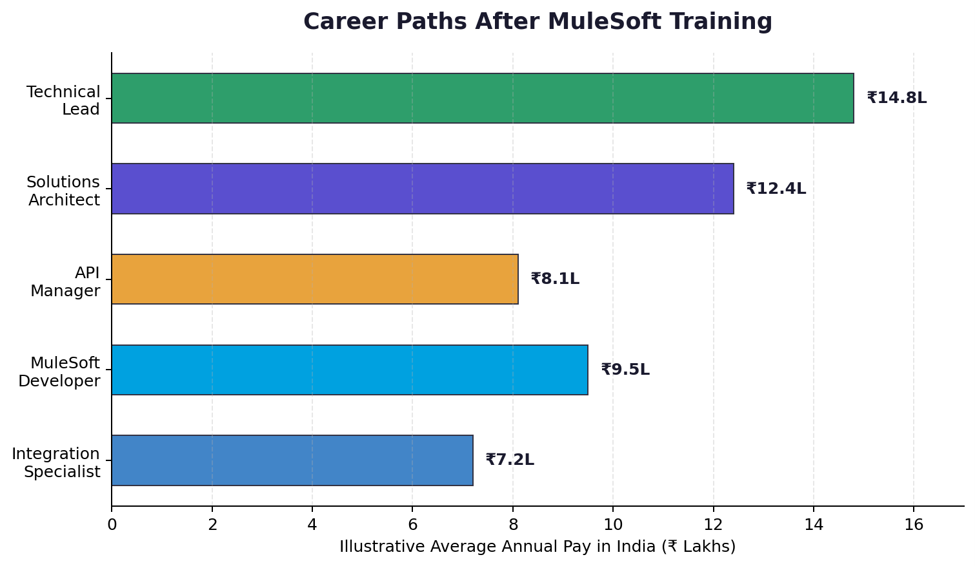
One of the more appealing things about this field is that it doesn't lock you into a single job title forever. People typically start as an integration developer or MuleSoft developer, working under a senior architect on specific flows and APIs. With a couple of years of hands-on project experience, many move into API management or become the go-to specialist for a particular business system integration.
From there, the natural progression is toward solutions architecture — designing the overall integration strategy for an organization rather than building individual flows — or toward technical leadership, managing a team of developers across multiple integration projects. Consulting is another common path, since MuleSoft-certified professionals are frequently brought in by System Integrator partner firms to work across multiple client environments rather than staying tied to one company.
Certification: Does It Actually Matter?
This question comes up constantly, and the honest answer is: yes, but not in isolation. The MuleSoft Certified Developer - Level 1 (Mule 4) credential is widely recognized and often listed as a preferred, sometimes required, qualification in job postings. It signals to a hiring manager that you understand the platform's core concepts well enough to pass a structured, proctored exam.
What certification doesn't do is replace real project experience. Plenty of candidates pass the exam and then struggle in an interview when asked to walk through how they'd design a specific integration, because memorizing exam objectives and actually building something under real constraints are different skills. The strongest candidates combine both — a certification that gets them past the initial resume screen, and hands-on project work that lets them speak confidently once they're in the room.
Common Mistakes Beginners Make
A few patterns show up again and again among people learning this platform, and knowing them in advance can save a lot of frustration.
Jumping straight into complex flows before understanding basic REST and API concepts
Treating DataWeave as something to memorize rather than practice — it clicks much faster with repetition than with reading
Ignoring error handling until a project breaks in a way that's hard to trace
Skipping the certification study guide and assuming hands-on practice alone is enough for the exam's specific question style
Not building a portfolio of sample projects to reference during interviews
None of these mistakes are fatal, and almost everyone who's proficient today made at least a couple of them early on. The difference is simply recognizing them sooner rather than later.
Frequently Asked Questions
Do I need a coding background to learn MuleSoft?
A basic understanding of programming logic helps, but you don't need to be a seasoned software engineer. Many people transition into this field from roles in QA, business analysis, or general IT support. What matters more is comfort with structured, logical thinking and a willingness to get hands-on with the tools rather than only reading about them.
How long does it realistically take to become job-ready?
Most structured training programs run between six and ten weeks for the core curriculum, but genuine job readiness usually takes a bit longer once you factor in certification prep and building a small portfolio of practice projects. Three to four months of consistent effort is a realistic timeline for someone starting from scratch.
Is MuleSoft still relevant given how fast the API and integration space changes?
Yes, and this comes up a lot because the tech industry moves quickly. MuleSoft continues to be actively developed and updated by Salesforce, and enterprise integration needs aren't going away — if anything, they're growing as companies adopt more cloud tools and need them to work together. The platform itself evolves, which is exactly why choosing training that covers current versions matters.
What's the difference between learning through free tutorials and paying for structured training?
Free tutorials are genuinely useful for getting a feel for the platform, but they rarely offer structured feedback, a clear progression toward certification, or exposure to realistic, messy project scenarios. Paid, structured programs tend to fill that gap with mentorship, doubt-clearing sessions, and a curriculum that's mapped to what employers and certification exams actually expect.
Getting Started: A Practical First Step
If any of this resonates, the most useful thing you can do right now isn't to buy the first course you find, but to spend a weekend exploring the free trial of Anypoint Platform and going through a couple of introductory tutorials. See if the way of thinking — breaking a business process down into APIs and flows — feels engaging rather than tedious. It's a genuinely different mental model from general application development, and it's worth confirming you enjoy it before committing serious time and money to a structured program.
From there, look for training that treats the certification as a milestone rather than the entire goal, gives you enough hands-on lab time to actually get comfortable making mistakes, and connects you with people who are further along the same path. Integration work, almost by definition, is collaborative — the sooner you start thinking like someone who connects systems for a living, the sooner it stops feeling like an abstract skill and starts feeling like a career.
It's also worth being honest about the parts of this field that don't get talked about enough. Integration work can be thankless when it's running smoothly — nobody notices a system that's quietly syncing data correctly every day — and it can be intensely stressful when something breaks in production, because a failed integration often means a business process has stopped entirely somewhere downstream. That combination of low visibility during success and high pressure during failure is part of why experienced integration professionals are paid well; the responsibility is genuinely higher than it looks from the outside.
The good news is that none of this requires a rare kind of talent. It requires curiosity about how systems fit together, patience for debugging things that don't work the first time, and a willingness to actually build rather than just read. Those are learnable habits, not innate gifts, which is exactly why people from such a wide range of backgrounds — QA testers, business analysts, support engineers, even career changers with no formal tech background — have successfully moved into this field.
The demand isn't a passing trend. As long as companies keep adopting new tools faster than those tools can natively talk to each other, someone will need to build the bridge. That's a fairly durable place to plant a career, and it's one that tends to reward the people willing to put in genuine, hands-on practice rather than those looking for a shortcut.