
Workday HCM Cutover Blueprint: Data Freezes to Day-One Success
Last updated on Aug 25, 2026

The process of transforming from an existing Human Resources Information System (HRIS) to the modern Workday Human Capital Management system is considered to be one of the complicated operational changes that the company can go through. While months of effort go into the discovery, architecture, business process framework configuration, integration, and user acceptance testing—skills that are generally mastered in a trusted workday hcm course—the success of the project ultimately will depend on a brief period in which the tension levels are very high.
Cutover is the well-planned transfer from the legacy systems to the production Workday system. It is the time when the work of the legacy system is stopped, historical and default information about the workforce is collected and processed, the Production Workday system is installed and checked, the new Workday system is connected with external systems and the company switches to full work mode.
The unsuccessful cutover can result in payroll discrepancies, incorrect data feeds from the benefits suppliers, breaches of regulations, and immediate loss of employees' trust towards the company. In contrast, the orderly cutover process will ensure that there are no interruptions in business processes and will rise to trust on the first day of operations.
Strategic Execution of a Workday Cutover
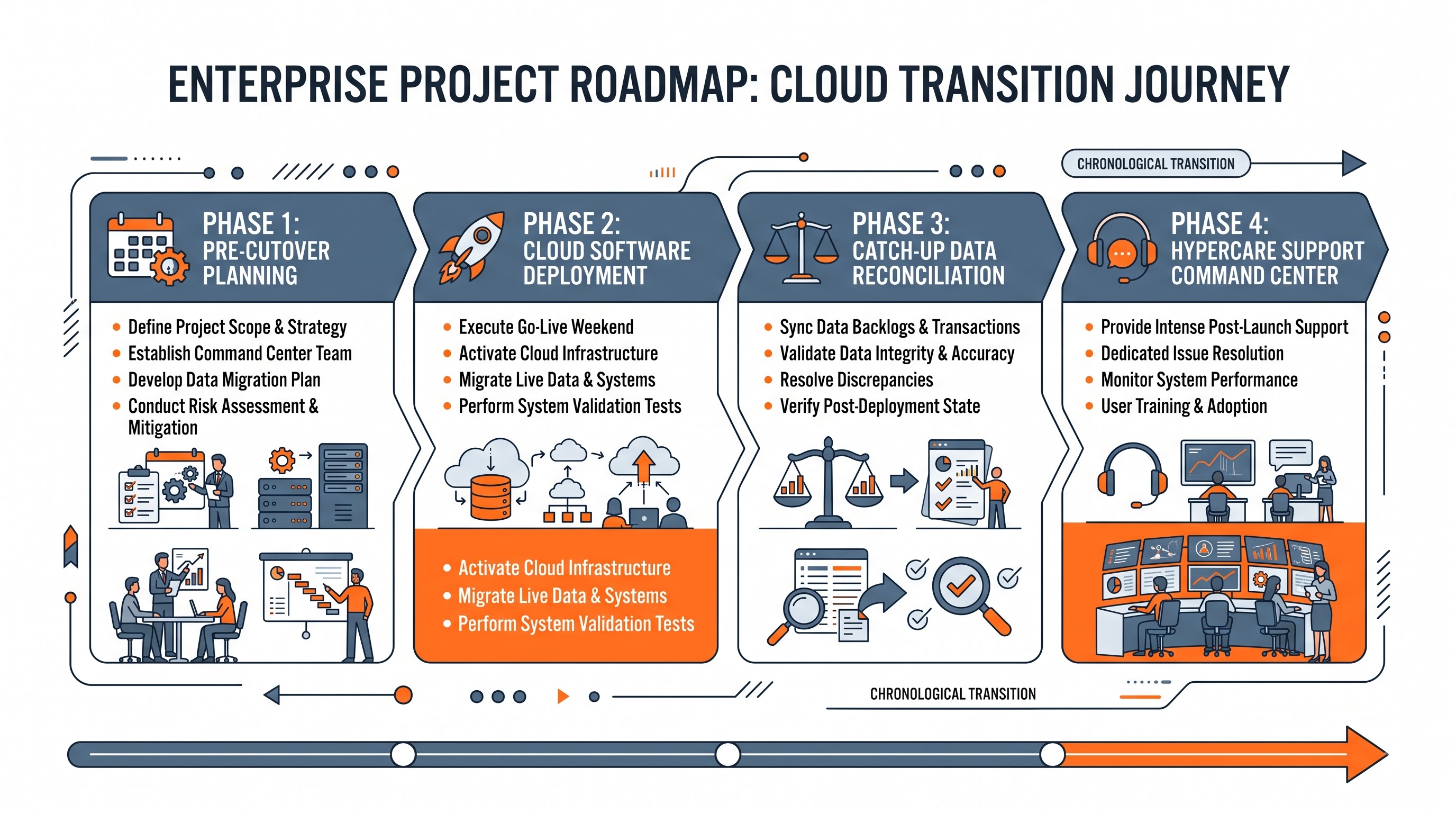
An effective Workday HCM cutover is not a short event that can be completed in a single weekend; it is a coordinated project that may take several weeks. Planning requires the division of the entire cutover process into four principal phases: pre-cutover preparation, outage period, waiting period, and follow-up assistance period.
Pre-Cutover Preparation
In the weeks leading to the main downtime period, the project team looks through all the necessary configs in the Gold Tenant, creates the complete cutover runbook down to the last minute, checks the cutover staffing schedules, and notifies all departments of the upcoming outage periods and the deadlines for the submission.
The Outage Period
This is the main downtime period that usually lasts for about three to five days. During the downtime, legacy systems are put to freeze, Workday tenant gets unlocked for the loading of administrative information through the Enterprise Interface Builders, and the configuration is migrated.
The Catch-Up Processing Window
When business activities are essentially stopped, any events incurred at the blackout period, including emergency terminations, off-cycle hires, address changes, or urgent adjustments for remuneration, should be recorded, audited, and imported to Workday before being available for all users.
Day-One Readiness and Hypercare Window
Once the production tenant is available to managers and employees, a command center will be in operation to monitor authentication, assess integration performance, resolve user tickets, and review day-one activities like time entry, onboarding, and payroll calculations.
Designing and Enforcing the Legacy Data Freeze Strategy
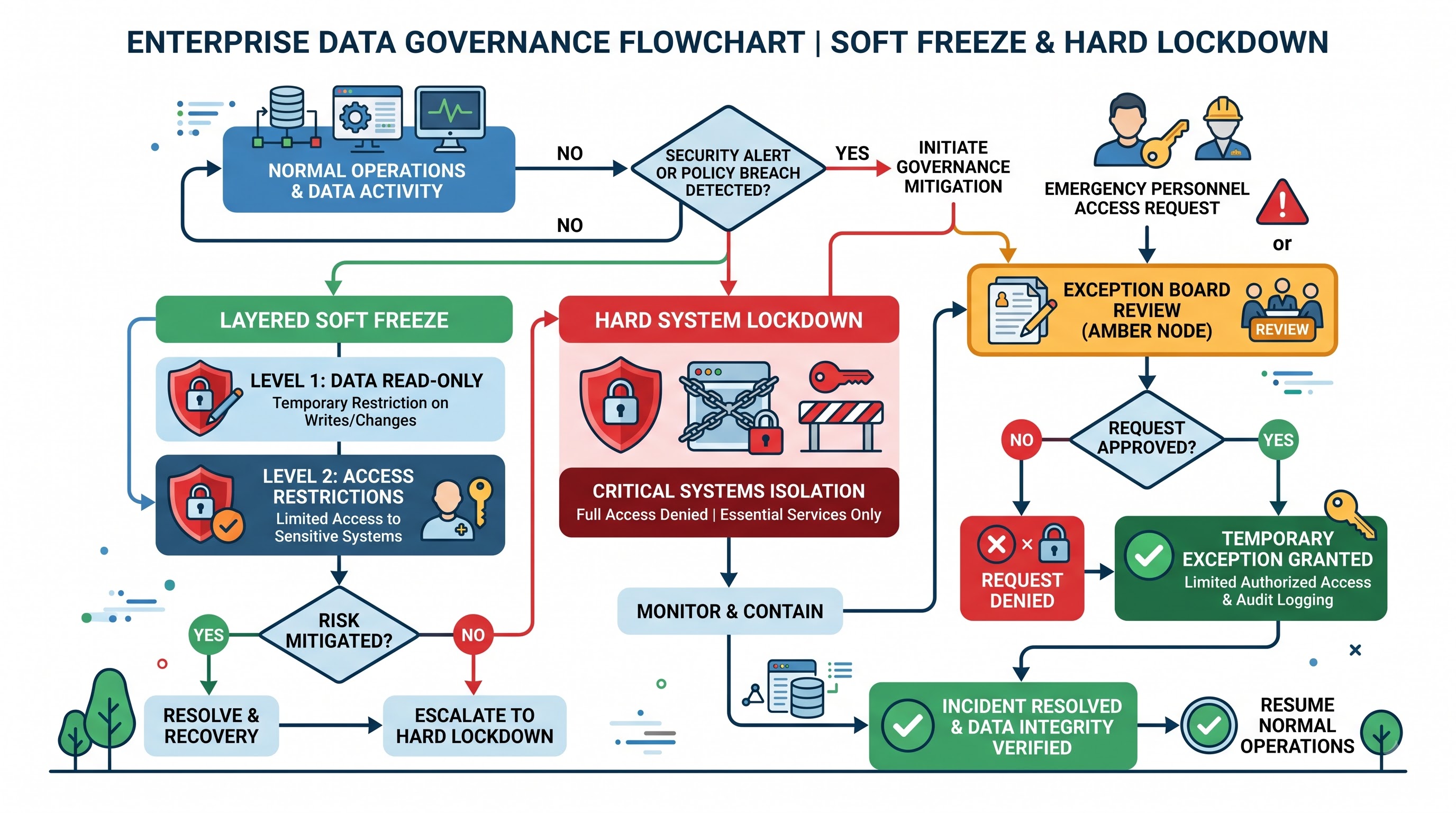
Data freeze is the boundary that stops the dynamic flow of legacy data while allowing extraction teams to capture an organization’s latest developments. In order to set up an effective freeze, the challenge is to achieve an appropriate balance between the technical need for stable data and the operational need for an enterprise to keep hiring, promoting, and compensating employees.
Distinction Between Hard and Soft Freezes
In big organizations, the same freezing procedure usually doesn't apply. Instead, companies go for a layered freezing process:
A soft freeze starts two or three weeks before the transition weekend. This implies that normal business processes stopped. For example, reorganization processes, job descriptions, and salary adjustments take no effect before the freeze. At this point, the only transactions that can be done are critical ones (e.g., hiring someone, taking a leave, putting someone on the list of urgent departures). The HR department has to give approval for businesses to perform these operations.
A hard freeze takes place during the transition weekend. The older HCM and payroll systems are placed in the read-only mode with all users. No updates of any kind can be performed during that period.
Departmental Blackout Windows and Submission Deadlines
Saracen - It's essential to communicate strict cutoff dates to the business units ahead of time in order to avoid a huge influx of submissions right before the hard freeze takes place.
It is necessary to send a message to the department of recruitment and hiring on the last day the offers will be issued before the go-live phase along with the regulations governing offer issuance after the go-live phase.
Compensation and mobilization requests can only be approved if submitted at least a week prior to the freeze date in order to clear legacy queues.
The administration at the benefits department needs to collaborate with carrier notification dates and make sure that any life-changing events that take place during the freeze period are recorded in the logs.
With payroll, the requirement is stricter. The cutover dates should be prepared according to the dates of the end of the pay period and money disbursement date.
The Protocols for Managing Exceptions
Although strict guidelines are in place, real business emergencies can nevertheless occur during freeze periods. For example, a manager may need to fire an employee in the interest of security, or an urgent regulatory submission may need to be made in a frozen state to change an address.
To handle the situation, the cutover team needs to create an Exception Governance Board, which can help keep track of any emergency transaction during the freeze in a secure centralized tracking system that includes the following items:
A unique identifier for the transaction.
The ID number and name of the employee.
The type of the transaction (was it a termination, hiring, or bank account update).
The date of the event.
The reasons for making the transaction and the name of the executive who approved it.
The analysis of the implications of the transaction in terms of its influence on payroll, access to the building, and health care approval processes.
The information about whether manual processing will be performed on the transaction in the old system or the transaction would wait for the processing in Workday.
Sequence of Ingestion of Enterprise Data in Workday HCM
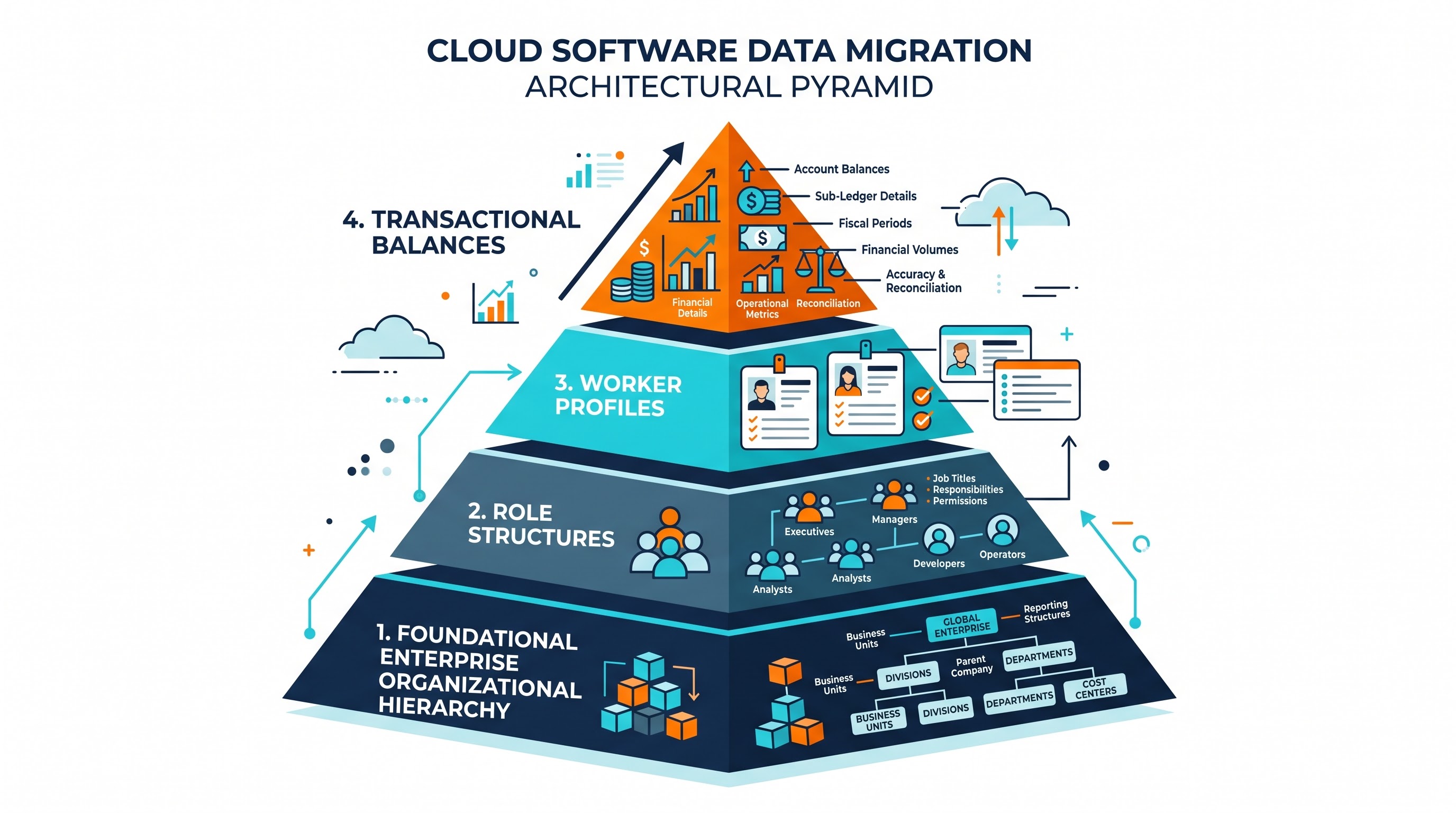
The data uploading procedure in Workday during the cut-over period necessitates quite the stringent chain of dependencies. Owing to the framework based on the system of objects associated through reference IDs, the data uploading occurs through a strict hierarchical order.
Uploading worker information prior to the establishment of the corresponding supervisory bodies and the related worker positions will not succeed. Certainly, grasping the complex structure of such entities is central to the practical workday hcm training.
Tier 1: Organizational structure and the foundation of the architecture
The first tier lays the foundations for the architecture of the organization:
Organizations, Legal entities, and Currency Projects.
Cost Centers, Regions, and Custom Organizations.
Supervisory Organization Hierarchy with top organizations and subordinate organizations.
Locations, Location Information and Time Profiles.
Job Classifications, Management Levels, Job Families, Job Profiles.
Compensation Scheme, Grades, Grade Profiles and Allowance Policy.
Tier 2: Setting Up Positions and Job Management Structures
After the basic organizational structure is confirmed, the development of structural roles takes place:
The creation of job vacancies within Supervisory Organizations for organizations relying on the Position Management staffing model.
The assignment of job classifications and monetary standards, hiring limitations, and employment categories to the positions.
The establishment of access control positions for supervisory organizations, cost centers, and special organizations to start the automated processes once the employees are registered.
Tier 3: Ingestion of Active Workers
Worker ingestion involves multiple steps for each worker including identifying who they are, how do they work and benefits eligibility:
Fundamentals of Worker Demographics: Personal identification information, national identifiers, legal name and preferred name, primary workplace, means of contact, date of birth and country of citizenship.
Hire and Placement Information: Carrying out hire or contingent worker process. The worker is attached to its Supervisory Organization, Position, Location, and Job Title with the exact effective date from history or newly created.
Pay and Compensation: Providing information related to the salary, hourly rate, steps of compensation, allowances and eligibility for merit program.
Banking and Payment Elections: Provision of employee bank account details and payments.
Benefits Election: Provision of active benefit information, risk coverage and begin date.
Historical Records: Provision of hire date, service date, and seniority calculation date.
Tier Four: Transactional and Historical Balances
The last entry tier fills in the dynamic transaction balances and point-in-time information.
Absence and Leave Balances: It includes loading accrued paid time off, sick leave balances, milestones for length of services acquired, and active leaves with their expected return dates.
Compensation History: It involves loading salary history changes, as well as merit adjustments required for reporting purposes and further compensation review.
Performance and Talent History: It consists of loading any rating cycles, results of goal achievement and talent assessments, if so required.
The Catch-Up Processing Playbook
Catch-up processing refers to the operational gap created by the blackout window. In the process of loading baseline data by the technical cutover team, the actual labor actions keep happening. Catch-up processing is thus a well-structured procedure that aims at bringing the new Workday production tenant to the exact and timely reflection of the company.
Delta Transactions Classification
Delta transactions that are processed during the blackout can belong to one of two categories: Pre-Cutover Effective Deltas that have happened chronologically previous to the phrase of data extraction but were authorized or processed in the legacy system after the completion of extraction.
Blackout Window Effective Deltas that have taken place during the blackout, for example, an employee starting working on the Monday of the blackout weekend or an offboarding that occurs on Sunday.
Identifying Manual Entry or Automated Catch-Up
The volume of delta transactions determines which method will be used to process them:
Manual Catch-Up Processing should be applied in case the transaction volumetrics are low but there is high risk involved. Executives' appointments, terminations, and changes in banking must be done manually by HR professionals who have gone through structured workday hr training in order to validate business process routing and security roles.
Automated Delta Ingestion involving Enterprise Interface Builders is utilized in case the volume of transactions is high, for instance, mass seasonal onboarding, organization-wide bonus payments, or large-scale organizational restructuring.
Reconciliation and Variance Audit
All reconciliation processes must go through a rigorous reconciliation procedure before the production system is approved for employees.
Headcount reconciliation is the process of comparing the active number of employees and non-employees in the legacy program and extract files, production, and the exceptions file. All differences must be accounted for by new hires, terminations, or change under the status.
Compensation reconciliation refers to the process of calculating the total amount of annual salary in the legacy system and comparing it with the total compensation loaded in Workday. All differences must be investigated down to the information about each employee.
Benefits and deductions auditing refers to the process of checking how many employees have chosen each type of plan and the type of cover to avoid drops in covers and incorrect payroll deductions.
Integrations, safety, and cutover
Workday is not working alone, but it is the heart of the technology ecosystem of the companies. One of the key parts of the cutover process is transferring integrations from testing environments to productive environments.
Processes to Implement Integration Cutover
In the implementation of the integration cutover, the transition of interfaces from simulators for the outbound and inbound messages to the actual productions of vendors is needed:
Stopping Old Scheduled Jobs: All automatic cron jobs, exports by SFTP, and APIs originating from the old HR and payroll systems should be stopped to avoid double data sending and file overwriting by the vendors.
Flipping Endpoints and Credentials: Workday integration configurations must be updated with the addresses of the real vendors’ SFTPs, PGP encryption keys, API tokens, and credentials for authentication.
Initial Baseline Snapshot Delivery: Discussions with the key downstream service providers, to check if they need a full population baseline file or an instant delta file at go-live time, will be held.
Integration Sequencing: The initial outgoing integrations, such as Active Directory and Identity Management, must be triggered first and prepared for single sign-on of employees before activating the downstream services partisan feeds.
Single Sign-On and Identity Access Management Transition
Synchronized access to user authentication from day one needs a correct alliance of Workday, Identity Providers, and corporate directory services.
Rules for Active Directory provisioning need modification, allowing Workday to become an authoritative source of truth for identities. This integration should synchronize unique identifiers of workers, corporate emails, managers, and departments.
Policies on Single Sign-On need to be set up in Workday’s production environment. Even though the transition team initially will use Workday’s login credentials, SSO will have to be enforced on all employees before the tenant is opened for them.
Validation of Multi-Factor Authentication settings should be conducted to guarantee smooth authentication of remote workers and field employees on desktop and mobile applications.
Establishment of Security Groups and Auditing of Roles
Security in Workday is dynamic and hierarchical in nature. Hence, security administrators must ensure during cutover that:
Role-Based Security Group allocations have been correctly made for working organizations. The absence of HR Partner/HR Manager in any organization will lead to business processes that cannot be moved forward.
User-Based Security Groups such as system administrators, integrators, and compliance auditors may only be assigned to those personnel who have requisite level of access.
Policies on Domain and Business Process Security must be effective and updating process on tenants’ security cache is finalized.
Mock Cutovers: The Dress Rehearsal Strategy
One of the most significant indicators of the success of cutovers is the quality of mock cutover that was done before the actual cutover took place. A mock cutover is an actual simulation of the whole cutover weekend done in a stage or implementation environment using real legacy data pulls.
Goals of Mock Cutovers
For a good cutover plan, it is advisable to do at least two-three rounds of mock cutovers during implementation. Mock cutovers have distinct operational objectives:
Validation of Time and Critical Path: Mock cutovers give actual running times for each step in the cutover plan. If the EIB load that was estimated to take one hour ended up taking seven hours in the mock cutover, then timelines of the cutover must be revised or the datafile must be sent in batches.
Testing of the Order of Tasks: Mock cutovers reveal unforeseen dependencies such as trying to load some compensation steps before the grade profile is connected to the job profile.
Trial of the Team: Mock cutovers prepare the cutover command team aware of communication protocols used, escalation procedures and handoff processes in case of time constraints.
Cutover Runbook Management
The result of every rehearsal cutover is a revised Cutover Runbook. The Cutover Runbook serves as the essential operations guide for the process of going live. It includes:
A task identification number and a descriptive name of the task.
One that is functional such as Core HCM, Compensation, Payroll, Security, or Integrations.
The actual system/environment in which the task is carried out.
Pre-requisite tasks that must have been completed before the task can begin.
An owner and a backup.
Estimated time of beginning, length of implementation, and final time of execution.
Actual time of beginning, length of implementation, and completion time during the rehearsal.
The validation stage and sign-off requirements for the successful completion of the task.
Command Center Governance and the Go/No-Go Decision Framework
The usual corporate hierarchy is momentarily replaced with a dedicated Cutover Command Center structure during the cutover execution. The governance model provides for rapid decision-making, clear communication, and swift problem resolution.
Cutover Command Center Operation's Frequency
The Cutover Command Center is in operation continuously during the entire cutover weekend, either in a dedicated physical war room or through a managed virtual control center.
Every three to four hours the cadence meetings are held. During these short meetings, the leaders of the workstreams provide the status updates on their activities: completed activities, tasks that are underway, and risks that need to be addressed.
The Cutover Incident Log is a record of technical and functional problems that occurred during the loading process. Each issue is documented, and severity is assigned to it and an investigator is designated for solving this issue.
Go/No-Go Decision Points
The cutover strategy features clearly described Go/No-Go decision points ensuring that decision-makers carefully examine the relevant metrics and determine if it is advisable to continue with the installation process.
Gate 1 is determined before the legacy hard freeze is implemented. The steering committee checks if testing is completed successfully, gold tenant configuration is approved, and if there are any operational issues that prevent going into blackout.
Gate 2 is defined after the initial baseline and preliminary reconciliations during the cutover weekend. The decision-makers concentrate on load error rates, timing on critical path, and integrity numbers.
Gate 3 marks the main Go/No-Go decision point which is given several hours before the system starts operating. At this point, the steering committee assesses the core business readiness.
Core human capital management data has been uploaded with accuracy levels over 99 percent across all headcounts.
Key integrations with payroll, benefits carrier and Active Directory have been tested successfully and are running well.
The results of payroll calculation parallel testing are reconciled within the acceptable scope of the business.
Security roles have been checked to ensure that there are no supervising organizations that have not had their approval role assigned.
Running behind schedule has been checked and has been documented.
Once all requirements are met, executive sponsors give final approval to proceed with tenant opening. Should there be major challenges beyond the safety net timeframe, the Rollback Protocol will be executed.
Day-One Operational Readiness and Hypercare Stabilization
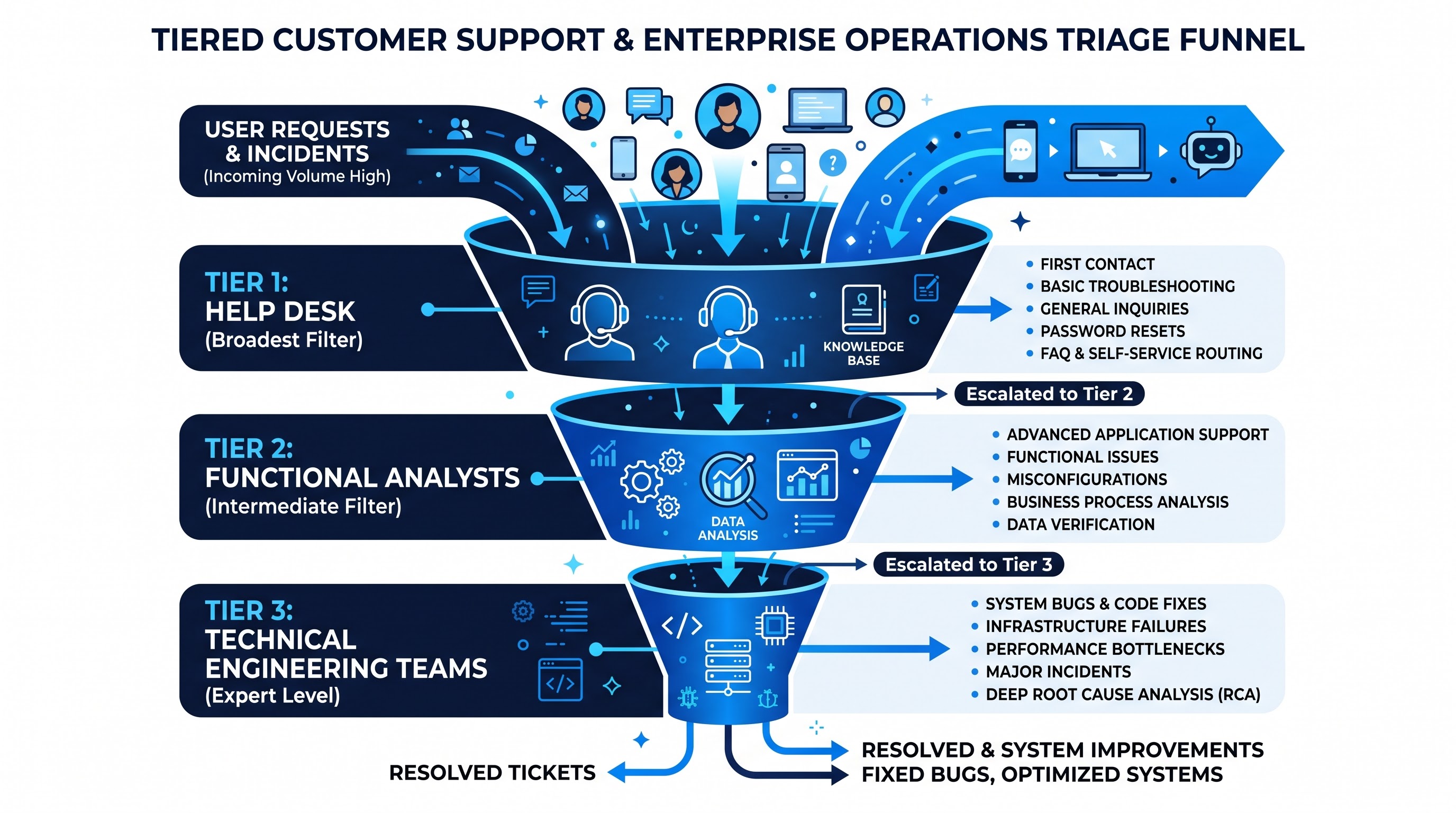
The activation of a Workday production application signifies the completion of the technical transition and the commencement of the hypercare period. Day-One Operational Readiness requires detailed planning and preparation to help users and evaluate system efficiency and stabilize operations.
Day One Command Center and Triage System
Upon entering day one, command center activity moves from technical data moving to support and dealing with issues. In order not to overload the technical teams, the support is divided into levels.
Level 1 Support involves HR shared services, help desk workers, and floor assistants who deal with standard inquiries, password renewing, basic instructions for apps, and setting apps.
Level 2 Support represents functional HR analysts and experts who deal with issues related to configuration differences, process roadblocks, incorrect compensation rules, and data amendments.
Level 3 Support suggests workday technical managers, integrations developers, security officers, and Workday Contacts, who deal with major bugs, integrations errors, tenant issues, and escalated problems in case with a vendor.
Monitoring of Critical Day-One Processes
The hypercare team should be responsible for monitoring key processes and technical queues during the start-up period.
Track onboarding and new hires. For the purpose of ensuring that the onboarding process can be performed by the users who come on the same day go live or just prior to go live.
Manager approvals should be tracked through automated reports on stalled processes. In case of the manager's absence, the administrator should make a proper adjustment.
Payroll processing is considered to be the biggest test. The team should monitor time entry submissions, manager's approvals, as well as payroll calculations, so that the very first payroll processing is trouble-free.
Integration queue monitoring presupposes continuous checking of the Workday integration process events in order to catch errors in the system in time.
Hypercare Governance and Transition to Operations
The term Hypercare usually refers to the period of thirty to ninety days that follows the go-live stage when at least two payroll cycles must be processed and at least one financial close must have occurred.
During this time, Hypercare Review Meetings take place weekly in order to find out about ticket volume, find patterns on errors made in the system, discuss integration data flows, and review adoption metrics. A complete review of each repeating issue is conducted and it leads to the design of the necessary micro-training for users or adjustments in the configuration.
The official Transition to Business-As-Usual status is achieved after the ticket volume reaches its average values, after all cutover exceptions are processed, after all integration processes can be performed without manual support and after the internal team takes on full responsibility for the Workday HCM production tenant.
Strategic Checklist for a Successful Workday Cutover
To make sure all workstreams are fully operational, project managers and technical leads must also keep a close tab on the following key imperatives during the cutover process:
Governance and Planning
- Set up a Cutover Governance Board that features diverse members and has the authority to escalate any issues.
- Create a comprehensive Cutover Runbook that is full of a detailed description of tasks, their owners, and prerequisites for them.
- Use an implementation tenant and complete at least two rehearsal runs of the cutover with realistic legacy data.
- Formulate clear and measurable criteria for every major deployment as to whether to go or not.
Data Management and Ingestion
- Create and implement both soft and hard legacy data freezes.
- Make sure all exceptions are put in a centralized Exception Governance Log.
- Make sure the data is ingested with strict adherence to the architecture.
- Make sure the data about the worker headcount and deductions is reconciled between both Workday and legacy data sets.
Systems Integrations and Technical Architecture
Turn off dated scheduled extraction jobs to stop data conflicts.
Update production endpoint, auth certs and PGP key for each interface that sends and receives data.
Active Directory sync, Single Sign On policy review, Multi-factor authentication for all users.
Review security group assignments for each supervisor organization to avoid any deadlock situations in process flows.
Change Management and Day One Readiness
Send appropriate information about system failures and deadlines to all the relevant departments.
Create a multi-layered Hypercare Command Center to support operations from day one.
Monitor the main processes conducted in the first week, including newly hired training, timekeeping, authority's approvals, and payroll processes.
If required, keep the Hypercare Services at least two full payroll periods and start the usual operations thereafter.
Having all work streams functioning to full capacity requires project coordinators and employees that have undergone specialized workday courses to be wary of the following points during the cutover process