
Workday Integration: Connecting HR Systems, Data, and Business Processes
Last updated on Sep 2, 2026
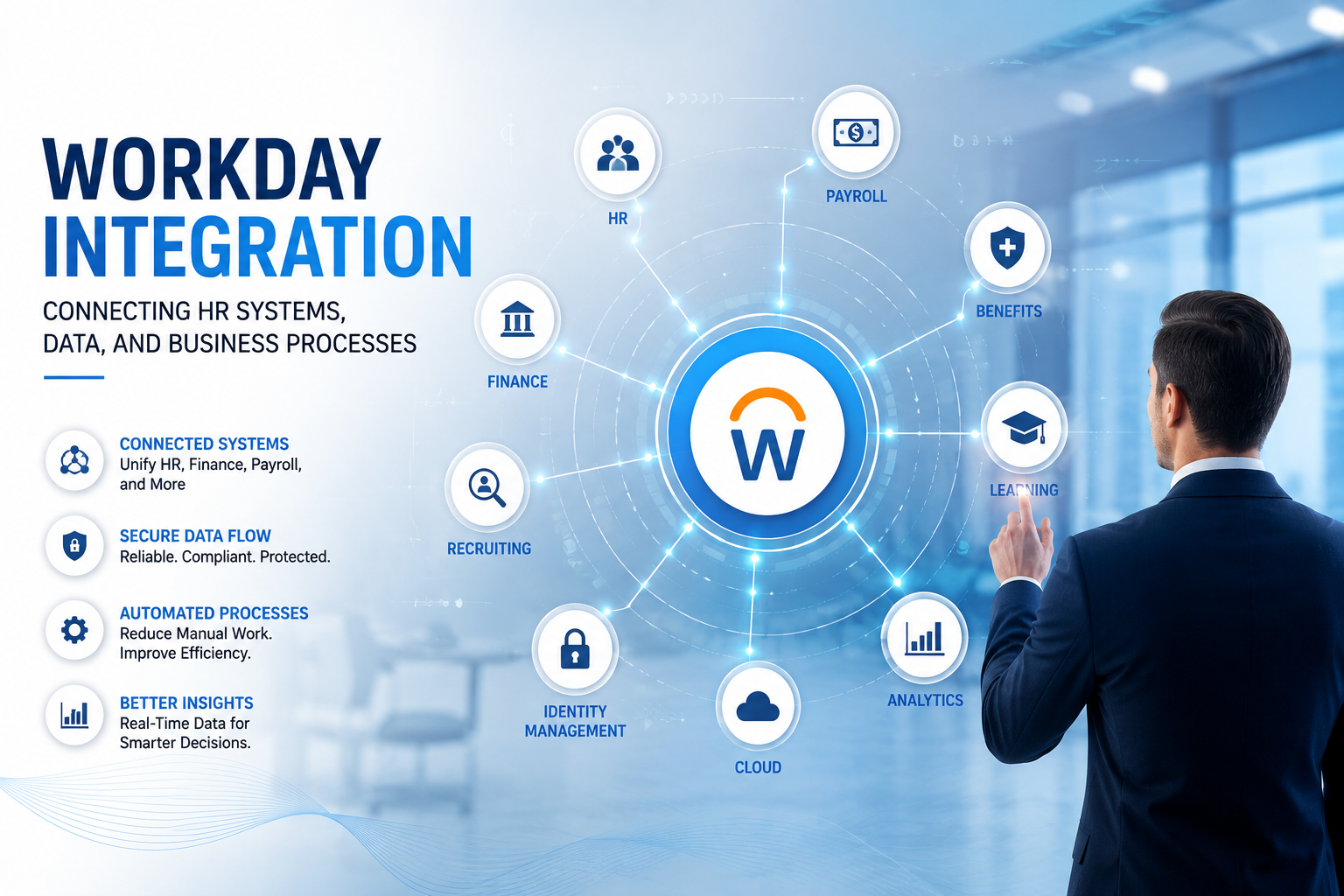
Modern organizations rarely depend on a single application to manage their business. An HR team may use Workday for human resources and payroll-related processes, while finance teams, identity-management platforms, learning systems, benefits providers, recruitment tools, and external applications may operate independently. The challenge is not simply having these systems. The real challenge is making them communicate reliably.
This is where Workday Integration becomes important. Workday Integration connects Workday with other applications and services so information can move between systems in a controlled, secure, and meaningful way. Instead of employees or administrators repeatedly entering the same information into multiple applications, integrations can automate the movement and transformation of data.
For example, when a new employee joins an organization, their information may need to reach an identity-management system, payroll provider, benefits platform, learning application, and other internal systems. Without integration, this process can involve multiple manual steps. With a properly designed integration, Workday can become part of an automated flow where the right information reaches the right system at the right time.
However, Workday Integration is more than connecting two applications. It involves understanding business requirements, data structures, integration technologies, security, error handling, testing, monitoring, and long-term maintenance. For professionals beginning to explore this field, a Workday integration course can provide a structured way to understand these concepts while building a foundation for real-world integration scenarios. That is why integration has become an important skill for professionals working with the Workday ecosystem.
Why Workday Integration Matters
The value of integration becomes easier to understand when we look at how information moves through a real organization. Consider a company hiring a new employee. The employee's name, job title, department, manager, location, employment status, and other information may initially be maintained in Workday. Other systems may need parts of this information to perform their own functions.
An identity-management platform may need the employee's name and employee ID to create an account. A learning platform may need the employee's department and job information to assign appropriate training. A benefits provider may require eligibility information. A payroll system may need compensation and employment details. If each system is updated manually, the organization has to deal with repetitive work and the possibility of inconsistent information. Integration creates a connected flow.
Workday can send information to external systems, receive information from external applications, or support more complex workflows across multiple systems. This reduces unnecessary manual work and helps organizations maintain more consistent data.
Integration can also improve the employee experience. When systems connect, a change in one business process can automatically trigger actions elsewhere. An employee does not necessarily need to contact several departments just because their role, location, manager, or employment status changes. The larger the organization becomes, the more valuable this automation can be.
Understanding the Workday Integration Landscape
Before building an integration, it is important to understand the different ways Workday can communicate with other systems. Workday provides several integration technologies and approaches, and the right option depends on the business requirement. Some integrations are designed for scheduled data exchange. Others need near-real-time communication. Some involve standard Workday functionality, while others require custom transformation and processing.
At a high level, Workday integrations can involve:
Workday-to-external-system integrations
External-system-to-Workday integrations
Two-way integrations
File-based integrations
API-based integrations
Web services
Event-driven or business-process-related integrations
Cloud-based integration patterns
The important point is that there is no single integration approach that is best for every situation. A payroll interface may have completely different requirements from an integration with an identity-management platform. A benefits provider may expect a particular file format, while another application may expose an API. A Workday integration professional therefore needs to think beyond technical configuration. The first question should always be: What business problem are we trying to solve?
Workday Integration Architecture
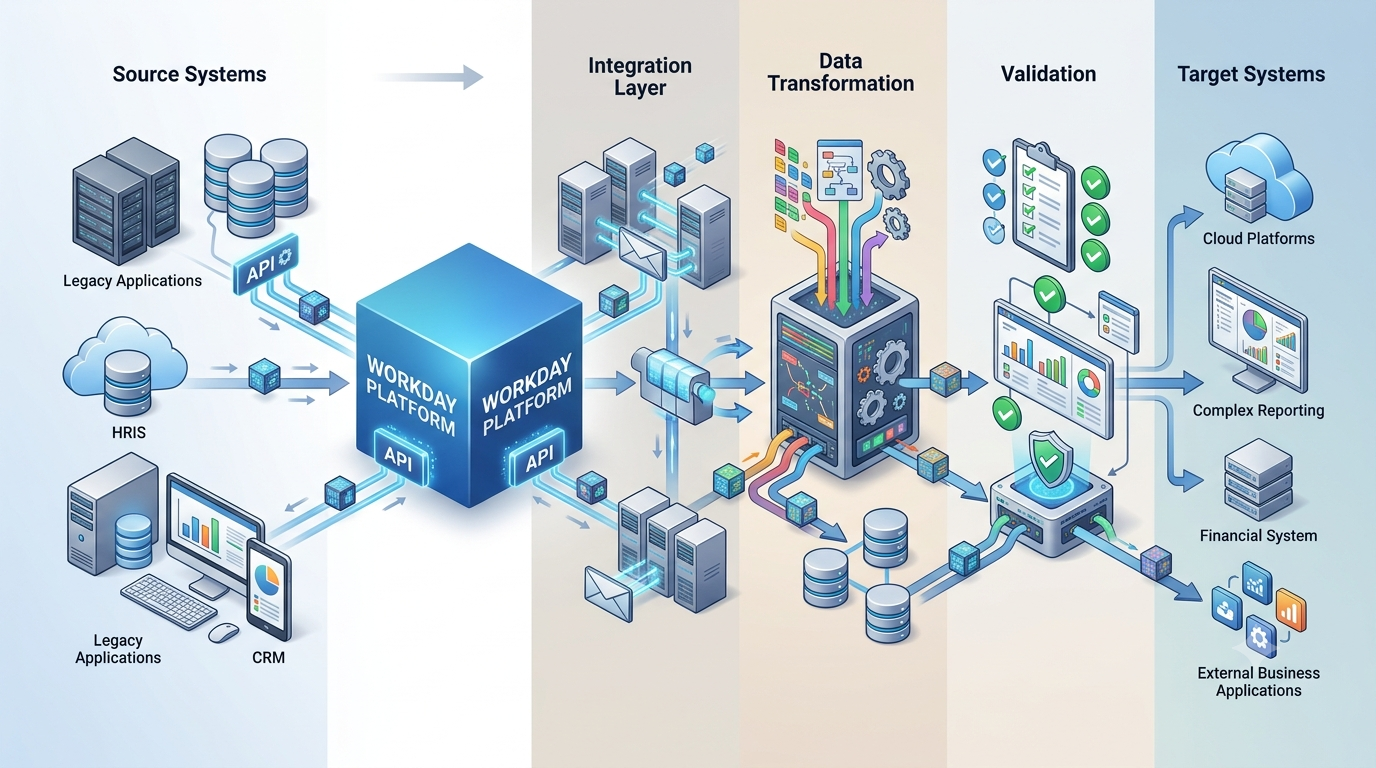
A good integration starts with a clear architecture.Imagine Workday as one system in a larger technology environment. Information may originate in Workday, travel through an integration process, be transformed into the format expected by another application, and then be delivered securely.
A simplified integration flow might look like this:
Source System → Workday Integration → Data Transformation → Validation → Target System
Each stage has a purpose. The source system provides information. Workday may retrieve or generate the required data. The integration layer processes the information and applies business rules. Transformation changes the data into the structure required by the target system. Validation checks whether the information is complete and acceptable. Finally, the target system receives the processed information. In more complex environments, the flow can involve multiple systems.
For example:
Workday → Integration Platform → Identity System → Notification Service
Or:
Recruiting Process → Workday → Learning Platform → Reporting System
The architecture should make it clear where data originates, how it is transformed, where security is applied, and how failures are handled. This clarity becomes extremely valuable when an integration has to be maintained months or years after its original development.
Workday Integration Types
One of the first concepts professionals need to understand is the difference between common integration types.
Outbound Integrations
An outbound integration sends information from Workday to another system. For example, Workday may send employee information to a payroll provider.
The integration retrieves the required data, applies business rules, transforms the information, and delivers it to the destination.
Outbound integrations are common because Workday often acts as the primary source of employee and organizational information.
Inbound Integrations
An inbound integration brings information from another system into Workday.
For example, an external system may provide data that needs to be loaded into Workday.
Inbound integrations require careful attention to data validation because information entering Workday can affect important business processes.
Bi-Directional Integrations
Some business scenarios require information to move in both directions.
For example, one system may send employee-related information to Workday while Workday sends updated information back to that system.
Bi-directional integrations are more complex because developers must understand synchronization, data ownership, timing, and conflict management.
The most important question is often not simply "which system sends data?" but which system is the authoritative source for each piece of information? That decision should be established before integration development begins.
Workday Integration Tools and Technologies
Workday integration professionals work with different tools depending on the integration requirement. The right technology is usually determined by factors such as the type of data being exchanged, the target application, security requirements, processing frequency, and the complexity of the business process. A major concept is the Workday Integration System, which represents an integration configuration designed to exchange data between Workday and another system. It provides a structured way to manage how information is retrieved, processed, transformed, and delivered.
Professionals may also work with technologies such as web services, APIs, XML, JSON, SOAP, REST, and file-based data exchange. Each approach has its own purpose, and understanding when to use one over another is an important part of integration design. Workday also provides integration-focused technologies and frameworks that allow organizations to build reusable and configurable integration solutions. These capabilities can help teams handle recurring processes without creating completely different approaches for every external application.
For example, an integration may retrieve a worker population, apply filtering logic, transform employee information, and generate a file for an external provider. The technical implementation depends largely on what the target system expects and how the receiving application is designed to consume the information.
If the target application accepts JSON through a REST API, the integration design will be different from an application that expects a fixed-width text file delivered through a secure file-transfer mechanism. Professionals building their skills through workday integration training can therefore benefit from learning these technologies together rather than treating each one as an isolated topic. This broader understanding helps integration professionals select appropriate technologies, design cleaner data flows, and build solutions that are easier to maintain as business requirements evolve.
Data Transformation: Turning Information Into the Right Format
One of the most important parts of integration is data transformation. Different systems rarely store information in the same structure. Workday may represent a department using a particular identifier, while an external application may use a different code. Workday may store employment status in one format, while the target system expects another. The integration therefore has to translate the information.
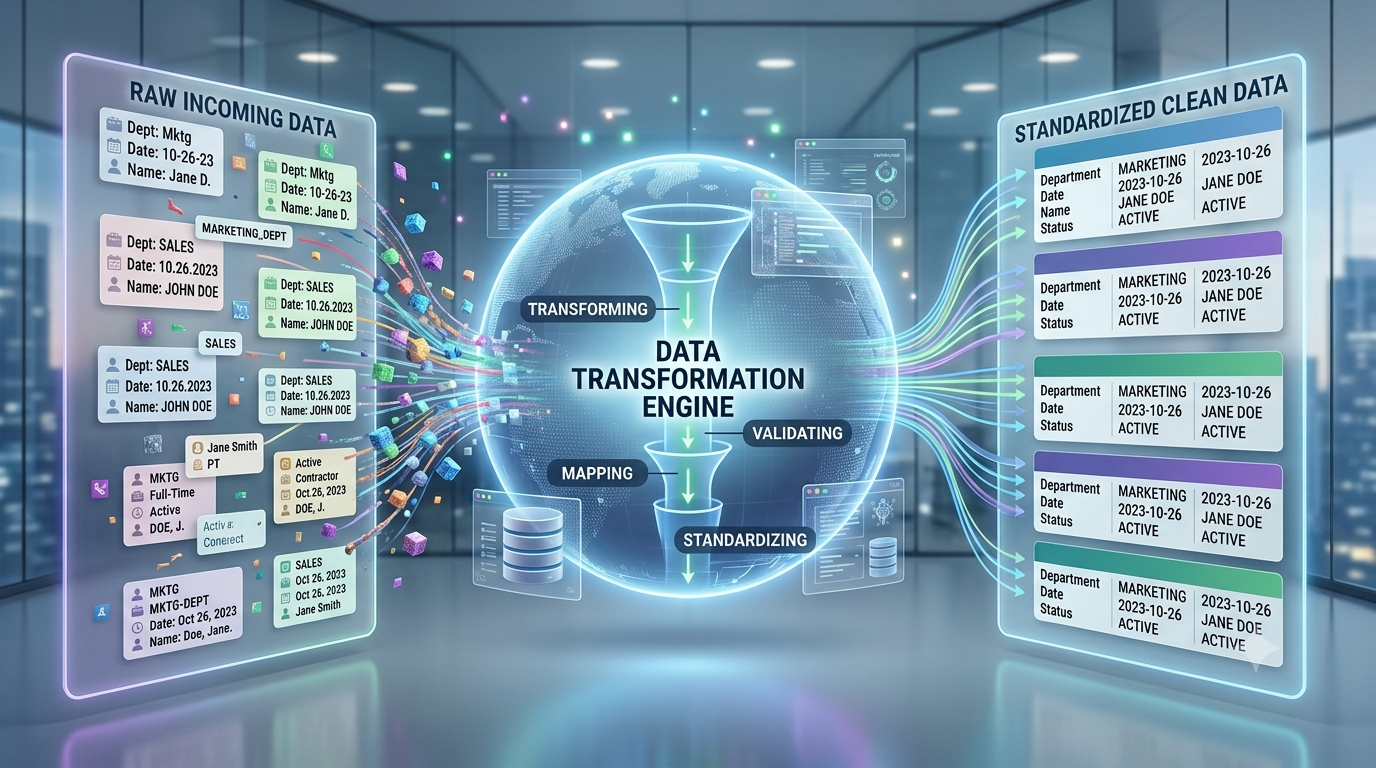
For example:
Workday: Full-Time
Target System: FT
Or:
Workday Department: FIN-001
Target System: Finance
These transformations may appear simple, but large enterprise integrations can contain hundreds of mapping rules. A strong integration design documents these mappings clearly. It should be possible for another professional to understand where each target field comes from, what transformation is applied, and what happens when the source value is missing or invalid. This is one reason data mapping is often one of the most important stages of integration development.
APIs and Web Services in Workday
APIs and web services allow applications to communicate programmatically. Instead of exchanging information manually, one application can request or send information through defined interfaces. In the Workday ecosystem, professionals may encounter both SOAP-based and REST-based web services depending on the business requirement and available functionality.
Understanding APIs requires more than knowing how to make a request. A developer should understand authentication, request structure, response structure, data formats, error responses, pagination, security, and rate or usage considerations where applicable.
For example, an API response may contain employee information in a structured format. The integration then needs to identify the relevant fields and transform them for the receiving application.This makes API knowledge valuable for Workday professionals who work on modern application ecosystems.
Workday Integration Security
HR data is highly sensitive. Employee information can include names, addresses, compensation details, organizational information, employment status, and other confidential data. Therefore, integration security cannot be treated as an afterthought. A secure integration should follow the principle of least privilege. An integration should have access only to the information and operations it actually needs.
Authentication is another major consideration. Depending on the integration, secure authentication mechanisms and credentials may be required to establish communication between systems. Data transmission should also use secure channels.
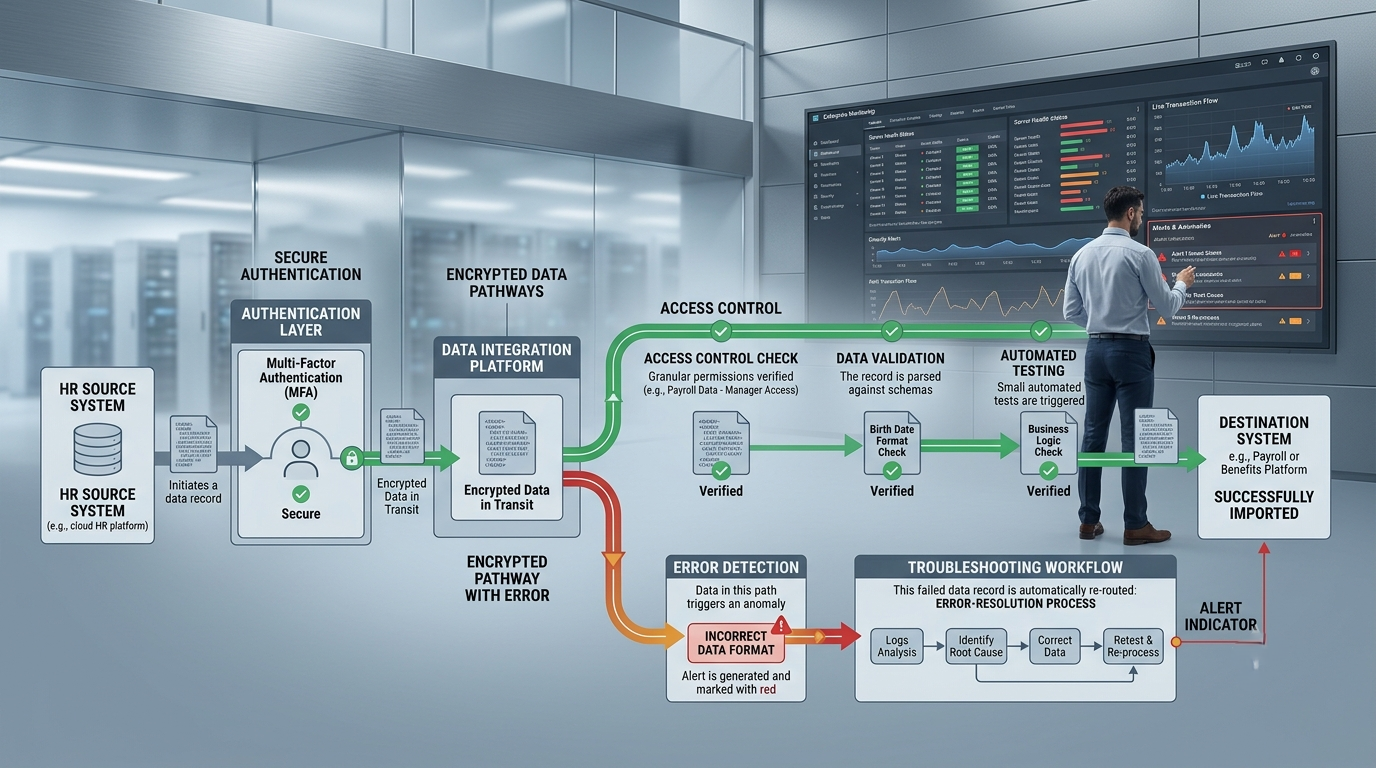
Security must be considered throughout the integration lifecycle:
Access → Authentication → Data Retrieval → Transformation → Transmission → Logging
Even logs require attention. An error log should provide enough information for troubleshooting without unnecessarily exposing sensitive employee information. Good integration design therefore balances operational visibility with data protection.
Error Handling and Monitoring
An integration that works perfectly under normal conditions is not necessarily a successful integration. Real systems generate unexpected situations. An employee may have a missing field. An external system may become unavailable. A file may contain invalid records. An API may return an error. A required value may not match the expected format. Without proper error handling, these issues can remain unnoticed.
A well-designed integration should identify failures and provide useful information for investigation.
For example, instead of simply reporting:
Integration Failed
a useful error might indicate:
Employee record could not be processed because the required department identifier was missing. That level of information makes troubleshooting much faster. Monitoring is equally important. Organizations should know whether integrations are running successfully, whether files are being delivered, whether records are rejected, and whether failures require immediate attention. In production environments, integration monitoring becomes an operational responsibility rather than just a development task.
Testing a Workday Integration
Testing should begin before an integration reaches production. A basic testing process may include unit testing, integration testing, data validation, negative testing, and user acceptance testing. Positive testing verifies that valid data produces the expected result. Negative testing asks what happens when something goes wrong.
For example:
What happens when an employee has no department?
What happens when a date is incorrectly formatted?
What happens when the target system is unavailable?
What happens when a duplicate record is received?
What happens when a required value does not exist?
These scenarios matter because production data is rarely perfect. Testing should also verify business rules. Suppose an integration is designed to send only active employees. Testing should confirm that inactive or terminated workers are handled according to the requirement. The goal is not simply to prove that the integration runs. The goal is to prove that it produces the correct business outcome.
Scheduling and Data Frequency
Not every integration needs to run continuously. Some integrations may run once a day. Others may need to run several times during the day. Certain business processes may require more immediate data exchange. The frequency should be based on business requirements.
For example, a daily benefits file may not need real-time processing. An identity-management process related to onboarding may have a stronger requirement for timely execution. Choosing an unnecessarily frequent schedule can create additional processing and operational complexity. Choosing a schedule that is too slow can create business problems. Therefore, integration timing should be treated as an architectural decision.
A useful design question is: How quickly does the target system actually need the data?
The answer helps determine whether batch, scheduled, event-driven, or API-oriented processing is appropriate.
File-Based Integrations
Despite the growth of APIs, file-based integrations remain important in enterprise environments. Many external providers still exchange information through structured files.
A typical process may involve Workday generating a file containing employee information and securely delivering it to another system. File formats can include CSV, XML, fixed-width text, or other formats depending on the receiving application.
File-based integrations require attention to several details:
File naming conventions
Field order
Data types
Delimiters
Character encoding
Date formats
Record counts
Encryption
Secure file transfer
Error handling
Duplicate prevention
A small formatting issue can cause an entire file to be rejected by a receiving system. Therefore, file specifications must be treated as formal technical contracts rather than informal instructions.
Workday Integration and Business Processes
Integration is closely connected to business processes because it helps different systems respond to important events within an organization. Consider employee onboarding, for example. The process may begin when a candidate becomes a worker, and once the worker is created or reaches a particular stage, other systems may need to perform related activities. An integration can automate these downstream actions and ensure that the required information reaches the appropriate systems without unnecessary manual effort.
Similarly, changes in job, compensation, location, manager, or employment status may trigger information exchanges with external applications. This creates a direct relationship between business events and technical processing. Integration professionals therefore need to understand Workday business processes, not just integration configuration. If a developer understands only the technical side but does not understand the underlying HR process, it becomes easier to create an integration that works technically but does not fulfill the actual business requirement. The strongest integration professionals understand both the technical workflow and the business process behind it.
The Future of Workday Integration
Enterprise applications are becoming increasingly connected. Organizations are moving toward cloud-based platforms, API-driven architectures, automation, analytics, and AI-assisted business processes. As these technologies evolve, integration becomes even more important because every connected application depends on reliable data exchange.
At the same time, integration professionals are likely to work with increasingly complex ecosystems. A single business process may involve HR, payroll, finance, identity management, learning, analytics, and external service providers. In areas such as employee development, workday learning integrations can also help connect learning processes with broader workforce data and business workflows.
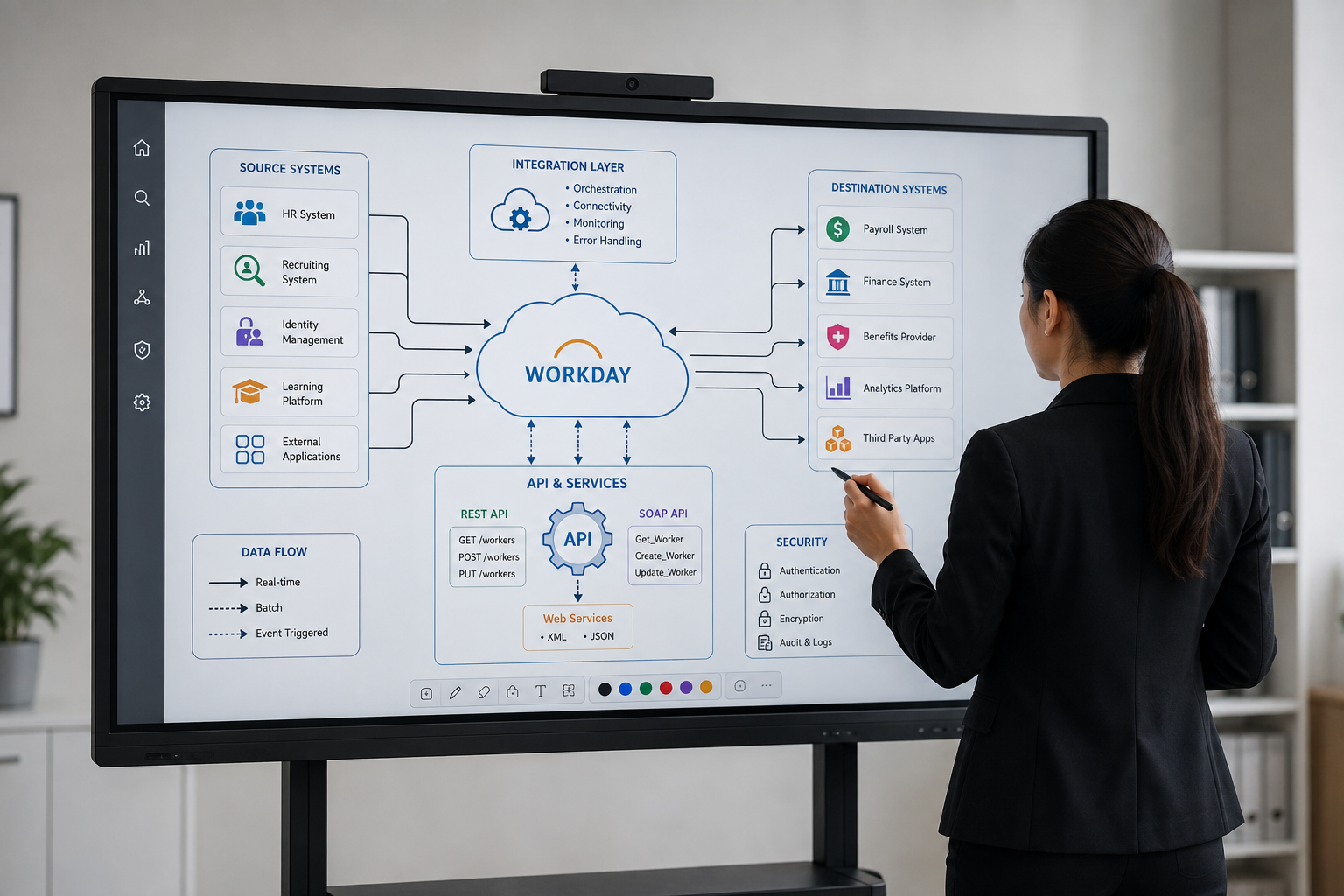
The role of integration is therefore moving beyond simple data transfer. Modern integration is increasingly about creating reliable digital workflows that allow different applications to work together with minimal manual intervention.
The future professional will need a combination of skills: Workday knowledge, integration architecture, API understanding, data transformation, security awareness, troubleshooting ability, and business-process understanding. Technical knowledge alone will not be enough. The ability to understand how information moves through an organization, how systems depend on one another, and how technology supports business processes will become increasingly valuable.
Conclusion
Workday Integration sits at the intersection of technology, data, and business operations. It allows Workday to communicate with the wider enterprise environment, helping organizations automate repetitive processes, improve data consistency, connect employee-related systems, and reduce manual effort. But effective integration is not simply about moving data from one application to another. It requires careful planning, accurate data mapping, secure communication, appropriate integration technologies, strong error handling, thorough testing, and continuous monitoring.
For professionals entering this field, the most valuable approach is to learn the concepts behind the technology and then reinforce those concepts through practical scenarios. Understand the business requirement first. Identify the source of truth. Define the data flow. Select the appropriate integration approach. Transform and validate the information. Secure the exchange. Test both successful and failed scenarios. Then monitor the solution after it goes live.
That mindset turns integration from a technical task into a reliable business capability. As organizations continue to connect more applications and automate more employee processes, professionals who can design, build, troubleshoot, and maintain those connections will remain an important part of the enterprise technology landscape.