
Workday Integration Terminology Every Beginner Should Know
Last updated on Oct 14, 2026
Navigating the Workday Integration Ecosystem Essay
Enterprise software is rarely an island. Workday, for many organizations, is a central pillar of Human Capital Management, payroll, procurement, and finance. But to get real value out of a system like Workday, your data needs to flow elsewhere. Into or out of other systems, and through an integration layer. And there are many possible partners for such connections: specialized applicant tracking systems, corporate benefits carriers, payroll engines, ERP suites, Identity and Access Management solutions, or executive reporting lakes.
The integration layer itself forms a critical link in this chain, and this is where most people building connections to or from Workday need help. The jargon-laden glossary of terms tossed around by veterans is a downright intimidating hurdle for anybody seeking to gain a working knowledge of the domain. The integration consultants, HR admins, and business analysts of the future find that enrolling in structured workday integration training online at OnlineITGuru often provides them the fastest path to cut through the noise, demystifying the vocabulary so that their team can confidently design interfaces, troubleshoot production pipelines, and translate functional requirements into practical technical architectures.
This tutorial will provide an overview of essential Workday integration terms. This guide will explain the basics and highlight particular elements: objects, transformation logic, messaging tools, scheduling features, and management processes. Notably, it does not use technical jargon associated with code writing, scripting languages, or relational databases. Instead, it will define operational terms and essential concepts behind Workday’s integration management and tools.
The Architecture of Workday: Object-Oriented Approach
Before diving into transports and tools, it is important to grasp the fundamental concept behind Workday’s data storage and retrieval. Unlike traditional databases that use SQL (structured query language), Workday uses objects stored in memory.
Business Objects
While in databases, such actions are executed using queries, in Workday, they are performed as operations. For example, business objects could be Workers, Organizations, Positions, Academic Units, or Supplier Invoices.
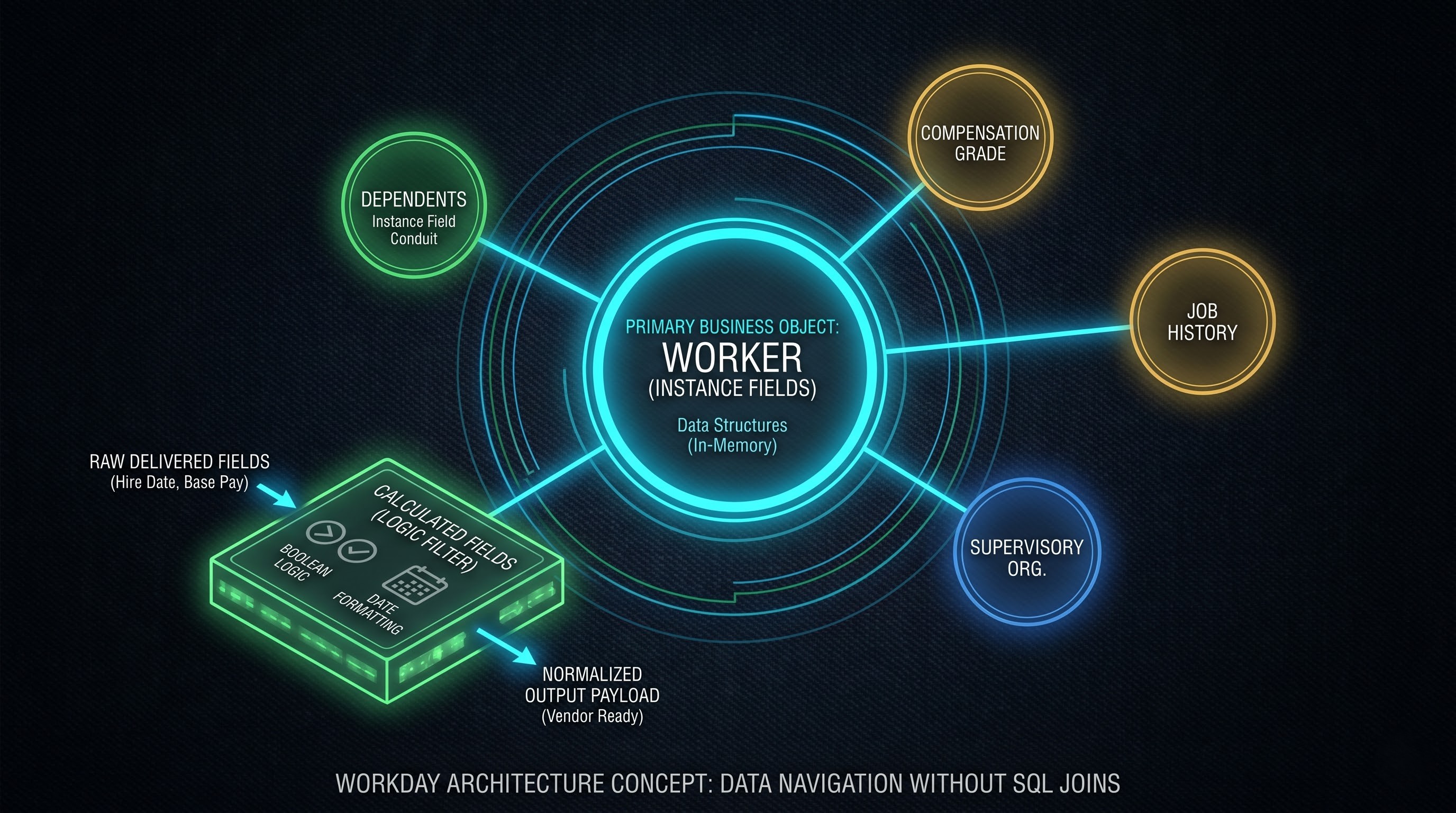
A Business Object acts as an abstract entity that contains a set of static properties and associated business logic. As Workday uses an in-memory graph to store all data, querying this structure resembles the traversal of real-life associations rather than SQL JOIN operations. Thus, an integration process that reads a Worker Business Object would simultaneously extract the information about the employee’s compensation plans, benefits elections, reporting structure, job history, and other relevant data.
Primary Business Objects and Related Business Objects
In general, a data loader or extractor must identify the integration’s scope when initiating the process. The Primary Business Object concept refers to the record that receives the integration tool’s first queries. For example, if an organization needs to provide the integration with an up-to-date list of employees to populate the building’s access management system, the Business Object under the primary key will be the Worker Business Object.
Connected directly to that entity are Related Business Objects. These are entities that are structurally dependent or related to the main entity. For example, Dependents, Compensation Grade, Job History, and Emergency Contacts are the related business objects to the main entity, Worker. When building integrations, it is essential to identify and set the correct primary entity to ensure that the output has only one root record for a target subject; however, you can traverse to related entities to extract relevant attributes.
Fields and Field Types
Business objects also comprise Fields. A field is a unit of data that describes a business object attribute. Workday classifies fields into different data types according to their underlying structure:
Instance Fields: These fields establish associations between one-to-one or one-to-many relationships and hold values that identify other individual Business Objects. In other words, Manager’s name is not a simple string value but another Worker Business Object identified through an Instance Field.
Simple Type Fields: This category describes fields that store simple data types such as strings, numbers, dates, time, and boolean values. A worker's date of birth or legal middle name is considered a simple field.
Self-Referencing Fields: These fields provide a mechanism for self-referencing or looping within a structure to identify reports, parents, or other objects. For instance, navigating to the supervisory organization above a particular department.
Workday Delivered Fields versus Calculated Fields
Delivered Fields constitute fields delivered by the vendor and define objects in the system. They contain specific data elements such as Legal Name, Hire Date, Base Pay Rate, Business Elements, and Assignment Information. On the other hand, Calculated Fields do not have a value until it is calculated, derived, or transformed from existing data by using an expression. For instance, a calculated field can help determine a hire range based on the hire date.
Calculated Fields, or Calc Fields, are one of the most powerful declarative tools in the platform. A Calculated Field is business logic set in the UI without having to write application scripting code. With Calculated Fields developers can take, transform, extract, evaluate, or aggregate data.
If a particular external insurance company requires that a date is present in a non-standard year-month-day format and without hyphens, then a Calculated Field can re-format this delivered hire date. If an end-point requires that an employee must be tagged with a particular indicator if they work in a particular state, make over a certain amount, and are marked exempt, then a Boolean Conditional Calculated Field can evaluate this. Calculated Fields take core data and convert it to ready-to-use or formatted payload in the application tier.
Reporting Data Sources
A Reporting Data Source is a pre-indexed, vendor optimized lens through which Workday data can be queried and filtered. It dictates what instances of a Business Object get evaluated, and what security context the query has.
For instance, the Worker Business Object can be accessed from different data sources. One such source might return all the workers, including the ones already terminated, on leave, or retired. Another data source might be limited only to active employees, thus automatically excluding the inactive workers. Choosing the right Data Source is usually the very first technical decision when building query-driven integrations. Picking the wrong Data Source means the system would perform unnecessarily, while selecting the overly restrictive source would result in loss of records in downstream systems.
Basic Security and Identity Concepts
Since integrations are essentially processes running fully automated and do not involve a human operator, their security, authentication, and permission policies should be strictly separated from the standard user accounts.
Integration System User
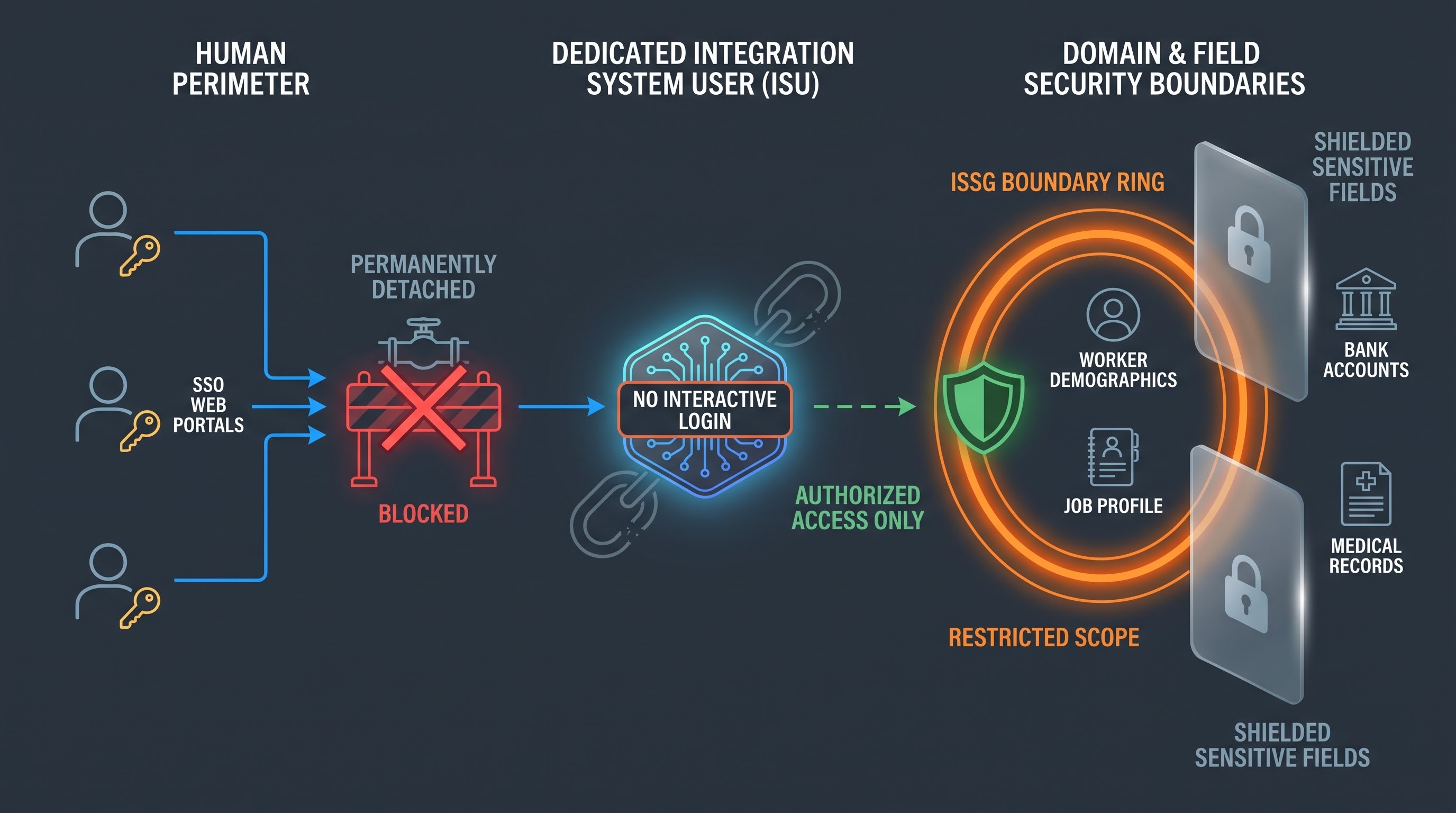
An Integration System User is a special digital identity assigned to perform various programmatic operations such as executing various queries or web service calls or batch processes. An Integration System User is always a programmatic process, never a real person. It should not be possible to log in as an Integration System User from a regular workstation, single-sign-on URL, or a standard dashboard.
By assigning Integration System Users to particular integrations, you ensure that interface-related responsibilities are separated from day-to-day operations. If an HR administrator, for example, were to leave the company and their personal account be deleted, an automated benefits enrollment system that utilized the administrator’s personal account would cease operating. Integration System Users allow you to design interfaces that are not reliant on individual users.
Integration System Security Group
Much as individual users are organized into security groups that define and restrict their access to particular functions and data, an Integration System User should belong to an Integration System Security Group. Through this definition, you get to identify the business processes, domains, objects, and fields whose data will be read, updated or subjected to any other action by the integration.
Workday adopts a solid security model on field level and on the domain level. If you create an integration that will produce an outbound payroll file but has no access to domain security policy of the bank account number, then your integration will fail or will be with empty data records for the route data. The security model of Workday integration adheres to the concept of least privilege. This means that an automated task should have access to just the necessary fields needed for it to do its job.
Main Integration Toolsets and Archetypes of Delivery
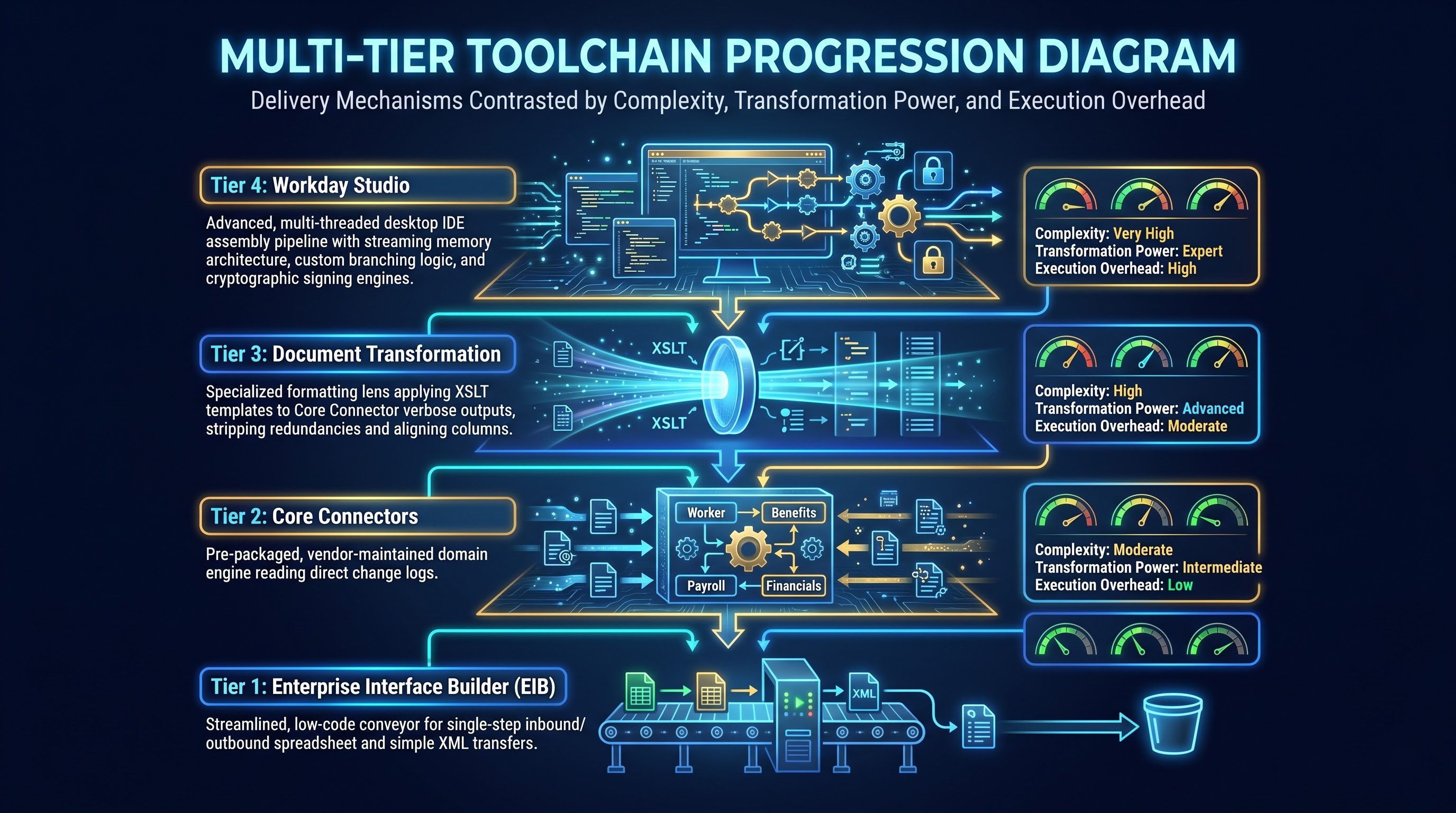
Workday does not have a single tool to develop an interface. There are several tools that vary in terms of complexity and transformation requirements.
Enterprise Interface Builder
Enterprise Interface Builder, which can also be called EIB, is the most popular, easiest, and fastest approach in implementing the Workday integration process. A user can employ this method in pulling or pushing the data to or from Workday without writing any code.
An outbound EIB makes use of a data source (usually custom report) in extracting business instances and then transforming into structured formats before pushing into an external server or endpoint. The inbound EIB, on the other hand, consumes the flat document or spreadsheet from the external side and maps the inbound fields and operations into web service operations and commits bulk transactions into the platform. Some of the typical use of EIB include bulk compensation updates, performance ratings, benefit deductions, and reporting dumps to an external data warehouse.
Core Connectors
Core Connectors denote the prepackaged sets of integrations developed by vendors to allow rapid connection to the frequently encountered categories of external providers. In turn, the creation of an integration from scratch implies the specification of all of the necessary extraction rules, the ability to traverse through complicated data models, and incorporation of enterprise events. Therefore, since managing such pre-built suite requires profound knowledge of functional HR domain coupled with integration fluency, comprehensive workday hcm integration training from the platforms such as OnlineITGuru can empower a developer to understand the underlying intricacies of the connector templates, as well as transformations that can be safely applied without getting bogged down in data complexities.
Core Connectors are organized by business domain:
Core connector for worker: It is designed to relay information concerning people’s hire, promotion, transfer, and terminations to downstream identity, directory, and IT service platforms.
Core connector for benefits: This component is intended to provide enrollment, election, and dependent coverage data to external insurance carriers.
Core connector for payroll: It is configured to transmit time, pay, deductions, and tax information to different payroll engines.
Core connector for financials: It helps to relay transactions, journals, invoices, and procurement information to enterprise ledgers.
The core connectors serve as an application programming interface, and since they are designed and maintained by the platform vendor, they simplify the management process. Unlike other application programming interfaces, the core connectors require minimal maintenance during the biannual platform updates, thus reducing the overall maintenance costs.
Document transformation
Although core connectors help to extract a significant amount of enterprise data, third-party external software vendors usually request this information in a different format. The format can include structured files, specific delimiters, a unique order, width of a column, and checksum footers. Document transformation is a downstream process from core connectors that help to convert this data into the required format.
Document Transformation captures the rich, verbose output resulting from a Core Connector, and it applies a dedicated processing template to it. This layer strips down the redundancies, rearranges blocks of data, changes the date layout, removes or injects punctuation, and transforms the payload into the exact structure required by the receiving vendor. This isolates the data gathering logic from the visual presentation logic, so that a change in one vendor's file specifications does not ripple into the core integration logic.
Workday Studio
The top layer of the platform's integration power is Workday Studio. Unlike the web-based, configuration-driven nature of EIBs and Connectors, Workday Studio is a full-featured desktop-based integrated development environment based on the open-source Eclipse foundation.
Studio is for mission-critical, enterprise-level, or highly sophisticated integration scenarios that are beyond the scope of declarative tools. Developers can build complex, multi-threaded pipelines with it, which can:
Orchestrate sequential or parallel queries to various internal and external application programming interfaces.
Process exceedingly voluminous data payloads beyond standard memory thresholds through streaming data architectures.
Implement elaborate conditional logic, branching, loop routines, and bespoke error handling.
Perform intense cryptographic operations, digital signatures, and binary file manipulations.
Interact dynamically with external web services via REST, SOAP, and direct message queues.
While an EIB could be built in an afternoon within an administrative browser, a Workday Studio integration is a serious software development artifact that requires local unit tests, version control, and proper deployment pipelines. To actually learn how to build such multi-threaded, enterprise-grade assemblies, one needs to participate in workday online integration training and get the required project labs under their belt to learn Studio development properly.
Change Tracking, Event Triggering, and Automation Mechanics
Integrations generally function in one of two modes: complete data snapshots or incremental change deltas. Comprehending how Workday monitors and isolates business activity is fundamental to designing performant interfaces.
Change Detection and Effective Dating
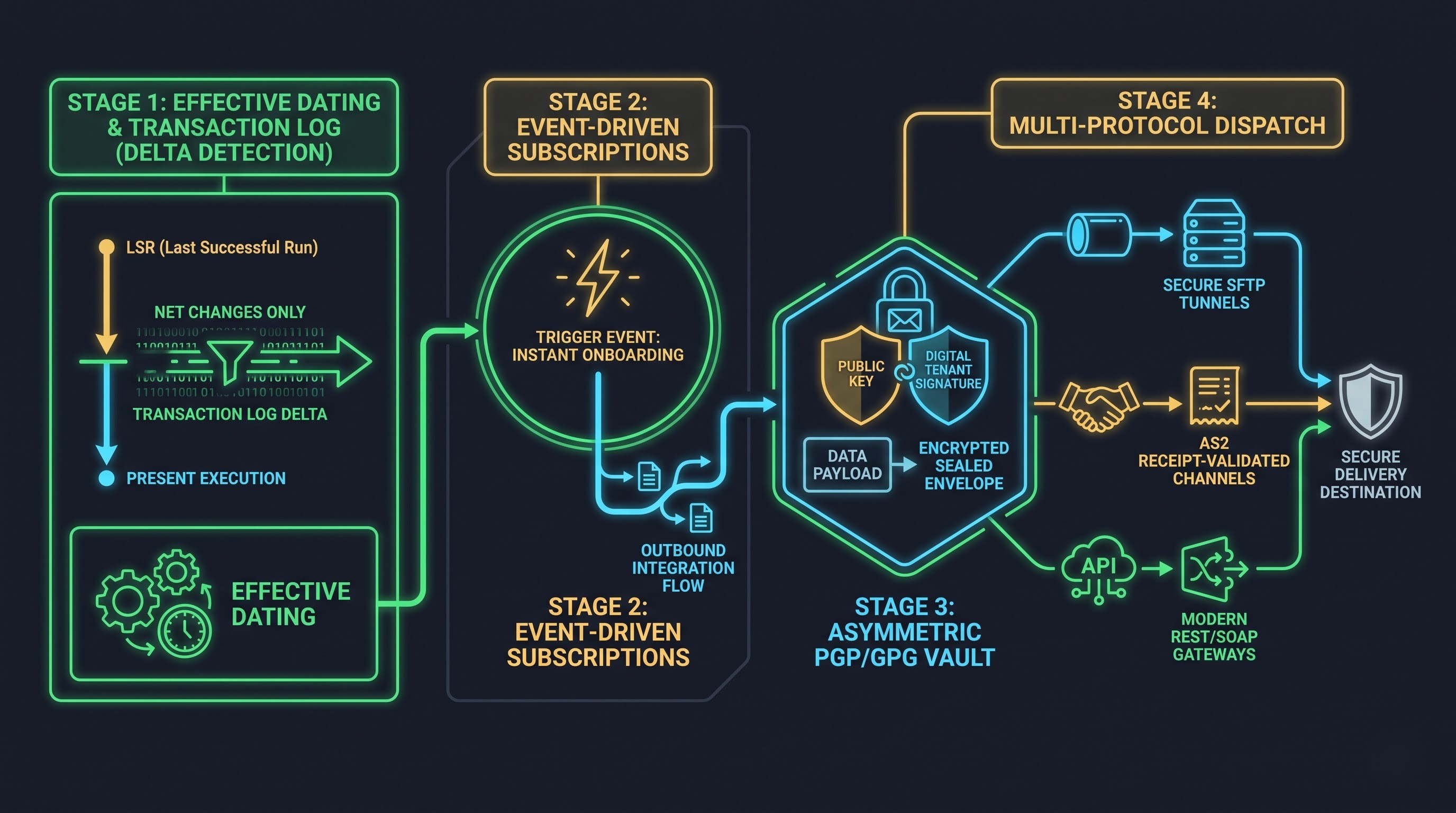
Workday is a fundamentally effective-dated system. Every organizational event, whether a compensation revision or a legal name update or a leadership promotion, is associated with an effective date which may span in the past, present, or distant future.
Within snapshot interfaces, the system extracts all records that match the defined criteria as of the moment that the integration is run. However, for continuous interfaces that are connected to payroll or identity systems, it would be highly inefficient to constantly transfer hundreds of thousands of the same records every day. The ability to detect changes allows integrations to look back at a given window of time and determine which specific records have been created, modified, or rescinded since the last execution and only emit those updated records.
Transaction Logs
The Transaction Log is the internal audit trail used to detect changes. Every time a business process is completed, a field is updated, or a worker profile is modified a chronological record of these events are permanently stored in the Transaction Log.
More advanced integration tools, particularly Core Connectors and custom Studio interfaces, actually read the Transaction Log directly. It would take too long to check a million plus historical database records for changes, so instead it asks the log directly what events have happened (compensation changes, address updates, etc.) between the time of your last integration run and now. This approach is much faster and more efficient, letting your interface quickly narrow in on the few relevant changes among hundreds of thousands of possible database records.
Subscriptions and Event-Driven Architecture
Most database interfaces operate on a schedule; hourly or nightly batches being the most common. However, modern applications often need to act instantly when an event happens. A subscription model or event-driven approach allows a database interface to launch an outbound integration as soon as a particular business logic has happened within the tenant.
For example, when a recruiter moves a candidate to the hired state in an onboarding workflow, the completion of that business process can then trigger an outbound integration immediately. Within seconds, the new hire's foundational profile can be pushed out to their IT identity management system to pre-provision and prep an email inbox, network access and order equipment long before their actual first day in the building.
Data Transport, Web Services, and Messaging Standards
After extraction and transformation or after external data is available for extraction, the data must be transported over the organization’s network securely. Workday follows industry-standard web services and transport protocols.
Web Services: SOAP and REST
Workday offers a full set of Application Programming Interfaces that follow open web standards:
Simple Object Access Protocol (SOAP): The majority of legacy and programmatic enterprise transactions in Workday are delivered via SOAP-based web services. These are strictly structured, self-descriptive, and Web Services Description Language-defined. In Workday, hundreds of distinct public web services are available, including Put Worker, Get Compensation, Submit Journal Entry, and Import Time Tracking. SOAP requests contain operations within structured envelopes and offer explicit schema validation.
Representational State Transfer (REST): More and more often, Workday supplies modern REST APIs for building applications on top of its products. These APIs use light modular data requests/responses serialized in modern data formats. They can be consumed by modern interactive mobile apps, portal UIs, microservices, or other light middleware platforms, which need to exchange data quickly and with low overhead.
Data Delivery Protocols
Once a payload file is generated (a comma-delimited text file, payroll file, banking file, etc.), the data is transferred to the target application via one of the below file delivery protocols:
SFTP (SSH File Transfer): Standard method for file exchange between two servers. Can be used for recurring data integrations, as data transmission is encrypted within the SSH framework. Source and target application connections can be established using public-key encryption or user/password authentication.
AS2 (Applicability Statement 2): Standard for exchanging encrypted and signed files over the Internet. Used mostly for high-security data transfers like EDI or benefits file distribution. AS2 requires a receipt validation message sent back to the source application to confirm successful delivery of encrypted data.
HTTPS Post/Get: For direct data distribution over the web to a web server, public API, or any SaaS platform.
Encryption: PGP and GPG
Due to the sensitivity of human resource profiles, tax identification numbers, compensation packages, and health records, payload encryption at rest is required for outward-bound files on the public Internet.
Pretty Good Privacy (PGP) and open-source variant (GPG) are both asymmetric encryption standards supported by the platform. In this scenario, the external receiving partner will provide their Public Encryption Key. Workday will encrypt the output file utilizing the public key as the final step in the integration process. The encrypted file cannot be read by anyone outside the receiving vendor. Only the recipient possesses the corresponding Private Key needed to decrypt the file. Additionally, integrations can digitally sign to confirm the file originates from a legitimate Workday tenant and has not been tampered in transit.