
Workday Integrations Explained: Why This Skill Is Becoming Essential for Every Workday Professional
Last updated on Sep 12, 2026
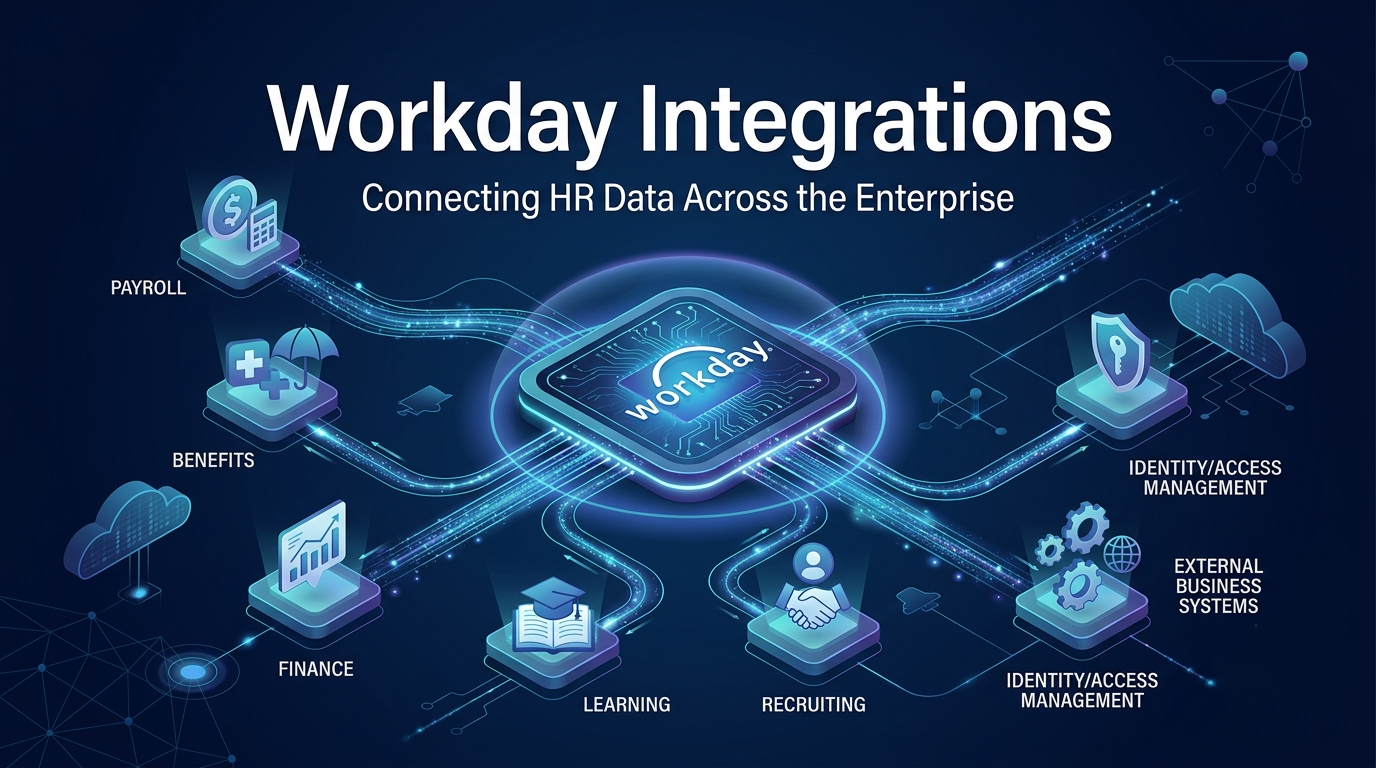
Workday has grown far beyond a standalone HR and finance system. Most organizations running Workday today also connect it to payroll vendors, benefits carriers, background check providers, learning platforms, and internal tools that existed long before Workday was implemented. Every one of these connections depends on integration work, and that work has quietly become one of the most in-demand skill sets in the entire Workday ecosystem.
This article breaks down why integrations matter so much right now, what the learning path actually looks like, and how to evaluate a training program before you commit your time to it. The goal is simple: give you a clear, practical understanding of where integrations fit into a Workday career, without unnecessary jargon or inflated claims.
Why Integration Knowledge Has Become a Career Differentiator
For a long time, Workday careers were fairly compartmentalized. Functional consultants worked on HCM, payroll, or finance configuration. A separate group handled integrations, usually working in Workday Studio, EIBs, and Core Connectors. The two groups rarely overlapped, and that was considered normal. That separation is breaking down. As Workday deployments mature, the number of connected systems around them keeps growing, and most companies can no longer afford to treat integrations as a niche specialty handled by a small, separate team. Functional consultants are increasingly expected to understand at least the basics of how data moves in and out of Workday, and to be able to troubleshoot common integration issues without escalating every problem to a technical specialist.
This shift is exactly why demand for a structured workday integration course has grown steadily over the past few years. Organizations want consultants who can bridge both sides: understanding the business process and understanding the technical mechanism that supports it. A consultant who can do both is simply more useful on a project team, and more difficult to replace.
This trend is also visible in how implementation partners structure their teams. Rather than maintaining rigid, separate tracks for functional and technical consultants, many firms now actively encourage cross-training, specifically because client engagements increasingly require both skill sets on the same project, often from the same individual during smaller or mid-sized implementations where hiring a fully separate integration specialist isn't cost-effective. This makes integration knowledge less of an optional specialization and more of a baseline expectation for consultants who want to remain competitive as project structures continue to shift in this direction.
What Workday Integrations Actually Involve
Before evaluating any training path, it helps to understand what “Workday integrations” actually covers, since the term gets used loosely.
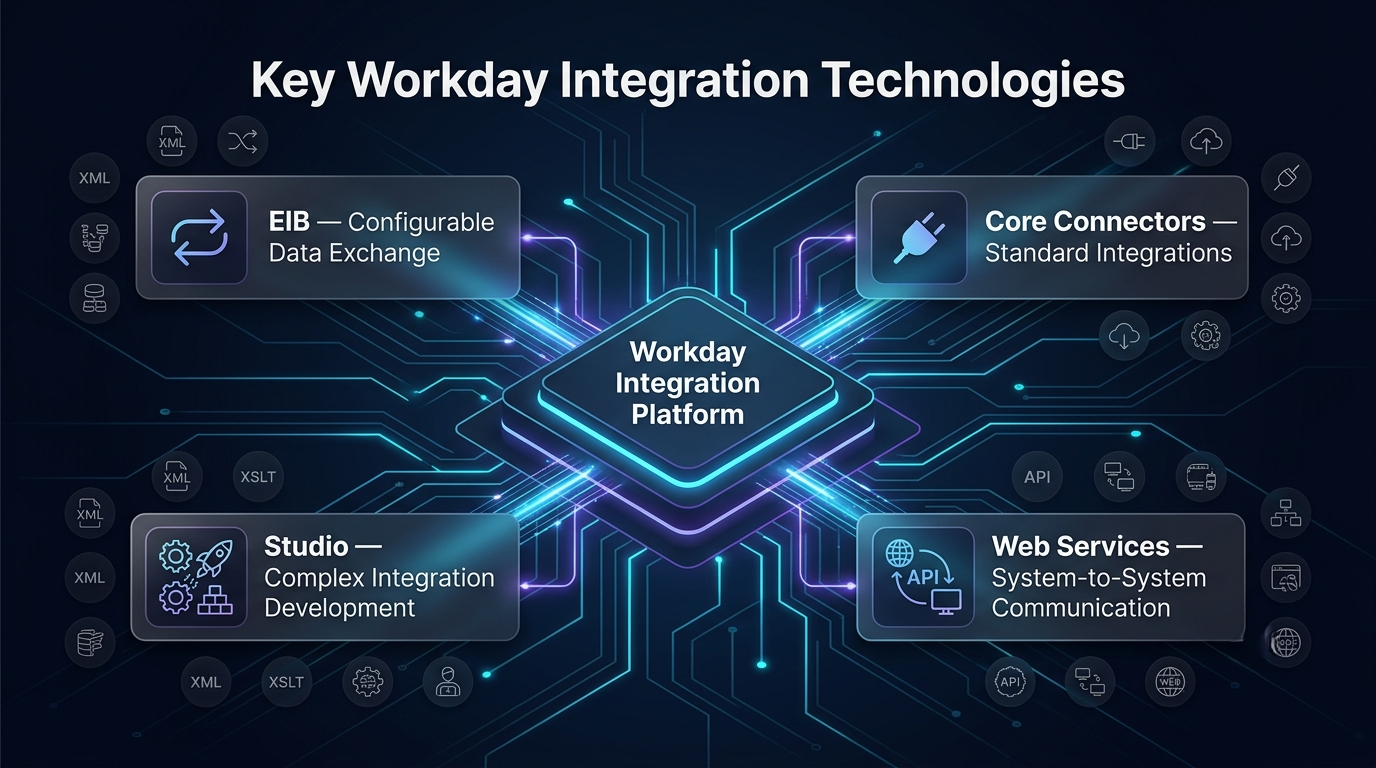
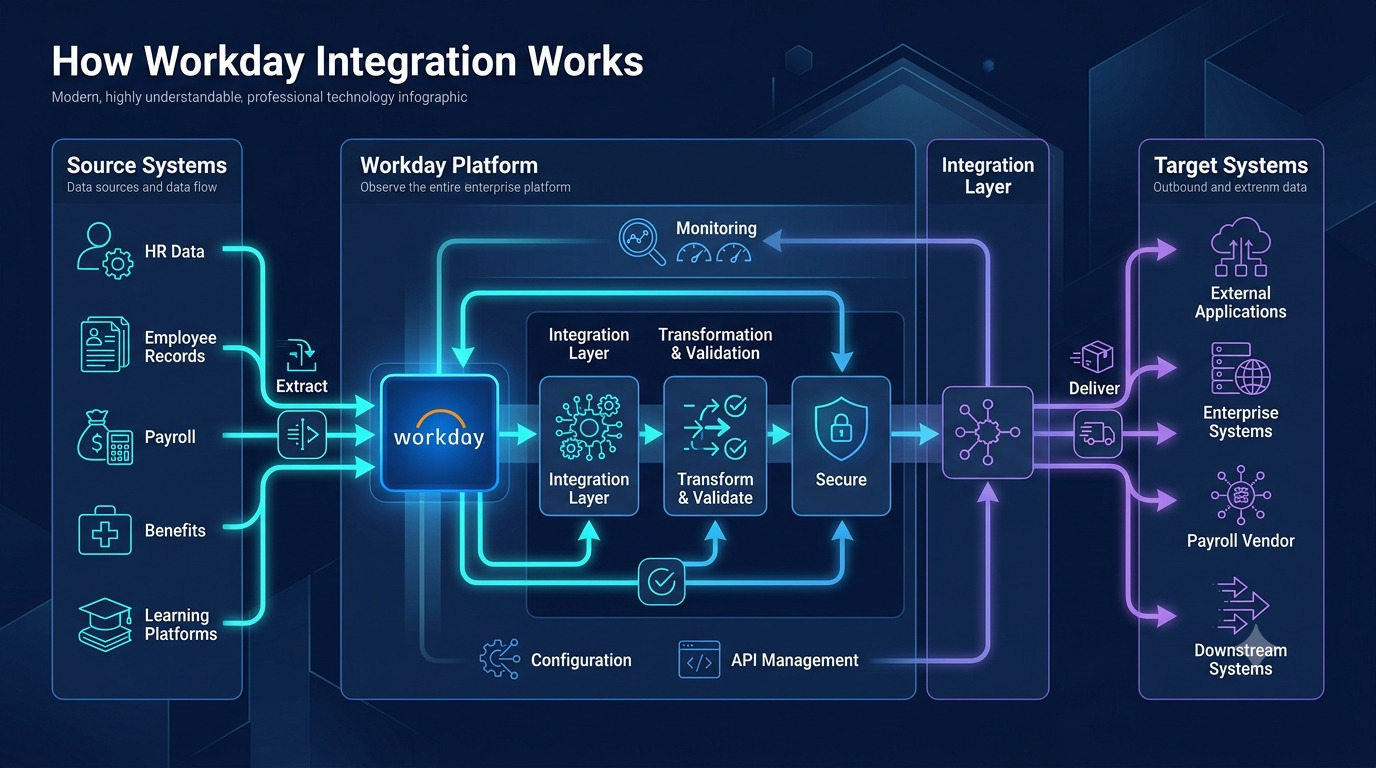
At a technical level, Workday integrations refer to the tools and processes used to move data into and out of Workday, and to keep that data synchronized with external systems. The core components include:
EIB (Enterprise Interface Builder): A configuration-based tool used for simpler, template-driven data loads and extracts, often used for one-time or recurring file-based transfers.
Core Connectors: Pre-built, configurable integrations for common scenarios such as payroll interfaces or benefits enrollment feeds.
Workday Studio: A more advanced, code-based tool used for complex integrations that require custom logic, transformations, or handling of non-standard file formats.
Workday Web Services (SOAP/REST): APIs that allow external systems to communicate directly with Workday in real time.
Integration security and reporting: Permissions, integration system users, and the tracing and monitoring tools used to diagnose failures.
A well-rounded understanding of integrations means knowing not just how each of these tools works individually, but when to use one over another, and how to trace a failure back to its root cause when something breaks.
The Difference Between Training and Practical Readiness
It's worth being direct about something that often gets glossed over: completing a course and being job-ready are not automatically the same thing. This is where the distinction between watching tutorials and going through structured workday integration training actually matters. Training that is built around real project scenarios tends to cover integration work in a specific sequence: first the underlying architecture (how Workday's integration cloud is organized and how data flows through it), then the configuration-based tools like EIBs and Core Connectors, and only after that the more advanced, code-heavy work in Workday Studio. This order matters because integrations are one of those subjects where gaps in the fundamentals tend to surface later, usually during troubleshooting rather than during initial setup.
Programs that skip straight to advanced Studio scenarios without first building a solid grasp of the basics often leave learners able to follow along with a demo but unable to independently diagnose a failed integration in a live environment. The practical value of any training comes down to whether it includes hands-on exercises that mirror real production issues: failed validations, mismatched field mappings, authentication errors, and the kind of edge cases that don't show up in a simplified tutorial.
Where the Career Impact Actually Shows Up
The professional value of integration skills tends to show up in a few concrete ways rather than as a vague general benefit.
First, it changes the kind of work you're staffed on. Integration issues come up on nearly every implementation and support project, and consultants who can handle them directly, instead of routing every technical question to a separate team, are typically involved in a wider range of project activities.
Second, it affects how clients and project leads perceive your role. A consultant who can explain both the functional design and the technical mechanism behind an integration failure is often brought into more strategic conversations, including planning discussions where integration architecture decisions are being made.
Third, it has a direct effect on compensation and job market positioning. Purely functional configuration knowledge is common across the Workday talent pool. The combination of functional expertise and integration fluency is considerably less common, and that scarcity is reflected in how these roles are compensated and staffed, particularly on complex, multi-system implementations.
None of this means integration skills guarantee promotions or job security. But across the current Workday job market, this combination consistently appears as a differentiating factor in job postings, project staffing decisions, and consultant rate cards. It's also worth noting how this plays out across different career stages. For consultants earlier in their careers, integration exposure often accelerates the timeline to being trusted with independent client-facing work, since it demonstrates a broader technical range than functional configuration alone. For more experienced consultants, adding integration skills to an already strong functional background frequently opens the door to solution architect or technical lead roles, which typically require exactly this kind of dual understanding. Even for consultants who don't intend to move into a purely technical track, having enough integration fluency to participate meaningfully in technical discussions tends to improve how effectively they can scope projects, estimate timelines, and manage client expectations during implementations.
Where Learning Integrations Applies Beyond the Obvious Cases
Most people associate Workday integrations primarily with payroll and benefits interfaces, since those are the most commonly cited examples. In practice, the same underlying skills apply across a much wider range of business needs.
One area that often gets overlooked is workday learning integrations, where completions, certifications, and training records from external learning platforms need to sync back into an employee's Workday profile. This type of integration relies on the same core mechanics: EIBs or Core Connectors to move the data, field mapping to align external record structures with Workday's data model, and validation rules to catch mismatches before they cause reporting errors. Once the fundamentals are in place, applying them to a learning integration scenario, an expense system feed, or a background check interface becomes a matter of adapting the same approach to a different data set, rather than learning an entirely new skill. This is one of the more practical benefits of building a solid integration foundation: the knowledge transfers across use cases far more easily than most people expect going in.
A Closer Look at the Core Integration Tools : Since these tools come up repeatedly in any discussion of Workday integrations, it's worth understanding each one in a bit more detail, along with the situations where it's typically the right choice.
EIB (Enterprise Interface Builder) is generally the starting point for most integration work. It uses a template-based approach, meaning you define a source, a target, and a set of field mappings without writing custom code. EIBs are well suited to straightforward, high-volume data loads, such as importing a batch of new hires, updating compensation records, or exporting employee data to a flat file for an external system. Their main limitation is flexibility: EIBs work well when the data structure is relatively simple and consistent, but they struggle with complex conditional logic or heavily nested data formats.
Core Connectors sit a step above EIBs in terms of built-in functionality. These are pre-configured integration templates designed for specific, common use cases, most notably payroll interfaces and benefits enrollment feeds to insurance carriers. Because they're purpose-built, Core Connectors require less custom configuration than EIBs for these specific scenarios, but they're also less flexible outside of their intended use case.
Workday Studio is the tool most people mean when they refer to “advanced” integration work. It's a development environment that allows for custom logic, complex data transformations, conditional branching, and integration with non-standard file formats or protocols. Studio integrations require more technical familiarity, including some exposure to XML, XSLT, and Java-based components, but they're necessary for scenarios that EIBs and Core Connectors can't handle, such as integrations involving multiple data sources, complex validation rules, or real-time processing requirements.
Workday Web Services round out the toolkit by enabling direct, real-time communication between Workday and external systems using SOAP or REST APIs. This is the layer that supports scenarios like a third-party recruiting platform pulling job requisition data directly from Workday, or an external system pushing updates into Workday as soon as a change occurs, rather than waiting for a scheduled batch process.
Understanding when to use each of these tools, rather than defaulting to the one you're most comfortable with, is one of the clearest signs of practical integration competence. A consultant who reaches for Workday Studio to solve a problem that a simple EIB could handle is often working less efficiently than one who matches the tool to the actual requirement.
Common Integration Issues and Why They Matter for Career Growth
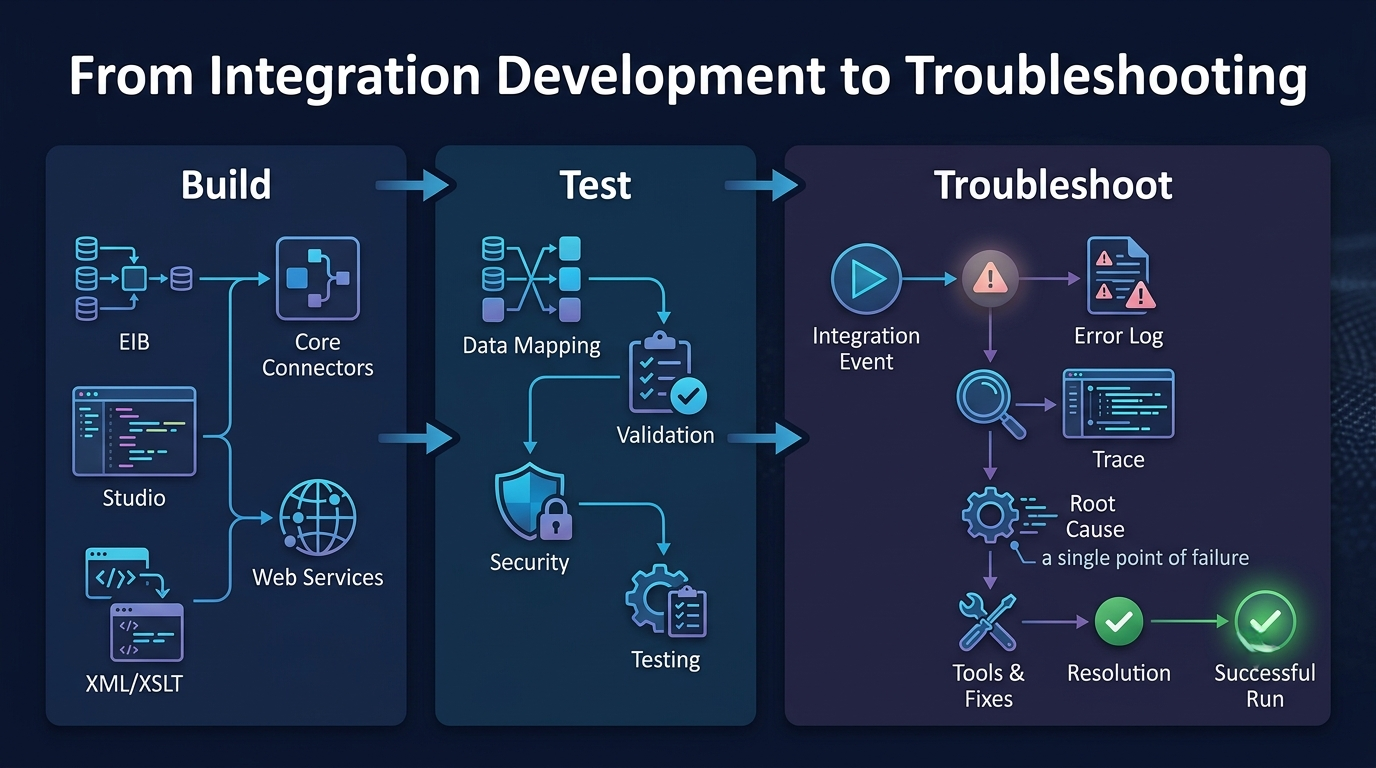
A large part of the practical value of integration knowledge comes from troubleshooting, not just initial setup. Several categories of issues come up repeatedly across Workday implementations, and being able to diagnose them quickly is often what separates a consultant who can “use” integrations from one who genuinely understands them. Field mapping errors are among the most common issues, typically occurring when a source system changes its data format or field structure without the corresponding integration being updated. Authentication and connectivity failures are another frequent category, often related to expired credentials, certificate issues, or changes in network configuration on either the Workday side or the external system's side. Validation failures occur when incoming data doesn't meet Workday's business rules, such as a required field being blank or a value falling outside an expected range.
Each of these categories requires a slightly different troubleshooting approach, and being able to quickly narrow down which category a given failure falls into is a skill that develops primarily through hands-on exposure to real integration scenarios, rather than through reading documentation alone. This is one of the main reasons structured training that includes deliberate troubleshooting exercises tends to produce more capable practitioners than self-study built entirely around successful, ideal-case examples.
How to Evaluate a Program Before Enrolling
If you're deciding whether to invest time and money into learning Workday integrations, a few criteria are worth checking before committing to a specific program. Depth of the curriculum. Look for a syllabus that covers integration architecture, EIBs, Core Connectors, Workday Studio, security configuration, and web services, in that general order. Be cautious of programs that promise full integration readiness in an unrealistically short timeframe, since meaningful fluency with these tools requires sustained, hands-on practice.
Instructor experience. Instructors who have worked directly on live client integrations typically explain error handling and troubleshooting differently than those who have only studied the material academically. This shows up in how thoroughly a course addresses real failure scenarios, rather than only demonstrating successful, ideal-case walkthroughs.
Hands-on project work. A program is more likely to translate into practical skill if it includes exercises that require building and troubleshooting integrations end-to-end, rather than only following along with pre-built examples. Peer feedback. Speaking with people who have already completed the program, rather than relying solely on marketing materials or testimonials, tends to give a more accurate picture of what the course actually delivers and how well it prepares learners for real project work. Post-course support. Workday's platform continues to evolve, and integration methods that are current today may be updated within a year or two. Programs that offer some form of ongoing access to updated content or a support community tend to hold their value longer than those that end abruptly once the final module is complete.
Getting Started: For most Workday professionals, the practical starting point is to build a working understanding of EIBs and Core Connectors first, since these configuration-based tools cover a large share of real-world integration needs without requiring a programming background. From there, Workday Studio becomes relevant for more complex, custom scenarios involving non-standard data formats or advanced transformation logic.
The overall time investment varies depending on prior technical exposure, but most structured programs are designed to take a functional consultant from foundational understanding to practical, project-ready competence over a period of a few months of consistent study, rather than requiring a complete career change or a return to formal computer science education.
A reasonable sequence looks something like this: begin with the conceptual overview of how Workday's integration architecture is organized and how data moves between systems. Move next into hands-on EIB configuration, working through practical scenarios such as loading employee data or building a simple outbound extract. Once that foundation is solid, introduce Core Connectors and their specific configuration requirements for payroll and benefits scenarios. Finally, move into Workday Studio for scenarios that genuinely require custom logic, and pair that technical learning with exposure to the tracing and monitoring tools used to diagnose failures in a live environment. Following this kind of sequence, rather than jumping directly into the most advanced tool, tends to produce a more durable and transferable understanding, since each stage builds directly on the concepts introduced in the one before it.
Conclusion
Workday integrations have moved from a specialized, siloed skill set to a core competency that increasingly overlaps with functional consulting work. As more systems connect to Workday, the ability to understand, configure, and troubleshoot these connections has become a meaningful differentiator in project staffing, client relationships, and compensation.
For professionals evaluating whether to build this skill set, the key considerations are straightforward: choose a program with a well-sequenced curriculum, instructors with real project experience, sufficient hands-on practice, and some form of ongoing support as the platform evolves. Approached this way, integration skills become a practical, measurable addition to a Workday career rather than an intimidating technical detour.