
Workday SOAP API Integration: Architecture, Security, Mechanics, and Use Cases
Last updated on Sep 30, 2026
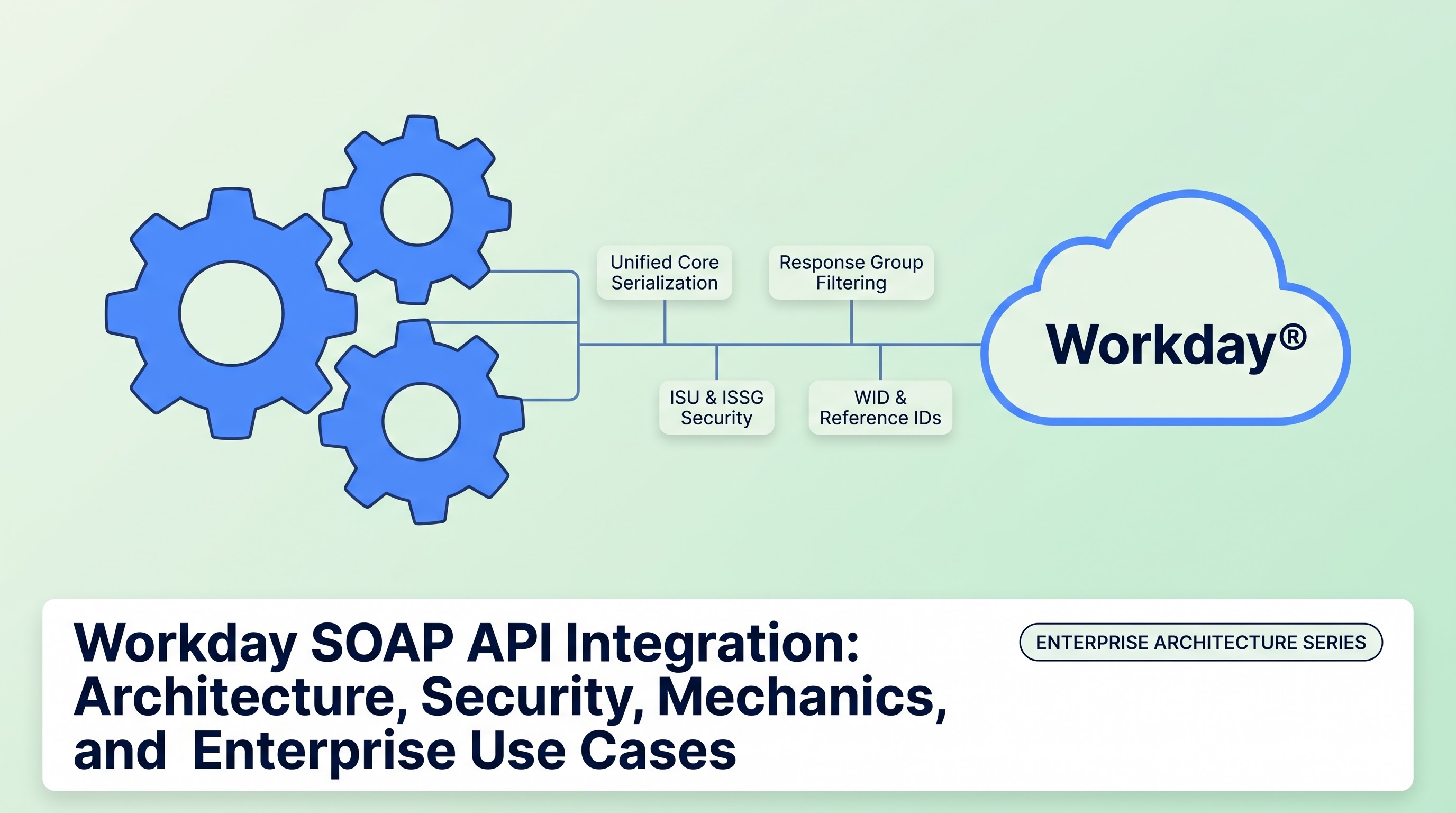
Overview of Workday Web Services
Workday acts as a key transactional record-keeping system for many modern companies as it consolidates human capital management, payroll, finance, procurement, and student information. Since business systems do not exist independently, the real value of Workday becomes evident when it is constantly sharing data with identity service providers, downstream active directories, brokerage services, payroll services of third parties, enterprise resource planning systems, and CRM systems. The implementation of Workday Web Services, notably the Simple Object Access Protocol, lies at the bottom of the integration framework of Workday platforms.
WWS or Workday Web Services provides a set of standard programmatic application programming interfaces available for transactional and operational operations in the Workday sphere. While REST or Graph technologies are gaining popularity amongst mobile-first and event-driven microservices, SOAP API remains critical to creative solutions requiring a large amount of data and precise typing in case of enterprise collaboration. SOAP's WSDL and XML Schemas contribute to the strict schema definitions.
Understanding the integration of Workday SOAP API involves going deeper: investigating how the business object model converts to XML formats, how enterprise identity and authority shape the process of message processing, how various integration brokers execute complicated operations that require keeping track of states, and how the data extraction of huge volumes is done in a way to avoid running out of memory and achieving execution timeouts. The paper discusses the basic structure, functional elements, protocol processes, and examples of actual practices of Workday SOAP integrations.
Architecture Principles and the Unified Core
The case with Workday is not typical of a traditional relational database. Instead of having different tables maintained by foreign key references and worked through SQL views, Workday works based on a memory-oriented object-based core called Workday Unified Core. In this model, the notion of business objects refers to real-life entities such as workers, firms, managerial structures, positions, accounts, and cost centers that exist in memory.
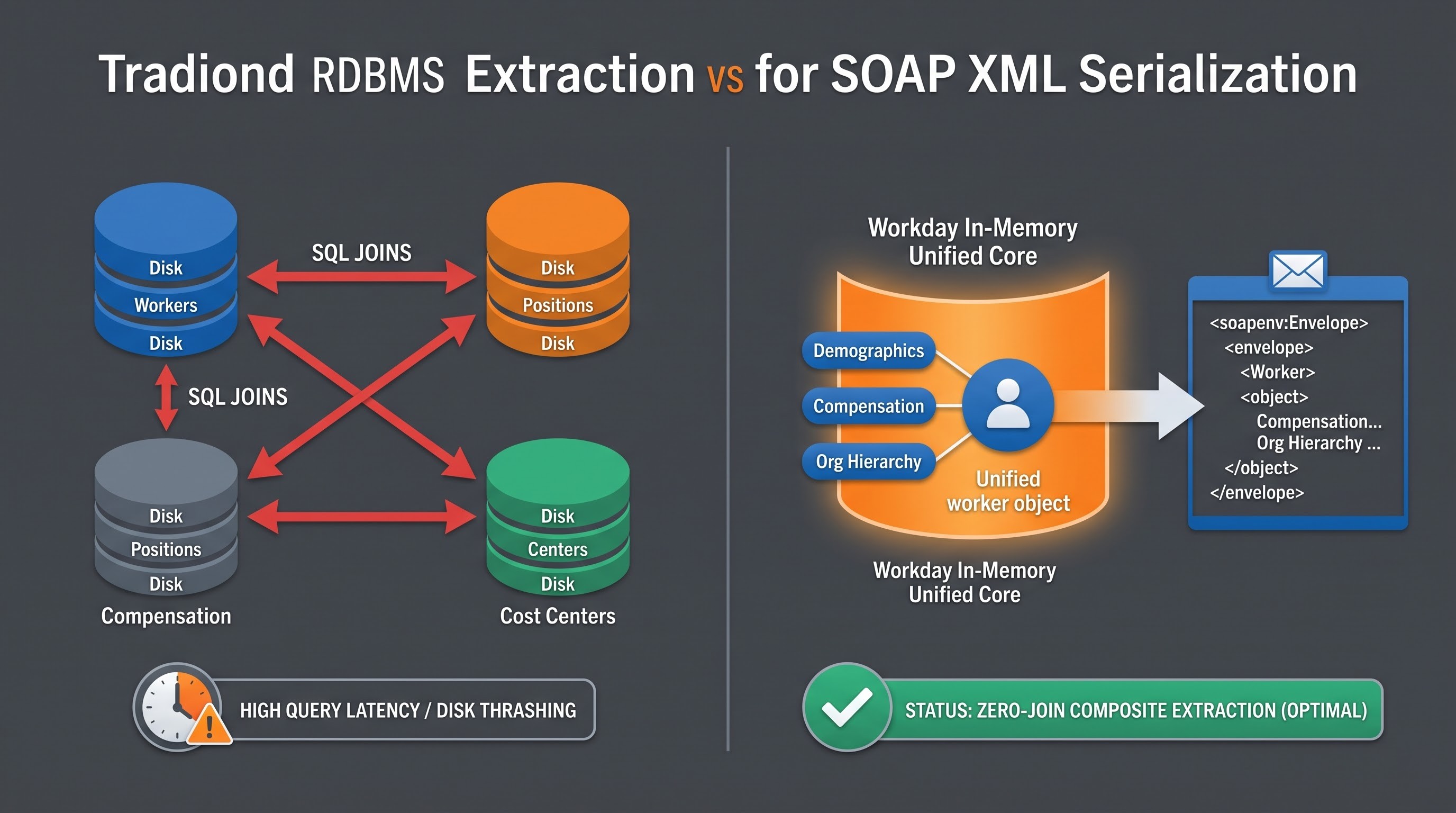
All business entities carry out precise associations, features, and transaction histories. When implementing SOAP integration, an outside world is not sending queries, rather directly connecting with the Object Management Server through a messaging layer that turns received and outgoing XML files to the conventional object transactions.
The Single Data Model Principle
One of the distinctive features of Workday architecture is an approach where all modules like Human Capital Management, Finance, Payroll, Procurement, and Adaptive Planning utilize one design concept. One worker data is never repeated if the worker was once a requisition authorization in Procurement, expense reporting in Finance, and salary payment in Payroll.
When invoking a SOAP API operation such as Get_Workers, the client interacts with an operation intended to provide an all-encompassing composite of that worker object. In accordance with the request criteria and response group parameters defined in the XML envelope, the returned document can at once serialize demographic particulars, active position information, compensation stages, organizational hierarchies, and direct deposit distributions without the necessity of multiple independent database joins or composite view transformations in separate systems.
Versioning and Forward Compatibility
Enterprise SaaS applications necessitate constant platform evolution while ensuring that mission-critical integrations remain intact. Workday implements this via a semi-annual release cycle along with explicit API versioning.
Every SOAP endpoint is directly linked to a certain API version. Workday guarantees forward compatibility in a rolling window of versions, meaning that the enterprise client invoking the past version ensures that he/she is still under the same contract even though at the same time the underlying platform introduces schema changes and improvements in the next platform releases.
When an updated version gets published, the discontinued fields continue to operate as per the older agreement until the time is right for them to be wiped out. This provides the linkage engineers with adequate time for adapting the integration payloads, checking them for compliance with the updated WSDL specifications, and synchronizing them with the latest business logic. If you are one of the specialists who are just about to enter into the practical utilization of the system, going through a structured workday integration tutorial from OnlineITGuru will give you all instructions that are necessary for creating said agreements and checking out the payloads on the go.
The WSDL Ecosystem and Functional Modules
Workday provides SOAP APIs as individual functional web services instead of just one big endpoint. Each functional service deals with a separate field of activity and maintains a separate WSDL file and XSD.
Components of Key Web Services
Human Capital Management Service: It is the most used web service as it includes the processes connected with the lifetime of personnel. The key processes of this service are the following: request worker demographic and transaction details, hire contract staff, modify job descriptions, manage talent records, and change data about identity.
Staffing Service: This service entirely concentrated on organizational movement and structural staffing activities. This service provides the opportunity to hire staff, fire, contract, transfer, promote, or place workers on leave.
Compensation Service: Regulates the allocation of base salary, variable payments, incentive programs, bonuses, and stock options. It involves rules about eligibility for certain positions and compensation tables.
Payroll and Payroll Interface Services: Contains operations concerned with processing payroll runs, providing data for tax accounts, and making changes in people’s demographics and payroll for external payroll authorities.
Financial Management Services: Compresses several services including Financial Management. Cash Management, Revenue Management, and Business Assets Accounting. The services make operational functions such as creating journals, performing vendor payments, processing payments from customers, and reconciling statements.
Systems and Integration Service: A service layer making things like getting details about integration systems, controlling enterprise system launches, accessing audit records, controlling asynchronous messages sent in different systems, and checking the status of various events possible.
Workday WSDL Anatomy
A Workday WSDL is an official XML file. It serves as a constant working plan. There are four critical attributes:
Data Type: The XSD schema indicates every complex element, enumeration, and allowable simple type in the payload. It specifies the mandatory tags, the tags that may be repeated, and the accepted format.
Messages: General definitions of the data being transmitted are further divided into input messages (i.e. request payload sent from an external system) and the output messages (the response payload from Workday).
Port Types and Operations: The services expose a series of operations linking every operation with the input, output, and error messages.
Bindings and Endpoints: These parts describe the actual network protocols and transport formats (SOAP over HTTP/HTTPS) plus the physical URL endpoint in a particular Workday tenant data center.
In order to successfully deploy a typical enterprise solution, it is imperative to obtain the tenant-specific and version-specific WSDL. Since the tenants in Workday may consist of customized fields as well as extended configurations and forms of reference identification, the WSDL will serve both as a reference and a record for the different premises of the tenant in question.
The Technical Mechanics: Protocol Loading
SOAP communications with Workday follows standard SOAP envelopes, utilizing HTTPS to operate. Each item in the communication series has the same envelope with optional headers and a required body.
Handling References: The Philosophy behind Workday IDs
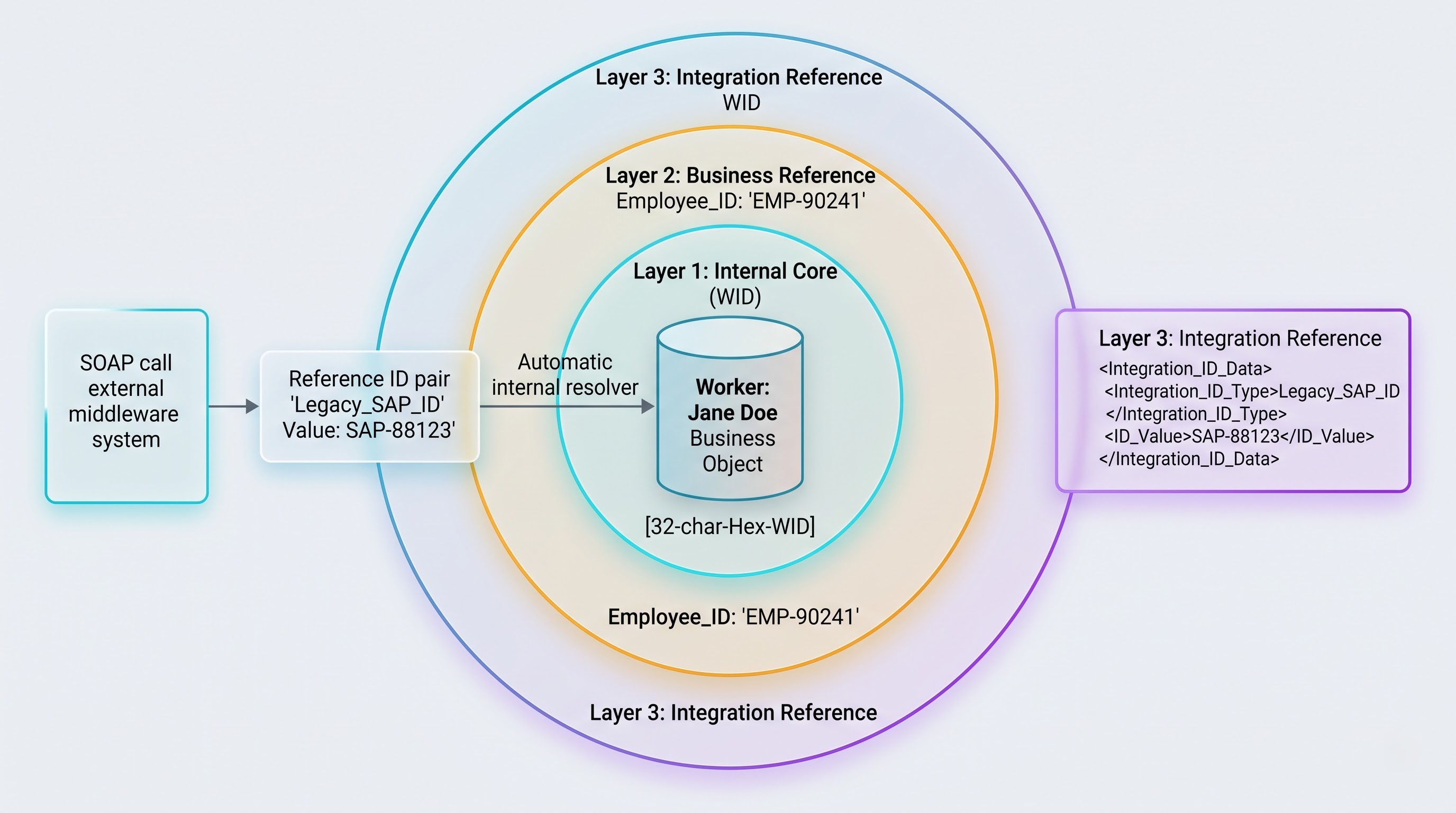
Reference mechanism is one of the most important design principles within the Workday SOAP communication. Traditional relational databases use auto-generating surrogate keys, composite primary keys, or complex strings to identify subjects. However, according to Workday, references should be identified in a more sophisticated way.
Workday ID (WID): This is a hexadecimal string made up of thirty-two characters that is made automatically by the Workday system whenever any business object is created. This ID acts as an eternal internal pointer to that specific object in the Workday database. Although the IDs are known for their high reliability, they are not stable across tenants.
Reference ID (Integration ID): This is a unique identifier chosen by the user for business reasons that identifies some object within the domain of reference. Employee ID, Cost Center ID, ISO Currency Code, and Country Alpha-2 Code are some of the most common examples of Reference IDs.
Organization and Custom Reference Domains: These are unique identifiers created to convert the IDs from the previous computer systems into Workday system IDs.
While generating a SOAP request, integration architects are able to make use of related objects such as assigning an employee to a certain Supervisory Organization internally or through a Reference ID pair. This pair consists of the reference type identifier and the corresponding reference value. This functionality is crucial for decouple-and-load patterns because it allows external middleware to initiate calls with regards to legacy enterprise values without having to perform lookup queries that extract internal WID from Workday.
Advanced Filters and Response Groups in SOAP requests
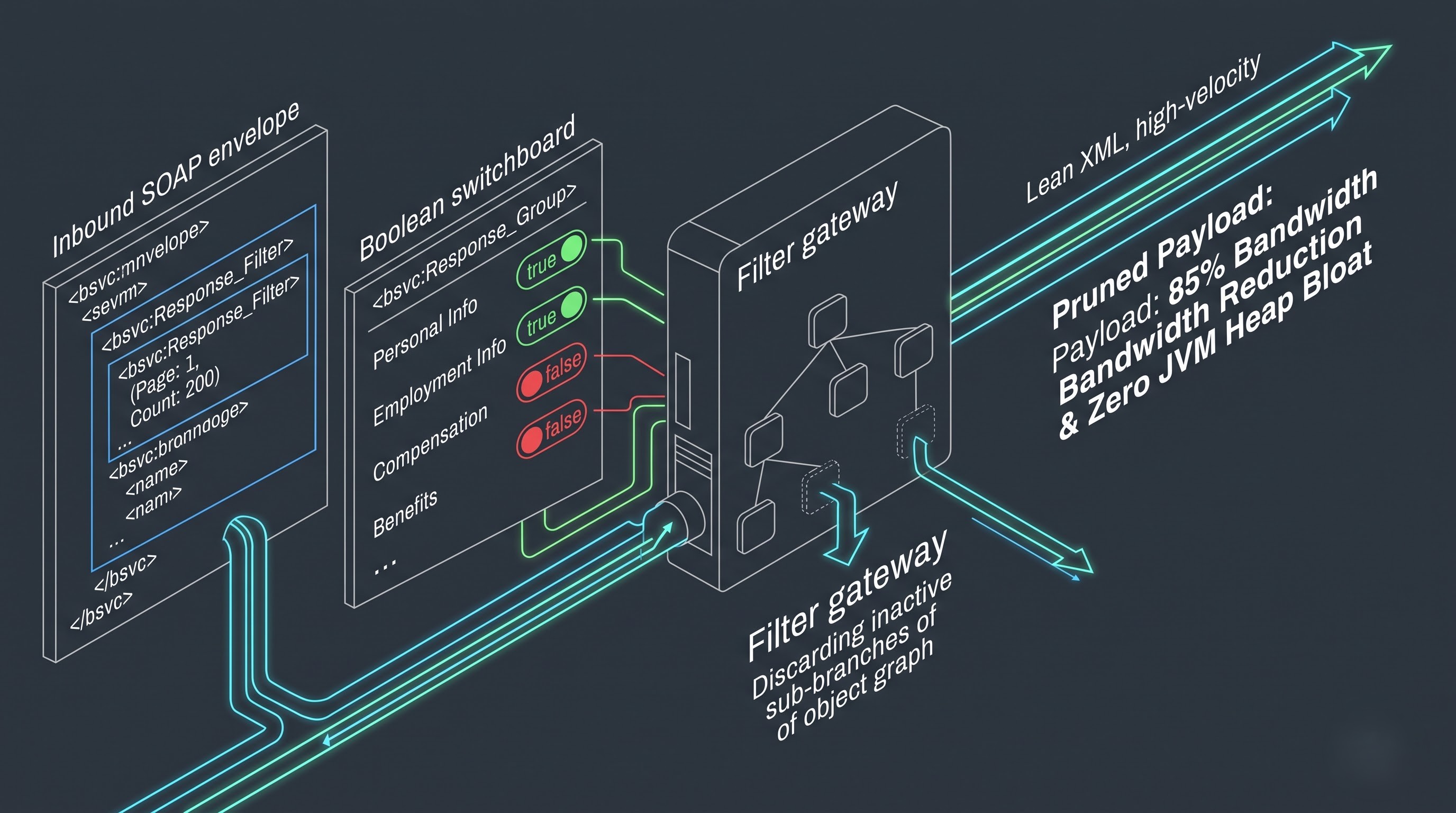
Workday’s Get operations such as Get_Workers aim at minimizing the network chatter. If a single comprehensive request is issued, a huge amount of XML will be returned in case all the object graph is returned. In order to lower both the load on the server and the network bandwidth, Workday SOAP requests use request criteria filters as well as response groups.
Using transaction effective dates or entry time to obtain either the snapshot state or changes.
Using organizational structures and their configuration, eligibility demands, or criteria about the worker’s situation.
As for the response groups, these are doers of transaction jobs by receiving input from the caller system. The system transmits an array of booleans that indicates precisely which sub-graphs of the business object have to be filled out in the information in the XML body. The external identity synchronization can switch on the response groups for providing information about the personal information, user accounts, and primary working place, while keeping off the ones for patronizational payments, performance check-ups, allocating benefits, and telling about dependents' lives. This allows throwing away the unnecessary data and significantly increasing the throughput of the integration pipeline.
Security, Authentication & Governance
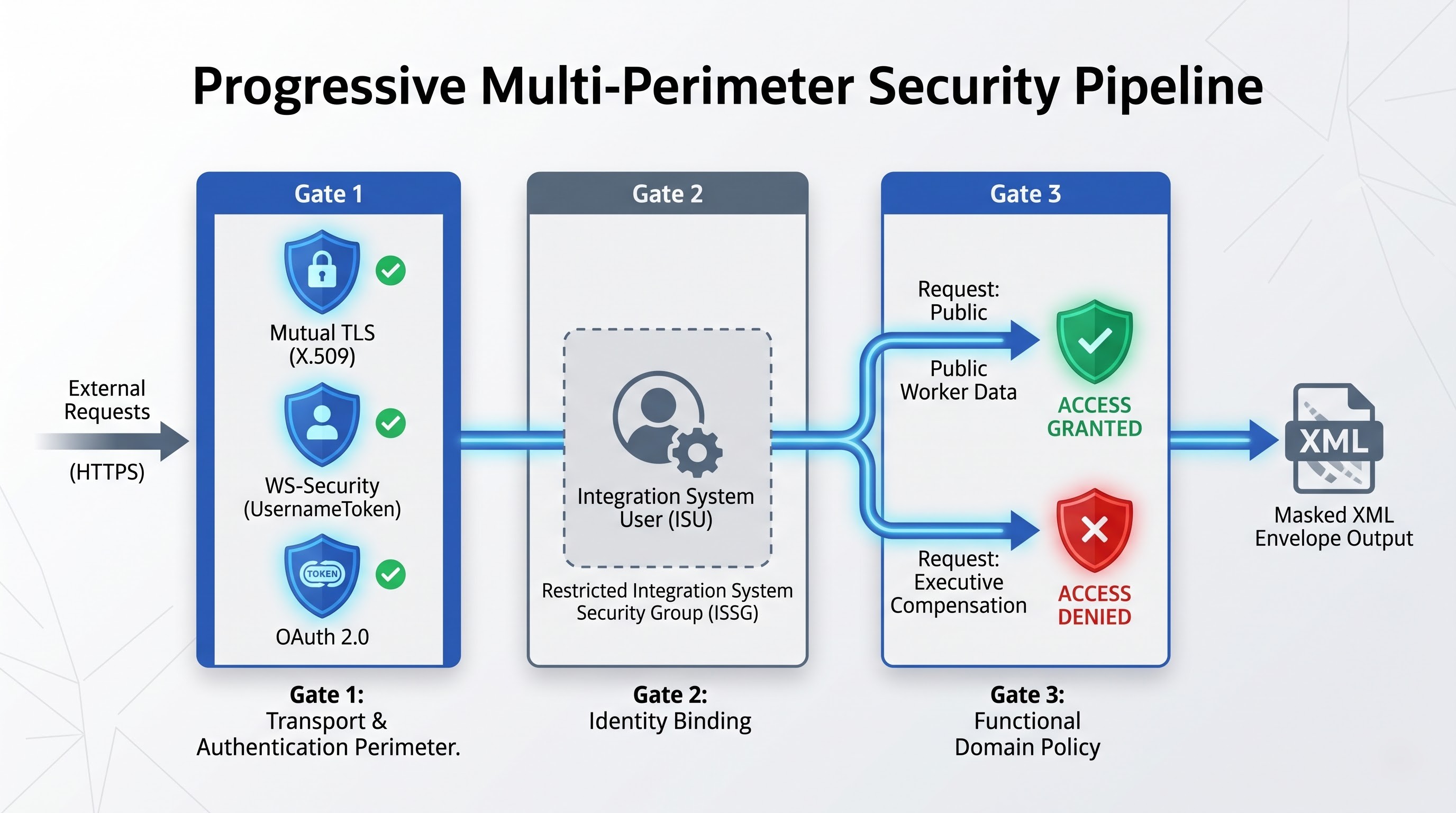
Security is not optional in Workday integrations. Because SOAP endpoints can expose executive compensation, personally identifiable information, and organisational financials, securing the endpoint requires multi-tiered authorisation and enterprise-grade authentication controls.
Security Groups and Integration System Users (ISUs)
Human users never directly use programmatic SOAP endpoints. The ideal architectural approach is to have all programmatic traffic terminate at dedicated Integration System Users (ISUs). An ISU is a special type of system account within Workday that has no interactive login capability and is excluded from interactive multi-factor authentication policies.
Workday authorisation is governed by a strict role-based access control model implemented through Integration System Security Groups (ISSGs):
Principle of Least Privilege: An ISU is put into a custom ISSG created solely for that specific integration’s transactional mandate.
Securable Web Services and Securable Operations: Each SOAP operation maps back to securable domain policies. For the ISSG to perform an operation, the ISSG must be explicitly granted Get or Put access to the underlying security domains that control the target business objects.
Contextual Data Restrictions: In addition to operational security, Workday implements data-level security. An ISU may be permitted to initiate a compensation retrieval operation, but if its security group does not have access to the executive compensation segment, those specific attributes are excluded from the response payload, or the transaction is rejected altogether, depending on the constraint configurations.
Authentication Methods
Workday supports multiple authentication models for SOAP interactions that can be setup through the Integration System User:
Username-Token Profile (WS-Security): The most traditional mechanism, where credentials are embedded in the SOAP header, within a WS-Security block. The profile contains the username, tenant identifier and either a clear-text password (always protected by transport-layer TLS encryption) or a cryptographic password digest created using a base64-encoded SHA-1 hash over a unique nonce, timestamp and password.
Mutual Authentication (X.509 Client Certificates) Organisations implement mutual TLS for enhanced security perimeters. During the initial TLS handshake the client system presents a trusted digital certificate. Workday will validate the certificate chain against trusted enterprise roots and map the presented certificate directly to the Integration System User specified, bypassing the use of static application passwords altogether.
OAuth 2.0 Bearer Tokens: Workday supports OAuth 2.0 token-based flows for its web service endpoints, although it's mainly designed for REST APIs. An integration client exchanges cryptographically signed JSON Web Tokens (JWT) for a short-lived access token, which is then passed within the HTTP authorisation header when dispatching the SOAP request. This eliminates long-lived credentials and fits into modern identity federation governance models.
Architectural Design Strategies and Patterns for Integration
When integrating an enterprise ecosystem with Workday using SOAP, you need to choose the appropriate integration pattern that matches your latency requirements, transaction volumes, and operational dependencies.
Real-Time Synchronous Integrations (Request Reply)
The synchronous request-reply pattern is used when the external system requires an immediate, deterministic result before it can finish its own workflow.
For example, an external enterprise service bus might query Workday to validate cost center availability or worker status in real time before allowing access to physical security assets. Like this:
The middleware builds a small, focused SOAP request envelope.
The request is sent through an open HTTPS socket directly to the Workday tenant endpoint.
Workday processes the message in memory, applies validation rules and returns an immediate SOAP response (or a detailed SOAP Fault) within the same connection.
Architectural Trade-Offs: This pattern affords immediate data consistency but suffers from tight runtime coupling. Execution will be throttled if the upstream process that started it is under scheduled maintenance or high server loads, leading to latency or connection failure.
Asynchronous Extraction and Bulk Data Synchronisation
Syncing enterprise-wide data with synchronous point-to-point SOAP calls can degrade performance; think pulling all forty thousand employees into a data warehouse or ingesting large volumes of journal lines.
A large synchronous Get_Workers call that attempts to fit hundreds of megabytes of XML into one transmission will often result in HTTP socket timeouts, middleware memory heap exhaustion, or server-side throttling. Architectural strategies for bulk extraction using SOAP are:
Paging and Chunking: Workday provides pagination elements within the request criteria to allow the integration developer to iterate through worker pools by specifying a page number and page size. Processing worker data in manageable batches of one hundred to five hundred objects guarantees stable memory footprints on both client and server engines.
Transaction Log Ingestion Where high-volume integrations do not extract full demographic snapshots every run, they use the Workday Transaction Log. The calling application passes a time interval into the request so that only workers that experienced certain tracked business events (like promotions, address changes or terminations) within the specified time window are queried.
Shifting Enterprise Interface Builder (EIB) work away from SOAP Data Payloads: When files have crossed essential operational limits, architects usually utilize asynchronous orchestration designs instead of pure SOAP Data Payload formats. Clients call up the Enterprise Interface Builder process by means of SOAP Integration Service. Knowing how to use these hybrid extraction techniques and when to migrate from synchronous SOAP to batch tools is one of the main areas of candidate evaluation for obtaining workday integration core certification at OnlineITGuru that assesses advanced tenant orchestration and data handling knowledge.
Outbound Messaging as an Event-Driven Orchestration
Workday SOAP is more than an inbound mechanism. Workday can also be the client initiating outbound SOAP communications based on internal platform events.
Business process event routing and Workday Outbound Subscriptions:
An HR administrator starts a “Hire” event from the Workday UI.
When a business process reaches a defined workflow milestone (e.g., final HR approval), it triggers an Outbound Messaging step.
Workday creates an outbound SOAP document with the hire information and posts it to an external endpoint that is controlled by enterprise middleware.
The middleware processes the message, provisions downstream accounts, and optionally makes a synchronous inbound SOAP call back to Workday to write back newly generated account attributes, such as an enterprise email address or network login handle.
Enterprise Core Use Cases
To understand how these technical primitives fit together in production architectures, consider four classic enterprise integration patterns focused on Workday SOAP services.
Automated provisioning of workers and identity management
The most common Workday integration scenario is when you synchronise personnel records between Human Resources and Information Technology directories.
Business Context: When a worker is hired, transferred or terminated, identity management systems such as Active Directory, Microsoft Entra ID or Okta need to immediately align security access to prevent data leaks and maintain productivity.
Implementation Flow: The identity management orchestrator calls the Human_Resources service every hour or on the occurrence of an event using the Get_Workers operation of the SOAP service. The request specifies a transaction log filter for all events completed since the last run and turns response groups on for personal information, employment data, and communication methods.
Operational Outcome: The orchestrator loops through the returned XML, maps Workday organisational attributes to network distribution groups, issues local provisioning commands and then calls back into Workday via the Maintain_Contact_Information operation to populate the worker’s primary work email address and office telephone extension once provisioned.
Global Payroll Interface Alignment
For enterprises operating across multiple sovereign jurisdictions, Workday is commonly run as the global HR system of record, with specialised local third-party payroll engines used to manage tax compliance, social security withholdings and national currency disbursements.
Business Context: Each payroll pay cycle, delta changes associated to salary changes, statutory deductions, hour bank allocations and banking configurations need to be extracted and transformed for local payroll vendors.
Implementation Flow: Integration broker calls the Payroll_Interface SOAP service. It sends a Get_Payroll_Extract request, specifying the unique Pay Group reference ID and the cycle effective dates. Workday determines the precise retroactive changes, structural adjustments and regular compensation deltas within that pay period.
Operational Outcome: The XML returned is a deeply nested object graph that details baseline compensation, retroactivity calculation, and deduction instructions. The broker unmarshals this structured XML, processes it through an internal transformation pipeline, and formats the output into fixed-length text or localised banking formats for transmission to the local payroll provider.
Automated Inbound Supplier Billing
Supplier invoices are ingested regularly from external e-invoicing platforms, OCR optical scanning systems or supplier self-service portals directly into Workday Financial Management as part of accounts payable workflows.
Business Context: Supplier bills in the thousands are not to be entered manually by a human, but invoices captured in external platforms are to be continuously loaded into Workday for ledger balancing, tax tracking, three-way matching to purchase orders, routing for departmental approvals.
Implementation Flow: When an invoice document is approved externally, the ingestion system formats a Submit_Supplier_Invoice request against the Financial_Management SOAP service. The request payload provides the supplier’s external reference code, payment terms, invoice date, lines, tax codes and related purchase order references.
Operational outcome Workday validates payload against internal financial controls. If the supplier reference cannot be resolved, or there is a conflict with accounting cross-validation rules for the line items, a structured SOAP Fault is returned indicating the reason for the failure. If valid, Workday creates the supplier invoice record, initiates the internal approval business process, and returns the new invoice transaction identifier to the source system.
Third-Party Benefits Carriers Enrolment
HR organisations also manage enrolment feeds that send employee medical, dental and life insurance selections to insurance carriers, typically in industry-standard formats like EDI 834.
Business Context: While Workday has native Benefits Administration, insurance underwriters demand accurate, ongoing enrolment profiles that specify dependents, coverage levels, and premium deductions.
Implementation Flow An integration pipeline is connected to the Benefits_Administration SOAP service to poll for elections finalised during an annual open enrolment window or off-cycle qualifying life events. The request includes specific Benefit Plan Type and Benefit Group identifiers.
Operational Outcome: The extraction provides full dependency trees with spousal and child data and coverage effective dates. This rich data model is passed through a translation engine that produces standardised carrier electronic data interchange streams that match the deducted payroll withholdings to active insurance policies.
Professional Expertise and Future Career Directions
Creating production-level SOAP integrations requires knowledge of both the broader system design and the finer details of XML messages. As companies continue to consolidate their business systems with Workday, the need for specialists who can traverse security domains, craft resilient schemas, and engineer two-way integrations is high. If you are gearing up for technical interviews, customer meetings, or integration manager roles, working through some select workday integration interview questions will let you gauge your understanding of different scenarios, error resolution methods, and tenant optimization practices.