
Workday Studio Architecture: Components and Workflow
Last updated on Oct 26, 2026
Workday may be called one of the best examples of cloud-based suites for enterprise management including such modules as human capital management, financial management, payroll and planning as one cloud transactional suite. With growth of the organizations the diversity in the technical environment becomes clear. And it is necessary to ensure a reliable and secure integration of Workday with other third party applications, on premise solutions, bank systems, clearing houses and identity providers.
For this purpose Workday provides a variety of integration solutions, starting from such simple tasks like report exporting and up to complex solutions for process orchestration. The top of the integration solutions hierarchy represents Workday Studio.
Workday Studio may be considered as full feature graphical application for designing integration assemblies, which are mostly complex and transactional. With the help of Workday Studio it is possible to implement such functions of enterprise management as protocol management, transactions, multithreading, transformations, recoverable error handling and services calls. The understanding of architecture and process flow of Workday Studio is essential for architects, developers and IT managers.
Architecture Principles and Design Philosophy
The architecture of Workday Studio is developed on the basis of the design philosophy that it is necessary to combine the openness of standards with the governance, isolation and security that are inherent characteristics of enterprise cloud environment.
The basic principles of Workday Studio architecture are implemented in the context of Enterprise Integration Pattern (EIP) design approach. With the help of the messaging backbone that mainly includes the enhanced open-source messaging platform, Workday Studio enables to integrate various integration techniques into processing blocks. In the context of EIP design approach, the integration is implemented through the assembly of messages that are provided from the entry points, processed, interacting with the internal and/or external web services, handling the exceptions and delivering them through delivery channels.
Architecturally, Workday Studio is based on the following four principles:
Cloud Integration Runtime Environment
Integration development takes place in a localized desktop environment; however, execution is confined to Workday Cloud. Studio-assembled components will be compiled, packaged, deployed, and scheduled within the isolated boundaries of a certain tenant environment of the customer. In light of the significance of the concept of multitenancy in the cloud environment of Workday, Studio implements a rigid resource governance in the system. The integrations run in a sandboxed execution environment that accurately governs memory usage, threads allocation, transaction timeout, and input/output throughput.
Processing of Message-Driven Integrations
Concerning the architecture, each Studio-based assembly operates in a message-driven fashion. Messages comprise both business data and metadata, execution properties, and context variables. Processing components do not maintain any persistent state with respect to the separate instances of processing within different integration executions. Instead, all states are transmitted transitively through the message pipeline or persisted.
Independence from Format and Protocol
While the native Workday technology stack utilizes XML structures, Web Service definition language, and JavaScript Object Notation, Studio acts as a universal translator. The architecture of Studio considers binary format, plain text, comma-separated file format, structured data, archived data, and encrypted payload.
Declaration-based Assembly against Imperative-based Scripting
While Studio cares mostly for configuration and visualization rather than scripting, the developer declares his/her assembly through the use of the set of the pre-defined building blocks in a visual way. If there is a need for procedural programming, calculations or routing, the scripting bridges allow to make the necessary actions through programming, without interrupting the flow.
Development Environment and Packaging
The development process of the Workday Studio integration is a bridge between the developer’s computer and the multi-tenant cloud-based service called Workday.
Integrated Development Environment based on Eclipse
Workday Studio is basically an application which has been created through the usage of the Eclipse framework. Some toolkits, synchronization mechanisms, palette drawers, and local validation engines are present in the workspace of the Eclipse platform. Prior to starting the development of a project in the local workspace, the developers usually make sure that the client configuration process is completed either by making use of the official tools of the tenants or workday studio download package.
The development environment shows the integration flow in a visual form of the diagram. The components are taken from the palette and put into the sequence flow where connections create message flows. At the same time, the underlying system keeps the XML configuration files of the assembly.
The level of integration between workspace and Workday tenant through web management services available on Workday website is very tight. Due to that developers will be able to accomplish the following tasks:
See web services and custom schemas definitions for particular tenant in real time.
Get the definitions of metadata such as custom fields, business objects and validation.
Test endpoints and run unit testing locally.
Deploy the integration package straight into tenant’s repository.
Project Structure and Components
Components of Workday Studio Project include the following folders:
Assembly Definitions: Visual representation of the integration processes and process flows for error handling.
Custom Schema Resources: Metadata definitions for particular tenant, enterprise schema and documents.
Transformation Resources: Stylesheets, scripts and mappings for payload transformation.
Configuration Properties: Deployment properties, target environment variables and credentials.
The implementation of the project will allow the development environment to develop one software product – Integration System Archive (Clarinet Package) that will contain all the required instructions for the cloud engine to create and implement integration.
Basic Structural Elements
Workday Studio Assembly contains some structural elements. These structural elements are applied for performing some specific functions related to the processing of data, control of operations order and limits.
Message Container: Root, Parts and Context
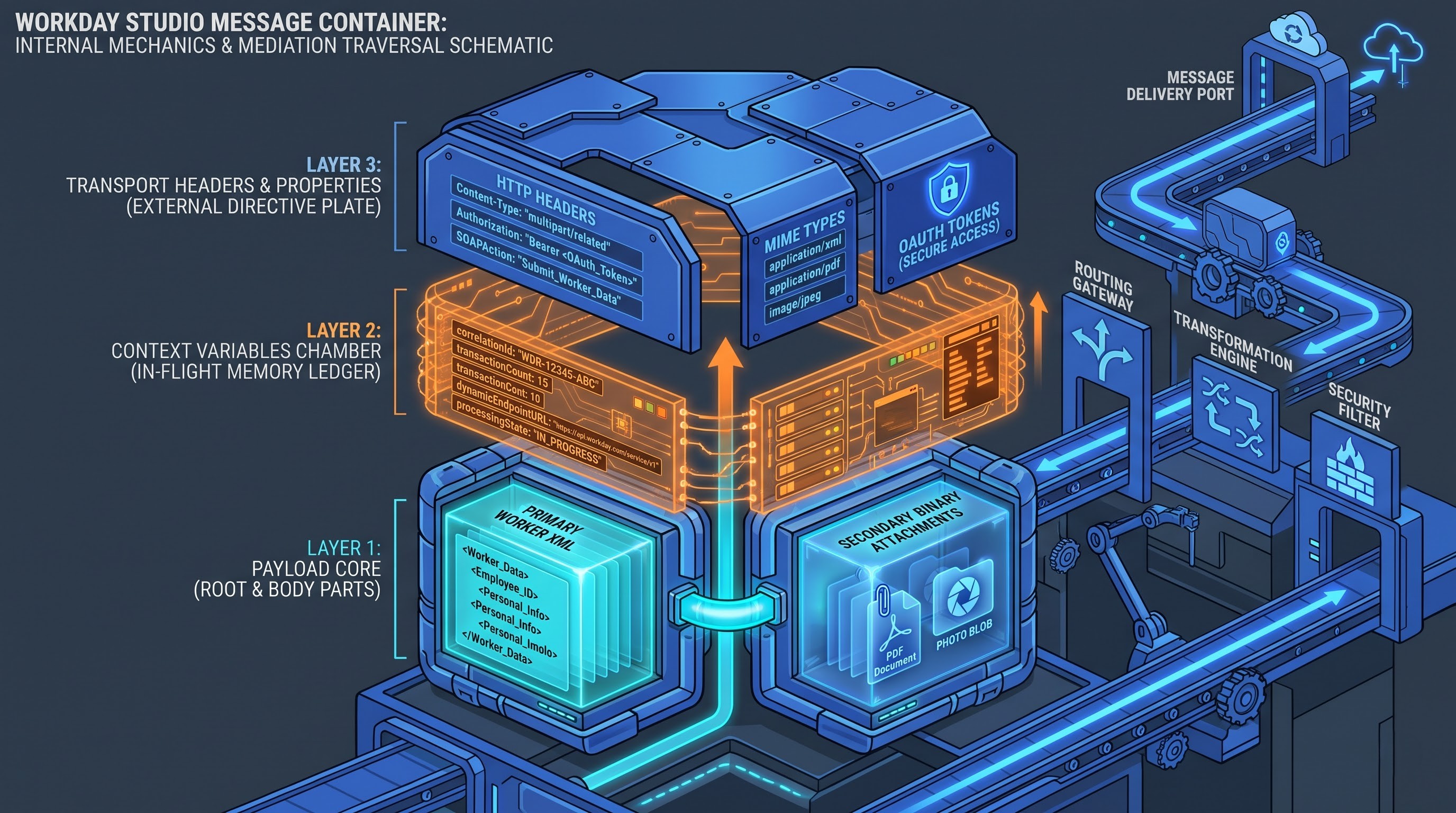
Message Container is the key element of the Workday Studio Integration Flow. At each stage of the pipeline, the assembly will process the input message container, perform necessary transformations and provide the output message container. The message container includes the following components:
Message Root and Body Parts: This is the message itself. In case of simple integrations, there is only one message root with the payload presented in plain text or XML format. However, in the case of Workday Studio, it is possible to process multipart messages. The multipart message may contain several parts such as, for example, an XML structure of the employee and photo of this employee in the PDF format.
Context Variables: Variables available during the entire process execution period. Both writing and reading actions are possible with such type of variables during any point of the execution chain. It could be utilized to store the configuration properties, transaction count, tokens, file name, and correlation ID.
Message Headers & Properties: Temporary information related to the message transport layer. The information within the header layer could be utilized as a directive for the transport layer concerning HTTP content types, SOAP action, encoding type, and security tokens.
Transportation Layer & Endpoints
Transportation Layers are the boundaries of the assembly that describe how traffic will get into and leave the application through the network protocol layers:
Inbound Endpoints: They indicate the way how the input message will be received to start the process of integration process execution. The process could be started by means of batch execution on the cloud, tenant manually, enterprise interface triggering, or HTTP listener endpoints.
Outbound Endpoints: They indicate how the processed message will be sent out. There are special outbound connectors for Secure File Transfer Protocol, Hypertext Transfer Protocol (secure and regular), Simple Mail Transfer Protocol, and Web Services.
Splitters & Aggregators
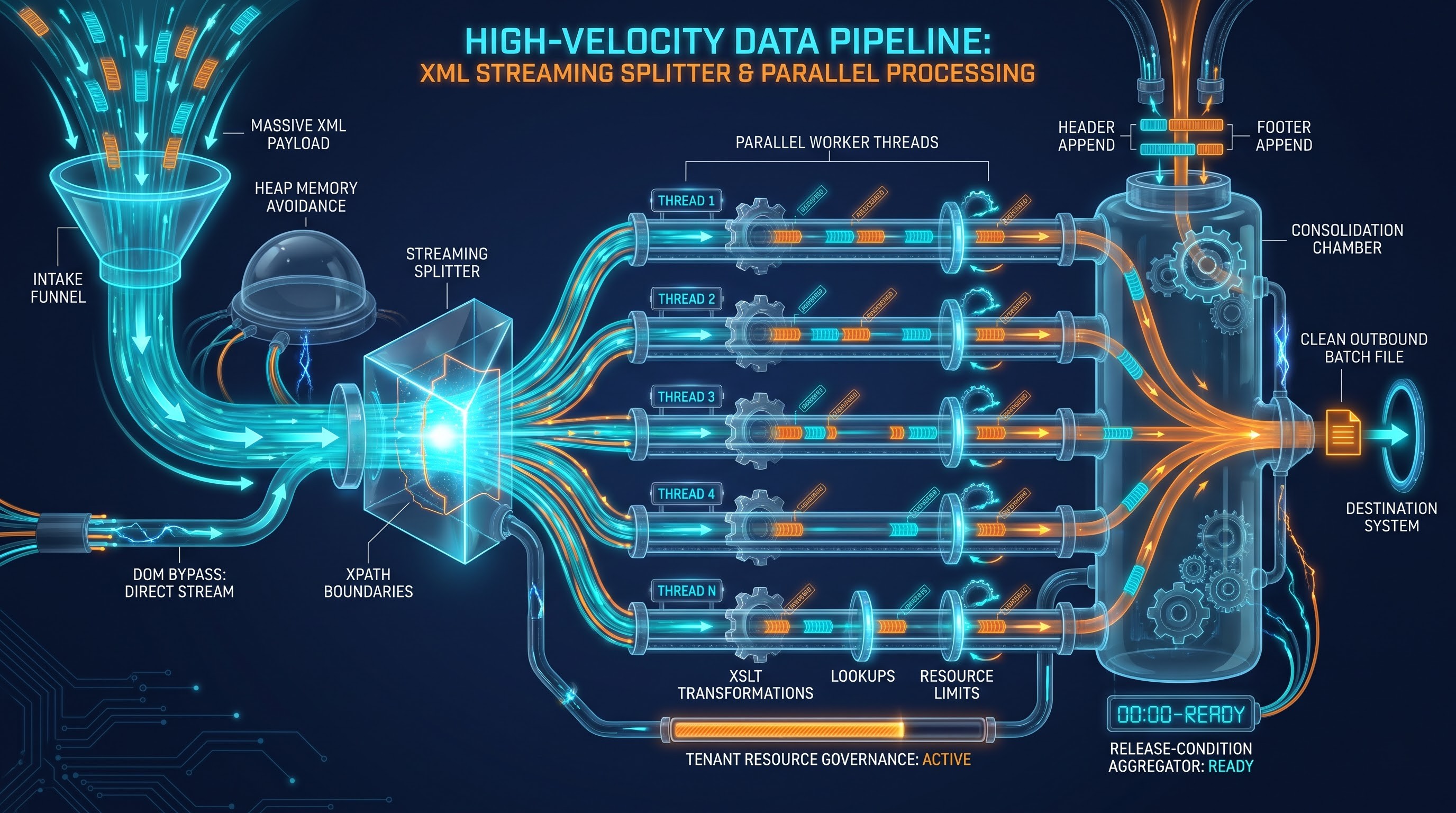
For the enterprise integration that is concerned with the processing of data, there is a need for the processing of large files with the information about tens or even hundreds of thousands of employees as well as the general ledger journal entries or invoices. There is a considerable amount of data processed by the execution engine in the working memory leading to the exhaustion of system resources. In order to solve this problem, the studio uses streaming splitters & aggregators:
Splitters: The breaking down of large data streams into smaller pieces of messages. The operation principle of splitters is connected with the breaking down of the structured XML nodes, text file delimiters and fixed size records. The streaming splitters use the direct access to the input stream, which allows splitting record fragments without having to load the whole parent file into the memory.
Aggregators: The structural opposites of splitters. Aggregators collect all the fragments of messages that were created during the parallel/sequential loopings and wait until the releasing conditions are satisfied in order to create one message from the fragments of messages. These releasing conditions may be the number of records, batch completion conditions and time limits.
Media and Router
Assembly process flow control is accomplished through mediation and routing components:
Routers: Compare the message attributes, context parameters, or message contents against certain criteria so that the proper means of handling the messages downstream can be determined. Filtering routers filter out messages based on certain criteria, but content-based routers intelligently route payroll messages, executives' messages, or geographic sub-regions for processing.
Mediation: Standard processing components that lie within the sequence of processing paths. The mediations are the processing components where context parameters can be set, message headers can be altered, message body contents can be stripped, or message transformations can be done.
Transformers
Messages may not be in the same format in various software platforms. There are many options for transformation in Studio:
Extensible Stylesheet Transformations: The engine embedded internally to transform an XML document to any form which may include but is not limited to other XML structures, pure text, CSV files and HTML documents.
Data Initialization and Formatting Engines: The engines that will template the document's structure with data obtained from the message context.
Stream Transformers: Engines used for stream transformations to easily transform binary or character streams by doing such things as encoding changes, Base64 transformations, gzip compressions, zip compressions and cryptographic transformations (for instance, PGP encryption).
Deep-Dive: Integration Process
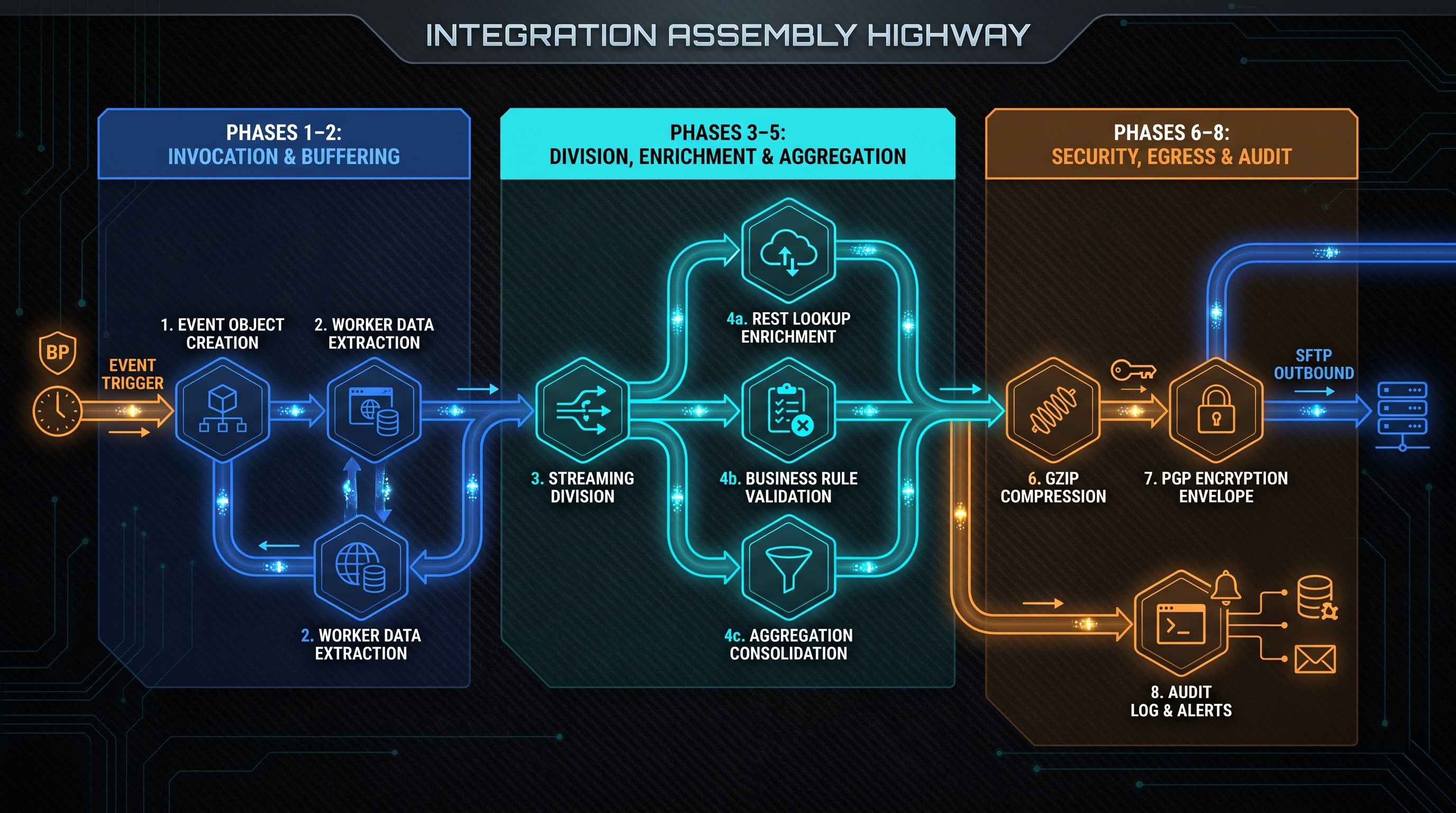
In order to know how the architecture layers function, it is necessary to take a look at the events taking place chronologically when implementing Workday Studio assembly.
Phase 1: Invocation and Initialization
Workday Cloud Integration starts with an event that occurs within the cloud environment. This event may either be scheduled (a daily payroll job), event driven (notification about starting a business process with the workers onboarding) or interactive (administrator invocation).
An Integration Event object will be created by Workday at run time. The Integration Event object will serve as the persistent object of the integration run and will include some of the details, including the timestamp, start parameters, logs, status and run time flags configured by the user.
Phase 2: Ingestion and Buffering
After initialization, the integration run will reach the inbound transport point. In an outbound scenario, where the extraction of data is needed from Workday and exporting it to another system, the integration run will create a query for the data extraction from Workday Web Services or Enterprise Interface Service layer.
Workday Studio provides native connection to Workday production database using its internal web services adapters. The usage of internal web services adapters eliminates any network latency issues and maximizes performance in calling standard operations like Get Workers, Get Invoices and other custom reports as Web Services.
Data to be included in the integration run will be in the message pipeline. For cases when inbound scenarios are considered, where import of data files into the Workday from the external sources is required, an outbound adapter such as SFTP or HTTP will be used to retrieve data.
Phase 3: Data Division and Parallelization
As the enterprise collects large volumes of data, the assembler provides the data immediately to the streaming splitter so that not all data should be materialized into active RAM via the scanning of the stream and dividing the stream into pieces according to business units, for example, splitting the stream of records of the whole enterprise population by employees.
There is an option for parallelization of the process in the Studio environment. Parallelization of loops provides the processing of split messages by different threads depending on the restrictions on the resources of the tenant. Each thread works only with a sub-message; hence, it allows reducing significantly the processing time of the batch.
Phase 4: Data Enrichment and Business Logic Processing
The sub-messages are subject to business logic processing and data enrichment:
External/Internal Lookups: In the case where additional information about the record other than the original payload (external bank transit code validation, internal cost center code lookup, for example) is needed, the assembler invokes further web service calls to Workday and external REST API services.
Validation of Business Logic: Scripts test the logic behind the business rules, such as salary increase pro-ratios, tax ID format rules, or record filters based on complex status logic.
Reshape Payloads: Transformation engines use transformations of enumerations, masking of personal information, and dates/times to map internal Workday object models to target schemas.
Phase 5: Aggregation and Consolidation
With the records having already been processed, transformed, and validated, it is time to move to the aggregator component. The aggregator component stores the processed records in buffers while counting the processed records against the initial split inventory.
After all of the records have been processed, the aggregator has done its work and the assembler combines the messages into a consolidated outbound payload with a document header and trailer (number of records, control totals, or batch hash).
Phase 6: Final Format and Envelope with Security
There may be a need for encryption at the transport layer/file level in this phase where there will be an export of the bundled payload out of the Workday cloud-based environment. The activities that will be done in phase 6 include:
Compression will be done using zip or gzip compression.
Cryptography will be done using PGP encryption using the public keys uploaded in the security store in the Workday tenant.
But the documents will be enveloped with digital signatures, S/MIME envelope or password protected zip file depending on the requirements of the partner.
Phase 7: Transfer Outbound
In this phase, the payload which has been encrypted in the previous phases will be passed to the outbound transport component. The outbound transport component in this phase will establish a secure connection to the endpoint destination (external payroll bureau, data lake or clearing house).
The Studio components will manage the low-level communication such as TLS negotiation, HTTP status codes, connection failures and socket disconnects.
Phase 8: Post-Run, Audit Logging and Status Logging
In this last phase there will be an opportunity for audit and logging:
Integration attachment methods will hold the output files, audit logs and debug logs in the Workday Integration Event record according to the retention policy of the tenant.
Status logging will keep a log of whether the run was successful, completed with warnings or failed.
Operational logging will be performed on the Workday console and it will include the summary of counts, errors and latency processed.
Notifications will send enterprise level alerts through emails, Workday notifications and alerts to notify the operational teams regarding the status of the pipeline.
Security Architecture, Fault Tolerance and Scalability
Workday Studio is designed to perform in the highly secure and high-performance environment that exists in core enterprise systems. In the architecture design, the security, fault tolerance and resource management are taken into account.
Isolation of Tenants and Cryptographic Keys
Because of the multi-tenancy architecture of Workday, the integrations will execute in isolated virtual runtimes. The integration executing in one tenant will not have any access to the runtime memory, buffers and data pipelines of another tenant.
The separation of credentials from integration logic will be ensured. Regardless of the circumstances, there will never be any password, API key, private key, and PGP key that will be included in Studio Assembly code. Instead, all these will be provided by Integration System User, Public Private Key Pairs, and Secure Configuration in the Workday tenant administration page. Credential collection will be automated through internal pointers, and developers will not need to include any credentials in their project code.
The transfer of data within Studio will take place in an encrypted format using the TLS protocol. When data payloads are being stored in the cloud storage buffer during the split/aggregate process, Workday cloud storage encryption will be used.
Conclusion
Workday Studio acts as a perfect example of an advanced integration architecture that could be applied in organizations characterized by complex landscape. Advanced Integration Architecture consists of the integration of very powerful and declarative modeling environment based on the Eclipse platform and of a very governed, secure and multi-tenant cloud runtime environment to ensure the performance and integrity of data while orchestrating his activities.
This magic lies in the perfect synchronization of the elementary parts that include stream splitter, mediation loop, transformer, decoupled endpoint, and error handling. It would be beneficial for those people who wish to gather more information on this topic or prepare for the upcoming interviews to have a look at the well-prepared set of workday studio interview questions at OnlineITGuru.