
Workday Studio Certification and Training Guide
Last updated on Oct 19, 2026
Workday Studio is undoubtedly the top integration tool ever created for Workday applications. While other applications such as the Enterprise Interface Builder and Core Connectors serve primarily in relation to basic data transfers, Workday Studio deals with the integration problems of companies. The software provides an integration development platform that is based on the Eclipse framework and enables specialists to handle huge volumes of information, implement routing, call various web services, and modify complex information.
Working with Workday Studio and processing the information through the main system of Workday requires certain qualifications and skills for development and implementation of a unique assembly. As a result, it is obvious that Workday is very serious about its training and certification processes. Thus, those people who want to succeed in fulfilling the strict requirements may choose from a number of courses, including the Workday Studio certification offered by OnlineITGuru, which covers in detail advanced runtime processes and security issues.
The Significance of Workday Studio in the Workday Ecosystem
Today’s cloud technology shares its ecosystem with many applications. For example, in many international projects, Workday Human Capital Management, Workday Payroll, and Workday Financials are connected to external recruitment solutions, region-specific tax authorities, banking processes, identity management systems, and conventional ERP solutions.
In case integration services require sophisticated customized pagination, conditional loops, large file streaming, notifications on errors from business processes, or even data transformations in different formats, ordinary solutions are insufficient. However, this is where Workday Studio comes into play.
The integration process with Workday Studio is done entirely in the Workday Cloud with the help of the multi-tenant runtime system. This is achieved by developing and packaging integration logic on the Eclipse-based workstation, compiling it, and uploading it to the multi-tenant system to receive resources and scheduling from Workday.
If the integration logic is imperfectly developed, it can lead to data breaches, memory issues, or any other security violations since the process takes place in a shared space.
Understanding Certification: Partner Certification vs. Workday Pro
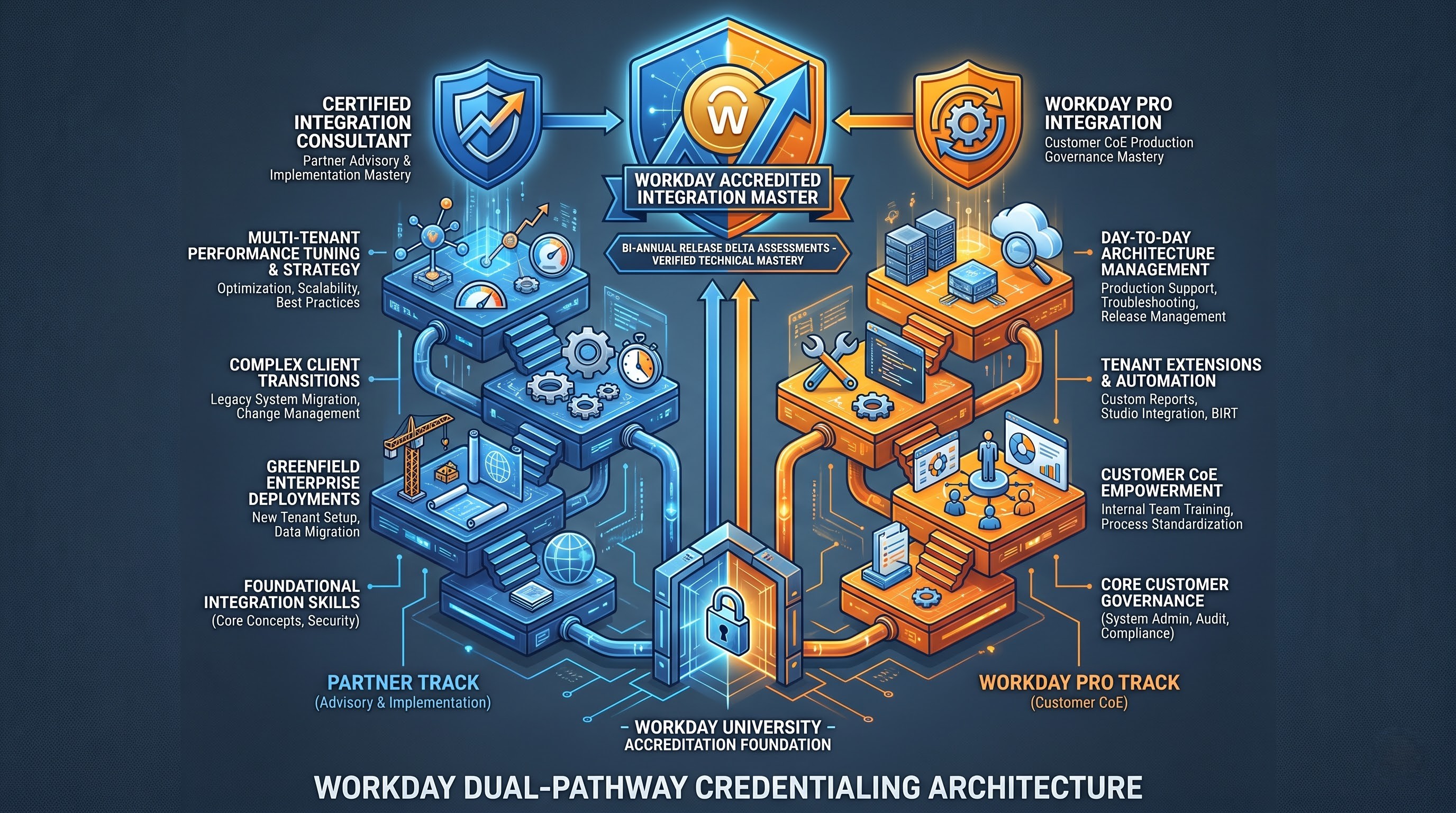
A source of confusion for potential applicants is the distinction between actual candidate eligibility and the certifications available. Unlike certification systems operated by vendors that allow anyone to purchase exam vouchers in the open market, Workday citizenship is part of a closed system.
The Closed System
Workday certifications are only open to those persons without sponsorship. Only two categories of candidates are accepted to take the Workday certification exams:
Certifying Vendors: Employees of Workday-certified vendors who are engaged in the business of deploying and consulting Workday solutions
Direct Customers: Permanent employees of organization using Workday products
Workday employees themselves also qualify, and if a candidate ceases to work for any of the conferring partners or the direct customer, their qualifications are still maintained based on their employer, although they will have all their academic records.
Partner Certification Path
The Certified Workday Integration Consultant (Studio Track) certification is given to those who have successfully passed Workday Studio exam and belong to implementation partner and advisory partner organizations and take part in the implementation of the process. This certification authorizes the consultant to build, run and deploy Studio packages for implementation tasks. The partner certification implies the need for rapid and deep understanding of the approach because they will have to perform complex greenfield design and steer through peculiarities of performance and client transition process.
Workday Pro Integration Track
The Workday Pro Integration Track is the closest equivalent of the certification for internal employees of Workday customers. Workday Pro Integration Track includes Workday Studio. The purpose of the Pro track is to provide customers with technical expertise that was previously available for deployment partners only.
The enrollers have to complete and understand all the classes which our OnlineITGuru website provided by Workday University and pass those exams in order to get the Workday Pro integration certification.
Prerequisites & Foundations (Required)
Then Workday Studio will fail without any prior knowledge of basic Workday concepts. Studio is not for beginners, and requires a lot of prior knowledge.
Functional Tenant Core Values
Candidates should have good knowledge about the general object model of Workday. The data graph for workday is object orientated and critical. Tables and other keys are what traditional relational databases have. What prospective candidates should know:
Business Objects and Reference Architecture: This covers the links between Workers, Organisations, Positions, Jobs and Financial Worktags in the organization.
Object Identifiers: What are Reference IDs, Workday IDs (WID) and universal IDs across systems?
Users and Integration System Security Groups Users: Integration has to be done by service accounts called Integration System Users. The processing of users is controlled by Integration System Security Groups which are responsible for the evaluation of domain and business process security rights.
Reporting as a Service & Report Generation
Workday Report Writer experience is a must for a Studio developer. Most of the data-driven Studio integration tasks don't make direct API calls, they use specially developed Advanced Reports as endpoints of Reporting as a Service.
Applicants should have knowledge of:
Developing complex reports in Business Objects platform.
Development of calculated fields like Extract Single Instance, Extract Multi Instance, Lookup Related Value, Format Date etc.
Publishing reports as web services with REST endpoints.
Assembly Integration: Changing Prompt Parameters
Elementary integration tools
Candidates should have the requisite knowledge of the standard existing integration tools before making use of the Studio:
Enterprise Interface Builder: Designing of the inputting and outputting builders for one-source conversion.
Core Connectors and Document Transformation: Use of the change detection blocks by connectors so as to capture the transaction and reworking the information via the simple XML stylesheets.
Prerequisites in Coding and Technical Skill
Even though Studio includes advanced drag-and-drop capabilities in its Eclipse-based environment, coding and markup skills are still essential for developing automated solutions that meet industry requirements. In case you are a developer who wants to learn these basic components gradually, you can find a dedicated Workday Studio tutorial on the site of OnlineITGuru.
XML and XML Schema Definition: Studio is mainly built upon XML-based documents; one needs to know that XML means understanding hierarchies of nodes, namespaces, and schema validation.
XPath: Querying XML by means of XPath allows locating nodes, evaluating boolean conditions, and dealing with sets of nodes, which is one of the core daily operations.
XSLT: Modern system integration solutions Workday performs XML transformation using the Extensible Stylesheet Language Transformations (XSLT 1.0, 2.0, and 3.0), depending on whether streaming mode is on or off.
MVEL: MVFLEX Expression Language is applied directly in Studio properties, channels, and variables.
Web Services Architecture: One needs to be familiar with how SOAP messages work, how WSDL schemes are created, what REST services are, and how JSON requests are created.
Core Curriculum and Architecture of the Studio Training Track
Though enterprise courses are available through official outlets, several programmers speed up the process of preparation using Workday Studio online training offered by OnlineITGuru, involving real-time projects for environment configuratons, transport architecture, streaming transformations and cloud deployments.
In general, the core curriculum is divided into several integral modules.
Module on Studio Workspace and Project Framework
The first module of the course focuses on teaching developers how to configure their local environment. Participants gain knowledge about how Eclipse plug-in communicates securely with Workday sandbox and implementation tenants. Participants also learn about the structure of the Studio project in terms of its folders:
Assembly File: The principal XML configuration file that defines the visual orchestration.
Project Configuration: Managing metadata, integration IDs, and the dependencies of external resources.
Custom Code Resources: Packaging the custom XSLT style sheets, XML schemas, formatting templates, and JAR files into local project folders.
Transport and Mediation Architecture
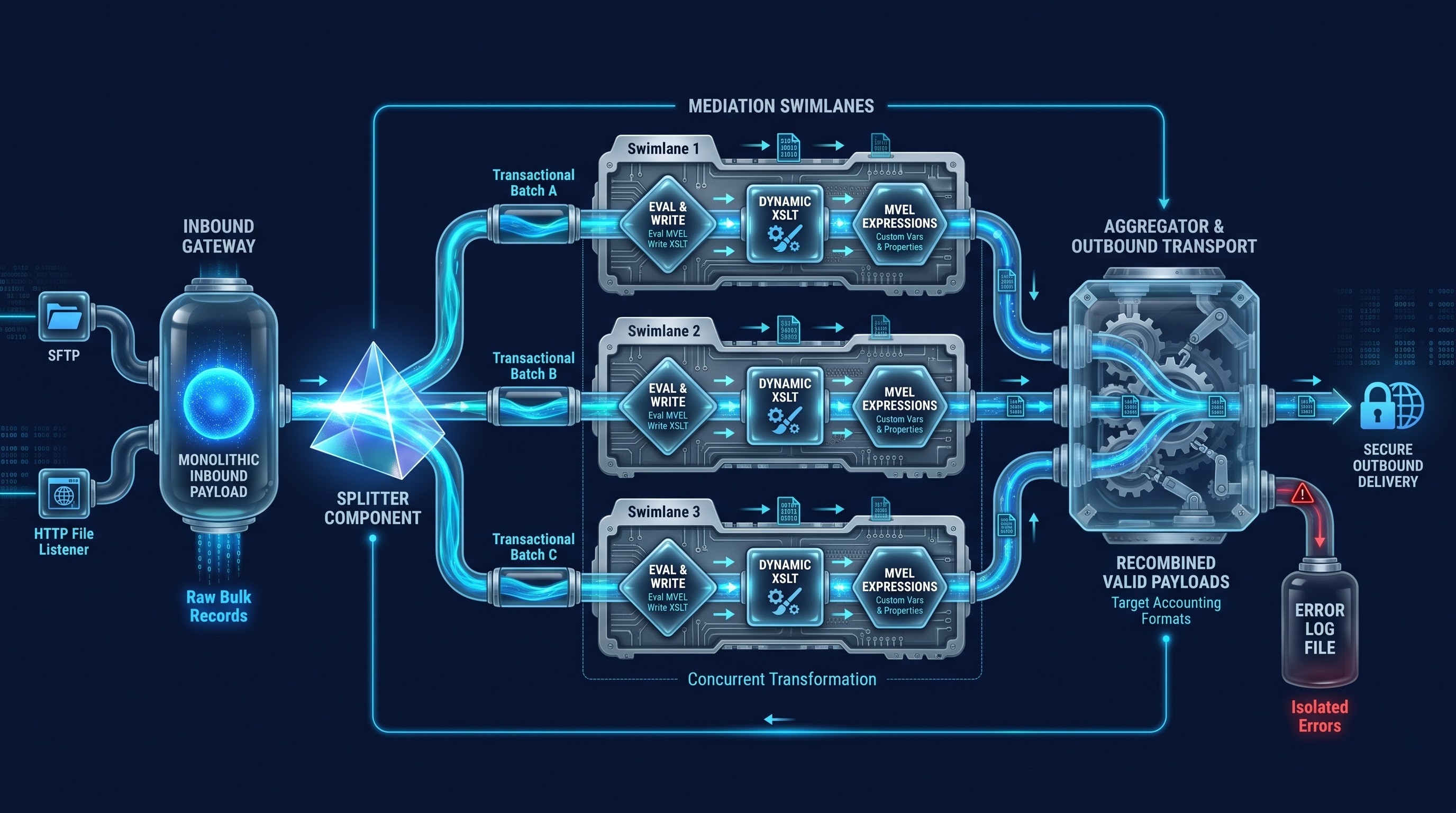
Every Studio integration is based on the processing pipeline that organizes swimlanes, sub-assemblies, transport, and mediation.
In the course of this module, students will learn how to distinguish between:
Inbound Transport: Receiving information via file listeners, SFTP or HTTP endpoints, or inbound web services triggers.
Outbound Transport: Transmitting information through HTTP, SFTP, AS2, or SMTP.
Workday-in and Workday-out components: Specific connectors allowing for the exchange of information effectively with Workday messaging queues, or audit logging services.
Mediation Techniques & Activities
Many student hours must be spent learning how to familiarize themselves with the component palette.
Studio assembly enables the transport of the data seamlessly through mediation techniques:
Async-Mediation and Sync-Mediation allow effective timing of sequential procedures in either single-threaded or asynchronous manner.
Store and Copy techniques include payload capturing, variable scope management, and keeping records.
Eval and Write techniques allow modifying headers, creating output strings, and changing dynamic execution properties.
Routing techniques allow for conditional execution flow control. Splitter and Aggregator help with processing of large files by means of data splitting, parallel or sequential execution of activities, and data aggregation.
Usage of Workday Web Services
The Workday functional catalog presents a broad array of public workday web service operations such as Get Workers, Put Candidate, Submit Compensation and Import Journal Entries.
The training focuses heavily on the effectiveness of the process to:
Create and set up SOAP request headers.
Test requests and validate the results with the aid of Web Services Tester in Studio.
Employ the technique of handling pagination correctly where one needs to set the size of the batches and number of pages so that the application will not retrieve tens of thousands of records at once yielding the tenant timeout.
Make usage of Workday REST API along with the standard SOAP technology making use of JSON payloads when required.
Memory Management: DOM VS. Streaming
It could be regarded as the only technology aspect of the Workday Studio course.
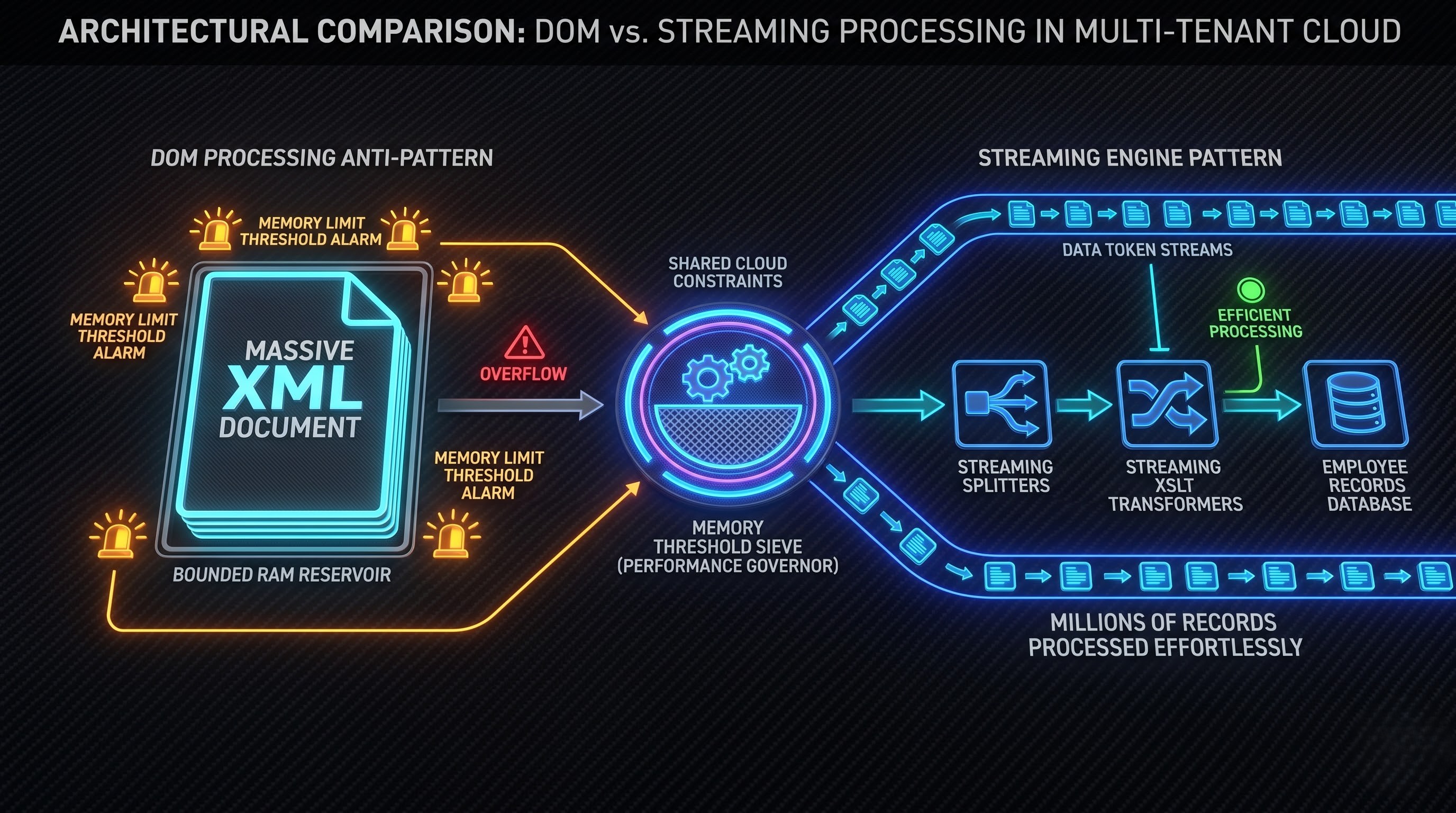
In case of DOM processing, the entire XML file is loaded into the memory of the integration server at run time. This allows developers to run random access XPath queries and perform bidirectional lookups with ease. However, memory space is limited for the cloud tenants. Loading a huge data file using DOM processing means that tenants’ engine uses up all of the available memory space and therefore fails the integration event.
Streaming, on the contrary, reads data in a linear way treating it as a continuous stream of tokens or characters. This does not require having the complete file in memory and allows Studio to process huge files with millions of records without risk of failing the execution environment.
Certification exam usually includes scenario-based questions aimed at testing candidates’ skills in the configuration of streaming splitters, streaming XSLT, and streaming aggregators in order to achieve the best possible performance when working in the cloud.
Error Handling, Logging and Event Management
Integrations in production must fail gracefully: If the failure of integration does not involve any logs indicating that something has gone wrong it leads to a number of risks in operations.
Try-Catch Stack and Error-handling Sub-Assemblies: Capturing exceptions of type technical exceptions, connection timeouts, and errors in applications.
Integration Messages: Sending informational messages, warnings, and critical error messages straight to the Integration Events log within the tenant using defined message-generation steps.
Severe Error Handling: Setting up conditional alerts for the support team through email or an audit file in the integration event with an error summary.
The Certification Exam
Upon completion of all coursework and other requirements, the candidate will be required to take a proctored examination. The exam is daunting,, and it looks to test practical application rather than resorting to cramming.
Profile of the Exam and Types of Questions
The certification exam consists of scenario-based multiple-choice and multiple-select questions. Almost all questions consist of a scenario describing a business problem, a pattern in the enterprise architecture, or issues related to the integration process.
The candidate can be supplied with an example of an architectural diagram description, e.g. a source system delivering a bulk payroll file with employee deductions, and the integration should split the file, validate employees against Workday tenant, transform valid records into accountancy format, write invalid records to error file and send the result file via SFTP. The questions in the exam will ask which exact sequence of Studio components, splitters, transports and variables must be used to implement the requirement without running into memory limits exception.
The subjects to be discussed include:
Setting up the studio environment and building the project.
Component configuration, assembly flow, variable scopes.
REST & Report as a Service consuming Workday Web Services.
Data transformation using XSLT, MVEL and transformation components.
Configuration of the splitter and aggregator, especially the streaming configuration.
Security context configuration, logging and exception handling.
Study Strategies That Work to Pass the Exam
To prepare for the exam, you should follow this study strategy:
Read the official lab exercises carefully: The lab exercises given in official training have real world implementation examples. It’s a lot more effective to remake those integrations in a development sandbox than to pore over slide decks.
Recognize the Scope of Variables and Understand Their Behavior: Many answers are based on knowing the scope of variables. Candidates must understand the difference in behavior between Message Properties, Message Headers, and Integration Event Documents, as well as between the data exchange taking place between parent and sub-assemblies.
Adopt an Elimination Approach While Answering Exam Questions: The multiple-choice test contains many distractors that may explain nonexistent elements, a bad MVEL expression, or a wrong design, such as DOM parsing for several gigabytes of files. Disregarding the options that contradict essential Workday design concepts will leave you with only technical answers in no time.
Manage Your Time Effectively: Scenario questions are often quite lengthy. Candidates need to be careful not to spend more than two minutes on a single question and mark scenario questions for further consideration.
Studio Development Best Practice in Production
Possessing certification indicates a basic level of abilities, but excellence in being a Workday Studio developer at the production level includes observing good design practices in everyday work.
Efficiency and Use of Resources
Normally, integration of Studio works over shared cloud resources, for which reason resource usage is important.
As long as you do not know the size of your files, always use streaming instead of downloading them.
Do not use Web Service API calls multiple times within loops. If you need to process ten thousand workers, use batch processing or asynchronous web service calls whenever possible, rather than making ten thousand synchronous calls.
Enhance your custom reports. Badly constructed computed fields on your Report-as-a-Service connection may result in a low performance of the source record before being passed to the Studio.
Preventive Integration Design
Enterprise solutions can be affected by faults in the network, inoperability of third-party services, validation problems.
Implement retry mechanism in outbound HTTP and SFTP transfers for this purpose without manual effort needed.
Avoid including account names and endpoint in any fields within assemblies. Utilize Workday Integration Attributes, Integration Maps, and Secure Environment properties set in Integration System tenant. This would help modify passwords and endpoints in environments for testing and production without the need to recompile or redeploy any of the components.
Ensure that no business process attachments and temporary files take any storage space in tenant as they are not required.
Documentation and Maintenance
Integration in Studio may require maintenance many years later when its first developer has left the organization.
Use expressive names for swimlanes, mediation steps, variables, and transports, as while the name of step “Async-Mediation-Validate-Tax-IDs” carries some meaning regarding logic implemented by this step, “Step-4” gives no information at all.
Employ Notes and Documentation properties of the step in Eclipse Studio palette to document some business reason behind using custom routing, certain XSLT transformation, or custom error code.
Maintain strict version control outside the tenant. While Workday keeps the record of deployment events, it is strongly advised that organizations maintain source Studio projects in Git or similar version control systems for the purpose of tracking commits, peer reviews, and change logs.
Certification Maintenance and Career Growth
Receiving the Workday Studio certification is an important professional milestone but not a lifetime achievement.
Recertification Procedure
Workday updates its software twice a year, introducing new features, improvement in web services, security architecture, and the architecture itself.
To make sure that this knowledge is obtained, Workday requires a specific set of training to be done by certified individuals. Certified Partners and WB Pro members are to participate in such trainings, and go through the documentation and release assessments.
Creating Your Impact at Work
Being certified as a Workday Studio professional puts a person on the top bracket of software design. Most organizations are in the process of upgrading software, unifying platforms of different acquired companies, and getting data transferred from/to their systems.
Professionals who gain expertise in Studio can expect to finish their career as:
Lead Integration Architect – Has the responsibility for system design on a global scale, data security development, and multi-country implementations.
Workday Technical Lead – Oversees technical team during the project and manages all aspects of the project scope as well as making sure that the corporate objectives are addressed in the solution deployed in the cloud.
Workday Extend Specialist – Employs digital integration techniques gained through Specialist work with Workday Extend to produce customized cloud software applications.
With the required experience in object-oriented programming, data manipulation, and cloud streaming knowledge as well as fulfilling all the necessary training duties, an IT professional is able to achieve great success in this rapidly developing niche.