
Workday Studio Message Context: Mastering Variables, Properties, Streams
Last updated on Sep 22, 2026

In the world of enterprise architecture, Workday serves as the core mechanism for linking human labor, money and overall business processes. As companies develop, the quantity of information travelling between Workday and outside sources increases significantly. While elementary integrations are conducted by means of Enterprise Interface Builders or conventional integrators, integration teams have to resort to Workday Studio due to the complicated nature of processes, synchronization between different systems and advanced data transformations.
Workday Studio offers an environment for creation of systems that is based on Eclipse and is powered by a specific execution engine. In this environment developers build assemblies that are used for rerouting, transforming, improving and sending data. Nevertheless, the flexibility ensured by Workday Studio brings along the necessity to comply with certain principles of architecture. It is important to note that in contrast to the typical self-sufficient middleware tools that work on separate elastic servers, Workday Studio assemblies operate in the multi-tenant architecture of the Workday cloud.
In this multi-tenant ecosystem, the operation of integration assemblages is constrained by particular limits imposed by the system. The available memory is limited, resources for CPU usage are restricted, and as a consequence, heavily memory-dependent solutions can meet with difficulties that lead to Out Of Memory exceptions or problems in execution due to too much time spent on the procedures of garbage collection. The fundamental aspect of this architecture is the Workday Message Context.
Engineers who have the understanding that Workday Message Context is just like a typical storage space or commonplace key-value container usually find themselves fighting issues like slowness in integration, performance problems and incompatibility when progressing from the testing sizes to enterprise sizes, where there are no longer small volumes to handle. If you are learning the core assembly concepts, you will need help from a formal workday studio tutorial. To design and develop successful Workday integration it becomes the most crucial element to be aware of message variables and message properties fundamentals as well as usage.
The Architecture of Message Context in Workday
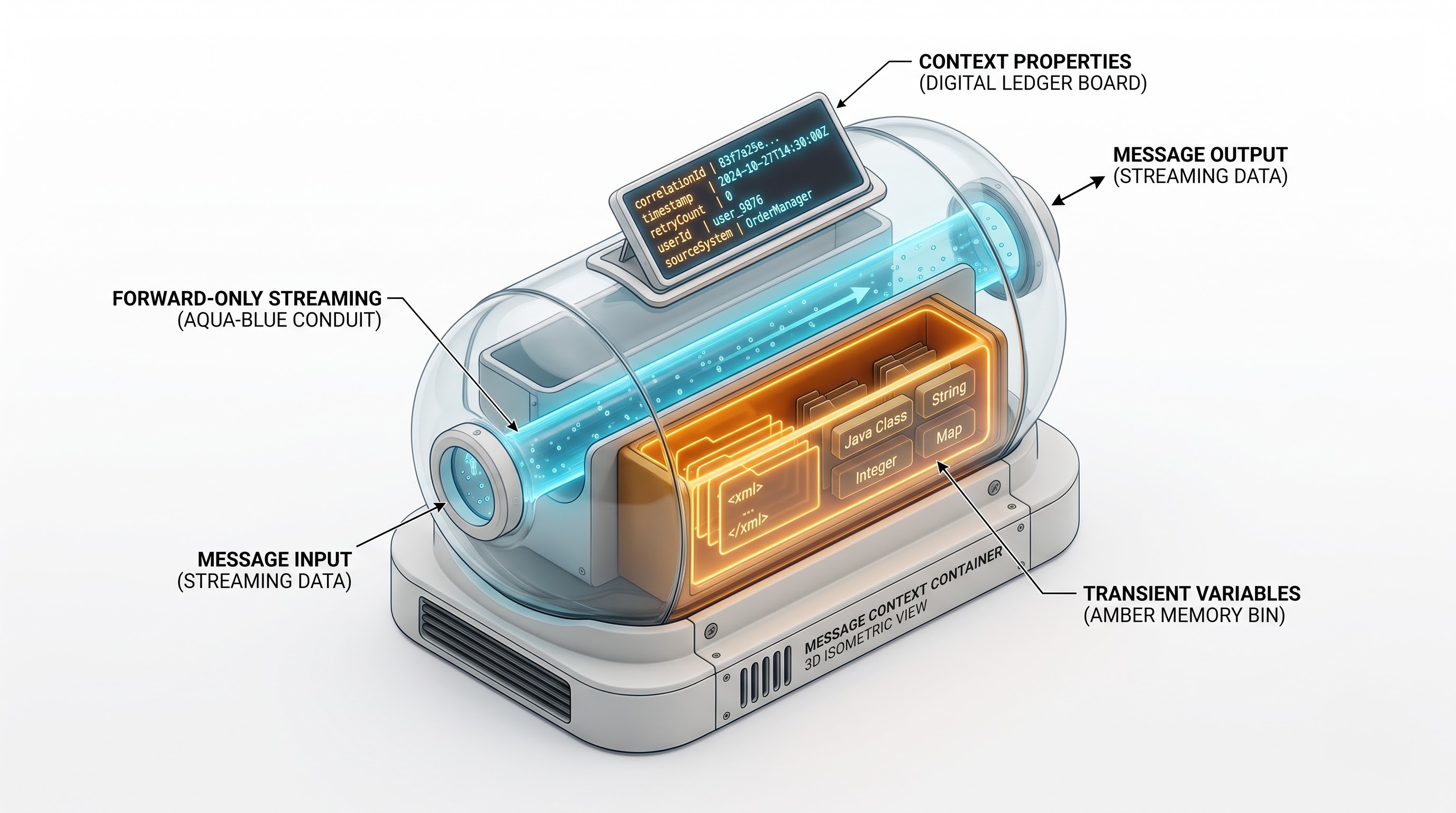
Triggered by some integration event in Workday, a message processing container called "message exchange" is instantiated. Within the exchange, the leading object travels through mediation paths, transport endpoints, and sub-assemblies of the message processing container and is referred to as the Message Context.
The Message Context is a unified abstraction that encapsulates the complete state of a message at any given time. The Message Context encompasses three main data compartments:
Message Root (also referred to as content or payload).
Context Variables (generally referred to as vars).
Context Properties (generally referred to as props).
The context also includes some additional user oriented data compartments such as runtime metadata, transport headers, integration execution credentials, event references, and error states.
Comprehending data flow in an assembly requires understanding the difference between metadata and payload data. Metadata is concerned with the description about how things work, transit headers, security tokens, and flags used in the process. Payload data is about business processes such as thousands of employee profiles, complex organizational structures, journal lines or invoices.
The Workday runtime engine is built on the concept of streaming pipelining. In theory, the data travels through the assembly as water moves through pipes with sequential transformation of the data and does not rest in memory. However, once the software engineer assigns a large portion of data to a variable or a field or forces the runtime to process a large payload in memory, the stream of data turns into a body of water.
Message Content Streams: Calculated Method of Striking Memory
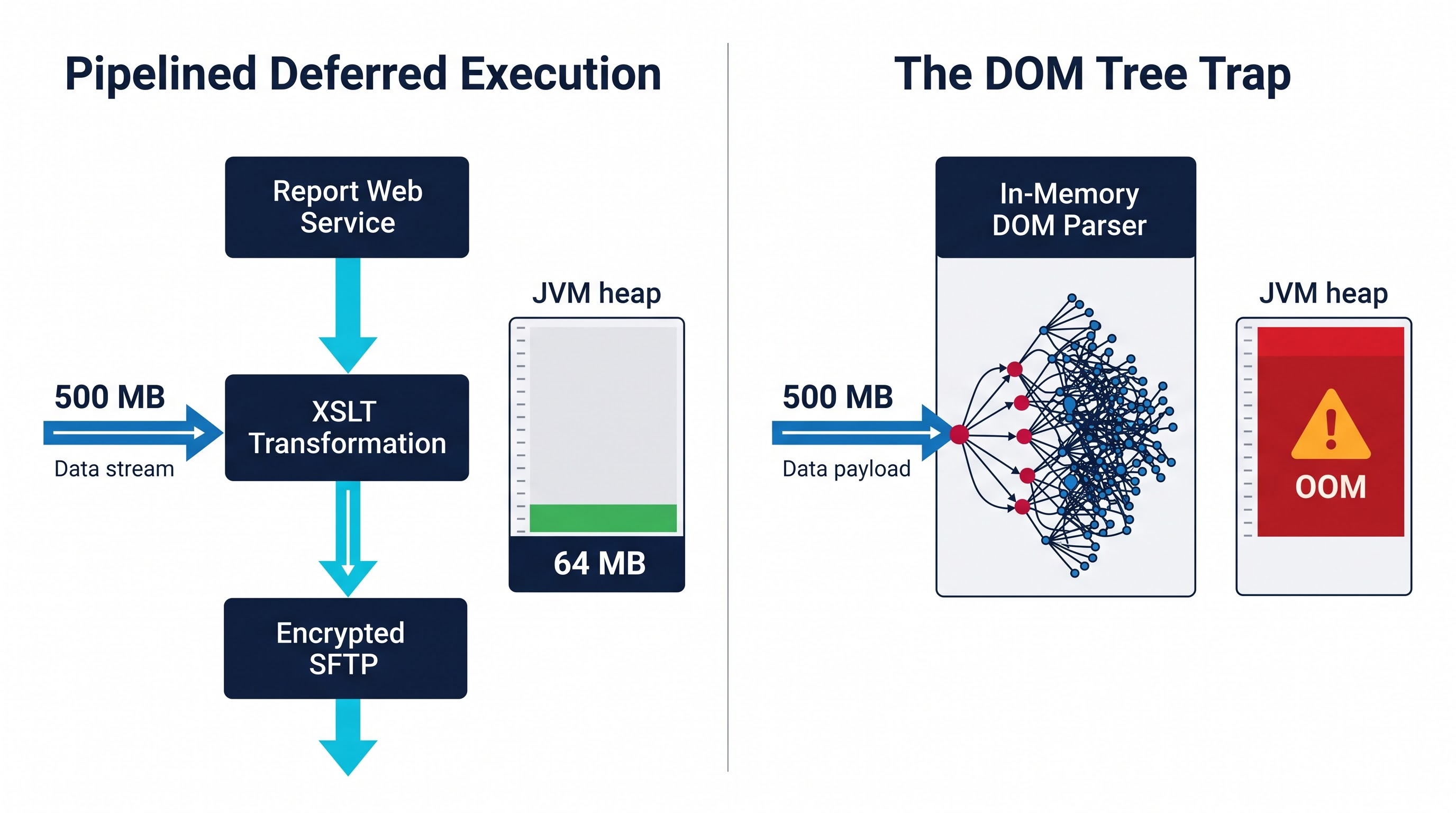
The message content is the payload. In the Workday Studio application, the content matter is privately processed via the streaming abstraction system. Instead of loading the complete XML document or JSON file or CSV feed into the memory as a whole string or in-memory document object model, the engine interprets the payload as a current input stream.
The Process of Consideration of Streams and Idempotent Issue
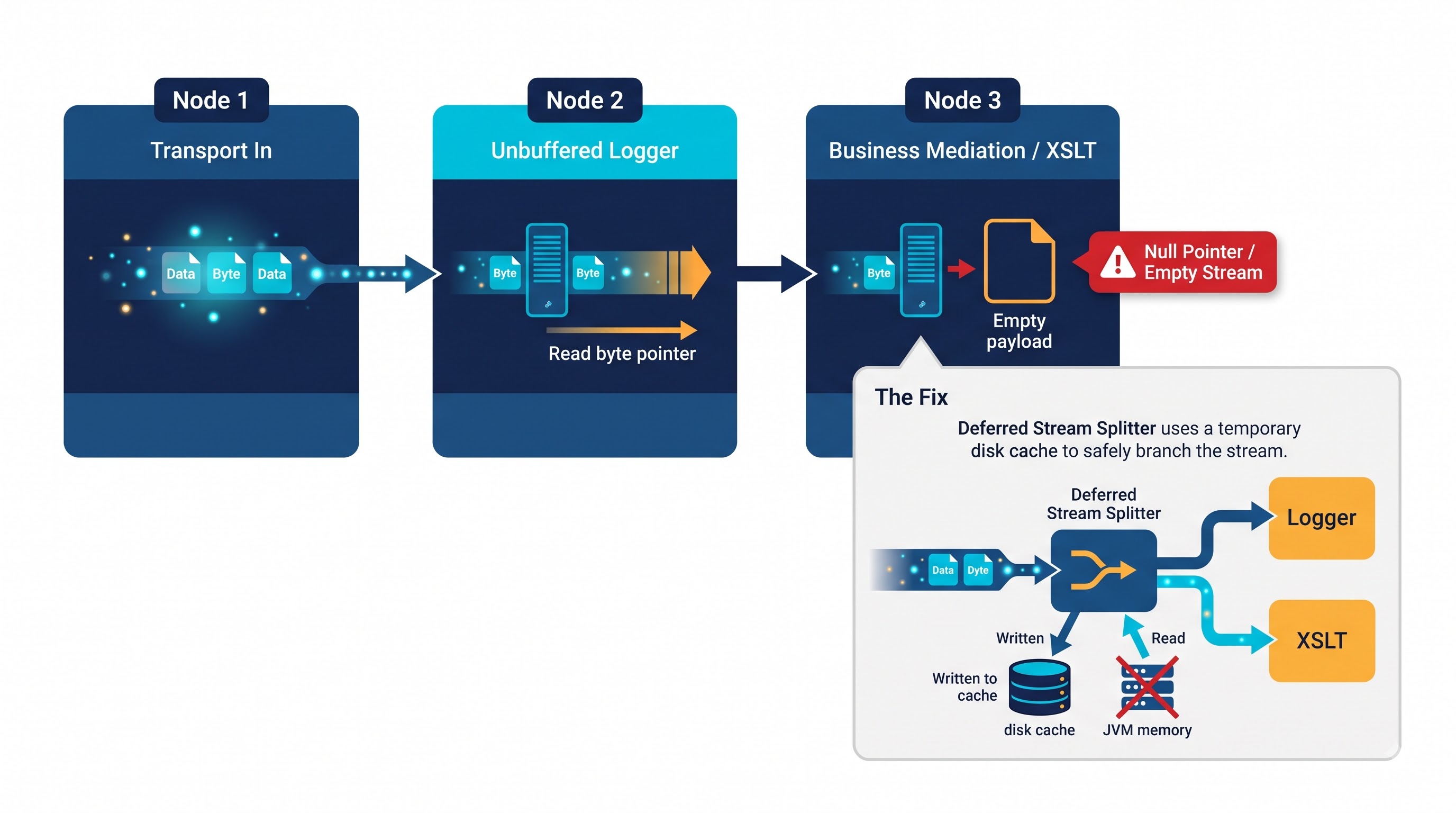
In the Java processing environment, the input stream is inalienably only from the forward direction and destructive as it is read. Whenever the transport component obtains an incoming message, it starts the streaming process. If the next mediation stage reads the stream, for example, for parsing the whole document or applying XSL transformation, the pointer shifts toward the end of the file making the whole message unreadable unless it is recorded or returned back.
This one architectural feature is often a source of misconceptions for budding engineers. When an assembly is built to use a logger component to log its incoming payload, but that same logger consumes the stream to produce the output, the next stage in the process is likely to get an empty stream which causes null pointer exceptions or empty payload errors.
To solve this, non-experienced developers often implement additional logic in the intermediate components for caching or duplicating the stream or for organizing the streaming data inside a string variable. Although this approach ensures reading the data multiple times, it completely spoils the intention of having a streaming architecture and brings the entire payload into the JVM heap memory. Though having a memory cost for a ten-kb employee delta file is insignificant, the same cannot be said about a five-hundred-megabyte benefits enrollment file or a multi-gigabyte payroll journal extraction.
Pipelining and Deferred Execution
High-performance streaming is built on deferred execution and pipelined input-output streams. When an assembly processes transformations or validations, an efficient intermediating device bypasses creating an additional intermediate file. The device connects the output stream of the producer directly to the input stream of the consumer.
For illustration, while reading a Workday outbound report, the web service response stream can be routed directly to an Extensible Stylesheet Language Transformation operation. The transformation processor receives nodes from the incoming stream, performs required transformations, and emits the transformed bytes directly to the output stream leading to a compression or encryption unit that streams the bytes to an external Secure File Transfer Protocol endpoint.
At no moment in time is the entire document present in the computer memory at the same time. The assembly memory footprint is fixed and independent of the number of records in the file being processed.
Message Variables: Navigation, Steadiness, and Storage Requirements
While the main stream of message content carries the relevant business payload, integration assembly sometimes has to capture intermediate values, store secondary datasets, and produce results of computations. This is where Context Variables become necessary.
Scope and Storage of Variables
Variable is a name for an object associated with message context in Workday Studio. Variables provide developers with an opportunity to create a secondary storage alongside permanent message content. The variable may keep all types of objects, including primitive strings and boolean values, numbers, complex Java objects, nested collections, and secondary XML documents.
Unlike local variables in programming languages that are allocated on the call stack and erased at the end of the execution frame, the variables in Workday Studio exist while the message is processed unless they are manually deleted or overwritten.
In addition, Workday Studio offers developers an option to assign data streams to variables directly. In case the assembly calls a secondary web service to get compensation information about the employee while the first stream with employee demographic data is paused, the response to the second call may be saved into some variable.
The Concealed Expense in Terms of Memory of Using Secondary Documents
The use of full secondary XML documents as variables is the most frequently employed design in systems responsible for memory failure. For example, let’s take an assembly processing vendor invoices. Within the main stream, an inbound invoice file is being transmitted. For each vendor found in the file, the assembly performs a Workday query through a web service and saves the resultant supplier profile document in a variable named in line with the name of the vendor.
Now, supposing that the inbound file contains thousands of invoices for hundreds of different vendors, while the developer enters a value into variables, forgetting to clear them, then every single vendor profile document will remain on the integration heap forever. Even more distressing is the fact that because these variables are being referred to within the context, the garbage collector of the Java Virtual Machine is unable to free them from memory. And here is what happens eventually: the heap fills up with historical context objects before the engine runs out of memory completely.
For all purposes, variables can be seen as containers with a high capacity. When something big is put into a variable, this thing will start using heap space for as long as the processing moves from the stages where the variable is acting, or it has been removed from the content according to the design of the program.
Properties of messages. Lightweight and state tracking information
Message Properties are regarded as the third significant component of the Workday Message Context. Upon a quick view, these properties might seem to be similar to variables: they consist of key-value pairs which exist in the context and can be accessed using different expression languages. Nevertheless, the architecture and nature of Message Properties turn out to be different from the architecture of so-called variables.
Metadata vs Datasets
The purpose of Properties is identified to be the delivery of lightweight metadata. The most typical uses of Properties incorporate such practices as:
Storage of routing keys and attributes regarding integration system configurations.
Storage of batch numbers, iteration numbers, and timestamps of processing.
Tracking of correlation IDs via distributed sub-assemblies.
Storage of transport header parameters, which include file names, content types, and target paths.
Since properties serve the needs of operational metadata, proper optimization takes place when fetching and retrieving them, which means properties have a lightweight nature. However, because the way of writing a property is no different from that of writing a variable, developers abuse properties whenever they use those for storing tiny pieces of business data obtained from the message payload.
Expressing Properties Accumulation Concerns
There exists a typical antipattern that emerges in the iteration loops. The assembly is transforming a huge file into records. Whenever a new record is being evaluated, an expression step extracts no less than fifteen attributes from a current record, like an employee ID, department ID, cost center ID, the date when the employee was hired, and the manager’s ID.
Although fifteen string properties pertaining to a single employee take up very little space, making hundreds of thousands of dynamic property keys during a single integration run creates a junked context hash map. In the most extreme situation, assemblies that create unique property names dynamically according to record identifiers cause the property map to grow in size. Since properties are not cleaned automatically, they remain related to the integration exchange and increase the amount of memory needed for serialization or transfer of the state of the message.
Only integration orchestration metadata can make use of properties. Properties are to be utilized only for purposes such as message routing, retrying, and execution flags and should not be used as a distributed database or document model for business objects. Engineers wanting to have thorough hands-on labs in assembly scoping and state management may benefit from the relevant workday studio courses of OnlineITGuru.
Technical Comparison: Variables vs. Properties vs. Content Streams
In order to create fool-proof integrations, an architect must intuitively know which component from the mechanical perspective should be applied for the defined task.
Content Streams are the only component which is designed for processing unbounded business payloads. Their capacity is theoretically based only on storage plus transport bandwidth, assuming they are processed with streaming mechanics. They cannot be accessed randomly, but should be read using sequential access. Once being read, their content disappears unless it is routed via the buffering component.
Variables refer to mid-tier or heavy-tier containers. They are capable of keeping the structured documents, streams, lists, and java objects. They are able to support random access, because any mediation can retrieve a variable by its name at any point of the assembly process. However, their capacity is limited strictly by the available heap memory. Using variables as the unbounded payloads is considered to be an anti-pattern.
Properties are lightweight versions of key-value pairs that allow fast random access and can be accessed by transports and subassemblies alike. The content of properties should be limited to scalars: integers, strings, booleans, and dates. Attempting to use properties to store XML fragments, base64 data, or large arrays may stress the metadata engine unnecessarily.
Reasons for Memory Issues and Failures
Memory-related errors in Workday Studio assemblies are usually not the result of sudden hardware malfunctions; typically, they are the result of anti-patterns in architecture causing data to leave the streams and be stored in memory instead. The identification of these patterns enables teams to avoid them in their design sessions or code reviews.
Anti-pattern 1: Unbounded in-memory documents
One of the main reasons why Out of Memory errors occur is the creation of a document tree in memory by parsing an unlimited JSON or XML payload.
It is important to note that converting a stream to an in-memory Document Object Model (DOM) does not create a memory footprint proportional to the original file size. A fifty-megabyte XML file saved on the disk uses simple text. However, when the file is ingested by a DOM parser, Java objects for each element node, attribute node, text node, and namespace declaration are created, along with pointers connecting the nodes to one another.
Usually, the size of an in-memory DOM is from five to ten times bigger than the size of the original text file, which means that a seemingly simple worker extract of two hundred megabytes can immediately grow into two gigabytes of heap space consumed during DOM processing. In a multi-tenant environment with constraints on heap usage, it results in an immediate system crash.
Antipattern 2: Unrestricted variable assignments in loops
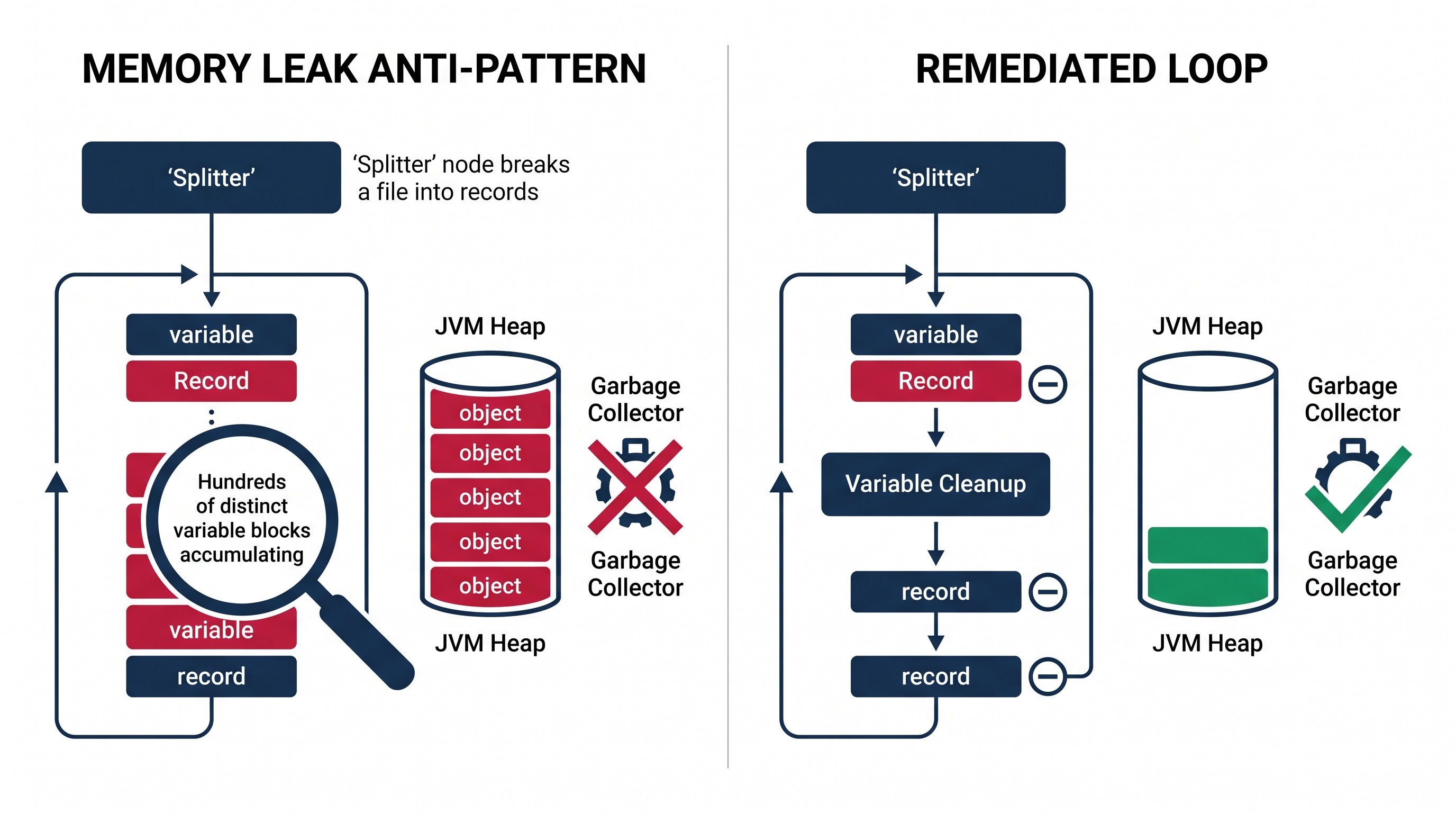
A common bug that happens in split-and-process integration workflows is when a significant input file with twenty thousand records is broken into multiple chunks with the Splitter component.
During the processing phase, a developer calls the service or the Workday sub-assembly to check if everything is in order. The results of this operation are then stored in the message variable. If the developer does not clean the message variable clearly, or if the index names have variables, then the overall context accumulates a lot of unnecessary objects. Even though the single records are small, the results of twenty thousand variables will contribute to the increase in pause times due to garbage collection.
Antipattern 3: Interceptor loggers break the stream processing
There are many benefits to logging, as it allows resolving issues more easily, but improper logging is often detrimental to the efficiency of streaming.
When an engineer places a logger or auditing action in between the steps of an assembly process and sets it up so as to output the entire message text, the logging framework has to access the stream for reading the log text. If the log system reads the stream but does not create an underlying, optimized persistent cache, the stream either becomes consumed – not allowing downstream components to operate – or changes into an in-memory string so that both the logger and all the following components can access the stream.
By requiring complete visibility of the entire payload during intermediate logging, the developer forces the runtime to put the entire payload into memory.
Antipattern 4: Limitless Aggregation
The counterpart of the Splitter component is the Aggregator. Many integration patterns require splitting the data set, processing each entry in a different way, and aggregating the results.
When an assembly is set up to combine fifty thousand transformed records using an in memory approach, the runtime engine needs to store all fifty thousand separate message contexts or payload segments in the JVM heap at once till the last condition of execution is met. If the size of the aggregate file is substantial, the amount of memory needed to bring it together will go way above what was allocated at runtime.
Conclusion
Workday Studio is a very advanced integration system that allows for the management of complex transactions and flows of data in global ecosystems. However, working in a multi-tenant cloud environment requires the developers to think in terms of architectural efficiency as well as resource optimization.
Workday Message Context is the main element of the whole Studio system. By understanding the borders between Message Content Streams, Context Variables, and Context Properties, developers can make informed decisions about the architecture of systems they create.
By taking care of the main payload as an everlasting process, the integration engine can maintain its light workload. By working with temporary and limited assignments only, from which we carefully get rid of the variables after they have completed their tasks, we prevent the subtle stacking of memory.
By using only essential operating metadata, we make sure that the context for integration is always working and minimizing overhead.
The application of these core principles will likely entail that integration can be accomplished in a more effective manner than rectifying bugs and memory issues.
Those wishing to further their career as an enterprise integration developer can benefit from a specialized workday studio course offered by OnlineITGuru, which will enable them to gain experience with live projects, deal with tenant configurations and develop integration architectures.