
YAML vs. Classic Pipelines in Azure DevOps: Team Guide
Last updated on Nov 20, 2026
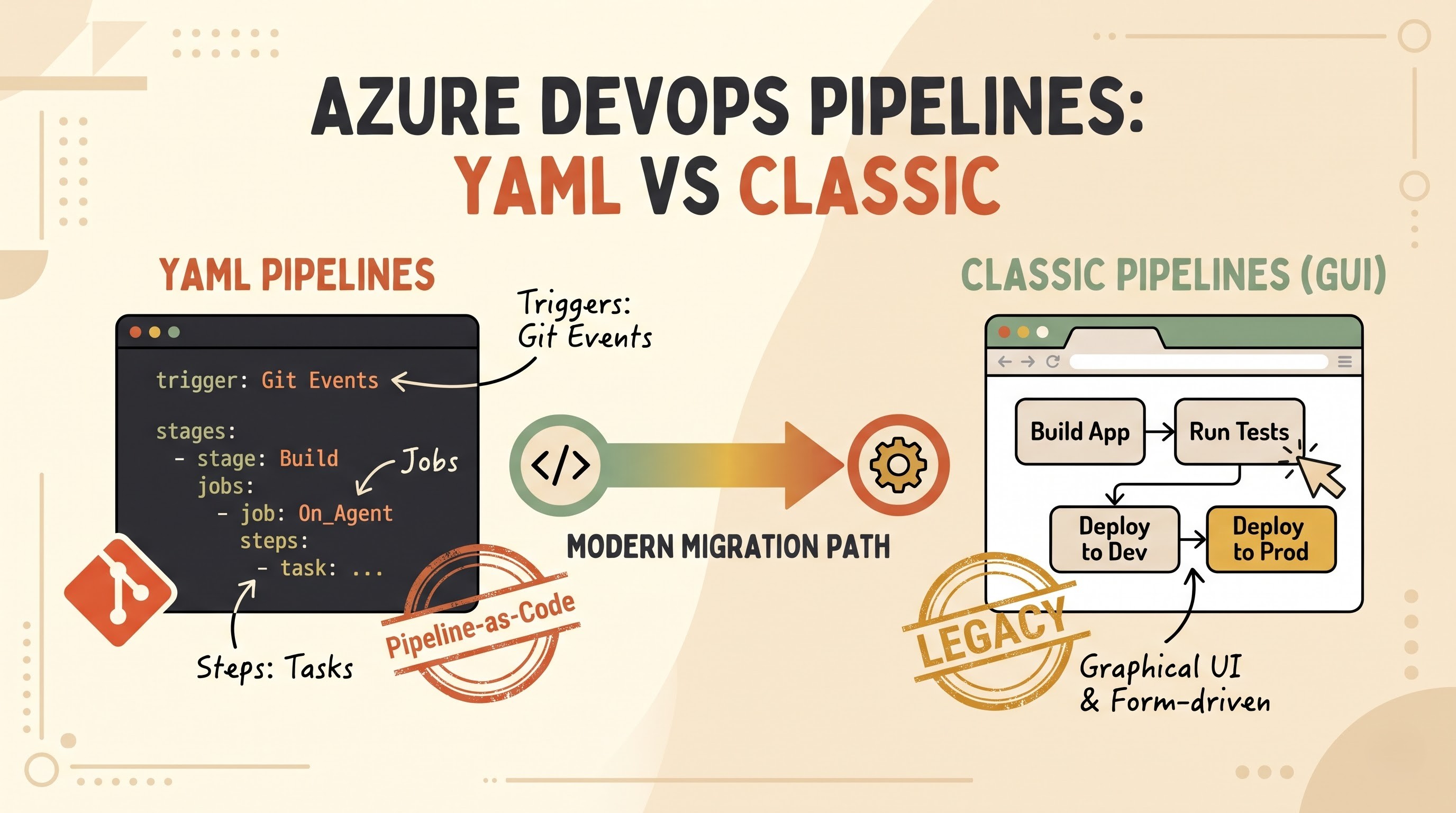
Fast, reliable, repeatable delivery is essential to modern software engineering. As the teams start to work with Azure Pipelines, an essential architectural principle that must be considered in any good azure devops online course, the very first choice that they will have to make is about the type of pipeline – YAML or classic pipeline. Both approaches automate the building, testing, packaging and releasing of software across environments. Both use Azure Pipelines agents, service connections, variable groups and task runners behind the scenes. But the philosophy behind each approach – and the day-to-day operational experience they provide – is quite different.
Over the past few years, software delivery has fundamentally changed to treat infrastructure, configuration, and automation definitions as version-controlled code. YAML pipelines show the pipeline-as-code philosophy, where the workflow definitions are stored directly in source control with application code. Conversely, classic pipelines are the graphical, form-driven legacy of Azure DevOps, enabling engineers and operations specialists to build pipelines visually in the web portal. Anyone who’s running software delivery at scale should understand how these two models function, where each model excels, and how teams transition between the two.
Grasping the Basic Concepts
Before discussing strengths and trade-offs, it is useful to clarify what both pipeline models do and how they are structured.
What is a yaml pipeline?
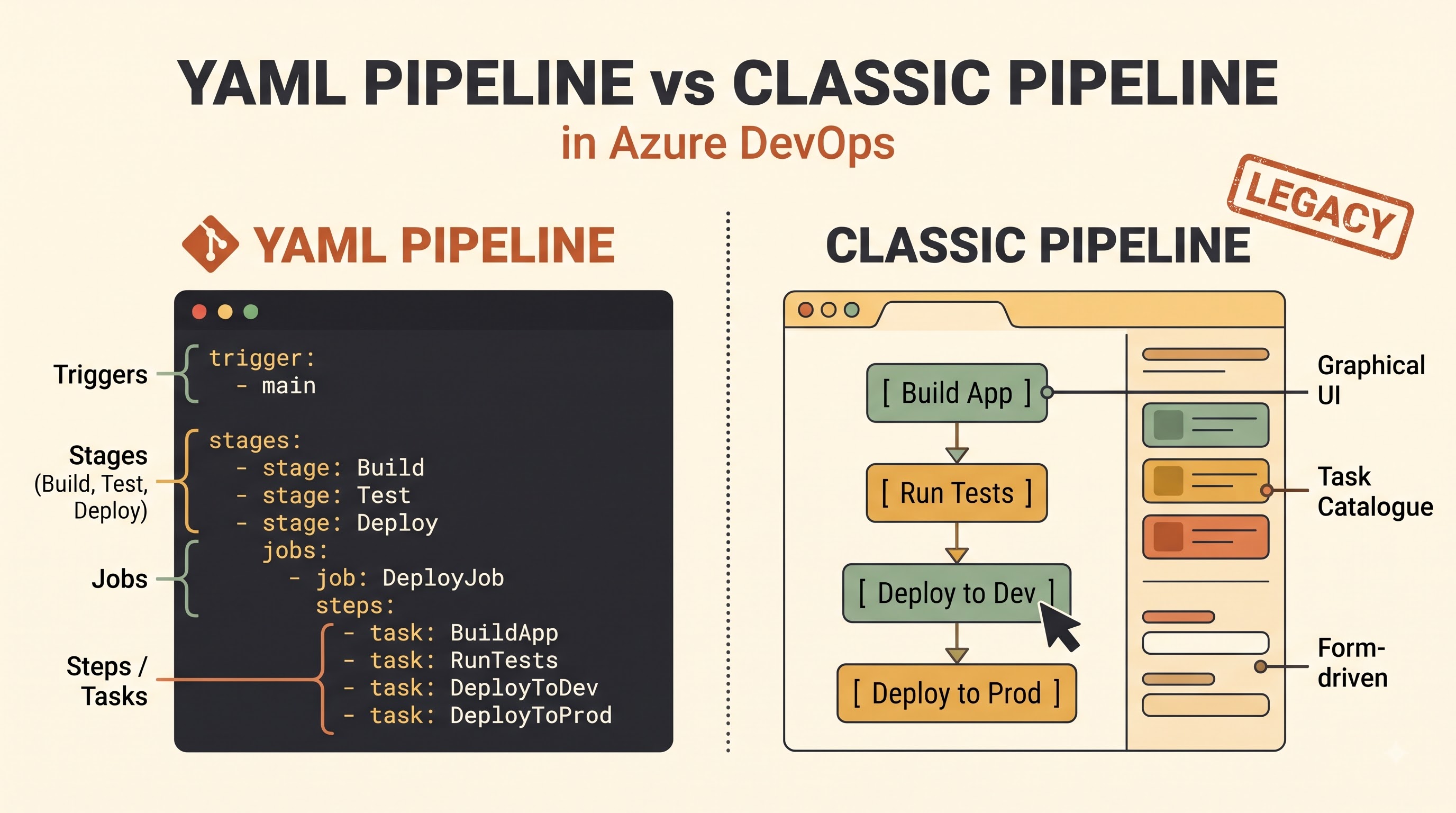
A YAML pipeline is a plain text definition of continuous integration and continuous deployment, using the YAML syntax. It is usually stored in a file, such as an azure-pipelines.yml file, in a Git repository. Instead of clicking through web forms to configure build steps, triggers and deployment stages, engineers describe the entire workflow declaratively in text.
A YAML pipeline organises work in a clear hierarchy in concept. At the highest level are triggers that determine when the pipeline should run—commits to particular branches, pull requests or scheduled times—and agent pool settings that define where execution occurs. Under that are stages, which usually represent major phases such as building, running automated tests, and deploying to staging or production. Each stage has one or more jobs. Each job runs on an agent or container. Each job has sequential steps or tasks that run commands, scripts, or built-in Azure Pipelines tasks.
Because the file is part of the repository, the pipeline definition moves with the codebase across branches. If the feature branch adds a new test suite or needs a particular build step, that change can be made directly in the branch’s YAML file without disturbing the main branch until the pull request is merged.
What is Classic Pipeline?
Azure DevOps has a graphical user interface to create and maintain a classic pipeline. The user opens the visual designer, adds tasks from a catalogue, fills in input fields and checkboxes, and configures triggers, variables, retention rules, and approvals directly in the browser instead of editing a text file in a code repository.
Historically, continuous integration and continuous deployment are two different concepts in classic workflows. A classic build pipeline will compile code, run unit tests, and publish build artefacts. Those published artefacts are then fed through stages like development, testing, quality assurance and production with visual deployment phases, pre-deployment and post-deployment approvals and deployment gates through a classic release pipeline.
The classic designer provided an intuitive interface for many teams coming from older on-premises build servers or manual deployment checklists. All options were visible on screen, tasks were grouped in clear categories, and engineers didn’t need to memorise syntax rules or file structures to wire up an automated build.
Architectural and procedural differences
The difference between YAML and classic pipelines is more than text vs graphical menus. It defines the relationship between build and release stages, the way environments are modelled and teams collaboration on pipeline changes.
Decoupled Build & Release vs. Unified Multi-Stage Workflows
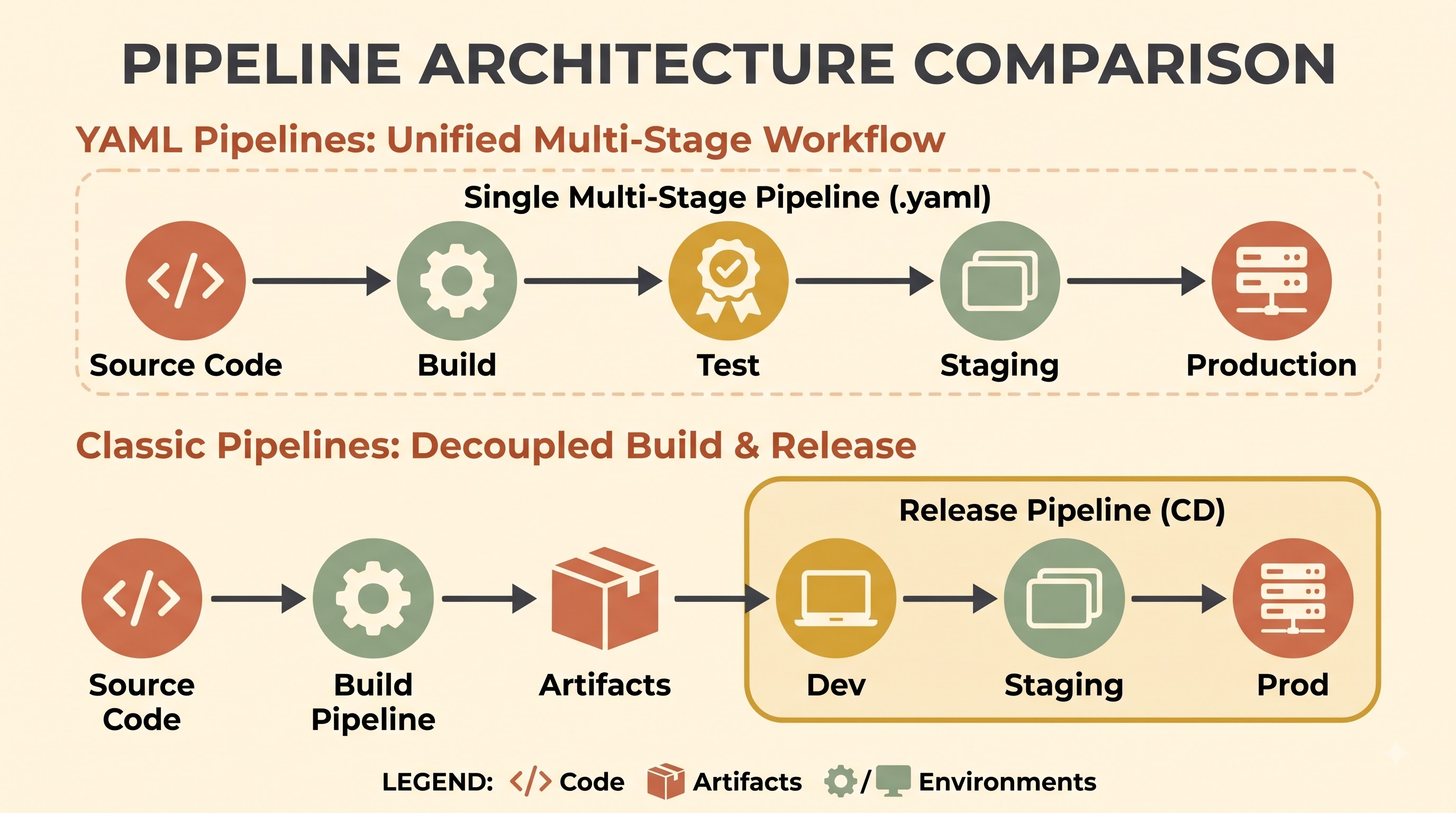
One of the most striking structural differences is the organization of the end-to-end delivery. YAML pipelines natively support multi-stage workflows in a single definition. Using a single pipeline definition the application can be built, unit and integration tests run, container images or binaries packaged and then the outputs promoted through staging and production stages. Stages can be configured to depend on others, so that later stages wait for successful completion of earlier stages, or based on branch name, variables, or the results of previous stages.
Classic pipelines have a traditional separation of build definitions and release definitions. Build pipelines are designed to produce artefacts. Release pipelines are designed to consume artefacts and orchestrate environment rollouts. This separation works well for simple pipelines, but separating logic into two different parts of the portal can make end-to-end traceability a bit less cohesive when one change spans build steps, artefact packaging, and environment configuration.
Target Resources and Environments, Deployment Jobs
Both approaches deliver software to attack infrastructure. But they have different target models. In YAML pipelines, deployment targets are generally structured around environments and deployment jobs. An environment is a logical target, such as dev, staging, prod. It can group resources like Kubernetes namespaces or virtual machines. Deployment jobs have built-in strategy patterns (run-once, rolling, canary deployments) and provide lifecycle hooks and environment-level approvals and checks.
Classic release pipelines are based on visual stages that represent environments, agent phases, deployment groups, pre-deployment and post-deployment approvers, and automated gates that query external services or monitoring signals to decide whether a release can proceed. A lot of these governance controls live in YAML environments and checks too but are typically configured in the Azure DevOps portal instead of inside the YAML file itself.
Container Support and Execution Contexts
Both pipeline styles can execute tasks on Microsoft-hosted or self-hosted agents. But YAML pipelines have richer native expressiveness for modern containerised execution models. YAML teams can run jobs or individual steps in containers, define sidecar or service containers for integration testing, and control execution matrices across multiple operating systems, versions or configurations cleanly in a single file. While classic pipelines can do many of the same underlying tasks and agents, complex matrix or container orchestration scenarios are often cleaner and simpler to maintain in YAML.
Version Control, code review and auditability
YAML pipelines perhaps have the single biggest benefit that pipeline definition is a first class citizen in source control.
Diff and Git History
When a YAML pipeline is stored in Git, each edit is committed with an author, timestamp, commit message and line-by-line diff. If a build suddenly fails or a deployment script starts acting up, engineers can look at the recent commits and see exactly what has changed and quickly identify the culprit. If something goes wrong , you can roll back a bad change by rolling back a Git commit or checking out a previous revision . At that point in time , the state of the pipeline is still in sync with the codebase.
Classic pipelines do have a revision history in the Azure DevOps web interface that an administrator can compare revisions or roll back to a previous version. However, looking at diffs across dozens of tasks and nested form fields in a browser is rarely as obvious or speedy as reading a side-by-side text diff in Git. Additionally, since classic pipeline definitions live outside the application repository, rolling back the application code to an earlier commit does not automatically roll back the pipeline configuration that built or deployed it.
Code Review and Pull Requests
Treating pipelines as code offers the same quality guardrails as application source code. You can suggest YAML pipeline changes in a feature branch and have them reviewed by a pull request. Teammates, security engineers, or platform specialists can review build commands, script arguments, or deployment conditions before they make it into the main branch. Branch policies can require approvals or validation checks on pipeline edits to prevent accidental or unreviewed changes from silently changing production delivery.
In classic pipelines, edits made in UI designer take effect when saved right inside the portal. Permissions can help restrict who can edit pipelines but there is no natural pull-request review loop like developers already use on a daily basis. And it's easier for an engineer to make an undocumented change to a classic pipeline during a busy release and forget to document why it was needed.
Branch-Specific Evolution
Because YAML files live in a repository, different branches can evolve their build or test behaviour independently. For example, an experimental branch could test against a preview runtime, or do an additional diagnostic step, without requiring every other branch to immediately adopt that behaviour. Once validated, the change merges cleanly with the rest of the work on the branch. Classic pipelines often have one central configuration for the pipeline definition, rather than branching with the code itself.
Reusability, standardisation and scale
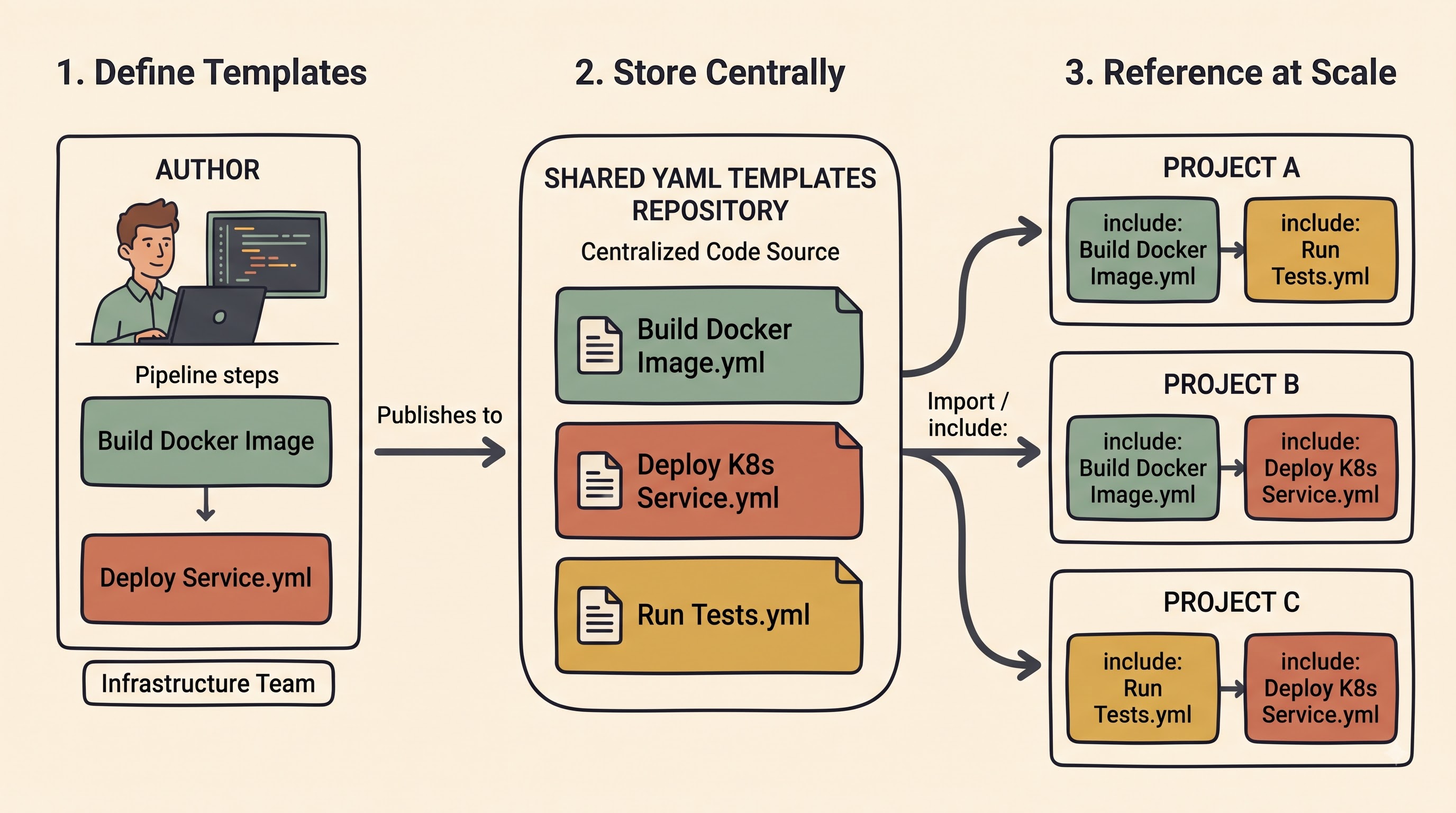
As an organization scales from a few repositories to dozens or hundreds of microservices, libraries, and applications, consistency becomes essential. When you copy-paste configs between projects, you end up with drift, duplicated effort, and inconsistent security practices.
Parameters, Variables, and YAML Templates
YAML pipelines shine for large-scale standardisation using templates, runtime and compile-time parameters, and variable reuse. Platform or DevOps teams can create centralised YAML templates for common tasks like building container images, running static analysis, scanning dependencies, or deploying services to a standard cluster and put them in a shared template repository.
Then application teams can use those templates and specify parameters for their service, such as project names, runtime versions, or target environments. If a security policy requires the addition of a new vulnerability scan, or an update to a shared build step, the template can be updated by the maintainers in one place and then rolled out consistently to all consuming pipelines. Templates can also be extended or locked down to help enforce organisational standards while providing teams with controlled flexibility.
Task Groups and Clone in the Classic Pipelines
Reusability in classic pipelines is primarily enabled by task groups and cloning of pipelines. Task group allows users to group a set of tasks and expose certain fields as parameters so the group can be reused across classic build or release definitions. Teams can also copy an existing pipeline as a starting point for a new project.
Task groups in the Classic UI are helpful, but they do not provide the same source controlled branching, diffing, and composable template architecture as YAML templates for complex multi-stage workflows. Over time, cloned classic pipeline instances tend to drift apart from each other as individual teams adjust settings in the UI, creating maintenance overhead when someone tries to standardise behaviour across an entire engineering organization.
Cross-Tool Portability
Another practical advantage of YAML is its familiarity across the broader DevOps ecosystem. YAML files are used by many modern CI/CD platforms to describe workflows. The exact schema and keywords are specific to Azure Pipelines, but the mental model of declarative pipeline-as-code - triggers, jobs, steps, artefacts, conditions, and matrix builds - translates well to other CI/CD tools and smooths the onboarding of engineers with prior pipeline-as-code experience.
Usability, Learning Curve and Developer Experience
A pipeline tool is only useful if the people maintaining it feel confident using it, without constant friction. Here, the experiences of YAML and classic pipelines are quite different depending on the background of the team.
Visual Discovery vs. Declarative Syntax
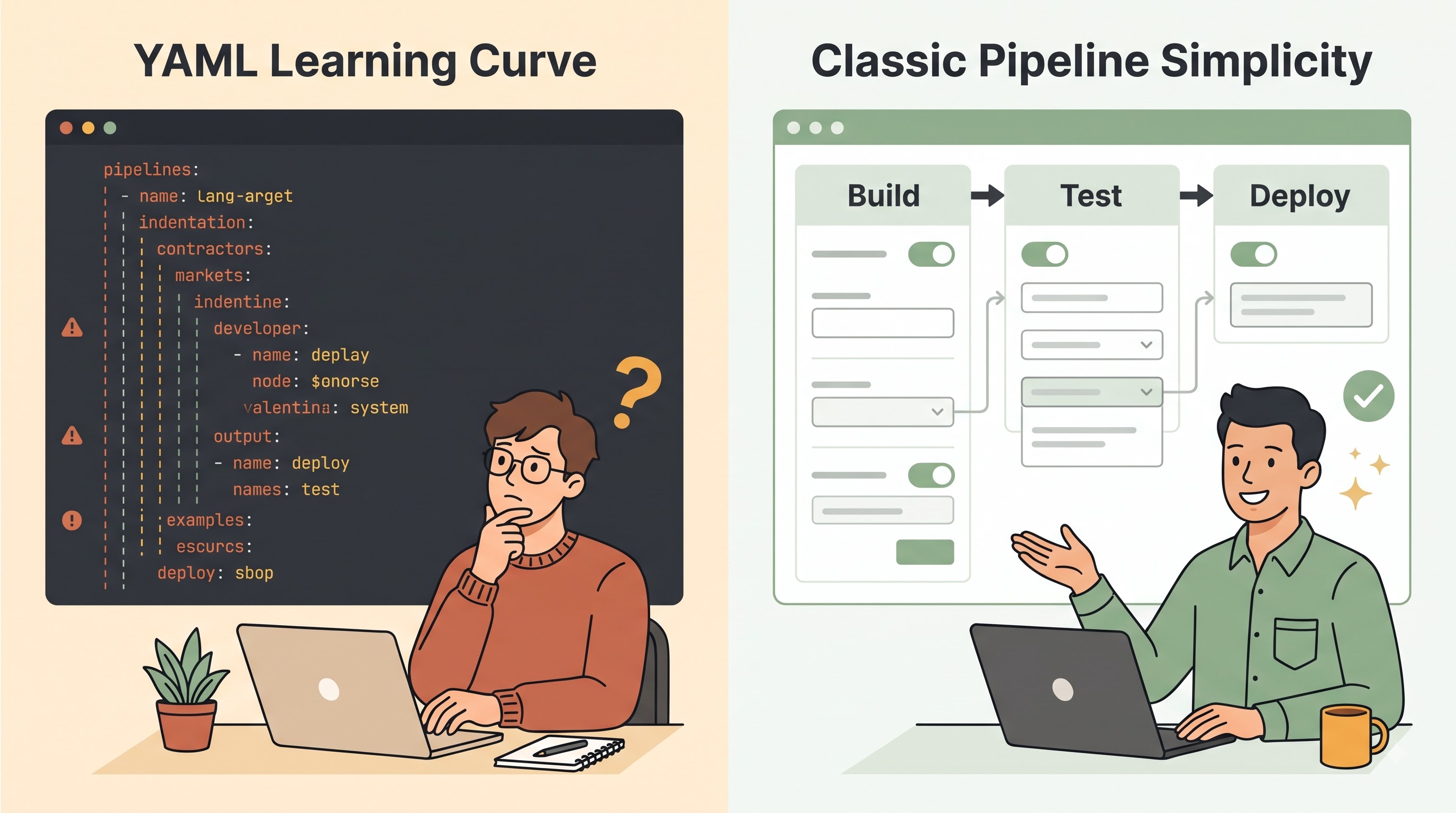
Visual discovery is well served by classic pipelines. The first time someone opens the classic editor, they can browse the available tasks, see labelled input boxes, read inline help text, and assemble a working build or release without memorising YAML keywords. For engineers or administrators who prefer graphical interfaces, or teams who are taking their very first steps into automation, this low initial barrier can make getting a basic pipeline running feel approachable.
YAML pipelines have a higher learning curve upfront. YAML is indentation and structure sensitive, so a wrong space or misaligned block can cause validation or parsing error. It takes practice to understand the interaction between stages, jobs, steps, templates, expressions, and conditions, especially in constructing multi-stage pipelines or parameterized templates, which is the reason for the emphasis on labs in microsoft azure devops training courses.
Helping Editors and Getting Stuff Done
“Modern tooling takes away a lot of the pain of writing YAML.” Azure DevOps includes a built-in YAML editor that offers syntax guidance and an assistant panel to help create task snippets without requiring users to manually look up every field. Developers may also edit YAML locally in a code editor or IDE, where they can use familiar search, multi-cursor editing, linting and Git workflows, instead of being forced to use a browser form for each adjustment.
Engineers who get comfortable with YAML tend to have higher day-to-day productivity. Text is way faster for bulk updates, copying blocks, sharing snippets in chat or pull requests, and refactoring repeated steps than clicking through dozens of UI forms and modal dialogues. But for a quick one-off experiment, or a tiny internal utility, the classic UI pipeline can sometimes feel faster to click together on the fly.
Governance, Security and Operational Control
In an enterprise environment, pipelines run with elevated privileges, having access to source code, pulling dependencies, building artefacts or container images, and deploying changes to cloud subscriptions, databases, and production clusters. YAML and classic pipelines are both part of the Azure DevOps security and governance model, but teams need to be thoughtful about how controls are applied.
Secrets, Service Principals, and Protected Resources
Never hard-code sensitive credentials, cloud service connections, variable groups, and secure files as plain text inside a repository. Neither YAML nor classic pipelines store secrets or external connections directly, but rather rely on Azure DevOps concepts such as service connections, variable groups (often backed by Azure Key Vault), and secure files to handle them securely.
When using YAML pipelines, protected resources like environments, service connections, agent pools, variable groups, and secure files may need explicit approval or pipeline permission checks before a YAML pipeline can use them. This prevents a rogue or unapproved branch edit from silently using a production service connection or deploying to a protected environment without proper authorisation.
Approvals, Gates And Compliance
Governance around production releases is important for audit and risk management. For classic release pipelines, visual pre-deployment and post-deployment approvals and automated gates are a familiar sight. YAML pipelines have similar controls as environment approvals and checks. You can configure reviewers to approve deployments before a stage can run. You can also configure automated checks to validate conditions before a stage runs.
Even with YAML, there are going to be some governance properties that are not going to be within the text file. Approval, configuration verification, and resource authorization should all be done within the Azure DevOps portal. In this way, there is a separation of the workflow definition from its governance approval process. When there are some teams that need more compliance and auditing, it would be better for them to use Git as their repository for the pipeline definition.
Real-World Scenarios: When to Use What
The choice of YAML vs classic pipelines is rarely an abstract one. It is contingent upon where your project is, what your team knows and what kind of software you ship.
Creating a New Project or Microservice
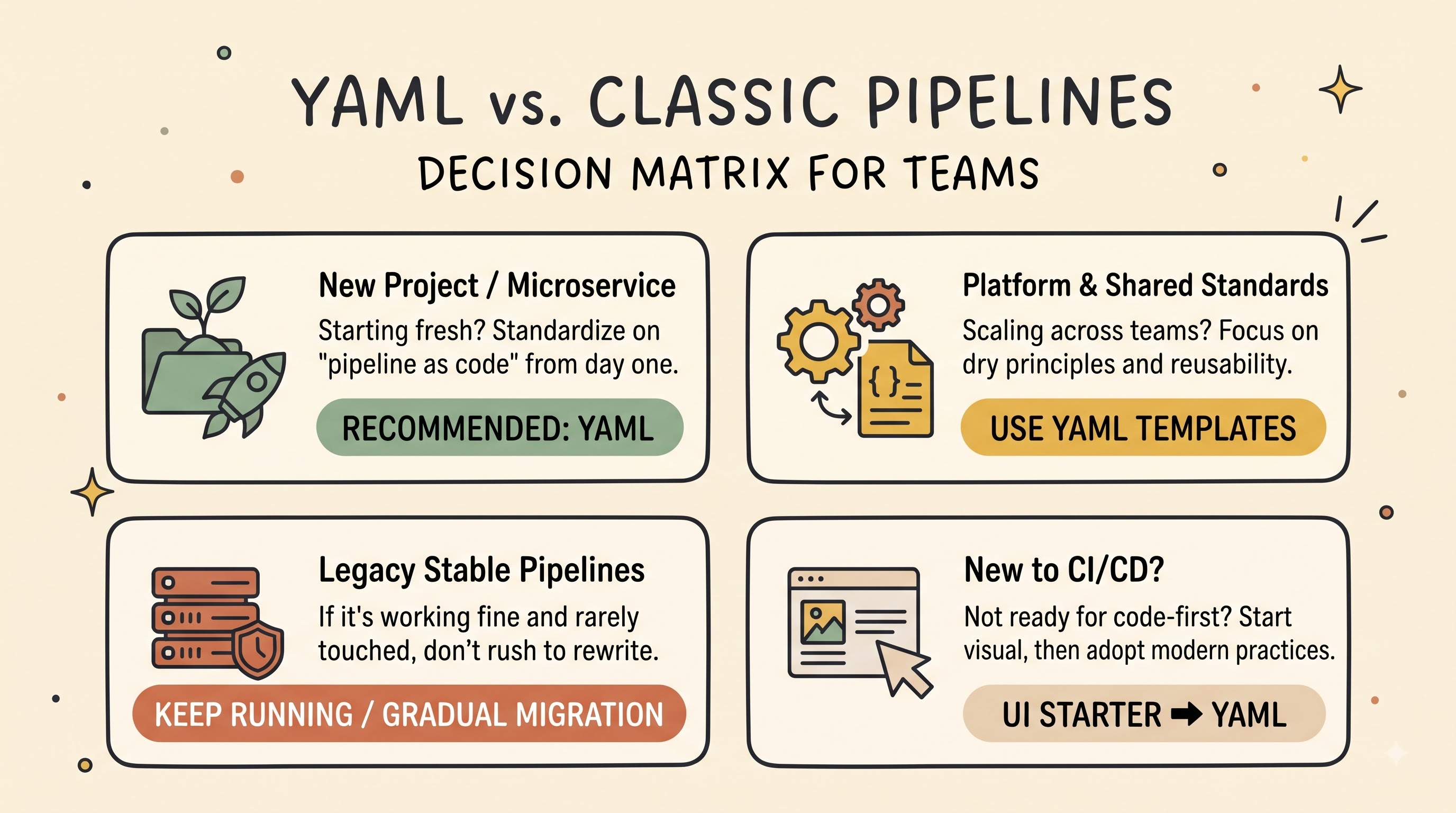
YAML pipelines are usually the best default choice for a new application, service or greenfield repository. Pipeline-as-code from day one prevents technical debt later, keeps the build and deployment logic versioned with the code from the very beginning, and makes it easy to introduce automated checks, pull-request reviews, and reusable templates as the project grows.
Developing Common Platform or DevOps Standards
When a platform or DevOps team is building standardised CI/CD blueprints for multiple product squads, YAML is clearly the better fit. Templates, parameters and shared repositories enable central maintainers to write best practices once, spread them widely, and keep changes reviewable and traceable.
Keeping Existing Classic Pipelines
Most organisations have already mature, reliable classic build and release pipelines running in production. If a legacy classic pipeline is stable, low-change, and tied to older release workflows, teams don’t always need to rewrite everything overnight. Classic pipelines can continue to run, while the team focuses their energy on active development or gradual modernisation. At the same time, Microsoft encourages the use of YAML pipelines for new pipelines, and treats classic pipelines as a legacy approach with less investment in new capabilities, so use of classic pipelines for new initiatives is generally discouraged.
Teams moving from manual or UI-driven workflows
Some teams use classic pipelines as a stepping stone when they are new to automated pipelines and struggling with YAML syntax or Git workflows, or they rely on the task assistant and generated starter YAML files to build confidence. However, in that case, when developers move from YAML to something else after gaining basic knowledge by attending training sessions or the best azure devops course according to the expertise of your team members, then you will be able to enjoy the advantages of code review and version control.
YAML migration from classic pipelines
Often, existing classic pipeline teams opt for migrating over time to unify their build and release workflows, track changes in Git and standardise templates across repositories. The migration strategy is carefully planned to mitigate risk and not disrupt ongoing releases.
Start with High-Value or Often Changed Pipelines
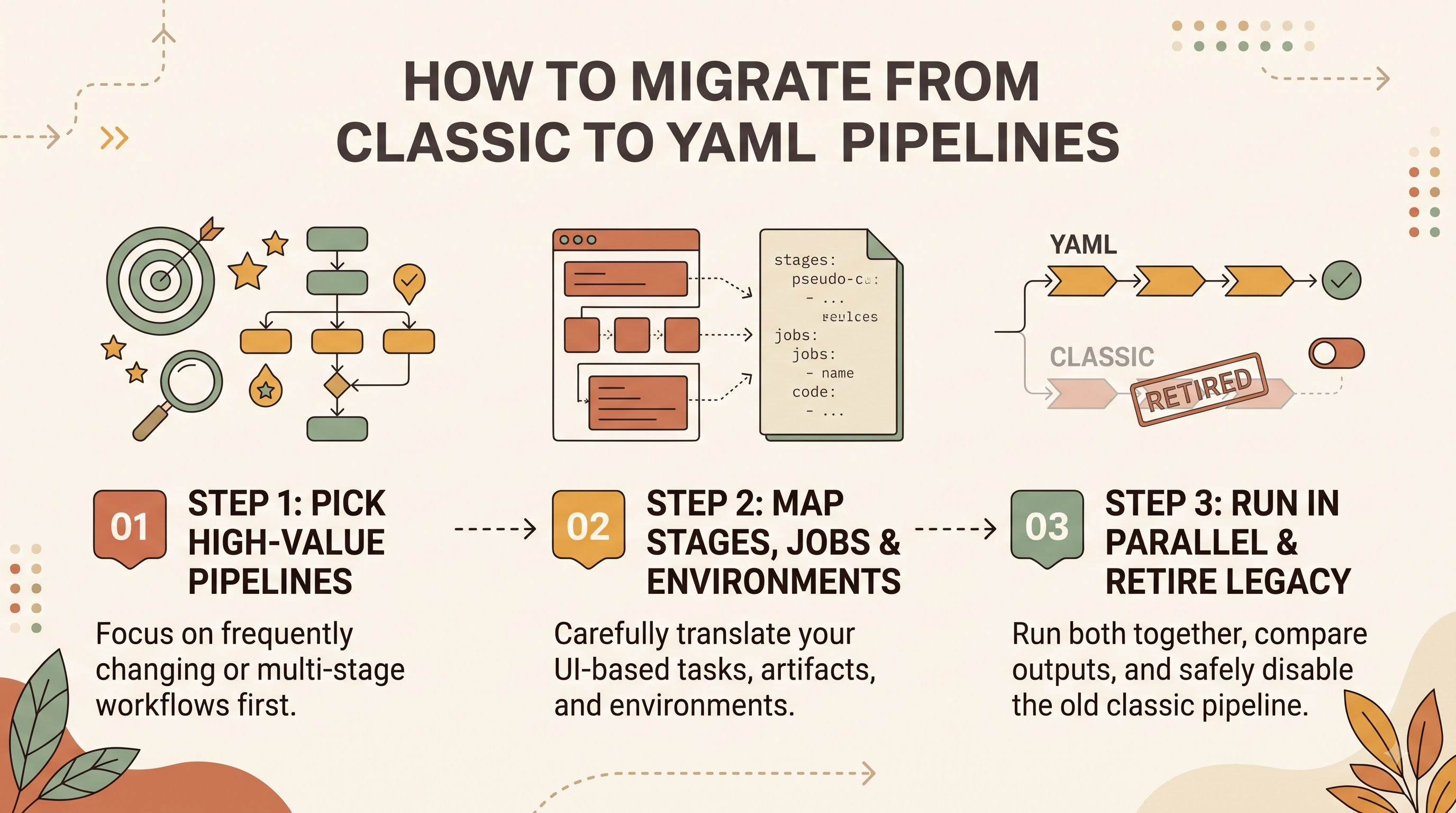
Start with pipelines that change frequently, span multiple environments, or are templates for new services rather than migrating all pipelines in one weekend. Those are the exact pipelines where you gain the most ROI from Git history, pull request reviews and reusable templates.
Translate Tasks, Stages, and Environments with Care
Migration is not always a simple mechanical one-to-one mapping. Classic build tasks and classic release stages often need to be re-structured into clear stages, jobs and deployment jobs in YAML. Azure DevOps can export or help translate task configurations; the task assistant helps map individual tasks. But the engineers should still review every step, variable, condition and artefact path carefully. Some classic release capabilities or deployment patterns may need slight tweaks or different patterns when expressed as multi-stage YAML and environments.
Decommission, but validate together first
A safe migration is to build and test the new YAML pipeline first in a non-production or parallel path. Sample runs should be compared against the classic pipeline for build outputs, test results, artefact contents, and deployment behaviour. Once the YAML pipeline is stable and stakeholders have signed off on the approvals and permissions, the old classic pipeline can be cleanly disabled or retired so the definition cannot be accidentally edited.
Conclusion
YAML and classic pipelines in Azure DevOps have the same core goal: automate software builds, tests, and deployments. But they are two different eras and working styles in software engineering. Classic pipelines offer a familiar, approachable, form-based visual interface. They are easy to explore, and still useful for keeping running where legacy workflows already exist. YAML pipelines bring continuous integration and continuous delivery to the pipeline-as-code fold, with definitions stored in version control, pull-request reviews, multi-stage workflows and reusable templates, aligning delivery automation to modern engineering practices. For new projects, growing teams, and standardised delivery platforms, YAML pipelines are the obvious choice for sustainable, scalable automation.