
Your Code Is Ready. Now What? How Azure DevOps Turns Software Into a Reliable Delivery System
Last updated on Sep 5, 2026
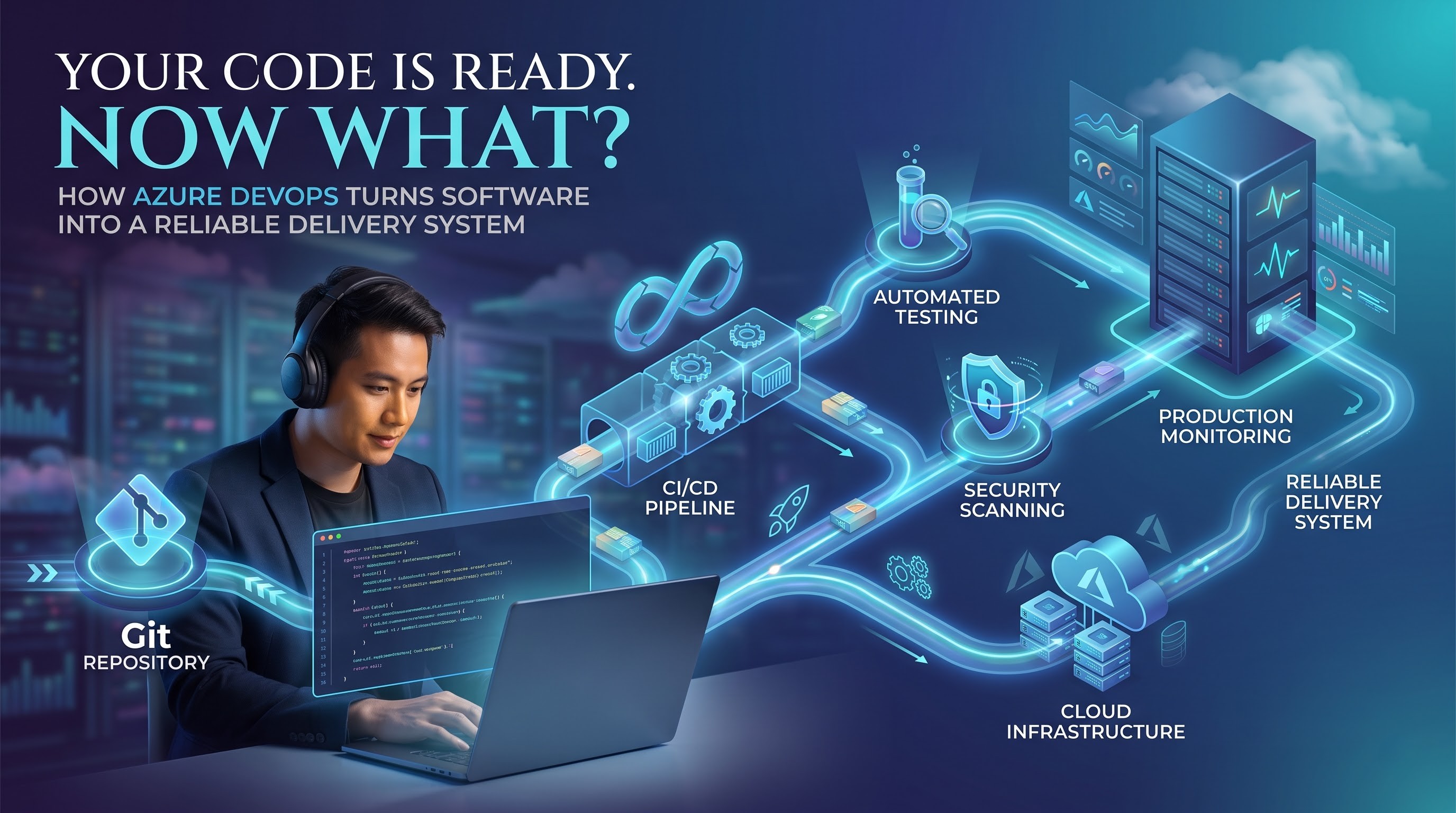
Writing code is only the beginning of modern software delivery. Once a feature is completed, it still has to pass through testing, security checks, deployment, infrastructure configuration, and monitoring before it can reliably serve real users. When these activities are handled manually, even a simple release can become dependent on several people and a long list of steps.
This becomes much harder as applications and development teams grow. A company may have multiple developers working on different features, several environments to maintain, frequent releases, cloud infrastructure to manage, and security requirements that cannot be treated as an afterthought. In such an environment, the challenge is no longer just writing good code; it is creating a reliable way to move that code from development into production.
This is where DevOps becomes important. Azure DevOps brings together source control, pipelines, testing, package management, deployment, and other development practices to help teams create a connected delivery workflow. The purpose is not simply to deploy applications more quickly, but to make the process repeatable, measurable, secure, and easier to improve.
For professionals entering cloud engineering or software delivery, an azure devops course can provide a structured way to understand this entire process. However, the most useful learning happens when the tools are studied as parts of a larger engineering workflow rather than as isolated features.
From Code Commit to Deployment: Where DevOps Really Begins
Consider what happens when a developer finishes a new feature. The code may work correctly on the developer's machine, but that does not automatically mean it is ready for production. The change still needs to work with the rest of the application, pass appropriate tests, meet security requirements, and operate correctly in the target environment.
In a manual process, each of these steps may involve a different person. Someone builds the application, another person runs tests, an operations engineer prepares infrastructure, and a release manager coordinates deployment. As the number of releases increases, this approach creates opportunities for mistakes and delays because the delivery process depends heavily on human coordination. DevOps changes that model by turning repeatable activities into automated workflows. When code is committed, an automated process can begin validating the change without requiring someone to manually start every step. The team receives feedback much earlier, while the change is still easy to understand and fix.
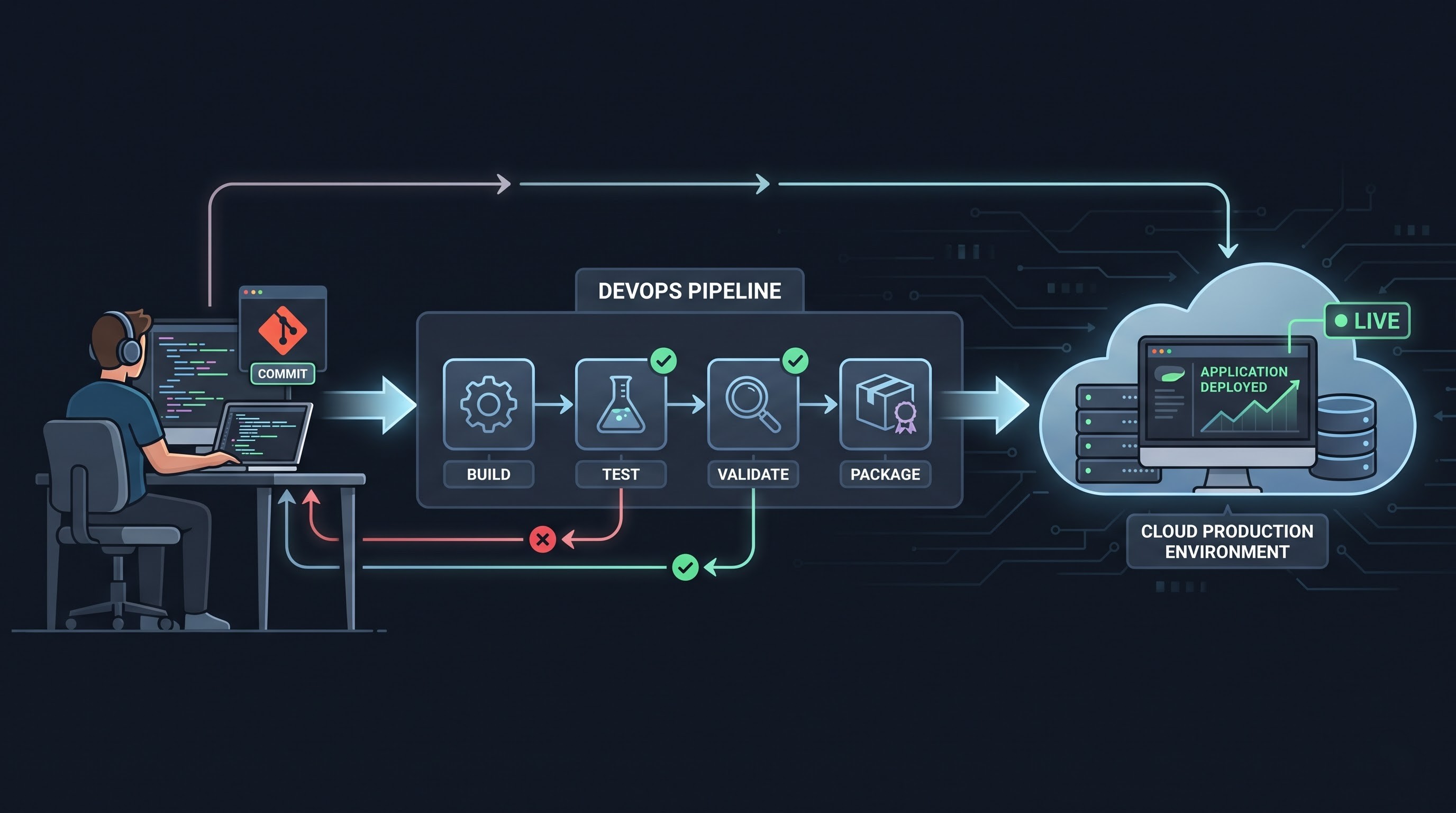
This is one of the most important ideas behind DevOps: feedback should arrive as close as possible to the moment when a change is introduced. If a developer discovers a problem minutes after making a change, it is usually much easier to correct than discovering the same problem several weeks later during a production release.
Azure DevOps supports this approach through services for repositories, work management, pipelines, testing, artifacts, and deployment. The real benefit comes from connecting these capabilities into a workflow where every stage contributes to the reliability of the final application.
Building a Pipeline That Moves With Your Code
Once source code is under control, the next challenge is deciding what should happen when that code changes. This is where Continuous Integration and Continuous Delivery become practical. Instead of treating building, testing, and deployment as separate manual activities, teams can connect them through automated pipelines.
Imagine a developer pushing a change to the repository. A pipeline can automatically retrieve the latest source, restore dependencies, compile the application, execute tests, perform quality checks, and create a deployable artifact. If one of these stages fails, the process can stop and provide information about what went wrong.
This simple workflow can have a significant effect on development. Developers no longer have to wait until a formal release cycle to discover that their changes introduced a problem. The pipeline continuously checks the software as it evolves, helping teams identify defects while they are still relatively small.
Azure Pipelines also allows teams to define delivery workflows using YAML. This means the pipeline itself can be stored and reviewed alongside the application code. Instead of having an important part of the release process hidden inside manual configuration, teams can treat pipeline definitions as version-controlled assets.
As environments become more complex, pipelines can include multiple stages, reusable templates, different agents, environment variables, approvals, deployment conditions, and automated validation. The current AZ-400 exam reflects this importance: designing and implementing build and release pipelines represents 50–55% of the exam's measured content. This makes pipelines more than automation scripts. They represent the rules an organization uses to decide how software moves from a developer's change to a production-ready release.
Keeping Development Organized When Teams Start Scaling
Automation alone cannot solve every delivery problem. A team may have an excellent pipeline, but if developers are constantly overwriting each other's changes or merging unfinished work into production branches, the delivery process will still be unstable. Source control provides the foundation for managing this collaboration. Git allows developers to maintain a shared history of changes while using branches to isolate individual pieces of work. A developer can work on a feature without immediately affecting the main development branch, then submit the change for review when it is ready.
Pull requests add another important layer. Instead of allowing every change to enter the main codebase automatically, teams can establish a review process where other developers examine the proposed changes. Automated pipeline checks can run at the same time, ensuring that code is not merged when important validation steps have failed.
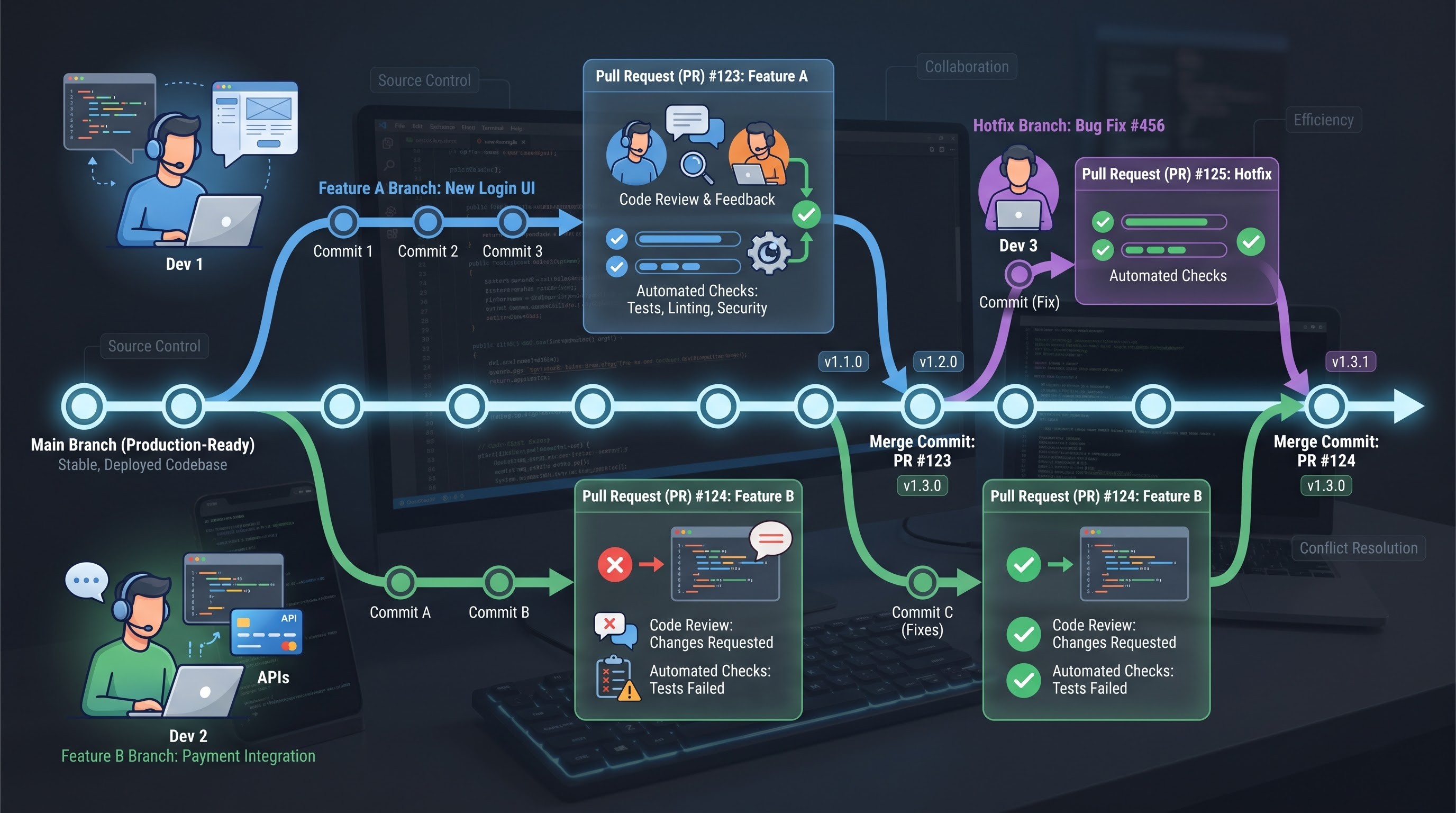
The branching strategy itself should reflect the way a team works. A small team releasing frequently may prefer short-lived feature branches and a lightweight workflow. A larger organization with strict release requirements may need additional controls around protected branches, release branches, hotfixes, and production changes.
This is why effective azure devops training should go beyond memorizing Git commands or learning where individual features are located. The more important skill is understanding how repositories, branches, pull requests, reviews, and automated validation work together to create a predictable development process.
Current Microsoft AZ-400 objectives include source-control strategy, branching workflows, pull requests, repository management, and integration between Azure DevOps and GitHub. Understanding these practices gives developers and cloud professionals a stronger foundation for working within larger engineering teams.
Testing and Security Before Production Finds the Problem
One of the biggest advantages of automation is the ability to discover problems before they reach users. Without automated validation, a development team may complete a feature and only discover an issue during manual testing or, worse, after deployment. Automated testing moves that feedback earlier in the process. Depending on the application, a pipeline can execute unit tests, integration tests, API tests, user-interface tests, or other validation procedures. Different tests can be positioned at different stages so that fast checks happen early while more extensive validation runs later.
The goal should not be to automate every possible test simply because the technology allows it. Effective DevOps teams choose tests based on the risks they need to control. A small unit test may catch a logic error within seconds, while a more comprehensive integration test may be necessary to confirm that multiple services communicate correctly.
Security follows a similar principle. Instead of waiting until the end of development to perform security checks, organizations can integrate security into the delivery pipeline. Source code, dependencies, containers, infrastructure, and configuration can all become part of the validation process. Secret management is another important consideration. Passwords, tokens, connection strings, and certificates should not be casually embedded in source code or copied manually between environments. Dedicated secret-management services and secure pipeline practices help separate sensitive information from application code.
This approach is commonly associated with DevSecOps because security becomes part of everyday development rather than a final inspection. Microsoft's current AZ-400 material includes dependency security, vulnerability scanning, pipeline security, compliance, and related security practices.
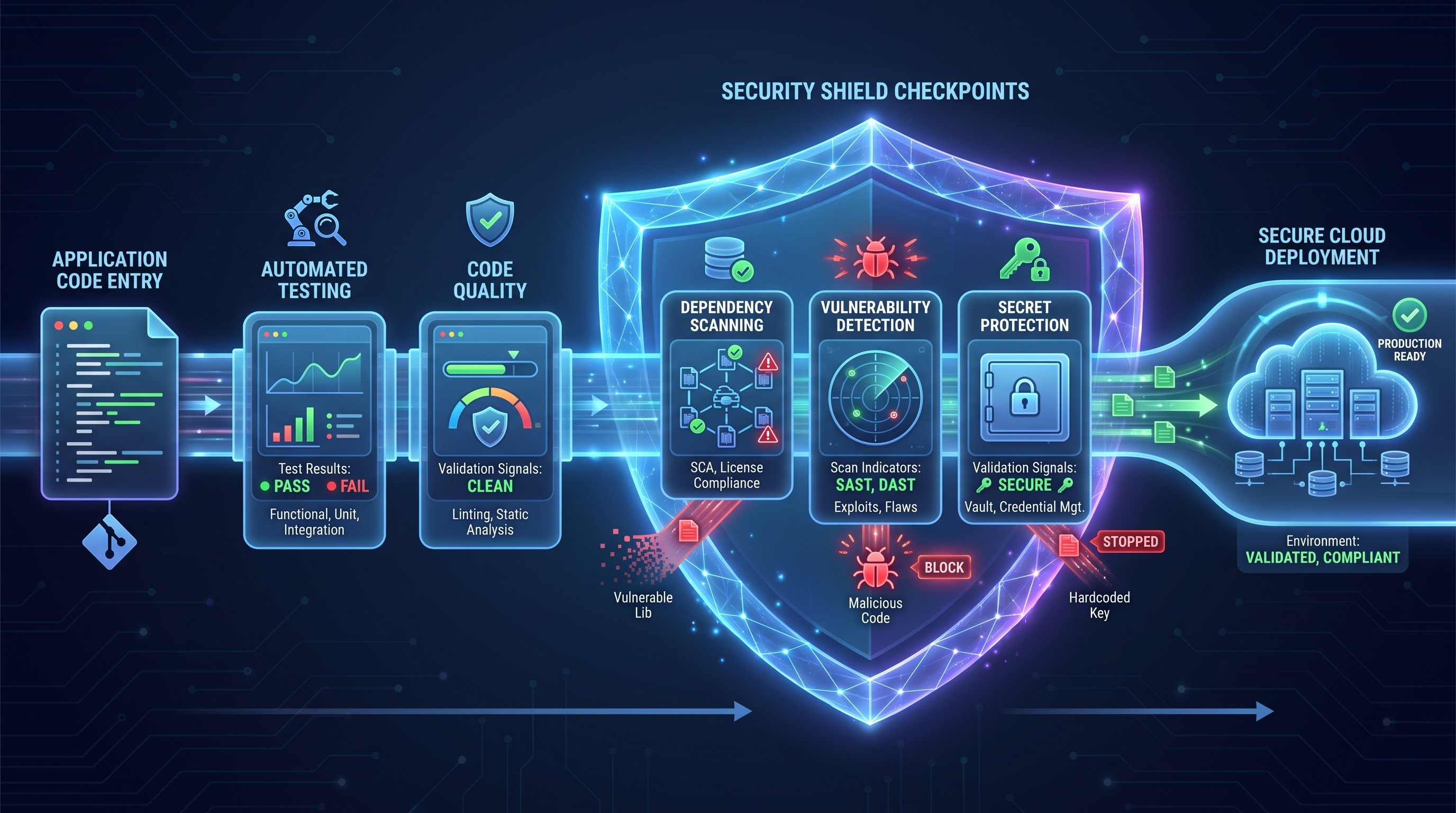
The result is a stronger definition of quality. A successful build should not only mean that the application compiles; it should provide increasing confidence that the software is functional, secure, and suitable for the next stage of delivery.
Infrastructure That Can Be Built Again Without Starting From Scratch
Software is only one part of a cloud application. Behind it may be virtual networks, databases, storage, compute resources, identities, monitoring services, and other components that must be configured correctly before the application can run. Manual infrastructure management creates a familiar problem. An engineer may successfully configure an environment, but reproducing that exact environment later can be difficult if the configuration exists mainly through a series of portal changes and undocumented decisions.
Infrastructure as Code addresses this problem by representing infrastructure through code or declarative configuration. Instead of manually creating every resource, teams can define what the environment should contain and use automation to provision it. The advantage becomes particularly clear when multiple environments are required. Development, testing, staging, and production can be created using consistent definitions while still allowing appropriate environment-specific configuration.
Infrastructure definitions can also be stored in source control. A change to the infrastructure can therefore go through review, history, and automated validation in much the same way as an application change. This makes infrastructure more predictable and reduces configuration drift—the gradual difference that can develop when environments are manually modified over time.
For cloud engineers, IaC is especially important because infrastructure is increasingly becoming part of the delivery pipeline. Microsoft includes Infrastructure as Code and configuration management among the capabilities associated with the DevOps Engineer Expert path. The broader lesson is simple: if an environment needs to be recreated reliably, its configuration should not depend entirely on someone's memory.
Deploying With Control—and Knowing What Happens Afterward
A fast deployment is not necessarily a good deployment. If a new version contains a serious problem, sending it to every user simultaneously can turn a small defect into a major production incident. Modern DevOps practices provide ways to reduce that risk. Teams can use deployment strategies that gradually expose changes, maintain separate environments, or release a new feature to a limited group before making it available to everyone.
Blue-green deployments, canary releases, rolling deployments, and feature flags are examples of approaches that can separate the act of deploying software from the decision to expose it fully to users. Approvals and deployment gates provide another layer of control. Automation can handle routine validation while predefined conditions determine whether a release is allowed to continue. This creates a balance between speed and governance: teams can automate repetitive work without removing important safeguards.
However, deployment is not the final stage. Once the application is running, teams need to know whether it is actually behaving as expected. Application performance, error rates, response times, resource consumption, logs, and user activity can provide evidence about the health of the release. This is where monitoring creates a feedback loop. A deployment may technically succeed while still producing slower response times or unexpected errors. Without observability, those problems can remain invisible until users report them.
Microsoft's current AZ-400 objectives include instrumentation and continuous feedback, including monitoring and application insights. This reflects an important DevOps principle: the delivery process should continue learning from what happens after deployment.
A mature workflow therefore looks less like a straight line and more like a cycle:
Build → Test → Secure → Deploy → Observe → Improve
The information collected from production can influence the next development cycle, helping the team make better decisions rather than simply repeating the same release process.
Turning Azure DevOps Skills Into Real-World Expertise
The best way to understand DevOps is to connect the individual concepts through a practical project. Instead of learning pipelines, source control, testing, infrastructure, and monitoring as unrelated topics, create a small application and take it through the complete delivery lifecycle. Start by placing the application in a Git repository and establishing a sensible branching workflow. Then create a pipeline that automatically builds the application whenever appropriate changes are introduced. Add automated tests and produce an artifact that can be promoted through environments.
From there, introduce security validation and externalize sensitive configuration. Define the required infrastructure through IaC and connect the provisioning process to the delivery workflow. Deploy the application to a test environment, establish appropriate approvals or deployment controls, and add monitoring so that the behavior of the application can be observed after release.
This kind of project changes how the technology is understood. A failed build becomes an opportunity to investigate dependency or code problems. A failed deployment becomes a lesson in configuration and environment management. A monitoring alert becomes evidence that deployment success and application health are not necessarily the same thing.
It also creates a stronger foundation for certification preparation. The AZ-400: Designing and Implementing Microsoft DevOps Solutions exam evaluates processes, source control, build and release pipelines, security and compliance, and instrumentation. Microsoft currently associates this exam with the DevOps Engineer Expert certification and lists Azure Administrator Associate or Azure Developer Associate as prerequisite certification options.
For learners, this means certification preparation is most effective when technical knowledge is supported by hands-on experience. Understanding why a pipeline uses a particular trigger, why a deployment needs an approval, or why infrastructure should be version controlled is more valuable than simply remembering the terminology. A strong DevOps professional should eventually be able to look at a delivery problem and reason through it. If deployments are slow, they should be able to identify where the bottleneck exists. If environments behave differently, they should consider configuration management and IaC. If a release introduces unexpected errors, they should know where monitoring and deployment controls can provide evidence.
That is the difference between learning a platform and developing DevOps engineering capability. Bringing the Pieces Together Azure DevOps becomes much easier to understand when it is viewed as part of a complete software delivery system rather than as a collection of individual services. Source control organizes collaboration. Pipelines automate the movement of code. Testing provides early feedback. Security checks reduce risk. Infrastructure as Code creates consistent environments. Deployment strategies provide control, while monitoring reveals what happens after the software reaches users. Each capability solves a different problem, but their real value appears when they work together. The journey might begin with a developer committing a few lines of code. From there, automation can build the application, validate its behavior, check for security concerns, create an artifact, prepare the infrastructure, deploy the release, and monitor its performance. If something fails, the resulting feedback can return to the development team and influence the next change.
That is the larger idea behind DevOps. It is not simply about learning another cloud service or creating a deployment pipeline. It is about designing a delivery process that allows teams to change software frequently without losing reliability and control. For anyone planning to learn Azure DevOps, that broader perspective is worth keeping in mind. The tools will continue to evolve, and individual services or features may change, but the underlying engineering questions remain relevant: How can software be tested earlier? How can infrastructure become repeatable? How can security move closer to development? How can deployments become safer? And how can production feedback improve the next release?
Once those questions become familiar, Azure DevOps stops looking like a long list of features to memorize. It becomes a practical framework for understanding how modern teams build, release, operate, and continuously improve software.