
Zero-Downtime Azure Releases: Automating Seamless Deployments with Slots and Traffic Routing
Last updated on Sep 24, 2026
The term modernizing software delivery, in terms of current cloud engineering, refers to removing the idea of scheduled maintenance windows. Financial loss, brand reputation loss, and client dissatisfaction arise from any disruption of service in consumer-oriented applications and global e-commerce systems and from important business tools.
Implementing the software directly on live production systems is an unavoidable risk, irrespective of how well the unit tests, integration tests, and staging tests have been done, due to production systems' unique traffic patterns and data variations which can hardly be reproduced in lower environments.
Among these release approaches, canary releases, and blue-green deployments are absolutely the best. In the case of blue-green deployment, rapid switching from one production environment to another is possible, implying that if an emergency occurs, the company has an instant recovery. On the contrary, with the canary deployment, change is done step by step, starting with small amounts of users.
Realizing these deployment schemes reliably, automatically, and in an auditable manner can be performed only with the help of a unified ecosystem of platforms. Microsoft Azure is capable of achieving this capability due to the usage of three major services: Azure Pipelines that serves for orchestration of complicated multi-stage release definitions; Azure App Services providing platform-as-a-service hosting solutions with built-in deployment slots; and Azure Traffic Manager facilitating sophisticated routing of traffic on a global DNS level.
This large-scale manual will describe the operating philosophy, technical realization, operational administration, and day-to-day management of blue-green and canary deployment with the help of Azure Pipelines, App Services, and Traffic Manager.
Architectural Approaches: In-Place, Blue-Green, and Canary
To explore the reasoning behind zero-downtime architectures, one should consider the various pros and cons of deployment techniques.
The Drawback of In-Place Deployment
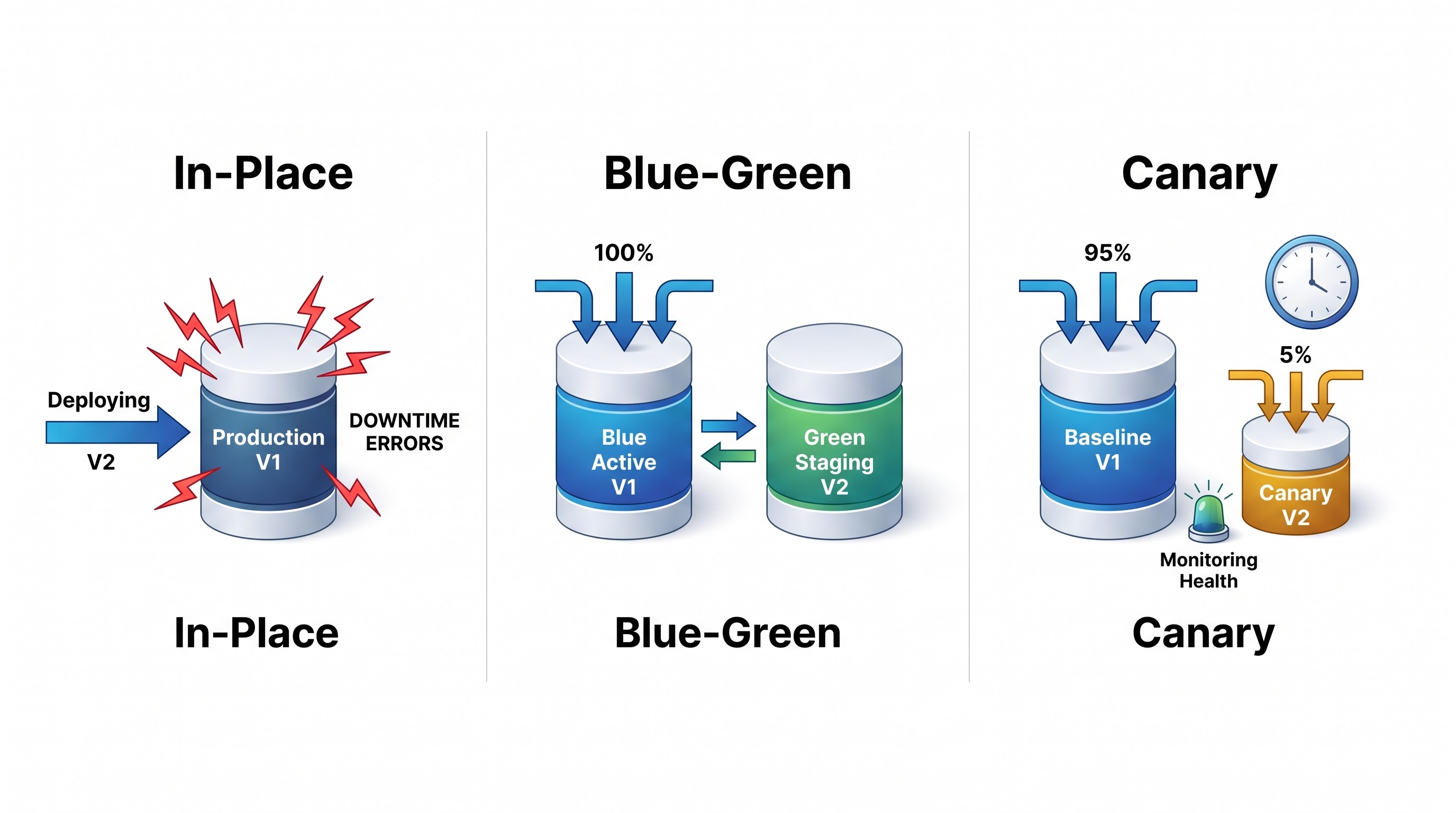
In the past, in-place deployment was regarded as the standard approach. It involves the copying of the build artifacts on top of existing binaries placed on the running servers. To execute this step, the application that needs to be updated is deactivated, receives new application packages, and gets reconfigured.
In doing so, the following risks are created. During the shutdown period, all requests from the users will get error messages about the non-functional service. If something goes wrong in the middle of the deployment process because of a broken artifact, missing environment variable, or starting exception, the system will stop working. The rollback will mean executing the steps of the initial process in the reverse order. Besides, in case of a distributed cluster with sequential updates performed by rolling updates, the system will be functioning in a mixed state.
Blue-Green Deployment Model
With blue-green deployment, the risk of this type of flaw is avoided by separating the process of deploying the application from that of redirecting traffic. This method uses two identical physical environments instead of changing a current one:
The Blue Environment: The production instance that is currently active and processing all client traffic.
The Green Environment: The idle environment that is used for staging the new release.
The model involves deploying new software exclusively to the inactive green environment. After that, it is possible for the engineering team, automated smoke tests, and synthetic transaction tests to perform all of the necessary actions with the application, while the production traffic will stay in the blue instance.
Once the green environment is confirmed to be stable, the live traffic is directed from the blue instance to the green instance. This operation happens on the network layer, which makes it transparent for the end-user. And finally, the blue environment remains on standby. In case anything goes wrong after switching to the green environment, it would be just enough to redirect the traffic back again to the blue environment.
The Canary Paradigm
Blue-green deployment might offer an instant safety fallback but is nonetheless an all-or-nothing approach. When switching traffic from blue to green, the new code has a hundred percent user adoption rate all at once. This means that if an edge-case bug makes it through testing, such as an unindexed query that only locks under production-level concurrency, the whole user base suffers from it at once.
Canary deployment mitigates the risk of this problem by introducing gradual exposure. The name "canary" comes from early mining practices where canaries were used to detect dangerous gases before miners were affected by them. In this case, canary deployment allows routing of only a small portion of real users, typically below five percent, to the new version of the software while the majority of traffic continues flowing to the base version.
Teams in engineering are always looking at the system health, telemetry information, and important business metrics from the canary group. In instances where error rates continue to occur, response time is good, and conversion rates do not decrease, traffic allocation is gradually increased to ten percent, twenty-five percent, fifty percent, and then one hundred percent. However, in cases of unusual behaviors, traffic will be restored back to the base version, and the damage will be limited to a small number of users only.
Core Azure Building Blocks
To succeed with these deployment strategies in the organization, specific infrastructure items are needed to maximize hosting, traffic management, and automation.
Azure Apps and Deployment Slots
Azure App Service is a fully managed PaaS unit which is used for web applications, REST APIs, and mobile backends because it manages everything in regard to App Service Plans and takes care of virtual machine setup, OS updates, load balancing, and other operations.
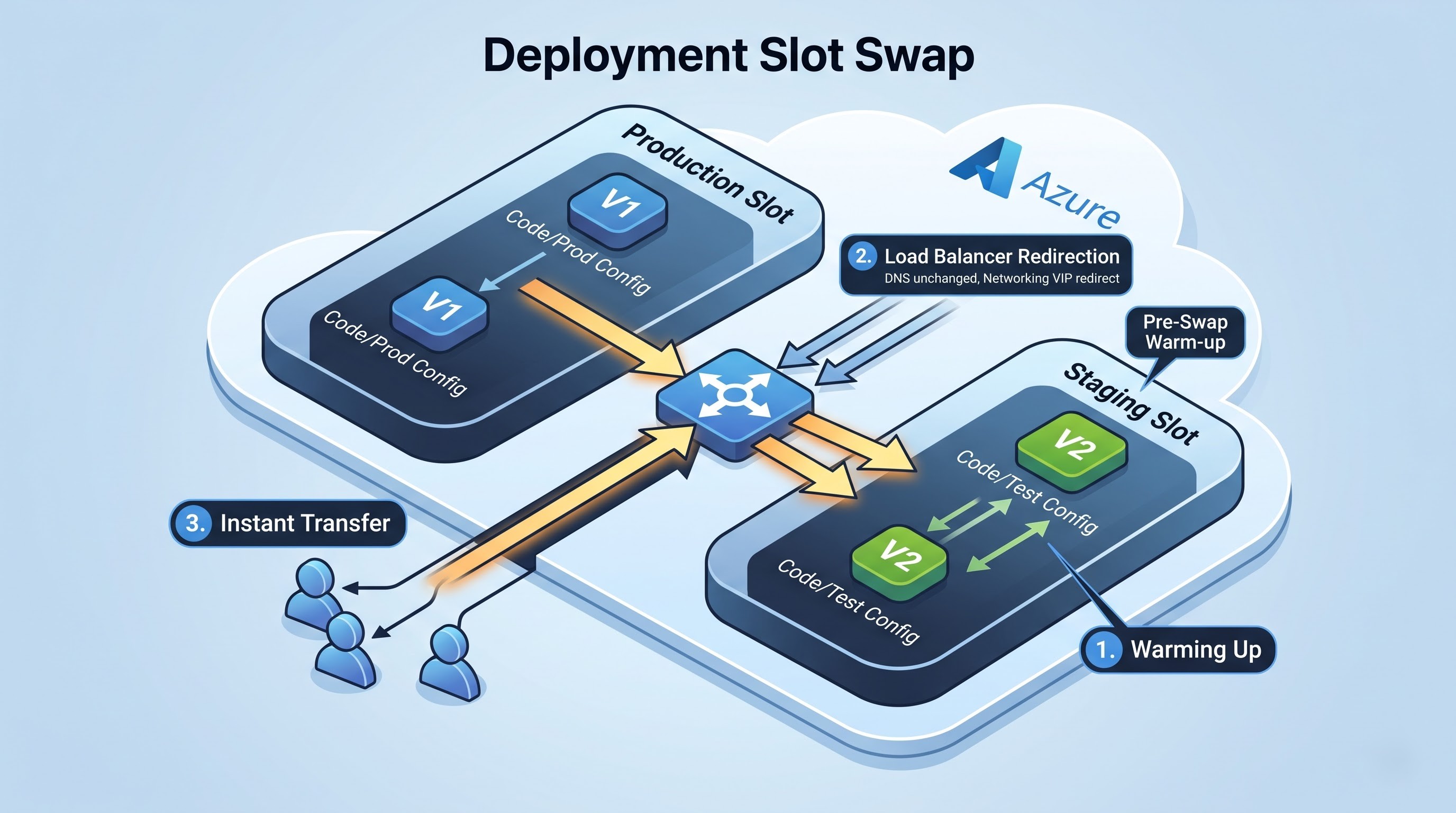
Central to the concept of zero-downtime releases in the Azure App Service is the Deployment Slot feature. Deployment slots are web applications that function independently using their own distinct hostname, parameters, network integrations, and scaling options, but all within the same App Service Plan.
Every App Service has a main production slot. Additional slots such as staging or canary slots can be created in conjunction with it. The main architectural advantage of deployment slots is their swap function.
When one changes App Service slots, the platform does not merely change the DNS record.
As a result, the App Service fabric undertakes a multi-step networking process.
First, it utilizes the configurations of the slot being changed.
Second, the health-probing commands are sent to the staging slot, which starts warming up the app (it does it to ensure that the generation of runtime, caches, and connection pools begins before any request is made).
Last, when the health probes show that the runtime app is ready, the App Service fabric carries out the swap.
The movement takes place in the networking aspect of the Azure load balancers, therefore there is no disconnection of clients, the actions of the threads are continuous and yet the time of downtime is zero.
Moreover, the deployment slots can redirect the traffic without the full swap taking place. This characteristic, called testing in production, enables an administrator to determine the volume of traffic flowing to production and development slots. This allows for canary releases without requiring external load balancers.
Azure Traffic Manager
App Service deployment slots offer swapping and routing as part of one datacenter or one App Service instance, whereas enterprise infrastructures require multi-region failover. In this case, Azure Traffic Manager serves as the global routing solution that these architectures need.
Azure Traffic Manager is a DNS-based load balancer generally used for traffic management. Unlike the reverse proxies or application gateways which usually initiate TCP sessions, Traffic Manager operates in the DNS resolution layer. When a user wants to find the DNS name of a particular application, the request will be sent to Azure Traffic Manager's DNS Resolution service. Traffic Manager evaluates its routing rules, checks the health of the configured endpoints, and sends back the required information.
Traffic Manager provides several routing types:
1. Priority Routing: This is the process of sending the traffic to the primary endpoint, but in case this endpoint goes down, the traffic will be switched automatically to some backup endpoints.
2. Weighted Routing: The traffic in this type of routing gets distributed to several endpoints according to certain weights assigned to them.
3. Performance Routing: This traffic routing type selects the endpoint that has the fastest response time according to the user's location.
4. Geographic Routing: This type of routing sends the request to the endpoint based on the user's region.
With the help of advanced deployment patterns, a regional blue-green switch and extensive canary deployment can be achieved using Traffic Manager’s weighted and priority routing techniques in various App Service instances worldwide.
Azure Pipelines
The Azure Pipelines developmental team is responsible for developing the continuous delivery and integration (CI/CD) engine built on Azure's DevOps framework. This service includes cloud-based and on-premise applications, whether through self-hosting or using Azure’s hosted model.
In contemporary enterprises, release management utilizes the technology of Multi-Stage Pipelines based on YAML. The use of YAML pipelines is fundamentally different from conventional release methods in that it enables a completely code-operated delivery process. If you are interested in developing, controlling, and scaling production release pipelines, you should enroll in the best azure devops course at OnlineITGuru that provides the requisite practical lab experience for managing enterprise CI/CD systems.
Every stage of a pipeline refers to a relevant life cycle point during development—this can involve building the application, protecting it with security verification, releasing it on staging, or any other point of development.
An Environment embodies a planned group of computing resources, including App Services, Kubernetes ecosystems, or virtual computers.Organizations can use pipeline deployments to different Environments, thus applying rigid governance practices, including:
Manual approval checks from business stakeholders or system architects. Automated health check processes that seek the help of Azure Monitor or Application Insights or other RESTful endpoints prior to moving to the process.
Enforced deployment timing schedules.
Complete audit logging that indicates which version was deployed to which environment and via which pipeline.
Strategy 1: Deploying Blue-Green Strategy
Using an automated blue-green deployment model with Azure Pipelines and Azure App Services allows for verifying and adjusting changes before releasing them to the public and enabling rollback in case of failure.
App Service Slot Swap Life Cycle
To execute blue-green deployment, one must take advantage of the fact that the production slot is the Blue environment, while the staging slot serves the Green environment.A proper operational sequence in Azure Pipelines is quite strict.
Artifact Generation: In the CI phase, the application source code is built, unit testing suites are executed, security vulnerability reports are generated, and a non-changeable deployment artifact is generated.
Deployment to Inactive Slot: In the CD phase, the Green environment is used to deploy the newly-built artifact to the staging deployment slot. The production deployment slot is not used at all and continues working with real customers.
Configuration Application and Warming: Once the files are written to the disk, the Azure App Service runtime starts. The application-specific configuration options, including the test flags or staging DB connections, are initialized. The Azure Pipelines sends synthetic warm-up calls to the hostname assigned to the staging slot.
Automated Testing: The pipeline performs automated smoke testing on the staging slot URL, ensuring the basic functionality of important business operations which include authentication, connectivity to databases, and the receipt of API responses. In case the test fails, the pipeline terminates instantly causing no effect on the production environment and sending notifications to the engineering team regarding the failure.
The Swap of the Slots: After verification is complete and the stakeholders grant their approval, the pipeline is kicked into motion with App Service swap. The Azure load balancers assign the virtual IP address automatically. The slot will be converted from staging to production and vice versa. It is important to understand the automation gate checks and zero-downtimes for cloud architects in practical azure devops learning.
Post-swap Monitoring: After the swap has taken place, the pipeline proceeds with the validation process. The previous version of the production software is now kept in the staging slot. If there are any critical signals that can indicate something wrong in the performance of the application during the first half an hour, for example, a sudden growth of HTTP 500 errors, the pipeline will perform the reversal process of the swap within seconds.
System of Slots and Sticky Settings
A major point in the operation of blue-green deployments through App Service slots is to distinguish between slots with their site settings and slots with errors.
In Azure App Services, environmental settings such as App Settings, Connection Strings, and Log Files may be connected as Deployment Slot Settings or as sticky settings.
Non-Sticky Settings: This type of settings follow the code when a swap happens. For example, when the staging slot becomes the production slot, such settings are brought to accompany the code. This feature is applicable to the settings that can be classified as the behaviors of the application, feature flags, or framework variables, which are controlled by the version of the code.
Sticky Settings: The sticky type of settings stays with the physical slot and does not transfer from slot to slot. The application uses this type of settings during swap. Thus, whereas some environment-dependent resources can be used in different slots, for example, the production slot has to point to the production database and to write to the production storages always, the staging slot has to be sending requests only to testing databases or sandbox services.
Improperly managing sticky settings is one of the leading causes of unsuccessful blue-green deployment. If a connection string for the production database is wrongly set up to be non-sticky, it will remain in the staging slot after the swap, leading to the new live application reading from the staging database instead. The automation of slot swapping should only be performed after a thorough configuration review.
Strategy 2: Using Canary Deployment
Blue-green deployment methods facilitate rollback, while canary deployments provide safety via risk mitigation and statistical verification. Azure allows for two methods of implementing canary releases: intra-service through App Service Traffic Routing or inter-service using Azure Traffic Manager.
Intra App Service Canary Traffic Routing
Using an Azure App Service instance, Testing in Production allows engineers to route requests between the production and staging slots without the usage of another router.
In this mode, the built-in routing of Azure App Service routes incoming requests through the slots according to the percentage of weights provided by the engineer.
Suppose a user uses the application for the very first time:
The routing fabric determines which slot the user will be connected to. The user is either routed to the production slot or to the staging slot as per traffic distribution settings.
The routing fabric saves an HTTP cookie "x-ms-routing-name" in the user's browser to record the allocated slot.
The routing fabric will read the value of the cookie in all subsequent requests and ensure that the user remains connected to the same slot throughout the session. This ensures that a user cannot keep switching between the old and new versions of the application during a session.
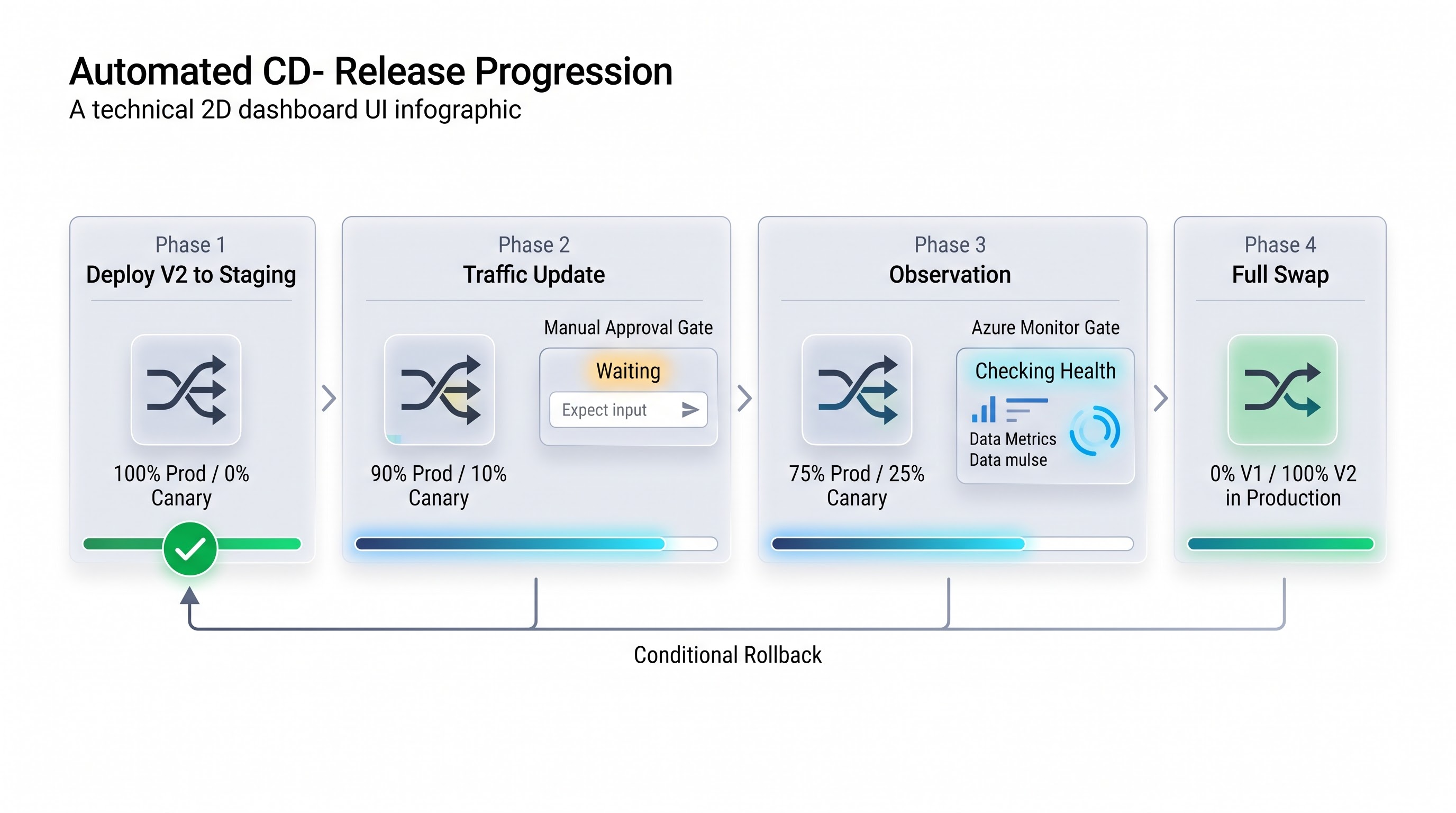
Azure Pipelines can drive this process in a controlled rollout window:
Phase One: The new release will be implemented in the staging slot, while the traffic distribution is set to zero percent for staging and one hundred percent for production. The corresponding automated smoke tests are performed with respect to the slot URL.
Phase Two: In this stage of the new release, the traffic routing settings are updated so that ten percent of the public traffic is routed to the new release in the staging slot with ninety percent of the traffic still in production.
Phase Three: The processes are paused for a pre-defined observation period, which may constitute, for example, two hours. Throughout the observation of the operational health system functions, the automated gates are used.
Phase Four: When the operational health gates signal that everything is working effectively, the pipeline can reach the point where it can increase the percentage of canary users to twenty-five and fifty percent from the original stage.
Phase Five: When confidence in the functioning of the exported product is achieved, the full swap can be conducted through the pipeline.
Cross-Region Canary: Azure Traffic Manager
In situations where an application is deployed in multiple regional App Services for the purpose of disaster recovery or latency enhancement, traffic routing based solely on local slots cannot provide an adequate solution. Azure Traffic Manager serves as an orchestration platform allowing for the implementation of canary releases globally.
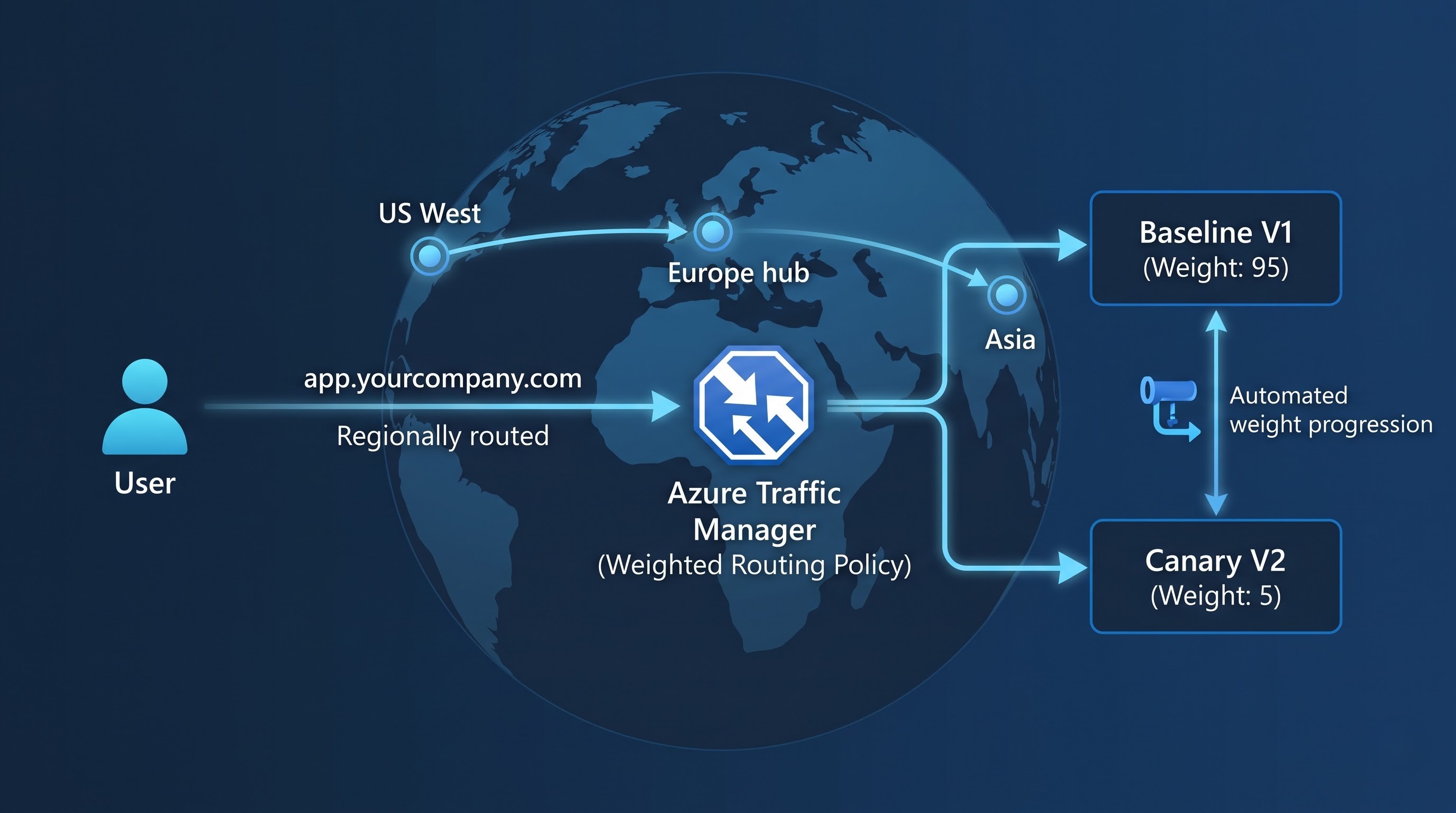
Within this architecture, multiple App Service instances are created either in different regions or within the same region as distinct infrastructure deployments. The instances of your application are marked as a Baseline Production instance and a Canary instance. Both instances are registered as endpoints in Azure Traffic Manager using the Weighted Routing policy.
The operational release process consists of the following steps:
First setup configuration: The Traffic Manager profile allocates 95% of the total global traffic to the Baseline App Service endpoint by giving it a weight of 95. The Canary App Service endpoint is given a weight of 5.
Deployment of the Canary Pipeline: The Azure Pipelines service deploys the candidate release artifacts to the Canary App Service endpoint. While the deployment occurs, the active health probes of the Traffic Manager ensure that if the Canary app restarts, or suffers from delayed start, it will be treated as unhealthy and hence no user can get to an unprepared instance.
Adjustments to weights: Once the canary has proven its reliability, the automated Azure Pipeline script modifies the Traffic Manager endpoint weights through either Azure CLI or PowerShell modules. The weight of the Canary endpoint is increased in automatic increments of 5, 20, 50, and finally 100.
Transition and harmonization: After the canary has received all 100% of traffic, and passed all business checks, the pipeline updates the Baseline App Service with the new version of the application, resets the Traffic Manager weights back to the initial baseline position and finishes the deployment process.
Summary
The concept of zero-downtime releases is not just a technical dream but a crucial need for organizations wishing to satisfy their customers with a reliable and smooth operation of their digital services. Since replacing time-consuming downtimes caused by updates with blue-green deployments and canary releases, companies are able to minimize human errors and preserve continuous functioning of their business.
Azure has been developed to assist in the process. App Services on Azure provides organizations with a feature that simplifies their infrastructure management, i.e. deployment slots, which permit switching to new servers. Azure Traffic Manager helps achieve global DNS-based routing, which makes it possible to perform canary releases. In order to be able to put these deployment concepts into practice, engineers have to attend a structured microsoft devops course on development of automated enterprise-grade cloud solution management.