
Software Development
Web Tables in Selenium
Last updated on Jun 15, 2020
Copy Link:

The next topic in Selenium it certification is web tables. So now initially, start with
 So now we will see
 And as the name suggests, these dynamic tales, do not have a limit to rows and Columns. And now, we will see
What is a web table?
A table is a HTML data, that is displayed with <table> tag . In the <table> tag <tr> defined the row data and <td> defines the column data. We people usually use <table> to display the data in row and column format. Let us initially have a look regarding the basic HTML table.<table>
<tbody>
<tr>
<th>Automation Tool</th>
<th>Licensing</th>
<th>Market response</th>
</tr>
<tr>
<td>Selenium</td>
<td>Free</td>
<td>In</td>
</tr>
<tr>
<td>QTP</td>
<td>Paid</td>
<td>Out</td>
</tr>
</tbody>
</table>
This would display the output as shown below
These tables were usually classified as two types :
Static Web tables:
In these tables, the data is static, i.e here rows and columns are fixedDynamic Web tables:
In these tables, data is dynamic. i.e here rows and columns are variable. So to write the XPath consider the above codestep -1 :
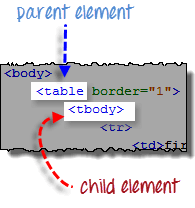
Select the parent Element In Web drivers, X- path locators start with a double forward slash (//) followed by a parent element. Since we are now dealing with tables, the parent will be tables (//tables) step - 2 :Add the child Elements:
Since for every table <tbody> is immediately followed by <table> . And <tbody> is usually considered as the child element of <table> . And all child elements will be placed to the right of the parent element <tbody> and these are separated by one forward flash
Add predicates :
From the code shown above, this <tbody> contains two <tr> tags. And these elements were called as the <tbody> child elements. Moreover, these <tr> elements is called as siblings.Accessing Nested tables :
A table within a table is called the Nested tables. In HTML , we can execute the nested tables with the following code<html>
<head>
<title> Sample</title>
</head>
<body>
<table border="1">
<tbody>
<tr>
<td> One</td>
<td> Two</td>
</tr>
<tr>
<td> three </td>
<td>
<!-- inner table -->
<table border = "1">
<tbody>
<tr>
<td>1-2-3</td>
<td>4-5-6</td>
</tr>
<tr>
<td> 7-8-9</td>
<td>10-11-12</td>
</tr>
</tbody>
</table>
</td>
</tr>
</tbody>
</table>
</body>
</html>
Likewise, through web driver we can execute the following code for nested tables
public static void main(String[] args) {
String baseUrl = " URL";
WebDriver driver = new FirefoxDriver();
driver.get(baseUrl);
String innerText = driver.findElement(
By.xpath("//table/tbody/tr[2]/td[2]/table/tbody/tr/td[2]")).getText();
System.out.println(innerText);
driver.quit();
}
So now we will see
How to use X-path to locate web elements?
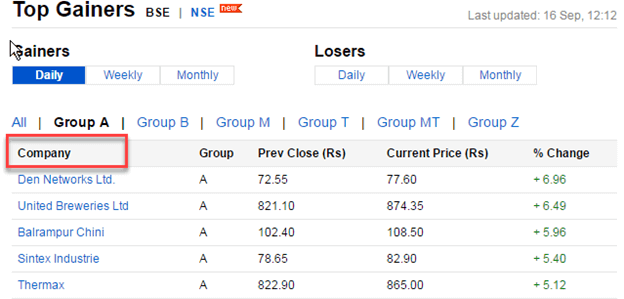
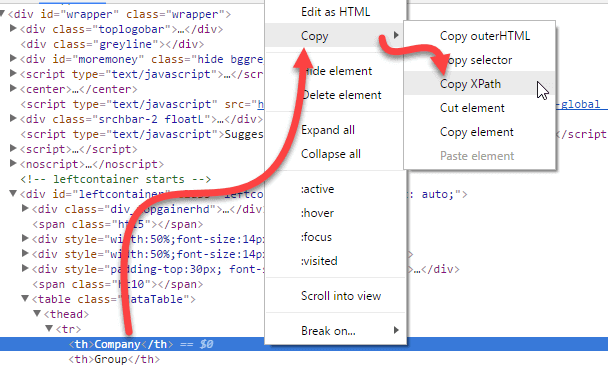
Select any dynamic table as shown above. Select any table heading and then right Click on it to inspect the element. Now pick any table heading to add to X-path. And soon after selecting <th> right click on it then you will be finding a copy option. And then click over it to copy it to the X-path. So like this, people would find X-path and copy it.
And as the name suggests, these dynamic tales, do not have a limit to rows and Columns. And now, we will see
How to fetch rows and Columns from dynamic web table?
Selenium web driver allows you to fetch the number of rows and columns in the dynamic web table. Execute the following code to find the rows and columns in your table. import java.text.ParseException; import java.util.List; //import selenium packages import org.openqa.selenium.By; import org.openqa.selenium.WebElement; //import drivers import org.openqa.selenium.chrome.ChromeDriver; import org.openqa.selenium.WebDriver; public class Noofrowsandcols { public static void main(String[] args) throws ParseException { WebDriver wd; System.setProperty("webdriver.chrome.driver","G://chromedriver.exe"); wd= new ChromeDriver(); wd.get(" https://onlineitguru.com/onlinetutorials/selenium"); //No.of Columns List col = wd.findElements(By.xpath(".//*[@id=\"leftcontainer\"]/table/thead/tr/th")); System.out.println("No of cols are : " +col.size()); //No.of rows List rows = wd.findElements(By.xpath(".//*[@id='leftcontainer']/table/tbody/tr/td[1]")); System.out.println("No of rows are : " + rows.size()); wd.close(); } }How to fetch the data in the dynamic table?
In the table, we do have numerous amount of data. And to fetch a particular record in the table, scanning it from top to bottom will be a time taking process. So we can directly fetch the data using the row and column number. import java.text.ParseException; import java.util.List; //import selenium packages import org.openqa.selenium.By; import org.openqa.selenium.WebDriver; // import web elements import org.openqa.selenium.WebElement; import org.openqa.selenium.chrome.ChromeDriver; //import time packages import java.util.concurrent.TimeUnit; public class RowandCell { public static void main(String[] args) throws ParseException { WebDriver wd; System.setProperty("webdriver.chrome.driver","G://chromedriver.exe"); wd= new ChromeDriver(); wd.get("http://demo.guru99.com/test/web-table-element.php"); wd.manage().timeouts().implicitlyWait(20, TimeUnit.SECONDS); WebElement baseTable = wd.findElement(By.tagName("table")); //To find third row of table WebElement tableRow = baseTable.findElement(By.xpath("//*[@id=\"leftcontainer\"]/table/tbody/tr[3]")); String rowtext = tableRow.getText(); System.out.println("Third row of table : "+rowtext); //to get 3rd row's 2nd column data WebElement cellIneed = tableRow.findElement(By.xpath("//*[@id=\"leftcontainer\"]/table/tbody/tr[3]/td[2]")); String valueIneed = cellIneed.getText(); System.out.println("Cell value is : " + valueIneed); wd.close(); } }Asiggnment :
Consider a web table that contains the number values like Salaries.Execute the program to dispaly the max of those numbers. And if you struck anywhere feel free to contact Selenium Online Courses And there are some cases, where the people would like to see the complete data. And you people can see the data through the following code:import java.text.ParseException; import java.util.List; //import selenium packages import org.openqa.selenium.By; import org.openqa.selenium.WebDriver; // import chrome drivers import org.openqa.selenium.chrome.ChromeDriver; import org.openqa.selenium.WebElement; // import timing unit import java.util.concurrent.TimeUnit; public class NofRowsColmns { public static void main(String[] args) throws ParseException { WebDriver wd; System.setProperty("webdriver.chrome.driver","G://chromedriver.exe"); wd = new ChromeDriver(); wd.manage().timeouts().implicitlyWait(5, TimeUnit.SECONDS); wd.get(URL"); //To locate table. WebElement mytable = wd.findElement(By.xpath("/html/body/table/tbody")); //To locate rows of table. List < WebElement > rows_table = mytable.findElements(By.tagName("tr")); //To calculate no of rows In table. int rows_count = rows_table.size(); //Loop will execute till the last row of table. for (int row = 0; row < rows_count; row++) { //To locate columns(cells) of that specific row. List < WebElement > Columns_row = rows_table.get(row).findElements(By.tagName("td")); //To calculate no of columns (cells). In that specific row. int columns_count = Columns_row.size(); System.out.println("Number of cells In Row " + row + " are " + columns_count); //Loop will execute till the last cell of that specific row. for (int column = 0; column < columns_count; column++) { // To retrieve text from that specific cell. String celtext = Columns_row.get(column).getText(); System.out.println("Cell Value of row number " + row + " and column number " + column + " Is " + celtext); } System.out.println("-------------------------------------------------- "); } } }