
Architecting the Enterprise Engine: The Definitive Guide to Modern ServiceNow Administration
Last updated on Jul 7, 2026
The shift in enterprise software has meant that system administration roles have changed from being a reactionary configuration talent to being the fundamental architects of the platform. ServiceNow has moved from being seen as just an IT ticketing program to now acting as the brain of digital workflows in all other functions such as HR, Legal, Security and Customer Service.
Administration of such platforms involves working through complicated data relationship models, complex security structures, and automated processes within multiple environments. Errors made in the basic framework cause compounding technical debt, whereas optimized administration allows for increased speed throughout the organization. This book explores the main aspects of service now administration and explains how to achieve success in architectural, automation, data, security, and lifecycle administration. In order to help administrators translate theoretical knowledge into practice, a clear understanding of these aspects through an industry-focused servicenow training, a complete servicenow training online is imperative.
1. Core Architecture: Comprehending Schema and Data Fabric
The Service Now Platform is based on a relational database layer at its architecture level. The ServiceNow Administrator course should not only be concerned about form design but also focus on how the tables, inheritance method, and reference tables work with data.
Table inheritance and Extensibility System
ServiceNow employs a standard inheritance system where parent tables are responsible for core attributes while child tables are responsible for extending those attributes. A typical example is the Task table which acts as the parent of:
Incident
Problem
Change Request
Requested Item
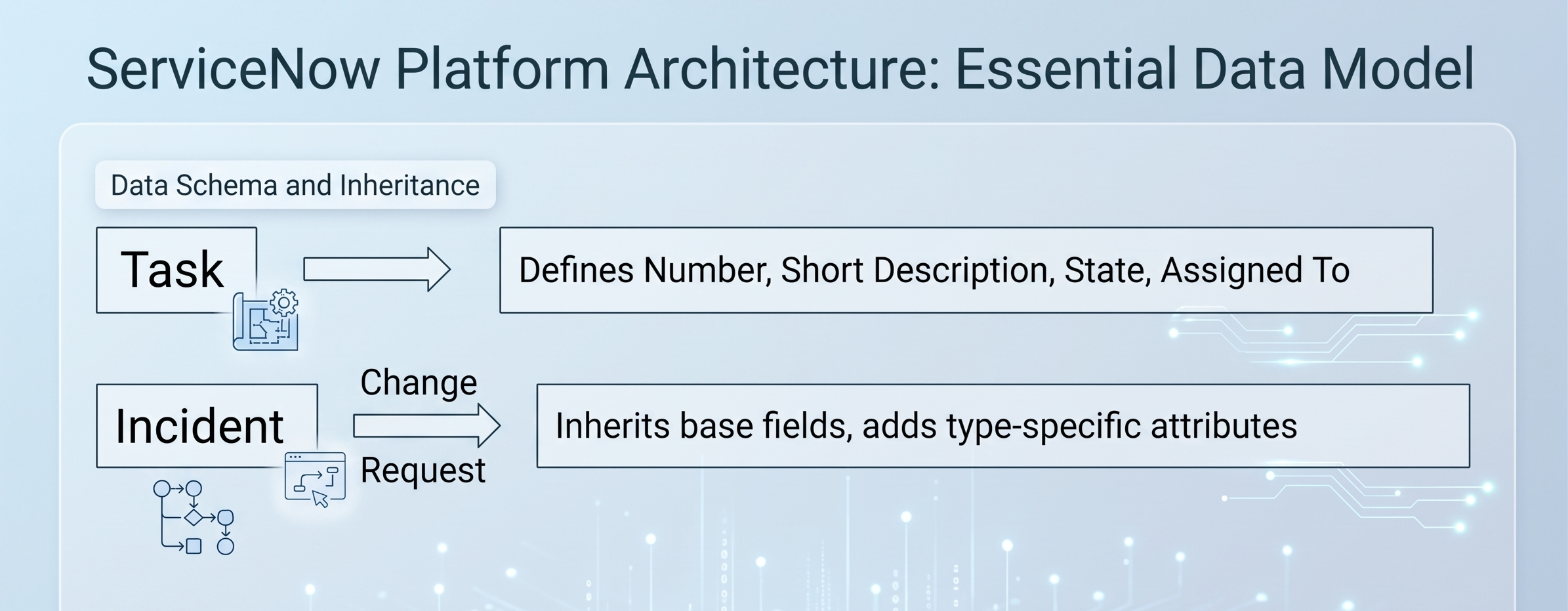
As soon as a field is introduced into the Task table, it immediately gets disseminated to all child tables. Administrators have to make proper use of the hierarchy. Building new custom fields only on local child tables while they perform a role for all types of tasks leads to problems with data segregation and disruption of the consolidated report. At the same time, stuffing the Task table with too many details only relevant to a subset of child-level tasks slows down the work as it increases the database row size.
On top of the above-mentioned pillars, the Configuration Item table plays an important role in the overall architecture. The Item table branches off into thousands of different kinds of infrastructure sub-classifications such as cmdb_ci_win_server and cmdb_ci_database. Knowing how this table works enables proper targeting of queries, scripts and filters when it comes to reporting.
The Difference Between Reference Fields And Document ID Fields
In advanced servicenow training online, reference fields allow for establishing data relationships and ensuring proper integrity of these records by pointing to a SysID of 32 characters which would uniquely distinguish that particular record from the rest of the records held by it. It also facilitates creation of polymorphic references. However, if polymorphic references need to be created, one must choose from the following options:
Reference Fields Inheritance: In this case, a reference field can be pointed to a parent class such as Task and provide the user with an option of selecting the record from classes such as Incidents, Problems, etc.
Document ID Fields: Each Document ID field stores the name of the table along with the SysID value, allowing the field to act as a reference record for any type of record in the system.
2. Enhanced Security and Access Management: The ACL System and Data Boundaries
Establishing effective data security while ensuring that business procedures run without hindrance represents one of administrators' key roles. ServiceNow's approach to data access is through multiple steps of security processing, using Contextual Security as the first step, followed by verification of physical system conditions.
The ACL Assessment Process
Whenever a user tries to get access to some piece of information, Service Now uses an algorithm for assessment of the request's security features. Access can be granted through the analysis of two levels of ACL.
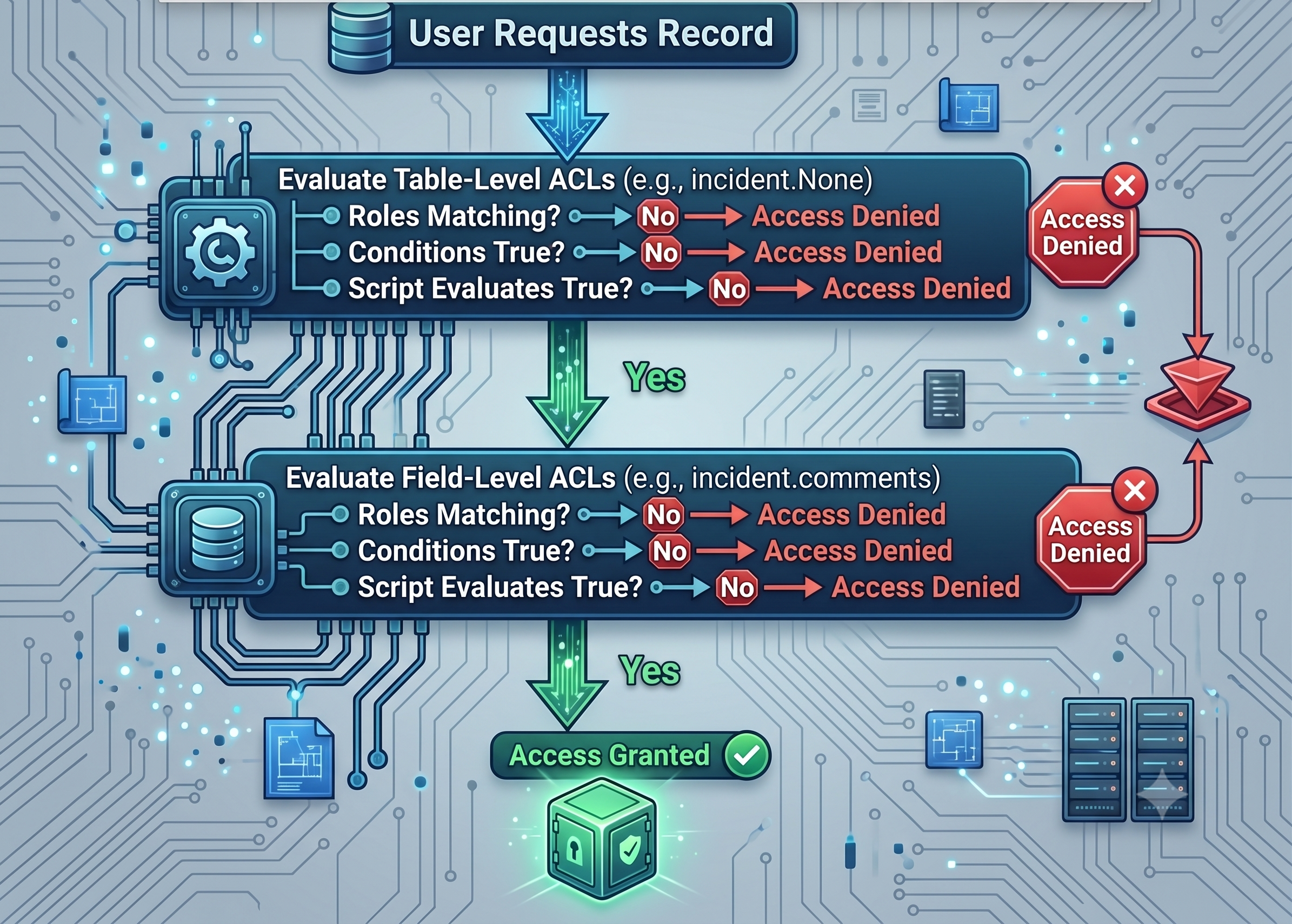
For each layer (Table and Field), security is achieved through the following three evaluations: Roles, Conditions, and Scripts. For access to be granted, all three parameters have to evaluate to true. If a particular ACL has roles to be matched, the correct condition string, and if the script executes to give answer = true;, then the operation is allowed.
Wildcards (*) and None Rules
Having knowledge about the way the system reads particular table target expressions is essential to avoid unintentional data exposure when working on your custom modules:
table.None: Works directly with the table itself. For a user to be able to see the record canvas and work with the queries on the rows, he has to pass this ACL.
table.*: Serves as a wildcard expression for all the fields within the particular table. If there isn't an explicitly defined ACL for a certain field, the limitations of the table.* ACL applies to the field.
table.field: Defines access to a particular field. This ACL overrides all wildcards for this particular field.
Architectural Risk Note: In the event that one configures a table.field ACL to allow reading by the public, and yet does not set up the table.None ACL for the same table, users would be fully blocked anyway since the table access check is done first and would default to denied in the absence of an appropriate rule.
Data Filtration in Conjunction with High Level Security Settings
In cases of very high levels of multi-tenancy or confidentiality of data, ACLs may be too cumbersome to manage. In this case, administrators need to augment the access security system using Data Filtration. Data filtration is a server-side scoping mechanism which works independent of ACLs and filters out full sets of records from any database queries depending on the criteria of the subject (for example, splitting HR case paths across the geographical regions of different divisions).
It ensures that the base ACL remains lean, lowers maintenance costs, and avoids information leakage through reports and global searches.
3. Data Integrity & Governance: Mastering the CMDB, CSDM, and Import Engines
Your ServiceNow instance is nothing but data. Bad data governance transforms your ServiceNow instance into a costly and chaotic storage place for data. It is imperative for administrators to promote data integrity by way of structured data ingestion processes, an approach that is heavily pointed out throughout complete servicenow online course modules.
The Common Service Data Model (CSDM) Domains
Common Service Data Model (CSDM) is built using four unique domains to correlate between the technical and the business value infrastructure. The foundational domain forms the base of the CSDM architecture through the use of key framework tables such as sys_user (users), cmn_location (physical location), and core_company (vendors/business units). Design domain represents the strategic planning level that deals with architectural mapping and application intentions by using unique tables such as cmdb_ci_appl for applications and cmdb_ci_service_design for service design.
Manage Technical Services domain connects the design to the physical and logical infrastructures, and it involves physical reality asset tables and configuration tables. They include cmdb_ci_server for hardware assets, cmdb_ci_database for relational databases, and cmdb_ci_query_builder for service mapping relationships. The last domain is the Sell/Consume domain. This is the front end and it presents the user-friendly services and the business offers. This domain is used for service catalog and consumer tables. Examples include cmdb_ci_service_business for the business service portfolio and sc_cat_item for end-user catalog items.
Strong Import Set Design and Data Transformations
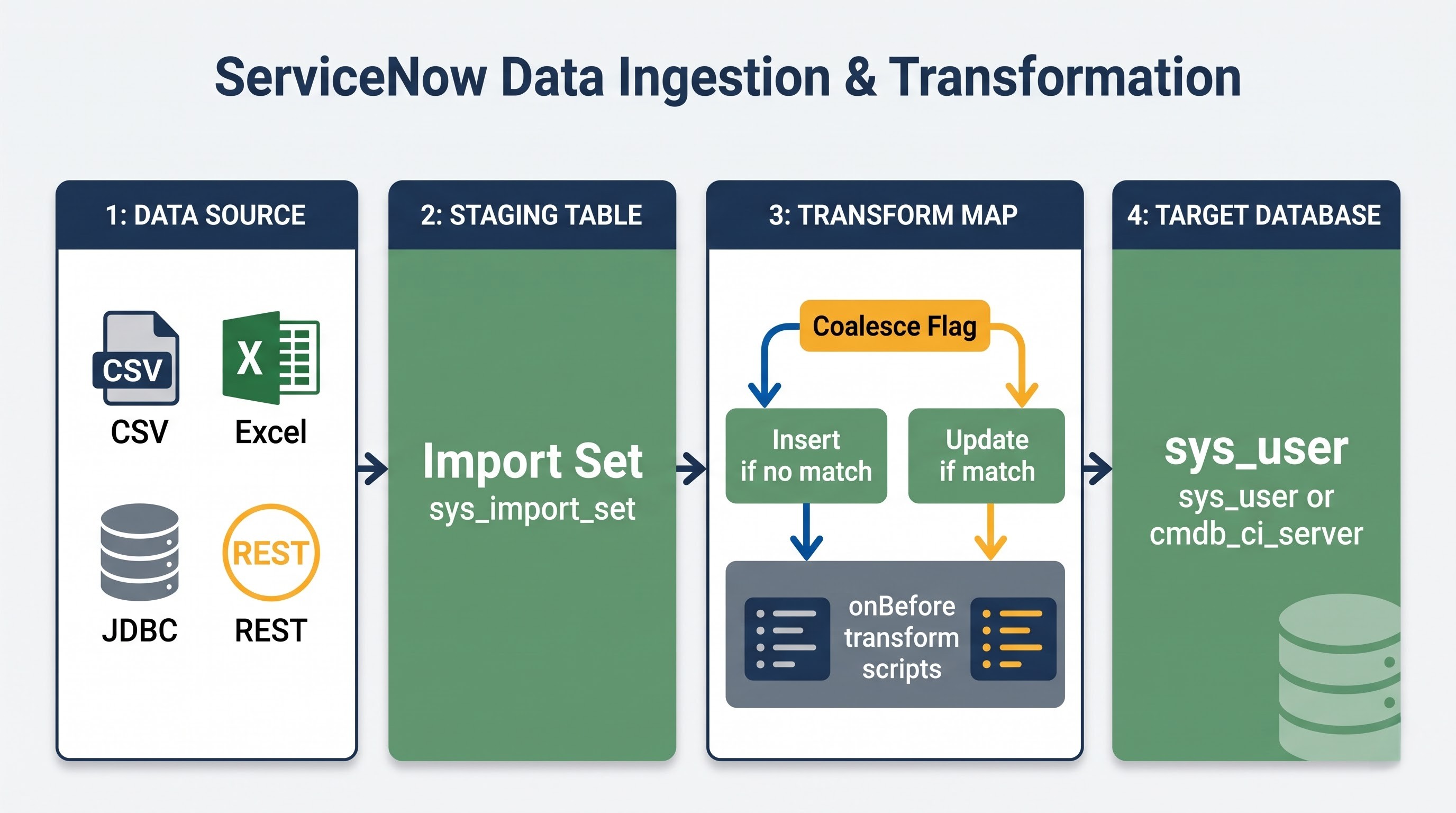
When importing enterprise data from other third party systems, skipping the import stage will result in immediate data corruption and duplication. Contemporary administrators need to create scalable ETL (Extract, Transform, Load) flows with Strong Import Set Transformers rather than legacy transform mappings.
External Data Source -> Staging Table -> Strong Transform Engine -> Target Schema (CMDB/Users)
│
▼
Concurrent Ingestion Nodes
Strong Transformers separate the data extraction process from target mapping and allow administrators to perform multi-tier parsing, cleansing and lookups within one transformation flow. This is needed for handling large enterprise JSON and web service packages out-of-the-box, and distributing processing load between multiple ingestion nodes in order to prevent imports from clogging up the processing queue.
Rules for Identification and Reconciliation Engine (IRE)
For ensuring the integrity of CMDB, the data sources (Discovery, SCCM, cloud integration spokes, etc.) should not be free to overwrite the attributes of the configuration items. Here comes the role of IRE which becomes the guardian of data modification.
The administrators set up IRE rules in order to define:
Identification Rules: Unique identifier (for example, Serial Number and MAC) which sets a baseline of CI matching and ensures that no duplicate assets will be created.
Reconciliation Priorities: source hierarchy rules that define data ownership. For example, you can set the system to give the priority of the server OS version to ServiceNow Discovery over an import spreadsheet while leaving the asset cost field owned by the accounting database.
Data Refresh Rules: rules that monitor stale data sources and alert when expected automated discovery does not update data during a specified period of time.
4. Automation Orchestration: Flow Designer, Business Rules and Orchestration Engines
Automation of processes is an engine of platform ROI. At the same time, using the wrong automation tool to solve specific problems results in fragile and non-maintainable technical debt.
Processing On The Server Side: The Filter Circuit
As soon as a transaction record lands in the database, the ServiceNow system runs the server-side scripts strictly in chronological order called the processing circuit.
User Saves Record
│
▼
1. Before Business Rules (modify values before SQL write)
│
▼
2. Database Write (SQL insert/update run)
│
▼
3. After Business Rules (run asynchronous secondary events)
│
▼
4. Async Business Rules/Flow Designer (background queue execution)
Before Business Rules: This process runs before the record modifications get written into the database. It is recommended to use it when you need to perform input validation, modify fields of the current record (current.field = value;) or abort the transaction with current.setAbortAction(true).
After Business Rules: This process runs right after the SQL transaction completion. You should use it when it is necessary to modify other or remote records that are located outside of the current table canvas. It is never recommended to call current.update(); in a Before or After business rule because it may cause locking of the thread and even an endless loop.
Async Business Rules: The rules are sending the transaction to the system scheduler queue (sys_trigger) and running it in the background thus allowing the user's interface thread to be unlocked immediately.
Migration to Flow Designer and Integration Hub
The contemporary administration standards suggest utilizing flow designer engines that have low code/no code rather than designing the customized JavaScript workflows. Practical utilization of these latest orchestrator tools has become an essential foundation for any contemporary servicenow admin course.
[Flow Trigger: Change Request Closed]
│
▼
[Action 1: Look up Target CIs]
│
▼
[Action 2: IntegrationHub Spoke -> Post to Enterprise Communications Platform]
IntegrationHub allows connecting flows with any external application via ready-to-use spokes (for example, Azure AD, AWS, Jira). Administrators need to use subflows to encapsulate logical routines for the creation of enterprise access bundles or multiple approval flows. It will help abstract operational complexity from catalog items.
5. System Optimization and Instance Health: Log Monitoring, Transactions Monitoring, and Performance Tuning
The performance of the enterprise instance will become lower and lower with time due to poor query designs, reporting without indexes, inefficient scripts. Administrators have to track logs in order to ensure quick loading pages and efficient transactional throughput.
Transaction Logs and Thread Analysis
Whenever there is an issue of slow user interface, it is necessary to analyze the sys_log_transaction log. The following equation gives precise statistics for each transaction that goes through the platform nodes:
$$\text{Total Transaction Time} = \text{SQL Time} + \text{Business Rule Time} + \text{Client Response Time} + \text{Network Latency}$$
In analyzing transactions with high SQL time, it is possible to determine the unindexed fields in the database. In the case where the users frequently make global string searches in an unindexed custom field across millions of tasks, the node database has to make full table scans. Administrators can use this to request an index in the Service Now support to instantly fix the problem.
Scripting Issues Identified Using the Node Log Analysis
Synchronous scripting issues might take time. An example of this could be nested GlideRecord in a Before business rule.
This structure will require a database call per each record that comes from the first iteration, which results in exponential increase in the number of queries to the database. Administrators need to check their application logs on lengthy transactions and rewrite those scripts to make use of GlideAggregate when counting records or using arrays.
6. Updates, Lifecycle, and Application Deployment: Making Critical Changes Securely
As organizations grow, customizations deployments within multi-instance development environments become increasingly complicated. Environment synchronization is crucial to successful platform updates and application deployment.
Update Set Structure and Handling of Conflicts
Update sets store customizations created for an instance and enable administrators to pack these customizations into an update set and move across environments:
[Development Instance] ──► Customize ──► Pack Update Set
│
▼
[Production Instance] ◄── Apply Update Set ◄── [Test Instance] Test/UAT
In order to keep the update set hygiene intact, it is necessary for administrators to follow stringent development policies:
Transaction related data like test incidents or user records should never be captured in the update set but only structural changes to configurations like forms, scripts and tables.
Overlapping of code edits is one of the worst mistakes any developer can make in terms of modifying the same form layout or script included at once in different active update sets.
Always ensure to resolve all preview issues and conflicts in the test environment before making any production commitment because selecting "Accept Remote Update" without going through a proper code review can easily override your production fix.
Automated Test Framework (ATF)
It has been seen that ServiceNow releases platform upgrades twice in a year. In order to avoid any malfunction in important business processes because of these upgrades, it becomes essential for administrators to develop robust test coverage using the Automated Test Framework (ATF).
ATF enables administrators to develop regression tests that run purely on server nodes and test runner browsers. Organizations can significantly reduce their UAT timelines from weeks to hours through automated validation of form fields, catalog item submission, approvals and script execution.
[ATF Test Suite Run]
├── Step 1: Open Catalog Item Form ────► Pass
├── Step 2: Fill Mandatory Fields ────► Pass
├── Step 3: Click on Submit Button ──────► Pass
└── Step 4: Check Target Record ───────► Pass
Performing these tests before and after the environment upgrade would help you detect code regression within your environment very easily. Knowing how to perform these regression tests will be one of the major milestones to achieve in your servicenow administrator certification journey.
Scoped Application and Global Scope
Traditionally, administrators used to customize all workflow processes straight away in the Global application scope. Though it grants the freedom of access to all parts of the platform but poses a large amount of maintenance overhead over a period of time. Global scope customizations are vulnerable to unintentional changes through other update sets and are usually in conflict with native out-of-the-box configuration of the system during the platform upgrades.
Administrators must now use the concept of Scoped Application while building new products using App Engine Studio.
9. Futureproofing and Long-Term Performance Maintenance
Eventually, your instances will experience a problem referred to as "configuration drift." In this case, separate development of applications changes the baseline behavior of your tables. To ensure the healthy state of your instances in the long run, you need to set up maintenance frameworks.
Creating an Internal Governance Board
To maintain your ServiceNow instances, you should create a CoEI Center of Excellence and Innovation. This body should consist of platform owners, enterprise architects, and business unit leaders to examine customization requests. No developer is allowed to create custom tables or scripts globally unless they prove that it is impossible to satisfy a requirement using native out-of-the-box configurations and workflows.
Executing Periodic Instance Cloning
To keep Dev and Test environments healthy, it is necessary to implement the strategy of periodical cloning. Cloners overwrite data structures in non-production environments with the copy of the Production instance database.
These tools can be used to ensure that configuration settings specific to environments, such as the URLs to integration endpoints, different user permissions for developers, and test scripts already in place, do not get overwritten in the process of synchronization. The perfect matching between lower environments and Production ensures that your ATF regression tests suites run precisely before any new code release. Getting certified as a servicenow administrator provides professionals with the necessary framework to perform these intricate processes without losing data.
Conclusion: From System Administrator to Platform Engineer
Modern ServiceNow administrators are no longer limited to being technicians performing actions such as adding fields on forms and resetting user passwords; they become platform architects responsible for ensuring the performance, security, and scalability of the application engine.
Using relational schemas, proper configuration of access rights, observing CSDM data integrity requirements, and focusing on native automation mechanisms, such as Flow Designer, administrators can build bulletproof environments that are safe from technical debt. Continuous professional development in servicenow administrator certification certifications guarantees that technical teams will have all the skills needed to manage Now Platform.