
Building a Career in Revenue Operations: The Definitive Guide to Salesforce CPQ
Last updated on Aug 13, 2026
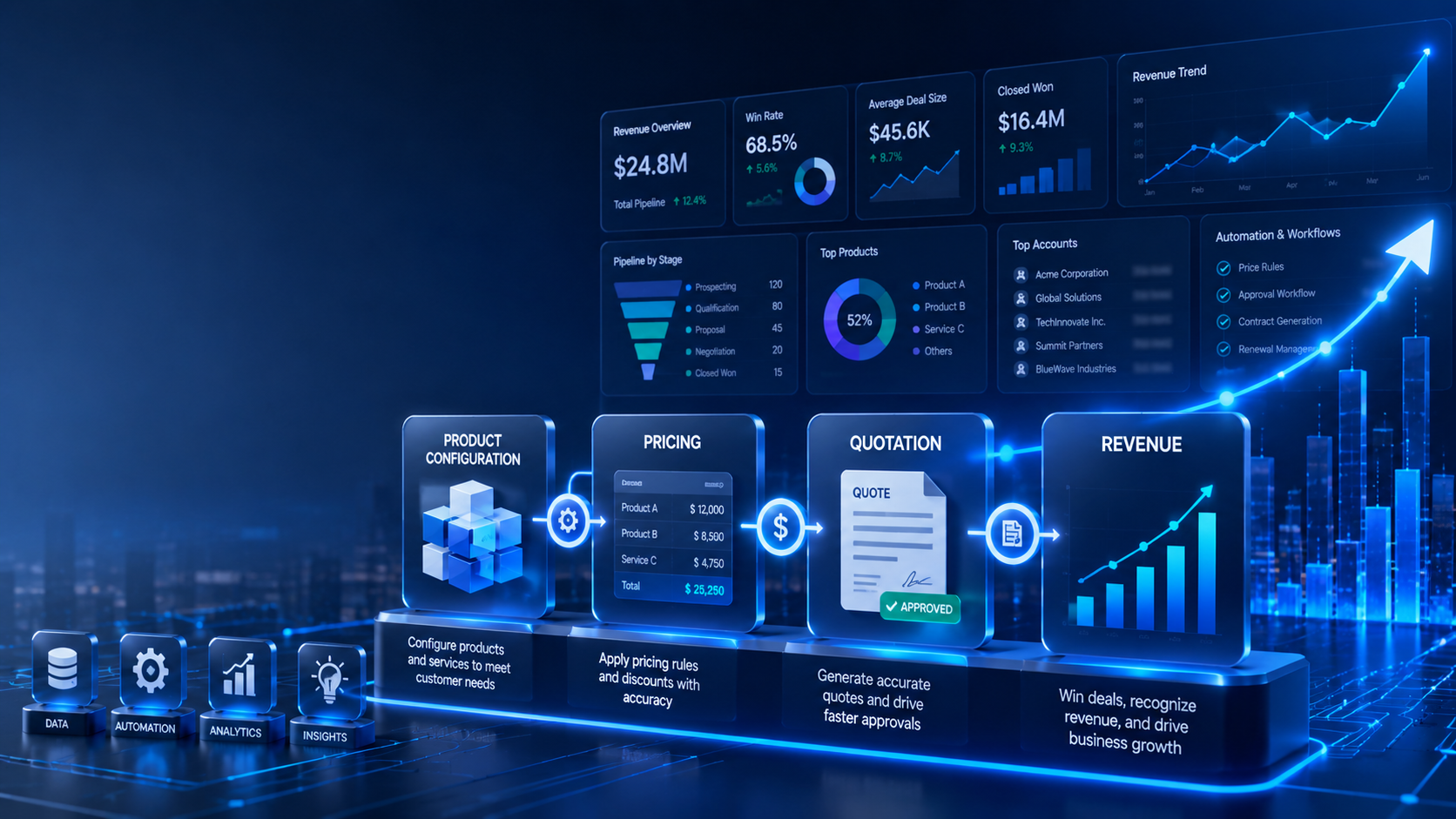
If you’ve ever worked at a growing B2B company, you’ve probably seen the spreadsheet that runs the business. It starts simple enough—a rep opens Excel, plugs in a product price, applies a discount, and sends a PDF to a buyer. But as the company scales, that spreadsheet turns into a monster. Suddenly you’re selling multi-year software subscriptions, custom onboarding packages, usage tiers, and co-termed add-ons.
Before long, reps are using outdated versions of the pricing sheet, accidentally discounting services below cost, or promising custom terms that finance can’t support. Deals take days to approve, and when they finally close, billing has to reconstruct the math by hand just to send a valid invoice.
This is where Revenue Operations (RevOps) steps in, and it's precisely why Salesforce CPQ exists. Salesforce CPQ (Configure, Price, Quote) moves complex deal mechanics out of rogue spreadsheets and places them directly inside your CRM. When implemented properly, it turns messy sales requirements into predictable, repeatable rules.
Whether you’re a Salesforce Admin looking to specialize, a RevOps analyst designing deal flows, or a consultant seeking structured salesforce cpq training to build these solutions, this guide walks through how the system actually works on the ground—without the marketing fluff.
Why Standard CRM Quoting Fails at Scale
Many teams ask: "Why can’t we just use standard Salesforce Sales Cloud with Price Books and Opportunity Line Items?" For simple transactional sales—where a customer buys 10 units of Product A at $50 each—Sales Cloud works fine. But standard CRM functionality breaks down as soon as your business model evolves beyond flat catalog items.
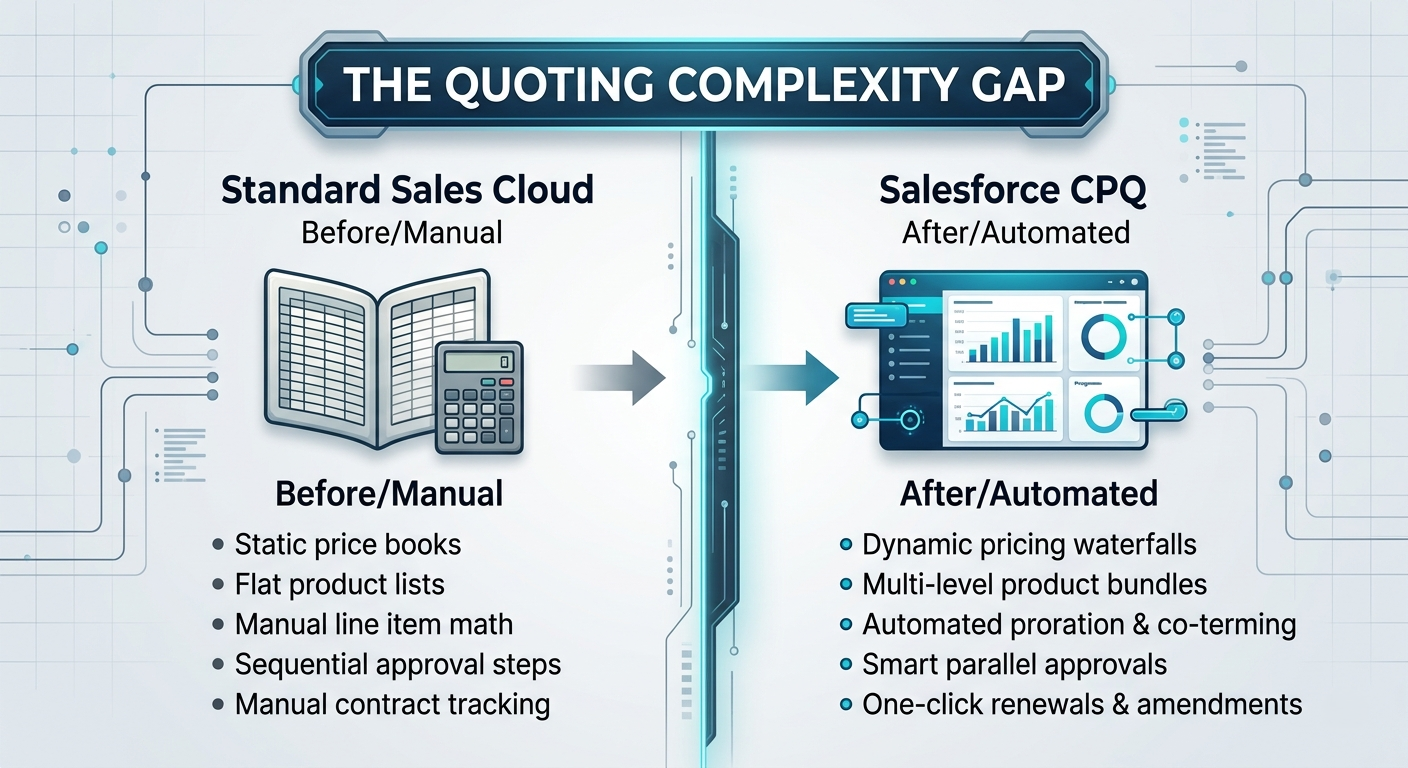
Here is where standard CRM limits kick in:
No product guardrails: Sales Cloud won't stop a rep from selling a cloud add-on to a customer who hasn't bought the core platform license.
Rigid pricing structures: Standard Price Books handle fixed list prices well, but they fail when you need block pricing (e.g., $100 for 1–10 seats, $400 for 11–50 seats) or percent-of-total calculations (e.g., charging 15% of total software cost for support).
Manual term calculations: If a customer signs a 27-month contract mid-year, someone has to calculate the prorated monthly license fee manually in a custom formula field or on a calculator.
Disconnected contracts: Standard Opportunities don't easily track historical subscription states, making mid-term contract changes (amendments) and annual renewals a nightmare to track accurately.
Salesforce CPQ bridges this gap by enforcing configuration logic, applying automated pricing tiers, and tracking the complete subscription lifecycle from initial proposal to annual renewal.
The Core Mechanics: How CPQ Processes a Deal
At its foundation, Salesforce CPQ runs through four distinct operational phases: Configure, Price, Quote, and Contract.
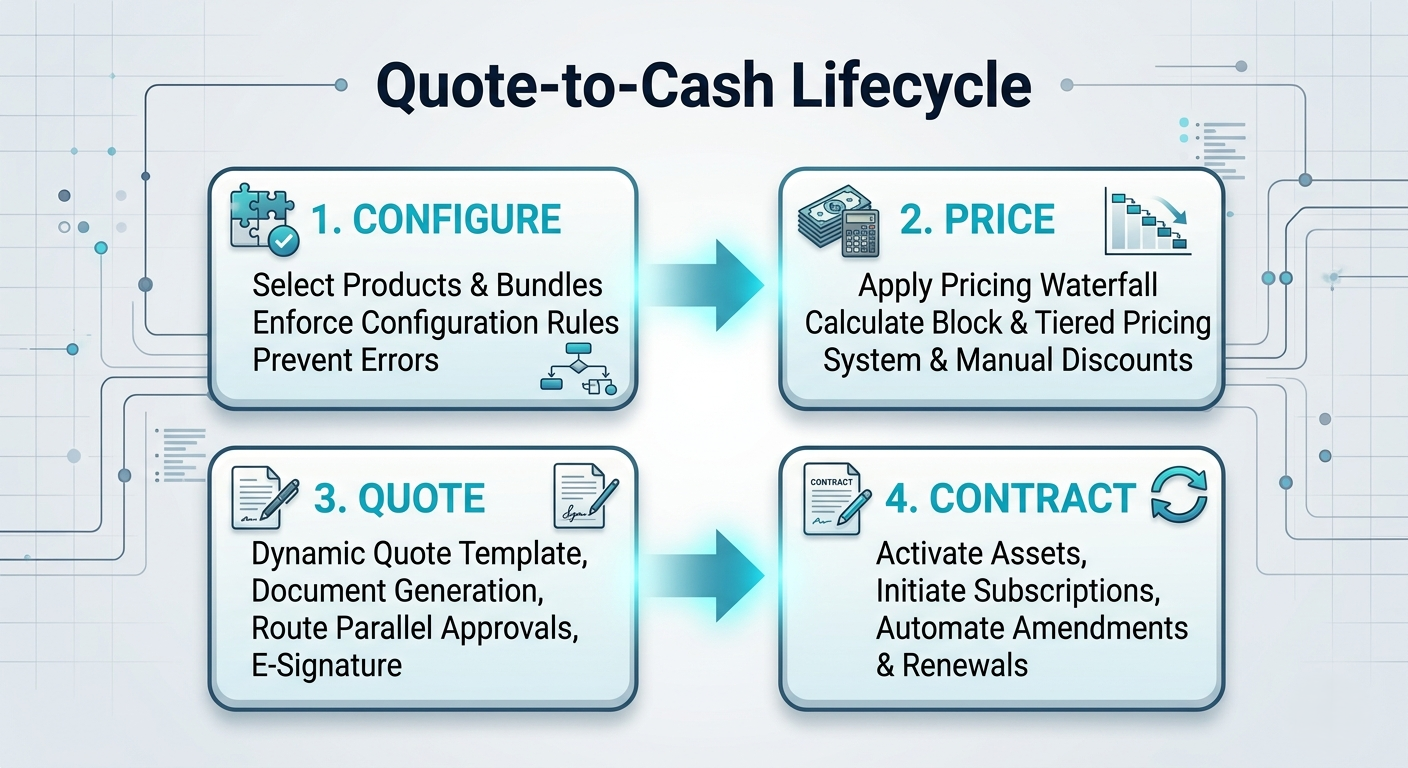
Let's break down what happens behind the scenes in each phase.
Phase 1: Configure (Product Engine)
When a sales rep opens the Quote Line Editor in Salesforce CPQ, they aren't looking at a raw database table. They see organized product catalog structures designed to guide their choices.
Product Bundles
Instead of selecting standalone line items, items are grouped into Bundles. A bundle consists of:
Parent Product: The main product being sold (e.g., Enterprise Platform).
Product Features: Categories within the bundle (e.g., User Licenses, Add-on Modules, Professional Services).
Product Options: The individual items a rep can select inside each feature.
Product Rules
Product Rules act as real-time guardrails inside the Quote Line Editor. They prevent sales reps from building invalid configurations:
Validation Rules: Throw an error notice on screen if a rep picks invalid combinations (e.g., "You cannot select Premium Support without at least 50 Enterprise Licenses").
Selection Rules: Automatically check, uncheck, hide, or add specific product options based on selections made elsewhere in the quote.
Filter Rules: Dynamically adjust the list of visible products based on parameters like the customer's region, currency, or industry.
Alert Rules: Display non-blocking warning messages to reps (e.g., "You selected standard setup, but enterprise clients typically require dedicated implementation").
Phase 2: Price (The Pricing Waterfall)
Pricing in CPQ is calculated through a step-by-step sequence known as the Pricing Waterfall. Each step takes the result of the previous calculation and modifies it based on specific business rules.
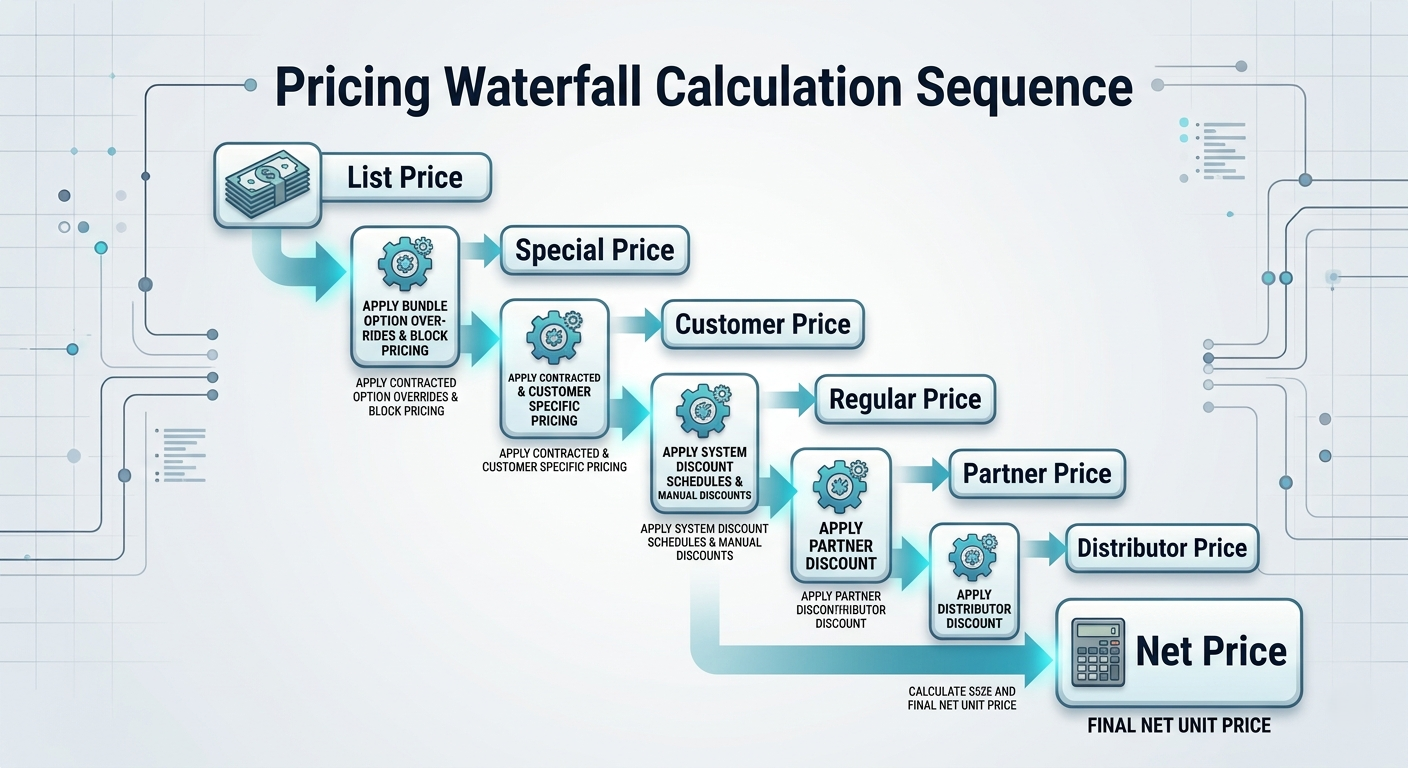
How Key Pricing Models Function
Block Pricing: Used when cost is determined by quantity ranges rather than per-unit math.
Example: 1–10 seats cost a flat $500/year; 11–50 seats cost a flat $1,500/year.Percent of Total (PoT): Calculates a line item's price as a set percentage of other items on the quote.
Example: Maintenance is configured as 18% of the net price of all hardware items selected in the bundle.Option Price Overrides: Allows a standalone item to carry a different price when sold inside a specific bundle.
Example: A training session normally costs $1,000 standalone, but drops to $400 if bought together with an Enterprise License.Contracted Pricing: Remembers negotiated rates for specific accounts. If Account X negotiated a custom rate of $80/user last year, CPQ automatically applies $80/user whenever a rep builds a new quote for Account X.
Phase 3: Quote (Document Generation & Approvals)
Once the products are configured and priced, the rep needs internal sign-off and a clean customer proposal.
Advanced Approvals
Standard Salesforce approvals work sequentially—if a quote needs approval from Finance, Legal, and VP of Sales, it travels down the line one person at a time. CPQ’s Advanced Approvals framework works differently:
Parallel Approval Paths: Sends approval requests to Finance and Legal simultaneously if distinct thresholds are triggered.
Smart Re-approvals: If a quote is recalled, edited, and resubmitted, the system checks what changed. If the rep modified the payment terms but didn't alter the discount, only Legal receives the re-approval request. Finance isn't bothered twice.
Quote Templates & Document Generation
CPQ generates dynamic PDFs using Quote Templates. Rather than maintaining dozens of template variants, administrators set up conditional visibility rules on template sections:
Section A (Standard Terms) prints on every quote.
Section B (SLA Terms) prints only if Premium Support is present on the quote lines.
Section C (Custom Payment Terms) prints only if payment terms differ from "Net 30".
Phase 4: Contract & Renewals
The quoting process doesn't end when the customer signs. CPQ automates post-sale record keeping:
Contract Creation: Marking an Opportunity as "Closed/Won" triggers CPQ to build an official Contract record tied to the Account.
Subscription Records: Recurring software items generate Subscription records detailing start dates, end dates, quantities, and prices.
Asset Records: One-time hardware or service purchases generate Asset records for long-term tracking.
Automated Amendments: If a customer wants to add 20 seats mid-contract, the rep clicks "Amend" on the Contract. CPQ builds an Amendment Quote pre-populated with existing lines, automatically prorating the cost of the new seats for the remaining contract term.
Renewal Forecasts & Quotes: Months before the contract expires, CPQ automatically creates a Renewal Opportunity and Renewal Quote with active pricing, inflation escalations, and original discount structures intact.
Detailed Walkthrough: Structuring an Enterprise SaaS Deal
To see how these mechanics interact in real life, let's walk through a typical enterprise software transaction —the kind of scenario you
would regularly analyze and configure in a comprehensive salesforce cpq course.
The Deal Scenario
A sales representative is closing a 3-year contract for an enterprise customer with the following requirements:
Core Software: 100 User Licenses ($120/user/year base list price) on a 36-month term.
Implementation Services: 50 Hours of Onboarding Professional Services (Flat $200/hr).
Support Plan: Premium SLA calculated at 15% of the total software subscription value.
Negotiated Discount: 10% discount applied only to user licenses (Implementation and Support remain non-discountable).
Manual Excel Calculation vs. CPQ Automation
If a rep builds this quote manually in a spreadsheet, they have to perform multiple calculations, account for term lengths, apply selective discounting, and ensure dependent percentages are ordered correctly.
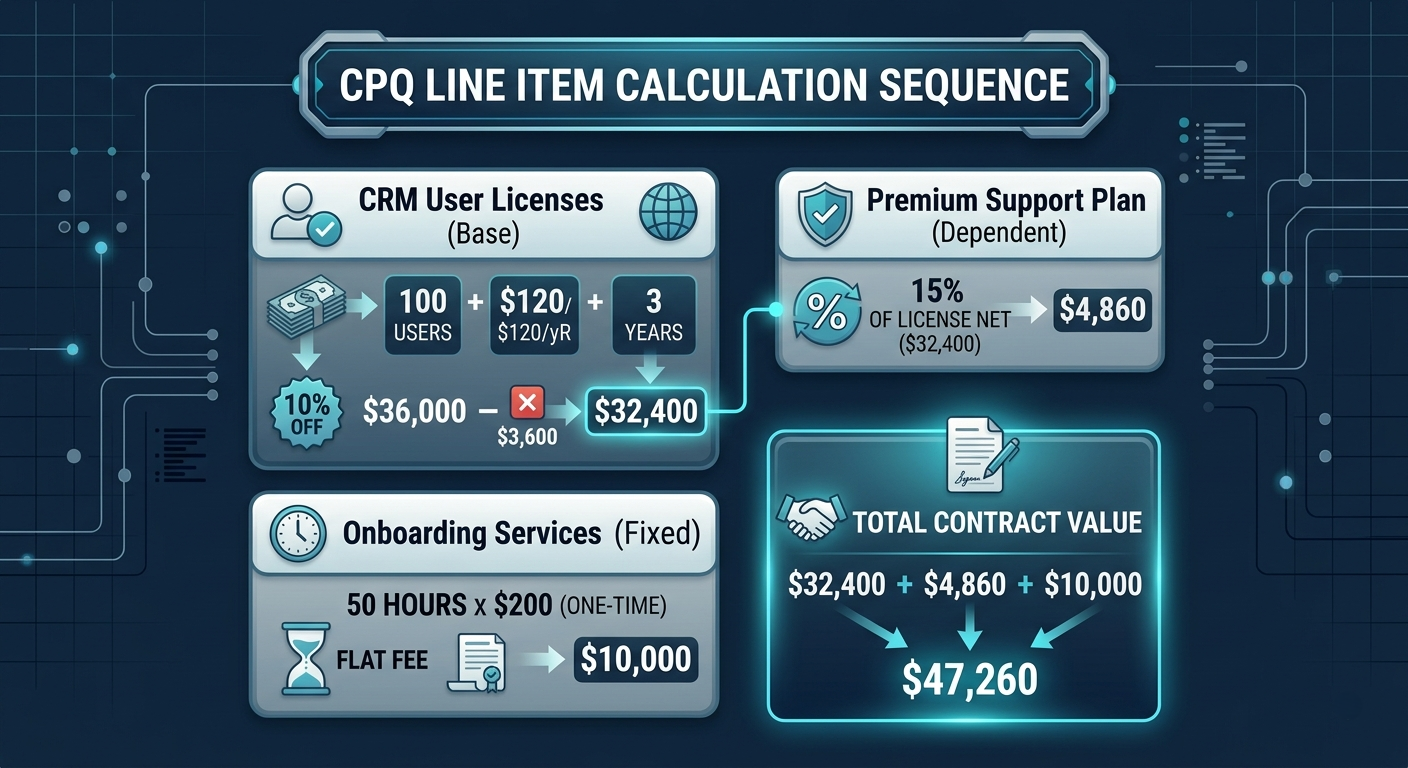
Here is how CPQ executes the exact same math automatically:
License Term Multiplication: The rep enters 100 for quantity and sets the start/end dates to 36 months. CPQ calculates the base value:
Base Value = 100 × $120 × 3 = $36,000Targeted Line Discount:The rep enters a 10% discount on the user license line. CPQ adjusts the line item Net Price:
Discounted Value = $36,000 × (1 - 0.10) = $32,400Percent of Total Evaluation:The Premium Support plan is set up as a Percent of Total item pointing at the user license product family. CPQ reads the discounted net value of the licenses ($32,400) and calculates 15%:
Support Fee = $32,400 × 0.15 = $4,860One-Time Service Calculation: Implementation is marked as a non-subscription Asset item, so it isn't multiplied by the 36-month term length:
Implementation = 50 × $200 = $10,000
Quote Summary Display: The rep sees the final contract value ($47,260) update immediately in the Quote Line Editor without touching a single formula or calculating term length adjustments by hand.
Technical Comparison: Sales Cloud vs. Salesforce CPQ
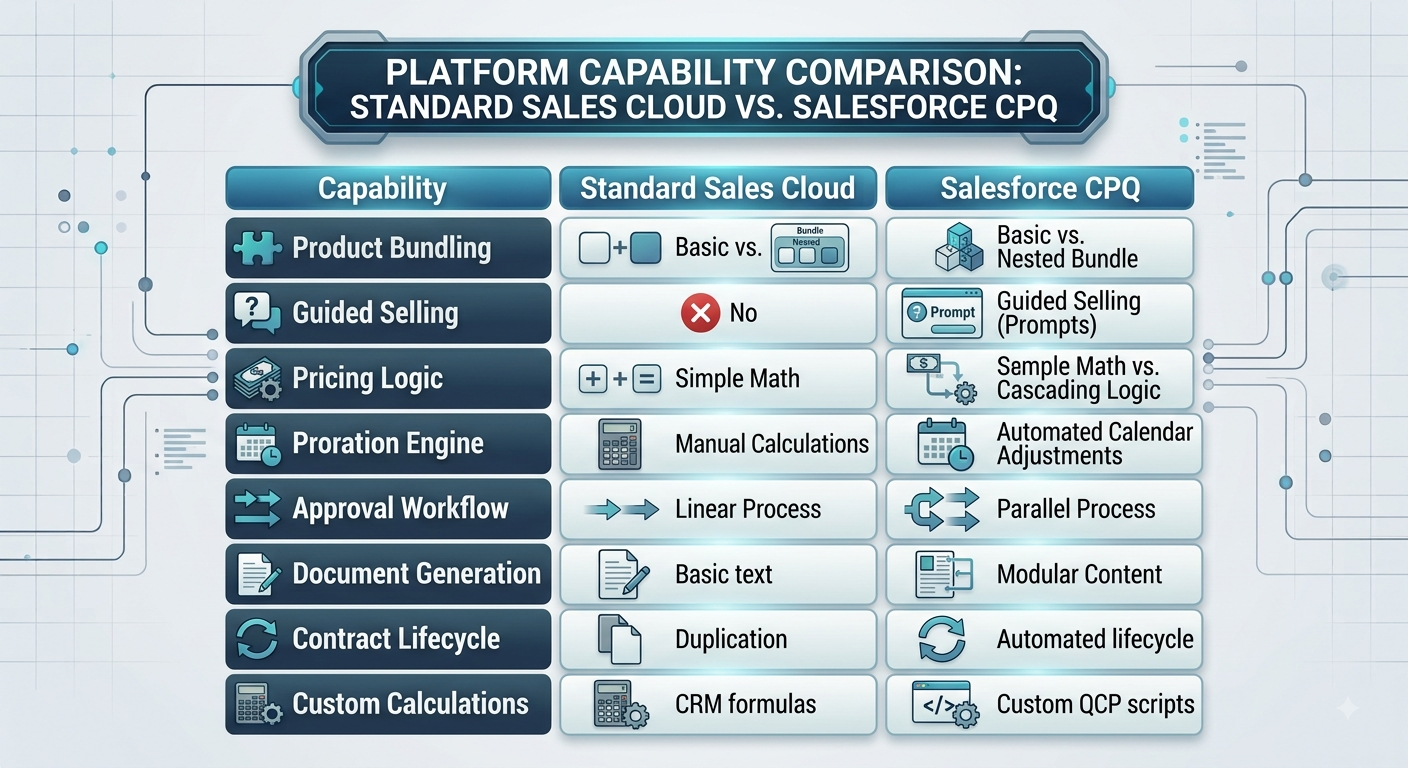
If you need to evaluate whether your organization actually requires CPQ, use this functional comparison table:
Architectural Gotchas and Implementation Best Practices
CPQ is a powerful managed package, but poor implementation design can destroy performance. If your Quote Line Editor takes 20 seconds to load every time a rep edits a quantity, adoption will drop quickly. Here are real-world gotchas to keep in mind when configuring CPQ:
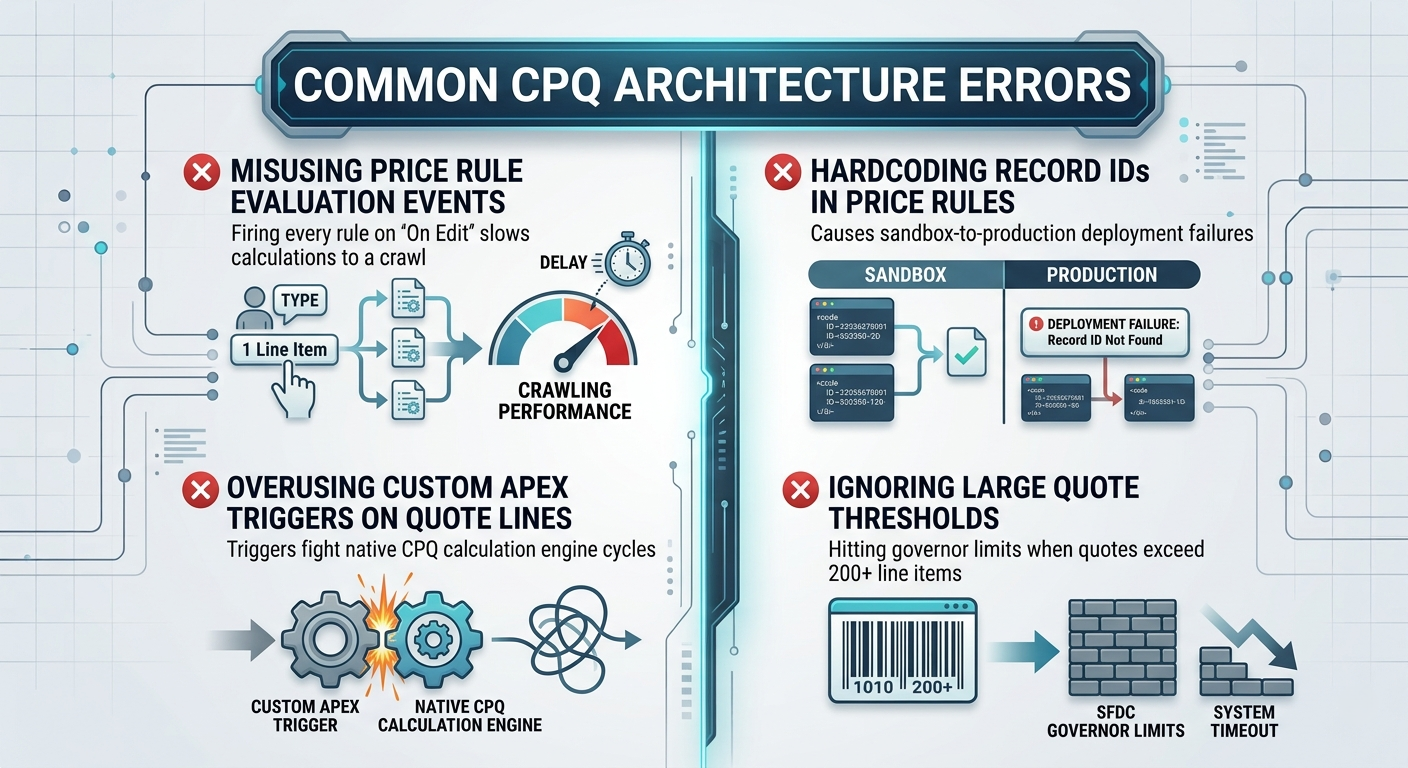
Gotcha 1: Price Rule Overload and Slow Calculation
Every time a user changes a field in the Quote Line Editor, CPQ executes the Quote Calculation Sequence (QCP). If you have 50 Price Rules set to trigger "On Edit", the browser has to evaluate all 50 rules sequentially before returning control to the user.
Best Practice: Group Price Rules carefully into discrete Evaluation Events:
On Initialization: Runs once when the Line Editor loads.
Before Calculate: Runs before CPQ computes field formulas.
On Calculate: Runs while standard calculations occur.
After Calculate: Runs after standard pricing math finishes.
Use Evaluation Order values explicitly so rules run in a strict, predictable sequence rather than firing randomly.
Gotcha 2: Hardcoding Record IDs
Hardcoding Pricebook IDs, Product IDs, or Record Type IDs inside Price Conditions or Product Rules is one of the most common rookie mistakes. When you deploy from sandbox to production, those IDs change, breaking your pricing rules overnight.
Best Practice: Use Custom Settings, Custom Metadata Types, or reference Developer Names instead of hardcoding 15-digit record IDs in rule filters.
Gotcha 3: Fighting the Native Calculation Engine with Custom Triggers
New CPQ developers often try writing standard Apex triggers on SBQQ__QuoteLine__c to handle custom pricing logic. This frequently results in recursive loop errors or race conditions where your Apex code overwrites CPQ calculations—or vice versa.
Best Practice: Keep logic inside native Price Rules whenever possible. If you encounter complex math that native rules can't handle, use the native
Custom Script / Quote Calculator Plugin (QCP)—a JavaScript framework designed by Salesforce specifically to run safely inside the CPQ calculation engine.
Gotcha 4: Twin Fields Disconnect
Salesforce CPQ uses a concept called Twin Fields to pass data seamlessly down the object pipeline:

If a custom field on the SBQQ__ Quote Line__ c object shares the exact same API Name and Field Type as a custom field on the SBQQ__Subscription__c object, CPQ automatically copies the value from the Quote Line to the Subscription record when the contract is built—no Apex code or Flow required.
Best Practice: Always double-check API names and field data types when creating custom tracking fields across CPQ objects. A simple typo breaks the twin-field automation link.
Building a Career in RevOps and Salesforce CPQ
Because CPQ directly touches how a business makes money, skilled CPQ professionals are among the most sought-after specialists in the Salesforce ecosystem. Whether you learn through on-the-job experience or enroll in salesforce cpq training online, mastering these core capabilities opens up several distinct career paths.
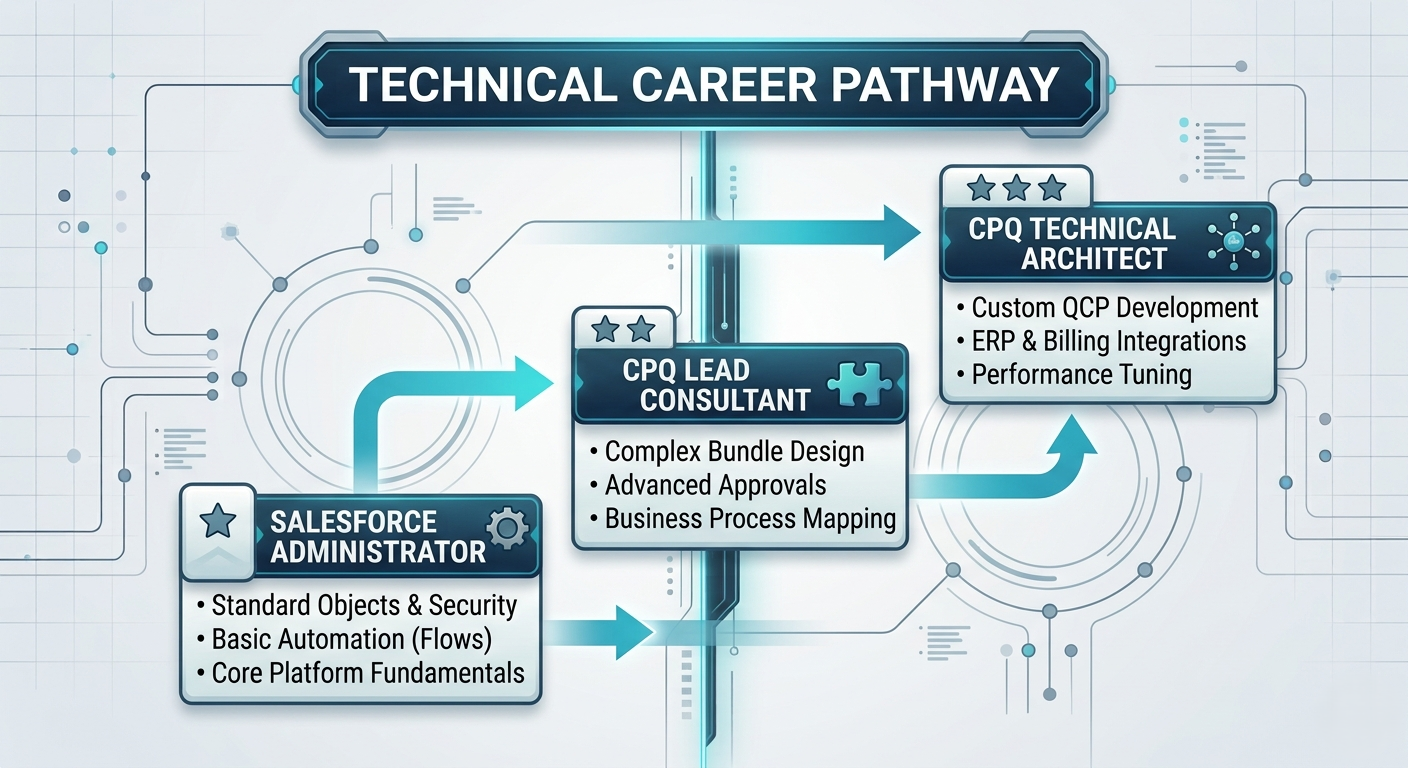
The Roles:
CPQ Business Analyst / RevOps Specialist: Focuses on translating complex sales discount policies, approval hierarchies, and packaging rules into clear functional requirements.
CPQ Functional Consultant / Admin: Builds the actual configuration inside Salesforce—setting up bundles, discount schedules, product rules, dynamic templates, and approval matrices.
CPQ Technical Architect: Writes custom JavaScript plugins (QCP), builds complex integrations between CPQ and ERP/Billing platforms (like SAP, NetSuite, or Salesforce Billing), and optimizes platform performance for high-volume transactions.
Realistic Practical Roadmap
If you want to move into CPQ from standard Salesforce administration or RevOps analysis, follow this practical progression:
Step 1: Solidify Standard Platform Foundations
Before touching CPQ, ensure you have a firm handle on core Salesforce Administration:
Standard CRM object relationships (Account, Opportunity, Product2, Pricebook2, PricebookEntry).
Flow Builder automation.
Profile permissions, Field-Level Security, and record sharing models.
Step 2: Learn Core CPQ Object Architecture
Get comfortable with how CPQ managed package objects interact with standard objects:
SBQQ__Quote__c (Child of Opportunity/Account)
SBQQ__QuoteLine__c (Child of Quote)
SBQQ__ProductOption__c and SBQQ__ProductFeature__c (Children of Product2)
SBQQ__Subscription__c (Child of Contract/Account)
Step 3: Get Hands-on in Developer Sandboxes
You cannot learn CPQ just by reading documentation. Get a free Salesforce Developer Org with CPQ pre-installed (available through Salesforce Trailhead) and build practical scenarios yourself:
Build a 3-tier product bundle with nested options and option constraints.
Create a Price Rule that applies a graduated discount schedule based on total quote quantity.
Set up a Percent-of-Total calculation for a mandatory service addon.
Create an Advanced Approval workflow that routes quotes to Finance only when overall discount exceeds 20%.
Step 4: Pursue Certification
Once you have real configuration experience under your belt, target the Salesforce Certified CPQ Specialist credential. The exam tests your practical understanding of bundle setups, pricing waterfall behavior, amendment/renewal mechanics, and document generation rules.
Frequently Asked Questions
What skills do I need before learning Salesforce CPQ?
You need a solid understanding of standard Salesforce Administration (at the level of a Certified Administrator). You should understand how standard objects relate to one another, how formula fields function, and how record security works. A basic understanding of general B2B sales concepts (recurring revenue, discounting, contract terms) is also extremely helpful.
Is Salesforce CPQ a separate system or native to Salesforce?
It is completely native. Salesforce CPQ (originally an external tool called SteelBrick acquired by Salesforce in 2015) is installed as a managed package directly inside your standard Salesforce environment. All CPQ data (Quotes, Quote Lines, Subscriptions, Bundles) lives natively inside standard Salesforce database tables.
What is the practical difference between Salesforce CPQ and Salesforce Billing?
Salesforce CPQ handles everything up to the point of sale: configuration, pricing calculations, approval routing, quote presentation, and initial contract creation.
Salesforce Billing picks up right where CPQ leaves off: converting accepted Orders into monthly invoices, collecting payments, processing credit notes, and handling revenue recognition accounting rules.
Key Takeaways for RevOps Teams
Salesforce CPQ isn't just a proposal generator—it is a core RevOps engine that aligns Sales, Finance, and Legal teams around a single source of truth.
Guardrails over Governance: CPQ protects profit margins by enforcing pricing policies, approval limits, and product dependencies automatically in real time.
Lifecycle Automation: By treating contract amendments and annual renewals as native database events, CPQ turns single transactions into predictable recurring revenue streams.
Design for Scalability: Successful implementations require clean product data, structured price rule evaluation logic, and minimal custom Apex overrides.
Mastering these mechanics transforms complex pricing strategies into a streamlined, scalable operation that drives predictable business growth.