
Containers and Pods in OpenShift: Core Architecture
Last updated on Oct 31, 2026

Cloud-Native Architecture of Applications
The software development domain has witnessed a drastic change during the past decade due to the shift from the traditional monolithic software that runs on static hardware or virtual machines to the cloud-native architecture of distribution. This shift was necessitated by the need for quicker time-to-market, scalability, availability, and resource utilization in hybrid or multi-cloud setups. At the core of this paradigm shift is the concept of containerization, which involves packaging of the whole application along with its dependencies and configuration into a single, standard unit. This guarantees consistent behavior of the software irrespective of the environment it is running on, whether it be the developer’s personal computer or cloud-based infrastructure.
Nonetheless, with the growing footprint of containers starting with a couple of experimental services up to hundreds and even thousands of microservices, inevitably comes a point where it becomes impractical to run individual containers manually. In such a situation, what can help is orchestration tools for containers that saw Kubernetes being developed as an industry standard for automatic deployment, scaling, and management of containers. Building on the excellent job that was done by Kubernetes, Red Hat OpenShift offers additional features for orchestrations and creates Kubernetes application platform including developer tools, automated application life cycle management, advanced security, and networking. To be able to become proficient with OpenShift, it is required to first learn about the basics of this technology – containers and pods.
Although containers are offering isolation and packaging on a process level, pods are high-level abstractions that fundamentally transform the architecture, networking, and management of applications in the cluster. In-depth study covers the topic of containers and pods in Red Hat OpenShift regarding their operation, underlying kernel technologies, networking, storage, security, and architecture.
For individuals willing to understand such principles in an industry-based manner, it would be beneficial for them to join the openshift training courses, where they can gain knowledge regarding clustering deployment, workload management, and enterprise architecture.
History of workload isolation from Bare Metal to Containers
To get an understanding of the importance of containers and pods in the OpenShift environment, it is essential to look into the history of workload isolation. As it was already mentioned above, applications in bare metal computers were hosted on physical servers. Such an approach had several drawbacks such as the ineffective utilization of resources by applications since they used just a small part of CPU and RAM resources and multiple applications deployment on one OS resulted in library versioning issues and conflicts.
Virtualization gave birth to the notion of hardware abstraction via software called hypervisor. Virtual machines emerged, that is complete operating systems comprised of kernel, libraries, and applications. While virtual machines provide for the efficient use of hardware resources and great workload isolation, the downside of virtual machines is their low efficiency as they consume too many memory resources for guest operating systems operation and CPU instructions for kernel operations.
With regard to the development of containerization technology, a lightweight container architecture was developed where there is no use of guest operating system. As opposed to hardware virtualization, the process of containerization makes it possible to virtualize the kernel of the operating system. A container is made up of an application environment together with all the runtime dependencies, binaries, configurations, and libraries bundled up into one package, and this is referred to as a container image. The containerized application runs within an isolated process on top of the kernel of the host operating system. This leads to improved performance and quick startup of the process.
Container Architecture: An Engine for Isolation
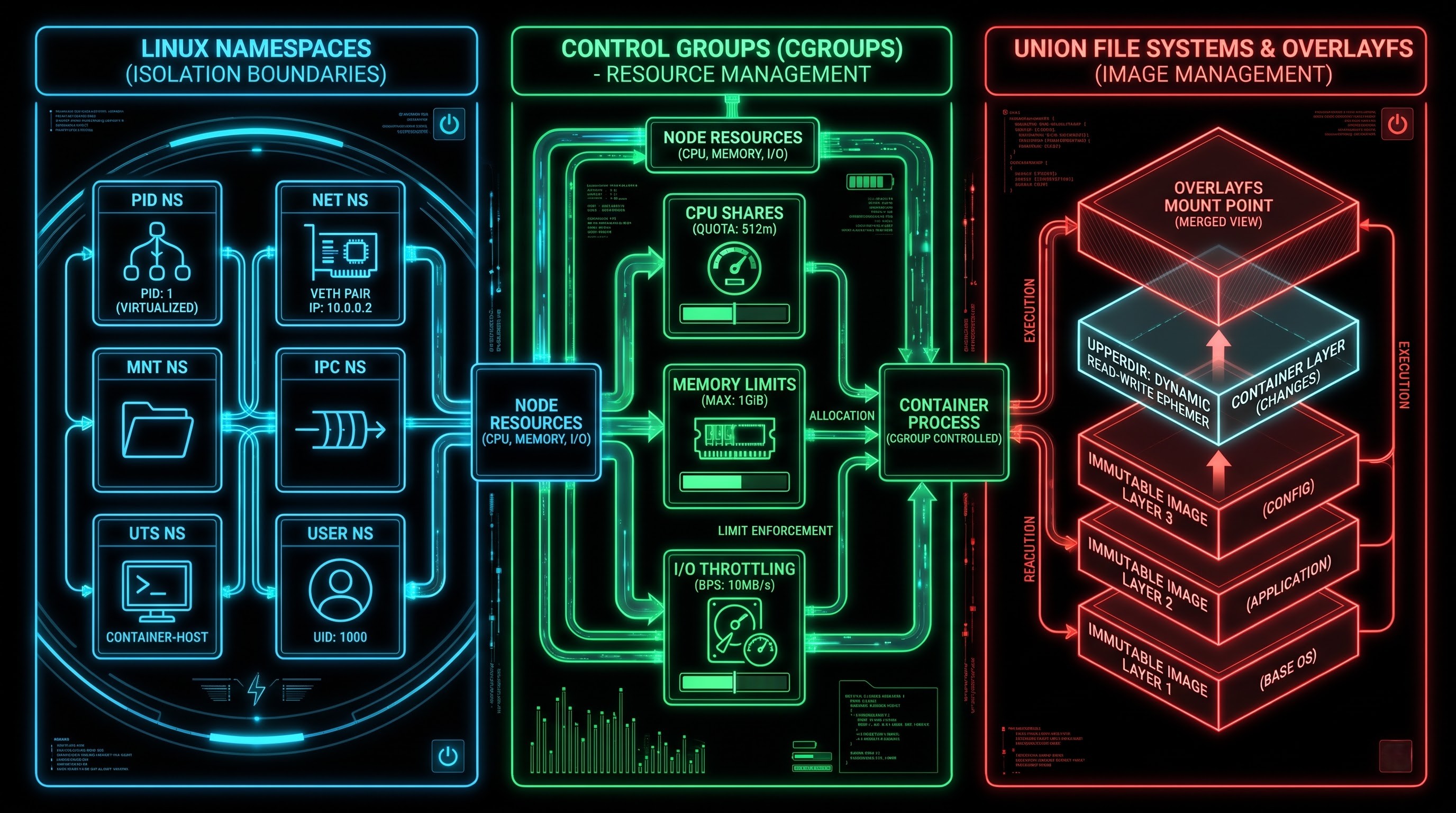
In the context of Red Hat OpenShift, the container is the basic building block for deploying any software application. However, it is not just a single entity because a container is built from multiple Linux kernel components working in tandem to provide resource management, process isolation, and secure isolation. In order to fully comprehend the approach taken by OpenShift in managing containers, it is important to know the following Linux kernel technologies: namespaces, cgroups, and union file systems.
Linux Namespace: Process Isolation
The Linux namespace creates an isolated view of kernel resources whereby one group of processes can see one set of kernel resources and another group can see a totally different set of kernel resources. It allows OpenShift to provide its container applications with an isolated environment in which they can run. The key namespaces include:
PID Namespace: It provides that each container will have a private copy of the process hierarchy. In fact, when a process is running in a container, it will receive Process ID of 1 and therefore the process will be treated as an init process for its virtual system although in reality the process is assigned a very high Process ID in the namespace of the operating system.
Network (NET) Namespace: It provides for the virtualization of the networking subsystem. Each container will be provided with its own virtual networking subsystem having its own interfaces, IP addresses, routing table, port number range, and firewall configuration, thereby avoiding any conflict that might arise due to networking by different processes running on the same computer.
Mount (MNT) Namespace: It separates mount points of the filesystems accessible to the process.
IPC Name Space: Through this process, it is possible to isolate the IPC resource of the processes like System V IPC and POSIX message queues. In this manner, it is possible to ensure that the processes inside the container can communicate only with processes that have been allowed to do so.
UTS Name Space: This namespace helps to configure the hostname and domain name of the individual container in relation to other containers and the host operating system.
USER Name Space: This namespace helps in user ID mapping. With the help of user namespaces, a process can be used as a root process within the container and as a normal process outside the container.
Control Groups: Resource Management and Throttling
Whereas namespaces restrict the access to resources by a process, the control groups ensure the consumption of resources by the process. In a corporate OpenShift environment, there will be different applications running on the same physical computer nodes. In the absence of any means of managing resources, the process running at high loads may end up consuming all available CPU and memory, thereby starving other important applications.
The solution to this problem is through the use of control groups or cgroups where management and monitoring of resource management of some processes takes place. The OpenShift architecture uses cgroups to set strict limitations and allocation of CPU shares, memory, input/output, and network data transfers. With the right resource requests and limitations, OpenShift achieves optimal cluster density and performance without any resource starvation in the clusters.
Container Images and Union File Systems
The container image is defined as a static and immutable template that contains all the necessary instruction to create a container. They are stored and transferred through the network effectively because of the use of layered file systems (e.g., OverlayFS). Each line in the Containerfile/Dockerfile is defined as a distinct layer in the file system that shows specific changes made in the file system. When OpenShift creates a container based on the image, it adds an extra read-write layer above the read-only layers of the image. All the changes that are performed in the environment (e.g., logging files, changes in the configurations, creation of the temporary artifacts) are performed in the ephemeral container layer.
The Pod Abstraction: The Need For Pods In Kubernetes and OpenShift
Even though the concept of containers is great in packaging and isolation of processes, in the real world most of the enterprise applications contain several processes instead of having just a single process. It is not rare for web applications to contain several processes along with them like log shippers, proxy sidecars for service mesh, and metrics exporters.
When it comes to container engines that fall into the category of traditional, such as Docker, multi-applications inside a single container is regarded as an anti-pattern because it is expected that a container should contain only one process causing issues related to PID 1, signaling, and logging. On the other hand, when the issue comes to running dependent processes inside individual containers on the host level, the problem emerges in terms of communication between them.
Red Hat OpenShift, which uses a similar approach to Kubernetes, gives an answer in the form of Pod.
Pod is the smallest and simplest entity that can be deployed by using OpenShift objects. Pod is not a container; it is a set of one or more containers having shared lifecycle, storage, and networking.
Features of Pod
Co-location and co-scheduling: All the containers in one Pod will definitely be scheduled to the same worker node in the OpenShift platform. All containers will be launched, run and stopped simultaneously.
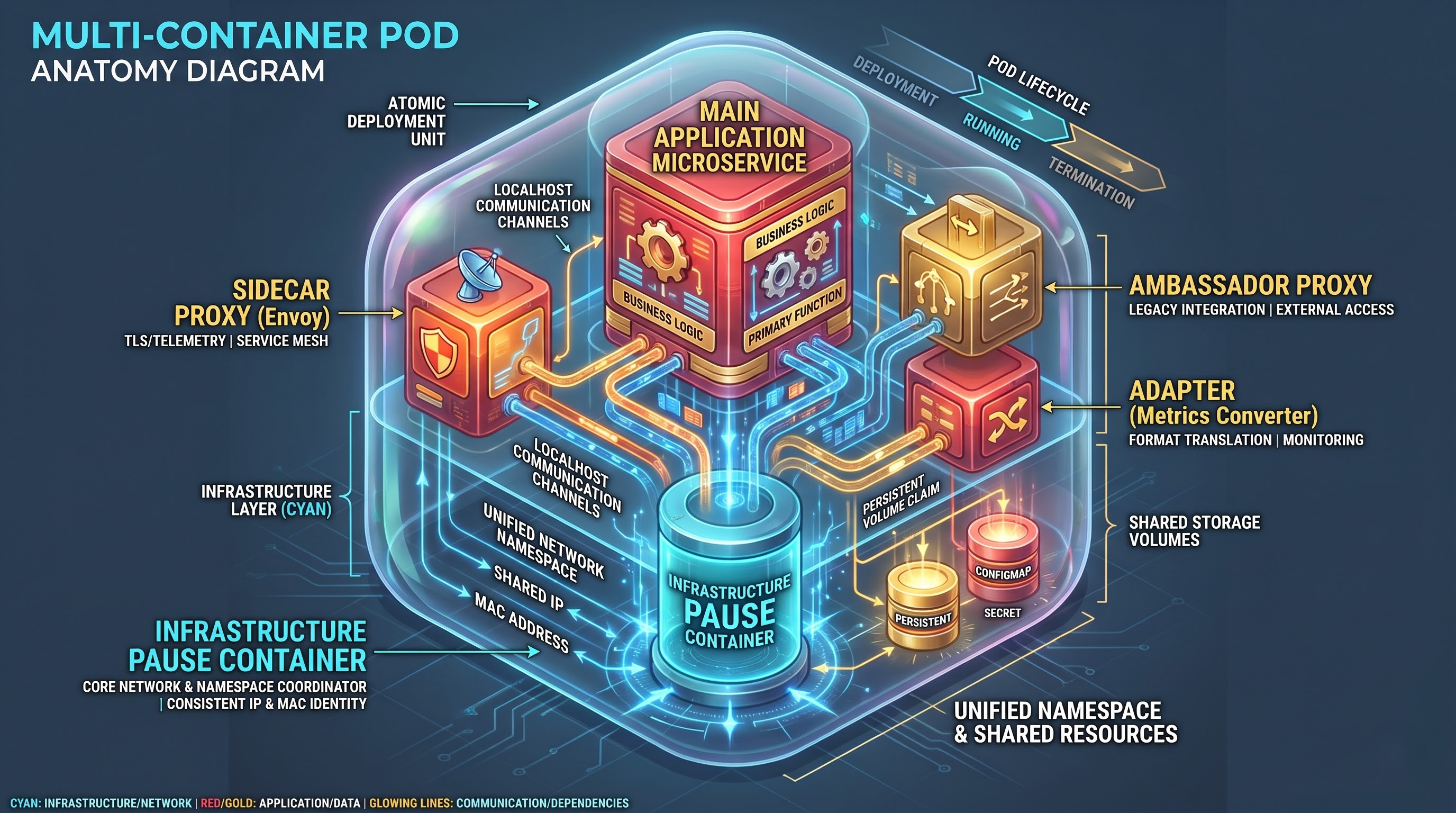
Unified Network Namespace: Containers within a Pod share the same network namespace. It implies that all containers within the same Pod share the same IP address and port space. Consequently, inter-communication among the containers within the same Pod will be made through localhost using different ports.
Shared Volumes: The Pod will be able to create shared volumes that will be attached to the file system of the container. This way, interaction among the containers will be facilitated.
Unified Life-Cycle: Pod is an atomic unit. Hence, any operation on the part of OpenShift (scale, delete, update) will be performed on the Pod level and not on a container-by-container basis.
OpenShift Pod's Anatomy: Understanding Its Internal Structure
The analysis of the OpenShift's architecture and the mechanism of Pods' creation and management is impossible without the examination of the internal structure and sophisticated interaction of components of a Pod. Usually, in the enterprise OpenShift, the production Pod is implemented using specific architectural techniques and contains several containers.
Infrastructure Container and Namespaces Sharing
After receiving the command to create a Pod from the OpenShift worker node, the runtime does not start the application containers at once. What it does first is creating the infrastructure container (or pause container). It is a lightweight container especially created to perform specific functions.
The only thing which the infrastructure container does is configuring and managing the shared Linux namespaces of the Pod: Network namespace, IPC namespace, and UTS namespace.
After that, all other application containers, which are created in this Pod, join the namespaces mentioned. In such a way, the advanced architecture makes sure that no matter what happens with the application container, whether it crashes, restarts or is replaced, the Pod keeps its unique network identity and IP/MAC addresses because of the infrastructure container.
Multi-Container Design Patterns inside Pods
When enterprises utilize the microservices approach to construct applications using OpenShift, the multi-container Pod patterns are used to address the architectural issues without any tight coupling of irrelevant codebases:
Sidecar Pattern: The design pattern that implies the use of one more container that adds some additional functionality to the main application container. As for the example of the Sidecar Pattern implementation, we can refer to the implementation of the Envoy sidecar proxy container that operates together with the main application container and forwards all the incoming and outgoing traffic. The sidecar proxy container offers such functionalities as mutual TLS encryption, traffic routing, telemetry, and distributed tracing.
Ambassador Pattern: The proxy container that operates as a mediator between the main application container and the third-party service. This pattern makes it possible to hide all the complexity of interaction with the third-party services like database connection strings, authentication protocol, old APIs, and others.
Adapter Pattern: The helper container that standardizes the output of the main application container. The adapter container may gather some proprietary metrics from the application and represent them in the Prometheus format in the OpenShift cluster.
The Network Model in OpenShift Pods
The implementation of the networking in Red Hat OpenShift is based on one of the main principles of Kubernetes architecture – each pod has a unique and routable IP-address in the cluster.
IP per Pod design model
There are some general principles by which pods communicate in Red Hat OpenShift:
Each pod can be communicated with all the other pods, which are situated at any node in the cluster, without any need of NAT implementation.
Nodes agents (for example, kubelet) can communicate with all the pods, which are situated at this particular node.
The IP-address of the pod equals the IP-address, which other pods will use when communicating with it.
The implementation of this model in OpenShift is carried out by using complex Container Network Interface (CNI) plugins, which include such historically used CNI plug-ins like SDN (Software Defined Networking) and modern OVN-Kubernetes (Open Virtual Network) CNI plugin.
Containers Communication with Other Containers and with Other Services
Since all the containers in the same Pod share the network namespace and thus the IP address, all the inter-container communication happens through localhost. In other words, when you have your web application running inside a container listening at port 8080 and a sidecar container at 9090, then you can reach out from your web application to your sidecar at http://localhost:9090.
When it comes to communication between Pods, we use the OpenShift Service. As we know, Pods are ephemeral by nature, meaning that they can be recreated and rescheduled in different nodes because of scaling up, node failure, etc. This is not the case for the OpenShift service which is an abstract concept with static IP and hostname to route requests to a group of Pods with certain label.
OpenShift Pods Storage and Persistence
Storage space that exists in a writable layer within a container is always ephemeral in nature. This means that whenever the container stops running or is restarted, any data stored in the writable layer is erased forever. While this is useful in microservices architecture, enterprise systems usually require persistent storage even when a container stops running or fails to restart or when there is Pod rescheduling and node failure. OpenShift provides a mechanism of storing data through Volumes and Persistent Volume Claims.
Comparison of Ephemeral Storage vs. Persistent Volumes
EmptyDir Volumes: Such volumes are created once a Pod is scheduled onto a node and exist until the Pod remains on the node. Any information contained in the emptyDir volume will be automatically removed once the Pod is stopped or rescheduled.
Persistent Volumes and Persistent Volume Claims: For the purposes of running stateful applications, such as relational databases, messaging applications, and content management systems, OpenShift separates storage management from pod management. This is achieved through Persistent Volumes provisioned through enterprise storage backend technology that may take any of these forms: NFS, block storage on the cloud, enterprise storage arrays networks, or Red Hat OpenShift Data Foundation as software-defined storage. The next step for the developer is to allocate storage dynamically through the use of Persistent Volume Claims based on the required capacity and access modes. Lastly, OpenShift will mount these Persistent Volumes into the Pod file system hierarchy for data persistence.
Security Foundations: Container and Pod Security in OpenShift
The security mechanisms in Red Hat OpenShift are quite distinct from those of Kubernetes due to the fact that the default mode of operation in Kubernetes allows applications in containers to run with elevated permissions. This poses significant security challenges to the entire platform in the event of any compromise of the applications.
Security Context Constraint (SCC)
OpenShift gives the possibility for the administrator to apply Security Context Constraints (SCCs) which limit the actions a Pod is allowed to perform and its security context. Such SCCs contain the following critical properties:
Container running as UID 0.
Permission to run containers with host namespaces, network and port binding.
Ability to mount host filesystem and interact with the host kernel directly.
Using of SELinux labels and Linux capabilities such as CAP_NET_ADMIN, CAP_SYS_ADMIN.
The default set of restrictive SCCs (such as the restricted-v2 profile) contains limitations on running of containers as root, host access and mandatory usage of SELinux multi-category security labels. That means that even if the attacker manages to exploit a vulnerability within a containerized application, his privileges will be limited and there will be no way to perform lateral movements.
Life Cycle Management of Orchestration of Pods
Orchestration of the Pods manually in a production environment would be an impractical task. OpenShift utilizes advanced controllers such as Deployments, ReplicaSets, StatefulSets, and DaemonSets to manage the life cycle of desired state of the Pods.
Controllers and Desired State Management
The controllers are feedback mechanisms that continuously monitor the current state of the OpenShift cluster and strive to match the desired state.
Deployments & ReplicaSets: It helps in maintaining a set number of replicas of a Pod alive. If there is any failure in the worker node that runs the Pod, the OpenShift cluster identifies the failure and recreates the Pod replica on a healthy worker node.
StatefulSets: This kind of controller is built for stateful applications that have a requirement for a unique network identity, stable storage, and deployment and scaling of the application.
DaemonSets: DaemonSet controller makes sure that the replicas of a Pod get created on all or the selected worker nodes of the OpenShift cluster. This is useful when we need to create some infrastructure services like logging services, storage services, and cluster monitoring agents.
This information related to platform security, security context limitations, and controller orchestration can only be learned through mentorship. After cloud engineers become certified through openshift certification course, they will be knowledgeable enough to work at production level environments.
Conclusion
Container and Pod abstraction are the basic units of Red Hat OpenShift. The container technology is a highly disruptive one where as far as packaging of applications is considered, namespaced Linux Kernel Resources, control groups and union file systems make it a lightweight execution environment. This technology becomes even more disruptive due to the concept of pod abstractions, which helps solve architecture problems concerning multi-process enterprise workload execution along with networking and shared storage.
Incorporating this disruptive technology with the enterprise-level security of Security Context Constraints, Software Defined Networking and automatic controller orchestration makes OpenShift an extremely reliable and scalable platform for cloud-native application development. An understanding of container and pod abstraction concepts will assist enterprise architects in designing resilient distributed architecture.