
Low-Code vs. Pro-Code: Striking the Right Balance in App Engine Studio
Last updated on Jul 11, 2026
The main issue in modern enterprise software development is that there is a growing need for digital workflow solutions every day, but the pool of qualified developers specializing in this area is not very large. There are not enough means to process the application backlog in IT using traditional approaches alone. In the meantime, giving unrestricted access to non-tech savvy business stakeholders to robust development platforms can result in uncontrolled application proliferation, technical debt, security issues, and upgrade difficulties.
In order to solve this problem of a growing talent gap, innovative organizations have already started taking steps by making investments in effective upskilling programs. Investing in servicenow online training in India by using the services of OnlineITGuru has now become a critical strategy for those companies that wish to equip their employees with essential skills.
ServiceNow AES (App Engine Studio) resolves this issue by integrating low-code configuration and high-code engineering in one environment. To make sure that you strike the right balance, though, it is not about simply purchasing the platform – it is about setting up a proper operating model, separate personas, technical boundaries and automation of governance.
This paper explains how to do that in the context of ServiceNow AI platform.
Paradigm shift within the core: Unified Application Engine Environment
In traditional enterprise IT, the development process has always been divided into two different worlds:
Pro-Code Development: Skilled engineers would write custom JavaScript, develop complex database schemas, create custom APIs and have full control over the runtime environment. This technique was very flexible but also took a lot of time and was costly to maintain.
Low-Code/No-Code (LCNC) Development: Business analysts used point solutions for automating trivial things like spreadsheet tracking and basic form approvals. Such apps often produced data silos, were unsafe and had poor performance for scaling.
ServiceNow unifies these two worlds by integrating LCNC visual builders and professional coding frameworks into the same infrastructure. A program developed by using drag-and-drop visual technique in App Engine Studio relies on exactly the same infrastructure—Workflow Data Fabric—as an application created by a highly skilled technical architect in JavaScript and custom APIs with relational tables.
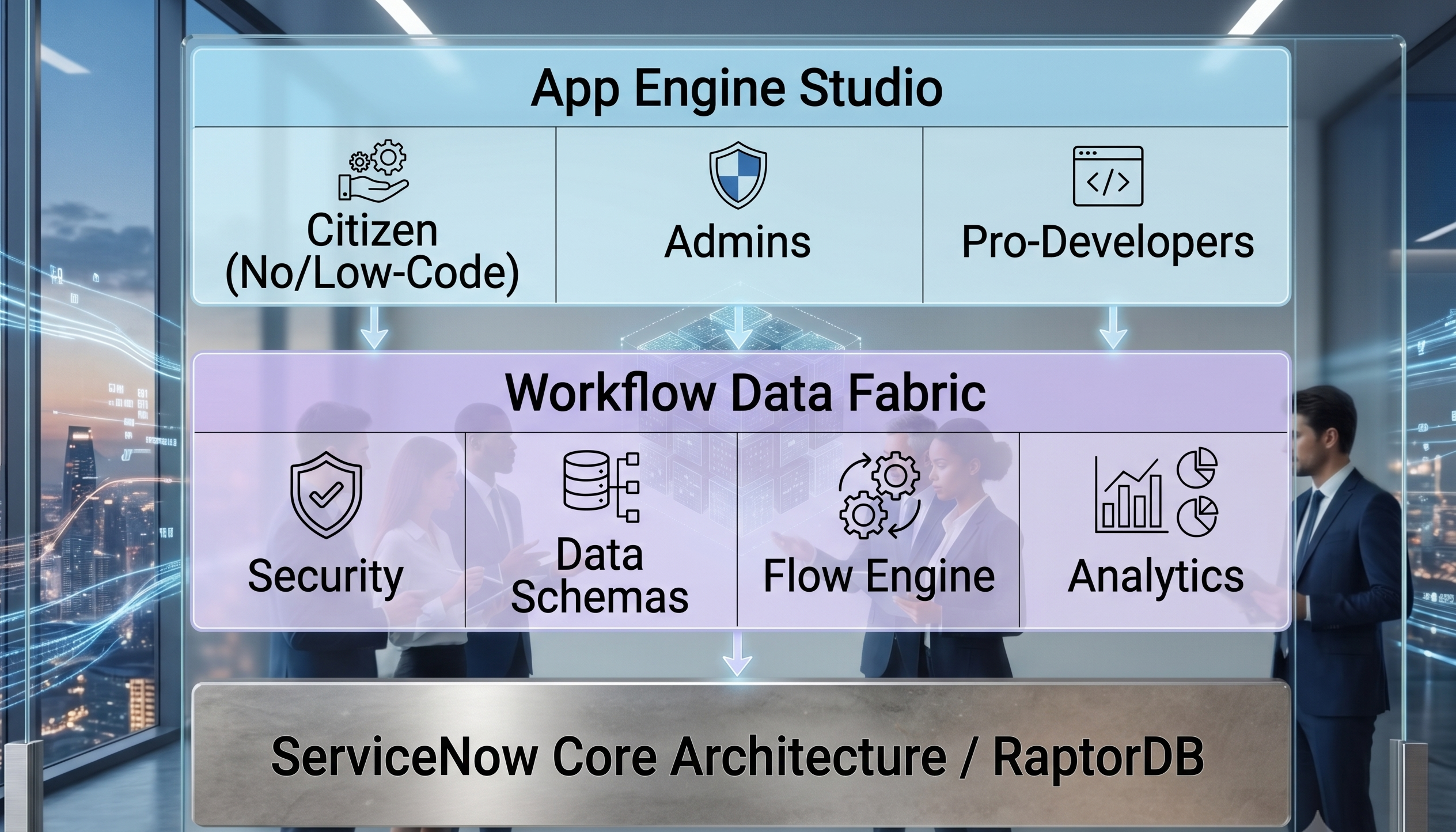
The unified platform alters the way IT scales operations. Companies can now opt to use low-code development for simpler tasks and let professionals take care of more complicated things like infrastructure and reuse.
Defining Development Personas
In order to keep App Engine Studio running smoothly, it is important for businesses to define clear boundaries of who builds what. Not doing so will lead to friction within the project.
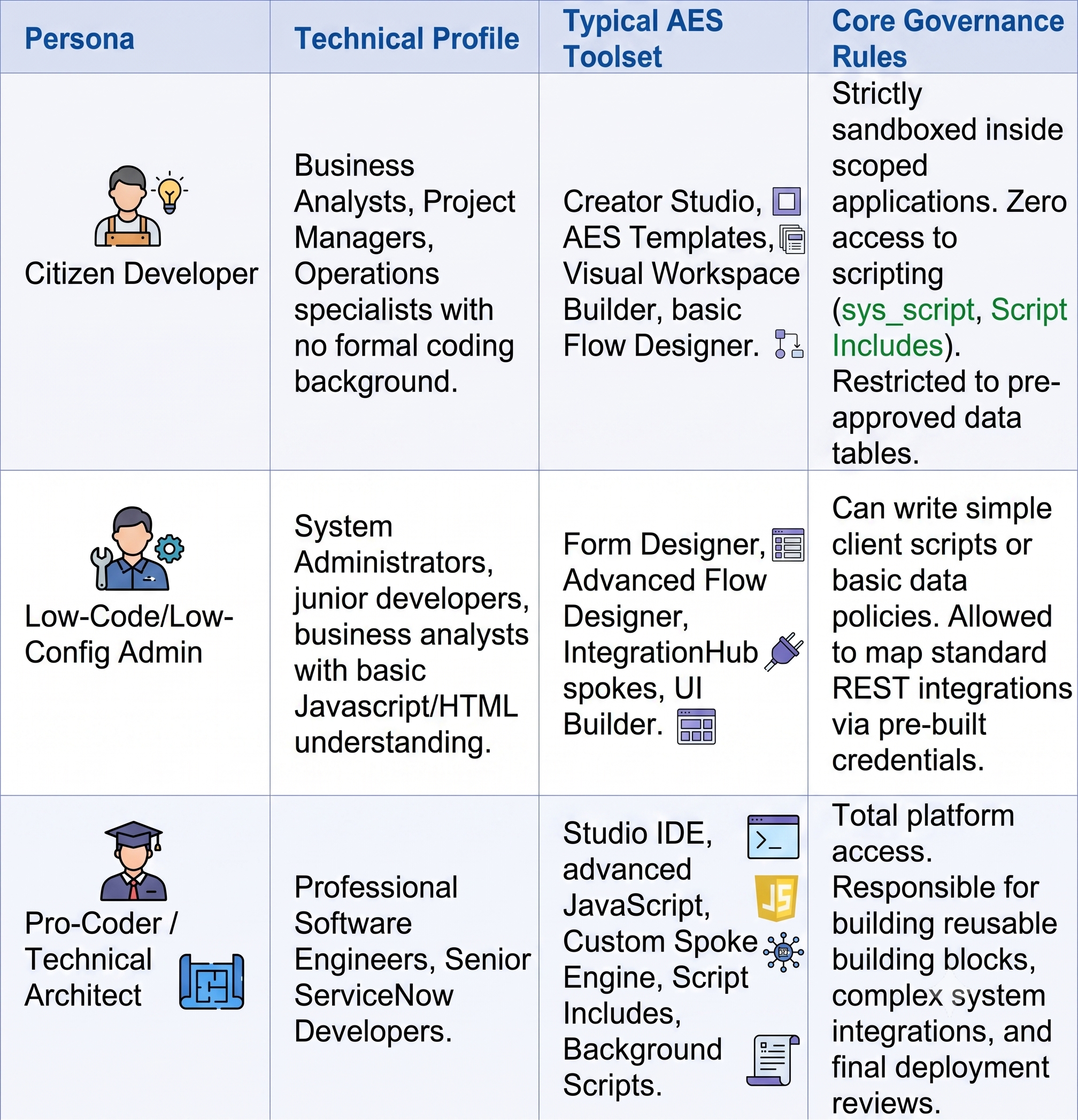
As such, as companies grow and increasingly implement the AES, the need to train developers in becoming platform architects is vital. To be able to learn about these features from an engineering perspective, take a servicenow developer training course online by OnlineITGuru.
The Technical Limitations: Low-Code versus Pro-Code in AES
Being clear about where low-code visualization stops and pro-code begins ensures maintenance over time.
Where Low-Code Serves
In AES, the following use-cases leverage the strengths of low-code visualization:
Process Request Management: Request-management, tracking progress through the system, and standard record mutations.
State Change Workflow: Taking a business request (such as hardware provisioning, marketing asset approval, and travel authorization) through state changes and human approvals.
Information Gathering: Constructing forms that use standard UI elements to gather employee data and then storing the information in scope tables.
Notifications and Tasking: Automation of email generation, Microsoft Teams/Skype/Slack notifications and generation of sub-tasks in order to fulfill an operation.
Integration: Integration with standard external applications such as Jira, Salesforce or Workday using existing integration spokes from the IntegrationHub.
When Pro-Code is Mandatory
When applications reach their capacity with regard to scale, complexity of algorithms, or heavily customized user interface, pro-code becomes mandatory.
Massive Asynchronous Data Processing: Handling large volumes of raw data messages or processing real-time asynchronous JSON files that come from outside and when using visual loops in Flow Designer causes performance degradation.
Deep Algorithmic Calculations: Cases that require calculation on matrices, dynamic pricing calculations, or script-based complex data evaluation prior to record update.
User Experience Interface Customization for Complex Portal Pages: Highly interactive portal pages development through customization of web components or custom CSS layouts.
Legacy System Integration: Development of custom mid-server scripts, handling mutual TLS authentication handshake, or working with systems that lack REST/SOAP endpoint.
The Architecture of Co-Creation: Developing Reusable Blocks
The most effective development approach in the ServiceNow environment is an architectural design known as Co-Creation. Pro-code developers do not create simple form or routing logic. They create robust, secure, and reusable blocks that citizen developers then can incorporate into visual flows.
This approach is based on three main technical building blocks:
A. Action Designer (IntegrationHub)
If a citizen developer requires data from an external ERP or any other database, he/she should not be required to write any code and configure the raw endpoints. The pro-coder uses Action Designer to wrap all complex REST calls, the process of authentication, and even error handling into one declarative block. Citizen developers who work with Flow Designer see this particular custom action in the form of a visual card with text inputs and outputs where all technical integration details are safely hidden behind a user-friendly interface.
B. Parameterized Script Includes
Instead of embedding JavaScript into workflow business rules (which is harder to update in the future), pro-coders develop object-oriented Script Includes in the scoped application that take input parameters, perform all business logic in the secure way and return output values. Low-code builders have the possibility to use this complex logic via selection from the list or simple data policy without code modification.
C. Customized UI Component Libraries
For applications which are based on Next Experience Workspaces, pro-coders use ServiceNow CLI and develop custom UI components according to the ServiceNow Seismic framework. Those components are uploaded directly to the instance and give the ability to low-code developers to add customized tools such as calendar, map or chart directly to the workspace.
Configuring the Automated Governance Model
Unrestrained citizen development can result in poor platform health. This problem can be avoided by implementing an aggressive automated governance model through the use of the App Engine Management Center (AEMC), along with automated check points.
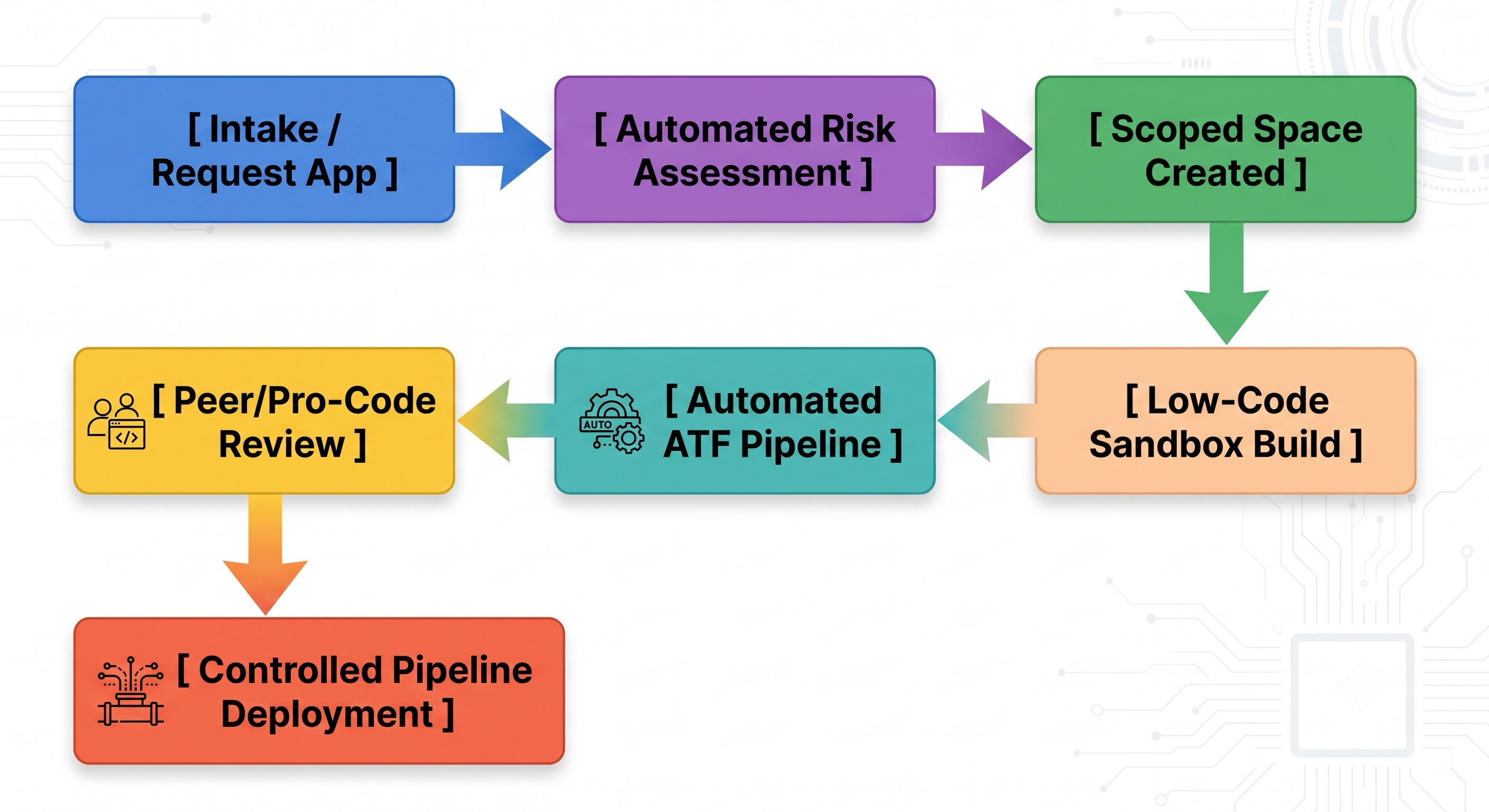
1. Controlled Ingress & Scoped Application Isolation
Citizen developers should never operate in the Global application scope. Any new application project that is created using the App Engine Studio should create a unique Application Scope (for example: x_snc_marketing_app).
Such an isolation would serve as a hard perimeter security feature. If the citizen developer creates a problematic query or incorrectly configures any process, the problem will be limited to just that application scope and not spread to ITSM, HRSD, or the performance of the system.
2. Delegated Development Permission Profiles
The administrators have to develop specific permission profiles for delegated development. This will enable citizens to use their verified skills to do the following:
They are allowed to make tables but not able to delete tables.
They are permitted to make flows but unable to activate background scripts.
They are able to configure forms but unable to get client scripting fields.
3. Automated Code Scanning Using Instance Scan
Any application going through the process of deployment needs to go through the Instance Scan engine of ServiceNow. Users are free to make check rules that restrict the deployment of an application if they find some of the low-code errors such as the following:
Queries made by using the gr.next() method within a loop.
SysID is used within components to make applications non-portable across development, testing, and production instances.
Missing of Access Control List in tables to prevent unauthorized access.
4. Automated Test Framework Integration
All application templates given to the citizen developers need to contain automated test code. The moment a citizen developer makes changes in workflows and form fields, there is an automatic running of the ATF suite.
Case Studies from the Real World: Striking the Perfect Balance
Case Study 1: Global Manufacturing Factory (Supply Chain Operations)
The Problem: The business required local solutions for managing its physical inventories through 14 different plants. There was an 18 month wait for these solutions at Central IT.
The Solution: Central IT developed a fundamental scoped architecture in App Engine Studio, with core tables connected to their ERP system plus template configurations. Plant managers who worked at these locations acted as citizen developers to develop particular front end forms, email notifications, and dashboard designs that were unique to their operational processes.
The Outcome: The development process for 14 different applications took less than 12 weeks to design, develop and deploy. Central IT had complete control of the central database and security boundaries.
Case Study 2: Financial Services Institution (Client Onboarding Workflow)
The Problem: The bank needed an efficient client onboarding platform that would enable identity verification, check credit history, and communicate with regulatory compliance databases.
The Solution: It was evident that the low-code solution alone wouldn’t be able to accommodate all of the sophisticated data demands and security protocols. Thus, a combination of a pro-code and low-code approach was chosen. Pro-code developers created encrypted IntegrationHub actions for communication with the regulatory databases. Low-code developers used the validated blocks of data to build employees’ workspace, document retrieval processes, and task routing rules.
The Outcome: The mixed development team delivered the project three times faster than estimated using a traditional pro-code approach. The most important achievement is that the business analysts now can modify task routing rules autonomously without opening an engineering ticket.
Operational Roadmap: Forming a Center of Excellence
In order to sustainably manage the low-code and pro-code combination, it is recommended that companies set up a Low-Code Center of Excellence (CoE).
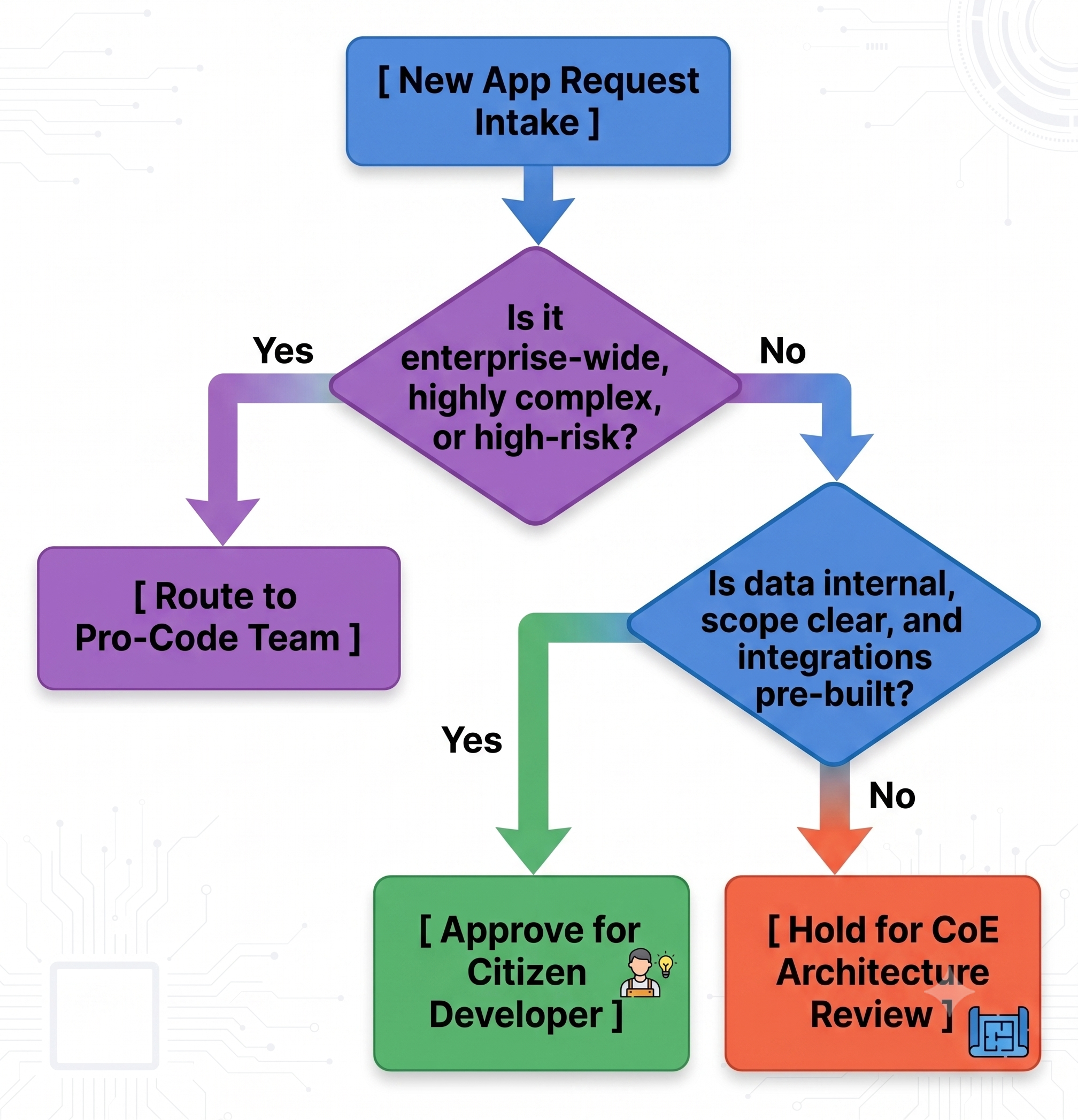
Step 1: Form the Demand Intake Process
Users cannot be allowed to develop their applications without justification. Develop a demand intake form within the Employee Center through which users submit their application demands. The CoE will examine each demand intake with respect to a qualification matrix:
Step 2: Development of a Training & Certification Program
Link the permissions to develop on the platform to an actual developer training program and certification. Developers can earn their access level depending on the completion of certifications:
Level 1 (Citizen Builder): Completion of ServiceNow Welcome to Learning courses and App Engine Studio basics. Access: Building via approved templates only.
Level 2 (Advanced Low-Coder): Completion of Flow Designer and UI Builder tracks. It entails the ability to design custom tables and processes within the allowed limit.
Level 3 (Pro-Developer CoE): Obtaining ServiceNow Certified Application Developer (CAD). Access: Platform code development, integrations, and application code review.
Step 3: Regular Application Portfolio Reviews
No application is to be running indefinitely without proper oversight. These reviews need to be conducted bi-annually based on telemetry data from App Engine Management Center. The items to be covered in the review are as follows:
Volume of Use: Decommission/archive applications which do not have any use for the last 90 days.
Redundancy: In case three different departments have created applications for employee tracking, merge them to create one application.
Impact on Performance: Check for slow running queries and workflow bottlenecks which may arise over time due to growing.
Getting CAD certification calls for a good knowledge of ServiceNow’s architecture. For instance, many organizations use extensive servicenow online training in India offered by OnlineITGuru in order to upscale the learning of their own pro-code teams who will have to deal with complex integrations and components.
Advanced Architecture: Avoiding Technical Debt and Upgrade Drift
In scaling your enterprise environment using the App Engine Studio (AES), one of the biggest threats that lies ahead is not a problem of immediate application failure but rather upgrade drift and technical debt. In cases where low-code configurations are not tracked or when pro-code developers develop custom code to overcome some of the limitations of low-code, your instance will suffer from performance issues during the process of upgrading ServiceNow to the latest version.
The Problem with Over-configuration via Visuals
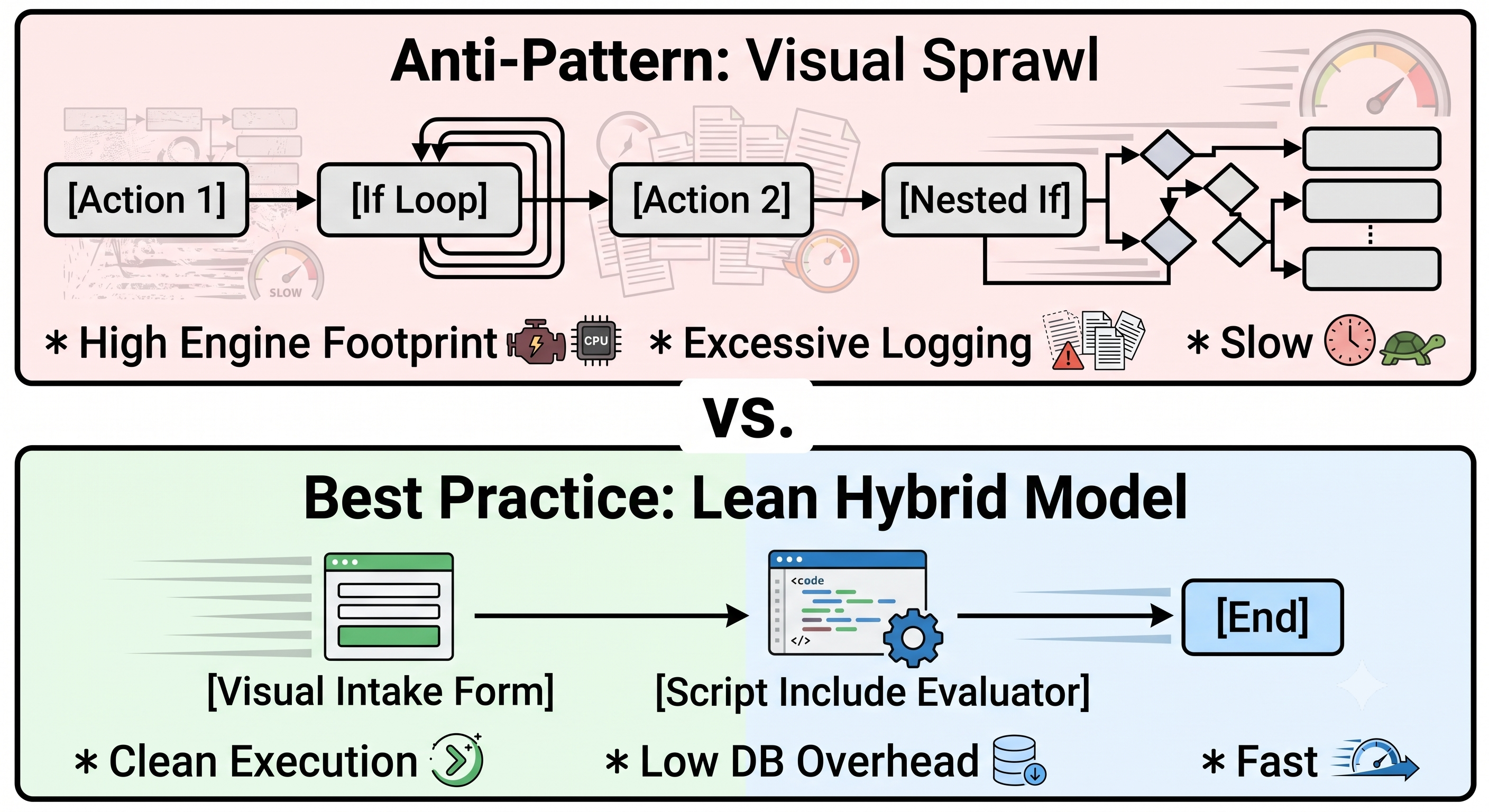
Builders using low-code tend to circumvent scripting restrictions by creating highly nested visuals in Flow Designer. One visual flow containing more than 50 actions with numerous conditionals and loops will generate an incredibly large footprint on the execution engine.
Each and every block that you create in Flow Designer leaves a lot of logs behind into the database of your platform (sys_flow_context and sys_flow_execution_value). With thousands of transactions executed in an hour, logging becomes a huge overhead on your database causing lockups.
Technical Blueprint for Upgrade Safe Architectures
In order to ensure that applications developed in AES do not face any issues with upgrading cycles without requiring manual intervention, there are three architectural guidelines that need to be followed strictly:
Following Standard UI Patterns Strictly: Low-code developers need to use standard Workspace components and refrain from adding custom HTML/CSS elements within portals. Standard components will automatically inherit any changes in structure and security, as well as performance improvement through platform upgrades.
Create CSA Configurations for Custom Logic: If an AES application is supposed to access any core table, such as cmdb_ci or sys_user, developers should refrain from writing global queries for that purpose. Instead, they need to build CSA configurations. These clearly-defined configurations serve as a contract layer; even if there are any changes in the core table schema in future releases, the abstraction layer provided by the platform saves the application from failing.
Replace Custom Script with Declarative UI Policy: The architects using the pro-code approach need to carefully evaluate the applications to ensure that any dynamic form transformation such as field hiding, compulsory inputs, choice change based on roles is done using Declarative UI Policy, not custom client-side scripts (g_form). This policy is natively processed by the platform browser engine without additional processing.
In-depth Understanding: GenAI Application Development Using Now Assist
The Now Assist feature offered in the Creator function of the App Engine Studio introduces a brand-new era in the collaboration between professional and non-professional developers. The generative AI automatically takes away the challenges that citizen developers had to deal with earlier, especially those related to syntax difficulties.
Speeding Up the Work of Citizen Developers
Instead of being troubled by a blank page, the citizen developer will only have to enter a natural language prompt to develop the application architecture from scratch. A good example would be the following:
"Create an application that issues physical security badges to an employee; the application should contain employee name, office details, reason for application, and the picture. The approval from a supervisor needs to be received before forwarding a notification about the badge delivery."
As per the above statement, Now Assist analyses and quickly develops:
Relevant scoped data tables with data types as String and References fields and Images attachments.
Workspace user interface for fulfillment agents.
Visual flow in Flow Designer.
Enables the Pro-Coder: Code Generation and Explanation
GenAI is not limited to non-IT professionals. For professional coders performing engineering tasks in the text editor of AES, Now Assist is the acceleration tool for complex engineering tasks:
Text-to-Code: A coder can input a comment such as // Function to call external REST endpoint and parse return payload to verify user compliance status, and Now Assist will provide clean and efficient JavaScript code in accordance with ServiceNow scripting best practices (such as using sn_ws.RESTMessageV2).
Code Explanation: In the situation where a coder needs to inherit an application developed by another coder, Now Assist can generate an English description of a complex piece of custom code written by the previous developer.
12. Conclusion: The Long-Term ROI of a Balanced Platform
Balancing low-code and pro-code activities within App Engine Studio impacts the approach enterprises take towards their digital transformation initiatives. Instead of developing a shadow IT system and a frozen development pipeline, businesses are able to develop a working environment where business speed coexists with technical boundaries.
For this kind of integration to be possible, there must always be a steady flow of professionals on the platform. This way, technical staff will be guided to focus on a specific servicenow developer course online through OnlineITGuru, allowing engineers to develop robust modules.
Through keeping citizen developers within isolated scopes, using automated code reviews, and concentrating professionals on developing reusable infrastructure components, companies will be able to develop applications very fast. This results in a smooth development process that is adaptable to changes and ready for upgrades through future platform releases.