
Mastering ServiceNow CMDB Health, Discovery, Relationships, and Duplicates
Last updated on Aug 3, 2026
The Configuration Management Database (CMDB) is the key component of any advanced ServiceNow environment, acting as the definite source of truth about an organization’s IT systems, software, and underlying dependencies. When managing such activities as quick incident handling, complex data center moves, change risk mitigation, and cloud provisioning, the integrity of the business operations is determined by the accuracy of CMDB information.
IT systems are getting more and more complex and IT infrastructure is increasingly distributed with multi-cloud technologies, serverless architectures, microservices and edge computing. The proper condition of a CMDB can’t be maintained without effective governance of the information in it, along with automated information gathering and prevention of duplicates, which prevents the CMDB from becoming a source of problems, the “CMDB Graveyard.”
In this technology article we will discuss the architecture and processes that are behind keeping the ServiceNow CMDB healthy.
The architecture of CMDB health, including the key metrics, the health dashboard, and data rot identification.
CIs and the relationships of dependency mapping: Building business services and building real parent-child relationships.
The use of automatic data ingestion via ServiceNow Discovery: Best practices for MID server deployment, credential management and scheduling.
Duplicate prevention with the help of the duplication identification and reconciliation engine (IRE): Understanding how IRE rules work for duplicates and using the data manager of the CMDB.
Operational management and control procedures It defines the necessary life cycle policies, ownership models, and auditing frameworks on an ongoing basis.
The Basis of CMDB Health
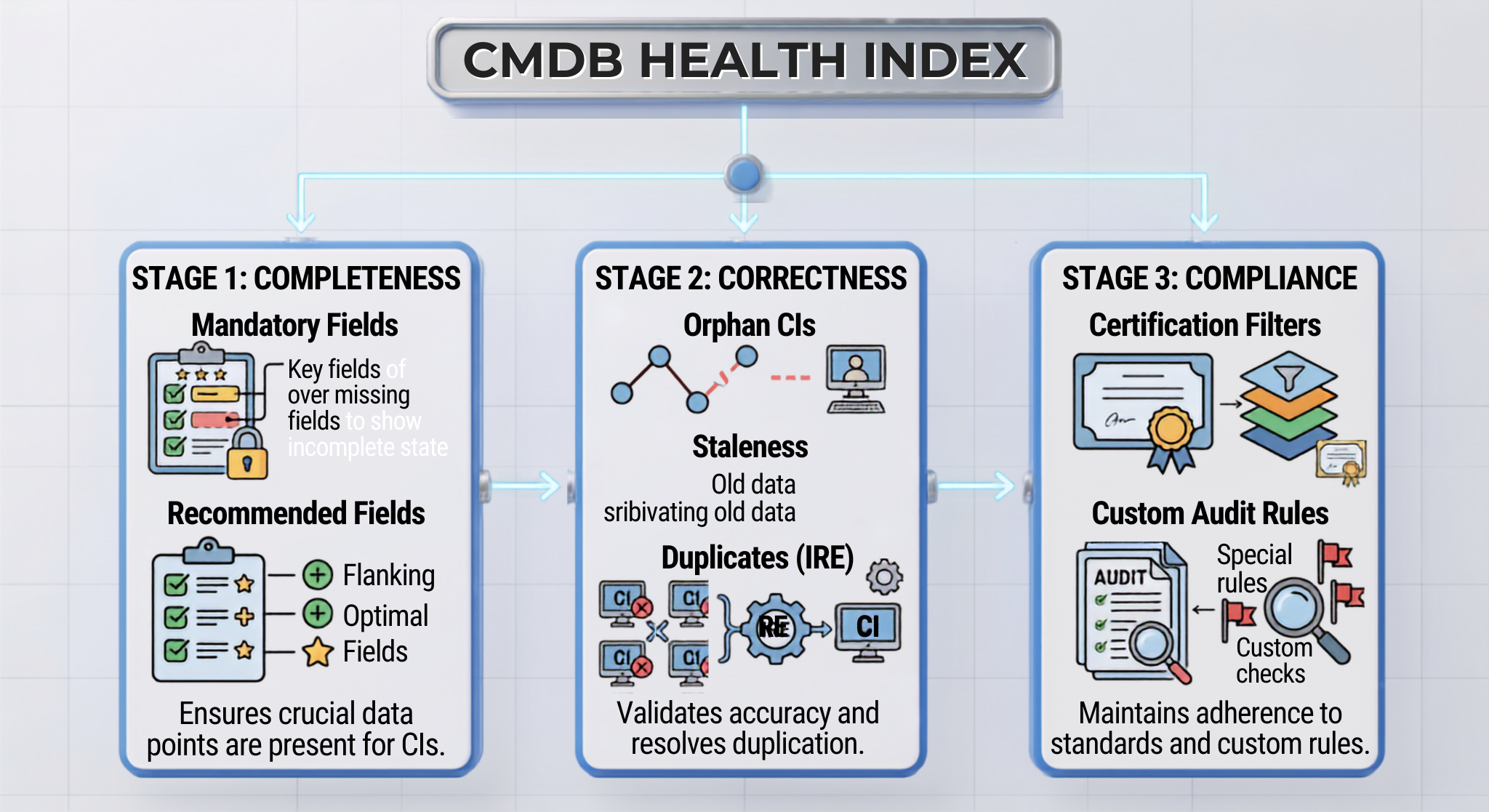
“Healthy” CMDB is determined not by the number of entries it possesses, but by the relevancy, accuracy, and freshness of its CIs. Be it a servicenow online course that you attend or be it enterprise architecture that you design, your assessment of health will always be based on the CMDB Health Dashboard, which measures data quality in three fundamental parameters: Completeness, Accuracy, and Conformity.
The Three Components of CMDB Efficiency
1. Completeness
Completeness is the number of available properties in the Configuration Items. ServiceNow has broken this concept into two parts.
Optional Properties: The properties required to perform regular operations by a CI (e.g. Name, IP Address, Serial Number, Environment, Owner Group).
Pitfall to avoid: Making a database field mandatory in the system dictionary (sys_dictionary) for CI tables will cause issues in the automatic data import processes (Discovery, REST API integration, etc.) when the imported data does not have the mandatory fields. Instead, implementation of the mandatory property should go through CMDB Health Completeness rules.
2. Accuracy
The accuracy is a metric that measures the quality and correctness of the information stored in the Configuration Management Database (CMDB). It consists of three components of evaluation:
Orphan CIs: CIs eligible for recording but not recognized either due to unavailability of required relationships (e.g. virtual machine record without a hosting server).
Staleness: CIs not updated or upgraded through discovery process or interfacing within the certain time frame (e.g. not updated during 30, 60, or 90 days).
Duplicates: Multiple CI records from the database describing the same real asset object in the physical or logical world.
3. Conformity
The conformity is a measure that determines if the CIs meet certain state standards and effective regulatory and internal requirements. This requires the implementation of CMDB Audit Rules to check attributes against the standards established for them.
CI Relationships and Dependency Mapping
The real benefit of CMDB is not that it allows to track individual assets but the connections between them. A simple record of 10,000 computers is just a list of assets. A network of 10,000 computers coupled to the respective virtual hosts, storage devices, databases, middleware, and business processes presents an actionable enterprise architecture.
CI Relationship Schema (cmdb_rel_ci)
All CI relationships within ServiceNow are stored in the same core table called cmdb_rel_ci. This table forms a directed graph with three essential fields:
Parent (parent): upstream or container CI.
Child (child): downstream or contained CI.
Type (type): type of dependency (as defined by cmdb_rel_type) which defines both its parent and child.
Standard Types of Relationships
Using standard OOTB types of relationships which are essential for automated impact evaluation and service mapping; avoid using custom types unless absolutely necessary.
ServiceNow Implementation of Relationship Types Between Configuration Items
It is vital for a successful mapping of the IT dependencies and impact-analysis to have the relationships defined between the configuration items (CIs). Below are the various relationship types operational in the system:
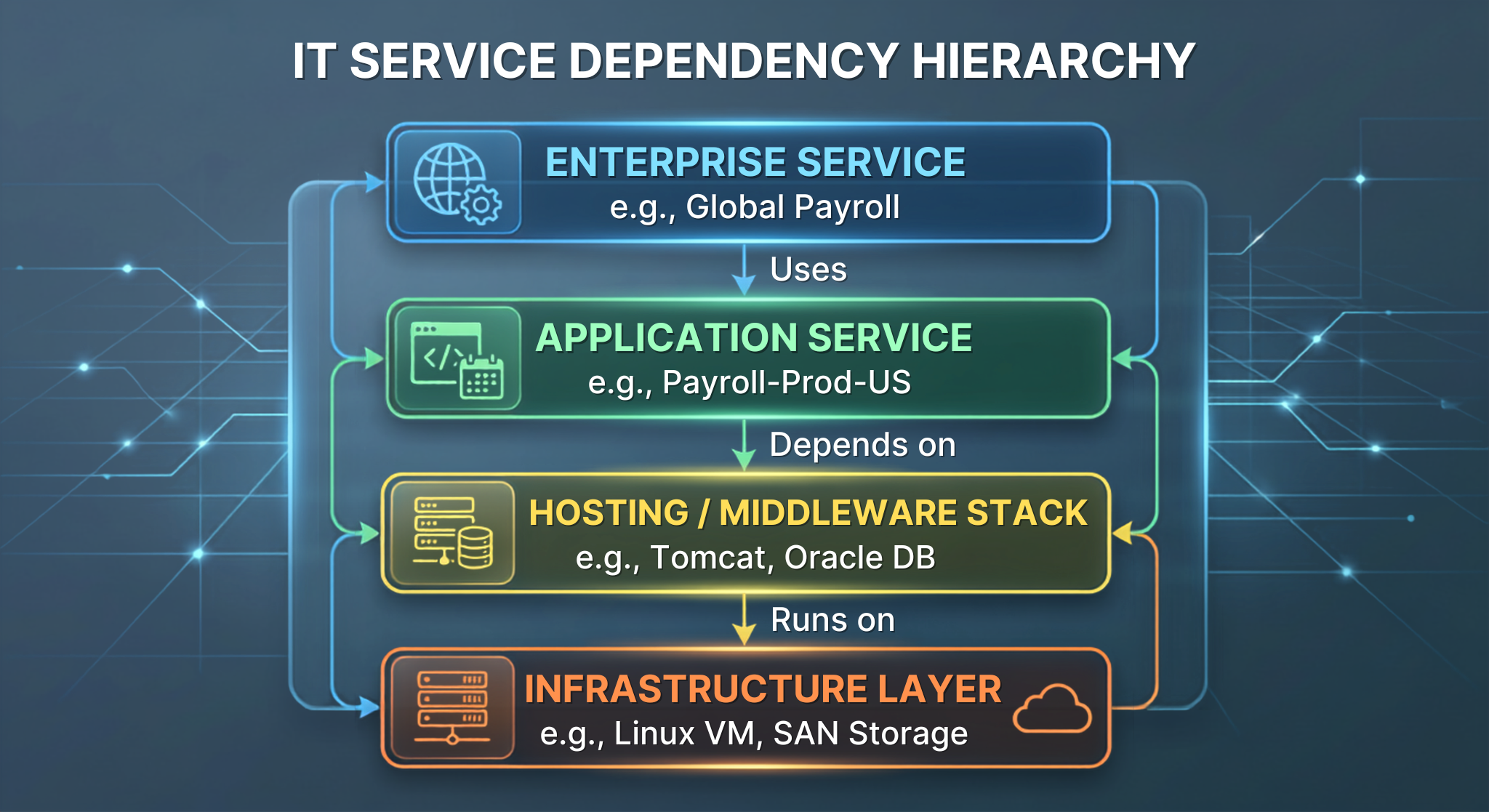
Runs on : Runs mean that in the execution layer, the software component like application server or database instance is dependent on an operating system or a virtual server for effective performance.
Depends on : Used by is the relationship which helps in identifying logical dependencies between the services. This relationship indicates that higher-level entities can be dependent on an operational application to perform its functions.
Hosted on : Hosts provides details on the virtualization-hosting environment and other realities for hosting. An example of the implementation is that a virtual machine is hosted off a physical hypervisor.
Contains : Contained by means that the parent entity will be able to contain (whether logically or physically) the child entity. An example can be seen when an IT cluster contains the nodes.
Connects to : This relationship will demonstrate both physical and logical connectivity between different computer hardware elements.
Creating Service Topologies: Transformation from Infrastructure to Business Services
ServiceNow has categorized its services into structured levels, starting from the infrastructure level to business capabilities level.
Common anti-patterns in topology
Inverted Dependency: Changing the roles of parent and child (e.g., claiming that a Physical Server is dependent on a Web Application). This messes up Incident Impact Analysis calculations.
Spaghetti Mapping: Skipping the Application Service layer and linking infrastructure directly to Enterprise Business Services. This undermines the whole concept of managed Change Management risk analysis.
Orphaned Applications Services: Creating Application Service records cmdb_ci_service_discovered without the proper linkage to CIs. Therefore, Service Mapping does not work.
Automated ingestion through ServiceNow discovery
Manual support of CMBD is doomed. To support a fully operational CMDB, automated ingestion is required through ServiceNow Discovery and Service Graph Connectors.
ServiceNow Discovery operates through an agentless solution that taps into the MID Server to assess network devices, servers, hypervisors, cloud resources, and applications, thus bringing back inventory details and dependency information directly to the instance.
The Four Phases of the Discovery Process
The discovery process in ServiceNow happens in four stages through the ECC Queue (ecc_queue).
Scan: If the IP address is available in the network for the first time (using ICMP ping and TCP port scanning).
Classification: It scans all the available IPs through the protocol (Windows WMI/WinRM, Unix/Linux SSH, and SNMP for network device) to find out the operating system and type of the device.
Identification: Takes the hardware details (Serial Numbers, MAC Addresses, UUID, Hostname) for making a decision as to whether the Ethernet device is targeted to CMDB.
Exploration: Runs specific patterns to get more data related to the device, like running applications, network interfaces, storage devices, updated patches, and running processes.
Best Practices for Discovery
Sizing and Placement of MID Units
Do not rely on a single MID unit in large-scale environments; use a cluster of MIDs configured for redundancy and for load balancing purposes.
Place MID units in the same high-speed networks, local data centers, or VPCs as the source of contact to avoid network latency and any WAN-related congestion.
As a rule of thumb, provide at least 4 CPU cores and 8–16 GB RAM for every independent MID unit and set a limit for the number of simultaneous threads (i.e., threads.max) to anywhere between 25 and 50 depending on the band-width of the network and memory provided.
Security Considerations
Do not ask for a Windows domain administrator to make use of the discovery; using these credentials is dangerous. Use local administrator credentials. Set up Windows Remote Management (WinRM) to ensure stringent use of service account credentials.
Use SSH Key (public/private) authentication for Linux/Unix instead of root passwords.
Integrate with external vaults such as CyberArk and add the MID Server for automatic retrieval of the credentials without storing them in plaintext.
Fine-Tuning Discovery Timetables
Multi-Tier Discovery Timetable:
Daily (24 hours): Important active infrastructure for instance, Virtual Machines, Cloud Instances, Kubernetes Clusters.
Weekly (7 days): Essential standby infrastructure, for instance, Network Switches, Storage Arrays, Datacenter PDU devices.
Monthly (30 days): Inactive resources or low-level subnets.
Subnet Bandwidth Management: Schedule discovery in accordance with different subnets so that no links in the network will become overloaded, the state tables of the firewall will be filled up, or the application will create unreasonable alarms in the security system.
Canceling duplication using Identification and Reconciliation Engine (IRE)
Data duplication is the most common problem in deploy CMDB. The cause is related to the data coming from various sources, such as ServiceNow Discovery, Service Graph Connectors (SCC) for SCCM/JAMF, Cloud Discovery, and manual data imports, being processed independently from each other.
In order to eliminate the issue, ServiceNow requires all CMDB data to undergo processing using IRE.
Identification Rule Breakdown
An Identification Rule describes the way the IRE decides whether a processed file matches some existing CI record or is a new hardware asset.
Main Guidelines for Identifying Entries
Avoid matching adherents with dynamic attributes: Avoid making use of components like IP Address or Name as ideal identifiers. IP Address tends to continuously change due to DHCP and Cloud facilities resulting in data propriety issues.
Utilize constant hardware identifiers: Motor hardware identifiers like Serial Number, BIOS UUID or immutable codes assigned by a Cloud facility (Instance ID) to be used for preferred matching.
Deal with the absence of affirmations assertively: Tag definitions with Allow null attribute value = FALSE, in order to prevent an empty or null definition from being matched with existing data with empty attributes.
Authority and Reconciliation Rules
When two or more automated sources update the same CI record, conflicts may become visible (specifically, SCCM sends host data differently than ServiceNow Discovery). The purpose of Reconciliation Rules is to indicate the data source authorized to update particular CI characteristics in a particular table.
Data Refresh Templates
Data Refresh Templates define the valid duration of data updates received from various sources. Whenever an authoritative source fails to send data updates after a certain duration (such as 30 days), then low-priority data sources can update the field. This avoids inactive high-priority sources from preventing the continuous use of various low-importance updates.
Eliminating Entry Duplicates: De-duplication Tasks and Recovery
ServiceNow detects duplicate CIs that have occurred in CMDB (often due to missing identification attributes or imports that were not processed taking into account the identification attributes) with the help of De-duplication Tasks (cmdb_duplication_task).
Duplicates Processing Workflow Steps
Choose Master CI: From records of CI created via relevant data sources, pick a record that is older, more comprehensive or current.
Mix with Attributes: Duplicates are assigned contextual attributes, but not attributes that are part of Master CI.
Operating History of Change: Update Change Incidents, Change Requests and System Log entries in operational history to point to Master CI instead of duplicate CI.
Add to Relationships: Transfer records of duplicate CIs to Master CI using cmdb_rel_ci table.
Turn Off or Remove: Set CI record as Non-Operational / Retired or permanently delete CI with help of data life cycle policies .
Automated CMDB Lifecycle Management (CMDB Data Manager)
When you process lifecycle states through millions of records using a variety of scriptable options, business rules, or background processes, you may experience performance issues. To solve this issue, ServiceNow has developed the CMDB Data Manager (CMDB Data Manager) framework, which provides the possibility of standardizing lifecycle policies in the organization through using scalable policy definitions.
Core Lifecycle Policies
1. Retirement Policies
When automated sources stop discovering configuration items (CIs), they automatically move to the Retired state.
Policy condition: Discovery Status = Active AND Discovery = More than 90 days ago AND Class = Hardware.
Action: Set system status to Non-Operational and install status to Retired.
2. Elimination Policies
Retired or orphaned CIs will be deleted once the retention period for the archive is finished.
Policy Condition: Operational Status is Non-Operational and Last Update is > 180 days
Action: The required records and the complete associations are deleted using cmdb_rel_ci.
3. Attestation Policies
This is used to create tasks from time to time for human CI Owners to attest whether all the records regarding logical records like Business Applications and Service Mapping definitions are perfect.
Policy Condition: Class = Business Application AND Last Attestation > 365 Days.
Action: A CMDB Attestation Task will be assigned to an Application Owner.
Real-World Implementation Framework: CMDB Governance Blueprint
A robust, enterprise-level CMDB requires continuous processes rather than just a one-off endeavor. Below is a guideline for the implementation of CMDB governance through phases.
Stage 1 – Establishing and Structuring the Hierarchy (Months 1 – 3)
Ensure your CMDB framework is in accordance with the Common Service Data Model (CSDM 4.0).
Getting your administration team trained through service now training classes will ensure that taxonomy standards are maintained throughout the different departments.
Avoid creating custom classes in cmdb_ci. Make sure to utilize the standard tables as much as you can while complying with the requirement.
Determine the primary business applications and the respective network infrastructure supporting them.
Stage 2 – Automated Data Collection and Configuration of the IRE (Months 4 – 6)
Implement MID Server Clusters in the various zones in the network with secured vault functionality.
Direct the custom data imports, such as importing scripts as well as integration through IRE engine using either cmdb_sdk or IdentificationEngineScriptable APIs.
Establish clear Reconciliation Rules between various data streams (Discovery vs. SCCM vs. Cloud APIs).
Stage 3 – Permanent Oversight and Data Healing (Months 7 and Thereafter)
Enable CMDB Health Dashboard schedules to ensure that daily completeness and correctness metrics are generated.
Implement CMDB Data Manager policies to ensure that deprecated information is traced.
Perform governance audits every month to highlight persistent de-duplication issues and the cases that have not been resolved.
Conclusion
Implementation of a CMDB is dependent on the right blend of automation for collecting data, data reconciliation, and governance practices. The combination of using ServiceNow Discovery, configuring IRE to get rid of duplicate data, and automation of lifecycle management helps businesses turn their CMDB into a valuable generator of assets. If you wish to acquire such knowledge practically, then enroll yourself in servicenow training online.
Technical Self-Evaluation Questions
In case you are going to write any exam (CSA, CIS-DIS or CIS-SM) or even going through a regular servicenow course syllabus, make sure that you know how to answer the following core technical questions:
How does the IRE analyze an incoming payload if several Identifier Entries exist for the target CI class?
Answer: The IRE analyzes the Identifier Entries by priority. If the payload fits the requirements of Priority 1 (e.g., Serial Number + Serial Number Type), the IRE updates the proper CI and stops the analysis. It will only continue to Priority 2 if Priority 1 did not lead to success.
What happens if you insert a CI record into cmdb_ci_server using the standard gr.insert() method instead of using IRE?
Answer: The direct insertion would avoid all Identification Rules, Reconciliation Rules, Data Source Prioritization, and Duplicate Detection that might lead to duplicated records, incorrect updates in the system, and reduced integrity of the data. All data should be inserted by means of CMDBTransformUtil API or IntegrationHub ETL.
What is the difference in terms of structure between cmdb_ci_appl and cmdb_ci_service_auto in relation to the Service Mapping and CSDM 4.0 has been implemented?
Answer: cmdb_ci_appl (Application) refers to some particular software (component) that has been run with the help of some process on the server (e.g., local instance of Apache). cmdb_ci_service_auto (Discovered Application Service) refers to the actual implementation of finished service or its instance that unites infrastructure components, which creates functional capacity for IT.