
OpenShift Container Platform: What Happens Behind the Scenes When You Deploy an Application?
Last updated on Oct 1, 2026
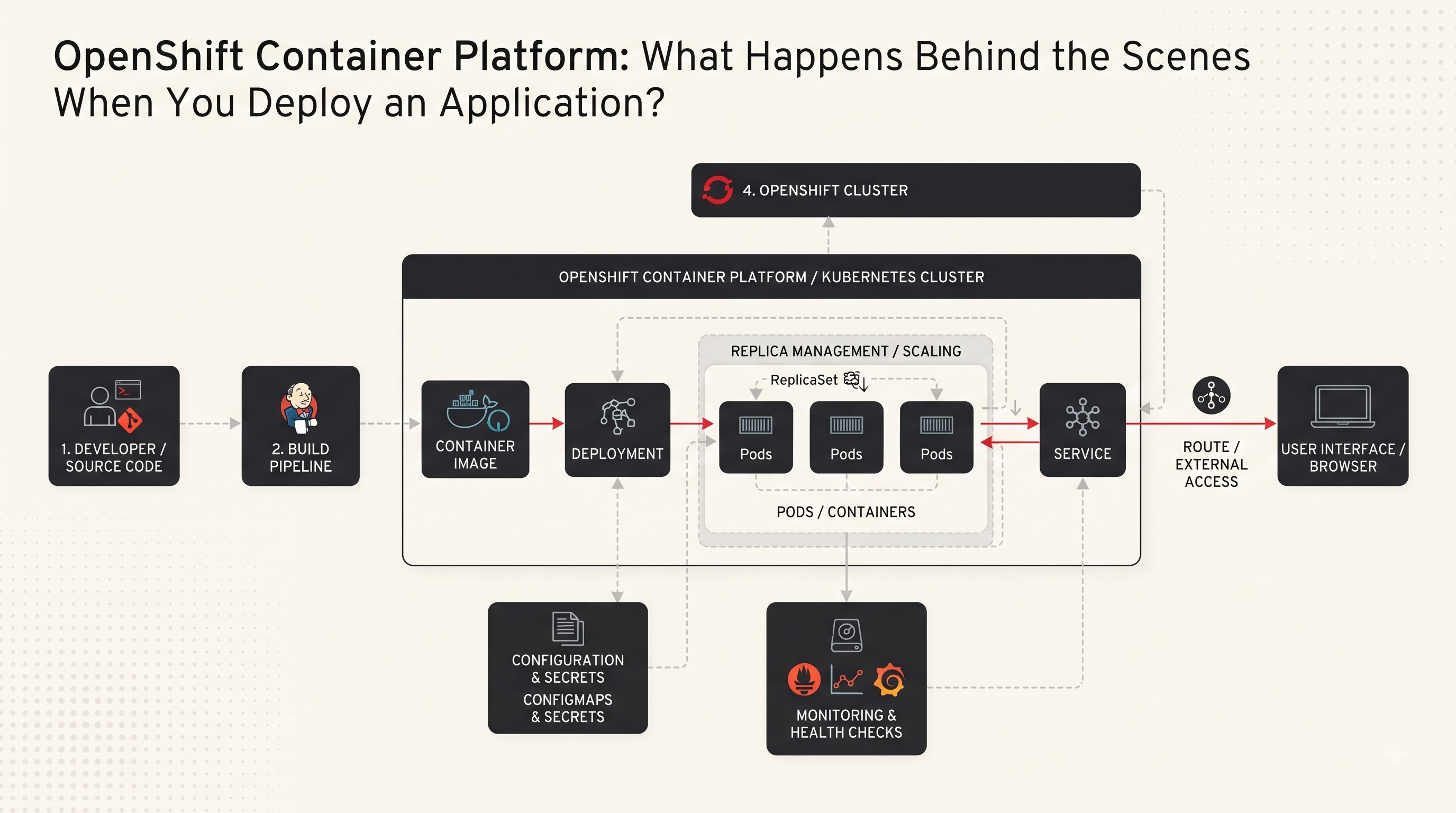
Imagine a developer has just finished an application. The code works perfectly on their laptop the features have been. Everyone is ready to see it running for real users. The obvious next step sounds simple: deploy the application.. What actually happens after someone clicks Deploy? Where does the application go? How does OpenShift know how computing power it needs? How does OpenShift make the application available to users? What happens if one container crashes?. How does OpenShift make sure the application continues running without someone manually fixing every problem?
These questions reveal what makes the OpenShift Container Platform interesting. It is not simply a place where containers are stored and started. The OpenShift Container Platform provides an environment for building, deploying, managing, scaling and monitoring containerized applications. Underneath the experience developers see is a collection of technologies working together. Containers package the application and its dependencies Kubernetes manages workloads and resources networking connects components and the OpenShift Container Platform adds tools and capabilities that make the entire process more manageable for development and operations teams.
The easiest way to understand the OpenShift Container Platform is therefore not to memorize a list of features. Instead follow an application from the moment its developer submits the code until the moment a user opens that application in a browser. Along the way every important concept in the OpenShift Container Platform starts to make sense.
It Starts With Code. Code Alone Cannot Run in Production
Every application begins with something a developer creates: source code. It might be a web application, an API, a background service, or a larger system made up of independent services. On a developer's computer, that application may depend on a programming language, runtime, operating system libraries, configuration files, and external packages.
This creates one of the problems in software development: an application can work perfectly in one environment and behave differently somewhere else. A developer might say, "It works on my machine," while the operations team discovers that the production server has a runtime version, missing dependencies or incompatible system libraries. Containers address much of this problem by packaging an application with the components it needs to run. Instead of thinking only about the source code, the application can be represented as a container image that provides a consistent unit for deployment.
That image becomes a starting point for the OpenShift deployment process. When a development team changes the application, a new version can be built into a container image. The image can then move through environments, such as development, testing, staging and production. This creates a more predictable path between writing software and running software. This is also where teams beginning their openshift training often discover an idea: the OpenShift Container Platform is not replacing the application itself. The OpenShift Container Platform is providing the platform and orchestration environment around the application so that teams can operate it reliably.
From Source Code to a Container Image
Before the OpenShift Container Platform can run an application as a container there needs to be a container image. Think of the image as a packaged version of the application. It contains the application code and the environment required to start it.
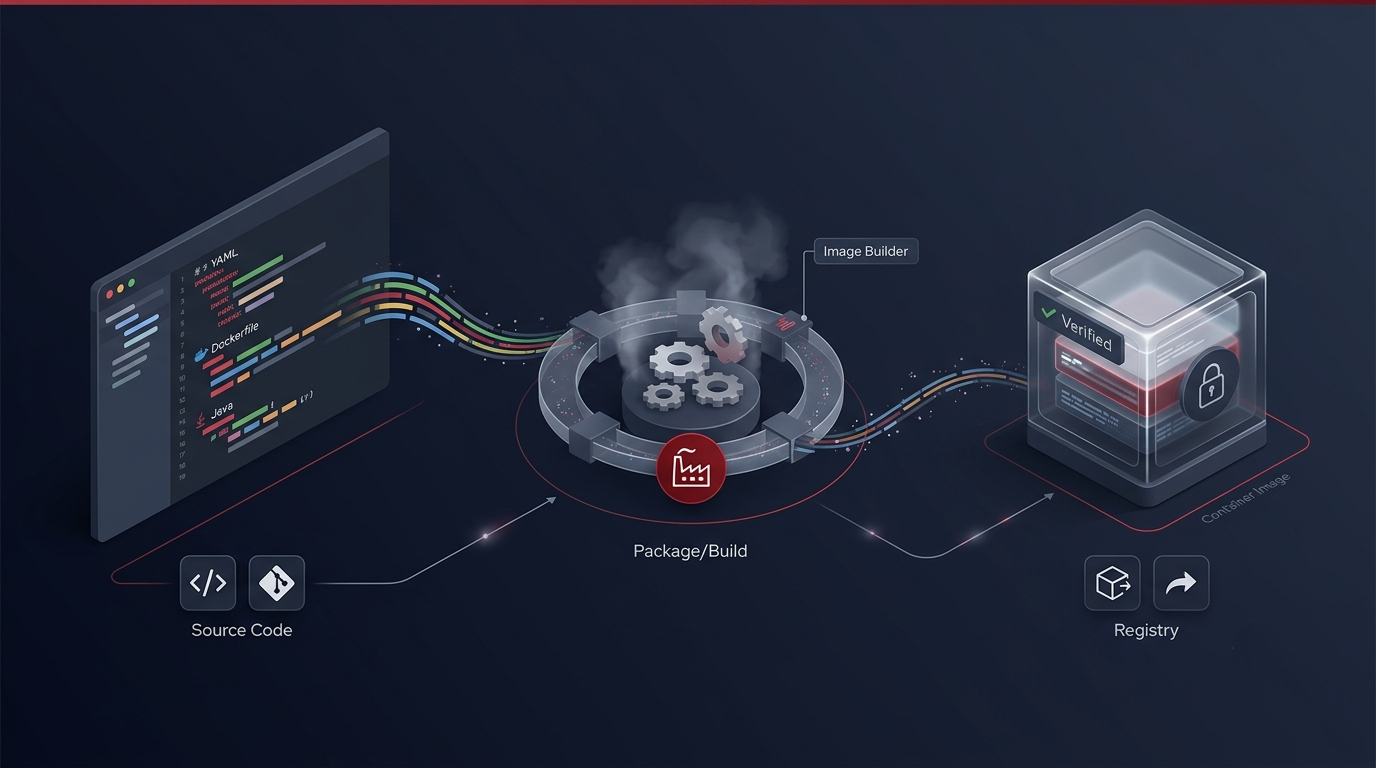
A typical process might begin when developers push code into a source-code repository. That change can trigger a build process. The build system takes the source code follows the application's build instructions, installs required dependencies and produces a container image.
The image is then stored in a container registry.
A registry acts somewhat like a warehouse for container images. Of keeping an image only on a developer's computer, the organization stores it somewhere from which the OpenShift Container Platform can retrieve it when needed. Different versions of the application can have image tags or identifiers, allowing teams to know which build they are deploying. For example, imagine an online shopping application has a release. The team might produce an image representing version 2.4 of the application. The OpenShift Container Platform can then be instructed to deploy that image.
The important point is that the OpenShift Container Platform does not need to understand every line of application code. The OpenShift Container Platform needs an image and the instructions describing how that application should operate. This separation is powerful. Developers can concentrate on building the application while the OpenShift Container Platform handles much of the infrastructure required to run it.
OpenShift Does Not Simply "Start a Container”
At this stage it is tempting to think that OpenShift does something simple: it receives an image and starts a container. In reality, more things are happening.OpenShift is built around Kubernetes concepts so applications are shown through resources that describe the desired state of the system. Of manually telling a specific server "Run this container on this machine " the platform works from a description of what should exist.
Suppose a team says that its application should have three running instances. The important instruction is not which physical or virtual machine should run each instance. The important requirement is that three healthy instances should be available. The orchestration system then works to make that desired state happen. This is one of the important concepts to understand when learning the platform. Developers and administrators describe the desired configuration while the platform continuously works to keep the environment aligned with that configuration.
If an instance disappears, the system can detect that the current state no longer matches the desired state. It can then take action to restore the instance. That is a shift from traditional server management. Of treating every server as something that must be manually configured and maintained the platform treats workloads as managed objects whose desired state can be declared and continuously reconciled.
Where Does the Application Actually Run?
Now comes an obvious question: if OpenShift is managing everything, where does the application actually run? OpenShift environments contain compute resources where workloads can execute. Nodes commonly represent these resources. A node provides the computing environment in which application workloads can run. Developers usually do not need to choose a specific node every time they deploy an application. The orchestration layer evaluates available resources and scheduling requirements before placing workloads. It considers factors such as CPU and memory workload requirements, constraints and other scheduling information.
Imagine an OpenShift environment containing nodes. One node may already be heavily utilized while another has capacity. When a new workload needs to run the scheduler helps determine a location rather than requiring a developer to select a machine manually. This makes the platform more flexible. As workloads change the infrastructure can also change. Organizations can add resources when they need capacity or reduce resources when appropriate. The application is therefore separated from the idea of a permanent server. That separation is one of the reasons container orchestration has become important for application environments.
Pods: The Smallest Practical Unit You Need to Understand
When learning Kubernetes-based platforms one word appears repeatedly: Pod.
A pod is the deployable unit in Kubernetes and OpenShift. It provides the environment in which one or more containers can run together. For straightforward applications a pod contains a single application container.. A pod can also contain multiple tightly coupled containers that need to share certain resources or communicate closely.
This distinction matters because people sometimes say, "OpenShift runs containers," which's broadly understandable but technically incomplete. OpenShift manages workloads through Kubernetes abstractions and containers run within pods. Imagine a web application packaged into a container. OpenShift creates a pod, for that workload. The pod is scheduled onto a node and the container starts inside it. If the application is configured to run replicas OpenShift can create multiple pods representing those replicas.
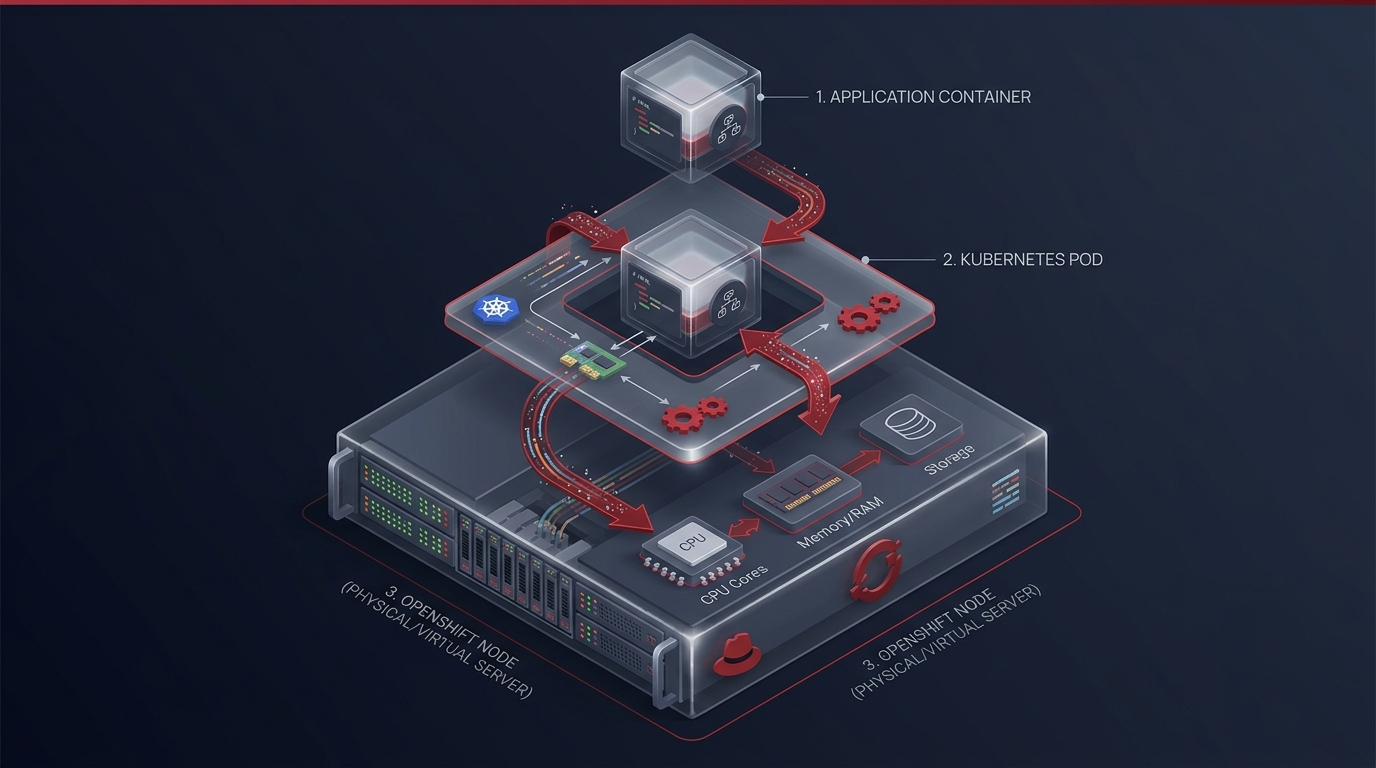
So the chain begins to look like this:
Application code → Container image → Pod → Node
Each layer solves a problem. The image packages the application. The pod provides the deployment unit. The node supplies the compute environment. OpenShift and Kubernetes coordinate how these pieces should operate together. Once this relationship becomes clear, many other OpenShift concepts become much easier to understand.
What Happens When the Application Needs Capacity?
Now imagine the application becomes popular. At 10 there might be only a few hundred users. By lunchtime, traffic could increase significantly. If the application is running as an instance, that instance may eventually become overloaded. This is where scaling becomes important. Instead of manually creating another server and configuring the application from scratch, the platform can increase the number of application replicas. More pods can run the application, allowing traffic to be distributed across multiple instances.
For example, an application might start with two replicas. Later increase to five.
The idea sounds simple. What happens behind the scenes is what matters. The platform must create workloads schedule them to available resources start their containers and ensure they are ready to get traffic. Scaling therefore means more than changing a number. Another point to consider is how traffic knows where to go. Users do not want to know the IP address of each pod. They just want to open the application and get a response.That is why OpenShift networking concepts are important.
Services Give the Application a Stable Destination
Pods are not machines. They can be created, removed or replaced. Their network identities can change when workloads move or restart.If users had to connect to each pod running applications would become difficult. A Kubernetes Service gives a way to reach a group of pods.Think of a Service as a front door for an application. Behind that door there can be pods. The Service gives an endpoint while the platform manages the changing set of application instances behind it.
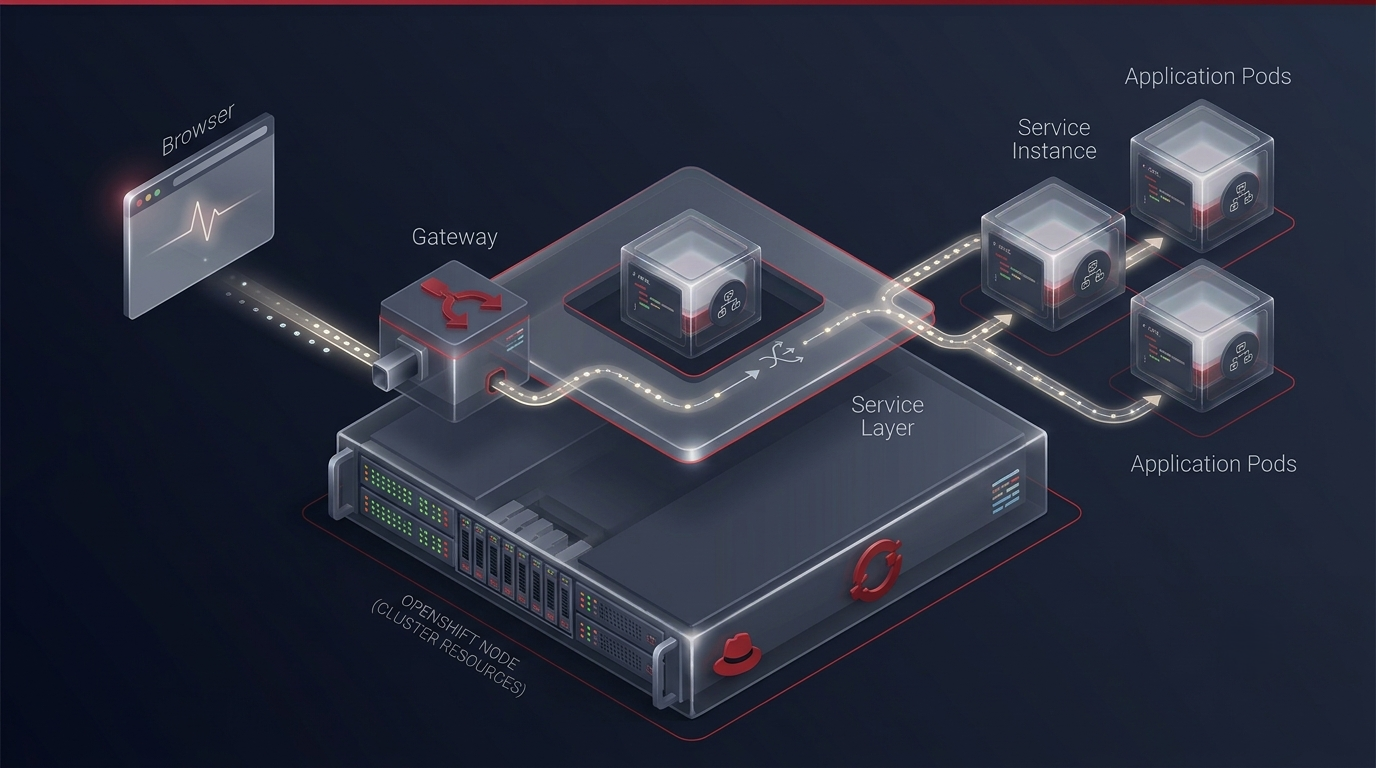
Suppose an application has three pods:
Pod A
Pod B
Pod C
A user does not need to know about all three. The Service gives a destination, and traffic can go to the available application instances. If Pod B disappears and a new one is created, the Service can keep giving the logical access point. This separation between the application endpoint and individual workload instances is essential for applications.
Routes Bring External Users Into the Picture: Communication is only part of the story. Eventually, an application often needs to be reachable from outside the OpenShift cluster. This is why OpenShift's routing capabilities matter. Imagine a customer typing an address into a browser. That request must travel from the network into the OpenShift environment and finally reach the right application.
A simplified path might look like: User → External endpoint → OpenShift routing layer → Service → Pod → Application
The user does not see the complexity behind that request. They simply get the application’s response. The routing layer helps link requests to the right service. Depending on the environment's security needs, and configuration, organizations can use TLS encryption, domain names, certificates and other networking controls. This is one reason why an OpenShift environment should be seen as an application platform, not just a container runtime. It links application workloads with networking, security, configuration, storage and operational processes.
What If a Container Crashes?
This is where the difference between running a container and using an orchestration platform becomes clear. Containers can fail. An application may hit an error. A process might stop. A node could have a problem. A deployment might bring a bug. In a managed environment, someone may have to notice the failure and restart the application. In OpenShift the platform constantly checks the state of managed workloads. If the real state does not match the desired state, the orchestration system can act to fix it. Suppose an application should have three replicas but one pod stops running. The system can try to bring the application to three available replicas.
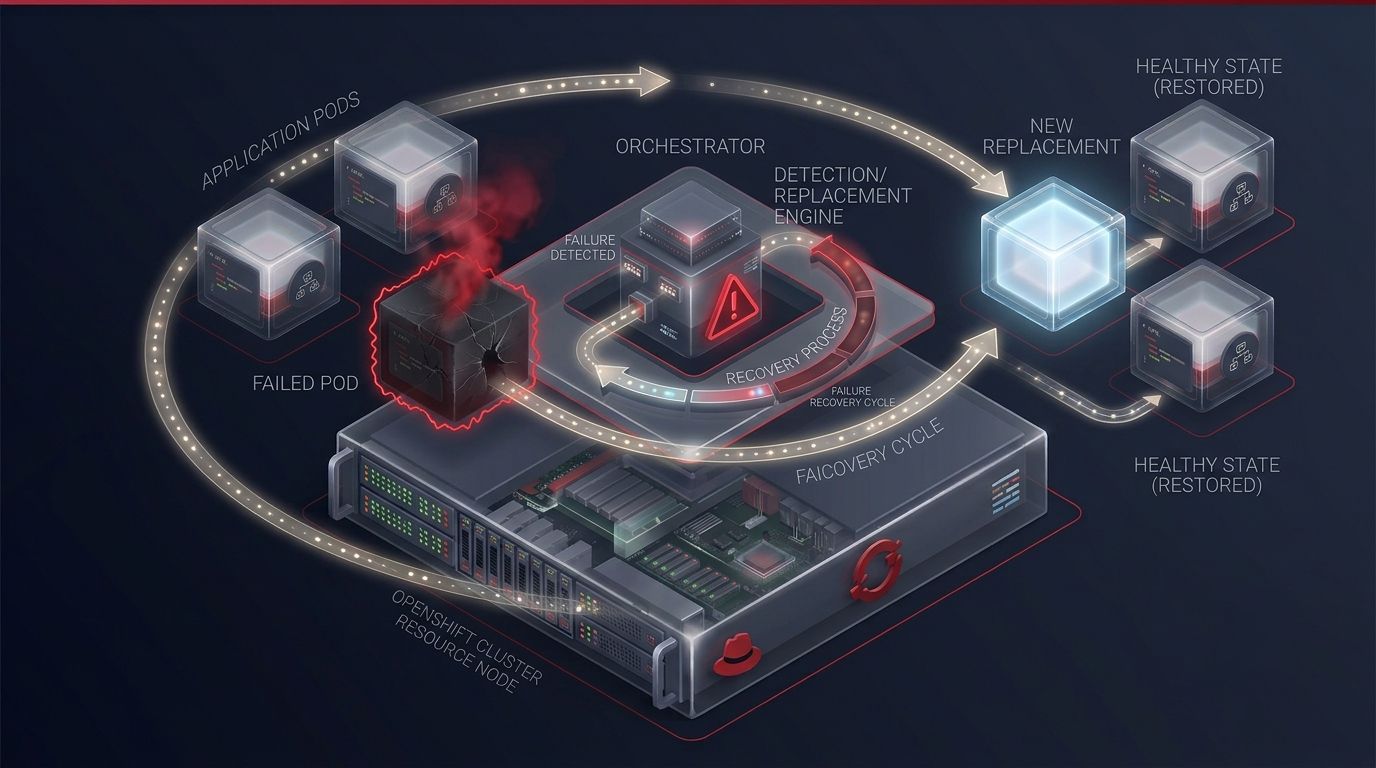
This does not mean OpenShift magically fixes every problem. If the application has a bug, restarting it may not solve the issue.. Orchestration gives an important layer of resilience by automatically managing workload lifecycle events.
This distinction is critical.
OpenShift can automate recovery from infrastructure and workload-state problems. It cannot replace good application design. The application still needs error handling, health checks, resource configuration, logging and monitoring.
Health Checks Help OpenShift Know Whether an Application Is Ready
A running process is not necessarily an application. Imagine a container has started successfully. The application inside it is still loading data or connecting to another service. If traffic reaches it early users may get errors. The platform now asks not "Is the container process running?" Also, "Is this application ready to serve users?" This difference can have an impact on reliability during deployments, restarts, scaling events, and temporary failures.
Configuration Should Not Be Buried Inside the Container
Another practical challenge appears when the same application moves between environments. A development environment may connect to one database. A testing environment may use another. Production might have different endpoints, credentials and configuration values. Hard‑coding all of these values into the application image would make deployments difficult and potentially create security problems.
OpenShift provides mechanisms for separating configuration from application images. Configuration values can be managed independently so that the same application image can be deployed into environments with different settings. Sensitive information requires care. Credentials, tokens, certificates and other secrets should not simply be placed into source code. Exposed through application images.
This separation makes deployments more flexible because the application package remains relatively consistent while environment‑specific information can be supplied separately. It also supports a development process: build the application once then configure it appropriately for the environment where it runs.
Storage Changes the Conversation
Containers are often treated as workloads. A container can Be replaced by another container. That is perfectly acceptable for stateless applications. What happens when the application needs to store information that must survive beyond the life of a container? Consider a database, file‑processing application, or content management system. If important data were stored inside a temporary container filesystem, deleting the container could result in data loss. This is where persistent storage becomes important. OpenShift can work with storage mechanisms so that applications can access data beyond the lifetime of an individual pod. The exact storage architecture depends on the environment, infrastructure, workload and storage technologies being used. But the underlying principle is straightforward:
Application compute and application data do not always have the lifecycle.
Understanding this distinction is essential when designing applications. A pod may be temporary. The data it uses may need to survive for years.
Security Is Built Into the Deployment Model
Running applications at scale also introduces security challenges. An OpenShift environment may contain hundreds or thousands of workloads belonging to teams. Those workloads need controlled access to resources, networks, secrets, storage and other services. This makes identity and access management an important part of the platform. OpenShift environments can apply permissions that determine what users and workloads are allowed to do. Security controls can help limit access and reduce the impact of configuration mistakes. This becomes particularly important in enterprise environments where development teams, operations teams, security teams and administrators may have responsibilities. A developer might need permission to deploy an application within a project. Should not automatically have unrestricted control over the entire cluster.
That separation supports the principle of privilege: users and workloads should receive the access required for their responsibilities rather than unlimited permissions. Security therefore is not something that should be added only after an application has been deployed. Security is part of the architecture surrounding the application.
Monitoring Turns a Running Application Into an Observable Application
Deploying an application is not the end of the process. Once users begin interacting with it, teams need to know what is happening. Is CPU usage increasing? Is memory consumption growing? Are pods restarting? Are requests failing? Is traffic increasing? Is an application responding slowly? Without observability, a production system can become a box. OpenShift environments can provide monitoring and logging capabilities that help teams understand application and infrastructure behavior. Developers and administrators can use these signals to investigate problems, understand resource usage, and identify patterns.
Logs are particularly useful when something goes wrong. Suppose users report that the application suddenly stopped processing orders. Looking at the browser may reveal an error message, but application logs can provide more information about what happened internally. Similarly, metrics can reveal patterns that are difficult to see from individual requests. A gradual increase in memory consumption, for example, might indicate a problem that's not immediately visible to users.
This is why deployment and observability should be considered together. A production‑ready application should not simply be running. The team should have visibility to understand whether the application is running correctly.
What a Deployment Really Looks Like From Beginning to End
At this point the entire journey becomes easier to visualize. I see a developer writes application code and pushes a change to the source repository. A build process creates a container image that holds the application and its dependencies. That image is stored in a registry. OpenShift receives the deployment configuration. Starts creating the required workload. The scheduler decides where the pod should run based on resources and scheduling rules.
I watch the container start inside the pod.I notice the application starts initializing. Health checks help decide if the application is alive and ready to receive requests.I see a Service offering an internal endpoint for the application. If external users need access routing routes requests to the right Service.I observe that if multiple replicas are set up several pods can serve the application. If traffic grows the workload can be scaled according to the deployment strategy.
I keep an eye on monitoring and logging to give visibility into the applications behavior.
I see that if a pod fails OpenShift can restore the desired workload state.
The entire process can therefore be represented as a loop:
Build → Package → Deploy → Schedule → Run → Observe → Scale → Recover
I note that then the cycle starts again whenever the application changes.
Why This Model Changes the Developer Experience
I understand that the real value of OpenShift is not that it removes complexity completely. Instead it moves complexity into a platform that manages it consistently. Without an orchestration platform a team may need to think about servers, deployment scripts, container processes, networking, service discovery, scaling, health checks, storage, permissions and recovery. With OpenShift these concerns can be expressed through a platform and declarative configuration. That does not mean developers no longer need to understand infrastructure. In fact understanding the concepts becomes even more valuable.A developer who understands pods can make deployment decisions.
Someone who understands Services can troubleshoot networking effectively.
Someone who understands resource requests and limits can avoid configured workloads.
Someone who understands readiness checks can design deployments.
I realize this is one reason structured open shift training can be useful for professionals moving from application deployment toward containerized and Kubernetes-based environments. The important learning is not simply remembering commands. It is understanding what the platform is doing and why.
OpenShift Is More Than a Kubernetes Interface
Because OpenShift is built around Kubernetes, it is sometimes described simply as "Kubernetes with features. ”While that description can provide a starting point, it does not fully explain how teams experience the platform. OpenShift provides an integrated platform around Kubernetes concepts with capabilities that support application development, deployment, security, networking, operations, and administration. For an organization, this integration can reduce the need to assemble every part of the application platform independently. Instead of treating the cluster, container workflow, deployment process, security model, developer experience, and operational tooling as completely separate concerns, OpenShift provides a more unified environment.
That matters in enterprise settings where many teams need a consistent way to build and operate applications. The platform also encourages teams to think in terms of processes. If one application can be built, deployed, monitored and scaled through a defined workflow, the same principles can be applied to applications.
Consistency becomes an advantage.
The Learning Curve Is Really About Understanding the Connections
I notice someone approaching OpenShift for the time may encounter a long list of unfamiliar terms: pods, deployments, services, routes, projects, nodes, operators, images, registries, secrets, persistent volumes, replicas and more. I see that trying to memorize all of these terms independently can make the platform seem more complicated than it actually is.
I think a better approach is to understand how the pieces connect.
The container image represents what should run.
The pod provides the environment where the container runs.
The node provides the compute resources.
The deployment mechanism describes how the workload should be maintained
The Service provides internal access.
The route can expose the application externally.
Configuration and secrets provide information. Persistent storage protects data that needs a lifecycle. Logging shows what is happening. Once these relationships become clear, the vocabulary no longer feels like a collection of technical terms. This is also where an openshift course can become more valuable when it focuses on workflows rather than isolated definitions. The goal should be to understand what happens when an application moves through the platform, how the components interact and how to troubleshoot the system when something does not behave as expected.
The Real Story Behind "Deploy"
The time someone says, "Just deploy the application, " it is worth remembering how much is hidden inside those two words. Deployment can involve creating or retrieving a container image defining the desired workload, scheduling pods, allocating resources, configuring networking, connecting services, applying security rules, providing configuration, attaching storage, running health checks, exposing the application, collecting logs, watching metrics, and maintaining the desired state.OpenShift brings these moving parts into a platform where they can be managed in a way.
That is the story behind the platform.
It is not about putting containers somewhere and starting them. It is about creating an environment in which applications can be deployed repeatedly connected to services scaled when necessary, observed during operation, and recovered when individual components fail. Perhaps the most important idea is that the application does not have to be treated as a fragile process tied to one server. Instead, it becomes a managed workload.
Final Thoughts
Understanding OpenShift Container Platform becomes much easier when you stop looking at it as a collection of commands and start following the journey of an application. A developer writes code. The code becomes a container image. The image is stored in a registry. OpenShift uses that image to create workloads. Kubernetes-based orchestration determines where those workloads run. Services provide communication. Routes connect users. Health checks help determine whether applications are ready. Scaling adds capacity when required. Persistent storage protects data. Security controls limit access. Monitoring and logging reveal what is happening behind the scenes.
None of these components exist in isolation. They work together to create a platform where modern applications can move from development into production in a repeatable and manageable way. That is why understanding OpenShift is not simply about learning how to launch a container. It is about understanding the journey from code to a running application and knowing what happens at every stage.
Once you can follow that journey, the platform becomes less mysterious. What initially looks like a collection of Kubernetes objects, containers, networking components and configuration files starts to look like a connected system, with a clear purpose: helping applications run reliably while giving teams the control and automation needed to manage them at scale.