
OpenShift Explained: The Key Elements That Comprise Red Hat’s Enterprise Container Platform Essay
Last updated on Sep 19, 2026
Although OpenShift is traditionally known as an enterprise Kubernetes product, the tool’s very essence goes far beyond that. Indeed, Kubernetes serves as the orchestration engine behind the tool. At the same time, OpenShift implies a set of tools, security guardrails, engineering tools, engineer and operator support, and other elements that are required to extract value from the Kubernetes platform. As of now, Red Hat OpenShift is essentially a hybrid-cloud application platform that is used to build and scale container-native applications on Kubernetes.
Therefore, explaining what OpenShift really is will include elaborating on what elements comprise it. Indeed, logically, if there is an application that is created by coding, it needs to be designed, built, and deployed to production. As such, a developer might need a development environment for coding, and operations might need a service as a platform to package and deliver the application. The Kubernetes cluster needs to route workloads to the specified hosts, have networking tools to expose the application, enforce security guardrails, and have operators to watch for the correct configuration. All of these will be orchestrated in OpenShift, and the tool can be used as much more than an orchestrating system for Kubernetes.
OpenShift Starts With Kubernetes. Goes Beyond It
I see OpenShift has Kubernetes at its core. Kubernetes gives the model that coordinates container work. Kubernetes can plan work across nodes keep applications in the state we want find services and let us scale or roll out changes. OpenShift takes a Kubernetes version that follows the rules and then adds services around it. Those extra services include tools for developers, safety features, watching, CI/CD, operators and other parts that help big companies deliver apps.
I think the difference is important. OpenShift is not another name for Kubernetes. A group could set up a Kubernetes cluster. Then pick separate tools for login, developer steps, image control watching, app delivery and cluster work. OpenShift gives a platform that covers many of those needs. That makes the environment more guided so developers and admins can share tools and steps while the platform takes care of hidden tasks.
I imagine an app launch. A developer writes code makes a container image pushes that image to a registry tells how the app should run and then puts it on Kubernetes. Kubernetes can do the coordination. Many other questions appear. How does the developer build the image? How do we control who can use it? How does the app reach the world? How do we update it? How do we gather logs and numbers? How does the company keep safety rules in place?
I believe OpenShift is built for the app life cycle, not just the container coordination step. Hat’s current OpenShift platform has tools for writing and sending apps automatic upgrades, watching, safety, CI/CD, GitOps, operators and running in a mix of clouds.
I still think knowing Kubernetes is vital, for anyone using OpenShift. The ideas do not vanish when OpenShift comes in. Pods, deployments, services, namespaces, controllers, APIs and scheduling stay core. OpenShift adds platform power around those ideas and gives its own tools like the oc command line and a web console.
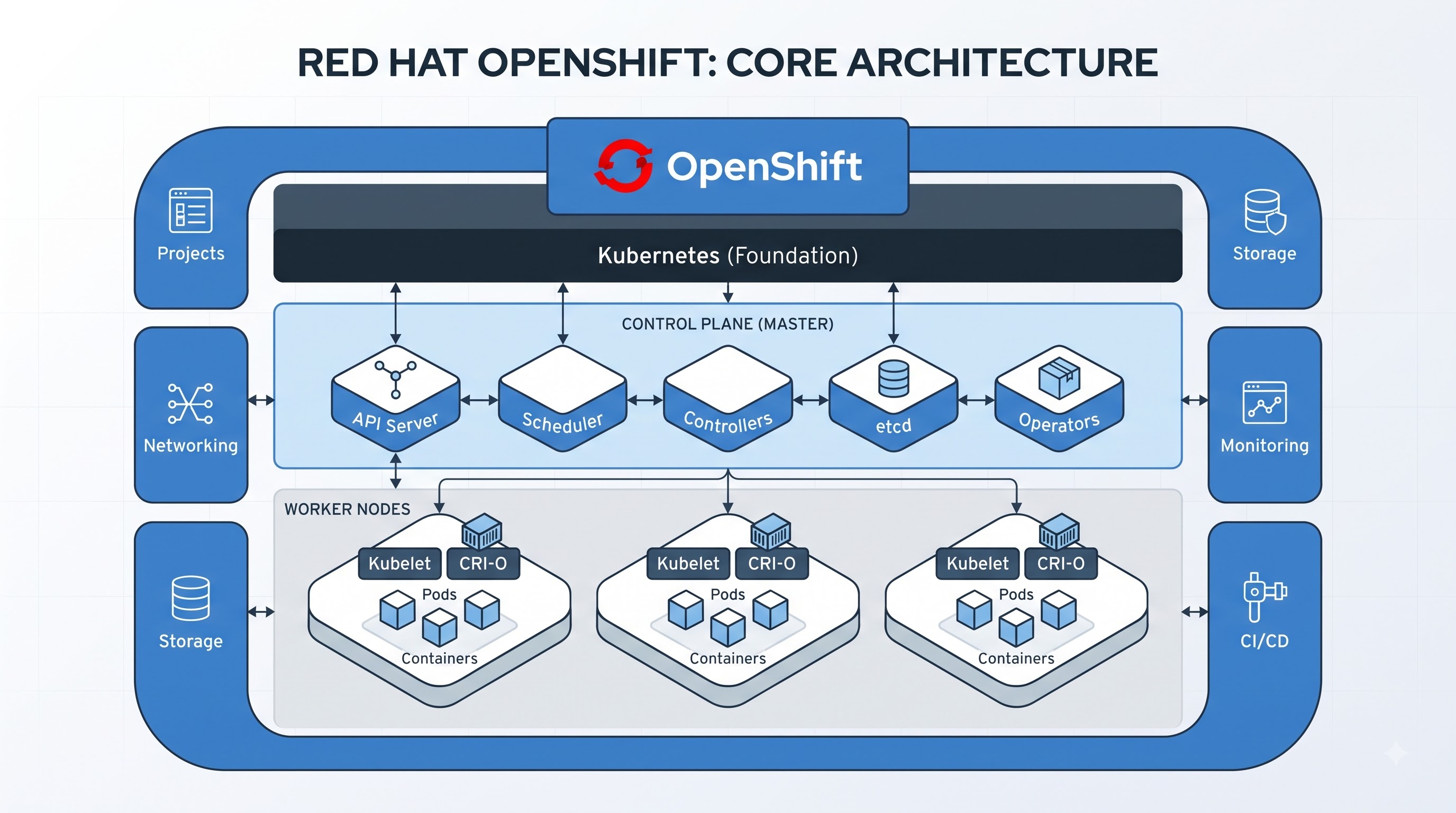
The OpenShift cluster can be seen in two parts:
the control plane and the worker or compute side. The control plane is in charge of managing the cluster and keeping it in the state that we want. The worker nodes provide the computing environment where application work runs. Red Hat’s architecture documents explain that the control plane handles work on compute machines while services such as CRI‑O and the Kubelet run on nodes to support container execution.
The control plane is where the cluster’s management decisions take place. The Kubernetes API is the interface that users, administrators, automation and other components use to talk to the cluster. The scheduler decides where new work should run and controllers keep checking the state against the desired state and act when something is off. This idea is one of the core concepts of Kubernetes. It is a concept that anyone working with the OpenShift cluster must understand.
Worker nodes have a job. They give the compute resources needed to run application pods and their containers. A node contains the parts that need to talk to the control plane and to start, stop and manage work. In practice the control plane decides what should happen while the worker environment supplies the resources where that work actually runs. This difference is especially important when troubleshooting an application because a problem can come from the application, the node, the network, storage or the control plane.
OpenShift also organizes work through projects. A project lets users group. Separate their resources from other teams inside a cluster. It is similar to a Kubernetes namespace. Also fits into OpenShift’s user and access‑management model. Projects can hold application resources such as pods, services, deployments, configuration objects and other items needed for a workload.
For example an organization might set up projects for development, testing and production. Another organization could create projects, around teams or specific applications. The key point is that a cluster is not one big shared space where every workload lives together. Projects create a boundary that helps teams manage resources and access in an organized way.
Once this layout is clear the OpenShift cluster becomes easier to picture. The control plane manages the cluster the workers give the execution environment. The projects organize the applications and resources that teams deploy. Around these core parts OpenShift adds networking, security, storage, operators, developer services and monitoring.
Why Operators Rule OpenShift
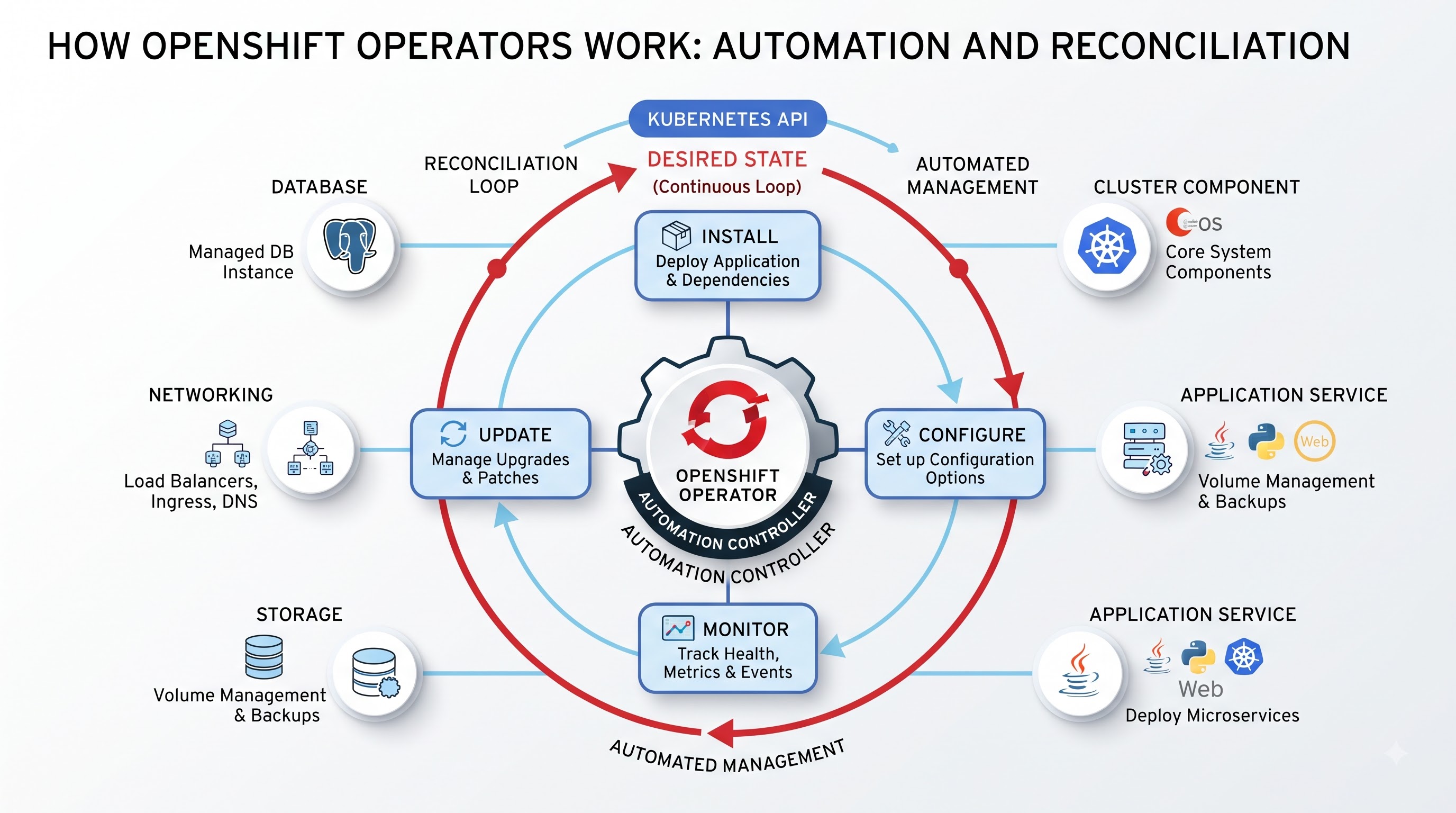
Operators are one of those ideas worth paying attention to when studying OpenShift. An Operator is a type of software that leverages Kubernetes APIs to automate management of a specific component or application. Instead of performing installation, configuration, health checks, upgrades, or any other activities manually or developing an automation script that will handle these tasks, a single Operator can take care of these activities.
These considerations become particularly relevant when one speaks about the enterprise landscape. There are many components, each with specific requirements, and the process of installing a program or a database is only part of the story. Ensuring it is appropriately configured, backed up, upgraded, monitored, and available is another matter entirely. Using an Operator, one can encode the operational knowledge of a component into a program so that it can be managed automatically.
A Red Hat documentation states that Operators are “fundamental extensions to the Kubernetes control plane” that should be used to “package, deploy, and manage” services on an OpenShift platform. In effect, there are two categories of Operators in OpenShift: Cluster Operators that perform essential management tasks and those handled by the Operator Lifecycle Manager. The second group is used to manage additional components that are not considered “core” software.
An example can help understand what Operators do and how they are used. Suppose that a company needs a database, and the preferred option is to use an open-source solution. It is possible to install the required components and scripts and then perform health checks, configuration changes, backups, restores, and other database administration tasks. Alternatively, one can use the Operator that was developed to handle these tasks. It will know which components and scripts to launch and in which order, and it will be able to manage the application or service more effectively. For someone pursuing openshift online training, this example also shows why understanding Operators is important for managing applications consistently rather than relying entirely on manual administration.
It is not hard to guess that Operators are closely related to the concept of automation in OpenShift. Everything is configured to operate in a desired state, and there are specific instructions on how to reach that state. In effect, Operators are tools that help applications and services maintain the desired state. The Operator Lifecycle Manager (OLM) and the software catalog that comes with OpenShift provide capabilities to search, install, and manage Operators. An administrator can make certain Operators available to developers and applications by including them in the catalog.
The main takeaway is that Operators help to operationalize the company’s knowledge and experience. They reduce the amount of routine administrative activities that need to be performed. Finally, if the company has multiple clusters or multiple instances of the same application, operators can be used to ensure consistency across clusters and instances.
Containers, Images, and the Journey From Code to a Running Application
Another feature of the OpenShift model comprises containers. A container serves to package up an application and associated elements into a portable manifestation. Instead of having to configure a specific server to host a particular application, a container image can be created that encapsulates the application’s environment, and the resultant image can be hosted on any compatible container platform.
The OpenShift platform is built on top of generic container technologies and is compliant with the Open Container Initiative standards. In addition, it has tools and features that support a CI/CD pipeline and enable development teams to transition from code to a running application.
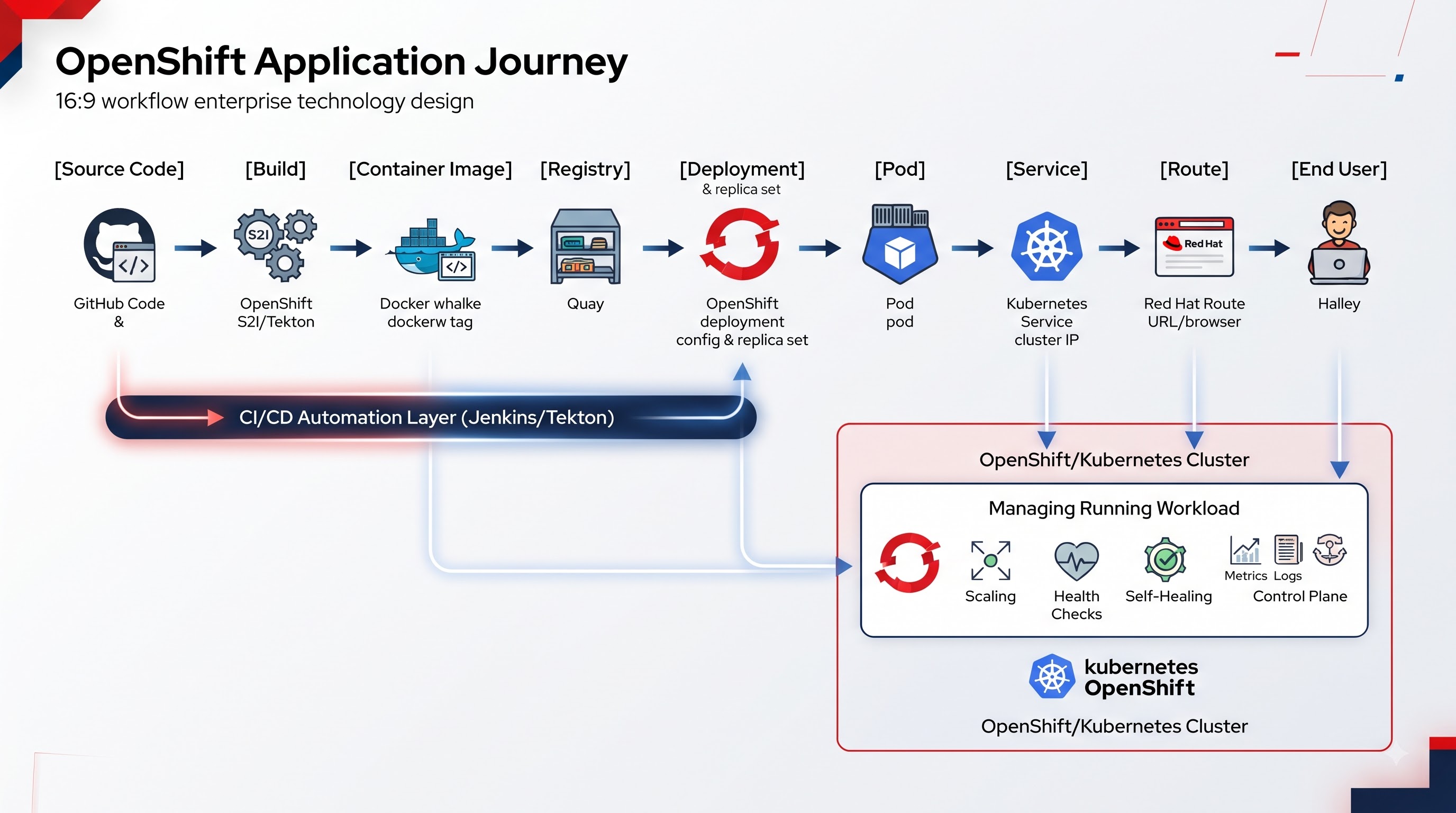
In general, the application development cycle is multifaceted and involves several phases such as coding, building, and deployment. With OpenShift, the process starts when the application code is committed to a Git repository, where it is built into a container image. Next, the image is stored in a registry, against which OpenShift pulls the necessary image to deploy the application. The Kubernetes platform layer handles the specifics of running workloads, scheduling pods, and ensuring that the actual state of each component matches the desired state.
When it comes to application development and delivery, OpenShift offers multiple options. As per the Red Hat documentation, the platform “ships with integrated CI/CD tooling and Source-to-Image (S2I) capabilities for building application images, as well as support for GitOps and other delivery models, depending on your architectural requirements.” This implies that development teams can choose from various methods for delivering applications to target environments.
In this regard, OpenShift makes operations simpler by establishing a link between development and operations. With this platform, a developer does not have to understand every aspect of the infrastructure before delivering an application. At the same time, the development teams can standardize and operationalize specific aspects of the application delivery process. Finally, it is worth remarking on the difference between an image and a running container. Overall, an image is merely an application packaged up, whereas a container is an instance of that image that actually runs. The orchestration of containers takes place through Kubernetes components such as pods and deployments.
The key takeaway is that OpenShift enables the connection of these stages into a single pipeline that can be automated, thus helping to achieve CI/CD goals.
Security Is Part of the Platform Not an Afterthought
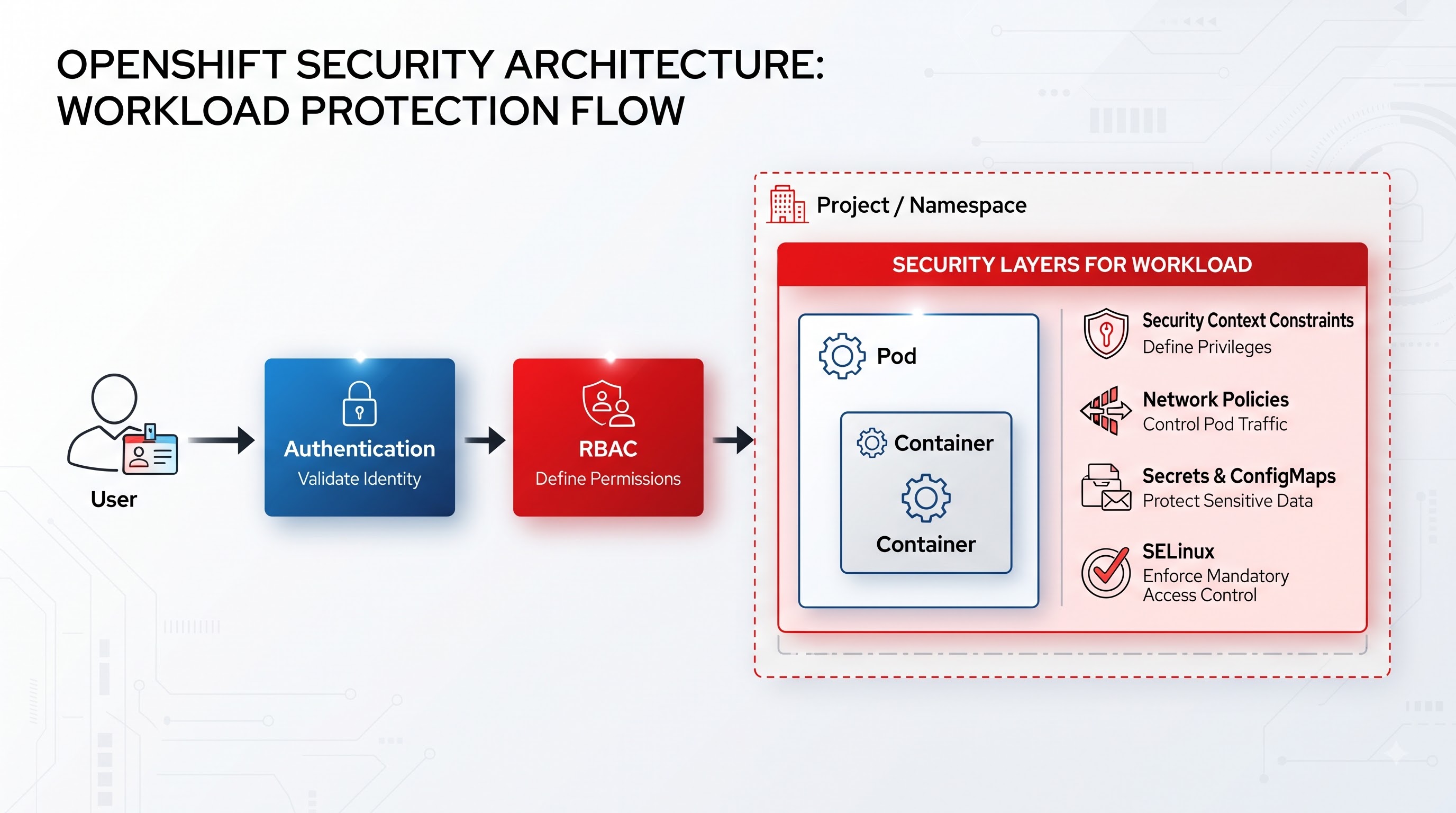
Security is more complex when enterprises deploy applications on a shared platform. The platform must decide who can access a resource what applications may do, which containers receive capabilities and how workloads stay isolated.
OpenShift looks at security at layers. The simplest layer is users and their permissions to access the cluster and its resources. Role‑based access control can be applied to users and service accounts. At the workload level, Security Context Constraints can be applied to pods to define what the pods are allowed to do – for example, whether the pods can run containers, which capabilities they can use, which files they can access and so on.
The idea is that a container should not have blanket access to the host it is running on. If an application does not need to do everything, then by default the application should not be able to do those things. This is why configuration options exist for what a workload can do what users it can. So on.
Security is also connected to networking and identity. A multi‑tenant environment should have boundaries between applications and users. Access control rules can define who has access to manage resources, and network rules can define what workloads can communicate with other workloads. The overall point is that security is part of the application platform in OpenShift. Red Hat documentation states that the OpenShift platform includes security checks in all parts of the container stack and enables security functions in the application lifecycle.
As a result, a student should think about security in terms of applications and workloads rather than as something that comes after the application is deployed. This is why RedHat OpenShift training should include lab exercises that involve users, roles, service accounts, permissions, projects, and workload isolation rather than a purely technical focus on commands and deployment.
Networking, Routes, and Storage: Making Applications Useful
You may be able to run the application in a container, but how do you make it accessible to users and other applications? This is where the networking facilities of OpenShift come into play. Inside the cluster, services provided by Kubernetes offer stable endpoints for other pods to communicate with a group of pods. As you cannot rely on the pods to stay at the same IP address (they are designed to be ephemeral), the application inside a pod cannot rely on being at a certain address. The other consideration is that you will most probably want the pods to change on restart. A Service provides a stable abstraction layer for the application to consume.
The same Services can be exposed to external users via the OpenShift Routes, which define a hostname and rules. One of the ideas that make OpenShift different from Kubernetes is the notion of Route, which allows publishing applications outside the cluster. One of the concepts that many experienced Kubernetes developers miss when they start working with OpenShift.
Another consideration is the storage layer, which is often overlooked. While stateless applications can be trivially re-created from their image with the state saved somewhere else, databases with other stateful applications have to have a place to store their state. OpenShift provides facilities to attach and use persistent storage via Kubernetes resources PersistentVolumes and PersistentVolumeClaims, which define storage classes.
The separation between compute, networking, and storage is essential, as issues with any of them will bring down the application. The application may be fine in the pod, but it may not be available to the users, as it could be in the wrong network. The network issues may be on the client side, but the database that the application tries to write to may be out of space on the storage backend. Understanding the interplay between the different layers is crucial to troubleshooting production applications.
The Developer Experience: From Application Code to Production
The toolset covers parts of the production cycle such as building applications, deploying them, and managing them. Developers can use the web console, command‑line utilities, and integrated development environments (IDEs) to build applications. The choice depends on the organization’s requirements and infrastructure.
In Red Hat’s documentation for developers, Red Hat notes that OpenShift is suitable for supporting Cloud‑Native applications, legacy apps and modernized programs in on‑premises, Cloud‑Native and edge environments. The documentation mentions developing tools, command‑line utilities and IDE integration, CI/CD, GitOps, container image creation and management and security.
Notably, the documentation highlights the need for consistent developer experience. In an organization, developers working on programming languages and application types can share the same development environment and processes while deploying their code to production. With OpenShift, developers do not need to understand all aspects of the underlying infrastructure because the development workflow is automated. The same applies to the operations team; the operations team can define the processes for submitting applications to production through CI/CD or DevOps pipelines. Developers do not have to create production‑grade artifacts, such as containers, themselves because CI/CD pipelines can be used for this purpose.
In this context the GitOps methodology fits naturally into the MTA. GitOps considers configuration and application code as documents and uses continuous delivery/continuous deployment (CI/CD) principles to manage changes in version control. In words developers and the operations team can change the desired state of the code, application or infrastructure and then automate the deployment and configuration of these changes in an environment making the process auditable.
From the perspective of someone taking OpenShift training the section concerning the use of different command‑line tools and the concepts behind them is the most interesting. Developers need to learn the principles of operations through examples. While the actions described in this section are not difficult it is important to understand how the toolset works with containers and Kubernetes objects and how a command affects the application. Moreover this approach helps to visualize the changes that have occurred. Thus developers do not just run the commands; developers learn the context. Use the acquired knowledge and skills in practice.
For instance the command line utility (CLI) is a means to an end. The operations personnel and developers should understand what a particular Kubernetes object type is, what it is responsible, for and how it fits into the context of the application. In essence each command changes some aspect of the application. To ensure that developers learn it is necessary to associate the change with an action that the command performs, not just the fact that it performs it.
Conclusion: What Really Defines OpenShift?
The simplest way to think about OpenShift is to regard the major components as a single system. Kubernetes stands in the middle as the orchestration engine, while OpenShift, with all its supplementary components, implements functions to build, secure, run, and manage applications in general. The control plane oversees the operations of the cluster, while the worker nodes run the application workloads. Projects are a means of organizing units of work in either production or development, while operators manage a set of Kubernetes resources and facilitate processes of platform and app management through custom resource definitions. Containers package the application code, while deployments and Kubernetes resources run the applications. Networking exposes the applications, and storage is used to store persistent data. Security controls access to both the platform and the applications.
The additional layer of abstractions that constitute OpenShift defines the differences between the platform and generic Kubernetes clusters. The former implies greater emphasis on the development process and application lifecycle management, while the latter is simply a tooling and orchestration platform for containers. Red Hat documentation states that OpenShift is a platform for building, deploying, and managing applications, from development to production.
From the perspective of a beginning administrator, the most valuable aspect of this definition is that there is no need to memorize dozens of individual commands. Instead, one should understand the interplay of various layers and major components because these interactions comprise almost all operations. For instance, it is essential to comprehend how developers’ work results in the deployment of the application, how these applications are deployed as containers, what workloads are created in Kubernetes, how they are secured and exposed, what role Operators play in managing the platform, and how monitoring is implemented. For someone pursuing openshift training online, understanding these connections is more useful than simply memorizing commands because it helps build a practical view of how OpenShift operates as a complete environment. In the end, OpenShift ceases to be a disorganized collection of components and is instead seen in its true capacity: as a complete solution for application lifecycle management in modern infrastructure.