
Optimizing OpenShift Costs in Enterprise Kubernetes
Last updated on Nov 16, 2026
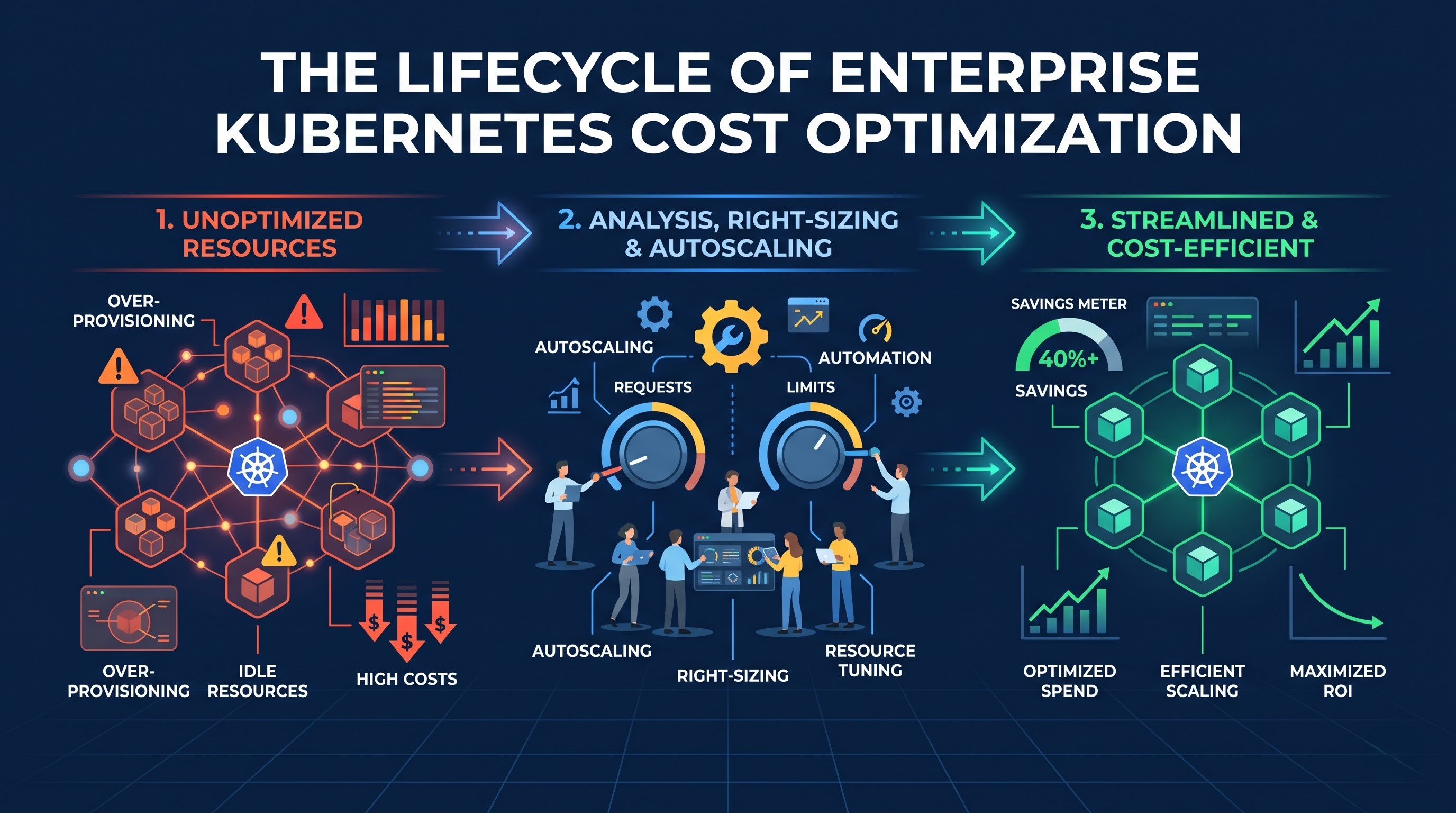
Red Hat OpenShift provides enterprises with powerful container orchestration, developer self-service, built-in security guardrails and consistent operational tooling across hybrid and multi-cloud estates. But those same features that make OpenShift so appealing at scale—shared compute pools, declarative self-service deployments, dynamic autoscaling, and multi-tenant projects—can quietly inflate infrastructure bills when resource management is not a priority. OpenShift clusters, whether managed or self-managed, tend not to appear as neat line items on cloud invoices that map directly back to a single business unit. Instead, organisations are eyeing significant costs for compute instances, block and object storage volumes, network traffic, control plane and observability overhead, and software licensing.
You’re not talking about starving applications of compute or turning off high availability protections to optimise OpenShift costs in an enterprise environment. High availability, predictable latency and fault tolerance are still non-negotiable for production systems. True cost optimisation couples real workload demand to allocated capacity across all layers of the stack: container sizing, project guardrails, pod and node autoscaling, instance selection, storage and artefact hygiene and FinOps governance. Platform engineers, application developers and finance leaders are able to substantially minimise waste and maintain reliability by viewing resource management as a continuous lifecycle, not a one-time cleanup.
Enterprise OpenShift Environments Drift Toward Waste: Why
In the traditional virtual machine model, teams usually provision dedicated servers for an application and have a relatively direct link between a machine and a bill. OpenShift changes that, pooling the underlying CPUs, memory and storage across projects and nodes. Theoretically, sharing improves efficiency, but several structural patterns in the enterprise routinely lead to idle or stranded capacity.
First, engineers naturally pad resource requests at initial deployment to protect new services from slow startups, traffic spikes or out-of-memory events. The scheduler schedules pods based on requested resources, not actual real-time consumption, so an overly generous request reserves capacity on a node even when the container is using only a fraction of it. Multiply a small over-request across dozens of microservices, multiple environments, and multiple replicas and you can end up with hundreds of CPU cores or gigabytes of memory sitting unused while still driving up node counts.
Second, organisational scale adds multi-tenancy and sprawl. Big companies run development, quality assurance, staging, integration and production projects through many product squads. However, without any ownership, sizing, and lifecycle management practices, the workloads remain…. In an attempt to fill this gap of knowledge in the engineering teams, many organizations conduct openshift training for their development and platform operation teams.
Third, cost visibility generally follows technical autonomy. Developers are able to spin up new services or replicas quickly with self-service workflows, but finance and platform teams might not have granular attribution of what project, application, or business feature is driving the underlying compute and storage spend. Optimisation efforts stall or rely on blunt, top-down budget cuts that create friction across engineering teams lacking shared accountability and clear telemetry.
Requests, Limits, and QoS Container Sizing
OpenShift resource management is driven by container CPU and memory requests and limits, enforced through Linux control groups. Understanding the difference in behaviour between these two settings is important because confusing them is one of the most common sources of both wasted spend and runtime instability.
Resource request: The minimum CPU or memory that a container is guarantyd to have when it's being scheduled and running normally. The OpenShift scheduler uses requests to know whether a node has enough unallocated capacity to host a pod. If requests are set too high relative to actual sustained usage, nodes get filled up on paper long before physical hardware is saturated, forcing the cluster to scale out with additional nodes. If requests are set too low, however, pods may land on nodes that are already stressed and experience contention or eviction during busy periods.
Resource limits specify how much CPU or memory a container is allowed to use on a node. Memory limits are hard limits, which means that if a container exceeds its memory limit, the runtime kills the container with an out-of-memory condition. CPU limits behave differently because CPU is compressible; going over a CPU limit usually means throttling, not immediate termination, and this can manifest as increased response latency or slow request processing, even when there are spare CPU cycles on the node.
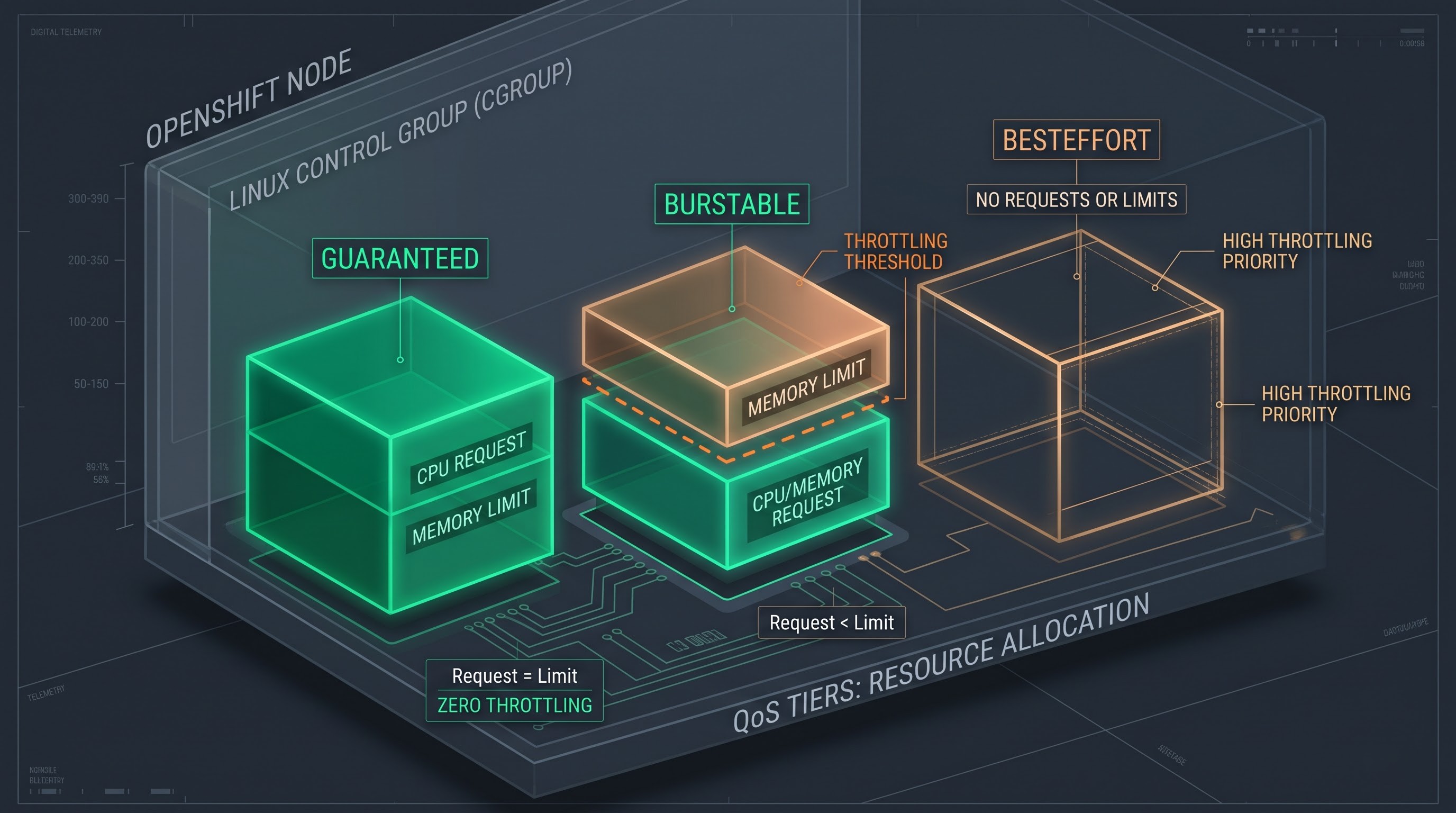
Requests and limits directly affect node pressure and eviction order, so OpenShift groups pods into Quality of Service tiers based on how those values are set on containers:
Guarantyd pods have the same request and limit values for CPU and memory on all containers, giving them the best protection during memory pressure at the node level.
Burstable pods have requests set lower than limits (or request and limit only for some resources), which allows the container to grow if there is spare capacity, but still provide a baseline.
BestEffort pods do not declare any requests or limits, so they are entirely at the mercy of spare capacity and are the first to be killed when a node is short of memory.
Many enterprise teams run into problems either by using the same huge limits and requests for every service, tying up expensive capacity, or by not providing limits at all, which can result in a runaway process or memory leak in one workload destabilising the neighbouring workloads on the same node. Much better is to measure real telemetry on representative traffic cycles, set requests near steady state needs with a reasonable buffer, and tune limits carefully so bursty workloads can breathe without risking node instability or bad latency spikes.
Rightsizing Workloads Without Compromising Reliability
Rightsizing is the practice of matching container resource assignments to what the application is actually doing. Enterprise applications exhibit daily, weekly, seasonal and release-driven patterns, so rightsizing is best achieved with observability and controlled rollouts, not guesswork.
Teams need to look at actual historical consumption by percentiles, not just averages or short-lived peaks. That service may average low CPU utilisation most of the day, but it can still have occasional bursts during batch jobs or login waves. Adjusting requests to realistic baselines, leaving appropriate headroom, and validating changes under realistic load will avoid false economies that lead to throttling or restarts.
OpenShift’s cost management and observability stack can help you identify over-provisioned containers by comparing configured requests and limits to actual utilisation. Once cost management optimisations are enabled on target projects and metrics are collected, platform and application teams can determine workloads where the requested CPU or memory is consistently more than the actual consumed. Once candidates are found, changes should be rolled out gradually in lower environments or canary deployments while monitoring latency, error rates, restarts, and out-of-memory events.
High availability has to be part of the sizing equation. Running one replica to save money creates a single point of failure - if that pod is terminated unexpectedly, availability drops. Topology spread constraints let you spread multiple replicas across availability zones and different nodes which protects uptime while still allowing each individual replica to be sized cleanly rather than over-inflated. Well-configured liveness, readiness, and startup probes also contribute to cost-effective stability by ensuring that unhealthy instances are detected correctly and traffic is only routed to containers that are ready.
Project guardrails: quotas, limit ranges and multi-tenancy

When you have dozens or hundreds of engineering teams sharing OpenShift clusters, you can't scale by relying on manual code reviews alone to ensure sensible resource sizing. OpenShift projects are the main enforcement boundary for resource discipline, extending Kubernetes namespaces with enterprise governance, policy and isolation.
ResourceQuotas define hard limits on the total amount of compute, memory, storage and object counts used in a project. By defining project-level quotas per tier and environment (more restrictive quotas for sandbox or development projects, larger governed quotas for production projects), platform teams can prevent a single team’s misconfiguration or runaway deployment from eating the capacity of the entire cluster.
LimitRanges are also used to control individual containers and pods in a project, as a complement to quotas. They can provide sensible defaults for requests and limits when a developer doesn't specify them, enforce min and max bounds so that teams don't accidentally request tiny fractional resources or giant blocks of memory, and maintain consistent ratios between requests and limits. Together, defaults and guardrails remove the common anti-pattern of either unconstrained resource requests or completely untethered pods.
Tiered multi-tenancy further enhances this governance by tying platform policies and infrastructure tiers to workload criticality. Development and test environments usually do not need the redundancy, 24-hour peak capacity, or costly specialised hardware of the production environment. Enterprises can break environments into separate projects or clusters with dedicated quotas, scheduling rules and operating schedules so that they are not paying production rates for non-production experimentation.
Autoscaling Strategies: Cluster, Horizontal, Vertical Scaling
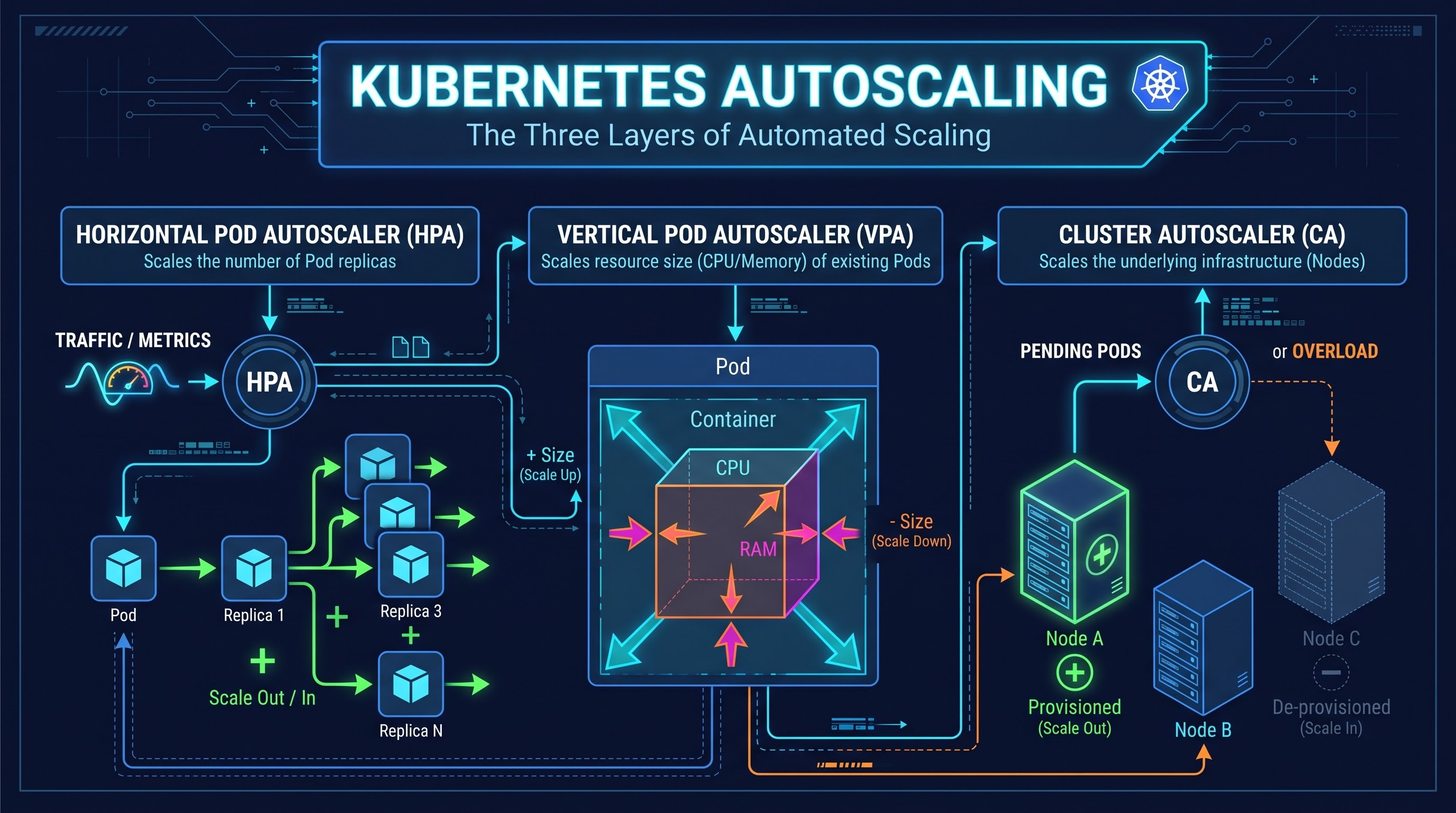
Static resource sizing problems in dynamic enterprise environments with varying traffic during the day, month or business cycle. Autoscaling fills the void between constant baseline capacity and fluctuating demand, allowing organisations to avoid paying for peak capacity during downtime, while still being able to meet demand spikes.
Horizontal Pod Autoscaler scales the number of pod replicas up or down based on observed metrics like CPU utilisation, memory usage or custom and external application metrics. Horizontal scaling is a good choice for stateless microservices, which can add or remove instances smoothly without losing state. Configured correctly, it will scale out replicas to handle increased request volume, and scale them back in when demand drops.
Vertical Pod Autoscaler is more about changing container resource requests and limits, not replica counts. It is a common practice to initiate vertical autoscaling in recommendation mode in production environments so that teams can observe the suggested CPU and memory values over time and verify how the recommendations perform against real workloads. Automatic vertical adjustments need careful consideration, for example by ensuring enough replicas so that pod restarts during updates do not impact service availability. Teams should also avoid using horizontal and vertical autoscalers on the same metric in ways that create conflicting scaling loops.
Cluster Autoscaler works at the infrastructure layer by adding worker nodes to the cluster when pods cannot be scheduled because there is not enough capacity, and scaling down underutilised nodes when workloads consolidate. Pod-level and cluster-level autoscaling must work in tandem . When horizontal pod scaling makes replicas too aggressively and node scale-down thresholds are set too conservatively, the cluster may hold on to idle nodes long after traffic has tapered off. In contrast, very aggressive scale down settings may cause frequent node churn or disrupt pods if disruption budgets and placement constraints are not tuned appropriately.
Node Architecture, Bin Packing and Infrastructure Selection
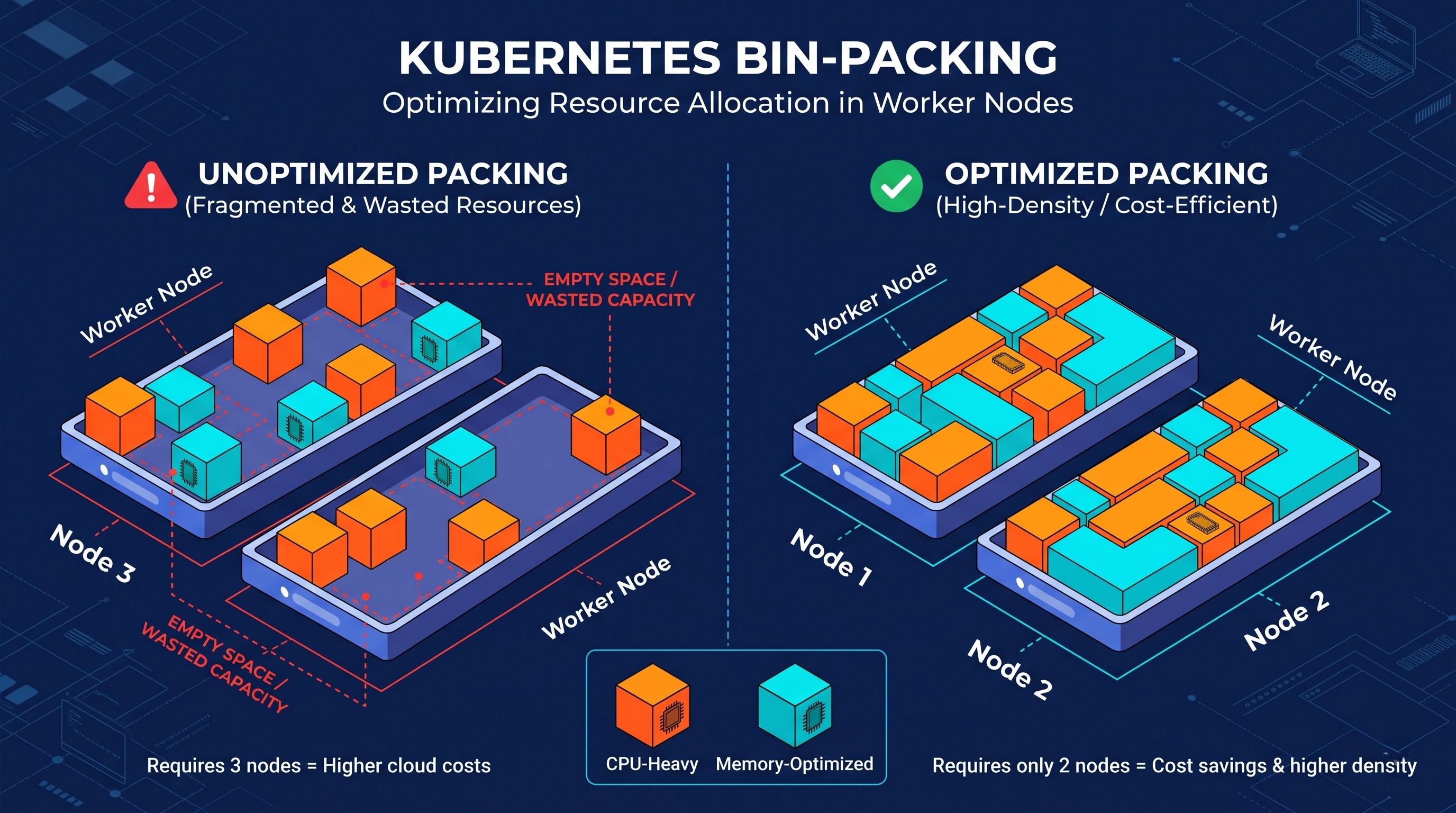
Even well-sized pods can leave money on the table if the underlying worker nodes are a poor match for the workload shapes. Each node allocates a portion of its CPU and memory to host operating system daemons, kubelet processes, and OpenShift platform components. The remainder is available for application workloads.
The bin-packing problem is to fit pods efficiently on the available nodes without leaving awkward pockets of unschedulable resources. Imagine a cluster with very large nodes, where each pod requests a lot of memory relative to modest CPU, or vice-versa. One dimension can be filled up completely and the other dimension is mostly empty. This leaves space unused by the remaining pods. Select node instance families that match workload profiles (general purpose, compute heavy, memory optimised, or specialised accelerator nodes where appropriate) to improve packing density and reduce wasted infrastructure.
To ensure that specific workloads are scheduled on the right node pools, administrators can use workload placement controls such as node selectors, affinities, anti-affinities, and taints with tolerations. For instance, specialised machine learning or data-processing workloads that need high memory or accelerators can be isolated to dedicated node pools with matching taints and tolerations, keeping general web microservices on standard, cost-effective nodes. Using different instance types in a pool can also increase capacity availability and pricing flexibility across cloud zones.
Once baseline demand and workload resilience are understood, commitment mechanisms and discounted capacity models -- such as cloud reservations, savings plans, or fault-tolerant spot capacity where workloads can tolerate interruption or checkpointing -- can further reduce unit compute costs. First, mature teams optimise workload efficiency and don’t lock into rigid commitments before stabilising pod sizing and autoscaling, so they can not commit to buying unnecessary waste.
Storage, Networking and Operational Lifecycle Hygiene
Storage, data transfer and forgotten platform artefacts quietly add up to recurring expenses across enterprise OpenShift environments, but compute gets the lion’s share of the attention in Kubernetes cost discussions.
Persistent volumes often outlive the applications that created them. Provisioned storage blocks can sit idle and billable month after month when developers delete deployments or tear down test environments without cleaning up associated persistent volume claims or snapshots.
Periodic audits, clear storage class tiers for different performance needs and automated cleanup policies for ephemeral environments help keep storage spend aligned with active data.
Pipelines, container registries and cluster state also tend to accumulate clutter over time. Storage is consumed, administrative queries are slowed down, and the control plane data store gets noisy with completed build pods, old image tags, unused secrets, stale routes or services and abandoned namespaces. You keep the environment lean and responsive by defining retention rules for build history, image pruning policies, and scheduled decommissioning of inactive projects.
Another subtle cost driver in distributed enterprise architectures is cross-zone and external network traffic. Distributing replicas across availability zones is important for high availability but chatty service to service calls or heavy replication of data across zones or regions can lead to noticeable data transfer charges. Designing services with reasonable caching, batching, and locality awareness, while maintaining resilience, keeps network spend in check without sacrificing reliability.
FinOps Governance: Visibility, Allocation, Culture
Technology alone cannot be used by a large enterprise to maintain cost efficiency without clear financial operations practices. FinOps aligns engineering, finance and product teams to a common operating model, driven by iterative cycles of informing, optimising and operating.
FinOps in OpenShift is based on labelling standards and cost allocation. Without consistent labels on owning team, application, environment, cost center, cost clusters are opaque. Deployment standards or admission policies enforce required labels, and with cloud billing integration and project-level visibility, organisations can accurately attribute compute, storage and shared platform overhead.
Another important aspect is transparent allocation of shared and idle costs. The wider platform is served by control plane components, monitoring and logging stacks, ingress controllers and unallocated slack capacity. If everyone agrees upfront on a fair way to share out common and idle spend – whether that’s on a proportional basis by usage, project allocation or a dedicated pool on the platform – then it avoids arguments about “missing” dollars and makes total cost of ownership visible to all teams.
Visibility is translated into day-to-day decision making through budgets, proactive alerts, and unit economics. Early alerts with realistic spend thresholds per project or business unit help teams catch anomalies—like a misconfigured autoscaler or unoptimised batch job—before a small spike becomes a major billing surprise. Linking cluster spend to unit economics, such as cost per transaction, cost per active user or cost per API call, helps leaders determine if their infrastructure growth is aligned with business value.
Sustainable OpenShift cost optimisation, crucially, comes down to culture and enablement. The cost-efficiency culture becomes an inherent aspect of engineering practice, not an annual fire drill, once the developer realizes how requests, constraints, and autoscaling impact the reliability of the application… The most common strategy is to enroll the IT personnel in a formalized open shift training process, enabling the developer to practice cluster management and governance.
A Practical Guide for Enterprise Teams
Organisations that are just starting or maturing their OpenShift cost optimisation program often make the fastest progress by moving in deliberate waves rather than trying to make all the changes at once:
Visibility and Ownership: Establish visibility and ownership through the standardization of labels in projects and workload, cost reporting, and training your team with an openshift course where engineers and developers can have a common language when discussing resource quotas and cost centers.
Eliminate obvious waste and idle capacity: Reclaim orphaned storage claims, abandoned projects and stale artefacts and put in place reasonable schedules or quotas for non-production environments.
Rightsize containers and enforce guardrails: Match CPU and memory requests and limits to observed usage patterns, and apply resource quotas and limit ranges across projects to prevent regression.
Properly autoscale and allocate the nodes: Manage variable traffic by means of vertical and horizontal autoscaling, autoscaling needs to be done in a manner that makes good use of the node pools you have selected, and choose instance types that will suit your workload.
Ongoing reviews should become routine: Keep on tracking the economics of your workloads, make sure to do regular efficiency analyses in engineering as well as finance, and manage sizing and commitments as your workloads evolve.
Organizations that marry great Kubernetes and OpenShift engineering with solid FinOps governance can achieve resilient high-performance workloads while managing infrastructure costs.