
Salesforce Is No Longer Just Clicks: Why LWC and Apex Are Changing the Developer’s Role
Last updated on Sep 15, 2026
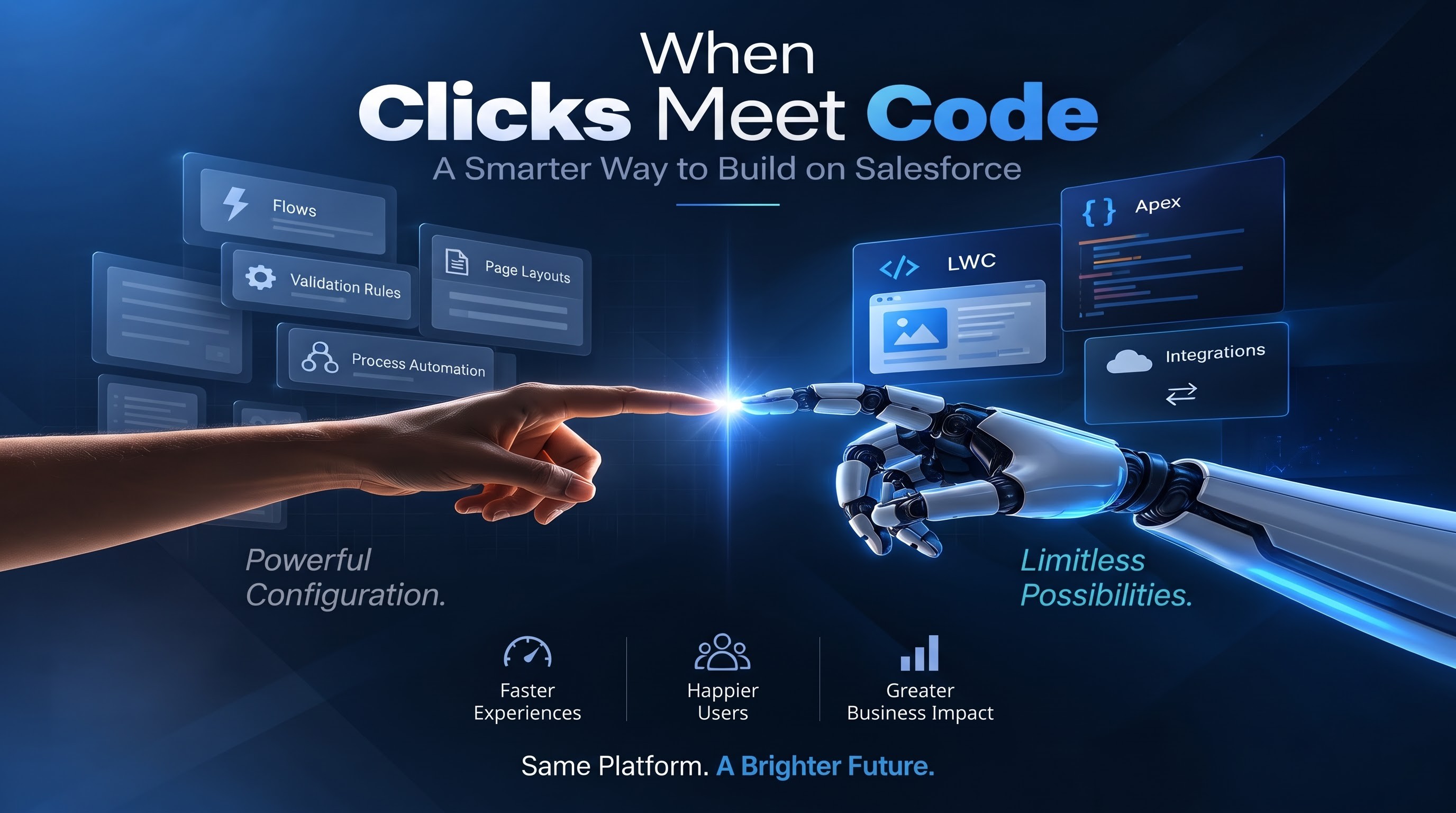
Salesforce has always been known for giving teams the ability to build business applications without writing large amounts of code. Administrators can create flows, validation rules, approval processes, page layouts, formulas, and other configurations through the platform itself. For many business requirements, this approach is still one of the best ways to build a solution because it is faster to maintain, easier for administrators to understand, and closely connected to Salesforce’s standard capabilities.
But Salesforce projects are becoming more demanding. Users are no longer satisfied with a screen that simply displays fields and provides a few buttons. They expect applications to respond quickly, show relevant information immediately, reduce unnecessary clicks, and behave more like the modern web applications they use every day. At the same time, businesses want Salesforce to communicate with external systems, work with large amounts of data, and support processes that cannot always be handled effectively through standard configuration.
This is where Lightning Web Components, commonly called LWC, and Apex development become increasingly important. The change is not really about replacing declarative tools with code. It is about understanding where each approach works best. A simple business rule may still belong in Flow. A complex user interface may be better handled through LWC. A calculation involving several Salesforce objects might require Apex. An external system integration may need Apex and an appropriate integration pattern. The real skill for a Salesforce developer is knowing where the boundary between configuration and custom development should be. That boundary is becoming more important as organizations build Salesforce environments that are larger, more connected, and more heavily used.
The Moment Standard Salesforce Configuration Stops Being Enough
Imagine a sales representative working on a large opportunity. The representative needs to select products, check customer eligibility, review pricing, compare different configurations, and understand how the selected products affect the final quote. A traditional Salesforce screen can certainly contain fields, related lists, buttons, and automation. But the experience can become complicated when every action requires the user to save a record, wait for automation, open another screen, and return to the original page.
The business process may technically work, but the user experience becomes frustrating. This is one of the situations where custom development starts making sense. Instead of making the user move through several Salesforce screens, an organization can create a custom Lightning Web Component that presents the required information in a more interactive way. The component can respond to user actions, retrieve relevant information, update the interface, and provide immediate feedback.
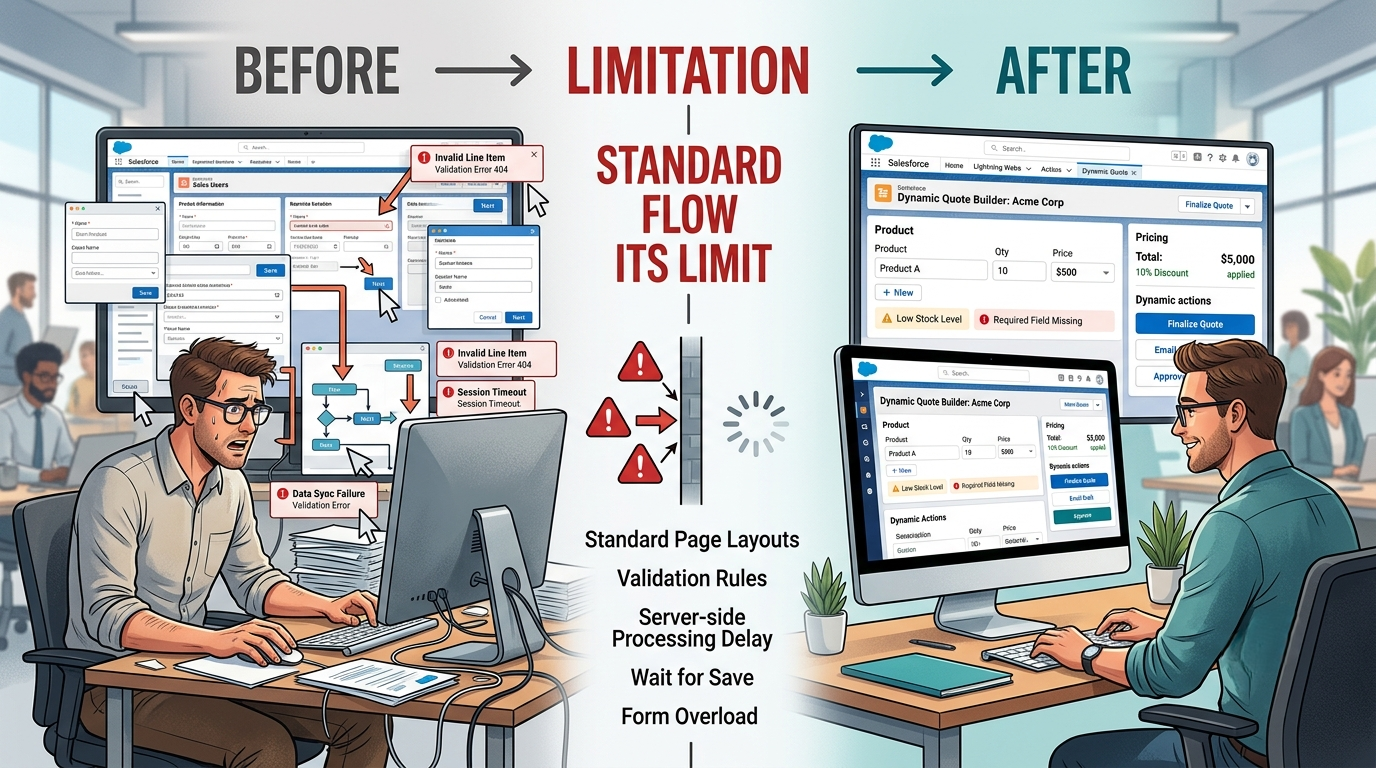
For example, consider a sales representative selecting a product. Instead of waiting until the entire form is submitted to discover that the product is incompatible with another selection, a custom component could identify the conflict while the user is making the selection. The interface could display the problem immediately and guide the user toward a valid configuration. This is not simply about making Salesforce look different. It is about moving some business interaction closer to the user. Flows and rules remain extremely useful in this environment. A Flow can update records, send notifications, create related records, or guide users through a business process. Validation rules can prevent invalid information from being saved. These tools should not be abandoned simply because LWC exists. The problem appears when teams try to solve every user experience requirement through declarative configuration.
A complex screen can eventually require a large number of conditional sections, flows, screen components, formulas, visibility rules, and workarounds. At some point, adding another configuration layer may make the system harder rather than easier to understand. LWC provides another option. A developer can create a focused interface that handles the interaction directly. The component can communicate with Salesforce data and, when necessary, call Apex to perform server-side operations. The important point is that custom development should solve a genuine limitation or requirement. Writing code simply because code is available is not a sign of a mature Salesforce architecture.
A good Salesforce team asks a more practical question: What is the simplest approach that provides the required business result without creating unnecessary technical debt? That question helps determine whether a requirement belongs in Flow, configuration, LWC, Apex, or a combination of these technologies.
Why Lightning Web Components Matter More Than Just UI Design
Lightning Web Components are often introduced as a modern way to create custom interfaces in Salesforce. That description is correct, but it does not fully explain why LWC has become important for Salesforce development. The bigger change is that developers can build reusable pieces of application functionality instead of depending entirely on standard Salesforce screens. Think about a customer service application where agents frequently need to see a customer’s recent orders, open cases, payment status, and important account information. A standard Salesforce page can display these details through different components and related lists. But if the support team needs a specific workflow, the standard page may force agents to search across multiple areas.
An LWC could bring the relevant information together into a focused workspace. The component might display recent orders at the top, open cases below them, and a customer status indicator beside the account information. When an agent selects an order, additional information could appear without forcing the user to leave the page. If the agent needs to create a case, the component could present the appropriate action based on the situation.
This type of interaction is particularly useful when employees spend a large part of their day inside Salesforce. Saving a few seconds on one action may not appear significant. But if an employee performs that action hundreds of times each week, the improvement becomes meaningful. LWC also encourages developers to think about components rather than entire pages. A useful component can potentially be reused in different parts of an application. A product selector, account summary, approval status display, or custom search interface does not necessarily need to be rebuilt every time another team needs similar functionality. That creates an opportunity for better development practices.
However, LWC also introduces responsibilities. Developers need to understand JavaScript, component structure, data communication, security, Salesforce APIs, and the relationship between client-side and server-side operations. They also need to consider what should happen when data is unavailable, when users do not have access to a record, or when an operation fails. A component that looks good but does not handle errors properly is not a successful enterprise application. This is why LWC development is increasingly connected to broader Salesforce development skills. Developers are not simply creating attractive screens. They are building application behavior that interacts with Salesforce data and business processes.
The difference becomes especially visible when the component needs information that cannot be obtained conveniently through standard Lightning Data Service or supported client-side approaches. In such cases, Apex can provide a controlled server-side layer between the component and Salesforce data. The result is a development model where the interface and business logic can work together without forcing every requirement into a standard page configuration.
3. LWC and Apex: Where the Real Developer Specialization Begins
The combination of LWC and Apex becomes particularly useful when an application has requirements that go beyond straightforward record editing. Consider a quote calculation. The final price might depend on product selection, customer type, contract terms, discount limits, quantity, regional rules, existing agreements, and information retrieved from another Salesforce object. Some of these rules may be manageable through standard configuration. But when the calculation becomes complex, maintaining it entirely through declarative logic can become difficult. A developer may instead use an LWC for the interactive experience and Apex for server-side processing. The LWC handles what the user sees and how the interface responds. Apex handles operations that require secure server-side processing, complex queries, calculations, or interactions with Salesforce data that are better handled on the server.
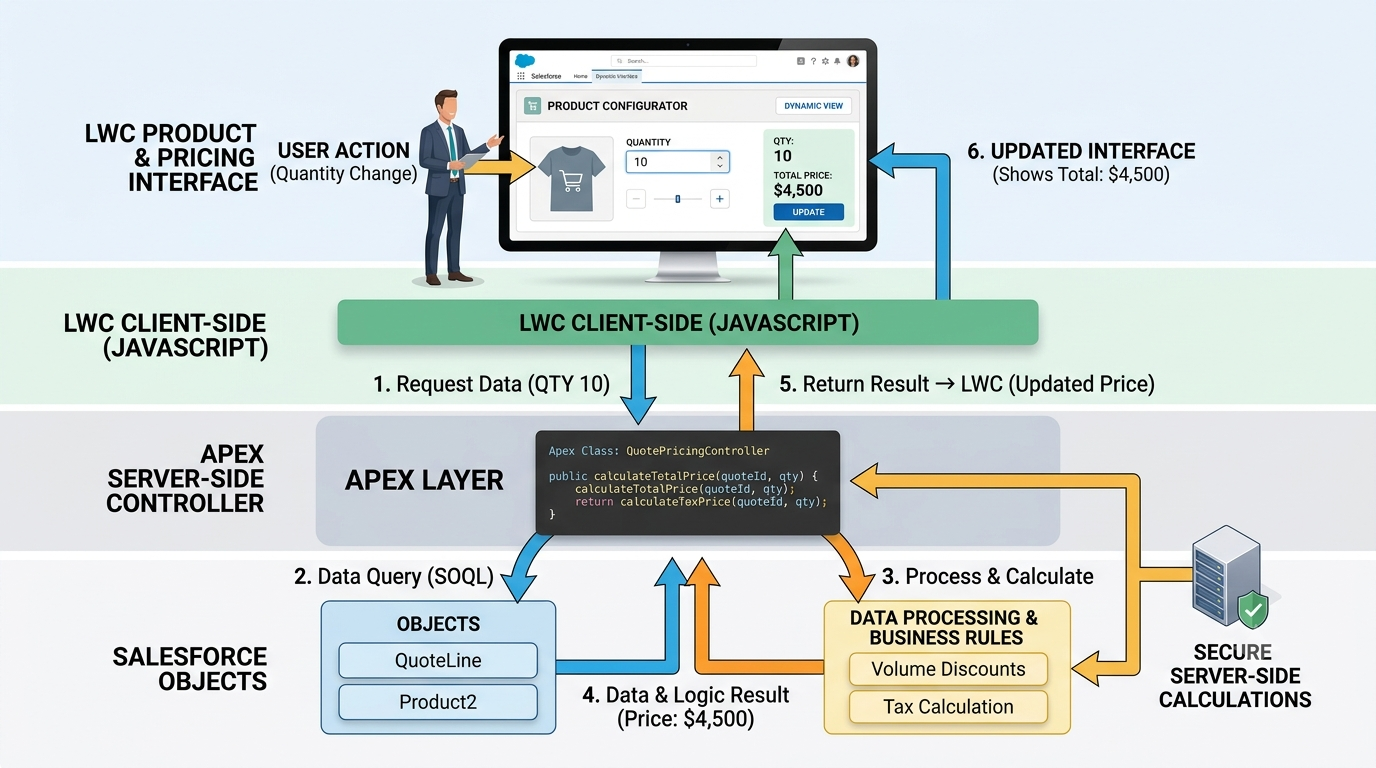
This separation can make the application easier to reason about. For example, a sales representative could change the quantity of a product in an LWC. The component could request updated pricing information. Apex could retrieve the required records, apply the relevant business logic, and return the result. The LWC could then update the displayed total without forcing the user to navigate through several screens.
This is where developers begin to move beyond basic Salesforce configuration. They need to understand not only how to write Apex but also when Apex should be used. Poorly designed Apex can create governor-limit problems, security issues, slow transactions, or unnecessary complexity. A developer has to consider bulkification, SOQL efficiency, sharing behavior, CRUD and field-level security, error handling, transaction boundaries, and test coverage. These are not purely coding concerns. They directly affect the reliability of the Salesforce application.
The same applies to LWC. A developer must think about how often a component requests data, what information is loaded immediately, what can be loaded later, and how the interface behaves when a request fails. A component that repeatedly performs expensive server calls may provide a poor experience even if the underlying Apex works correctly. The best implementations therefore treat LWC and Apex as parts of one application rather than two unrelated technologies.
The developer understands the complete path: the user performs an action, the component responds, data is requested when necessary, Apex processes the operation, Salesforce returns the result, and the component updates the interface. That full-stack understanding is valuable because many Salesforce projects now involve more than configuring objects and automation. This is also one reason specialized learning has become more relevant for professionals working with Salesforce CPQ and other complex business applications. Someone exploring salesforce cpq training should not focus only on product configuration and pricing concepts. It is equally useful to understand how custom components, Apex logic, automation, and integrations can support complex quoting workflows when standard functionality does not provide the required experience. The specialization is therefore not simply “learning LWC.” It is learning how to make technical decisions across the Salesforce platform.
The Integration Problem: Salesforce Rarely Works Alone
One of the biggest reasons custom Salesforce development has become important is that Salesforce is rarely the only system involved in a business process. A company may use Salesforce for customer and sales information while relying on an ERP system for inventory, an external billing platform for payments, a contract management system for agreements, and another application for product information. The user, however, does not necessarily care which system stores the information. A sales representative may simply want to know whether a product is available and what price should be quoted. If they have to open three separate applications to answer that question, the technology becomes part of the problem.
A well-designed Salesforce experience can hide some of that complexity.
An LWC can provide the interface through which the user requests information. Apex can act as part of the server-side processing layer and communicate with appropriate external services when required. The response can then be presented inside Salesforce. The technical implementation depends heavily on the integration architecture. Developers may need to work with REST APIs, authentication mechanisms, Named Credentials, asynchronous processing, platform events, middleware, or other Salesforce integration capabilities. The correct approach depends on the volume of data, response-time requirements, system ownership, reliability expectations, and business process.
This is another area where developers need to think beyond individual features. Suppose a component makes an external API request every time a user changes a product selection. That might work during testing with a small number of users. In production, hundreds of users could generate a large number of requests. The external service could become a bottleneck, or Salesforce limits could become relevant.
The developer therefore needs to ask questions before writing the implementation. Does the user really need real-time information? Can some data be cached? Should the operation happen asynchronously? Can the external system provide a bulk endpoint? What happens if the external service is unavailable? Should the user see an error, a previous value, or a temporary status?
These decisions determine whether a custom integration is reliable. The same principle applies to Apex. An integration should not simply work when everything is functioning normally. It should also behave predictably when the external system is slow, unavailable, or returns unexpected information. This is why Salesforce developer specialization increasingly overlaps with integration architecture. The developer needs to understand the business process, Salesforce data model, user experience, integration requirements, and platform limits together.
For learners taking a salesforce cpq course, this perspective is especially useful because CPQ implementations often involve pricing, product information, customer data, contracts, orders, and downstream systems. Understanding where Salesforce configuration ends and custom development or integration begins can make a significant difference when working on real enterprise projects. The objective is not to make every process custom. The objective is to create a connected process that is reliable for the people using it.
When Should a Salesforce Team Choose Flow, LWC, or Apex?
The most useful skill is not knowing how to replace Flow with Apex. It is knowing when not to replace it. Suppose a business requirement says that whenever an opportunity reaches a particular stage, a notification should be sent to the account team. There may be no reason to write an Apex class or build an LWC. A Flow may solve the requirement cleanly. Now consider a requirement where a sales user needs to configure several products on one screen while seeing compatibility warnings, pricing changes, discounts, and calculated totals immediately. That requirement is more likely to benefit from LWC, potentially supported by Apex. There are also requirements where multiple technologies work together. A custom LWC could collect information from the user. Apex could validate the request and perform server-side calculations. A Flow could then manage a downstream business process after the records have been created or updated.
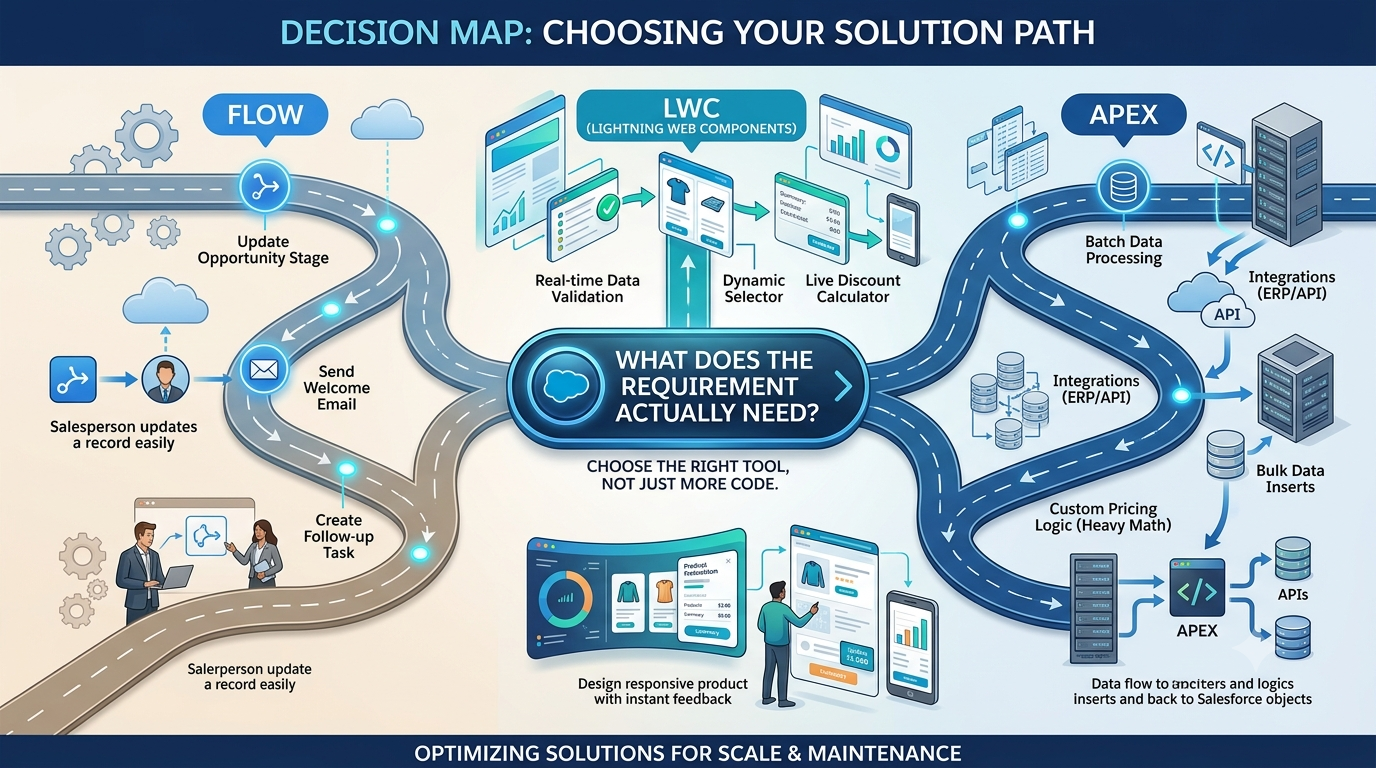
This hybrid approach is often more practical than treating development and configuration as competing philosophies. The decision should also consider maintenance. A solution that requires a developer for every small business-rule change may become expensive for the organization. If a rule can be safely maintained through configuration, keeping it declarative may be better. On the other hand, a very complicated collection of Flows can become difficult to troubleshoot. If several automations update the same records and depend on one another, understanding the final result can become challenging. In that situation, restructuring the architecture may be more valuable than adding another Flow.
The same issue exists with LWC and Apex. A developer should avoid creating a custom component for something that Salesforce already provides effectively. Custom development introduces testing, deployment, documentation, security review, maintenance, and future upgrade considerations. At the same time, avoiding code at all costs can create a different type of technical debt. Users may end up with slow processes, confusing screens, excessive manual work, or automation that becomes difficult to maintain.
The mature approach is therefore based on fit. Flow is often appropriate for process automation and straightforward business logic. Standard Salesforce capabilities should be preferred when they already meet the requirement. LWC becomes valuable when the user experience requires richer interaction or a customized interface. Apex becomes important when server-side processing, complex business logic, advanced data operations, or integrations require programmatic control. The boundaries are not absolute. Salesforce architecture is rarely about choosing one technology and using it everywhere. It is about combining capabilities in a way that keeps the system understandable and useful.
What This Means for the Salesforce Developer Career
The changing role of Salesforce development has an important implication for people entering the field. Knowing how to create a Flow is useful. Understanding objects, relationships, security, reports, automation, and Salesforce administration is also important. But developers working on larger projects increasingly need to understand how these capabilities connect with custom application development.
A developer may be asked to investigate why a standard Salesforce page is slowing down a sales process. The answer may not be a simple configuration change. The team might need to redesign the user interaction with LWC, move complex processing into Apex, optimize queries, and change how data is retrieved. Another project may require a custom quoting interface. A different project may involve connecting Salesforce to an external pricing service. Another may involve creating a reusable component for multiple business teams.
The common requirement is not one specific technology. It is problem-solving ability. Developers who understand only syntax can write code, but developers who understand the platform can decide what should be built and why.
That distinction becomes particularly important in enterprise Salesforce environments. The developer is often working with administrators, business analysts, solution architects, integration teams, sales operations teams, and end users. A technical solution has to fit into the broader system. This is why learning should move beyond isolated tutorials. Someone studying salesforce cpq training online can gain more value by connecting technical learning with real business scenarios. Instead of learning LWC as a collection of JavaScript concepts, learners can ask how a component could improve a quoting process. Instead of learning Apex as syntax alone, they can examine how Apex might calculate pricing, validate configurations, process records in bulk, or communicate with another system.
That approach makes technical knowledge easier to apply.
A strong Salesforce developer should gradually become comfortable moving across several layers of the platform. They should understand the data model, declarative automation, security model, Apex, LWC, APIs, testing, deployment, and basic integration architecture. They do not necessarily need to become an expert in every area immediately, but they should understand how the pieces fit together. The career advantage comes from being able to solve problems rather than simply knowing features.
7. The Future Is Not “Code Instead of Configuration”
The growing use of LWC and Apex does not mean that Salesforce is moving away from its low-code foundation. In reality, the future is more likely to involve a combination of declarative and programmatic development.
Organizations still benefit enormously from configuration. Administrators can make changes quickly without waiting for a development cycle. Business teams can automate straightforward processes themselves. Standard Salesforce functionality continues to reduce the amount of custom code required.But when the business requirement becomes highly interactive, data-intensive, integrated, or specialized, custom development provides another level of control.
This creates a more balanced development model. A Salesforce team might use standard objects and security controls as the foundation. Flows could manage straightforward automation. LWC could provide a specialized user interface. Apex could handle complex server-side logic. APIs and integration services could connect Salesforce to external systems. Each layer has a purpose. The biggest mistake would be assuming that one technology should handle everything. Using Flow for every requirement can create complicated automation. Using Apex for every requirement can make the platform unnecessarily dependent on developers. Building LWC screens for simple record updates can increase maintenance without providing meaningful value.
The better approach is architectural judgment. Developers need to look at the requirement from the user's perspective first. What is the user trying to accomplish? Where does the current process slow them down? Which information needs to be available immediately? Which rules must be enforced? Which systems contain the required data? What happens when something goes wrong?
Only after those questions are understood should the technical solution be selected.
This is the real significance of LWC and Apex specialization.
It is not simply that Salesforce developers are writing more code. They are increasingly responsible for designing application experiences that connect Salesforce configuration, custom interfaces, business logic, data, and external systems. That is a much broader role than traditional configuration work.
Conclusion: The Best Salesforce Solutions Know When to Stay Simple
Salesforce has made it possible to solve many business problems without traditional software development. That remains one of the platform's biggest strengths. But enterprise requirements continue to evolve. Users expect faster interfaces, organizations need deeper integrations, and business processes are becoming more specialized. That is where LWC and Apex have an important role. The goal is not to turn every Salesforce implementation into a custom application. In fact, unnecessary customization can create long-term problems. The goal is to use custom development where it provides clear value and continue using declarative capabilities where they are the better choice.
A well-designed Salesforce application may therefore contain very little custom code in one area and a significant amount in another. The difference comes from the business requirement. For developers, this creates an opportunity to build a broader skill set. Understanding LWC, Apex, Salesforce data, automation, security, and integrations allows them to participate in more complex projects and make better technical decisions.
The most valuable Salesforce developer is not necessarily the person who writes the most code. It is the person who can look at a business problem and confidently decide what should be configured, what should be customized, what should be integrated, and what should remain simple.
That is where Salesforce development is heading: not from clicks to code, but toward a practical combination of both.